"b00678cacce53329"{"id":"1002795","slug":"ky-barrier-shield-fx","title":"KY Barrier Shield FX","category":"Spells \u0026 Combat","engine":"4.12+,5.0+","assetVersion":"","engineVersion":"Engine Version: 4.12+,5.0+","tag":"Spells \u0026 Combat","accent":"blue","visual":"mech","summary":"An analysis of KY Barrier Shield FX, featuring 23 magic barrier and shield effects across Cascade and Niagara systems for Unreal Engine 4.27 and beyond.","platform":"Unreal Engine","indexPolicy":"index","publishedAt":"2026-11-20T07:20:16.091Z","updatedAt":"2026-11-20T07:20:16.091Z","sourceNotes":[],"fileContents":[],"compatibility":["Unreal Engine","Engine Version: 4.12+,5.0+"],"featuredImage":{"alt":"KY Barrier Shield FX","src":"/wp-content/uploads/published/2026/11/8eec687c10a4-4676e615-caf5-46c3-98b5-7c22b166dcb3-250a86cf35.webp"},"fileSizeBytes":63393790,"hasDownloadLink":true,"downloads":0,"terms":[{"taxonomy":"category","slug":"spells-and-combat","name":"Spells \u0026 Combat"}],"galleryImages":[{"src":"/wp-content/uploads/published/2026/11/b083a50e4a5d-bfba26ab-ccc6-45c6-9e4e-f3f58e7782a6-b1406ba9be.webp","alt":"KY Barrier Shield FX"},{"src":"/wp-content/uploads/published/2026/11/d92be8d3c940-b8941d5b-2ba3-4ff2-bea1-fb3343582591-30b043beaf.webp","alt":"KY Barrier Shield FX"},{"src":"/wp-content/uploads/published/2026/11/15a6e39e4a4d-43b70df4-636e-4bfd-adc0-3090bc85ed56-4bc20829db.webp","alt":"KY Barrier Shield FX"}],"accessPanel":{"kind":"resource","title":"Get this resource","safetyNote":"Resources are manually reviewed before listing to improve quality and reduce obvious risks.","fileName":"Content.7z","resourceType":"Resource archive","versions":[]},"contentHtml":"\u003cp\u003eA magical barrier in a real-time combat encounter serves two distinct functions at once: it signals physical resistance to incoming forces and establishes the visual identity of a character's defensive abilities. KY Barrier Shield FX provides twenty-three individual magic barrier and shield effects created specifically to represent these protective boundaries. Rather than confining defensive moments to a single generic visual cue, the package offers a wide selection of magic variations designed to represent different protective mechanics, elemental characteristics, or spell tiers inside Unreal Engine.\u003c/p\u003e\u003ch2\u003eMagic Barrier Variations in Real-Time Combat\u003c/h2\u003e\u003cp\u003eDefensive encounters require immediate, readable feedback so that players instantly recognize when an entity is invulnerable, deflecting damage, or holding a position under pressure. KY Barrier Shield FX addresses this requirement by delivering twenty-three separate iterations of barrier and shield magic. Having access to twenty-three distinct effects allows developers to separate defensive tiers cleanly across a project. A minor protective ward cast by a low-level unit does not need to look identical to an impenetrable force field deployed by a dungeon boss. Instead, distinct visual variations can be paired with specific gameplay systems, cooldown states, or damage thresholds.\u003c/p\u003e\u003cp\u003eBecause the collection focuses entirely on magic barriers and shields, each effect centers on establishing an active boundary layer around a target or across a designated space. In gameplay, such effects often attach directly to skeletal meshes at root or socket points to create personal bubbles, or spawn at hit locations as stationary defensive walls. The presence of multiple shield variations makes it straightforward to assign unique visual profiles to distinct spell schools, factions, or protective consumable items without needing to reconstruct visual identities from scratch.\u003c/p\u003e\u003ch2\u003eShield FX Across Cascade and Niagara Pipelines\u003c/h2\u003e\u003cp\u003eA central technical aspect of KY Barrier Shield FX is its split implementation across Unreal Engine's primary visual effects systems. The package provides assets configured for the legacy Cascade particle framework alongside dedicated NiagaraFX versions. This dual setup addresses the practical reality of studio workflows, where existing production pipelines often bridge older engine conventions and modern particle architecture.\u003c/p\u003e\u003cp\u003eCascade has served as the baseline particle system in Unreal Engine for generations of projects. Many ongoing titles or mature codebases continue to run Cascade systems due to stability, existing editor integrations, or legacy asset libraries that have not transitioned to newer frameworks. By retaining the Cascade version, KY Barrier Shield FX remains directly usable inside established setups without demanding an immediate architectural migration. Teams working within Cascade can drop the barrier assets directly into their levels or assign them to gameplay blueprint triggers with zero friction.\u003c/p\u003e\u003cp\u003eAt the same time, the inclusion of the NiagaraFX version brings the collection in line with Unreal Engine's modern, programmable simulation pipeline. Niagara processes particle logic differently, leaning on modular emitter stacks, highly performant parameter bindings, and flexible GPU simulation. Having dedicated NiagaraFX assets means that teams building modern visual effects architectures can harness the computational and structural advantages of Niagara while maintaining identical visual parity across protective barriers.\u003c/p\u003e\u003ch2\u003eEngine Compatibility Benchmarks Starting at UE4.27\u003c/h2\u003e\u003cp\u003eThe NiagaraFX implementation within the collection carries a specific baseline compatibility benchmark: Unreal Engine 4.27 and newer releases. Unreal Engine 4.27 represented a major stabilization point for Niagara, solidifying module standards, workflow stability, and cross-system parity before the broader transition to Unreal Engine 5.\u003c/p\u003e\u003cp\u003eFor projects running on engine versions prior to UE4.27, the Cascade versions provide a dependable pathway, ensuring that older project instances can still utilize all twenty-three barrier and shield variants without version mismatch errors. For projects running on UE4.27 or progressing into newer iterations of the engine, the NiagaraFX version opens up compatibility with modern engine features, scalable quality tiers, and updated rendering paths. Understanding this version line helps technical artists quickly identify how the package should be deployed across their specific engine branch without encountering unsupported emitter modules.\u003c/p\u003e\u003ch2\u003ePipeline Integration with the Cascade to Niagara Plugin\u003c/h2\u003e\u003cp\u003eWorking with the NiagaraFX implementation of KY Barrier Shield FX introduces an essential configuration step inside the editor environment. The Niagara versions require checking and enabling the Cascade To Niagara plugin. This plugin bridge is vital for projects transitioning from legacy emitter conventions to modern visual effects graphs.\u003c/p\u003e\u003cp\u003eIn standard Unreal Engine setups, Cascade and Niagara operate on distinct logic patterns. Cascade relies on fixed emitter modules, while Niagara utilizes programmable scratch pads and script-based module execution. The Cascade To Niagara plugin provides the translation layer and system hooks required to bridge structural properties and legacy data flows into the Niagara environment. Ensuring that this plugin is active in the project settings prevents compilation warnings, missing asset references, or unlinked emitter dependencies when deploying the NiagaraFX variants in a scene.\u003c/p\u003e\u003cp\u003eProduction teams should verify this plugin dependency early during asset staging. By confirming that the Cascade To Niagara plugin is active before assigning barrier systems to character blueprints or level sequences, artists avoid broken emitter links or unexpected playback errors during combat testing.\u003c/p\u003e\u003ch2\u003eDeploying Shield Assets in Production Workflows\u003c/h2\u003e\u003cp\u003eEvaluating an effect collection like KY Barrier Shield FX comes down to how efficiently it resolves visual requirements in day-to-day development. Because it contains twenty-three varied shield and barrier effects, technical directors and combat designers can tackle multiple defensive scenarios using a single, unified visual theme. The choice between Cascade and NiagaraFX ensures that regardless of whether a team maintains a legacy UE4 project or builds on a modern UE4.27-based branch, the barrier effects integrate smoothly with existing particle frameworks.\u003c/p\u003e\n\n\u003ch2\u003eContinue Browsing Similar Packs\u003c/h2\u003e\n\u003cul\u003e\n\u003cli\u003e\u003ca href=\"https://3dcghub.com/shield-fx-responsive/\" rel=\"noopener noreferrer\"\u003eShield FX Responsive\u003c/a\u003e\u003c/li\u003e\n\u003cli\u003e\u003ca href=\"https://3dcghub.com/ky-magic-fx-04/\" rel=\"noopener noreferrer\"\u003eKY Magic FX 04\u003c/a\u003e\u003c/li\u003e\n\u003cli\u003e\u003ca href=\"https://3dcghub.com/advanced-magic-fx-04/\" rel=\"noopener noreferrer\"\u003eAdvanced Magic FX 04\u003c/a\u003e\u003c/li\u003e\n\u003cli\u003e\u003ca href=\"https://3dcghub.com/advancedmagicfx18/\" rel=\"noopener noreferrer\"\u003eAdvancedMagicFX18\u003c/a\u003e\u003c/li\u003e\n\u003cli\u003e\u003ca href=\"https://3dcghub.com/advanced-magic-fx-17/\" rel=\"noopener noreferrer\"\u003eAdvanced Magic FX 17\u003c/a\u003e\u003c/li\u003e\n\u003c/ul\u003e","contentTextLength":6606,"navigation":{"current":85,"total":4797,"previous":{"id":"1002796","slug":"ky-magic-chant-fx","title":"KY Magic Chant FX","category":"Spells \u0026 Combat","platform":"Unreal Engine","updatedAt":"2026-11-20T07:20:53.760Z"},"next":{"id":"1002794","slug":"hit-vfx-pack","title":"Hit Vfx Pack","category":"Game Development Resource","platform":"Unreal Engine","updatedAt":"2026-11-20T07:19:32.822Z"}},"relatedResources":[{"id":"1002796","slug":"ky-magic-chant-fx","title":"KY Magic Chant FX","category":"Spells \u0026 Combat","engine":"4.12+,5.0+","assetVersion":"","engineVersion":"Engine Version: 4.12+,5.0+","tag":"Spells \u0026 Combat","accent":"blue","visual":"mech","summary":"A detailed technical breakdown of KY Magic Chant FX, featuring 33 magic chant circle effects across Niagara and Cascade pipelines.","platform":"Unreal Engine","indexPolicy":"index","publishedAt":"2026-11-20T07:20:53.760Z","updatedAt":"2026-11-20T07:20:53.760Z","sourceNotes":[],"fileContents":[],"compatibility":["Unreal Engine","Engine Version: 4.12+,5.0+"],"featuredImage":{"alt":"KY Magic Chant FX","src":"/wp-content/uploads/published/2026/11/a9c693298b3d-459e9b4f-a1e9-427b-a42e-788f325a9537-a725cd44e2.webp"},"fileSizeBytes":54725656,"hasDownloadLink":true,"downloads":0},{"id":"16666","slug":"shield-fx-responsive","title":"Shield FX Responsive","category":"Spells \u0026 Combat","engine":"4.26+,5.0+","assetVersion":"Engine version: 4.26+,5.0+","engineVersion":"5.2","tag":"Spells \u0026 Combat","accent":"blue","visual":"luts","summary":"Enhance your game’s visual feedback with Shield FX Responsive. This asset pack offers highly customizable, realistic shield effects specifically designed for main characters using Niagara and Blueprints.","platform":"Unreal Engine","indexPolicy":"noindex","publishedAt":"2026-03-12T17:45:37.000Z","updatedAt":"2026-04-19T15:43:43.000Z","sourceNotes":[],"fileContents":[],"compatibility":["Unreal Engine","Engine version: 4.26+,5.0+"],"featuredImage":{"alt":"Shield FX Responsive","src":"https://3dcghub.com/wp-content/uploads/2026/03/bbd7ae98-a01a-4834-a3d5-1095ea958d52.webp"},"fileSizeBytes":133840199,"hasDownloadLink":true,"downloads":2},{"id":"1002073","slug":"ky-magic-fx-04","title":"KY Magic FX 04","category":"Spells \u0026 Combat","engine":"4.26+,5.0+","assetVersion":"","engineVersion":"Engine Version: 4.26+,5.0+","tag":"Spells \u0026 Combat","accent":"blue","visual":"mech","summary":"KY Magic FX 04 provides 20 versatile magic effects covering fire, ice, dark spells, explosions, circular casting runes, and cascade-driven visual sparks.","platform":"Unreal Engine","indexPolicy":"index","publishedAt":"2026-10-26T15:37:16.489Z","updatedAt":"2026-10-26T15:37:16.489Z","sourceNotes":[],"fileContents":[],"compatibility":["Unreal Engine","Engine Version: 4.26+,5.0+"],"featuredImage":{"alt":"KY Magic FX 04","src":"/wp-content/uploads/published/2026/10/de596d5f4fc8-bb090b5e-7d33-4fc7-8595-807d571f88fa-d54d83a578.webp"},"fileSizeBytes":53485077,"hasDownloadLink":true,"downloads":4}]}
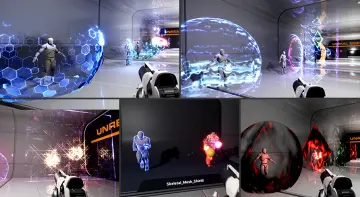
Resource screenshots
1 / 3
Join our channel
Follow 3DCGHUB on Telegram for new resource drops, migration updates, and community notices.
Resources are manually reviewed before listing to improve quality and reduce obvious risks.
No account required
Spells & Combat
KY Barrier Shield FX
An analysis of KY Barrier Shield FX, featuring 23 magic barrier and shield effects across Cascade and Niagara systems for Unreal Engine 4.27 and beyond.
A magical barrier in a real-time combat encounter serves two distinct functions at once: it signals physical resistance to incoming forces and establishes the visual identity of a character's defensive abilities. KY Barrier Shield FX provides twenty-three individual magic barrier and shield effects created specifically to represent these protective boundaries. Rather than confining defensive moments to a single generic visual cue, the package offers a wide selection of magic variations designed to represent different protective mechanics, elemental characteristics, or spell tiers inside Unreal Engine.
Magic Barrier Variations in Real-Time Combat
Defensive encounters require immediate, readable feedback so that players instantly recognize when an entity is invulnerable, deflecting damage, or holding a position under pressure. KY Barrier Shield FX addresses this requirement by delivering twenty-three separate iterations of barrier and shield magic. Having access to twenty-three distinct effects allows developers to separate defensive tiers cleanly across a project. A minor protective ward cast by a low-level unit does not need to look identical to an impenetrable force field deployed by a dungeon boss. Instead, distinct visual variations can be paired with specific gameplay systems, cooldown states, or damage thresholds.
Because the collection focuses entirely on magic barriers and shields, each effect centers on establishing an active boundary layer around a target or across a designated space. In gameplay, such effects often attach directly to skeletal meshes at root or socket points to create personal bubbles, or spawn at hit locations as stationary defensive walls. The presence of multiple shield variations makes it straightforward to assign unique visual profiles to distinct spell schools, factions, or protective consumable items without needing to reconstruct visual identities from scratch.
Shield FX Across Cascade and Niagara Pipelines
A central technical aspect of KY Barrier Shield FX is its split implementation across Unreal Engine's primary visual effects systems. The package provides assets configured for the legacy Cascade particle framework alongside dedicated NiagaraFX versions. This dual setup addresses the practical reality of studio workflows, where existing production pipelines often bridge older engine conventions and modern particle architecture.
Cascade has served as the baseline particle system in Unreal Engine for generations of projects. Many ongoing titles or mature codebases continue to run Cascade systems due to stability, existing editor integrations, or legacy asset libraries that have not transitioned to newer frameworks. By retaining the Cascade version, KY Barrier Shield FX remains directly usable inside established setups without demanding an immediate architectural migration. Teams working within Cascade can drop the barrier assets directly into their levels or assign them to gameplay blueprint triggers with zero friction.
At the same time, the inclusion of the NiagaraFX version brings the collection in line with Unreal Engine's modern, programmable simulation pipeline. Niagara processes particle logic differently, leaning on modular emitter stacks, highly performant parameter bindings, and flexible GPU simulation. Having dedicated NiagaraFX assets means that teams building modern visual effects architectures can harness the computational and structural advantages of Niagara while maintaining identical visual parity across protective barriers.
Engine Compatibility Benchmarks Starting at UE4.27
The NiagaraFX implementation within the collection carries a specific baseline compatibility benchmark: Unreal Engine 4.27 and newer releases. Unreal Engine 4.27 represented a major stabilization point for Niagara, solidifying module standards, workflow stability, and cross-system parity before the broader transition to Unreal Engine 5.
For projects running on engine versions prior to UE4.27, the Cascade versions provide a dependable pathway, ensuring that older project instances can still utilize all twenty-three barrier and shield variants without version mismatch errors. For projects running on UE4.27 or progressing into newer iterations of the engine, the NiagaraFX version opens up compatibility with modern engine features, scalable quality tiers, and updated rendering paths. Understanding this version line helps technical artists quickly identify how the package should be deployed across their specific engine branch without encountering unsupported emitter modules.
Pipeline Integration with the Cascade to Niagara Plugin
Working with the NiagaraFX implementation of KY Barrier Shield FX introduces an essential configuration step inside the editor environment. The Niagara versions require checking and enabling the Cascade To Niagara plugin. This plugin bridge is vital for projects transitioning from legacy emitter conventions to modern visual effects graphs.
In standard Unreal Engine setups, Cascade and Niagara operate on distinct logic patterns. Cascade relies on fixed emitter modules, while Niagara utilizes programmable scratch pads and script-based module execution. The Cascade To Niagara plugin provides the translation layer and system hooks required to bridge structural properties and legacy data flows into the Niagara environment. Ensuring that this plugin is active in the project settings prevents compilation warnings, missing asset references, or unlinked emitter dependencies when deploying the NiagaraFX variants in a scene.
Production teams should verify this plugin dependency early during asset staging. By confirming that the Cascade To Niagara plugin is active before assigning barrier systems to character blueprints or level sequences, artists avoid broken emitter links or unexpected playback errors during combat testing.
Deploying Shield Assets in Production Workflows
Evaluating an effect collection like KY Barrier Shield FX comes down to how efficiently it resolves visual requirements in day-to-day development. Because it contains twenty-three varied shield and barrier effects, technical directors and combat designers can tackle multiple defensive scenarios using a single, unified visual theme. The choice between Cascade and NiagaraFX ensures that regardless of whether a team maintains a legacy UE4 project or builds on a modern UE4.27-based branch, the barrier effects integrate smoothly with existing particle frameworks.

 Spells & Combat
 Spells & Combat
 Spells & Combat