"b00678cacce53329"{"id":"1002802","slug":"luos-s-lowpoly-particle-pack","title":"Luos's LowPoly Particle Pack","category":"Spells \u0026 Combat","engine":"4.17+,5.0+","assetVersion":"","engineVersion":"Engine Version: 4.17+,5.0+","tag":"Spells \u0026 Combat","accent":"blue","visual":"mech","summary":"Explore the visual style, Cascade particle setup, material workflows, and multi-platform performance of Luos's LowPoly Particle Pack in Unreal Engine.","platform":"Unreal Engine","indexPolicy":"index","publishedAt":"2026-11-20T07:27:05.323Z","updatedAt":"2026-11-20T07:27:05.323Z","sourceNotes":[],"fileContents":[],"compatibility":["Unreal Engine","Engine Version: 4.17+,5.0+"],"featuredImage":{"alt":"Luos's LowPoly Particle Pack","src":"/wp-content/uploads/published/2026/11/257ab7fa782c-7cdccd51-19d2-4cb8-82f0-72875bad09e5-5c608292be.webp"},"fileSizeBytes":32343681,"hasDownloadLink":true,"downloads":0,"terms":[{"taxonomy":"category","slug":"spells-and-combat","name":"Spells \u0026 Combat"}],"galleryImages":[{"src":"/wp-content/uploads/published/2026/11/0f596bc074c1-4a4a7319-2a64-4986-a6d4-592b0a0b2ee1-142636fd8f.webp","alt":"Luos's LowPoly Particle Pack"},{"src":"/wp-content/uploads/published/2026/11/1b74f6862c3a-1d09a233-8b57-4ff3-929d-ffef9fb35682-2000a10a57.webp","alt":"Luos's LowPoly Particle Pack"},{"src":"/wp-content/uploads/published/2026/11/7bd8b158c643-af86c488-5b93-4e16-8c80-5c7524f6227c-09bc96d82d.webp","alt":"Luos's LowPoly Particle Pack"},{"src":"/wp-content/uploads/published/2026/11/405511aff37c-7e0eb371-cb1c-4832-beed-7928abcc8d05-bb3716ddc3.webp","alt":"Luos's LowPoly Particle Pack"},{"src":"/wp-content/uploads/published/2026/11/27c5d37526a2-d6ec91ee-df5e-45d9-a66d-6b42b4bc8c0d-2ec415ff6a.webp","alt":"Luos's LowPoly Particle Pack"},{"src":"/wp-content/uploads/published/2026/11/2c66dd4902a4-d34f6cee-6806-4ca7-9391-09a5335a3621-c2996730c6.webp","alt":"Luos's LowPoly Particle Pack"},{"src":"/wp-content/uploads/published/2026/11/cdd07669f925-419d3d73-d5ec-4d0c-8fea-64366aee62e6-38cdc9cdf9.webp","alt":"Luos's LowPoly Particle Pack"},{"src":"/wp-content/uploads/published/2026/11/9b08e6a266ec-6737a55b-4cc0-44cd-98e9-67b33173bc53-5ef21a96a4.webp","alt":"Luos's LowPoly Particle Pack"},{"src":"/wp-content/uploads/published/2026/11/eb17daccfb23-69b22627-5b80-4dbf-a7ae-dd30abbb854a-de1142775a.webp","alt":"Luos's LowPoly Particle Pack"}],"accessPanel":{"kind":"resource","title":"Get this resource","safetyNote":"Resources are manually reviewed before listing to improve quality and reduce obvious risks.","fileName":"Content.7z","resourceType":"Resource archive","versions":[]},"contentHtml":"\u003ch2\u003eLowPoly Visual Identity and Combat Staging\u003c/h2\u003e\u003cp\u003eDistinct geometric contours and faceted surfaces define the aesthetic of Luos's LowPoly Particle Pack. Tailored specifically for stylized projects, these effects support fantasy combat encounters, energetic attacks, and physical impacts without relying on hyper-realistic smoke or photographic debris. The deliberate polygonal visual language establishes immediate clarity during chaotic battle scenes, giving gameplay events unambiguous spatial definition.\u003c/p\u003e\u003cp\u003eStylized attack sequences benefit heavily from readable silhouette boundaries. Instead of soft-edged volumetric clouds obscuring the play area, polygonal effects manifest as crisp, distinct shapes. When a strike connects or a spell discharges, the resulting impact carries a sharp visual weight that complements low-poly character meshes and environments. This harmony between particle form and environment geometry prevents stylized scenes from breaking visual coherence.\u003c/p\u003e\u003cp\u003eCombat telegraphing relies on instantaneous feedback. In fantasy gameplay scenarios where players must react to sudden swings, area-of-effect bursts, and projectile collisions, the structured facets of these low-poly particles preserve silhouette contrast against varied backgrounds. High-contrast shapes help players track hits, defensive parries, and elemental discharges across busy arenas without muddying the screen space.\u003c/p\u003e\u003ch2\u003eMaterial Architecture and Particle Variation\u003c/h2\u003e\u003cp\u003eUnderpinning the visual effects is a framework of clean, easily readable master materials and material instances. VFX artists and gameplay programmers often struggle with opaque shader graphs that hide essential parameters under sprawling math networks. Here, the material logic remains approachable, permitting direct intervention into visual properties without dismantling the underlying networks.\u003c/p\u003e\u003cp\u003eThis readability enables rapid iteration when authoring effect variants. Adjusting parameter values within an instance allows developers to modify coloration, emissive intensity, and display characteristics to establish alternate versions of base effects. A single baseline attack effect can be reconfigured into multiple elemental tiers or aligned with distinct character factions simply by updating instances. The simplicity of the material setup reduces pipeline bottlenecks during rapid prototyping phases.\u003c/p\u003e\u003cp\u003eCreating alternate variations directly inside material instances bypasses the need to rebuild whole emitter structures from the ground up. Production teams can repurpose core impact dynamics across multiple weapons, skills, or enemy attacks, maintaining technical uniformity across an entire project while offering visual diversity to the player.\u003c/p\u003e\u003ch2\u003eDeploying LowPoly Systems Across Platforms and Switch\u003c/h2\u003e\u003cp\u003ePerformance optimization stands as a foundational requirement across modern interactive projects. Luos's LowPoly Particle Pack is configured to run efficiently across every device and hardware platform, explicitly supporting restricted-power hardware such as the Nintendo Switch. Because polygonal visual effects rely on clean geometry rather than heavy, overdraw-intensive alpha textures, fill rate demands decrease significantly.\u003c/p\u003e\u003cp\u003eLowering translucent overdraw is critical on handheld and mobile chipsets. Hardware like the Nintendo Switch encounters severe fill rate bottlenecks when traditional particles overlap in deep stacks across the camera frame. The simplified, faceted surfaces characteristic of low-poly designs drastically mitigate these fill rate pressures. Rendering engines spend fewer cycles resolving complex pixel depth calculations, preserving consistent frame times even during intensive multi-character battles.\u003c/p\u003e\u003cp\u003eThe efficiency of the effects allows developers targeting lower-spec consoles to populate scenes with numerous concurrent impacts and combat bursts. Instead of heavily trimming visual effects budgets to maintain target framerates, creators can maintain visual feedback fidelity across both high-end desktop hardware and portable consoles without maintaining divergent asset pools.\u003c/p\u003e\u003ch2\u003eCascade Implementation and the Niagara Roadmap\u003c/h2\u003e\u003cp\u003eTechnical execution within the package relies on Unreal Engine's legacy Cascade particle framework rather than the Niagara system. While Niagara represents the current direction for dynamic simulations, Cascade remains completely functional and performant within the engine. There is no active indication that Cascade will be removed in the immediate future, making it a stable, production-ready system for ongoing projects.\u003c/p\u003e\u003cp\u003eOperating on Cascade provides immediate compatibility for projects built on established engine pipelines. Studios running production branches that have not transitioned to full Niagara pipelines can drop these emitters directly into existing levels, blueprints, and animation notifies without adjusting runtime simulation parameters or module scripts.\u003c/p\u003e\u003cp\u003eFor teams planning ahead, the technical transition is already mapped out. A comprehensive update will convert all effects in the package to utilize Niagara at a later date. This roadmap guarantees that projects starting on Cascade can rely on the existing setup today while remaining positioned to leverage Niagara once the unified update is deployed.\u003c/p\u003e\u003ch2\u003eUnreal Engine Pipeline Across 4.16 and 4.17+\u003c/h2\u003e\u003cp\u003eAsset deployment involves specific pipeline handling when moving across different Unreal Engine 4 versions. If a project is initiated in Unreal Engine 4.16 and subsequently transitioned to version 4.17 or higher, the package should be re-downloaded directly. The version updated for 4.17 incorporates targeted performance improvements that take advantage of engine features introduced in that release.\u003c/p\u003e\u003cp\u003eEngine versions frequently introduce adjustments to rendering passes, material compiler behaviors, and particle pooling efficiency. Re-downloading the package when updating from 4.16 into 4.17 or newer branches ensures that the underlying asset data adopts those internal runtime enhancements, eliminating minor discrepancies between legacy Cascade calls and updated engine logic.\u003c/p\u003e\u003cp\u003eManaging this update path requires minimal overhead but delivers measurable gains in rendering throughput. By matching the project build version with the corresponding package update, technical teams ensure their low-poly combat effects, impacts, and material instances perform at their intended efficiency across all target hardware.\u003c/p\u003e\n\n\u003ch2\u003eMore From The Same Workflow\u003c/h2\u003e\n\u003cul\u003e\n\u003cli\u003e\u003ca href=\"https://3dcghub.com/niagara-muzzle-flash-and-ejection-vfx-muzzle-flash-gun-vfx-bullet-vfx/\" rel=\"noopener noreferrer\"\u003eNiagara Muzzle Flash \u0026amp; Ejection VFX (Muzzle Flash, Gun VFX, Bullet VFX)\u003c/a\u003e\u003c/li\u003e\n\u003cli\u003e\u003ca href=\"https://3dcghub.com/fantasy-rpg-vfx-pack/\" rel=\"noopener noreferrer\"\u003eFantasy RPG VFX Pack\u003c/a\u003e\u003c/li\u003e\n\u003cli\u003e\u003ca href=\"https://3dcghub.com/bullet-vfx-pack/\" rel=\"noopener noreferrer\"\u003eBullet VFX Pack\u003c/a\u003e\u003c/li\u003e\n\u003cli\u003e\u003ca href=\"https://3dcghub.com/advancedmagicfx18/\" rel=\"noopener noreferrer\"\u003eAdvancedMagicFX18\u003c/a\u003e\u003c/li\u003e\n\u003cli\u003e\u003ca href=\"https://3dcghub.com/advancedmagicfx16/\" rel=\"noopener noreferrer\"\u003eAdvancedMagicFX16\u003c/a\u003e\u003c/li\u003e\n\u003c/ul\u003e","contentTextLength":6589,"navigation":{"current":78,"total":4797,"previous":{"id":"1002803","slug":"luos-s-pewpew-particle-pack","title":"Luos's PewPew Particle Pack","category":"Spells \u0026 Combat","platform":"Unreal Engine","updatedAt":"2026-11-20T07:30:33.126Z"},"next":{"id":"1002801","slug":"looping-fire-fx","title":"Looping Fire FX","category":"Fire \u0026 Explosions","platform":"Unreal Engine","updatedAt":"2026-11-20T07:26:12.081Z"}},"relatedResources":[{"id":"1002803","slug":"luos-s-pewpew-particle-pack","title":"Luos's PewPew Particle Pack","category":"Spells \u0026 Combat","engine":"4.16+,5.0+","assetVersion":"","engineVersion":"Engine Version: 4.16+,5.0+","tag":"Spells \u0026 Combat","accent":"blue","visual":"mech","summary":"Luos's PewPew Particle Pack provides 4 projectile types with 4 energy tiers, complete with charge, muzzle, and impact effects built in Cascade.","platform":"Unreal Engine","indexPolicy":"index","publishedAt":"2026-11-20T07:30:33.126Z","updatedAt":"2026-11-20T07:30:33.126Z","sourceNotes":[],"fileContents":[],"compatibility":["Unreal Engine","Engine Version: 4.16+,5.0+"],"featuredImage":{"alt":"Luos's PewPew Particle Pack","src":"/wp-content/uploads/published/2026/11/7451da800696-f997e86c-c561-4821-a055-09fbd7bb50a4-86a2f4c21f.webp"},"fileSizeBytes":182474562,"hasDownloadLink":true,"downloads":0},{"id":"1002131","slug":"niagara-muzzle-flash-and-ejection-vfx-muzzle-flash-gun-vfx-bullet-vfx","title":"Niagara Muzzle Flash \u0026 Ejection VFX (Muzzle Flash, Gun VFX, Bullet VFX)","category":"Spells \u0026 Combat","engine":"4.25+,5.0+","assetVersion":"","engineVersion":"Engine Version: 4.25+,5.0+","tag":"Spells \u0026 Combat","accent":"blue","visual":"mech","summary":"Explore Niagara Muzzle Flash \u0026 Ejection VFX, featuring 17 particle systems across 5 weapon classes with realistic muzzle flashes and bullet shell ejections.","platform":"Unreal Engine","indexPolicy":"index","publishedAt":"2026-10-29T09:12:22.074Z","updatedAt":"2026-10-29T09:12:22.074Z","sourceNotes":[],"fileContents":[],"compatibility":["Unreal Engine","Engine Version: 4.25+,5.0+"],"featuredImage":{"alt":"Niagara Muzzle Flash \u0026 Ejection VFX (Muzzle Flash, Gun VFX, Bullet VFX)","src":"/wp-content/uploads/published/2026/10/31a727bcc5b7-e1a79014-146f-40db-a58b-c05ead407923-cec126815f.webp"},"fileSizeBytes":232616178,"hasDownloadLink":true,"downloads":3},{"id":"1002869","slug":"advanced-magic-fx-14","title":"Advanced Magic FX 14","category":"Spells \u0026 Combat","engine":"4.26+,5.0+","assetVersion":"","engineVersion":"Engine Version: 4.26+,5.0+","tag":"Spells \u0026 Combat","accent":"blue","visual":"mech","summary":"Explore Advanced Magic FX 14, featuring Niagara and Cascade magic spells, elemental fire vortexes, lasers, healing, lightning, and built-in particle LODs.","platform":"Unreal Engine","indexPolicy":"index","publishedAt":"2026-11-20T16:32:06.460Z","updatedAt":"2026-11-20T16:32:06.460Z","sourceNotes":[],"fileContents":[],"compatibility":["Unreal Engine","Engine Version: 4.26+,5.0+"],"featuredImage":{"alt":"Advanced Magic FX 14","src":"/wp-content/uploads/published/2026/11/33641332d289-27e981bf-72b2-4c5e-86dc-4b4d536e5221-8a43b3a7ca.webp"},"fileSizeBytes":112659794,"hasDownloadLink":true,"downloads":0}]}
Resource screenshots
1 / 9
Join our channel
Follow 3DCGHUB on Telegram for new resource drops, migration updates, and community notices.
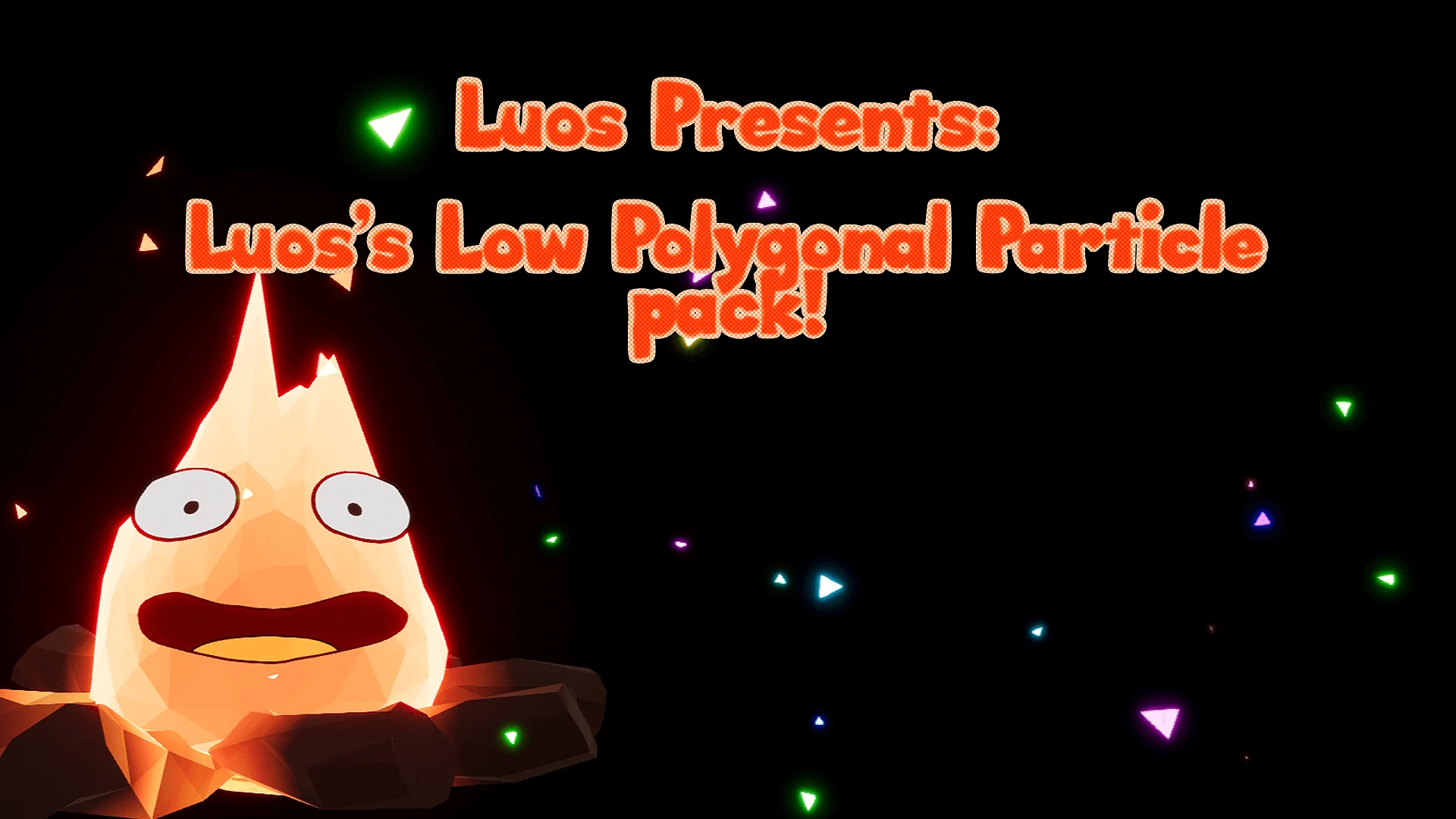
Distinct geometric contours and faceted surfaces define the aesthetic of Luos's LowPoly Particle Pack. Tailored specifically for stylized projects, these effects support fantasy combat encounters, energetic attacks, and physical impacts without relying on hyper-realistic smoke or photographic debris. The deliberate polygonal visual language establishes immediate clarity during chaotic battle scenes, giving gameplay events unambiguous spatial definition.
Stylized attack sequences benefit heavily from readable silhouette boundaries. Instead of soft-edged volumetric clouds obscuring the play area, polygonal effects manifest as crisp, distinct shapes. When a strike connects or a spell discharges, the resulting impact carries a sharp visual weight that complements low-poly character meshes and environments. This harmony between particle form and environment geometry prevents stylized scenes from breaking visual coherence.
Combat telegraphing relies on instantaneous feedback. In fantasy gameplay scenarios where players must react to sudden swings, area-of-effect bursts, and projectile collisions, the structured facets of these low-poly particles preserve silhouette contrast against varied backgrounds. High-contrast shapes help players track hits, defensive parries, and elemental discharges across busy arenas without muddying the screen space.
Material Architecture and Particle Variation
Underpinning the visual effects is a framework of clean, easily readable master materials and material instances. VFX artists and gameplay programmers often struggle with opaque shader graphs that hide essential parameters under sprawling math networks. Here, the material logic remains approachable, permitting direct intervention into visual properties without dismantling the underlying networks.
This readability enables rapid iteration when authoring effect variants. Adjusting parameter values within an instance allows developers to modify coloration, emissive intensity, and display characteristics to establish alternate versions of base effects. A single baseline attack effect can be reconfigured into multiple elemental tiers or aligned with distinct character factions simply by updating instances. The simplicity of the material setup reduces pipeline bottlenecks during rapid prototyping phases.
Creating alternate variations directly inside material instances bypasses the need to rebuild whole emitter structures from the ground up. Production teams can repurpose core impact dynamics across multiple weapons, skills, or enemy attacks, maintaining technical uniformity across an entire project while offering visual diversity to the player.
Deploying LowPoly Systems Across Platforms and Switch
Performance optimization stands as a foundational requirement across modern interactive projects. Luos's LowPoly Particle Pack is configured to run efficiently across every device and hardware platform, explicitly supporting restricted-power hardware such as the Nintendo Switch. Because polygonal visual effects rely on clean geometry rather than heavy, overdraw-intensive alpha textures, fill rate demands decrease significantly.
Lowering translucent overdraw is critical on handheld and mobile chipsets. Hardware like the Nintendo Switch encounters severe fill rate bottlenecks when traditional particles overlap in deep stacks across the camera frame. The simplified, faceted surfaces characteristic of low-poly designs drastically mitigate these fill rate pressures. Rendering engines spend fewer cycles resolving complex pixel depth calculations, preserving consistent frame times even during intensive multi-character battles.
The efficiency of the effects allows developers targeting lower-spec consoles to populate scenes with numerous concurrent impacts and combat bursts. Instead of heavily trimming visual effects budgets to maintain target framerates, creators can maintain visual feedback fidelity across both high-end desktop hardware and portable consoles without maintaining divergent asset pools.
Cascade Implementation and the Niagara Roadmap
Technical execution within the package relies on Unreal Engine's legacy Cascade particle framework rather than the Niagara system. While Niagara represents the current direction for dynamic simulations, Cascade remains completely functional and performant within the engine. There is no active indication that Cascade will be removed in the immediate future, making it a stable, production-ready system for ongoing projects.
Operating on Cascade provides immediate compatibility for projects built on established engine pipelines. Studios running production branches that have not transitioned to full Niagara pipelines can drop these emitters directly into existing levels, blueprints, and animation notifies without adjusting runtime simulation parameters or module scripts.
For teams planning ahead, the technical transition is already mapped out. A comprehensive update will convert all effects in the package to utilize Niagara at a later date. This roadmap guarantees that projects starting on Cascade can rely on the existing setup today while remaining positioned to leverage Niagara once the unified update is deployed.
Unreal Engine Pipeline Across 4.16 and 4.17+
Asset deployment involves specific pipeline handling when moving across different Unreal Engine 4 versions. If a project is initiated in Unreal Engine 4.16 and subsequently transitioned to version 4.17 or higher, the package should be re-downloaded directly. The version updated for 4.17 incorporates targeted performance improvements that take advantage of engine features introduced in that release.
Engine versions frequently introduce adjustments to rendering passes, material compiler behaviors, and particle pooling efficiency. Re-downloading the package when updating from 4.16 into 4.17 or newer branches ensures that the underlying asset data adopts those internal runtime enhancements, eliminating minor discrepancies between legacy Cascade calls and updated engine logic.
Managing this update path requires minimal overhead but delivers measurable gains in rendering throughput. By matching the project build version with the corresponding package update, technical teams ensure their low-poly combat effects, impacts, and material instances perform at their intended efficiency across all target hardware.
 Spells & Combat
 Spells & Combat
 Spells & Combat