"70b3cb896aae0d3c"{"id":"1000466","slug":"lgui-3d-ui-for-unrealengine","title":"LGUI - 3D UI for UnrealEngine","category":"Engine Tools","engine":"5.4","assetVersion":"Asset Version: 3.4.15","engineVersion":"Engine Version: 5.4","tag":"Engine Tools","accent":"blue","visual":"mech","summary":"LGUI (Lex GUI) is a 3D UI system for Unreal Engine featuring nested prefab workflows, a tween animation library, and extensive layout and interaction components","platform":"Unreal Engine","publishedAt":"2026-07-11T17:25:36.577Z","updatedAt":"2026-07-11T17:25:36.577Z","sourceNotes":[],"fileContents":[],"compatibility":["Unreal Engine","Asset Version: 3.4.15","Engine Version: 5.4"],"featuredImage":{"alt":"LGUI - 3D UI for UnrealEngine","src":"/wp-content/uploads/published/2026/07/e554cc27acbd-1a9f69a8-417b-4c2c-94c4-618e34106346-ed23e1890d.webp"},"hasDownloadLink":true,"downloads":1,"terms":[{"taxonomy":"category","slug":"engine-tools-tools-and-plugins","name":"Engine Tools"}],"galleryImages":[{"src":"/wp-content/uploads/published/2026/07/39dd724696e4-27d5bf2d-a310-40c3-a8d1-b4e78f85ba54-315dd5809e.webp","alt":"LGUI - 3D UI for UnrealEngine"},{"src":"/wp-content/uploads/published/2026/07/b89acf4a68ce-7849bfe1-1e4b-4ef9-887e-d9522a82a8a6-fe96929515.webp","alt":"LGUI - 3D UI for UnrealEngine"},{"src":"/wp-content/uploads/published/2026/07/e8d938f3992a-de76e163-b637-4d5b-a577-4dd48f0925d4-79ee65edf5.webp","alt":"LGUI - 3D UI for UnrealEngine"},{"src":"/wp-content/uploads/published/2026/07/7d475050986e-d39dd24b-5f71-413e-8f4d-bebdc1e6d3e4-7f8f923474.webp","alt":"LGUI - 3D UI for UnrealEngine"},{"src":"/wp-content/uploads/published/2026/07/4c6c1430bb72-bd0f2012-0800-4700-b1ec-17f4df061fba-bc2faf0dd5.webp","alt":"LGUI - 3D UI for UnrealEngine"},{"src":"/wp-content/uploads/published/2026/07/5967a1acd0da-a59d1efe-e09c-42f1-9332-d37eb77454dd-7513aa5d87.webp","alt":"LGUI - 3D UI for UnrealEngine"},{"src":"/wp-content/uploads/published/2026/07/200251f4c976-13ad4826-d321-4f58-bdcd-75b36ba963cb-1e6f680894.webp","alt":"LGUI - 3D UI for UnrealEngine"},{"src":"/wp-content/uploads/published/2026/07/fa991a9ca038-5630beac-a0a8-41f6-bb24-3442bc2f5f2f-32c3aeeeca.webp","alt":"LGUI - 3D UI for UnrealEngine"},{"src":"/wp-content/uploads/published/2026/07/d87c9d65f3c3-9016327e-6ebb-4df6-a02f-7b32b86213d9-be272b77a6.webp","alt":"LGUI - 3D UI for UnrealEngine"},{"src":"/wp-content/uploads/published/2026/07/6f575b781370-b411bac9-dfdd-4258-a2f8-b4d08d92bf94-21550e03b9.webp","alt":"LGUI - 3D UI for UnrealEngine"}],"accessPanel":{"kind":"resource","title":"Download this resource","eyebrow":"Free Download","message":"Log in or create a free account to start your download.","fileName":"Plugins.7z","safetyNote":"Resources are manually reviewed before listing to improve quality and reduce obvious risks.","actionLabel":"Download Free","resourceType":"Resource archive"},"contentHtml":"\u003cp\u003eVirtual reality applications and immersive 3D environments often require interface systems that exist fully within the game world rather than overlaid as flat screen elements. Creating these spatial interfaces usually means building custom rendering logic, interactive components, and animation systems from scratch. LGUI attempts to consolidate those requirements into a single framework.\u003c/p\u003e \u003ch2\u003eWhat LGUI (Lex GUI) Brings to Unreal Engine\u003c/h2\u003e \u003cp\u003eLGUI positions itself as a powerful 3D UI system for Unreal Engine. The framework is structured through three core pillars: the 3D user interface rendering system itself, a nested prefab workflow for assembling and reusing interface structures, and a dedicated tween animation library called LTween. Together, these elements allow developers to construct elaborate spatial interfaces.\u003c/p\u003e \u003cp\u003eThe system is heavily focused on world-space interaction. The creator notes that the demonstrated projects, including those built for the HTC Vive VR platform, are made entirely of LGUI. None of the UI in those showcases relies on UMG or Slate. This makes the toolkit particularly relevant for games and experiences where the interface must function as a set of physical objects within the 3D environment.\u003c/p\u003e \u003cp\u003eTutorials and project samples are available, demonstrating specific use cases. These include a 3D menu and an interface styled after the game 'The Division,' showing how the system handles complex, visually demanding HUDs in a real-time viewport.\u003c/p\u003e \u003ch2\u003eNavigating and Controlling LGUI UISelectable Components\u003c/h2\u003e \u003cp\u003eRecent updates to the system have refined how individual interface elements behave when interacted with. Version 3.4.18 introduced new parameters for the UISelectable component. The first is 'CanNavigateHere,' which allows the system to skip a specific selectable element when the player is using navigation input to move through the interface. This gives developers finer control over tab order and controller-based menu navigation.\u003c/p\u003e \u003cp\u003eThe same update added an individual 'Interactable' toggle for UISelectable. Previously, toggling interactivity for groups of elements might have required routing through a UICanvasGroup. Now, individual selectable items can be turned on or off directly, simplifying the process of disabling specific buttons or inputs without affecting their parent containers.\u003c/p\u003e \u003cp\u003eLTween, the system's animation library, also received an update in this version. Every individual tweener can now have its TickGroup set independently. This means developers can specify exactly when and how an animation evaluates during the engine's update loop, providing more precise control over sequencing and timing.\u003c/p\u003e \u003ch2\u003eLTween Updates: Game Pauses and Time Dilation\u003c/h2\u003e \u003cp\u003eHandling engine time correctly is a persistent challenge when building animated interfaces. If an animation system is not tied to the engine's timekeeping, UI elements can continue to move or transition when the game is paused, or behave incorrectly when time is dilated for slow-motion effects.\u003c/p\u003e \u003cp\u003eVersion 3.4.16 of LGUI addresses this by supporting GamePause and TimeDilation. This compatibility is a direct result of a new update method used by the LTween library. Because the tweening system now respects the engine's global time state, animations will pause appropriately when the game is paused, and they will scale correctly when TimeDilation is applied. This ensures UI behavior remains synchronized with the rest of the game's simulation.\u003c/p\u003e \u003ch2\u003eLayout Components and UMG Parity in LGUI\u003c/h2\u003e \u003cp\u003eWhile LGUI focuses on 3D interfaces, it aims to provide the same organizational convenience found in Unreal's standard 2D UI editor, UMG. To this end, version 3.4.15 added a set of new layout components. These components are named with the 'UIPanelLayout' prefix to make their purpose clear.\u003c/p\u003e \u003cp\u003eThe new layout options include UIPanelLayout_HorizontalBox and UIPanelLayout_VerticalBox for basic stacking, UIPanelLayout_UniformGrid for evenly spaced grids, and UIPanelLayout_FlexibleGrid for more dynamic arrangement needs. These tools allow developers to automatically arrange child elements within a 3D panel, just as they would in a standard UMG canvas, significantly reducing the manual placement required for complex menus.\u003c/p\u003e \u003ch2\u003eInfinite Scrolling and Interaction Refinements\u003c/h2\u003e \u003cp\u003eScrolling lists are a staple of interactive interfaces, but they can become performance burdens if not handled correctly. LGUI includes a UIRecyclableScrollView component to mitigate this issue. In version 3.4.10, this scroll view was updated to support an infinite loop. By checking an option called 'InfiniteLoop,' developers can create continuous scrolling lists that loop back to the beginning, which is particularly useful for cyclical menus and carousel-style select screens.\u003c/p\u003e \u003cp\u003eEarlier versions of the system focused heavily on expanding the types of UI elements available. Version 3.4.4 was a significant milestone in this regard, introducing several new element types that bridge the gap between LGUI, standard UMG, and the game viewport itself.\u003c/p\u003e \u003ch3\u003eUIWidget: Rendering UMG Inside LGUI\u003c/h3\u003e\n\u003cp\u003eOne of the introduced types is the UIWidget, which allows LGUI to render standard UMG widgets directly within the 3D LGUI environment. To make these widgets interactive in 3D space, the update also included a UIWidgetInteraction component. This means developers do not have to abandon their existing UMG widgets; they can port them into the LGUI system and interact with them as spatial elements.\u003c/p\u003e \u003ch3\u003eUIRenderTarget and UIFrameCapture\u003c/h3\u003e\n\u003cp\u003eAnother new type is UIRenderTarget. This element can display an LGUICanvas set to a RenderMode of RenderTarget. By using the LGUIRenderTargetInteraction component, users can interact with this rendered canvas, functioning much like a Retainer Box but within the 3D space.\u003c/p\u003e \u003cp\u003eFor capturing the game world itself, the UIFrameCapture type was added. This element can capture the game viewport as a texture for further use within the interface. This opens up possibilities for security camera feeds, reflective surfaces, or complex UI setups that need to display the 3D world on a virtual screen.\u003c/p\u003e \u003ch2\u003eRendering Fidelity and Platform Support for LGUI\u003c/h2\u003e \u003cp\u003eVisual quality and anti-aliasing are critical for text and crisp UI elements. Version 3.4.12 brought support for Multisample Anti-Aliasing (MSAA) to the LGUIRenderer. This applies to the ScreenSpace renderer, the WorldSpaceLGUIRenderer, and the RenderTarget renderer. MSAA can be enabled in the Project Settings under the LGUI section.\u003c/p\u003e \u003cp\u003eIn terms of platform compatibility, the MSAA support extends to Windows running DirectX 11 or DirectX 12, Android using Vulkan, and MacOS. Support for iOS is not tested. The same version also added support for the Substrate material mode in Unreal Engine 5.3, ensuring the system remains compatible with the engine's evolving rendering architecture.\u003c/p\u003e \u003ch2\u003eExtending LGUI with External Tools\u003c/h2\u003e \u003cp\u003eThe system is designed to work alongside established content creation tools. The creator provides integrations for TexturePacker, allowing developers to use that software to pack sprites and then apply them within LGUI. There is also an integration for BitmapFontGenerator, making it possible to generate and import custom bitmap fonts for the 3D interfaces.\u003c/p\u003e \u003cp\u003eFor more advanced visual effects, a Niagara LGUI Renderer is available. This allows the LGUI system to render particles directly from the interface elements, opening up possibilities for dynamic, particle-driven UI effects.\u003c/p\u003e \u003cp\u003eThis framework is distributed as a prebuilt binary and an editor blueprint project. It is suited for developers building immersive simulations or VR experiences where standard 2D UI solutions are insufficient. The combination of nested prefabs, diverse layout options, and native time-management features makes it most valuable for teams needing a robust, world-space interface solution without relying on Slate or UMG overlays.\u003c/p\u003e\n\n\u003ch2\u003eContinue Browsing Similar Packs\u003c/h2\u003e\n\u003cul\u003e\n\u003cli\u003e\u003ca href=\"https://3dcghub.com/ascent-ui-tools-gamepad-navigation-ui-framework/\" title=\"Ascent UI Tools - Gamepad Navigation \u0026amp; UI Framework\"\u003eAscent UI Tools - Gamepad Navigation \u0026amp; UI Framework\u003c/a\u003e\u003c/li\u003e\n\u003cli\u003e\u003ca href=\"https://3dcghub.com/pbl-database/\" title=\"PBL Database\"\u003ePBL Database\u003c/a\u003e\u003c/li\u003e\n\u003cli\u003e\u003ca href=\"https://3dcghub.com/blend-file-importer/\" title=\"Blend File Importer\"\u003eBlend File Importer\u003c/a\u003e\u003c/li\u003e\n\u003cli\u003e\u003ca href=\"https://3dcghub.com/narrative-navigator-maps-compasses-waypoints/\" title=\"Narrative Navigator - Maps, Compasses, Waypoints\"\u003eNarrative Navigator - Maps, Compasses, Waypoints\u003c/a\u003e\u003c/li\u003e\n\u003cli\u003e\u003ca href=\"https://3dcghub.com/make-modular-skeletal-mesh/\" title=\"Make Modular Skeletal Mesh\"\u003eMake Modular Skeletal Mesh\u003c/a\u003e\u003c/li\u003e\n\u003c/ul\u003e","contentTextLength":8035,"navigation":{"current":1391,"total":3713,"previous":{"id":"1000467","slug":"medieval-armory","title":"Medieval Armory","category":"Medieval","platform":"Unreal Engine","updatedAt":"2026-07-11T17:34:33.035Z"},"next":{"id":"1000465","slug":"sci-fi-drone-01","title":"Sci-fi Drone 01","category":"Mechanical \u0026 Robots","platform":"Unreal Engine","updatedAt":"2026-07-11T17:21:12.823Z"}},"relatedResources":[{"id":"28498","slug":"ascent-ui-tools-gamepad-navigation-ui-framework","title":"Ascent UI Tools - Gamepad Navigation \u0026 UI Framework","category":"Engine Tools","engine":"5.4 - 5.5","assetVersion":"Engine version: 5.4 - 5.5","engineVersion":"Asset Version:2.1 - 2.2","tag":"Engine Tools","accent":"blue","visual":"mech","summary":"Ascent UI Tools - Gamepad Navigation \u0026 UI Framework targets one of the slower parts of interface work: getting menus and widgets functional across gamepad-driven flows without heavy setup. It combines automatic navigation, sample menu structures, map-relate...","platform":"Unreal Engine","publishedAt":"2026-05-16T07:36:07.000Z","updatedAt":"2026-05-16T07:36:08.000Z","sourceNotes":[],"fileContents":[],"compatibility":["Unreal Engine","Engine version: 5.4 - 5.5","Asset Version: 2.1 - 2.2"],"featuredImage":{"alt":"Ascent UI Tools - Gamepad Navigation \u0026 UI Framework","src":"https://3dcghub.com/wp-content/uploads/2026/05/afa2df11869c_886c04f5-3515-4d43-a22c-ca4bd799f76f.webp"},"hasDownloadLink":true,"downloads":1},{"id":"14194","slug":"mission-objectives","title":"Mission \u0026 Objectives","category":"Engine Tools","engine":"5.2 - 5.4","assetVersion":"Engine version: 5.2 - 5.4","engineVersion":"Asset Version:1.5","tag":"Engine Tools","accent":"blue","visual":"audio","summary":"Streamline your game's narrative and gameplay loops with the Mission \u0026 Objectives plugin, a robust tool for designing quests, rewards, and multiplayer-ready events.","platform":"Unreal Engine","publishedAt":"2026-03-11T16:11:21.000Z","updatedAt":"2026-04-19T15:45:51.000Z","sourceNotes":[],"fileContents":[],"compatibility":["Unreal Engine","Engine version: 5.2 - 5.4","Asset Version: 1.5"],"featuredImage":{"alt":"Mission \u0026 Objectives","src":"https://3dcghub.com/wp-content/uploads/2026/03/b4d2cac2-cec9-4ebc-95be-8c5f1f57ba3b.webp"},"hasDownloadLink":true,"downloads":1},{"id":"14147","slug":"make-modular-skeletal-mesh","title":"Make Modular Skeletal Mesh","category":"Engine Tools","engine":"5.3 - 5.4","assetVersion":"Engine version: 5.3 - 5.4","engineVersion":"5.3","tag":"Engine Tools","accent":"blue","visual":"mech","summary":"Enhance your asset creation process with the Make Modular Skeletal Mesh subsystem. This tool enables developers to modify and combine skeletal mesh parts directly within the UE editor.","platform":"Unreal Engine","publishedAt":"2026-03-11T16:00:04.000Z","updatedAt":"2026-04-19T15:45:52.000Z","sourceNotes":[],"fileContents":[],"compatibility":["Unreal Engine","Engine version: 5.3 - 5.4"],"featuredImage":{"alt":"Make Modular Skeletal Mesh","src":"https://3dcghub.com/wp-content/uploads/2026/03/8090ef9f-f5d3-428e-940c-ad1f4ed77720.webp"},"hasDownloadLink":true,"downloads":1}]}
Engine Tools
LGUI - 3D UI for UnrealEngine
LGUI (Lex GUI) is a 3D UI system for Unreal Engine featuring nested prefab workflows, a tween animation library, and extensive layout and interaction components
Virtual reality applications and immersive 3D environments often require interface systems that exist fully within the game world rather than overlaid as flat screen elements. Creating these spatial interfaces usually means building custom rendering logic, interactive components, and animation systems from scratch. LGUI attempts to consolidate those requirements into a single framework.
What LGUI (Lex GUI) Brings to Unreal Engine
LGUI positions itself as a powerful 3D UI system for Unreal Engine. The framework is structured through three core pillars: the 3D user interface rendering system itself, a nested prefab workflow for assembling and reusing interface structures, and a dedicated tween animation library called LTween. Together, these elements allow developers to construct elaborate spatial interfaces.
The system is heavily focused on world-space interaction. The creator notes that the demonstrated projects, including those built for the HTC Vive VR platform, are made entirely of LGUI. None of the UI in those showcases relies on UMG or Slate. This makes the toolkit particularly relevant for games and experiences where the interface must function as a set of physical objects within the 3D environment.
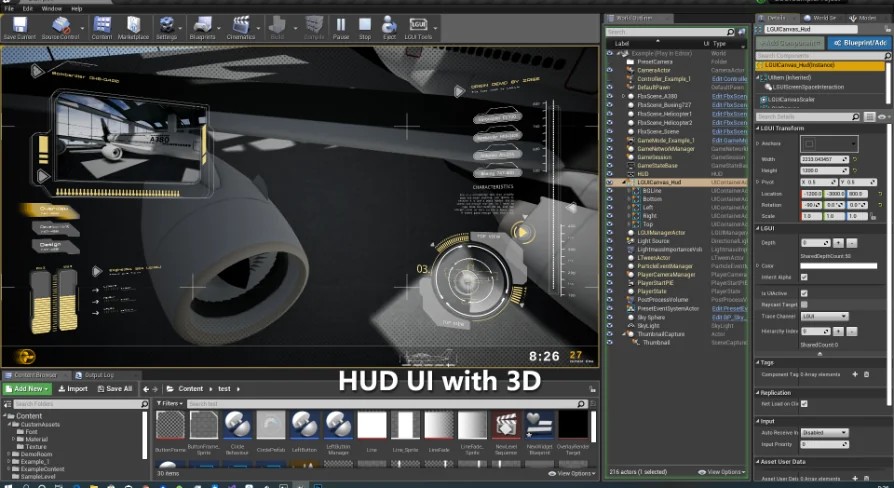
Tutorials and project samples are available, demonstrating specific use cases. These include a 3D menu and an interface styled after the game 'The Division,' showing how the system handles complex, visually demanding HUDs in a real-time viewport.
Navigating and Controlling LGUI UISelectable Components
Recent updates to the system have refined how individual interface elements behave when interacted with. Version 3.4.18 introduced new parameters for the UISelectable component. The first is 'CanNavigateHere,' which allows the system to skip a specific selectable element when the player is using navigation input to move through the interface. This gives developers finer control over tab order and controller-based menu navigation.
The same update added an individual 'Interactable' toggle for UISelectable. Previously, toggling interactivity for groups of elements might have required routing through a UICanvasGroup. Now, individual selectable items can be turned on or off directly, simplifying the process of disabling specific buttons or inputs without affecting their parent containers.
LTween, the system's animation library, also received an update in this version. Every individual tweener can now have its TickGroup set independently. This means developers can specify exactly when and how an animation evaluates during the engine's update loop, providing more precise control over sequencing and timing.
LTween Updates: Game Pauses and Time Dilation
Handling engine time correctly is a persistent challenge when building animated interfaces. If an animation system is not tied to the engine's timekeeping, UI elements can continue to move or transition when the game is paused, or behave incorrectly when time is dilated for slow-motion effects.
Version 3.4.16 of LGUI addresses this by supporting GamePause and TimeDilation. This compatibility is a direct result of a new update method used by the LTween library. Because the tweening system now respects the engine's global time state, animations will pause appropriately when the game is paused, and they will scale correctly when TimeDilation is applied. This ensures UI behavior remains synchronized with the rest of the game's simulation.
Layout Components and UMG Parity in LGUI
While LGUI focuses on 3D interfaces, it aims to provide the same organizational convenience found in Unreal's standard 2D UI editor, UMG. To this end, version 3.4.15 added a set of new layout components. These components are named with the 'UIPanelLayout' prefix to make their purpose clear.
The new layout options include UIPanelLayout_HorizontalBox and UIPanelLayout_VerticalBox for basic stacking, UIPanelLayout_UniformGrid for evenly spaced grids, and UIPanelLayout_FlexibleGrid for more dynamic arrangement needs. These tools allow developers to automatically arrange child elements within a 3D panel, just as they would in a standard UMG canvas, significantly reducing the manual placement required for complex menus.
Infinite Scrolling and Interaction Refinements
Scrolling lists are a staple of interactive interfaces, but they can become performance burdens if not handled correctly. LGUI includes a UIRecyclableScrollView component to mitigate this issue. In version 3.4.10, this scroll view was updated to support an infinite loop. By checking an option called 'InfiniteLoop,' developers can create continuous scrolling lists that loop back to the beginning, which is particularly useful for cyclical menus and carousel-style select screens.
Earlier versions of the system focused heavily on expanding the types of UI elements available. Version 3.4.4 was a significant milestone in this regard, introducing several new element types that bridge the gap between LGUI, standard UMG, and the game viewport itself.
UIWidget: Rendering UMG Inside LGUI
One of the introduced types is the UIWidget, which allows LGUI to render standard UMG widgets directly within the 3D LGUI environment. To make these widgets interactive in 3D space, the update also included a UIWidgetInteraction component. This means developers do not have to abandon their existing UMG widgets; they can port them into the LGUI system and interact with them as spatial elements.
UIRenderTarget and UIFrameCapture
Another new type is UIRenderTarget. This element can display an LGUICanvas set to a RenderMode of RenderTarget. By using the LGUIRenderTargetInteraction component, users can interact with this rendered canvas, functioning much like a Retainer Box but within the 3D space.
For capturing the game world itself, the UIFrameCapture type was added. This element can capture the game viewport as a texture for further use within the interface. This opens up possibilities for security camera feeds, reflective surfaces, or complex UI setups that need to display the 3D world on a virtual screen.
Rendering Fidelity and Platform Support for LGUI
Visual quality and anti-aliasing are critical for text and crisp UI elements. Version 3.4.12 brought support for Multisample Anti-Aliasing (MSAA) to the LGUIRenderer. This applies to the ScreenSpace renderer, the WorldSpaceLGUIRenderer, and the RenderTarget renderer. MSAA can be enabled in the Project Settings under the LGUI section.
In terms of platform compatibility, the MSAA support extends to Windows running DirectX 11 or DirectX 12, Android using Vulkan, and MacOS. Support for iOS is not tested. The same version also added support for the Substrate material mode in Unreal Engine 5.3, ensuring the system remains compatible with the engine's evolving rendering architecture.
Extending LGUI with External Tools
The system is designed to work alongside established content creation tools. The creator provides integrations for TexturePacker, allowing developers to use that software to pack sprites and then apply them within LGUI. There is also an integration for BitmapFontGenerator, making it possible to generate and import custom bitmap fonts for the 3D interfaces.
For more advanced visual effects, a Niagara LGUI Renderer is available. This allows the LGUI system to render particles directly from the interface elements, opening up possibilities for dynamic, particle-driven UI effects.
This framework is distributed as a prebuilt binary and an editor blueprint project. It is suited for developers building immersive simulations or VR experiences where standard 2D UI solutions are insufficient. The combination of nested prefabs, diverse layout options, and native time-management features makes it most valuable for teams needing a robust, world-space interface solution without relying on Slate or UMG overlays.
 Engine Tools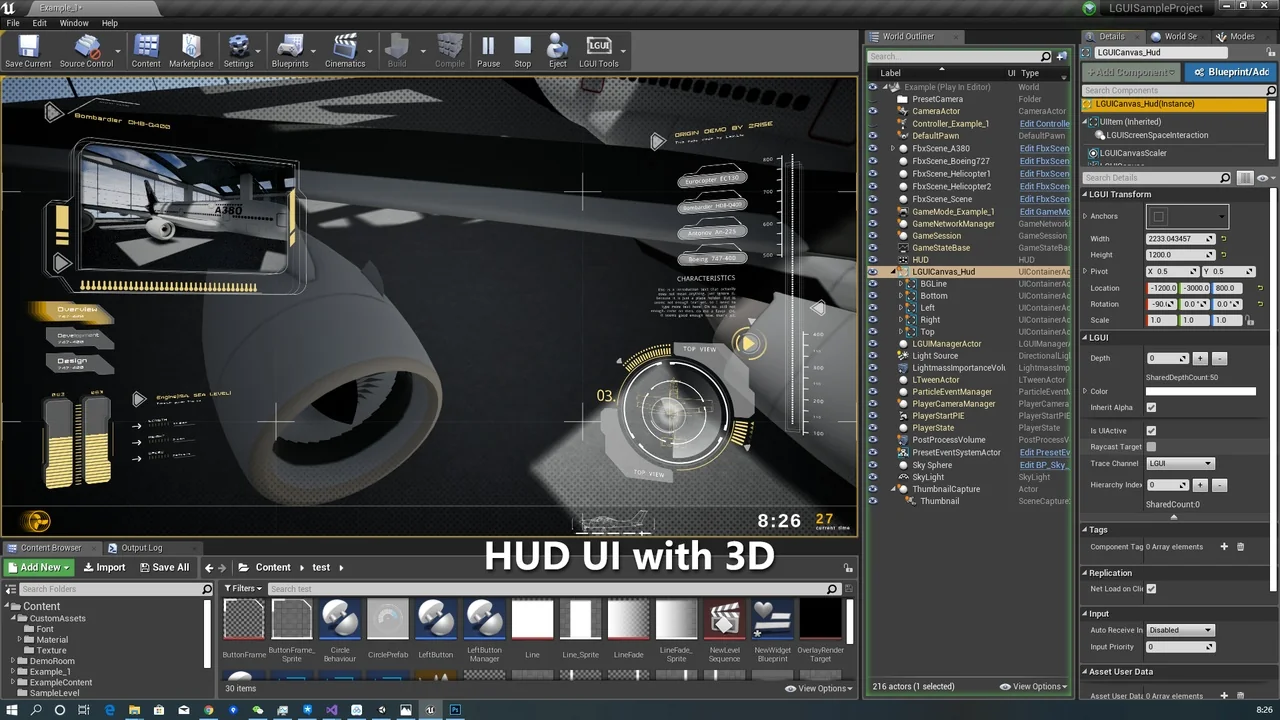
 Engine Tools
 Engine Tools
 Engine Tools