"7e6fc58c410f2894"{"id":"23289","slug":"impact-cfx-collision-effects-system","title":"Impact CFX - Collision Effects System","category":"Particles \u0026 Effects","engine":"Original Unity version: 2021.3.45","assetVersion":"Original Unity version: 2021.3.45","engineVersion":"Asset Version:1.5.4","tag":"Particles","accent":"cyan","visual":"animation","summary":"Impact CFX ties collision events to audio, particles, and decals in Unity scenes where surfaces, materials, and physics motion all matter. It also extends into footsteps and weapon impacts, while keeping performance in view with Jobs and Burst.","platform":"Unity","publishedAt":"2026-04-09T16:33:27.000Z","updatedAt":"2026-04-19T15:35:31.000Z","sourceNotes":[],"fileContents":[],"compatibility":["Unity","Original Unity version: 2021.3.45","Asset Version: 1.5.4"],"featuredImage":{"alt":"Impact CFX - Collision Effects System","src":"https://3dcghub.com/wp-content/uploads/2026/04/024561169d4f_0c48c6e2-5d14-424f-bfe6-037e5561b72f_1280x720_stretch.webp"},"hasDownloadLink":true,"downloads":0,"terms":[{"taxonomy":"category","slug":"particles-and-effects","name":"Particles \u0026 Effects"},{"taxonomy":"post_tag","slug":"game-systems","name":"Game Systems"},{"taxonomy":"post_tag","slug":"unity","name":"Unity"},{"taxonomy":"post_tag","slug":"vfx","name":"VFX"}],"galleryImages":[{"src":"https://3dcghub.com/wp-content/uploads/2026/04/f74795f9e3ce_89d2ff27-6e1e-4c7c-8eda-c38565589a37_scaled.webp","alt":"Impact CFX - Collision Effects System"},{"src":"https://3dcghub.com/wp-content/uploads/2026/04/7fcdb3ff7136_be8826b9-5a79-488f-b3ac-db8cabb9ce19_scaled.webp","alt":"Impact CFX - Collision Effects System"},{"src":"https://3dcghub.com/wp-content/uploads/2026/04/a50f89f47630_68248076-200e-4e90-976a-c38bc95d6a6d_scaled.webp","alt":"Impact CFX - Collision Effects System"},{"src":"https://3dcghub.com/wp-content/uploads/2026/04/960cb9449880_54bcd23f-9f79-475a-afa7-e2ad01905ad9_scaled.webp","alt":"Impact CFX - Collision Effects System"},{"src":"https://3dcghub.com/wp-content/uploads/2026/04/38eaa881f2f1_4605694a-2d23-452a-ae15-705d37069a78_scaled.webp","alt":"Impact CFX - Collision Effects System"},{"src":"https://3dcghub.com/wp-content/uploads/2026/04/05c328a6b562_cd5b2fc1-2dd2-44c8-85ed-0837ecd127a5_scaled.webp","alt":"Impact CFX - Collision Effects System"},{"src":"https://3dcghub.com/wp-content/uploads/2026/04/15a62f6b6d97_496157f4-c25c-4d5f-a42b-f1c79cba342f_scaled.webp","alt":"Impact CFX - Collision Effects System"}],"accessPanel":{"kind":"resource","title":"Access this resource","eyebrow":"Free Download","message":"Log in or create a free account to start your download.","fileName":"Impact CFX - Collision Effects System v1.5.4.7z","safetyNote":"All resources are 100% manually reviewed to eliminate all risks.","actionLabel":"Download Free","resourceType":"Resource archive"},"contentHtml":"\u003ch2\u003eCollision cues that match the surface\u003c/h2\u003e\n\u003cp\u003eIn a level full of moving crates, ragdolls, rolling bodies, and weapon hits, collisions need more than a generic sound cue. Impact CFX is a material-based collision effects system for Unity that produces audio, particle, and decal effects from physics collisions and raycasts. A downloadable Windows demo build is included, which makes it easier to inspect the behavior in a working scene before it is used in a production setup.\u003c/p\u003e\n\u003cp\u003eThe collision layer focuses on how objects meet and what they are made of. It can play audio when physics objects collide, with sounds based on the collision velocity and the materials involved. Sliding and rolling sounds are supported as well. On the visual side, the system can emit particles on collision and leave decals behind on impact. Terrain support is included, and it works well with rigidbodies connected by joints and ragdolls.\u003c/p\u003e\n\u003ch2\u003eFootsteps and bullet impacts share the same material logic\u003c/h2\u003e\n\u003cp\u003eThe same surface-aware approach carries into character movement and weapon feedback. Impact CFX can be used for footsteps, letting a character play different footstep sounds based on the material they are walking over. It also handles weapon impacts, where bullet hits can trigger sounds, particles, and decals.\u003c/p\u003e\n\u003cp\u003eThat gives the asset a practical place in gameplay scenes where one material system has to serve several reactions. A floor surface can inform the sound of a step, the look of a bullet strike, and the visual response of a collision without separating those reactions into unrelated tools.\u003c/p\u003e\n\u003ch3\u003eRaycasting needs C# scripting\u003c/h3\u003e\n\u003cp\u003eFootstep and weapon impact effects done through raycasting require C# scripting knowledge. In a real project, that means the gameplay code is responsible for checking what the character or projectile has hit, while Impact CFX supplies the collision response that follows from that hit information.\u003c/p\u003e\n\u003cp\u003eThat workflow is especially useful when a project already tracks movement, combat, and surface types through code. The asset fits at the point where those systems need to turn a hit into sound, particles, or a decal rather than just a boolean contact event.\u003c/p\u003e\n\u003ch2\u003ePerformance choices for crowded physics scenes\u003c/h2\u003e\n\u003cp\u003eBusy collision scenes are where the performance approach stands out. Impact CFX uses Unityâs Jobs system and Burst compiler to process effects with minimal performance impact, even with hundreds of colliding objects. The package also offers extensive configurability, so the setup can be tuned around the specific needs of a project instead of being locked to a single collision-response style.\u003c/p\u003e\n\u003cp\u003eThat matters in scenes where physics activity stays on screen for long stretches: stacked debris, joint-driven characters, ragdoll reactions, or repeated object collisions that would otherwise be tedious to manage by hand. The system keeps audio, particles, and decals connected to the same physical interaction, which makes the response easier to coordinate across a scene.\u003c/p\u003e\n\u003cp\u003eDocumentation is included as part of the package, so the collision setup is paired with reference material rather than standing alone. The package also includes a downloadable demo build for Windows, which gives a direct way to see the effect chain in motion.\u003c/p\u003e\n\u003ch2\u003eIntegrations, dependencies, and where it fits in a project\u003c/h2\u003e\n\u003cp\u003eImpact CFX is grouped with several integrations and extensions that match common Unity production pipelines:\u003c/p\u003e\n\u003cul\u003e\n\u003cli\u003eFMOD Integration\u003c/li\u003e\n\u003cli\u003eWwise Integration\u003c/li\u003e\n\u003cli\u003eMaster Audio Integration\u003c/li\u003e\n\u003cli\u003eURP \u0026amp; HDRP Decals\u003c/li\u003e\n\u003cli\u003eVFX Batch Effect\u003c/li\u003e\n\u003c/ul\u003e\n\u003cp\u003eThe Package Manager dependencies are Burst, Collections, and Mathematics. Technical details list the original Unity version as 2021.3.45, the package type as unitypackage, and the file size as 107.7 MB. The asset count is 222. Render pipeline compatibility is listed for 2021.3.45f2 across Built-in, HDRP, URP, and Custom SRP.\u003c/p\u003e\n\u003cp\u003eFor a production workflow, that places Impact CFX in the space where collision feedback needs to stay tied to material, motion, and raycast-driven gameplay logic. It is a fit for scenes that need footsteps, weapon impacts, sliding and rolling sounds, and layered collision reactions without treating each one as a separate system.\u003c/p\u003e\n\n\u003ch2\u003eRelated Resources Worth Checking\u003c/h2\u003e\n\u003cul\u003e\n\u003cli\u003e\u003ca href=\"https://3dcghub.com/opencv-for-unity/\" title=\"OpenCV for Unity\"\u003eOpenCV for Unity\u003c/a\u003e\u003c/li\u003e\n\u003cli\u003e\u003ca href=\"https://3dcghub.com/exporter-for-unreal-to-for-unity-2026/\" title=\"Exporter for Unreal to/for Unity 2026\"\u003eExporter for Unreal to/for Unity 2026\u003c/a\u003e\u003c/li\u003e\n\u003cli\u003e\u003ca href=\"https://3dcghub.com/dialogue-system-for-unity/\" title=\"Dialogue System for Unity\"\u003eDialogue System for Unity\u003c/a\u003e\u003c/li\u003e\n\u003cli\u003e\u003ca href=\"https://3dcghub.com/ambient-sounds-interactive-soundscapes-for-unity-6/\" title=\"Ambient Sounds – Interactive Soundscapes for Unity 6\"\u003eAmbient Sounds – Interactive Soundscapes for Unity 6\u003c/a\u003e\u003c/li\u003e\n\u003cli\u003e\u003ca href=\"https://3dcghub.com/pegasus-flythroughs-for-unity-6/\" title=\"Pegasus – Flythroughs for Unity 6\"\u003ePegasus – Flythroughs for Unity 6\u003c/a\u003e\u003c/li\u003e\n\u003c/ul\u003e","contentTextLength":4393,"navigation":{"current":3518,"total":3618,"previous":{"id":"23263","slug":"expanse-volumetric-skies-clouds-and-atmospheres-in-hdrp","title":"Expanse - Volumetric Skies, Clouds, and Atmospheres in HDRP","category":"Particles \u0026 Effects","platform":"Unity","updatedAt":"2026-04-19T15:36:47.000Z"},"next":{"id":"23332","slug":"magic-mirror-pro-recursive-edition","title":"Magic Mirror Pro - Recursive Edition","category":"Particles \u0026 Effects","platform":"Unity","updatedAt":"2026-04-19T15:35:30.000Z"}},"relatedResources":[{"id":"23279","slug":"glamor-advanced-image-effects","title":"GLAMOR Advanced Image Effects","category":"Particles \u0026 Effects","engine":"Original Unity version: 2022.3.18","assetVersion":"Original Unity version: 2022.3.18","engineVersion":"Asset Version:1.6a","tag":"Particles","accent":"cyan","visual":"mech","summary":"GLAMOR brings layer-selective screen-space effects into URP and combines them with a large library of advanced image-enhancing effects. It is set up for LTS-focused Unity workflows, with clear boundaries around supported versions and platforms.","platform":"Unity","publishedAt":"2026-04-09T16:28:09.000Z","updatedAt":"2026-04-19T15:36:47.000Z","sourceNotes":[],"fileContents":[],"compatibility":["Unity","Original Unity version: 2022.3.18","Asset Version: 1.6a"],"featuredImage":{"alt":"GLAMOR Advanced Image Effects","src":"https://3dcghub.com/wp-content/uploads/2026/04/6bdac97b4739_f5b81fbd-7583-4862-b0b6-2fa082fb7636_1280x720_stretch.webp"},"hasDownloadLink":true,"downloads":0},{"id":"23314","slug":"kws-water-system-hdrp-rendering","title":"KWS Water System (HDRP Rendering)","category":"Particles \u0026 Effects","engine":"Original Unity version: 2021.3.33","assetVersion":"Original Unity version: 2021.3.33","engineVersion":"Asset Version:1.5.9c","tag":"Particles","accent":"cyan","visual":"mech","summary":"KWS Water System (HDRP Rendering) is a module-based water component for PC and console projects. It covers large water surfaces, rivers, pools, underwater scenes, and shoreline interaction with HDRP-specific rendering.","platform":"Unity","publishedAt":"2026-04-09T16:38:17.000Z","updatedAt":"2026-04-19T15:35:30.000Z","sourceNotes":[],"fileContents":[],"compatibility":["Unity","Original Unity version: 2021.3.33","Asset Version: 1.5.9c"],"featuredImage":{"alt":"KWS Water System (HDRP Rendering)","src":"https://3dcghub.com/wp-content/uploads/2026/04/dd39527d95d8_f02ec359-66ad-4827-9123-9f44b6b0c75d_1280x720_stretch.webp"},"hasDownloadLink":true,"downloads":2},{"id":"23365","slug":"see-through-shader","title":"See-through Shader","category":"Particles \u0026 Effects","engine":"Original Unity version: 2021.3.45","assetVersion":"Original Unity version: 2021.3.45","engineVersion":"Asset Version:1.8.6","tag":"Particles","accent":"cyan","visual":"city","summary":"The See-through Shader keeps playable characters visible even when they move behind walls, structures, or other meshes. It works without modifying the mesh and comes with tools that make the effect quick to set up in a project.","platform":"Unity","publishedAt":"2026-04-09T16:48:23.000Z","updatedAt":"2026-04-19T15:35:28.000Z","sourceNotes":[],"fileContents":[],"compatibility":["Unity","Original Unity version: 2021.3.45","Asset Version: 1.8.6"],"featuredImage":{"alt":"See-through Shader","src":"https://3dcghub.com/wp-content/uploads/2026/04/84b3e554d99e_4c3b4d7f-1c87-4855-b7d6-f6a2d3ca7f88_1280x720_stretch.webp"},"hasDownloadLink":true,"downloads":1}]}
Particles
Impact CFX - Collision Effects System
Impact CFX ties collision events to audio, particles, and decals in Unity scenes where surfaces, materials, and physics motion all matter. It also extends into footsteps and weapon impacts, while keeping performance in view with Jobs and Burst.
In a level full of moving crates, ragdolls, rolling bodies, and weapon hits, collisions need more than a generic sound cue. Impact CFX is a material-based collision effects system for Unity that produces audio, particle, and decal effects from physics collisions and raycasts. A downloadable Windows demo build is included, which makes it easier to inspect the behavior in a working scene before it is used in a production setup.
The collision layer focuses on how objects meet and what they are made of. It can play audio when physics objects collide, with sounds based on the collision velocity and the materials involved. Sliding and rolling sounds are supported as well. On the visual side, the system can emit particles on collision and leave decals behind on impact. Terrain support is included, and it works well with rigidbodies connected by joints and ragdolls.
Footsteps and bullet impacts share the same material logic
The same surface-aware approach carries into character movement and weapon feedback. Impact CFX can be used for footsteps, letting a character play different footstep sounds based on the material they are walking over. It also handles weapon impacts, where bullet hits can trigger sounds, particles, and decals.
That gives the asset a practical place in gameplay scenes where one material system has to serve several reactions. A floor surface can inform the sound of a step, the look of a bullet strike, and the visual response of a collision without separating those reactions into unrelated tools.
Raycasting needs C# scripting
Footstep and weapon impact effects done through raycasting require C# scripting knowledge. In a real project, that means the gameplay code is responsible for checking what the character or projectile has hit, while Impact CFX supplies the collision response that follows from that hit information.
That workflow is especially useful when a project already tracks movement, combat, and surface types through code. The asset fits at the point where those systems need to turn a hit into sound, particles, or a decal rather than just a boolean contact event.
Performance choices for crowded physics scenes
Busy collision scenes are where the performance approach stands out. Impact CFX uses Unityâs Jobs system and Burst compiler to process effects with minimal performance impact, even with hundreds of colliding objects. The package also offers extensive configurability, so the setup can be tuned around the specific needs of a project instead of being locked to a single collision-response style.
That matters in scenes where physics activity stays on screen for long stretches: stacked debris, joint-driven characters, ragdoll reactions, or repeated object collisions that would otherwise be tedious to manage by hand. The system keeps audio, particles, and decals connected to the same physical interaction, which makes the response easier to coordinate across a scene.
Documentation is included as part of the package, so the collision setup is paired with reference material rather than standing alone. The package also includes a downloadable demo build for Windows, which gives a direct way to see the effect chain in motion.
Integrations, dependencies, and where it fits in a project
Impact CFX is grouped with several integrations and extensions that match common Unity production pipelines:
FMOD Integration
Wwise Integration
Master Audio Integration
URP & HDRP Decals
VFX Batch Effect
The Package Manager dependencies are Burst, Collections, and Mathematics. Technical details list the original Unity version as 2021.3.45, the package type as unitypackage, and the file size as 107.7 MB. The asset count is 222. Render pipeline compatibility is listed for 2021.3.45f2 across Built-in, HDRP, URP, and Custom SRP.
For a production workflow, that places Impact CFX in the space where collision feedback needs to stay tied to material, motion, and raycast-driven gameplay logic. It is a fit for scenes that need footsteps, weapon impacts, sliding and rolling sounds, and layered collision reactions without treating each one as a separate system.
 Particles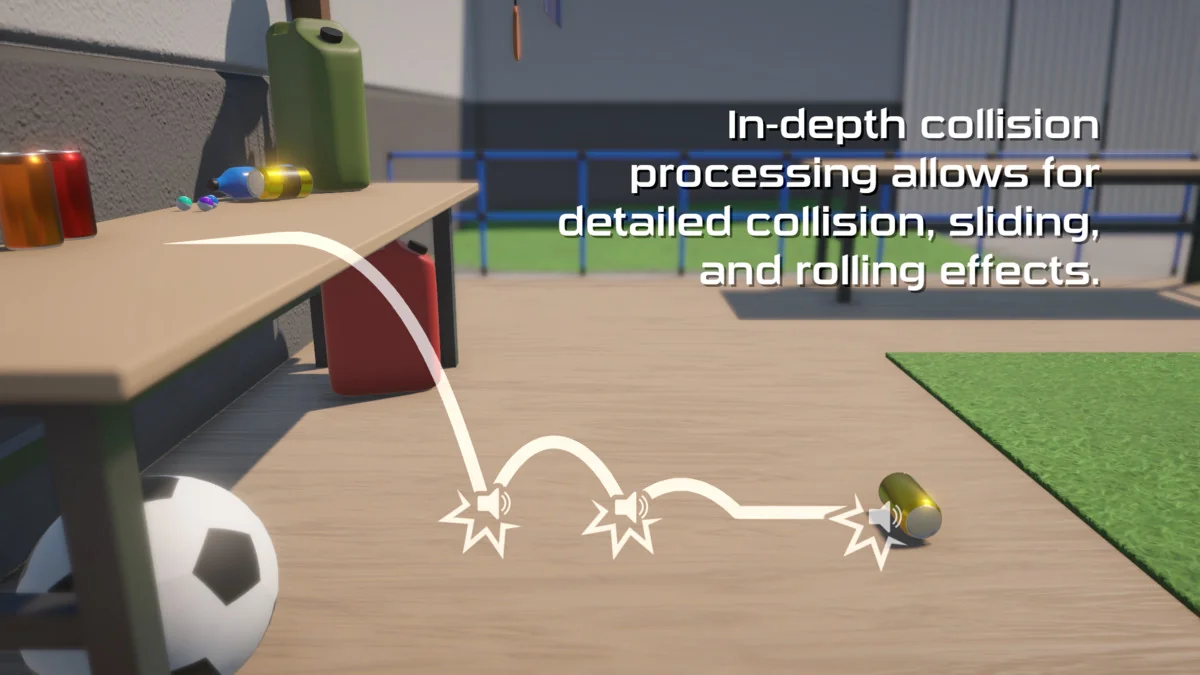
 Particles
 Particles
 Particles