"7e6fc58c410f2894"{"id":"23279","slug":"glamor-advanced-image-effects","title":"GLAMOR Advanced Image Effects","category":"Particles \u0026 Effects","engine":"Original Unity version: 2022.3.18","assetVersion":"Original Unity version: 2022.3.18","engineVersion":"Asset Version:1.6a","tag":"Particles","accent":"cyan","visual":"mech","summary":"GLAMOR brings layer-selective screen-space effects into URP and combines them with a large library of advanced image-enhancing effects. It is set up for LTS-focused Unity workflows, with clear boundaries around supported versions and platforms.","platform":"Unity","publishedAt":"2026-04-09T16:28:09.000Z","updatedAt":"2026-04-19T15:36:47.000Z","sourceNotes":[],"fileContents":[],"compatibility":["Unity","Original Unity version: 2022.3.18","Asset Version: 1.6a"],"featuredImage":{"alt":"GLAMOR Advanced Image Effects","src":"https://3dcghub.com/wp-content/uploads/2026/04/6bdac97b4739_f5b81fbd-7583-4862-b0b6-2fa082fb7636_1280x720_stretch.webp"},"hasDownloadLink":true,"downloads":0,"terms":[{"taxonomy":"category","slug":"particles-and-effects","name":"Particles \u0026 Effects"},{"taxonomy":"post_tag","slug":"game-systems","name":"Game Systems"},{"taxonomy":"post_tag","slug":"unity","name":"Unity"},{"taxonomy":"post_tag","slug":"vfx","name":"VFX"}],"galleryImages":[],"accessPanel":{"kind":"resource","title":"Access this resource","eyebrow":"Free Download","message":"Log in or create a free account to start your download.","fileName":"GLAMOR Advanced Image Effects v1.6a.7z","safetyNote":"All resources are 100% manually reviewed to eliminate all risks.","actionLabel":"Download Free","resourceType":"Resource archive"},"contentHtml":"\u003ch2\u003eLayer-selective screen-space effects in URP\u003c/h2\u003e\n\u003cp\u003eGLAMOR is an image effects framework for URP. Its core idea is straightforward: screen-space effects can be applied selectively by layer instead of being forced onto every part of the scene in the same way. That makes the framework useful when a project needs different image treatment for different layers inside one URP setup.\u003c/p\u003e\n\u003cp\u003eThe package also includes a large library of advanced and image-enhancing effects. It is the first version of the system, with more effects and enhancements planned as development continues, so it already sits in the part of the workflow where the final frame is shaped through post-style image treatment inside the rendering pipeline.\u003c/p\u003e \u003ch2\u003eWhere the layer control matters in a scene\u003c/h2\u003e\n\u003cp\u003eLayer selection is the feature that changes how the system behaves in practice. Instead of treating the whole view as a single surface, GLAMOR lets screen-space effects be tied to specific layers. In a real production workflow, that means a scene can keep different visual responses separated without needing a completely different effect setup for every variation.\u003c/p\u003e\n\u003cp\u003eThat approach fits projects that stay inside URP and want their image effects handled under one framework. Rather than splitting the visual treatment across unrelated tools, the system keeps the effect work in the same rendering path the project already uses. The result is a more direct way to manage how different layers receive image enhancement, while still staying within the URP pipeline.\u003c/p\u003e \u003ch2\u003eUnity version boundaries and supported targets\u003c/h2\u003e\n\u003cp\u003eVersion 2.0.0 for Unity 6 LTS is not compatible with the earlier Unity 6 v1.x versions or with Unity 2022.3. The previous version needs to be removed completely before installing 2.0.0, or the new version should be used in a new project instead.\u003c/p\u003e\n\u003cp\u003eThe system requires Unity 2022.3.18 and above with the URP renderer. It officially supports only LTS versions and has been tested in Unity 2022, Unity 2023, and Unity 6. It is compatible with Windows and Unity 2023.3 to Unity 6 URP, and it also supports the new URP Render Graph mode under a single framework.\u003c/p\u003e\n\u003cp\u003eThose boundaries matter for planning. GLAMOR is aimed at teams working in supported LTS builds rather than broad platform coverage, and non-LTS Unity versions are not officially supported. The system also does not officially support VR, Mobile, Mac, WebGL, OpenGL, or Consoles, and those platforms have not yet been tested here. That makes it a focused URP tool rather than a general-purpose image effects package for every target.\u003c/p\u003e \u003ch2\u003eOdin Inspector behavior and the BiRP variant\u003c/h2\u003e\n\u003cp\u003eThere is a specific Odin Inspector workaround for issues with Volume FX entries in the VFX renderer feature. Open Odin preference settings, go to editor types, uncheck the Script Types -\u003e Artngame folder, and update the editors. That stops the inspector elements in that folder from being replaced by Odin counterparts, which lets the GLAMOR system work normally.\u003c/p\u003e\n\u003cp\u003eA BiRP version is also available, but it uses a different approach. It does not use the layer-selective advanced method, and it is instead a large collection of image effects, many of which served as the base for the URP effects in GLAMOR. That makes the BiRP option a separate path rather than a direct match to the URP workflow.\u003c/p\u003e\n\u003cp\u003eFor projects already committed to URP and supported LTS versions, GLAMOR fits where layer-specific screen-space treatment and a broad effect library need to stay inside one rendering framework. It is a practical match for scenes that need selective control without stepping outside the supported Unity and URP boundaries.\u003c/p\u003e\n\n\u003ch2\u003eContinue Browsing Similar Packs\u003c/h2\u003e\n\u003cul\u003e\n\u003cli\u003e\u003ca href=\"https://3dcghub.com/opencv-for-unity/\" title=\"OpenCV for Unity\"\u003eOpenCV for Unity\u003c/a\u003e\u003c/li\u003e\n\u003cli\u003e\u003ca href=\"https://3dcghub.com/exporter-for-unreal-to-for-unity-2026/\" title=\"Exporter for Unreal to/for Unity 2026\"\u003eExporter for Unreal to/for Unity 2026\u003c/a\u003e\u003c/li\u003e\n\u003cli\u003e\u003ca href=\"https://3dcghub.com/dialogue-system-for-unity/\" title=\"Dialogue System for Unity\"\u003eDialogue System for Unity\u003c/a\u003e\u003c/li\u003e\n\u003cli\u003e\u003ca href=\"https://3dcghub.com/ambient-sounds-interactive-soundscapes-for-unity-6/\" title=\"Ambient Sounds – Interactive Soundscapes for Unity 6\"\u003eAmbient Sounds – Interactive Soundscapes for Unity 6\u003c/a\u003e\u003c/li\u003e\n\u003cli\u003e\u003ca href=\"https://3dcghub.com/pegasus-flythroughs-for-unity-6/\" title=\"Pegasus – Flythroughs for Unity 6\"\u003ePegasus – Flythroughs for Unity 6\u003c/a\u003e\u003c/li\u003e\n\u003c/ul\u003e","contentTextLength":3828,"navigation":{"current":3516,"total":3618,"previous":{"id":"23220","slug":"boing-kit-dynamic-bouncy-bones-grass-and-more","title":"Boing Kit: Dynamic Bouncy Bones, Grass, and More","category":"Particles \u0026 Effects","platform":"Unity","updatedAt":"2026-04-19T15:36:48.000Z"},"next":{"id":"23263","slug":"expanse-volumetric-skies-clouds-and-atmospheres-in-hdrp","title":"Expanse - Volumetric Skies, Clouds, and Atmospheres in HDRP","category":"Particles \u0026 Effects","platform":"Unity","updatedAt":"2026-04-19T15:36:47.000Z"}},"relatedResources":[{"id":"23289","slug":"impact-cfx-collision-effects-system","title":"Impact CFX - Collision Effects System","category":"Particles \u0026 Effects","engine":"Original Unity version: 2021.3.45","assetVersion":"Original Unity version: 2021.3.45","engineVersion":"Asset Version:1.5.4","tag":"Particles","accent":"cyan","visual":"animation","summary":"Impact CFX ties collision events to audio, particles, and decals in Unity scenes where surfaces, materials, and physics motion all matter. It also extends into footsteps and weapon impacts, while keeping performance in view with Jobs and Burst.","platform":"Unity","publishedAt":"2026-04-09T16:33:27.000Z","updatedAt":"2026-04-19T15:35:31.000Z","sourceNotes":[],"fileContents":[],"compatibility":["Unity","Original Unity version: 2021.3.45","Asset Version: 1.5.4"],"featuredImage":{"alt":"Impact CFX - Collision Effects System","src":"https://3dcghub.com/wp-content/uploads/2026/04/024561169d4f_0c48c6e2-5d14-424f-bfe6-037e5561b72f_1280x720_stretch.webp"},"hasDownloadLink":true,"downloads":0},{"id":"23237","slug":"crest-water-5-shallow-water","title":"Crest Water 5 - Shallow Water","category":"Particles \u0026 Effects","engine":"Original Unity version: 2022.3.62","assetVersion":"Original Unity version: 2022.3.62","engineVersion":"Asset Version:1.3.1","tag":"Particles","accent":"cyan","visual":"animation","summary":"Crest Water 5 - Shallow Water adds simulation-driven shallow water for shorelines and streams inside Crest 5. It gives artists a way to shape coastal edges, river channels, and other transition zones with static or camera-following shoreline behavior and an...","platform":"Unity","publishedAt":"2026-04-09T15:56:31.000Z","updatedAt":"2026-04-19T15:36:48.000Z","sourceNotes":[],"fileContents":[],"compatibility":["Unity","Original Unity version: 2022.3.62","Asset Version: 1.3.1"],"featuredImage":{"alt":"Crest Water 5 - Shallow Water","src":"https://3dcghub.com/wp-content/uploads/2026/04/d38076e02d44_6686ebed-098f-40ed-bea0-0be1704337bb_1280x720_stretch.webp"},"hasDownloadLink":true,"downloads":5},{"id":"23276","slug":"feel","title":"Feel","category":"Particles \u0026 Effects","engine":"5.2 - 6.1","assetVersion":"Original Unity version: 2019.4.3","engineVersion":"Asset Version:5.2 - 6.1","tag":"Particles","accent":"cyan","visual":"city","summary":"Feel gathers a large set of feedbacks and springs for moments that need motion, response, and extra punch. It reaches across camera work, UI, text, shaders, sounds, physics, and haptics through a single workflow.","platform":"Unity","publishedAt":"2026-04-09T16:28:21.000Z","updatedAt":"2026-10-09T05:54:10.435Z","sourceNotes":[],"fileContents":[],"compatibility":["Unity","Original Unity version: 2019.4.3","Asset Version:5.2 - 6.1"],"featuredImage":{"alt":"Feel","src":"https://3dcghub.com/wp-content/uploads/2026/04/7ebb1dbba7d2_173c8845-1063-44dc-aa55-65738aa93cce_1280x720_stretch.webp"},"hasDownloadLink":true,"downloads":16}]}
Particles
GLAMOR Advanced Image Effects
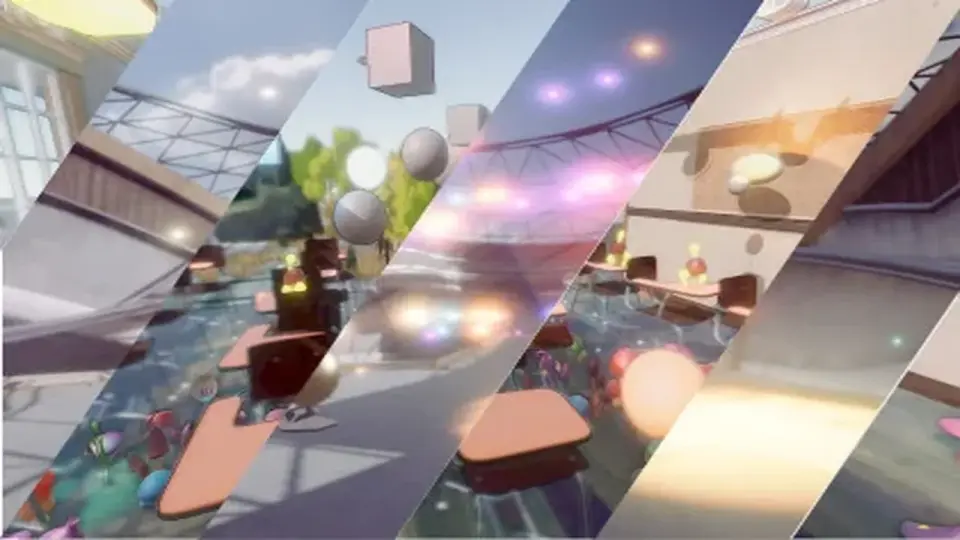
GLAMOR brings layer-selective screen-space effects into URP and combines them with a large library of advanced image-enhancing effects. It is set up for LTS-focused Unity workflows, with clear boundaries around supported versions and platforms.
GLAMOR is an image effects framework for URP. Its core idea is straightforward: screen-space effects can be applied selectively by layer instead of being forced onto every part of the scene in the same way. That makes the framework useful when a project needs different image treatment for different layers inside one URP setup.
The package also includes a large library of advanced and image-enhancing effects. It is the first version of the system, with more effects and enhancements planned as development continues, so it already sits in the part of the workflow where the final frame is shaped through post-style image treatment inside the rendering pipeline.
Where the layer control matters in a scene
Layer selection is the feature that changes how the system behaves in practice. Instead of treating the whole view as a single surface, GLAMOR lets screen-space effects be tied to specific layers. In a real production workflow, that means a scene can keep different visual responses separated without needing a completely different effect setup for every variation.
That approach fits projects that stay inside URP and want their image effects handled under one framework. Rather than splitting the visual treatment across unrelated tools, the system keeps the effect work in the same rendering path the project already uses. The result is a more direct way to manage how different layers receive image enhancement, while still staying within the URP pipeline.
Unity version boundaries and supported targets
Version 2.0.0 for Unity 6 LTS is not compatible with the earlier Unity 6 v1.x versions or with Unity 2022.3. The previous version needs to be removed completely before installing 2.0.0, or the new version should be used in a new project instead.
The system requires Unity 2022.3.18 and above with the URP renderer. It officially supports only LTS versions and has been tested in Unity 2022, Unity 2023, and Unity 6. It is compatible with Windows and Unity 2023.3 to Unity 6 URP, and it also supports the new URP Render Graph mode under a single framework.
Those boundaries matter for planning. GLAMOR is aimed at teams working in supported LTS builds rather than broad platform coverage, and non-LTS Unity versions are not officially supported. The system also does not officially support VR, Mobile, Mac, WebGL, OpenGL, or Consoles, and those platforms have not yet been tested here. That makes it a focused URP tool rather than a general-purpose image effects package for every target.
Odin Inspector behavior and the BiRP variant
There is a specific Odin Inspector workaround for issues with Volume FX entries in the VFX renderer feature. Open Odin preference settings, go to editor types, uncheck the Script Types -> Artngame folder, and update the editors. That stops the inspector elements in that folder from being replaced by Odin counterparts, which lets the GLAMOR system work normally.
A BiRP version is also available, but it uses a different approach. It does not use the layer-selective advanced method, and it is instead a large collection of image effects, many of which served as the base for the URP effects in GLAMOR. That makes the BiRP option a separate path rather than a direct match to the URP workflow.
For projects already committed to URP and supported LTS versions, GLAMOR fits where layer-specific screen-space treatment and a broad effect library need to stay inside one rendering framework. It is a practical match for scenes that need selective control without stepping outside the supported Unity and URP boundaries.
 Particles
 Particles
 Particles
 Particles