"6f9bd6df1f44a86f"{"id":"1001187","slug":"ies-light-profile-pack","title":"IES Light Profile Pack","category":"Shaders","engine":"5.0+","assetVersion":"","engineVersion":"Engine Version: 5.0+","tag":"Shaders","accent":"blue","visual":"mech","summary":"Implement realistic scene illumination using 50 custom IES light profiles and 18 light function materials in Unreal Engine arch viz and game projects.","platform":"Unreal Engine","indexPolicy":"index","publishedAt":"2026-09-17T06:39:20.061Z","updatedAt":"2026-09-17T06:39:20.061Z","sourceNotes":[],"fileContents":[],"compatibility":["Unreal Engine","Engine Version: 5.0+"],"featuredImage":{"alt":"IES Light Profile Pack","src":"/wp-content/uploads/published/2026/09/4b5f6d9fb219-b08be85f-915f-4436-a287-dc6aeca53074-074e4cae00.webp"},"hasDownloadLink":true,"downloads":0,"terms":[{"taxonomy":"category","slug":"shaders","name":"Shaders"}],"galleryImages":[{"src":"/wp-content/uploads/published/2026/09/32745aae471e-2629d2db-3c9f-4d48-8f3a-f6f98f3b6818-28cfb7fa7f.webp","alt":"IES Light Profile Pack"},{"src":"/wp-content/uploads/published/2026/09/e18120540b2b-8311f22e-3f9b-482e-b0c4-f688205f3405-d78a6dfc41.webp","alt":"IES Light Profile Pack"},{"src":"/wp-content/uploads/published/2026/09/3e5abe8803c6-70c38177-9db2-424e-bb9a-2b2f81f7a5c3-c104477e28.webp","alt":"IES Light Profile Pack"},{"src":"/wp-content/uploads/published/2026/09/ed8bfd1e7c9a-d8318dc3-4296-471f-a443-958ac0ae106f-412ee25864.webp","alt":"IES Light Profile Pack"},{"src":"/wp-content/uploads/published/2026/09/bde970eca08b-d925f188-a76a-43fc-8a68-533b24f43c6d-62391ac857.webp","alt":"IES Light Profile Pack"},{"src":"/wp-content/uploads/published/2026/09/9972b18d188c-9c2b7430-7bb1-4e24-8a8f-de52f370aecd-36668ff8c9.webp","alt":"IES Light Profile Pack"},{"src":"/wp-content/uploads/published/2026/09/4a606c39c621-4aa48870-975f-4b7c-b6d7-b6568ac4e285-301e83a7f0.webp","alt":"IES Light Profile Pack"}],"accessPanel":{"kind":"resource","title":"Download this resource","eyebrow":"Free Download","message":"Log in or create a free account to start your download.","fileName":"Content.7z","safetyNote":"Resources are manually reviewed before listing to improve quality and reduce obvious risks.","actionLabel":"Download Free","resourceType":"Resource archive"},"contentHtml":"\u003cp\u003eConfiguring realistic environmental illumination begins at the light actor level. Integrating photometric data into a scene shifts lighting from flat mathematical attenuation to nuanced, real-world light distribution. The implementation process within Unreal Engine relies on applying custom asset profiles directly to standard scene lights, pairing raw light actors with calibrated data. By assigning one of the profiles to an existing light source and enabling the designated checkbox for IES intensity, the engine automatically matches the light's output, spread, and decay to physically measured characteristics. This rapid implementation path delivers immediate depth without requiring manual adjustments to attenuation radiuses or custom falloff exponents.\u003c/p\u003e \u003ch2\u003eAssigning IES Profiles and Activating IES Intensity Checkboxes\u003c/h2\u003e\n\u003cp\u003ePlacing an IES profile into an active level requires only a few direct steps inside the light actor's details panel. Once an artist places a point light or spotlight in the scene, the light profile slot accepts the chosen asset. Checking the box to enable IES intensity is the critical calibration step in this process. When this setting is activated, the engine overrides standard linear intensity calculations in favor of the multiplier embedded directly within the profile itself.\u003c/p\u003e \u003cp\u003eThis simple toggle ensures that the subtle differences between narrow spotlights, wide architectural floods, and recessed ceiling fixtures remain physically coherent across an entire interior or exterior space. Artists working across complex sets can place these assets on multiple fixtures in minutes, relying on the stored photometric shapes to define how light feathers against walls, corners, and floor planes.\u003c/p\u003e \u003ch2\u003ePhotometric Distribution with the 50 IES Profiles\u003c/h2\u003e\n\u003cp\u003eThe collection provides 50 individual IES light profiles, each configured to simulate distinct real-world lighting scenarios. Standard digital light sources emit uniform conical or spherical illumination by default, creating synthetic, overly perfect edges where light strikes flat geometry. Real illumination fixtures do not behave this way; manufacturing variations in glass lenses, bulb filaments, reflectors, and fixture enclosures create asymmetrical patterns, distinct hot spots, and soft feathered edges.\u003c/p\u003e \u003cp\u003eWithin this set of 50 profiles, developers find solutions for varied lighting placements across indoor and outdoor spaces. Narrow, focused profiles deliver tight task lighting, downlight cones, and display illumination, throwing defined geometric shapes across nearby surfaces. Broader profiles replicate wide area diffusion, ceiling-mounted panels, wall-washers, and street illumination. Because these shapes are derived from specific lighting situations, swapping profiles allows rapid visual exploration when dialling in the balance between hard ambient edges and subtle secondary bounces.\u003c/p\u003e \u003ch2\u003eProjecting Patterns with 18 Light Function Materials\u003c/h2\u003e\n\u003cp\u003eBeyond static photometric profiles, the package introduces 18 light function materials that alter how illumination cuts through a scene. Light functions in Unreal Engine act as directional projection materials, casting textures, masks, and animated effects across surfaces intersected by a light beam. These 18 materials provide immediate environmental storytelling and technical framing across both high-fidelity interiors and stylized game spaces.\u003c/p\u003e \u003cp\u003eThe included light function materials simulate specific real-world and mechanical situations:\u003c/p\u003e\n\u003cul\u003e \u003cli\u003eWindow projections: Simulate sunlight filtering through structural frames, multi-pane glass, and mullions, casting distinct architectural patterns onto floors and furniture without requiring extra geometry to block the light path.\u003c/li\u003e \u003cli\u003eSearch lights: Recreate intense, focused conical projections with distinct aperture framing, ideal for exterior compounds, watchtowers, prison yards, or industrial facilities.\u003c/li\u003e \u003cli\u003eLaser grids: Cast sharp geometric security arrays and protective trip-grids across surfaces, establishing immediate visual boundaries and security zones inside gameplay spaces.\u003c/li\u003e\n\u003c/ul\u003e \u003cp\u003eApplying these light function materials to spotlights or directional lights introduces surface variety without increasing geometric complexity. The projected patterns break up flat surfaces, enrich shadow boundaries, and ground the lighting source in a physical, tangible apparatus.\u003c/p\u003e \u003ch2\u003eCalibrating Architectural Visualization and Game Levels\u003c/h2\u003e\n\u003cp\u003eThe balance of assets inside this pack serves two distinct production workflows: high-accuracy architectural visualization rendering and interactive game level design. In architectural visualization scenes, subtlety is paramount. Walls, crown moldings, and countertops reveal tiny imperfections under angled light, making the precise gradient drop-offs of the 50 IES profiles essential for believable realism. Downlights cast realistic scallops across drywall, while accent fixtures direct focused attention onto focal points without blowing out exposure values.\u003c/p\u003e \u003cp\u003eGame levels demand dynamic visual clarity alongside mood. The 18 function materials provide direct gameplay utility in these environments. Search lights can sweep dynamic patrol paths to establish stealth fail states, while laser grid materials project unmistakable hazard zones across access corridors. Meanwhile, the realistic IES profiles ensure that mundane game level props—such as emergency lights, desk lamps, industrial floodlights, and hallway fixtures—read with the same visual authenticity as cinematic offline renders.\u003c/p\u003e \u003ch2\u003ePipeline Integration and VFX Series Pack 1 Compatibility\u003c/h2\u003e\n\u003cp\u003eOriginating as Unreal Engine Sponsored Content for June 2019 and maintained within the permanent collection, these assets fit into standard production pipelines without cumbersome prerequisites. The pack maintains verified compatibility with VFX Series Pack 1, allowing artists to blend photometric illumination alongside existing visual effects set-ups.\u003c/p\u003e \u003cp\u003eConstruct Games, the developer behind this lighting package, also maintains a broader ecosystem of technical assets, including holographic materials, selection highlights, combat mecha, and game-ready modular turrets. Because the lighting package relies on native Unreal Engine lighting properties—IES slots, light intensity toggles, and standard light function inputs—it slots directly into projects alongside both modular props and complex visual materials. Placing the assets directly onto existing lights provides immediate atmospheric polish, giving developers a robust set of 68 lighting tools to shape realistic, high-impact environments.\u003c/p\u003e\n\n\u003ch2\u003eContinue Browsing Similar Packs\u003c/h2\u003e\n\u003cul\u003e\n\u003cli\u003e\u003ca href=\"https://3dcghub.com/lens-and-film-post-process/\" rel=\"noopener noreferrer\"\u003eLens and Film Post Process\u003c/a\u003e\u003c/li\u003e\n\u003cli\u003e\u003ca href=\"https://3dcghub.com/advanced-glass-material-pack/\" rel=\"noopener noreferrer\"\u003eAdvanced Glass Material Pack\u003c/a\u003e\u003c/li\u003e\n\u003cli\u003e\u003ca href=\"https://3dcghub.com/colorama/\" rel=\"noopener noreferrer\"\u003eColorama\u003c/a\u003e\u003c/li\u003e\n\u003cli\u003e\u003ca href=\"https://3dcghub.com/stylized-volumetric-clouds-shader/\" rel=\"noopener noreferrer\"\u003eStylized Volumetric Clouds Shader\u003c/a\u003e\u003c/li\u003e\n\u003cli\u003e\u003ca href=\"https://3dcghub.com/liquid-materials-vfx-pack/\" rel=\"noopener noreferrer\"\u003eLIQUID MATERIALS : VFX Pack\u003c/a\u003e\u003c/li\u003e\n\u003c/ul\u003e","contentTextLength":6710,"navigation":{"current":1159,"total":4218,"previous":{"id":"1001188","slug":"blink-and-dash-vfx","title":"Blink and Dash VFX","category":"Spells \u0026 Combat","platform":"Unreal Engine","updatedAt":"2026-09-17T06:42:29.643Z"},"next":{"id":"1001186","slug":"colorama","title":"Colorama","category":"Shaders","platform":"Unreal Engine","updatedAt":"2026-09-17T06:37:24.617Z"}},"relatedResources":[{"id":"1001000","slug":"lens-and-film-post-process","title":"Lens and Film Post Process","category":"Shaders","engine":"5.1+","assetVersion":"","engineVersion":"Engine Version: 5.1+","tag":"Shaders","accent":"blue","visual":"mech","summary":"Customizable post-processing effect for blur, lens distortion, chromatic aberration, film grain, light leaks, and more. Includes disk blur types and cinematic r","platform":"Unreal Engine","indexPolicy":"index","publishedAt":"2026-08-20T09:55:15.932Z","updatedAt":"2026-08-20T09:55:15.932Z","sourceNotes":[],"fileContents":[],"compatibility":["Unreal Engine","Engine Version: 5.1+"],"featuredImage":{"alt":"Lens and Film Post Process","src":"/wp-content/uploads/published/2026/08/9f516287e615-b76a2f41-7419-402c-9096-7d1b7d173679-78137b7b8c.webp"},"hasDownloadLink":true,"downloads":0},{"id":"1001590","slug":"art-of-shader-advanced-distortion","title":"Art of Shader - Advanced Distortion","category":"Shaders","engine":"5.1+","assetVersion":"","engineVersion":"Engine Version: 5.1+","tag":"Shaders","accent":"blue","visual":"mech","summary":"Configure, blend, and localize custom post process distortion shaders in Unreal Engine with fine-tuned noise, color, and strength controls.","platform":"Unreal Engine","indexPolicy":"index","publishedAt":"2026-10-10T16:10:36.328Z","updatedAt":"2026-10-10T16:10:36.328Z","sourceNotes":[],"fileContents":[],"compatibility":["Unreal Engine","Engine Version: 5.1+"],"featuredImage":{"alt":"Art of Shader - Advanced Distortion","src":"/wp-content/uploads/published/2026/10/f700cb0f25b0-7516c7c7-267a-4e8d-a0f1-b65c294c9161-4a2581dc6e.webp"},"hasDownloadLink":true,"downloads":0},{"id":"1001185","slug":"advanced-glass-material-pack","title":"Advanced Glass Material Pack","category":"Shaders","engine":"5.0+","assetVersion":"","engineVersion":"Engine Version: 5.0+","tag":"Shaders","accent":"blue","visual":"luts","summary":"Examine the Advanced Glass Material Pack, featuring 5 glass types, over 35 material instances, vertex painting support, and 42 mask and normal textures.","platform":"Unreal Engine","indexPolicy":"index","publishedAt":"2026-09-17T06:34:49.942Z","updatedAt":"2026-09-17T06:34:49.942Z","sourceNotes":[],"fileContents":[],"compatibility":["Unreal Engine","Engine Version: 5.0+"],"featuredImage":{"alt":"Advanced Glass Material Pack","src":"/wp-content/uploads/published/2026/09/d991116315e2-090806c4-3f39-426d-8dfc-75300ddf461e-649af1b75b.webp"},"hasDownloadLink":true,"downloads":2}]}
Shaders
IES Light Profile Pack
Implement realistic scene illumination using 50 custom IES light profiles and 18 light function materials in Unreal Engine arch viz and game projects.
Configuring realistic environmental illumination begins at the light actor level. Integrating photometric data into a scene shifts lighting from flat mathematical attenuation to nuanced, real-world light distribution. The implementation process within Unreal Engine relies on applying custom asset profiles directly to standard scene lights, pairing raw light actors with calibrated data. By assigning one of the profiles to an existing light source and enabling the designated checkbox for IES intensity, the engine automatically matches the light's output, spread, and decay to physically measured characteristics. This rapid implementation path delivers immediate depth without requiring manual adjustments to attenuation radiuses or custom falloff exponents.
Assigning IES Profiles and Activating IES Intensity Checkboxes
Placing an IES profile into an active level requires only a few direct steps inside the light actor's details panel. Once an artist places a point light or spotlight in the scene, the light profile slot accepts the chosen asset. Checking the box to enable IES intensity is the critical calibration step in this process. When this setting is activated, the engine overrides standard linear intensity calculations in favor of the multiplier embedded directly within the profile itself.
This simple toggle ensures that the subtle differences between narrow spotlights, wide architectural floods, and recessed ceiling fixtures remain physically coherent across an entire interior or exterior space. Artists working across complex sets can place these assets on multiple fixtures in minutes, relying on the stored photometric shapes to define how light feathers against walls, corners, and floor planes.
Photometric Distribution with the 50 IES Profiles
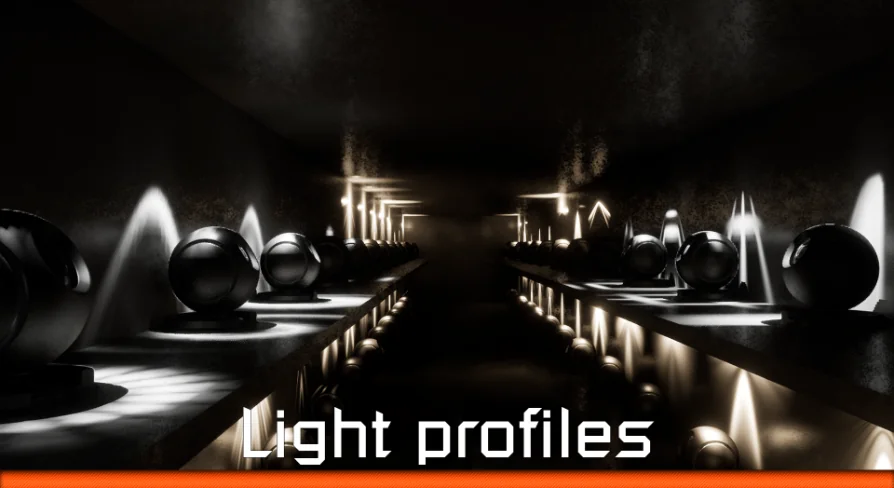
The collection provides 50 individual IES light profiles, each configured to simulate distinct real-world lighting scenarios. Standard digital light sources emit uniform conical or spherical illumination by default, creating synthetic, overly perfect edges where light strikes flat geometry. Real illumination fixtures do not behave this way; manufacturing variations in glass lenses, bulb filaments, reflectors, and fixture enclosures create asymmetrical patterns, distinct hot spots, and soft feathered edges.
Within this set of 50 profiles, developers find solutions for varied lighting placements across indoor and outdoor spaces. Narrow, focused profiles deliver tight task lighting, downlight cones, and display illumination, throwing defined geometric shapes across nearby surfaces. Broader profiles replicate wide area diffusion, ceiling-mounted panels, wall-washers, and street illumination. Because these shapes are derived from specific lighting situations, swapping profiles allows rapid visual exploration when dialling in the balance between hard ambient edges and subtle secondary bounces.
Projecting Patterns with 18 Light Function Materials
Beyond static photometric profiles, the package introduces 18 light function materials that alter how illumination cuts through a scene. Light functions in Unreal Engine act as directional projection materials, casting textures, masks, and animated effects across surfaces intersected by a light beam. These 18 materials provide immediate environmental storytelling and technical framing across both high-fidelity interiors and stylized game spaces.
The included light function materials simulate specific real-world and mechanical situations:
Window projections: Simulate sunlight filtering through structural frames, multi-pane glass, and mullions, casting distinct architectural patterns onto floors and furniture without requiring extra geometry to block the light path.
Search lights: Recreate intense, focused conical projections with distinct aperture framing, ideal for exterior compounds, watchtowers, prison yards, or industrial facilities.
Laser grids: Cast sharp geometric security arrays and protective trip-grids across surfaces, establishing immediate visual boundaries and security zones inside gameplay spaces.
Applying these light function materials to spotlights or directional lights introduces surface variety without increasing geometric complexity. The projected patterns break up flat surfaces, enrich shadow boundaries, and ground the lighting source in a physical, tangible apparatus.
Calibrating Architectural Visualization and Game Levels
The balance of assets inside this pack serves two distinct production workflows: high-accuracy architectural visualization rendering and interactive game level design. In architectural visualization scenes, subtlety is paramount. Walls, crown moldings, and countertops reveal tiny imperfections under angled light, making the precise gradient drop-offs of the 50 IES profiles essential for believable realism. Downlights cast realistic scallops across drywall, while accent fixtures direct focused attention onto focal points without blowing out exposure values.
Game levels demand dynamic visual clarity alongside mood. The 18 function materials provide direct gameplay utility in these environments. Search lights can sweep dynamic patrol paths to establish stealth fail states, while laser grid materials project unmistakable hazard zones across access corridors. Meanwhile, the realistic IES profiles ensure that mundane game level props—such as emergency lights, desk lamps, industrial floodlights, and hallway fixtures—read with the same visual authenticity as cinematic offline renders.
Pipeline Integration and VFX Series Pack 1 Compatibility
Originating as Unreal Engine Sponsored Content for June 2019 and maintained within the permanent collection, these assets fit into standard production pipelines without cumbersome prerequisites. The pack maintains verified compatibility with VFX Series Pack 1, allowing artists to blend photometric illumination alongside existing visual effects set-ups.
Construct Games, the developer behind this lighting package, also maintains a broader ecosystem of technical assets, including holographic materials, selection highlights, combat mecha, and game-ready modular turrets. Because the lighting package relies on native Unreal Engine lighting properties—IES slots, light intensity toggles, and standard light function inputs—it slots directly into projects alongside both modular props and complex visual materials. Placing the assets directly onto existing lights provides immediate atmospheric polish, giving developers a robust set of 68 lighting tools to shape realistic, high-impact environments.
 Shaders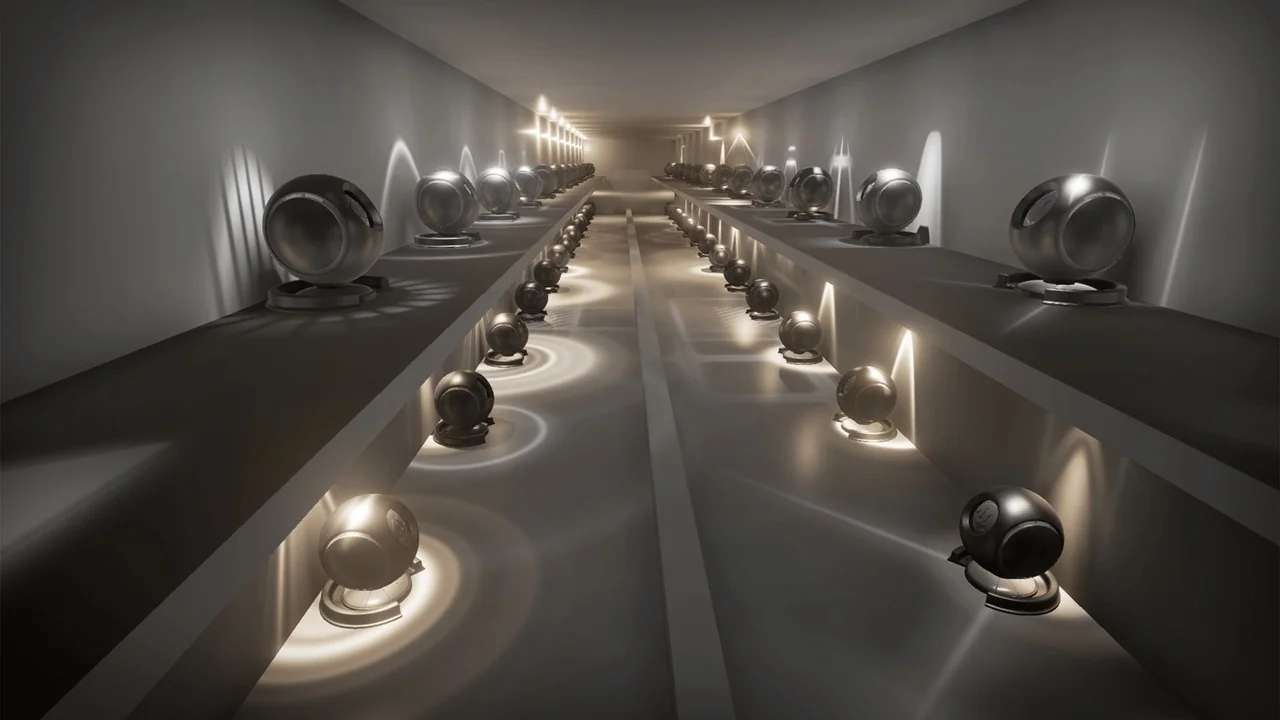
 Shaders
 Shaders
 Shaders