"6f9bd6df1f44a86f"{"id":"1001186","slug":"colorama","title":"Colorama","category":"Shaders","engine":"5.3+","assetVersion":"","engineVersion":"Engine Version: 5.3+","tag":"Shaders","accent":"blue","visual":"mech","summary":"Explore Colorama, a professional LUT pack delivering authentic teal-orange cinematic looks, preserved skin tones, rich skies, and multi-exposure options.","platform":"Unreal Engine","indexPolicy":"index","publishedAt":"2026-09-17T06:37:24.617Z","updatedAt":"2026-09-17T06:37:24.617Z","sourceNotes":[],"fileContents":[],"compatibility":["Unreal Engine","Engine Version: 5.3+"],"featuredImage":{"alt":"Colorama","src":"/wp-content/uploads/published/2026/09/a891cd318caf-558bb234-d23a-485e-bec7-4bed4cc4f77e-29923cf11d.webp"},"hasDownloadLink":true,"downloads":0,"terms":[{"taxonomy":"category","slug":"shaders","name":"Shaders"}],"galleryImages":[{"src":"/wp-content/uploads/published/2026/09/b4cf72742c40-fbd25fa1-eb3e-4bc5-bd92-8bd87242d052-10951c383d.webp","alt":"Colorama"},{"src":"/wp-content/uploads/published/2026/09/fb600b8931aa-de91ece2-22a9-4392-8ed3-55de8f1d5fb7-b4ae8a8bdf.webp","alt":"Colorama"},{"src":"/wp-content/uploads/published/2026/09/febc3721822d-dfdd6820-fb3e-4255-a9ef-f828ef506a95-92c3dd26a6.webp","alt":"Colorama"},{"src":"/wp-content/uploads/published/2026/09/b1e37c94578c-821c8e5a-35c2-4d08-aed0-fda0a091cc90-9a7db6dd1e.webp","alt":"Colorama"},{"src":"/wp-content/uploads/published/2026/09/37bd1ef4d190-22696dea-9c7e-4b57-be01-f8da67fd61a7-f7a5cf6134.webp","alt":"Colorama"},{"src":"/wp-content/uploads/published/2026/09/2113d867279b-20b77bc4-07c8-4d51-92f4-d159ba4a3454-51fa20b548.webp","alt":"Colorama"},{"src":"/wp-content/uploads/published/2026/09/3fd5cdfa8715-f3b91a9e-87dd-4df9-a8c0-0a914ec5d588-4be60f9c33.webp","alt":"Colorama"},{"src":"/wp-content/uploads/published/2026/09/734c71a704ba-76177add-4fcd-48cd-b177-122c30eb50e1-9346f804d0.webp","alt":"Colorama"},{"src":"/wp-content/uploads/published/2026/09/d2cf9c7106f5-ff78648a-5b31-440e-9662-bf659cafc449-81ed9072ce.webp","alt":"Colorama"}],"accessPanel":{"kind":"resource","title":"Download this resource","eyebrow":"Free Download","message":"Log in or create a free account to start your download.","fileName":"Content.7z","safetyNote":"Resources are manually reviewed before listing to improve quality and reduce obvious risks.","actionLabel":"Download Free","resourceType":"Resource archive"},"contentHtml":"\u003ch2\u003eCalibrating Scenes for an Authentic Cinematic Look\u003c/h2\u003e\n\u003cp\u003eEstablishing a compelling visual atmosphere requires deliberate control over contrast, tone distribution, and chromatic balance. In stylized digital rendering and cinematographic workflows, applying color grading directly alters how a viewer perceives scale, temperature, and dramatic weight. Colorama operates within this phase of visual treatment as a collection of professional LUTs created to produce authentic cinematic looks across a variety of environment setups and lighting scenarios.\u003c/p\u003e\n\u003cp\u003eColor grading packages often face a distinct set of challenges when applied across unevenly lit sequences. High-contrast frames run the risk of losing midtone subtleties, while heavily stylized profiles can corrupt carefully balanced elements. Colorama targets these issues by focusing on color separation and stable color management, ensuring that stylistic treatments enhance mood without destroying the fidelity of critical visual anchors.\u003c/p\u003e \u003ch2\u003eProtecting Skin Tones and Rich Skies in Teal-Orange Grading\u003c/h2\u003e\n\u003cp\u003eThe teal-orange look remains one of the most recognizable grading styles in modern cinematic production. By leveraging complementary colors, warm highlights and cool shadows create perceptual depth that makes subjects stand out naturally against their backgrounds. Achieving this aesthetic through automated look-up tables frequently introduces undesirable artifacts. Excessive cyan shifts often corrupt the upper atmosphere, causing blue skies to skew green, turn dull, or band abruptly. Simultaneously, warm compensation frequently oversaturates human subjects, turning natural skin tones leathery, neon, or inconsistently patchy.\u003c/p\u003e\n\u003cp\u003eColorama tackles this exact friction point. The collection delivers an authentic teal-orange grade engineered specifically to avoid compromising skin tones and rich skies. By isolating and preserving the critical spectral bands where human complexions register, the treatment maintains realistic warmth, softness, and natural flesh-tone gradation. Environmental skylines retain their rich gradients and clean blues rather than suffering from over-aggressive color replacement. This preservation allows productions featuring human subjects in broad daylight, sunset exteriors, or outdoor atmospheric environments to apply stylized grading without the need for manual rotoscoping or complex secondary isolation passes.\u003c/p\u003e \u003ch2\u003eManaging Dynamic Scenes with Exposure Offsets (-1, 0, and +1)\u003c/h2\u003e\n\u003cp\u003eA frequent complication when deploying look-up tables in varied render passes or live-action footage is exposure sensitivity. A LUT tuned exclusively for a perfectly exposed middle-gray target can blow out delicate highlights in overexposed takes, or crush nuanced darks into muddy black clipping on underexposed scenes. Rather than locking artists into a single rigid response curve, every file within Colorama comes packaged in three distinct exposures:\u003c/p\u003e\n\u003cul\u003e \u003cli\u003e\u003cstrong\u003e-1 Exposure:\u003c/strong\u003e Pulls down highlight intensities and retains detail in brighter scenes, preserving dynamic range in skies, practical light fixtures, and hot surfaces.\u003c/li\u003e \u003cli\u003e\u003cstrong\u003e0 Baseline Exposure:\u003c/strong\u003e Serves as the standard neutral response curve, balanced for correctly calibrated master scenes and controlled studio or key lighting.\u003c/li\u003e \u003cli\u003e\u003cstrong\u003e+1 Exposure:\u003c/strong\u003e Lifts midtones and extracts visibility from shadow regions, giving underexposed footage or moody, low-key lighting setups sufficient lift without washing out saturation.\u003c/li\u003e\n\u003c/ul\u003e\n\u003cp\u003eHaving dedicated exposure variations for each color file streamlines the visual matching process across changing camera setups, camera cuts, and disparate lighting conditions. If an intense outdoor sequence features harsh direct sunlight alongside backlit characters, swapping between the baseline, minus-one, and plus-one versions lets creators align the overall grade without having to stack destructive pre-LUT exposure gains that might induce banding or highlight shearing.\u003c/p\u003e \u003ch2\u003eNavigating Warm, Cool, and Neutral Visual Moods\u003c/h2\u003e\n\u003cp\u003eNot every sequence calls for the same emotional tone. A sterile laboratory scene requires vastly different chromatic cues than a desert sunset, an arid wasteland, or an intimate interior dialogue sequence. Colorama contains a broad assortment of LUTs capable of generating warm, cool, or neutral moods, enabling precise tonal alignment across contrasting narrative beats.\u003c/p\u003e\n\u003cp\u003eWarm color profiles emphasize amber, golden, and crimson undertones. These options are particularly suited for nostalgic sequences, golden-hour exteriors, cozy residential interiors, and arid landscapes where heat and intimate comfort dominate the storytelling. Cool grades, in contrast, emphasize slate, navy, cyan, and muted steel tones, making them natural fits for nocturnal scenes, winter environments, technological settings, and suspense-driven sequences where emotional detachment or physical tension is paramount.\u003c/p\u003e\n\u003cp\u003eThe neutral selections provide balanced, true-to-source clarity. Instead of forcing heavy chromatic bias onto the image, neutral profiles regularize tonal distribution, clean up muddy shadow transitions, and polish contrast curves. This gives creators a pristine, refined base that feels cinematic yet completely grounded in realistic observation. Having all three mood categories available in a unified collection enables smooth transitions between different project locations and emotional arcs while retaining consistent post-processing standards.\u003c/p\u003e \u003ch2\u003eIntegrating Colorama Across Post-Processing Pipelines\u003c/h2\u003e\n\u003cp\u003eThe styling provided by Colorama is targeted at colorists, virtual production artists, cinematographers, and 3D environment developers who require swift, predictable color grading. Because the package addresses stylized grading, cinematic look development, color balance, and environmental atmosphere simultaneously, it serves as a central post-processing tool during final render assembly and visual polish.\u003c/p\u003e\n\u003cp\u003eVisual artists working under tight deadlines frequently struggle with balancing custom grading against delivery schedules. Spending hours manually calibrating curves and balancing vector scopes to prevent skin tone corruption or sky degradation can disrupt production flow. Colorama solves this problem by providing pre-balanced, high-grade color tables that safeguard complex hues out of the box. Teams needing an evocative, stylized aesthetic without the secondary cleanup headaches can rely on the broad assortment of profiles and three-way exposure brackets to finalize their look efficiently.\u003c/p\u003e\n\n\u003ch2\u003eExplore Similar Assets\u003c/h2\u003e\n\u003cul\u003e\n\u003cli\u003e\u003ca href=\"https://3dcghub.com/stylized-volumetric-clouds-shader/\" rel=\"noopener noreferrer\"\u003eStylized Volumetric Clouds Shader\u003c/a\u003e\u003c/li\u003e\n\u003cli\u003e\u003ca href=\"https://3dcghub.com/post-process-pro-pack/\" rel=\"noopener noreferrer\"\u003ePost Process Pro Pack\u003c/a\u003e\u003c/li\u003e\n\u003cli\u003e\u003ca href=\"https://3dcghub.com/fluid-portal-vfx-pack/\" rel=\"noopener noreferrer\"\u003eFluid Portal VFX Pack\u003c/a\u003e\u003c/li\u003e\n\u003cli\u003e\u003ca href=\"https://3dcghub.com/lens-and-film-post-process/\" rel=\"noopener noreferrer\"\u003eLens and Film Post Process\u003c/a\u003e\u003c/li\u003e\n\u003cli\u003e\u003ca href=\"https://3dcghub.com/advanced-glass-material-pack/\" rel=\"noopener noreferrer\"\u003eAdvanced Glass Material Pack\u003c/a\u003e\u003c/li\u003e\n\u003c/ul\u003e","contentTextLength":6607,"navigation":{"current":1160,"total":4218,"previous":{"id":"1001187","slug":"ies-light-profile-pack","title":"IES Light Profile Pack","category":"Shaders","platform":"Unreal Engine","updatedAt":"2026-09-17T06:39:20.061Z"},"next":{"id":"1001185","slug":"advanced-glass-material-pack","title":"Advanced Glass Material Pack","category":"Shaders","platform":"Unreal Engine","updatedAt":"2026-09-17T06:34:49.942Z"}},"relatedResources":[{"id":"1000894","slug":"stylized-volumetric-clouds-shader","title":"Stylized Volumetric Clouds Shader","category":"Shaders","engine":"5.0+","assetVersion":"","engineVersion":"Engine Version: 5.0+","tag":"Shaders","accent":"blue","visual":"mech","summary":"A stylized volumetric cloud shader with dynamic controls for color, density, movement, and lighting, built for games, cinematics, and immersive scenes.","platform":"Unreal Engine","indexPolicy":"index","publishedAt":"2026-08-06T04:43:20.840Z","updatedAt":"2026-08-06T04:43:20.840Z","sourceNotes":[],"fileContents":[],"compatibility":["Unreal Engine","Engine Version: 5.0+"],"featuredImage":{"alt":"Stylized Volumetric Clouds Shader","src":"/wp-content/uploads/published/2026/08/71d33757280e-2287f8a8-713f-42a2-951b-9f5332b68bb4-ac24eb472e.webp"},"hasDownloadLink":true,"downloads":0},{"id":"15922","slug":"post-process-pro-pack","title":"Post Process Pro Pack","category":"Shaders","engine":"5.2+","assetVersion":"Engine version: 5.2+","engineVersion":"4.25","tag":"Shaders","accent":"blue","visual":"animation","summary":"Enhance your project's visuals with the Post Process Pro Pack. This collection features customizable master materials, 34 LUT files, and a bonus stylized water material.","platform":"Unreal Engine","indexPolicy":"index","publishedAt":"2026-03-12T13:29:14.000Z","updatedAt":"2026-04-19T15:44:39.000Z","sourceNotes":[],"fileContents":[],"compatibility":["Unreal Engine","Engine version: 5.2+"],"featuredImage":{"alt":"Post Process Pro Pack","src":"https://3dcghub.com/wp-content/uploads/2026/03/5547d228-7286-422e-8e00-494312ae8338.webp"},"hasDownloadLink":true,"downloads":2},{"id":"1000603","slug":"fluid-portal-vfx-pack","title":"Fluid Portal VFX Pack","category":"Shaders","engine":"5.3+","assetVersion":"","engineVersion":"Engine Version: 5.3+","tag":"Shaders","accent":"blue","visual":"mech","summary":"Interactive Fluid Portal VFX Pack with 14+ Niagara Fluids effects, customizable portal sets, materials, 4K textures, and a playable Win64 demo.","platform":"Unreal Engine","indexPolicy":"index","publishedAt":"2026-07-20T16:20:21.021Z","updatedAt":"2026-07-20T16:20:21.021Z","sourceNotes":[],"fileContents":[],"compatibility":["Unreal Engine","Engine Version: 5.3+"],"featuredImage":{"alt":"Fluid Portal VFX Pack","src":"/wp-content/uploads/published/2026/07/b656f5664f46-54ebd946-c6e0-452f-8bf1-e4b5f0c89b7b-2145f679bc.webp"},"hasDownloadLink":true,"downloads":1}]}
Shaders
Colorama
Explore Colorama, a professional LUT pack delivering authentic teal-orange cinematic looks, preserved skin tones, rich skies, and multi-exposure options.
Calibrating Scenes for an Authentic Cinematic Look
Establishing a compelling visual atmosphere requires deliberate control over contrast, tone distribution, and chromatic balance. In stylized digital rendering and cinematographic workflows, applying color grading directly alters how a viewer perceives scale, temperature, and dramatic weight. Colorama operates within this phase of visual treatment as a collection of professional LUTs created to produce authentic cinematic looks across a variety of environment setups and lighting scenarios.
Color grading packages often face a distinct set of challenges when applied across unevenly lit sequences. High-contrast frames run the risk of losing midtone subtleties, while heavily stylized profiles can corrupt carefully balanced elements. Colorama targets these issues by focusing on color separation and stable color management, ensuring that stylistic treatments enhance mood without destroying the fidelity of critical visual anchors.
Protecting Skin Tones and Rich Skies in Teal-Orange Grading
The teal-orange look remains one of the most recognizable grading styles in modern cinematic production. By leveraging complementary colors, warm highlights and cool shadows create perceptual depth that makes subjects stand out naturally against their backgrounds. Achieving this aesthetic through automated look-up tables frequently introduces undesirable artifacts. Excessive cyan shifts often corrupt the upper atmosphere, causing blue skies to skew green, turn dull, or band abruptly. Simultaneously, warm compensation frequently oversaturates human subjects, turning natural skin tones leathery, neon, or inconsistently patchy.
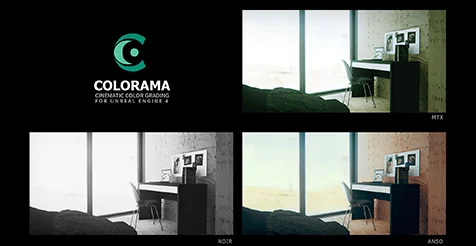
Colorama tackles this exact friction point. The collection delivers an authentic teal-orange grade engineered specifically to avoid compromising skin tones and rich skies. By isolating and preserving the critical spectral bands where human complexions register, the treatment maintains realistic warmth, softness, and natural flesh-tone gradation. Environmental skylines retain their rich gradients and clean blues rather than suffering from over-aggressive color replacement. This preservation allows productions featuring human subjects in broad daylight, sunset exteriors, or outdoor atmospheric environments to apply stylized grading without the need for manual rotoscoping or complex secondary isolation passes.
Managing Dynamic Scenes with Exposure Offsets (-1, 0, and +1)
A frequent complication when deploying look-up tables in varied render passes or live-action footage is exposure sensitivity. A LUT tuned exclusively for a perfectly exposed middle-gray target can blow out delicate highlights in overexposed takes, or crush nuanced darks into muddy black clipping on underexposed scenes. Rather than locking artists into a single rigid response curve, every file within Colorama comes packaged in three distinct exposures:
-1 Exposure: Pulls down highlight intensities and retains detail in brighter scenes, preserving dynamic range in skies, practical light fixtures, and hot surfaces.
0 Baseline Exposure: Serves as the standard neutral response curve, balanced for correctly calibrated master scenes and controlled studio or key lighting.
+1 Exposure: Lifts midtones and extracts visibility from shadow regions, giving underexposed footage or moody, low-key lighting setups sufficient lift without washing out saturation.
Having dedicated exposure variations for each color file streamlines the visual matching process across changing camera setups, camera cuts, and disparate lighting conditions. If an intense outdoor sequence features harsh direct sunlight alongside backlit characters, swapping between the baseline, minus-one, and plus-one versions lets creators align the overall grade without having to stack destructive pre-LUT exposure gains that might induce banding or highlight shearing.
Navigating Warm, Cool, and Neutral Visual Moods
Not every sequence calls for the same emotional tone. A sterile laboratory scene requires vastly different chromatic cues than a desert sunset, an arid wasteland, or an intimate interior dialogue sequence. Colorama contains a broad assortment of LUTs capable of generating warm, cool, or neutral moods, enabling precise tonal alignment across contrasting narrative beats.
Warm color profiles emphasize amber, golden, and crimson undertones. These options are particularly suited for nostalgic sequences, golden-hour exteriors, cozy residential interiors, and arid landscapes where heat and intimate comfort dominate the storytelling. Cool grades, in contrast, emphasize slate, navy, cyan, and muted steel tones, making them natural fits for nocturnal scenes, winter environments, technological settings, and suspense-driven sequences where emotional detachment or physical tension is paramount.
The neutral selections provide balanced, true-to-source clarity. Instead of forcing heavy chromatic bias onto the image, neutral profiles regularize tonal distribution, clean up muddy shadow transitions, and polish contrast curves. This gives creators a pristine, refined base that feels cinematic yet completely grounded in realistic observation. Having all three mood categories available in a unified collection enables smooth transitions between different project locations and emotional arcs while retaining consistent post-processing standards.
Integrating Colorama Across Post-Processing Pipelines
The styling provided by Colorama is targeted at colorists, virtual production artists, cinematographers, and 3D environment developers who require swift, predictable color grading. Because the package addresses stylized grading, cinematic look development, color balance, and environmental atmosphere simultaneously, it serves as a central post-processing tool during final render assembly and visual polish.
Visual artists working under tight deadlines frequently struggle with balancing custom grading against delivery schedules. Spending hours manually calibrating curves and balancing vector scopes to prevent skin tone corruption or sky degradation can disrupt production flow. Colorama solves this problem by providing pre-balanced, high-grade color tables that safeguard complex hues out of the box. Teams needing an evocative, stylized aesthetic without the secondary cleanup headaches can rely on the broad assortment of profiles and three-way exposure brackets to finalize their look efficiently.
 Shaders
 Shaders
 Shaders
 Shaders