"6f9bd6df1f44a86f"{"id":"1000839","slug":"highly-customizable-scanning-system","title":"Highly Customizable Scanning System","category":"Variety","engine":"5.3+","assetVersion":"","engineVersion":"Engine Version: 5.3+","tag":"Variety","accent":"blue","visual":"mech","summary":"Unreal Engine blueprint plugin offering four highlighting options, four scanning effects, and a focus scan mode for real-time environment scanning.","platform":"Unreal Engine","indexPolicy":"index","publishedAt":"2026-08-03T18:53:56.454Z","updatedAt":"2026-08-03T18:53:56.454Z","sourceNotes":[],"fileContents":[],"compatibility":["Unreal Engine","Engine Version: 5.3+"],"featuredImage":{"alt":"Highly Customizable Scanning System","src":"/wp-content/uploads/published/2026/08/0b008ff276aa-91bb510c-07cb-49c6-a061-fd683841dcba-ae616c8e55.webp"},"hasDownloadLink":true,"downloads":0,"terms":[{"taxonomy":"category","slug":"variety","name":"Variety"}],"galleryImages":[{"src":"/wp-content/uploads/published/2026/08/49aff3a0801e-d797d994-136c-4676-9076-c582d921a2e8-5b18b462d7.webp","alt":"Highly Customizable Scanning System"},{"src":"/wp-content/uploads/published/2026/08/991529411349-1746d5df-0c11-4b67-bfef-6e43ea49bf03-22cce17abc.webp","alt":"Highly Customizable Scanning System"},{"src":"/wp-content/uploads/published/2026/08/be07d76b861b-a18ee141-3b33-47a0-85c8-a4331d991eb9-86c0f278e9.webp","alt":"Highly Customizable Scanning System"},{"src":"/wp-content/uploads/published/2026/08/003049ad2282-890a1037-63c9-4ebd-8a6e-0de45268ebf4-53a8b6e193.webp","alt":"Highly Customizable Scanning System"},{"src":"/wp-content/uploads/published/2026/08/4ee7955ca83b-38e95e00-504d-4aa0-adb0-6d9bae51b1d9-3127c0c33a.webp","alt":"Highly Customizable Scanning System"},{"src":"/wp-content/uploads/published/2026/08/15658bd96e06-74c44f4a-aeed-446d-be87-e7ae21306e78-ef3fec48a3.webp","alt":"Highly Customizable Scanning System"},{"src":"/wp-content/uploads/published/2026/08/48a210d51ed1-70f9b4f3-6a5a-4c51-a2f4-0c90155d3e6a-a67907deee.webp","alt":"Highly Customizable Scanning System"},{"src":"/wp-content/uploads/published/2026/08/c67df5ec224e-1b46a3a8-f2b3-4574-9d95-bb019fa1de30-47cb11ab18.webp","alt":"Highly Customizable Scanning System"},{"src":"/wp-content/uploads/published/2026/08/e37c693d800f-76cf7815-284a-4da0-8956-46c7e1ab1117-0c8151d7f8.webp","alt":"Highly Customizable Scanning System"},{"src":"/wp-content/uploads/published/2026/08/63f33fcdf60c-21f460a4-603b-4c16-9583-17c803de0b9a-3b3483429e.webp","alt":"Highly Customizable Scanning System"}],"accessPanel":{"kind":"resource","title":"Download this resource","eyebrow":"Free Download","message":"Log in or create a free account to start your download.","fileName":"HighlyCustomizableScannin.7z","safetyNote":"Resources are manually reviewed before listing to improve quality and reduce obvious risks.","actionLabel":"Download Free","resourceType":"Resource archive"},"contentHtml":"\u003cp\u003eGames that lean into exploration, investigation, and environmental interaction often place scanning as a foundational activity rather than a background feature. Whether players examine alien flora, assess structural layouts, or tag hostile entities, real-time scanning transforms passive observation into structured gameplay feedback. Achieving distinct visual signatures for these interactions often pushes projects toward custom rendering techniques, specialized Material setups, and dedicated Post-Processing workflows that require ongoing maintenance.\u003c/p\u003e\n\n\u003ch2\u003eCore Architecture of the Scanning Component\u003c/h2\u003e\n\u003cp\u003eThe system operates as a Blueprint Component intended to integrate into Unreal Engine projects at flexible stages during development. It installs into a new project at inception or supplements an existing project without demanding an initial rebuild. This approach allows teams to graft scanning capabilities into established gameplay architectures without disrupting foundational project organization.\u003c/p\u003e\n\n\u003cp\u003eA companion example project accompanies the plugin, offering a tested environment that combines the Gym Level, a Third Person Character setup, and a Game Mode. The Gym functions as an interactive reference for comparing each configuration rather than remaining a static showcase. This permits side-by-side evaluation of options before committing to specific implementations in production scenarios.\u003c/p\u003e\n\n\u003ch2\u003e4 Highlighting Options and 4 Scanning Effects\u003c/h2\u003e\n\u003cp\u003eA central goal involves providing creators with enough variation to recreate recognizable scanning styles from released titles. 4 highlighting options form 1 half of the equation, each supplying distinct visual treatments for tagged objects during active scanning. 4 scanning effects form the 2nd half, governing the temporal and spatial behavior of each scan as it propagates through the environment.\u003c/p\u003e\n\n\u003cp\u003eThese 2 categories combine multiplicatively. By mixing highlighting choices with scanning behaviors, creators assemble combinations that match different thematic needs. A fast pulse paired with a tight outline serves alert and threat-focused gameplay, while a slow expansion combined with a translucent fill supports atmospheric investigation. Adjusting variables on either side shifts the resulting presentation.\u003c/p\u003e\n\n\u003ch2\u003eTranslucent Material Overlay Without Custom Depth\u003c/h2\u003e\n\u003cp\u003e1 of the 4 highlighting methods avoids established rendering pipelines by relying on a Translucent Material Overlay. This eliminates the requirement for Custom Depth passes and for Post-Process Volumes that typically drive advanced outline and fill operations.\u003c/p\u003e\n\n\u003cp\u003eBypassing Custom Depth simplifies Material organization across scenes where multiple objects receive highlight treatments. Post-Process Volumes remain free for other visual priorities, while highlighted objects retain their visual isolation through the overlay technique. This proves useful in environments where scan targets overlap with existing Post-Process effects that might otherwise conflict with dedicated highlight rendering.\u003c/p\u003e\n\n\u003ch2\u003eFocus Scan and Accessibility\u003c/h2\u003e\n\u003cp\u003eThe \u003ccode\u003eFocus Scan\u003c/code\u003e effect targets a specific usability problem tied to visual noise. Standard full-highlight displays can overwhelm scenes by flooding entire object surfaces with color or pattern, obscuring geometry and context. The \u003ccode\u003eFocus Scan\u003c/code\u003e effect addresses this by isolating attention to object outlines only.\u003c/p\u003e\n\n\u003cp\u003eRestricting highlights to outlines serves 2 connected functions. The 1st involves readability, since thin edge highlights preserve surface detail and keep underlying textures visible. The 2nd involves accessibility. Players relying on high contrast or simplified visual information benefit when highlights do not dominate the full silhouette. Outline-only emphasis maintains spatial clarity, letting players orient themselves while still receiving confirmation that their scan reached its target.\u003c/p\u003e\n\n\u003ch2\u003eBlueprint Implementation and Expansion\u003c/h2\u003e\n\u003cp\u003eThe entire system consists of Blueprints. No C++ components are required for installation or operation. This structural choice establishes a specific workflow for teams evaluating the plugin against their technical capabilities and constraints.\u003c/p\u003e\n\n\u003cp\u003eBlueprint-based architecture allows direct inspection of each scan and highlight behavior directly within the Editor Graph. New scanner types can branch from existing logic without recompiling a plugin or managing external dependencies.\u003c/p\u003e\n\n\u003cp\u003eCreative applications extend across multiple genres and scene types. In exploration titles, adjustable scan speeds and translucent fills support methodical discovery as players sweep unfamiliar terrain. In horror or tension-based experiences, rapid scan pulses and outline-only emphasis maintain spatial awareness without overwhelming darkened environments where Post-Processing options must stay reserved for atmospheric effects. In investigation games with rhythm-sensitive pacing, precise control over the relationship between scan propagation and highlight styling tracks the rhythm designers want to establish.\u003c/p\u003e\n\n\u003ch2\u003eDocumentation and Learning Resources\u003c/h2\u003e\n\u003cp\u003eSupplementary material accompanies the plugin to support implementation at different technical levels. A customization example video demonstrates specific configuration changes and their visual results. A Gym overview video surveys the companion level and its interactive showcases. A demo video presents assembled scanning configurations in action. A how-to video and how-to document offer stepwise guidance for core setup operations.\u003c/p\u003e\n\n\u003cp\u003eTogether these resources bridge the gap between installation and practical implementation. The Gym Level functions as both a testing ground and a visual index for comparing configurations. Rather than static documentation pages, the combination of video walkthroughs and interactive reference scenes offers multiple entry points depending on how a creator learns most efficiently.\u003c/p\u003e\n\n\u003ch2\u003eWho Benefits from Blueprint-Driven Scanning\u003c/h2\u003e\n\u003cp\u003eProjects requiring repeated iteration on scan appearance gain the most from this configuration. Procedural generation workflows, where every new level demands fresh scan calibration over unfamiliar geometry, benefit from avoiding Custom Depth dependencies. Teams targeting accessibility compliance through configurable visual feedback can turn direct outline emphasis into a production advantage rather than an engineering obstacle.\u003c/p\u003e\n\n\u003cp\u003eSolo developers and small teams relying on visual scripting for core systems can expand the Blueprint logic directly, adjusting scan effects and highlight behavior without opening a code editor. Projects already committed to specific Post-Processing pipelines can integrate the translucent overlay approach without restructuring render priorities, preserving existing visuals while introducing new options for player interaction.\u003c/p\u003e\n\n\u003ch2\u003eMore From The Same Workflow\u003c/h2\u003e\n\u003cul\u003e\n\u003cli\u003e\u003ca href=\"https://3dcghub.com/customizable-grid/\" rel=\"noopener noreferrer\"\u003eCustomizable Grid\u003c/a\u003e\u003c/li\u003e\n\u003cli\u003e\u003ca href=\"https://3dcghub.com/art-of-shader-film-and-special-effects/\" rel=\"noopener noreferrer\"\u003eArt of Shader - Film And Special Effects\u003c/a\u003e\u003c/li\u003e\n\u003cli\u003e\u003ca href=\"https://3dcghub.com/advanced-screen-material-3-ai-sources/\" rel=\"noopener noreferrer\"\u003eAdvanced Screen Material 3 / AI SOURCES\u003c/a\u003e\u003c/li\u003e\n\u003cli\u003e\u003ca href=\"https://3dcghub.com/absorption-fx/\" rel=\"noopener noreferrer\"\u003eAbsorption FX\u003c/a\u003e\u003c/li\u003e\n\u003cli\u003e\u003ca href=\"https://3dcghub.com/1000-mega-decal-package-ai-sources/\" rel=\"noopener noreferrer\"\u003e1000+ Mega Decal Package / AI SOURCES\u003c/a\u003e\u003c/li\u003e\n\u003c/ul\u003e","contentTextLength":6922,"navigation":{"current":1524,"total":4218,"previous":{"id":"1000840","slug":"injured-animation-pack","title":"Injured Animation Pack","category":"Locomotion / Gaits","platform":"Unreal Engine","updatedAt":"2026-08-03T19:02:20.995Z"},"next":{"id":"1000838","slug":"heroes-tribal-warrior","title":"Heroes - Tribal Warrior","category":"Humans","platform":"Unreal Engine","updatedAt":"2026-08-03T18:11:29.588Z"}},"relatedResources":[{"id":"1000163","slug":"customizable-grid","title":"Customizable Grid","category":"Variety","engine":"4.26+,5.0+","assetVersion":"","engineVersion":"Engine Version: 4.26+,5.0+","tag":"Variety","accent":"blue","visual":"mech","summary":"Customizable Grid is a highly customizable material for creating fast grid materials, with a UV-free world-position option and added UV control.","platform":"Unreal Engine","indexPolicy":"index","publishedAt":"2026-06-18T23:04:21.782Z","updatedAt":"2026-06-18T23:04:21.782Z","sourceNotes":[],"fileContents":[],"compatibility":["Unreal Engine","Engine Version: 4.26+,5.0+"],"featuredImage":{"alt":"Customizable Grid","src":"/wp-content/uploads/published/2026/06/a2b4a9acc08f-f5dcf95b-adce-40e3-9ab0-869c36e99070-24b9a5ba21.webp"},"hasDownloadLink":true,"downloads":1},{"id":"1000975","slug":"army-vfx","title":"Army VFX","category":"Variety","engine":"5.0+","assetVersion":"","engineVersion":"Engine Version: 5.0+","tag":"Variety","accent":"blue","visual":"mech","summary":"Army VFX is a highly customizable military effect pack with 27 effects, 4K textures, 1 blueprint, and 9 example sequences for early project development.","platform":"Unreal Engine","indexPolicy":"index","publishedAt":"2026-08-17T16:12:54.638Z","updatedAt":"2026-08-17T16:12:54.638Z","sourceNotes":[],"fileContents":[],"compatibility":["Unreal Engine","Engine Version: 5.0+"],"featuredImage":{"alt":"Army VFX","src":"/wp-content/uploads/published/2026/08/862682124bd1-f9bbe9d3-cd13-402c-98ac-dc129accfc21-e6033f4351.webp"},"hasDownloadLink":true,"downloads":3},{"id":"1002099","slug":"magiccircle-decal-30","title":"MagicCircle Decal 30","category":"Variety","engine":"5.0+","assetVersion":"","engineVersion":"Engine Version: 5.0+","tag":"Variety","accent":"blue","visual":"mech","summary":"Explore MagicCircle Decal 30, featuring several customizable magic circle decal materials configured for material instances and Projectile FX with Blueprint.","platform":"Unreal Engine","indexPolicy":"index","publishedAt":"2026-10-29T08:45:04.738Z","updatedAt":"2026-10-29T08:45:04.738Z","sourceNotes":[],"fileContents":[],"compatibility":["Unreal Engine","Engine Version: 5.0+"],"featuredImage":{"alt":"MagicCircle Decal 30","src":"/wp-content/uploads/published/2026/10/f3f391c425bf-001ae368-518c-4a3c-821e-2681dedcdba6-229032e328.webp"},"hasDownloadLink":true,"downloads":0}]}
Variety
Highly Customizable Scanning System
Unreal Engine blueprint plugin offering four highlighting options, four scanning effects, and a focus scan mode for real-time environment scanning.
Category:Unreal Engine,VarietyPlatform: Unreal EngineEngine Version: 5.3+Published: Aug 3, 2026
Variety
Resource overview
Games that lean into exploration, investigation, and environmental interaction often place scanning as a foundational activity rather than a background feature. Whether players examine alien flora, assess structural layouts, or tag hostile entities, real-time scanning transforms passive observation into structured gameplay feedback. Achieving distinct visual signatures for these interactions often pushes projects toward custom rendering techniques, specialized Material setups, and dedicated Post-Processing workflows that require ongoing maintenance.
Core Architecture of the Scanning Component
The system operates as a Blueprint Component intended to integrate into Unreal Engine projects at flexible stages during development. It installs into a new project at inception or supplements an existing project without demanding an initial rebuild. This approach allows teams to graft scanning capabilities into established gameplay architectures without disrupting foundational project organization.
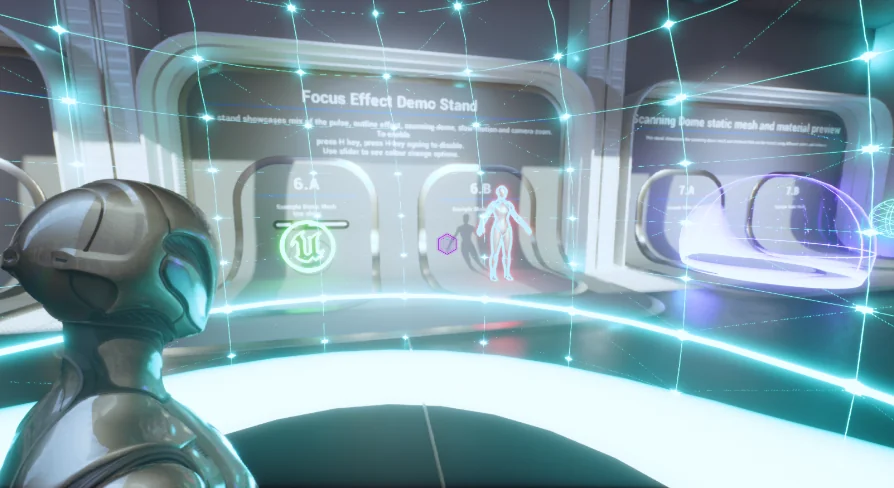
A companion example project accompanies the plugin, offering a tested environment that combines the Gym Level, a Third Person Character setup, and a Game Mode. The Gym functions as an interactive reference for comparing each configuration rather than remaining a static showcase. This permits side-by-side evaluation of options before committing to specific implementations in production scenarios.
4 Highlighting Options and 4 Scanning Effects
A central goal involves providing creators with enough variation to recreate recognizable scanning styles from released titles. 4 highlighting options form 1 half of the equation, each supplying distinct visual treatments for tagged objects during active scanning. 4 scanning effects form the 2nd half, governing the temporal and spatial behavior of each scan as it propagates through the environment.
These 2 categories combine multiplicatively. By mixing highlighting choices with scanning behaviors, creators assemble combinations that match different thematic needs. A fast pulse paired with a tight outline serves alert and threat-focused gameplay, while a slow expansion combined with a translucent fill supports atmospheric investigation. Adjusting variables on either side shifts the resulting presentation.
Translucent Material Overlay Without Custom Depth
1 of the 4 highlighting methods avoids established rendering pipelines by relying on a Translucent Material Overlay. This eliminates the requirement for Custom Depth passes and for Post-Process Volumes that typically drive advanced outline and fill operations.
Bypassing Custom Depth simplifies Material organization across scenes where multiple objects receive highlight treatments. Post-Process Volumes remain free for other visual priorities, while highlighted objects retain their visual isolation through the overlay technique. This proves useful in environments where scan targets overlap with existing Post-Process effects that might otherwise conflict with dedicated highlight rendering.
Focus Scan and Accessibility
The Focus Scan effect targets a specific usability problem tied to visual noise. Standard full-highlight displays can overwhelm scenes by flooding entire object surfaces with color or pattern, obscuring geometry and context. The Focus Scan effect addresses this by isolating attention to object outlines only.
Restricting highlights to outlines serves 2 connected functions. The 1st involves readability, since thin edge highlights preserve surface detail and keep underlying textures visible. The 2nd involves accessibility. Players relying on high contrast or simplified visual information benefit when highlights do not dominate the full silhouette. Outline-only emphasis maintains spatial clarity, letting players orient themselves while still receiving confirmation that their scan reached its target.
Blueprint Implementation and Expansion
The entire system consists of Blueprints. No C++ components are required for installation or operation. This structural choice establishes a specific workflow for teams evaluating the plugin against their technical capabilities and constraints.
Blueprint-based architecture allows direct inspection of each scan and highlight behavior directly within the Editor Graph. New scanner types can branch from existing logic without recompiling a plugin or managing external dependencies.
Creative applications extend across multiple genres and scene types. In exploration titles, adjustable scan speeds and translucent fills support methodical discovery as players sweep unfamiliar terrain. In horror or tension-based experiences, rapid scan pulses and outline-only emphasis maintain spatial awareness without overwhelming darkened environments where Post-Processing options must stay reserved for atmospheric effects. In investigation games with rhythm-sensitive pacing, precise control over the relationship between scan propagation and highlight styling tracks the rhythm designers want to establish.
Documentation and Learning Resources
Supplementary material accompanies the plugin to support implementation at different technical levels. A customization example video demonstrates specific configuration changes and their visual results. A Gym overview video surveys the companion level and its interactive showcases. A demo video presents assembled scanning configurations in action. A how-to video and how-to document offer stepwise guidance for core setup operations.
Together these resources bridge the gap between installation and practical implementation. The Gym Level functions as both a testing ground and a visual index for comparing configurations. Rather than static documentation pages, the combination of video walkthroughs and interactive reference scenes offers multiple entry points depending on how a creator learns most efficiently.
Who Benefits from Blueprint-Driven Scanning
Projects requiring repeated iteration on scan appearance gain the most from this configuration. Procedural generation workflows, where every new level demands fresh scan calibration over unfamiliar geometry, benefit from avoiding Custom Depth dependencies. Teams targeting accessibility compliance through configurable visual feedback can turn direct outline emphasis into a production advantage rather than an engineering obstacle.
Solo developers and small teams relying on visual scripting for core systems can expand the Blueprint logic directly, adjusting scan effects and highlight behavior without opening a code editor. Projects already committed to specific Post-Processing pipelines can integrate the translucent overlay approach without restructuring render priorities, preserving existing visuals while introducing new options for player interaction.
 Variety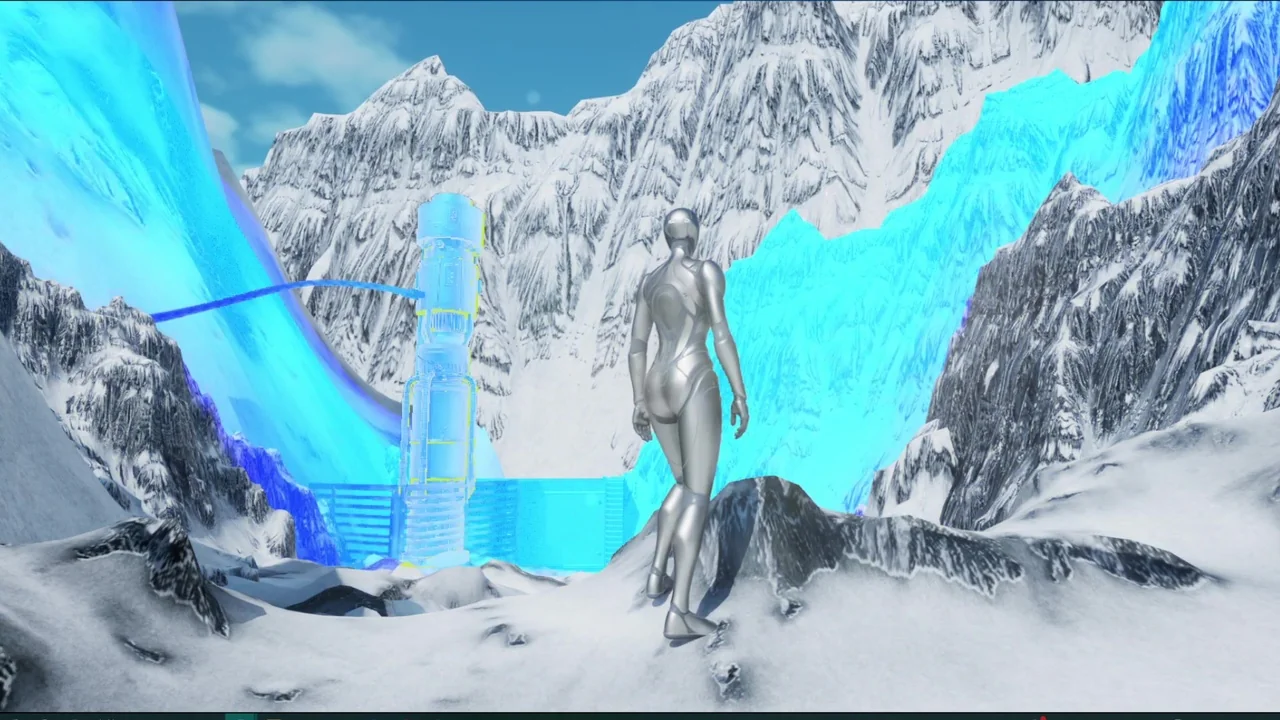
 Variety
 Variety
 Variety