"059e11fbf316ed56"{"id":"1000975","slug":"army-vfx","title":"Army VFX","category":"Variety","engine":"5.0+","assetVersion":"","engineVersion":"Engine Version: 5.0+","tag":"Variety","accent":"blue","visual":"mech","summary":"Army VFX is a highly customizable military effect pack with 27 effects, 4K textures, 1 blueprint, and 9 example sequences for early project development.","platform":"Unreal Engine","publishedAt":"2026-08-17T16:12:54.638Z","updatedAt":"2026-08-17T16:12:54.638Z","sourceNotes":[],"fileContents":[],"compatibility":["Unreal Engine","Engine Version: 5.0+"],"featuredImage":{"alt":"Army VFX","src":"/wp-content/uploads/published/2026/08/862682124bd1-f9bbe9d3-cd13-402c-98ac-dc129accfc21-e6033f4351.webp"},"hasDownloadLink":true,"downloads":2,"terms":[{"taxonomy":"category","slug":"variety-vfx","name":"Variety"}],"galleryImages":[{"src":"/wp-content/uploads/published/2026/08/1b5acab059f6-1f777e3b-7e8d-48fb-8094-9f5132391a0c-2cb578946b.webp","alt":"Army VFX"},{"src":"/wp-content/uploads/published/2026/08/7f25a9cb827d-d0929cfc-e701-4dd6-9ae5-ca9853e81b09-33353dd4ca.webp","alt":"Army VFX"},{"src":"/wp-content/uploads/published/2026/08/6b334a9e8558-4792d39d-e6fa-41ed-90e7-02d1aef3314f-6b021ddcb3.webp","alt":"Army VFX"},{"src":"/wp-content/uploads/published/2026/08/d6ad6ff86935-20ba06f7-972e-4863-b4ba-817f3e07f8a0-f47b5d7c8b.webp","alt":"Army VFX"},{"src":"/wp-content/uploads/published/2026/08/b64ceaccf1d1-978d2ba2-211e-4d34-9562-4f8e7c53afda-be81f07474.webp","alt":"Army VFX"},{"src":"/wp-content/uploads/published/2026/08/6dfbea4daa96-0cdf97ef-5e5b-470d-b471-da0f41e815c6-cb0d0150d2.webp","alt":"Army VFX"},{"src":"/wp-content/uploads/published/2026/08/655bdac14eae-f6ab3048-8925-4c8b-83b2-ef0f5c9a1785-209b7e8d3a.webp","alt":"Army VFX"},{"src":"/wp-content/uploads/published/2026/08/c5555f1a046e-735d9bed-bc05-4020-9d40-752454d1287b-fef16bdcbf.webp","alt":"Army VFX"},{"src":"/wp-content/uploads/published/2026/08/a647176090b5-bb0f9a6d-92bb-4f1c-a69c-f75058d7b2d6-94f354bfee.webp","alt":"Army VFX"},{"src":"/wp-content/uploads/published/2026/08/95e0f2238a82-2bbfdc22-179a-4207-ab26-d314f44b10f7-da209bf390.webp","alt":"Army VFX"}],"accessPanel":{"kind":"resource","title":"Download this resource","eyebrow":"Free Download","message":"Log in or create a free account to start your download.","fileName":"Content.7z","safetyNote":"Resources are manually reviewed before listing to improve quality and reduce obvious risks.","actionLabel":"Download Free","resourceType":"Resource archive"},"contentHtml":"\u003cp\u003eWhen you're starting a military-themed project, the first thing you need is effects that read clearly: a tank round leaving the barrel, a jet streaking past, a vehicle left destroyed after an explosion. Army VFX was put together specifically for that phase of development. It bundles a range of combat-related effects into one package, so you don't have to hunt for individual assets while blocking out gameplay or cinematic sequences. The pack is described as highly customizable, with 27 unique effects, 34 materials, 34 textures, 20 unique meshes, one blueprint, and nine sequences that show how to combine the effects for your own needs.\u003c/p\u003e \u003ch2\u003eA Combat-Focused Effect Library for Early Project Builds\u003c/h2\u003e\n\u003cp\u003eThe stated goal of Army VFX is to make life easier when you start a new project. Instead of assembling effects from multiple sources, you get a single library covering the effects most often needed during early development and prototyping. That includes everything from muzzle flashes to full explosions, smoke screens to destroyed vehicles. The pack also comes with nine sequences that are meant to demonstrate how the effects can be used together. These sequences serve as starting points, letting you see how a tank shot, an artillery strike, or a jet flyby might be assembled with the included assets.\u003c/p\u003e\n\u003cp\u003eBecause the pack is structured through a highly customizable setup, you can adjust the effects to fit the tone of your project. The materials and textures are included at 4K resolution, giving you room to work with while keeping the output sharp. The one blueprint included in the pack is likely the central controller for spawning and managing these effects, though the source doesn't specify its exact function. What it does offer is a structured entry point: you have the effects, the materials, the meshes, and the example sequences, and the intent is to let you make them your own.\u003c/p\u003e \u003ch2\u003eGround, Air, and Environmental Effects in One Pack\u003c/h2\u003e\n\u003cp\u003eArmy VFX covers a wide range of military action. The type of VFX list includes Destroyed, Environment, Jet, MuzzleFlash, Projectiles, Shells, Smoke Screen, Tank, APC, SPG, ARTY, Explosion, MLRS, and Heli. That’s a mix of ground vehicles, aircraft, and the effects that come with them. For ground-based combat, you have tank, APC (armored personnel carrier), SPG (self-propelled gun), ARTY (artillery), and MLRS (multiple launch rocket system) effects. For air support, there are Jet and Heli effects. The general combat effects like muzzle flash, projectiles, shells, smoke screen, and explosion can be used across all of those setups.\u003c/p\u003e\n\u003cp\u003eHaving these categories in one pack is useful when you're prototyping a battlefield scene. You can place a tank with its shell explosions, add an MLRS barrage with smoke trails, and bring in a helicopter with its own rotor and weapon effects. The 27 unique effects give you enough variety to cover multiple scenarios without overloading the project. The environment and destroyed effects also help with aftermath scenes, allowing you to show damaged vehicles and scorched ground as part of the same visual language.\u003c/p\u003e \u003ch2\u003eThe Blueprint and Sequence Approach to Customization\u003c/h2\u003e\n\u003cp\u003eThe pack includes one blueprint and nine sequences. The blueprint is a key part of the workflow, though its exact role isn't detailed. It likely serves as a reusable asset that connects all the effects, making it easier to trigger them from player actions, AI routines, or cinematic timelines. The nine sequences are described as examples of how to use the effects for your needs. This is a practical way to learn the pack: rather than examining every effect one by one, you can look at the sequences to see how effects are layered and timed for specific situations.\u003c/p\u003e\n\u003cp\u003eBecause the pack is highly customizable, you can take these sequences and modify them to match your own project's pace and intensity. If an explosion needs to be stronger, you might swap in a different material or adjust the mesh scale. If a smoke screen should linger, you could tweak the particle settings. The sequences give you a baseline, and the customizability gives you control. The included meshes—20 unique ones—give you physical objects to work with, such as shells, debris, or vehicle parts, though the exact meshes aren't listed.\u003c/p\u003e \u003ch2\u003eWhat 4K Textures, 34 Materials, and 20 Meshes Add to the Workflow\u003c/h2\u003e\n\u003cp\u003eThe visual backbone of Army VFX is a set of 34 materials and 34 textures, all at 4K resolution. This is a substantial amount of high-res content for an effects pack. With 4K textures, you get crisp detail even when the camera moves close to an explosion or a destroyed vehicle. That matters for both gameplay and cinematics, because the effects need to hold up from different distances and angles.\u003c/p\u003e\n\u003cp\u003eThe 34 materials give you a wide range of surface appearances, likely covering different types of fire, smoke, sparks, and other combat-related phenomena. The 20 unique meshes add physical form to the effects—think separate pieces for a tank turret flying off or fragments from a rocket explosion. The combination of these assets means you can build layered effects: an explosion can have a fireball, debris meshes, smoke, and a flash, all using different materials and textures. For a prototype, this level of asset integration saves you from having to create basic props and textures from scratch.\u003c/p\u003e\n\u003cp\u003eThe source doesn't specify which materials or meshes are included, but the numbers alone suggest a robust kit. With 34 textures, you're not limited to a single look for fire or smoke; you can change the look of an effect by swapping materials. The 20 meshes provide a physical scale to your visual effects, which is especially important for military scenes where the size and shape of debris and shell casings need to read correctly.\u003c/p\u003e \u003ch2\u003eUsing Army VFX to Prototype Military Action\u003c/h2\u003e\n\u003cp\u003eArmy VFX is best understood as a starting point for military game or cinematic projects. The pack's own description highlights its usefulness for the beginning of development and prototyping. That means you can drop these effects into a grey-box level, trigger them from simple logic, and quickly see how a combat encounter plays out. The 9 sequences are particularly useful for this, as they show you how to set up specific scenarios without digging into every particle parameter.\u003c/p\u003e\n\u003cp\u003eWhen you're ready to move beyond prototyping, the customizability ensures you aren't locked into a default look. You can adjust materials, replace meshes, or tweak the blueprint calls to fine-tune each effect. The inclusion of 4K textures gives you headroom for final quality, and the wide range of effect types means you can cover everything from a small arms firefight to a full-scale artillery shelling. Whether you're building a single-player campaign, a multiplayer shooter, or a military diorama, Army VFX gives you the tools to make the scene feel alive from the very first playtest.\u003c/p\u003e\n\n\u003ch2\u003eContinue Browsing Similar Packs\u003c/h2\u003e\n\u003cul\u003e\n\u003cli\u003e\u003ca href=\"https://3dcghub.com/niagara-mega-vfx-pack-vol-1/\" title=\"Niagara Mega VFX Pack vol. 1\"\u003eNiagara Mega VFX Pack vol. 1\u003c/a\u003e\u003c/li\u003e\n\u003cli\u003e\u003ca href=\"https://3dcghub.com/realistic-starter-vfx-pack-vol-2/\" title=\"Realistic Starter VFX Pack Vol 2\"\u003eRealistic Starter VFX Pack Vol 2\u003c/a\u003e\u003c/li\u003e\n\u003cli\u003e\u003ca href=\"https://3dcghub.com/swarms-vfx/\" title=\"Swarms VFX\"\u003eSwarms VFX\u003c/a\u003e\u003c/li\u003e\n\u003cli\u003e\u003ca href=\"https://3dcghub.com/fluid-ninja-live/\" title=\"Fluid Ninja LIVE\"\u003eFluid Ninja LIVE\u003c/a\u003e\u003c/li\u003e\n\u003cli\u003e\u003ca href=\"https://3dcghub.com/niagara-media-visualizers/\" title=\"Niagara Media Visualizers\"\u003eNiagara Media Visualizers\u003c/a\u003e\u003c/li\u003e\n\u003c/ul\u003e","contentTextLength":7020,"navigation":{"current":368,"total":3238,"previous":{"id":"1000976","slug":"asian-canal-environment-asian-canal-environment-asian-ancient-bridge-old-3d","title":"Asian Canal Environment (Asian Canal Environment Asian Ancient Bridge Old 3D )","category":"Historical","platform":"Unreal Engine","updatedAt":"2026-08-17T17:14:31.122Z"},"next":{"id":"1000974","slug":"animalia-lion-male","title":"Animalia - Lion (male)","category":"Characters \u0026 Creatures","platform":"Unreal Engine","updatedAt":"2026-08-17T16:08:33.242Z"}},"relatedResources":[{"id":"1001195","slug":"niagara-footstep-vfx-footstep-vfx-footstep-particles","title":"Niagara Footstep VFX (Footstep VFX, Footstep Particles)","category":"Variety","engine":"5.0+","assetVersion":"","engineVersion":"Engine Version: 5.0+","tag":"Variety","accent":"blue","visual":"mech","summary":"Implement responsive ground interaction with 15 optimized Niagara footstep particle systems covering dirt, water, snow, metal, and special abilities.","platform":"Unreal Engine","publishedAt":"2026-09-17T07:42:04.849Z","updatedAt":"2026-09-17T07:42:04.849Z","sourceNotes":[],"fileContents":[],"compatibility":["Unreal Engine","Engine Version: 5.0+"],"featuredImage":{"alt":"Niagara Footstep VFX (Footstep VFX, Footstep Particles)","src":"/wp-content/uploads/published/2026/09/cd2caddaa96d-421d258f-b206-4f4a-85f2-c3b5948ca0d8-d39872cc78.webp"},"hasDownloadLink":true,"downloads":2},{"id":"1001196","slug":"vfx-bundle-2","title":"VFX Bundle 2","category":"Variety","engine":"5.2+","assetVersion":"","engineVersion":"Engine Version: 5.2+","tag":"Variety","accent":"blue","visual":"mech","summary":"A technical breakdown of VFX Bundle 2, featuring 121 particle systems, 46 materials, and 18 dynamic weather and surface blueprints.","platform":"Unreal Engine","publishedAt":"2026-09-17T07:45:20.255Z","updatedAt":"2026-09-17T07:45:20.255Z","sourceNotes":[],"fileContents":[],"compatibility":["Unreal Engine","Engine Version: 5.2+"],"featuredImage":{"alt":"VFX Bundle 2","src":"/wp-content/uploads/published/2026/09/cb57fa104c87-9a1273ec-eeb8-4e2e-a3fb-ecf563281a9e-df81056cc7.webp"},"hasDownloadLink":true,"downloads":1},{"id":"1001295","slug":"rpg-crafting-and-environment-vfx","title":"RPG - Crafting \u0026 Environment VFX","category":"Variety","engine":"5.0+","assetVersion":"","engineVersion":"Engine Version: 5.0+","tag":"Variety","accent":"blue","visual":"city","summary":"Examine the 16 drag-and-drop RPG crafting and environment Niagara VFX, featuring custom heat distortion, density scaling, and interactive forge controls.","platform":"Unreal Engine","publishedAt":"2026-10-01T16:45:54.300Z","updatedAt":"2026-10-01T16:45:54.300Z","sourceNotes":[],"fileContents":[],"compatibility":["Unreal Engine","Engine Version: 5.0+"],"featuredImage":{"alt":"RPG - Crafting \u0026 Environment VFX","src":"/wp-content/uploads/published/2026/10/cf7fc1d8729c-0a9a80bb-cfb6-4b04-add7-8cb3ee42781d-517db1bf6a.webp"},"hasDownloadLink":true,"downloads":0}]}
Variety
Army VFX
Army VFX is a highly customizable military effect pack with 27 effects, 4K textures, 1 blueprint, and 9 example sequences for early project development.
Category:Unreal Engine,VarietyPlatform: Unreal EngineEngine Version: 5.0+Published: Aug 17, 2026
Variety
Resource overview
When you're starting a military-themed project, the first thing you need is effects that read clearly: a tank round leaving the barrel, a jet streaking past, a vehicle left destroyed after an explosion. Army VFX was put together specifically for that phase of development. It bundles a range of combat-related effects into one package, so you don't have to hunt for individual assets while blocking out gameplay or cinematic sequences. The pack is described as highly customizable, with 27 unique effects, 34 materials, 34 textures, 20 unique meshes, one blueprint, and nine sequences that show how to combine the effects for your own needs.
A Combat-Focused Effect Library for Early Project Builds
The stated goal of Army VFX is to make life easier when you start a new project. Instead of assembling effects from multiple sources, you get a single library covering the effects most often needed during early development and prototyping. That includes everything from muzzle flashes to full explosions, smoke screens to destroyed vehicles. The pack also comes with nine sequences that are meant to demonstrate how the effects can be used together. These sequences serve as starting points, letting you see how a tank shot, an artillery strike, or a jet flyby might be assembled with the included assets.
Because the pack is structured through a highly customizable setup, you can adjust the effects to fit the tone of your project. The materials and textures are included at 4K resolution, giving you room to work with while keeping the output sharp. The one blueprint included in the pack is likely the central controller for spawning and managing these effects, though the source doesn't specify its exact function. What it does offer is a structured entry point: you have the effects, the materials, the meshes, and the example sequences, and the intent is to let you make them your own.
Ground, Air, and Environmental Effects in One Pack
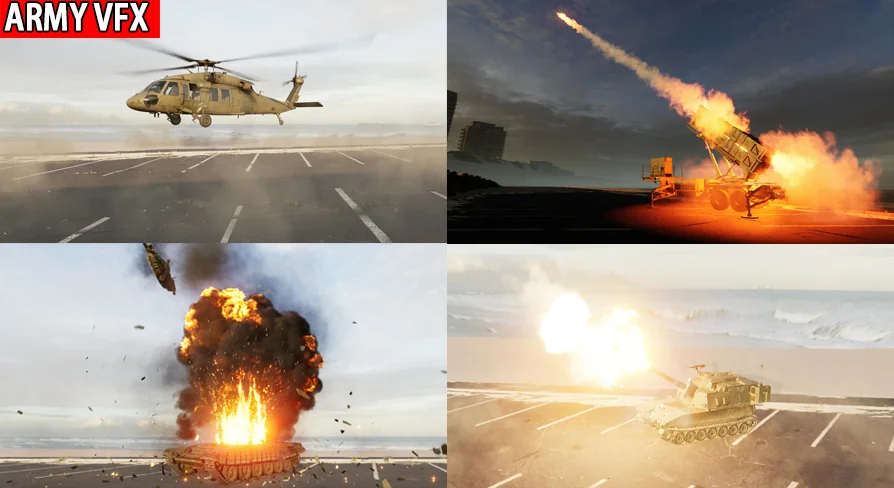
Army VFX covers a wide range of military action. The type of VFX list includes Destroyed, Environment, Jet, MuzzleFlash, Projectiles, Shells, Smoke Screen, Tank, APC, SPG, ARTY, Explosion, MLRS, and Heli. That’s a mix of ground vehicles, aircraft, and the effects that come with them. For ground-based combat, you have tank, APC (armored personnel carrier), SPG (self-propelled gun), ARTY (artillery), and MLRS (multiple launch rocket system) effects. For air support, there are Jet and Heli effects. The general combat effects like muzzle flash, projectiles, shells, smoke screen, and explosion can be used across all of those setups.
Having these categories in one pack is useful when you're prototyping a battlefield scene. You can place a tank with its shell explosions, add an MLRS barrage with smoke trails, and bring in a helicopter with its own rotor and weapon effects. The 27 unique effects give you enough variety to cover multiple scenarios without overloading the project. The environment and destroyed effects also help with aftermath scenes, allowing you to show damaged vehicles and scorched ground as part of the same visual language.
The Blueprint and Sequence Approach to Customization
The pack includes one blueprint and nine sequences. The blueprint is a key part of the workflow, though its exact role isn't detailed. It likely serves as a reusable asset that connects all the effects, making it easier to trigger them from player actions, AI routines, or cinematic timelines. The nine sequences are described as examples of how to use the effects for your needs. This is a practical way to learn the pack: rather than examining every effect one by one, you can look at the sequences to see how effects are layered and timed for specific situations.
Because the pack is highly customizable, you can take these sequences and modify them to match your own project's pace and intensity. If an explosion needs to be stronger, you might swap in a different material or adjust the mesh scale. If a smoke screen should linger, you could tweak the particle settings. The sequences give you a baseline, and the customizability gives you control. The included meshes—20 unique ones—give you physical objects to work with, such as shells, debris, or vehicle parts, though the exact meshes aren't listed.
What 4K Textures, 34 Materials, and 20 Meshes Add to the Workflow
The visual backbone of Army VFX is a set of 34 materials and 34 textures, all at 4K resolution. This is a substantial amount of high-res content for an effects pack. With 4K textures, you get crisp detail even when the camera moves close to an explosion or a destroyed vehicle. That matters for both gameplay and cinematics, because the effects need to hold up from different distances and angles.
The 34 materials give you a wide range of surface appearances, likely covering different types of fire, smoke, sparks, and other combat-related phenomena. The 20 unique meshes add physical form to the effects—think separate pieces for a tank turret flying off or fragments from a rocket explosion. The combination of these assets means you can build layered effects: an explosion can have a fireball, debris meshes, smoke, and a flash, all using different materials and textures. For a prototype, this level of asset integration saves you from having to create basic props and textures from scratch.
The source doesn't specify which materials or meshes are included, but the numbers alone suggest a robust kit. With 34 textures, you're not limited to a single look for fire or smoke; you can change the look of an effect by swapping materials. The 20 meshes provide a physical scale to your visual effects, which is especially important for military scenes where the size and shape of debris and shell casings need to read correctly.
Using Army VFX to Prototype Military Action
Army VFX is best understood as a starting point for military game or cinematic projects. The pack's own description highlights its usefulness for the beginning of development and prototyping. That means you can drop these effects into a grey-box level, trigger them from simple logic, and quickly see how a combat encounter plays out. The 9 sequences are particularly useful for this, as they show you how to set up specific scenarios without digging into every particle parameter.
When you're ready to move beyond prototyping, the customizability ensures you aren't locked into a default look. You can adjust materials, replace meshes, or tweak the blueprint calls to fine-tune each effect. The inclusion of 4K textures gives you headroom for final quality, and the wide range of effect types means you can cover everything from a small arms firefight to a full-scale artillery shelling. Whether you're building a single-player campaign, a multiplayer shooter, or a military diorama, Army VFX gives you the tools to make the scene feel alive from the very first playtest.
 Variety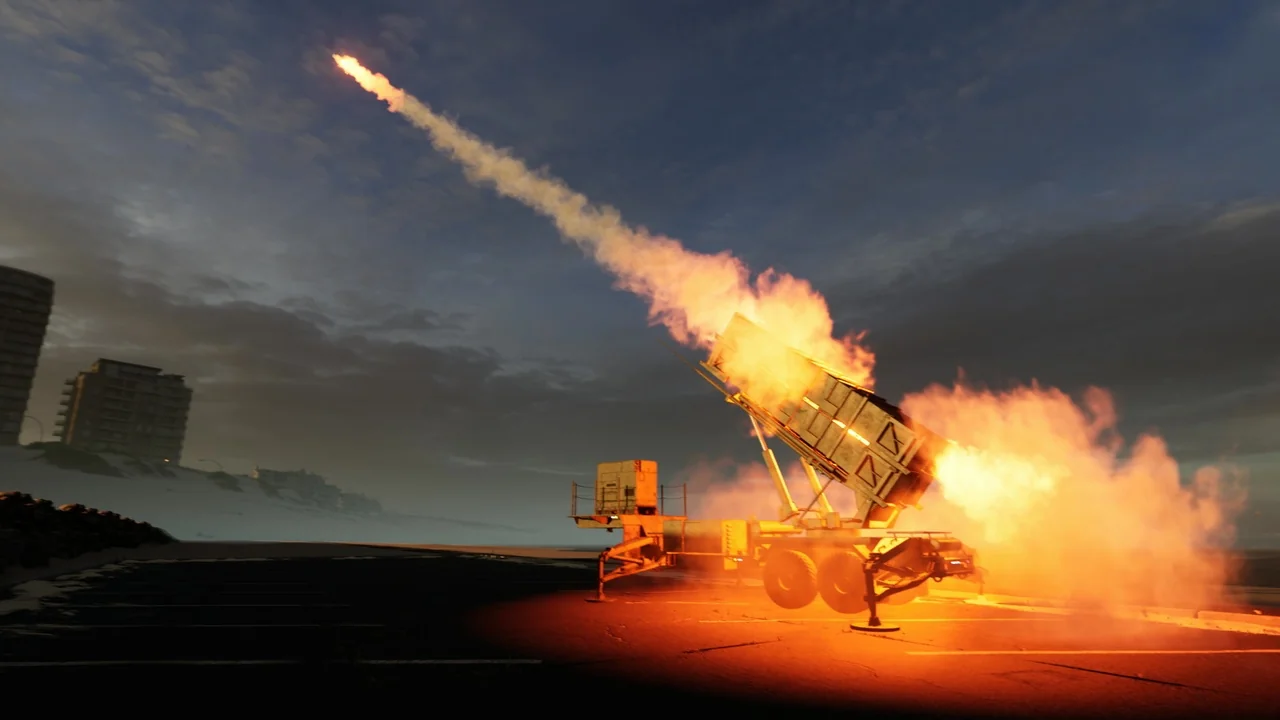
 Variety
 Variety
 Variety