"c14ff6bd758dadb1"{"id":"1000616","slug":"hair-for-days","title":"Hair For Days","category":"Variety","engine":"5.0+","assetVersion":"","engineVersion":"Engine Version: 5.0+","tag":"Variety","accent":"blue","visual":"mech","summary":"Hair For Days delivers 16 Unreal Engine hair grooms across male, female, and stylized looks, with modular parts and a drag-to-head-bone workflow.","platform":"Unreal Engine","publishedAt":"2026-07-20T20:50:38.651Z","updatedAt":"2026-07-20T20:50:38.651Z","sourceNotes":[],"fileContents":[],"compatibility":["Unreal Engine","Engine Version: 5.0+"],"featuredImage":{"alt":"Hair For Days","src":"/wp-content/uploads/published/2026/07/035830fd56dc-61b8cf6e-2ab4-431c-8d80-54650844900c-c2562865bc.webp"},"hasDownloadLink":true,"downloads":1,"terms":[{"taxonomy":"category","slug":"variety-vfx","name":"Variety"}],"galleryImages":[{"src":"/wp-content/uploads/published/2026/07/60460885c0df-92c89635-96de-4ff3-9f13-6c6f14ef07c3-90e9ad8a59.webp","alt":"Hair For Days"},{"src":"/wp-content/uploads/published/2026/07/612beecc0007-1aaf9ef5-bba9-49eb-a415-6541521ed855-93e67dd5bd.webp","alt":"Hair For Days"},{"src":"/wp-content/uploads/published/2026/07/56bf8f816a24-dd764a99-9fa4-48b1-93cf-af1874194830-f1f058eede.webp","alt":"Hair For Days"},{"src":"/wp-content/uploads/published/2026/07/21e8f2c81908-7c655d18-3954-4f93-bbe4-ee6cdaa6888d-a777ae5c08.webp","alt":"Hair For Days"},{"src":"/wp-content/uploads/published/2026/07/b4103d1a84a0-785a5cf3-8d05-410b-9d19-ae872b01697a-bfd5fa733e.webp","alt":"Hair For Days"},{"src":"/wp-content/uploads/published/2026/07/dc949b6378dc-899741ed-cfe0-4471-acf8-20ed1b30fa3f-e0a86fbdc2.webp","alt":"Hair For Days"},{"src":"/wp-content/uploads/published/2026/07/acd7b4d8eb03-eb5231ea-cb08-488e-ba66-8eb46b33af33-eada2b8201.webp","alt":"Hair For Days"},{"src":"/wp-content/uploads/published/2026/07/184f18781afd-bd979e27-dbec-4b73-bf7c-6d17a8219c5f-7aac459c65.webp","alt":"Hair For Days"},{"src":"/wp-content/uploads/published/2026/07/1b6cdecfd0c7-65f6c266-fac9-4d88-abd0-9cfa2fb2808c-01431d71fa.webp","alt":"Hair For Days"},{"src":"/wp-content/uploads/published/2026/07/2e951868cabc-dcc51b68-9c6e-4fa3-8250-41c8ac36120d-1bda7fd3da.webp","alt":"Hair For Days"}],"accessPanel":{"kind":"resource","title":"Download this resource","eyebrow":"Free Download","message":"Log in or create a free account to start your download.","fileName":"Content.7z","safetyNote":"Resources are manually reviewed before listing to improve quality and reduce obvious risks.","actionLabel":"Download Free","resourceType":"Resource archive"},"contentHtml":"\u003cp\u003eAttaching hair to a character in Unreal Engine usually means staring down a binding pipeline, but this package takes the drag-and-drop route instead. You move a groom onto your character, scale it to fit, and parent it to the head bone. No binding setup is required for the hair to function correctly in scenes.\u003c/p\u003e\u003ch2\u003eWhat ships in the Hair For Days package\u003c/h2\u003e\u003cp\u003eThe headline count is 16 unique hair style grooms covering a range of masculine and feminine looks. Five of those grooms are split into multiple parts, which gives artists separate pieces to toggle on or off rather than relying on a single rigid mesh.\u003c/p\u003e\u003cp\u003eBeyond the core hairstyles, the package includes separate facial hair assets: a mustache and a beard. These arrive as individual grooms, so they can be combined with appropriate head hair or used on their own depending on the character.\u003c/p\u003e\u003ch3\u003eModular hairstyles with multiple parts\u003c/h3\u003e\u003cp\u003eThe multi-part grooms break down as follows:\u003c/p\u003e\u003cul\u003e\u003cli\u003e\u003cp\u003e\u003cstrong\u003eFemale Long Hair\u003c/strong\u003e \u0026#8212; two style variants: hair behind the shoulders and hair over the shoulders.\u003c/p\u003e\u003c/li\u003e\u003cli\u003e\u003cp\u003e\u003cstrong\u003eFemale Long Hair Middle Part\u003c/strong\u003e \u0026#8212; two style variants: hair behind the ears and hair over the ears.\u003c/p\u003e\u003c/li\u003e\u003cli\u003e\u003cp\u003e\u003cstrong\u003eFemale Pony Tail Hair\u003c/strong\u003e \u0026#8212; three separate grooms: a base head cap, back hair, and a smaller back hair piece.\u003c/p\u003e\u003c/li\u003e\u003cli\u003e\u003cp\u003e\u003cstrong\u003eMale Short Hair\u003c/strong\u003e \u0026#8212; two separate grooms: side hair and top hair.\u003c/p\u003e\u003c/li\u003e\u003cli\u003e\u003cp\u003e\u003cstrong\u003eFemale Short Hair\u003c/strong\u003e \u0026#8212; two style variants: high clump and low clump.\u003c/p\u003e\u003c/li\u003e\u003c/ul\u003e\u003cp\u003eThe pony tail configuration is the most granular of the set, letting artists use the base head cap independently of the back hair pieces. That structure means a single ponytail groom can be reassembled in several configurations without editing the hair itself.\u003c/p\u003e\u003ch2\u003eCutting hair to derive new looks\u003c/h2\u003e\u003cp\u003eThe groom system supports cutting the hair, which opens up style options beyond what the package displays by default. Inside a project, an artist could take an existing groom, remove length or adjust shape through cutting, and produce a custom variant without building a new asset from scratch.\u003c/p\u003e\u003cp\u003eThe single-part grooms in the package are: Female Short Hair Bangs, Male Long Hair, Male Short Sleek Hair, Male Mullet Hair, Female Wavy Hair, Female Curly Hair, Female Over Shoulder Hair, Mohawk, Dreadlocks, Mustache, and Beard.\u003c/p\u003e\u003ch2\u003eHow a binding workflow works for cases that need it\u003c/h2\u003e\u003cp\u003eDragging the hair to the head bone covers standard use, but certain character rigs may require true binding for animation fidelity. Enabling binding in Unreal Engine requires setting up any groom for that specific character using Maya Xgen. The developer can generate the relevant Xgen Maya files for a given character when needed, because every groom must be configured for its target character through Maya Xgen before binding can function.\u003c/p\u003e\u003ch2\u003eUpdate history through May 2021\u003c/h2\u003e\u003cp\u003eThe package grew steadily over its first months on the market. The earliest tracked update, on January 5, 2021, added three new grooms and one new style. Two days later, a separate style was added. February brought three more grooms plus another style. March added three grooms. April introduced a new groom alongside a \u003cem\u003eLow poly\u003c/em\u003e Version of most existing grooms, giving performance-conscious scenes a lighter option for many of the hairstyles.\u003c/p\u003e\u003cp\u003eThe most recent tracked update, dated May 22, 2021, added the dreadlocks groom. A preview for dreadlocks was noted as coming soon before that release.\u003c/p\u003e\u003ch2\u003eLow poly grooms and facial hair in production\u003c/h2\u003e\u003cp\u003eThe \u003cem\u003eLow poly\u003c/em\u003e Versions introduced in April matter for scenes running many characters at once or targeting lower hardware ceilings. With those lighter grooms available for most of the package\u0026#8217;s hairstyles, teams can populate crowds or NPCs without committing to full-density hair across every figure.\u003c/p\u003e\u003cp\u003eThe package also includes separate facial hair assets \u0026#8212; a mustache and a beard \u0026#8212; delivered as their own grooms. These can be paired with appropriate head hair styles to build out a full character look, or used independently for supporting cast members where a hairstyle change alone is sufficient for variety.\u003c/p\u003e\u003ch2\u003eCompatibility with LL Face Control\u003c/h2\u003e\u003cp\u003eEditor testing notes confirm compatibility with LL Face Control. This means the grooms can be used alongside facial animation setups without requiring a separate binding pipeline for the hair to follow head movement during expressions or dialogue scenes.\u003c/p\u003e\u003ch2\u003eWhere Hair For Days fits in a real production\u003c/h2\u003e\u003cp\u003eThe package\u0026#8217;s combination of drag-and-drop attachment, cutting-based customization, and modular parts makes it suitable for teams that need varied character looks without authoring every groom in Maya. A production could use the female long hair variants across multiple characters by toggling behind-shoulders and over-shoulders styles, cut a male long hair groom into a shorter custom look, and slot in the mustache or beard for supporting characters.\u003c/p\u003e\u003ch2\u003ePractical takeaway when evaluating this asset\u003c/h2\u003e\u003cp\u003eIf your characters need quick, varied hairstyles and you want to avoid a binding pipeline for most cases, the drag-to-head-bone workflow here removes one of the usual hurdles. Reserve the Maya Xgen binding route for the ultra-specific rigs that genuinely require it, and lean on the cutting system and modular parts to stretch the 16 grooms into a wider range of looks.\u003c/p\u003e\n\n\u003ch2\u003eRelated Resources Worth Checking\u003c/h2\u003e\n\u003cul\u003e\n\u003cli\u003e\u003ca href=\"https://3dcghub.com/post-process-hand-draw-outline/\" title=\"Post Process Hand Draw Outline\"\u003ePost Process Hand Draw Outline\u003c/a\u003e\u003c/li\u003e\n\u003cli\u003e\u003ca href=\"https://3dcghub.com/car-vfx/\" title=\"Car VFX\"\u003eCar VFX\u003c/a\u003e\u003c/li\u003e\n\u003cli\u003e\u003ca href=\"https://3dcghub.com/dynamic-sketch-post-process-material/\" title=\"Dynamic Sketch Post-Process Material\"\u003eDynamic Sketch Post-Process Material\u003c/a\u003e\u003c/li\u003e\n\u003cli\u003e\u003ca href=\"https://3dcghub.com/swarms-vfx/\" title=\"Swarms VFX\"\u003eSwarms VFX\u003c/a\u003e\u003c/li\u003e\n\u003cli\u003e\u003ca href=\"https://3dcghub.com/niagara-text-visualizers/\" title=\"Niagara Text Visualizers\"\u003eNiagara Text Visualizers\u003c/a\u003e\u003c/li\u003e\n\u003c/ul\u003e","contentTextLength":5349,"navigation":{"current":1244,"total":3719,"previous":{"id":"1000617","slug":"hemlock-forest-jungle","title":"Hemlock Forest / Jungle","category":"Forest \u0026 Jungle","platform":"Unreal Engine","updatedAt":"2026-07-20T21:29:25.722Z"},"next":{"id":"1000615","slug":"goofy-npc","title":"Goofy NPC","category":"Characters \u0026 Creatures","platform":"Unreal Engine","updatedAt":"2026-07-20T20:43:34.110Z"}},"relatedResources":[{"id":"1001295","slug":"rpg-crafting-and-environment-vfx","title":"RPG - Crafting \u0026 Environment VFX","category":"Variety","engine":"5.0+","assetVersion":"","engineVersion":"Engine Version: 5.0+","tag":"Variety","accent":"blue","visual":"city","summary":"Examine the 16 drag-and-drop RPG crafting and environment Niagara VFX, featuring custom heat distortion, density scaling, and interactive forge controls.","platform":"Unreal Engine","publishedAt":"2026-10-01T16:45:54.300Z","updatedAt":"2026-10-01T16:45:54.300Z","sourceNotes":[],"fileContents":[],"compatibility":["Unreal Engine","Engine Version: 5.0+"],"featuredImage":{"alt":"RPG - Crafting \u0026 Environment VFX","src":"/wp-content/uploads/published/2026/10/cf7fc1d8729c-0a9a80bb-cfb6-4b04-add7-8cb3ee42781d-517db1bf6a.webp"},"hasDownloadLink":true,"downloads":1},{"id":"1001192","slug":"big-niagara-bundle","title":"Big Niagara Bundle","category":"Variety","engine":"5.0+","assetVersion":"","engineVersion":"Engine Version: 5.0+","tag":"Variety","accent":"blue","visual":"mech","summary":"A collection of 453 Niagara effects across 13 packs, featuring weather, holograms, abstract space visual systems, blueprints, and meshes.","platform":"Unreal Engine","publishedAt":"2026-09-17T07:36:32.355Z","updatedAt":"2026-09-17T07:36:32.355Z","sourceNotes":[],"fileContents":[],"compatibility":["Unreal Engine","Engine Version: 5.0+"],"featuredImage":{"alt":"Big Niagara Bundle","src":"/wp-content/uploads/published/2026/09/6fe3d65ea8f9-aae557ef-41e9-40c5-bffc-ac14b60707ec-02490edbb6.webp"},"hasDownloadLink":true,"downloads":0},{"id":"1001191","slug":"basic-pickups-vfx-set-niagara","title":"Basic Pickups VFX Set (Niagara)","category":"Variety","engine":"5.0+","assetVersion":"","engineVersion":"Engine Version: 5.0+","tag":"Variety","accent":"blue","visual":"mech","summary":"Explore the Basic Pickups VFX Set (Niagara), featuring 18 unique stylized visual effects for item collection, power pickups, and permanent in-game markers.","platform":"Unreal Engine","publishedAt":"2026-09-17T07:33:56.417Z","updatedAt":"2026-09-17T07:33:56.417Z","sourceNotes":[],"fileContents":[],"compatibility":["Unreal Engine","Engine Version: 5.0+"],"featuredImage":{"alt":"Basic Pickups VFX Set (Niagara)","src":"/wp-content/uploads/published/2026/09/e7b1a9d701d6-6cd44084-a605-441a-b1af-fd3445c9bef5-b6505b0ef9.webp"},"hasDownloadLink":true,"downloads":0}]}
Variety
Hair For Days
Hair For Days delivers 16 Unreal Engine hair grooms across male, female, and stylized looks, with modular parts and a drag-to-head-bone workflow.
Attaching hair to a character in Unreal Engine usually means staring down a binding pipeline, but this package takes the drag-and-drop route instead. You move a groom onto your character, scale it to fit, and parent it to the head bone. No binding setup is required for the hair to function correctly in scenes.
What ships in the Hair For Days package
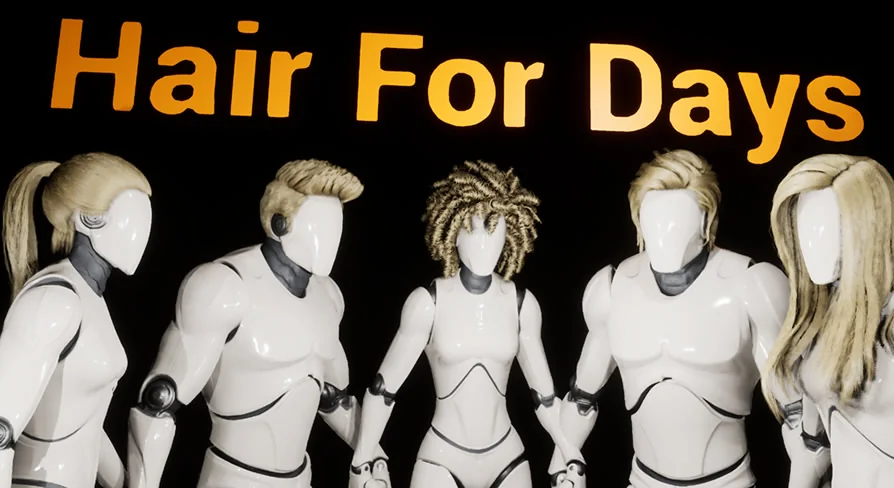
The headline count is 16 unique hair style grooms covering a range of masculine and feminine looks. Five of those grooms are split into multiple parts, which gives artists separate pieces to toggle on or off rather than relying on a single rigid mesh.
Beyond the core hairstyles, the package includes separate facial hair assets: a mustache and a beard. These arrive as individual grooms, so they can be combined with appropriate head hair or used on their own depending on the character.
Modular hairstyles with multiple parts
The multi-part grooms break down as follows:
Female Long Hair — two style variants: hair behind the shoulders and hair over the shoulders.
Female Long Hair Middle Part — two style variants: hair behind the ears and hair over the ears.
Female Pony Tail Hair — three separate grooms: a base head cap, back hair, and a smaller back hair piece.
Male Short Hair — two separate grooms: side hair and top hair.
Female Short Hair — two style variants: high clump and low clump.
The pony tail configuration is the most granular of the set, letting artists use the base head cap independently of the back hair pieces. That structure means a single ponytail groom can be reassembled in several configurations without editing the hair itself.
Cutting hair to derive new looks
The groom system supports cutting the hair, which opens up style options beyond what the package displays by default. Inside a project, an artist could take an existing groom, remove length or adjust shape through cutting, and produce a custom variant without building a new asset from scratch.
The single-part grooms in the package are: Female Short Hair Bangs, Male Long Hair, Male Short Sleek Hair, Male Mullet Hair, Female Wavy Hair, Female Curly Hair, Female Over Shoulder Hair, Mohawk, Dreadlocks, Mustache, and Beard.
How a binding workflow works for cases that need it
Dragging the hair to the head bone covers standard use, but certain character rigs may require true binding for animation fidelity. Enabling binding in Unreal Engine requires setting up any groom for that specific character using Maya Xgen. The developer can generate the relevant Xgen Maya files for a given character when needed, because every groom must be configured for its target character through Maya Xgen before binding can function.
Update history through May 2021
The package grew steadily over its first months on the market. The earliest tracked update, on January 5, 2021, added three new grooms and one new style. Two days later, a separate style was added. February brought three more grooms plus another style. March added three grooms. April introduced a new groom alongside a Low poly Version of most existing grooms, giving performance-conscious scenes a lighter option for many of the hairstyles.
The most recent tracked update, dated May 22, 2021, added the dreadlocks groom. A preview for dreadlocks was noted as coming soon before that release.
Low poly grooms and facial hair in production
The Low poly Versions introduced in April matter for scenes running many characters at once or targeting lower hardware ceilings. With those lighter grooms available for most of the package’s hairstyles, teams can populate crowds or NPCs without committing to full-density hair across every figure.
The package also includes separate facial hair assets — a mustache and a beard — delivered as their own grooms. These can be paired with appropriate head hair styles to build out a full character look, or used independently for supporting cast members where a hairstyle change alone is sufficient for variety.
Compatibility with LL Face Control
Editor testing notes confirm compatibility with LL Face Control. This means the grooms can be used alongside facial animation setups without requiring a separate binding pipeline for the hair to follow head movement during expressions or dialogue scenes.
Where Hair For Days fits in a real production
The package’s combination of drag-and-drop attachment, cutting-based customization, and modular parts makes it suitable for teams that need varied character looks without authoring every groom in Maya. A production could use the female long hair variants across multiple characters by toggling behind-shoulders and over-shoulders styles, cut a male long hair groom into a shorter custom look, and slot in the mustache or beard for supporting characters.
Practical takeaway when evaluating this asset
If your characters need quick, varied hairstyles and you want to avoid a binding pipeline for most cases, the drag-to-head-bone workflow here removes one of the usual hurdles. Reserve the Maya Xgen binding route for the ultra-specific rigs that genuinely require it, and lean on the cutting system and modular parts to stretch the 16 grooms into a wider range of looks.
 Variety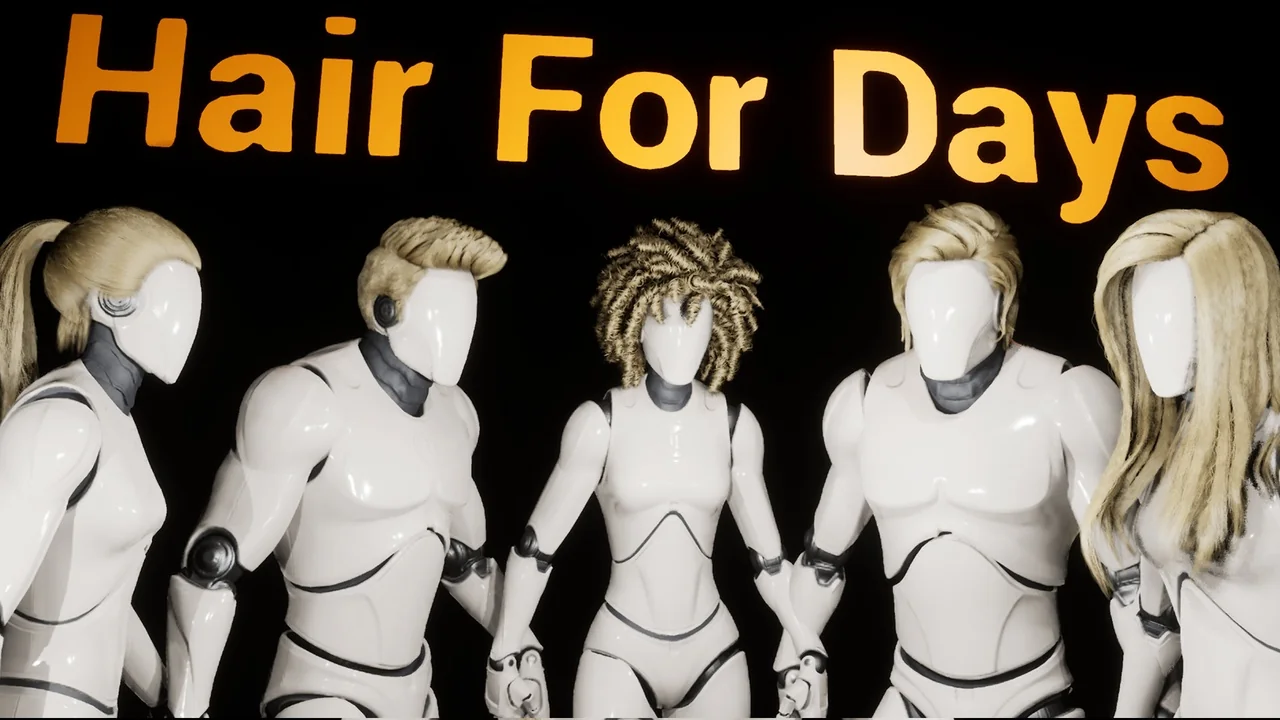
 Variety
 Variety
 Variety