"7b46a695175d8694"{"id":"1000035","slug":"car-vfx","title":"Car VFX","category":"Variety","engine":"5.0+","assetVersion":"","engineVersion":"5.0+","tag":"Variety","accent":"blue","visual":"mech","summary":"Car VFX collects 31 customizable effects with example setups for car crashes and stunts, covering damage, explosions, impacts, parts, smoke, and more.","platform":"Unreal Engine","publishedAt":"2026-05-21T10:13:16.908Z","updatedAt":"2026-05-21T10:13:16.908Z","sourceNotes":[],"fileContents":[],"compatibility":["Unreal Engine","Engine version: 5.0+"],"featuredImage":{"alt":"Car VFX","src":"/wp-content/uploads/published/2026/05/4d201b467366-9b6339a5-e68c-4669-9bde-91e528d1e1f1-abaa9dd8b6.webp"},"hasDownloadLink":true,"downloads":1,"terms":[{"taxonomy":"category","slug":"variety-vfx","name":"Variety"}],"galleryImages":[{"src":"/wp-content/uploads/published/2026/05/0746ab5c8943-d0e15ce0-3c72-4aff-b276-220ffe459426-1240ba371d.webp","alt":"Car VFX"},{"src":"/wp-content/uploads/published/2026/05/5c979a646572-9d9bd72c-3932-4570-8a00-b19042307c7f-cb43a2ccbb.webp","alt":"Car VFX"},{"src":"/wp-content/uploads/published/2026/05/23f30fbb2c55-48a021f1-9197-4660-9707-82f44173b25f-1f94246f70.webp","alt":"Car VFX"},{"src":"/wp-content/uploads/published/2026/05/8445ed4f11c0-c887bc3b-79b9-4514-9b61-9d0cf3b53817-2a764c15d9.webp","alt":"Car VFX"},{"src":"/wp-content/uploads/published/2026/05/1198b8a3078a-688ad131-6f02-4536-a30d-b17d98fadba5-41391521ad.webp","alt":"Car VFX"},{"src":"/wp-content/uploads/published/2026/05/c1db4dfbcef9-99814a22-ed82-42af-8fe6-8382334565dc-3f729f4f6f.webp","alt":"Car VFX"},{"src":"/wp-content/uploads/published/2026/05/d45406c5ac58-c7f04928-ffff-48fd-9be1-71cd9492593d-fd3e4737f2.webp","alt":"Car VFX"},{"src":"/wp-content/uploads/published/2026/05/e1c3d36273cf-33e4c7fb-2030-435d-90c1-bcf01dcaccf1-83593726e4.webp","alt":"Car VFX"},{"src":"/wp-content/uploads/published/2026/05/fa741d3b9dcd-a19f34a5-4b5a-4dd9-9bb7-e4cc1a56f9e4-a00ad55065.webp","alt":"Car VFX"},{"src":"/wp-content/uploads/published/2026/05/c90e1e5cacc9-cd964fbc-df3d-4a65-8b9f-9565c5b58196-2f8247ad66.webp","alt":"Car VFX"}],"accessPanel":{"kind":"resource","title":"Access this resource","eyebrow":"Free Download","message":"Log in or create a free account to start your download.","fileName":"Content.7z","safetyNote":"Resources are manually reviewed before listing to improve quality and reduce obvious risks.","actionLabel":"Download Free","resourceType":"Resource archive"},"contentHtml":"\u003cp\u003eVehicle action scenes rarely depend on one effect alone. A convincing crash or stunt moment usually needs layered motion, visible damage, environmental response, smoke, explosions, loose parts, and quieter idle elements that help the aftermath feel grounded. \u003cstrong\u003eCar VFX\u003c/strong\u003e Addresses that workflow directly with a set of effects and example setups aimed at making car crashes and stunts, and it does so with a strong emphasis on customization.\u003c/p\u003e \u003cp\u003eThe pack is not limited to one visual beat. Its stated VFX range covers \u003cstrong\u003eDamaged, Destruction, Environment, Explosion, Idle, Impacts, Parts,\u003c/strong\u003e And \u003cstrong\u003eStunts\u003c/strong\u003e. That spread matters because vehicle scenes often move through several states in quick succession. A car may enter a shot clean, hit something with force, throw off fragments, trigger smoke or fire, and then settle into a damaged state. By covering those categories together, the collection points toward scene assembly rather than isolated one-off moments.\u003c/p\u003e \u003ch2\u003eCar crash and stunt setups, not just isolated bursts\u003c/h2\u003e\n\u003cp\u003eThe most useful detail here is the inclusion of \u003cstrong\u003eExample setups\u003c/strong\u003e For building car crashes and stunts. That gives the pack a practical role in implementation. Instead of stopping at standalone effects, it provides examples that can be used as a basis for staging larger vehicle events. For artists and developers working on chase scenes, collisions, or heavily scripted stunt beats, that kind of structure helps tie multiple effect types into one sequence.\u003c/p\u003e \u003cp\u003eThe pack is also described as \u003cstrong\u003eHighly customizable\u003c/strong\u003e. In a vehicle-focused workflow, customization is often what determines whether an effect works across different shots. A minor sideswipe, a hard frontal collision, and a stunt roll do not read the same on screen, even if they share certain visual elements. The pack’s emphasis on customization suggests room to adjust how those events are presented rather than treating every impact as identical.\u003c/p\u003e \u003cp\u003eThat flexibility also pairs naturally with the categories included in the pack. \u003cstrong\u003eImpacts\u003c/strong\u003e Can serve the immediate strike. \u003cstrong\u003eParts\u003c/strong\u003e Can support pieces breaking away or scattering. \u003cstrong\u003eDamaged\u003c/strong\u003e And \u003cstrong\u003eIdle\u003c/strong\u003e Can help carry the shot after the main event has passed. \u003cstrong\u003eExplosion\u003c/strong\u003e And \u003cstrong\u003eDestruction\u003c/strong\u003e Expand the scale when the sequence needs more than a simple hit. \u003cstrong\u003eEnvironment\u003c/strong\u003e Widens the response beyond the vehicle itself, which is important when a crash interacts with the surrounding scene rather than feeling detached from it.\u003c/p\u003e \u003ch2\u003eDamaged, Destruction, Impacts, and Parts in one vehicle effects set\u003c/h2\u003e\n\u003cp\u003eThe stated effect types reveal how broad the pack’s scene coverage is. \u003cstrong\u003eDamaged\u003c/strong\u003e Effects imply the visual language of a car that has already taken a hit or is actively breaking down. \u003cstrong\u003eDestruction\u003c/strong\u003e Points toward heavier event-driven moments where the vehicle or nearby objects are being violently disrupted. \u003cstrong\u003eImpacts\u003c/strong\u003e Focus on the instant of collision, where timing and force have to read clearly. \u003cstrong\u003eParts\u003c/strong\u003e Adds a physical layer that helps sell the idea that something actually broke loose.\u003c/p\u003e \u003cp\u003eThen there are the categories that help bridge those moments together. \u003cstrong\u003eIdle\u003c/strong\u003e Is especially useful in aftermath scenes, where the vehicle is no longer moving at full speed but the event still needs visual residue. Smoke, heat, or subtle lingering activity can do a lot of narrative work in a wrecked scene. \u003cstrong\u003eEnvironment\u003c/strong\u003e Broadens the response beyond the vehicle body, which is often what separates a simple effect from a fully staged crash sequence. Dust, leaves, and surrounding disturbance can connect the car to the world around it.\u003c/p\u003e \u003cp\u003eThe tags reinforce that tone. \u003cstrong\u003eCar, Explosion, Stunt, Niagara, Leaves, Realistic,\u003c/strong\u003e And \u003cstrong\u003eSmoke\u003c/strong\u003e Outline a pack aimed at realistic vehicle action rather than stylized abstraction. Smoke and explosion are expected in a crash-oriented set, but the presence of leaves is notable because it hints at environmental interaction that can help outdoor scenes feel more reactive. Realistic is also an important signal here: the pack is positioned around believable action cues rather than exaggerated fantasy effects.\u003c/p\u003e \u003ch2\u003eWhat 31 effects, 54 materials, 52 textures, 3 blueprints, and 61 meshes suggest\u003c/h2\u003e\n\u003cp\u003eThe contents give a clearer sense of scale. \u003cstrong\u003eCar VFX\u003c/strong\u003e Includes \u003cstrong\u003e31 unique effects\u003c/strong\u003e, supported by \u003cstrong\u003e54 materials\u003c/strong\u003e, \u003cstrong\u003e52 textures\u003c/strong\u003e, \u003cstrong\u003e3 blueprints\u003c/strong\u003e, and \u003cstrong\u003e61 unique meshes\u003c/strong\u003e. It also includes \u003cstrong\u003e1 Car Dummy\u003c/strong\u003e. Those numbers show that this is not a tiny add-on shaped by a handful of particle bursts. It is a broader collection with enough supporting pieces to assemble different vehicle scenarios from multiple visual elements.\u003c/p\u003e \u003cp\u003eThe count of \u003cstrong\u003e31 unique effects\u003c/strong\u003e Points toward variation across crash and stunt situations. Since the pack spans damage, impacts, destruction, idle states, explosions, and parts, those effects are positioned to cover more than one stage of a vehicle event. That matters in practical implementation because variety helps avoid repeating the same response for every crash beat.\u003c/p\u003e \u003cp\u003e\u003cstrong\u003e54 materials\u003c/strong\u003e And \u003cstrong\u003e52 textures\u003c/strong\u003e Indicate that the visual treatment is not being carried by a minimal surface setup. Materials and textures are often what shape the look of smoke, debris, surface breakup, and other effect components, so those counts suggest a fairly developed visual library behind the scenes.\u003c/p\u003e \u003cp\u003eThe \u003cstrong\u003e61 unique meshes\u003c/strong\u003e Are just as important for a crash-focused pack. Vehicle destruction and stunt moments often need more than particles. Physical-looking fragments, debris forms, and supporting shapes can help impacts feel weightier and more readable. A higher mesh count fits well with the stated focus on parts, destruction, and environmental response.\u003c/p\u003e \u003cp\u003eThe inclusion of \u003cstrong\u003e3 blueprints\u003c/strong\u003e Reinforces the implementation angle. Blueprints can serve as a practical bridge between assets and in-scene use, especially when a pack includes example setups. Even without overexplaining how each blueprint is used, their presence shows that the pack is offering some structure for assembling or triggering effects rather than leaving everything as disconnected raw elements.\u003c/p\u003e \u003cp\u003eThe \u003cstrong\u003eCar Dummy\u003c/strong\u003e Also stands out because it directly supports the vehicle-specific purpose of the pack. Since the collection centers on crashes and stunts, having a car dummy provides a clear point of reference for setup and testing inside those scenarios.\u003c/p\u003e \u003ch2\u003eNiagara, realistic smoke, and environment response\u003c/h2\u003e\n\u003cp\u003eThe Niagara tag places the pack within a Niagara-based workflow, and that aligns with the creator’s wider catalog, which includes other Niagara-focused effect packs. For teams already working with Niagara, that tag is a practical indicator of where this resource sits in a larger VFX pipeline.\u003c/p\u003e \u003cp\u003eThe realistic tone suggested by the tags is also worth paying attention to when thinking about scene use. Vehicle action benefits from effects that feel grounded in the shot. \u003cstrong\u003eSmoke\u003c/strong\u003e Is central to that, especially in wrecks, burnouts, aftermath scenes, and hard impacts where visual density lingers after the main movement. \u003cstrong\u003eExplosion\u003c/strong\u003e Adds the more extreme end of the scale, while \u003cstrong\u003eLeaves\u003c/strong\u003e Suggests useful environmental disturbance for outdoor collisions or stunt passes through natural surroundings.\u003c/p\u003e \u003cp\u003eThat combination gives the pack range across both event intensity and scene context. It can support the loud instant of a crash, but it also points toward the less obvious layers that make a vehicle moment believable: air movement, debris response, residual smoke, and interaction with the surrounding environment.\u003c/p\u003e \u003ch2\u003eHow Car VFX fits projects that stage vehicle action\u003c/h2\u003e\n\u003cp\u003eThis pack fits projects that need to assemble vehicle incidents as sequences rather than drop in a single explosion and stop there. The core strength is the mix of crash- and stunt-oriented example setups, multiple effect categories, and a substantial set of supporting materials, textures, meshes, and blueprints. That makes it most relevant when a scene has to move through impact, breakup, debris, and aftermath in a cohesive way.\u003c/p\u003e \u003cp\u003eFor teams building car chases, wreck set pieces, or stunt-driven cinematic moments, \u003cstrong\u003eCar VFX\u003c/strong\u003e Offers a resource focused on exactly those needs. Its 31 effects, 61 meshes, and broad category coverage make it a practical choice for scenes where damage, parts, smoke, and environmental response all need to work together instead of appearing as separate disconnected events.\u003c/p\u003e\n\n\u003ch2\u003eMore From The Same Workflow\u003c/h2\u003e\n\u003cul\u003e\n\u003cli\u003e\u003ca href=\"https://3dcghub.com/vehicle-dynamic-effect/\" title=\"Vehicle Dynamic Effect\"\u003eVehicle Dynamic Effect\u003c/a\u003e\u003c/li\u003e\n\u003cli\u003e\u003ca href=\"https://3dcghub.com/swarms-vfx/\" title=\"Swarms VFX\"\u003eSwarms VFX\u003c/a\u003e\u003c/li\u003e\n\u003cli\u003e\u003ca href=\"https://3dcghub.com/fluid-ninja-live/\" title=\"Fluid Ninja LIVE\"\u003eFluid Ninja LIVE\u003c/a\u003e\u003c/li\u003e\n\u003cli\u003e\u003ca href=\"https://3dcghub.com/niagara-media-visualizers/\" title=\"Niagara Media Visualizers\"\u003eNiagara Media Visualizers\u003c/a\u003e\u003c/li\u003e\n\u003cli\u003e\u003ca href=\"https://3dcghub.com/niagara-bigvfx-pack/\" title=\"Niagara BigVFX Pack\"\u003eNiagara BigVFX Pack\u003c/a\u003e\u003c/li\u003e\n\u003c/ul\u003e","contentTextLength":8316,"navigation":{"current":1589,"total":3481,"previous":{"id":"1000036","slug":"cartoon-temple-environment","title":"Cartoon Temple Environment","category":"Fantasy","platform":"Unreal Engine","updatedAt":"2026-05-21T10:21:42.388Z"},"next":{"id":"1000034","slug":"zombie-hazmat","title":"Zombie - Hazmat","category":"Characters \u0026 Creatures","platform":"Unreal Engine","updatedAt":"2026-05-21T09:43:51.218Z"}},"relatedResources":[{"id":"27776","slug":"vehicle-dynamic-effect","title":"Vehicle Dynamic Effect","category":"Variety","engine":"5.1+","assetVersion":"Engine version: 5.1+","engineVersion":"","tag":"Variety","accent":"blue","visual":"mech","summary":"Vehicle Dynamic Effect focuses on a drivable car setup with reactive damage and impact effects. It combines body movement, crash behavior, sparks, broken glass, bullet hits, explosions, and alternate rainy and rusty presentation modes.","platform":"Unreal Engine","publishedAt":"2026-04-28T18:34:52.000Z","updatedAt":"2026-04-28T18:34:53.000Z","sourceNotes":[],"fileContents":[],"compatibility":["Unreal Engine","Engine version: 5.1+"],"featuredImage":{"alt":"Vehicle Dynamic Effect","src":"https://3dcghub.com/wp-content/uploads/2026/04/35dcb35f309d_c8e82229-22ef-4a5f-ac54-04d0917c27b3.webp"},"hasDownloadLink":true,"downloads":1},{"id":"1001196","slug":"vfx-bundle-2","title":"VFX Bundle 2","category":"Variety","engine":"5.2+","assetVersion":"","engineVersion":"Engine Version: 5.2+","tag":"Variety","accent":"blue","visual":"mech","summary":"A technical breakdown of VFX Bundle 2, featuring 121 particle systems, 46 materials, and 18 dynamic weather and surface blueprints.","platform":"Unreal Engine","publishedAt":"2026-09-17T07:45:20.255Z","updatedAt":"2026-09-17T07:45:20.255Z","sourceNotes":[],"fileContents":[],"compatibility":["Unreal Engine","Engine Version: 5.2+"],"featuredImage":{"alt":"VFX Bundle 2","src":"/wp-content/uploads/published/2026/09/cb57fa104c87-9a1273ec-eeb8-4e2e-a3fb-ecf563281a9e-df81056cc7.webp"},"hasDownloadLink":true,"downloads":2},{"id":"1001195","slug":"niagara-footstep-vfx-footstep-vfx-footstep-particles","title":"Niagara Footstep VFX (Footstep VFX, Footstep Particles)","category":"Variety","engine":"5.0+","assetVersion":"","engineVersion":"Engine Version: 5.0+","tag":"Variety","accent":"blue","visual":"mech","summary":"Implement responsive ground interaction with 15 optimized Niagara footstep particle systems covering dirt, water, snow, metal, and special abilities.","platform":"Unreal Engine","publishedAt":"2026-09-17T07:42:04.849Z","updatedAt":"2026-09-17T07:42:04.849Z","sourceNotes":[],"fileContents":[],"compatibility":["Unreal Engine","Engine Version: 5.0+"],"featuredImage":{"alt":"Niagara Footstep VFX (Footstep VFX, Footstep Particles)","src":"/wp-content/uploads/published/2026/09/cd2caddaa96d-421d258f-b206-4f4a-85f2-c3b5948ca0d8-d39872cc78.webp"},"hasDownloadLink":true,"downloads":2}]}
Variety
Car VFX
Car VFX collects 31 customizable effects with example setups for car crashes and stunts, covering damage, explosions, impacts, parts, smoke, and more.
Category:Unreal Engine,VarietyPlatform: Unreal EngineEngine version: 5.0+Published: May 21, 2026
Variety
Resource overview
Vehicle action scenes rarely depend on one effect alone. A convincing crash or stunt moment usually needs layered motion, visible damage, environmental response, smoke, explosions, loose parts, and quieter idle elements that help the aftermath feel grounded. Car VFX Addresses that workflow directly with a set of effects and example setups aimed at making car crashes and stunts, and it does so with a strong emphasis on customization.
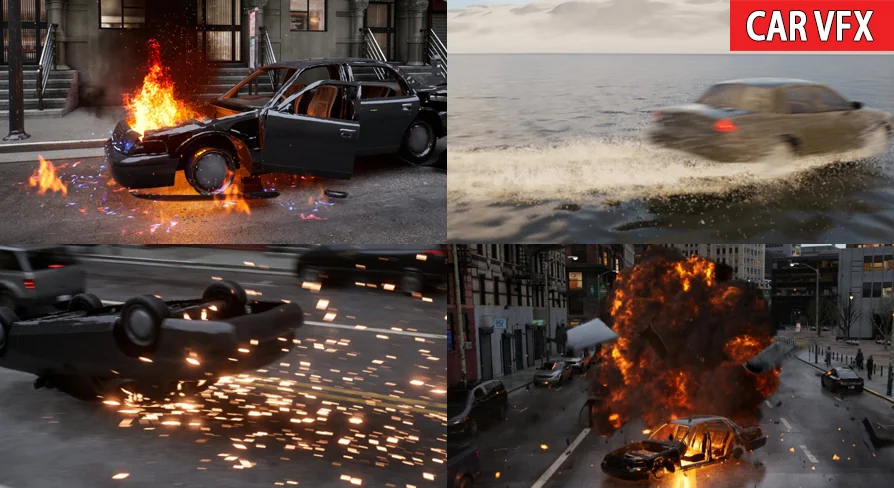
The pack is not limited to one visual beat. Its stated VFX range covers Damaged, Destruction, Environment, Explosion, Idle, Impacts, Parts, And Stunts. That spread matters because vehicle scenes often move through several states in quick succession. A car may enter a shot clean, hit something with force, throw off fragments, trigger smoke or fire, and then settle into a damaged state. By covering those categories together, the collection points toward scene assembly rather than isolated one-off moments.
Car crash and stunt setups, not just isolated bursts
The most useful detail here is the inclusion of Example setups For building car crashes and stunts. That gives the pack a practical role in implementation. Instead of stopping at standalone effects, it provides examples that can be used as a basis for staging larger vehicle events. For artists and developers working on chase scenes, collisions, or heavily scripted stunt beats, that kind of structure helps tie multiple effect types into one sequence.
The pack is also described as Highly customizable. In a vehicle-focused workflow, customization is often what determines whether an effect works across different shots. A minor sideswipe, a hard frontal collision, and a stunt roll do not read the same on screen, even if they share certain visual elements. The pack’s emphasis on customization suggests room to adjust how those events are presented rather than treating every impact as identical.
That flexibility also pairs naturally with the categories included in the pack. Impacts Can serve the immediate strike. Parts Can support pieces breaking away or scattering. Damaged And Idle Can help carry the shot after the main event has passed. Explosion And Destruction Expand the scale when the sequence needs more than a simple hit. Environment Widens the response beyond the vehicle itself, which is important when a crash interacts with the surrounding scene rather than feeling detached from it.
Damaged, Destruction, Impacts, and Parts in one vehicle effects set
The stated effect types reveal how broad the pack’s scene coverage is. Damaged Effects imply the visual language of a car that has already taken a hit or is actively breaking down. Destruction Points toward heavier event-driven moments where the vehicle or nearby objects are being violently disrupted. Impacts Focus on the instant of collision, where timing and force have to read clearly. Parts Adds a physical layer that helps sell the idea that something actually broke loose.
Then there are the categories that help bridge those moments together. Idle Is especially useful in aftermath scenes, where the vehicle is no longer moving at full speed but the event still needs visual residue. Smoke, heat, or subtle lingering activity can do a lot of narrative work in a wrecked scene. Environment Broadens the response beyond the vehicle body, which is often what separates a simple effect from a fully staged crash sequence. Dust, leaves, and surrounding disturbance can connect the car to the world around it.
The tags reinforce that tone. Car, Explosion, Stunt, Niagara, Leaves, Realistic, And Smoke Outline a pack aimed at realistic vehicle action rather than stylized abstraction. Smoke and explosion are expected in a crash-oriented set, but the presence of leaves is notable because it hints at environmental interaction that can help outdoor scenes feel more reactive. Realistic is also an important signal here: the pack is positioned around believable action cues rather than exaggerated fantasy effects.
What 31 effects, 54 materials, 52 textures, 3 blueprints, and 61 meshes suggest
The contents give a clearer sense of scale. Car VFX Includes 31 unique effects, supported by 54 materials, 52 textures, 3 blueprints, and 61 unique meshes. It also includes 1 Car Dummy. Those numbers show that this is not a tiny add-on shaped by a handful of particle bursts. It is a broader collection with enough supporting pieces to assemble different vehicle scenarios from multiple visual elements.
The count of 31 unique effects Points toward variation across crash and stunt situations. Since the pack spans damage, impacts, destruction, idle states, explosions, and parts, those effects are positioned to cover more than one stage of a vehicle event. That matters in practical implementation because variety helps avoid repeating the same response for every crash beat.
54 materials And 52 textures Indicate that the visual treatment is not being carried by a minimal surface setup. Materials and textures are often what shape the look of smoke, debris, surface breakup, and other effect components, so those counts suggest a fairly developed visual library behind the scenes.
The 61 unique meshes Are just as important for a crash-focused pack. Vehicle destruction and stunt moments often need more than particles. Physical-looking fragments, debris forms, and supporting shapes can help impacts feel weightier and more readable. A higher mesh count fits well with the stated focus on parts, destruction, and environmental response.
The inclusion of 3 blueprints Reinforces the implementation angle. Blueprints can serve as a practical bridge between assets and in-scene use, especially when a pack includes example setups. Even without overexplaining how each blueprint is used, their presence shows that the pack is offering some structure for assembling or triggering effects rather than leaving everything as disconnected raw elements.
The Car Dummy Also stands out because it directly supports the vehicle-specific purpose of the pack. Since the collection centers on crashes and stunts, having a car dummy provides a clear point of reference for setup and testing inside those scenarios.
Niagara, realistic smoke, and environment response
The Niagara tag places the pack within a Niagara-based workflow, and that aligns with the creator’s wider catalog, which includes other Niagara-focused effect packs. For teams already working with Niagara, that tag is a practical indicator of where this resource sits in a larger VFX pipeline.
The realistic tone suggested by the tags is also worth paying attention to when thinking about scene use. Vehicle action benefits from effects that feel grounded in the shot. Smoke Is central to that, especially in wrecks, burnouts, aftermath scenes, and hard impacts where visual density lingers after the main movement. Explosion Adds the more extreme end of the scale, while Leaves Suggests useful environmental disturbance for outdoor collisions or stunt passes through natural surroundings.
That combination gives the pack range across both event intensity and scene context. It can support the loud instant of a crash, but it also points toward the less obvious layers that make a vehicle moment believable: air movement, debris response, residual smoke, and interaction with the surrounding environment.
How Car VFX fits projects that stage vehicle action
This pack fits projects that need to assemble vehicle incidents as sequences rather than drop in a single explosion and stop there. The core strength is the mix of crash- and stunt-oriented example setups, multiple effect categories, and a substantial set of supporting materials, textures, meshes, and blueprints. That makes it most relevant when a scene has to move through impact, breakup, debris, and aftermath in a cohesive way.
For teams building car chases, wreck set pieces, or stunt-driven cinematic moments, Car VFX Offers a resource focused on exactly those needs. Its 31 effects, 61 meshes, and broad category coverage make it a practical choice for scenes where damage, parts, smoke, and environmental response all need to work together instead of appearing as separate disconnected events.
 Variety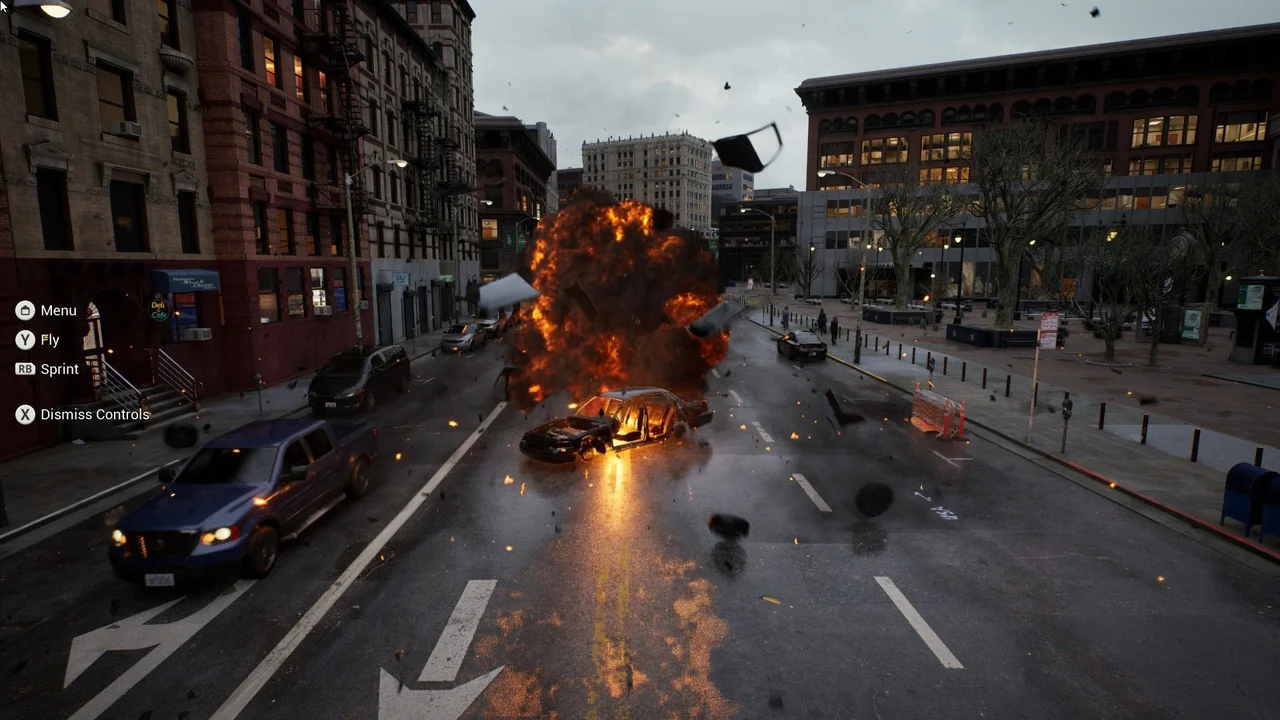
 Variety
 Variety
 Variety