"a19e0535960bd083"{"id":"1002028","slug":"flipbook-maker","title":"FlipBook Maker","category":"Engine Tools","engine":"4.27+,5.0+","assetVersion":"","engineVersion":"Engine Version: 4.27+,5.0+","tag":"Engine Tools","accent":"blue","visual":"mech","summary":"Convert Unreal Engine 5 skeletal mesh animations into flipbook textures and 2D flipbook animations for Paper setups, user widgets, and inventory systems.","platform":"Unreal Engine","publishedAt":"2026-10-26T13:04:08.987Z","updatedAt":"2026-10-26T13:04:08.987Z","sourceNotes":[],"fileContents":[],"compatibility":["Unreal Engine","Engine Version: 4.27+,5.0+"],"featuredImage":{"alt":"FlipBook Maker","src":"/wp-content/uploads/published/2026/10/2d970a54aab6-957f3222-3247-4585-87c5-b6e744ac4c9e-6781be6740.webp"},"hasDownloadLink":true,"downloads":0,"terms":[{"taxonomy":"category","slug":"engine-tools","name":"Engine Tools"}],"galleryImages":[{"src":"/wp-content/uploads/published/2026/10/cd20a9e89764-4185a09a-3ce5-4daf-8846-d49d2f4417b8-30a7247785.webp","alt":"FlipBook Maker"},{"src":"/wp-content/uploads/published/2026/10/da7a86d8cdeb-ee29ff17-e39c-40d0-aca4-88ec91f14f4f-83c54643b1.webp","alt":"FlipBook Maker"},{"src":"/wp-content/uploads/published/2026/10/d594a6907924-f04d4f24-903c-403b-ade2-c92326016fcb-0f5168a26a.webp","alt":"FlipBook Maker"},{"src":"/wp-content/uploads/published/2026/10/5b5274c75349-7bf85d54-5c30-49e6-acca-08b7c29e78ec-63881f3a8a.webp","alt":"FlipBook Maker"},{"src":"/wp-content/uploads/published/2026/10/50a14020e66f-4b7a885b-1381-47b4-be09-f1861727b5d0-132a011be0.webp","alt":"FlipBook Maker"},{"src":"/wp-content/uploads/published/2026/10/235b14feb97a-3a22ebe1-4163-4c13-8dfe-6c616cbefd5b-1338c26257.webp","alt":"FlipBook Maker"}],"accessPanel":{"kind":"resource","title":"Download this resource","eyebrow":"Free Download","message":"Log in or create a free account to start your download.","fileName":"FlipBook Maker.7z","safetyNote":"Resources are manually reviewed before listing to improve quality and reduce obvious risks.","actionLabel":"Download Free","resourceType":"Resource archive"},"contentHtml":"\u003cp\u003eFlipBook Maker functions as a lightweight editor tool in Unreal Engine 5 designed to convert skeletal mesh animations into baked flipbook textures. By extracting motion sequences directly from skeletal rigs, the tool bridges the gap between full 3D skeletal movement and planar 2D sprite workflows. It targets developers looking to compress complex character actions into reusable texture sheets, which can subsequently drive 2D Paper animations or live interface components.\u003c/p\u003e \u003ch2\u003eSkeletal Mesh Animation to FlipBook Texture Conversion\u003c/h2\u003e\n\u003cp\u003eThe primary mechanic of the tool centers on processing skeletal mesh animation sequences directly within the Unreal Engine 5 editor. Rather than requiring external digital content creation software or custom rendering pipelines to capture individual animation frames, the tool reads any skeletal animation assigned to a skeletal mesh and outputs a single flipbook texture layout. This conversion takes the full spatial movement of bones, skinning, and materials, collapsing the visual output into indexed frame grids on a flat texture plane.\u003c/p\u003e \u003cp\u003eCurrently, the tool operates strictly within the scope of skeletal meshes. Static meshes, procedural geometry, or non-rigged visual elements are not part of the capture pipeline. By concentrating exclusively on skeletal meshes, the utility handles bone-driven actions such as walk cycles, combat swings, facial gestures, and idle poses. The resulting texture sheets package the motion in sequential increments, preserving the timing and silhouette of the original 3D asset while drastically reducing runtime computational overhead.\u003c/p\u003e \u003ch2\u003eGenerating 2D FlipBook Animations in Paper Workflows\u003c/h2\u003e\n\u003cp\u003eOnce a skeletal mesh sequence has been baked onto a texture sheet, the generated flipbook texture can be converted directly into a 2D flipbook animation. In Unreal Engine, Paper framework assets rely on these sprite sequences to reconstruct smooth motion without computing vertex skinning or skeletal hierarchies in real time. The tool provides a clean transition from the raw baked image map into a functional 2D flipbook, allowing sprite-based characters and effects to mirror the exact fidelity of a 3D model.\u003c/p\u003e \u003cp\u003eThis conversion pathway simplifies the process of creating hybrid projects or purely 2D games derived from 3D source assets. Because any skeletal animation can be processed, developers can animate characters in 3D space, take advantage of complex inverse kinematics or physics rigs during the authoring phase, and then flatten the performance into clean sprite sheets. The resulting Paper flipbook animations retain regular frame counts and frame rates, making them immediately usable across side-scrollers, top-down setups, or ambient background actors.\u003c/p\u003e \u003ch2\u003eImplementing FlipBooks Inside User Widgets\u003c/h2\u003e\n\u003cp\u003eBeyond standard in-world sprite playback, FlipBook Maker supports the integration of generated flipbooks into user widgets. Displaying animated characters or equipment inside Unreal Motion Graphics (UMG) often requires render targets, dedicated 3D capture scenes, or heavy slate brush sequences that strain performance. FlipBook Maker bypasses those overhead costs by allowing the outputted flipbook texture sheets and animations to drive interface elements directly.\u003c/p\u003e \u003cp\u003eUser widgets can reference the flipbook to display animated portraits, icon states, ability previews, and menu graphics. Because the visual information exists as lightweight texture data, interface designers can incorporate dynamic, moving character representations into multiple HUD elements simultaneously without multiplying viewport draw calls or maintaining secondary 3D camera setups. The animation loops smoothly within standard UI containers, providing high visual polish while maintaining predictable rendering budgets.\u003c/p\u003e \u003ch2\u003eBlueprint Tool Architecture and Editor Execution\u003c/h2\u003e\n\u003cp\u003eThe system is built as an editor-oriented Blueprint tool, keeping the footprint light and the operational flow simple. By existing as a native Unreal Engine 5 tool, it avoids complicated installation steps, third-party software dependencies, or standalone command-line scripts. Developers interact with the asset directly inside the editor interface, targeting the chosen skeletal mesh and selecting the desired animation sequence for conversion.\u003c/p\u003e \u003cp\u003eThe architecture emphasizes low overhead and fast turnaround times. Iterating on character animations often requires repeated captures when timing, lighting, or mesh proportions change. With the tool operating internally, adjustments to a skeletal animation can be baked down into a replacement flipbook texture in minimal steps. The tight coupling with native engine formats ensures that generated textures conform to standard texture settings, compression rules, and resolution requirements automatically.\u003c/p\u003e \u003ch2\u003eWorkflow Integration with Physical Inventory System\u003c/h2\u003e\n\u003cp\u003eFlipBook Maker features verified compatibility with Physical Inventory System, providing a practical method for visualizing items and equipped gear. Inventory interfaces frequently require animated displays of weapons, equipment, or miniature player previews to show active states and selections. Rendering multiple live 3D models within an inventory grid can degrade frame rates, particularly on lower-end hardware or complex UI layouts.\u003c/p\u003e \u003cp\u003eUsing the tool alongside Physical Inventory System allows developers to represent skeletal items—such as spinning item previews, animated wearable gear, or active character inspect screens—as lightweight 2D flipbooks. The inventory UI retains full motion and aesthetic richness while executing through simple sprite playback inside widget slots. This combination ensures high visual fidelity across dense inventory menus without compromising the responsiveness of the underlying item management logic.\u003c/p\u003e\n\n\u003ch2\u003eContinue Browsing Similar Packs\u003c/h2\u003e\n\u003cul\u003e\n\u003cli\u003e\u003ca href=\"https://3dcghub.com/animated-blood-decals-realistic/\" title=\"Animated Blood Decals - Realistic\"\u003eAnimated Blood Decals - Realistic\u003c/a\u003e\u003c/li\u003e\n\u003cli\u003e\u003ca href=\"https://3dcghub.com/arctic-aurora-landscape/\" title=\"Arctic Aurora Landscape\"\u003eArctic Aurora Landscape\u003c/a\u003e\u003c/li\u003e\n\u003cli\u003e\u003ca href=\"https://3dcghub.com/flipbook-vfx-urp/\" title=\"Flipbook VFX - URP\"\u003eFlipbook VFX - URP\u003c/a\u003e\u003c/li\u003e\n\u003cli\u003e\u003ca href=\"https://3dcghub.com/2d-pixel-unit-maker-spum/\" title=\"2D Pixel Unit Maker - SPUM\"\u003e2D Pixel Unit Maker - SPUM\u003c/a\u003e\u003c/li\u003e\n\u003cli\u003e\u003ca href=\"https://3dcghub.com/cinematic-clouds-bp/\" title=\"Cinematic Clouds BP\"\u003eCinematic Clouds BP\u003c/a\u003e\u003c/li\u003e\n\u003c/ul\u003e","contentTextLength":5918,"navigation":{"current":63,"total":4026,"previous":{"id":"1002029","slug":"footstep-sound-component","title":"Footstep Sound Component","category":"Gameplay Features","platform":"Unreal Engine","updatedAt":"2026-10-26T13:32:14.260Z"},"next":{"id":"1002027","slug":"fitness-hall-sports-equipment","title":"Fitness hall - sports equipment","category":"Interior","platform":"Unreal Engine","updatedAt":"2026-10-26T13:03:08.441Z"}},"relatedResources":[{"id":"13412","slug":"animated-blood-decals-realistic","title":"Animated Blood Decals - Realistic","category":"Tools, Objects \u0026 Decor","engine":"4.26+,5.0+","assetVersion":"Engine version: 4.26+,5.0+","engineVersion":"4.19","tag":"Tools","accent":"blue","visual":"animation","summary":"Enhance your project with 15 realistic animated blood decals. This pack includes blood pools, droplets, and splatters driven by a custom blueprint actor for maximum visual impact.","platform":"Unreal Engine","publishedAt":"2026-03-10T17:00:08.000Z","updatedAt":"2026-04-19T15:46:28.000Z","sourceNotes":[],"fileContents":[],"compatibility":["Unreal Engine","Engine version: 4.26+,5.0+"],"featuredImage":{"alt":"Animated Blood Decals - Realistic","src":"https://3dcghub.com/wp-content/uploads/2026/03/040c39f6-0f53-4d49-af7d-60add91e8fe0.webp"},"hasDownloadLink":true,"downloads":1},{"id":"28484","slug":"arctic-aurora-landscape","title":"Arctic Aurora Landscape","category":"Mountain","engine":"4.26+,5.0+","assetVersion":"Engine version: 4.26+,5.0+","engineVersion":"","tag":"Mountain","accent":"blue","visual":"city","summary":"Arctic Aurora Landscape centers on a realistic snowy mountain scene shaped by layered terrain, aurora-filled skies, and atmospheric particles. It combines detailed landscape shaders, snow-covered vegetation, distant mountain backdrops, and lighting settings...","platform":"Unreal Engine","publishedAt":"2026-05-15T17:17:38.000Z","updatedAt":"2026-05-15T17:17:39.000Z","sourceNotes":[],"fileContents":[],"compatibility":["Unreal Engine","Engine version: 4.26+,5.0+"],"featuredImage":{"alt":"Arctic Aurora Landscape","src":"https://3dcghub.com/wp-content/uploads/2026/05/e519b62c651a_7fcc4b27-978c-4834-9de9-f4fe863e8487.webp"},"hasDownloadLink":true,"downloads":1},{"id":"23718","slug":"flipbook-vfx-urp","title":"Flipbook VFX - URP","category":"VFX","engine":"Original Unity version: 2020.3.14","assetVersion":"Original Unity version: 2020.3.14","engineVersion":"Asset Version:1.0.231","tag":"VFX","accent":"cyan","visual":"character","summary":"Flipbook VFX - URP brings stylized effects into URP projects with a setup that stays close to Shuriken Particle Systems. It includes SFX, custom flipbook shaders, and a wide set of effects for combat, magic, impact, fire, water, and dust scenes.","platform":"Unity","publishedAt":"2026-04-11T16:35:19.000Z","updatedAt":"2026-04-19T15:35:13.000Z","sourceNotes":[],"fileContents":[],"compatibility":["Unity","Original Unity version: 2020.3.14","Asset Version: 1.0.231"],"featuredImage":{"alt":"Flipbook VFX - URP","src":"https://3dcghub.com/wp-content/uploads/2026/04/88ad2b996c3d_6caf0230-c3bc-4fa8-8bec-c826c811fb4d_1280x720_stretch.webp"},"hasDownloadLink":true,"downloads":11}]}
Engine Tools
FlipBook Maker
Convert Unreal Engine 5 skeletal mesh animations into flipbook textures and 2D flipbook animations for Paper setups, user widgets, and inventory systems.
Category:Unreal Engine,Engine ToolsPlatform: Unreal EngineEngine Version: 4.27+,5.0+Published: Oct 26, 2026
Engine Tools
Resource overview
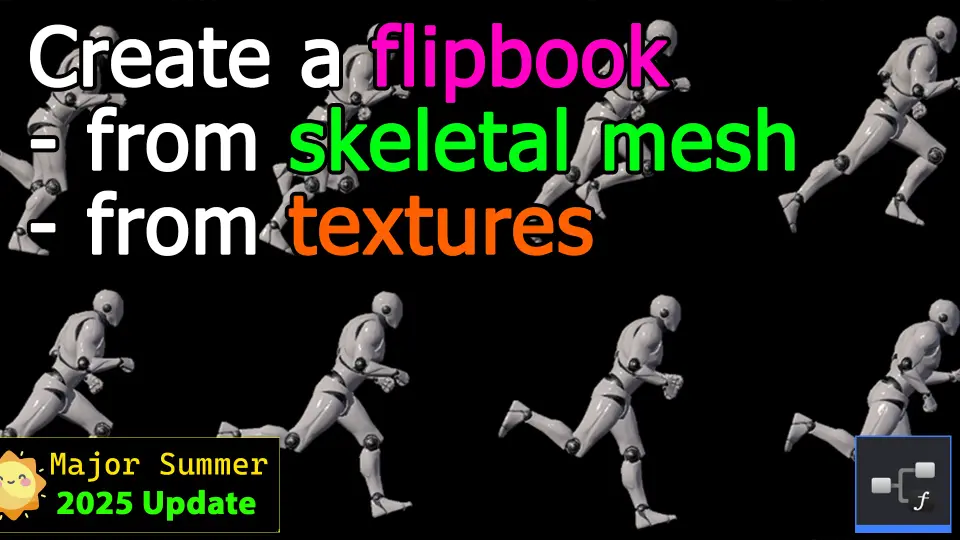
FlipBook Maker functions as a lightweight editor tool in Unreal Engine 5 designed to convert skeletal mesh animations into baked flipbook textures. By extracting motion sequences directly from skeletal rigs, the tool bridges the gap between full 3D skeletal movement and planar 2D sprite workflows. It targets developers looking to compress complex character actions into reusable texture sheets, which can subsequently drive 2D Paper animations or live interface components.
Skeletal Mesh Animation to FlipBook Texture Conversion
The primary mechanic of the tool centers on processing skeletal mesh animation sequences directly within the Unreal Engine 5 editor. Rather than requiring external digital content creation software or custom rendering pipelines to capture individual animation frames, the tool reads any skeletal animation assigned to a skeletal mesh and outputs a single flipbook texture layout. This conversion takes the full spatial movement of bones, skinning, and materials, collapsing the visual output into indexed frame grids on a flat texture plane.
Currently, the tool operates strictly within the scope of skeletal meshes. Static meshes, procedural geometry, or non-rigged visual elements are not part of the capture pipeline. By concentrating exclusively on skeletal meshes, the utility handles bone-driven actions such as walk cycles, combat swings, facial gestures, and idle poses. The resulting texture sheets package the motion in sequential increments, preserving the timing and silhouette of the original 3D asset while drastically reducing runtime computational overhead.
Generating 2D FlipBook Animations in Paper Workflows
Once a skeletal mesh sequence has been baked onto a texture sheet, the generated flipbook texture can be converted directly into a 2D flipbook animation. In Unreal Engine, Paper framework assets rely on these sprite sequences to reconstruct smooth motion without computing vertex skinning or skeletal hierarchies in real time. The tool provides a clean transition from the raw baked image map into a functional 2D flipbook, allowing sprite-based characters and effects to mirror the exact fidelity of a 3D model.
This conversion pathway simplifies the process of creating hybrid projects or purely 2D games derived from 3D source assets. Because any skeletal animation can be processed, developers can animate characters in 3D space, take advantage of complex inverse kinematics or physics rigs during the authoring phase, and then flatten the performance into clean sprite sheets. The resulting Paper flipbook animations retain regular frame counts and frame rates, making them immediately usable across side-scrollers, top-down setups, or ambient background actors.
Implementing FlipBooks Inside User Widgets
Beyond standard in-world sprite playback, FlipBook Maker supports the integration of generated flipbooks into user widgets. Displaying animated characters or equipment inside Unreal Motion Graphics (UMG) often requires render targets, dedicated 3D capture scenes, or heavy slate brush sequences that strain performance. FlipBook Maker bypasses those overhead costs by allowing the outputted flipbook texture sheets and animations to drive interface elements directly.
User widgets can reference the flipbook to display animated portraits, icon states, ability previews, and menu graphics. Because the visual information exists as lightweight texture data, interface designers can incorporate dynamic, moving character representations into multiple HUD elements simultaneously without multiplying viewport draw calls or maintaining secondary 3D camera setups. The animation loops smoothly within standard UI containers, providing high visual polish while maintaining predictable rendering budgets.
Blueprint Tool Architecture and Editor Execution
The system is built as an editor-oriented Blueprint tool, keeping the footprint light and the operational flow simple. By existing as a native Unreal Engine 5 tool, it avoids complicated installation steps, third-party software dependencies, or standalone command-line scripts. Developers interact with the asset directly inside the editor interface, targeting the chosen skeletal mesh and selecting the desired animation sequence for conversion.
The architecture emphasizes low overhead and fast turnaround times. Iterating on character animations often requires repeated captures when timing, lighting, or mesh proportions change. With the tool operating internally, adjustments to a skeletal animation can be baked down into a replacement flipbook texture in minimal steps. The tight coupling with native engine formats ensures that generated textures conform to standard texture settings, compression rules, and resolution requirements automatically.
Workflow Integration with Physical Inventory System
FlipBook Maker features verified compatibility with Physical Inventory System, providing a practical method for visualizing items and equipped gear. Inventory interfaces frequently require animated displays of weapons, equipment, or miniature player previews to show active states and selections. Rendering multiple live 3D models within an inventory grid can degrade frame rates, particularly on lower-end hardware or complex UI layouts.
Using the tool alongside Physical Inventory System allows developers to represent skeletal items—such as spinning item previews, animated wearable gear, or active character inspect screens—as lightweight 2D flipbooks. The inventory UI retains full motion and aesthetic richness while executing through simple sprite playback inside widget slots. This combination ensures high visual fidelity across dense inventory menus without compromising the responsiveness of the underlying item management logic.
 Engine Tools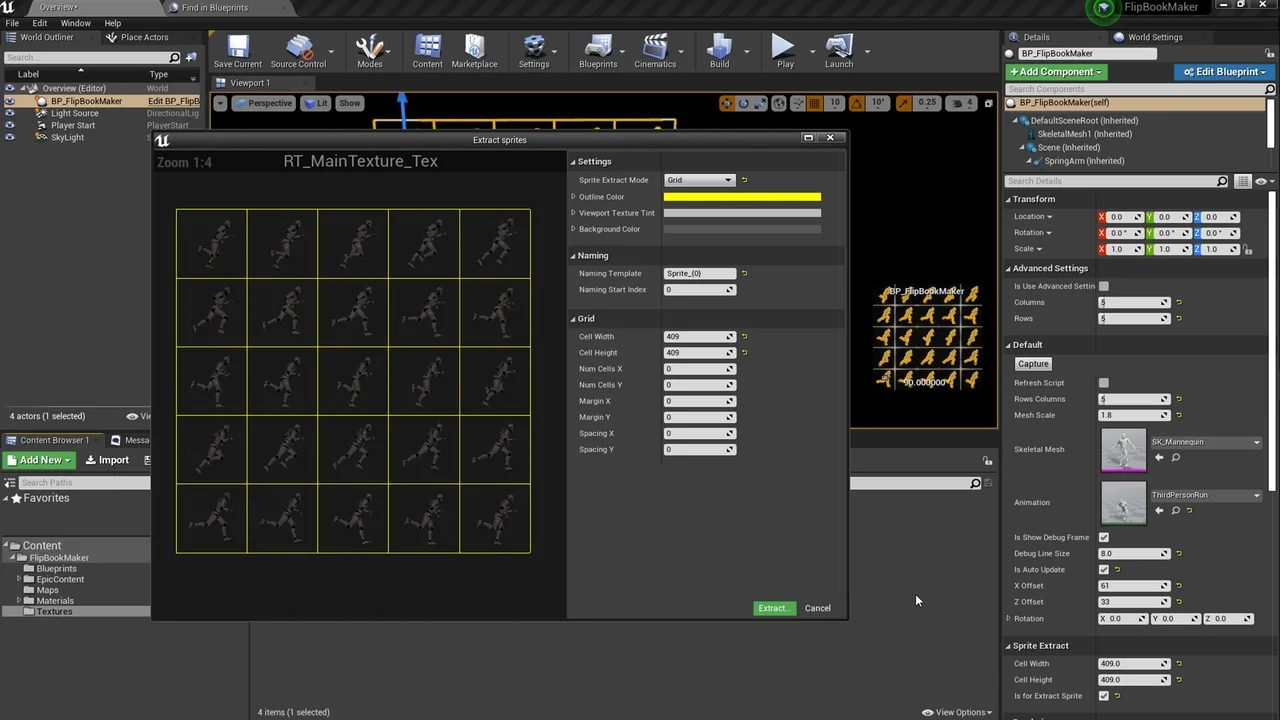
 Tools
Tools Mountain
 VFX
VFX