"4481da9c895ef786"{"id":"1001309","slug":"exec-cmd-dtcmd","title":"Exec CMD - DTCmd","category":"Engine Tools","engine":"4.26 - 5.8","assetVersion":"Asset Version: 1.3","engineVersion":"Engine Version: 4.26 - 5.8","tag":"Engine Tools","accent":"blue","visual":"mech","summary":"Run Windows command-line tasks, launch executables via full paths, execute batch scripts, and monitor console output without blocking Blueprint execution.","platform":"Unreal Engine","publishedAt":"2026-10-02T08:07:36.704Z","updatedAt":"2026-10-02T08:07:36.704Z","sourceNotes":[],"fileContents":[],"compatibility":["Unreal Engine","Asset Version: 1.3","Engine Version: 4.26 - 5.8"],"featuredImage":{"alt":"Exec CMD - DTCmd","src":"/wp-content/uploads/published/2026/10/680a85c7c937-3890e9e9-91ef-4940-a9df-64f25088660f-dd5e2e42ad.webp"},"hasDownloadLink":true,"downloads":0,"terms":[{"taxonomy":"category","slug":"engine-tools-tools-and-plugins","name":"Engine Tools"}],"galleryImages":[{"src":"/wp-content/uploads/published/2026/10/821d3745604a-f79dbf69-ea63-4d46-8d42-315f85ffbb18-f4699c0a43.webp","alt":"Exec CMD - DTCmd"},{"src":"/wp-content/uploads/published/2026/10/feea940aef37-a813d566-c800-4542-ae3f-e8ce14136882-90908fcbb8.webp","alt":"Exec CMD - DTCmd"},{"src":"/wp-content/uploads/published/2026/10/83f174fbcbdc-8b0f51a1-25f9-48c0-a03f-166ef75fd2b6-25ac67d4d3.webp","alt":"Exec CMD - DTCmd"},{"src":"/wp-content/uploads/published/2026/10/1a3732359f52-fccf720c-6388-43cf-81a1-495e0268f3fb-1ff6b0b189.webp","alt":"Exec CMD - DTCmd"}],"accessPanel":{"kind":"resource","title":"Download this resource","eyebrow":"Free Download","message":"Log in or create a free account to start your download.","fileName":"Exec CMD - DTCmd.7z","safetyNote":"Resources are manually reviewed before listing to improve quality and reduce obvious risks.","actionLabel":"Download Free","resourceType":"Resource archive"},"contentHtml":"\u003cp\u003eExec CMD - DTCmd provides a dedicated mechanism for bridging Unreal Engine visual scripting with the Windows operating system shell. Built specifically for Blueprint workflows, the tool delivers non-blocking command execution, standard output monitoring, return code acquisition, direct executable launching via full file paths, and batch script handling.\u003c/p\u003e \u003ch2\u003eNon-Blocking Windows Command Execution in Blueprint Graphs\u003c/h2\u003e\n\u003cp\u003eRunning operating system commands from an engine's main execution thread often risks frame stalls or total visual freezes whenever a child process takes time to complete. Exec CMD - DTCmd addresses this fundamental issue by running Windows command-line operations asynchronously. When a command is triggered through a Blueprint node, the parent application remains fully responsive while the requested process operates independently in the operating system environment.\u003c/p\u003e\n\u003cp\u003eBecause the command execution is decoupled from the frame loop, developers can trigger lengthy system-level utilities, data transfers, or file system modifications without stalling rendering, physics, or game logic. The task runs in the background, allowing Blueprint graphs to dispatch shell instructions cleanly without locking up the user interface or stalling real-time simulations.\u003c/p\u003e \u003ch2\u003eContinuous Output Monitoring and Return Value Capture\u003c/h2\u003e\n\u003cp\u003eMany system processes do not merely complete silently; they emit status indicators, diagnostic lines, and exit codes. Exec CMD - DTCmd is built to monitor the standard output stream generated by running operations and extract the final return value upon completion.\u003c/p\u003e\n\u003cp\u003eThe ability to monitor output content from time to time provides visibility into long-running tasks. Instead of waiting blindly for an entire process to finish, Blueprints can track line-by-line messages or interim data emitted by the console. Once the task terminates, the node returns the final exit code or return value, giving the visual script explicit confirmation of whether the operation concluded successfully or encountered an error condition. This feedback loop makes it practical to build downstream logic that responds dynamically to command success or failure.\u003c/p\u003e \u003ch2\u003eDirect Program Launching via Full File Paths\u003c/h2\u003e\n\u003cp\u003eIn addition to raw command-line text, Exec CMD - DTCmd includes the direct capability to launch third-party programs. This functionality requires providing the full file path to the target executable, isolating the operation from ambiguous system environment variable lookups.\u003c/p\u003e\n\u003cp\u003eBy defining the absolute path to an executable binary, projects can spin up auxiliary desktop software, secondary diagnostic utilities, or external rendering helpers directly from engine logic. The program executes within the Windows environment while the engine maintains control over the execution trigger, establishing a clean pipeline between interactive Blueprint events and standalone software packages installed on the host machine.\u003c/p\u003e \u003ch2\u003eExecuting Custom Operations Through Bat Scripts\u003c/h2\u003e\n\u003cp\u003eComplex command sequences often require chaining multiple utilities, setting temporary environment variables, or iterating through local directories. Rather than forcing developers to construct complex, multi-line command strings within a single Blueprint string literal, Exec CMD - DTCmd can execute Windows batch (.bat) scripts directly.\u003c/p\u003e\n\u003cp\u003eRunning a.bat file allows projects to delegate any arbitrary operation supported by the Windows command shell to an external script file. Developers can write customized routines within the script—such as archive extraction, file renaming, hardware state inspection, or local server management—and call that file through a clean Blueprint node. Because the batch execution inherits the non-blocking execution model, entire multi-step administrative routines can run in the background while the live engine session continues uninterrupted.\u003c/p\u003e \u003ch2\u003eSystem Tooling and Mqtt Client Compatibility Context\u003c/h2\u003e\n\u003cp\u003eBy connecting low-level system commands, console output listeners, executable management, and.bat script automation, Exec CMD - DTCmd functions as an operating system integration layer for Blueprint projects. The tool lists explicit compatibility with Mqtt Client implementations, making it relevant for setups that coordinate local machine behavior alongside networked messaging protocols or external broker architectures.\u003c/p\u003e\n\u003cp\u003eWhether used to monitor console output streams, launch specialized host applications by path, or execute batch routines behind the scenes, the package provides a grounded toolset for managing host machine processes without stalling the primary engine thread.\u003c/p\u003e\n\n\u003ch2\u003eMore From The Same Workflow\u003c/h2\u003e\n\u003cul\u003e\n\u003cli\u003e\u003ca href=\"https://3dcghub.com/runtime-speech-recognizer-real-time-offline-ai/\" title=\"Runtime Speech Recognizer (Real-Time, Offline, AI)\"\u003eRuntime Speech Recognizer (Real-Time, Offline, AI)\u003c/a\u003e\u003c/li\u003e\n\u003cli\u003e\u003ca href=\"https://3dcghub.com/audio-analysis-tools-beat-detection/\" title=\"Audio Analysis Tools (Beat Detection)\"\u003eAudio Analysis Tools (Beat Detection)\u003c/a\u003e\u003c/li\u003e\n\u003cli\u003e\u003ca href=\"https://3dcghub.com/objectdeliverer-tcp-udp-websocket-shared-memory-etc/\" title=\"ObjectDeliverer(TCP/UDP/WebSocket/Shared Memory/etc.)\"\u003eObjectDeliverer(TCP/UDP/WebSocket/Shared Memory/etc.)\u003c/a\u003e\u003c/li\u003e\n\u003cli\u003e\u003ca href=\"https://3dcghub.com/electronic-nodes/\" title=\"Electronic Nodes\"\u003eElectronic Nodes\u003c/a\u003e\u003c/li\u003e\n\u003cli\u003e\u003ca href=\"https://3dcghub.com/dynamic-ai-system/\" title=\"Dynamic AI System\"\u003eDynamic AI System\u003c/a\u003e\u003c/li\u003e\n\u003c/ul\u003e","contentTextLength":4797,"navigation":{"current":29,"total":3269,"previous":{"id":"1001310","slug":"global-search-pro","title":"Global Search Pro","category":"Engine Tools","platform":"Unreal Engine","updatedAt":"2026-10-02T08:08:28.344Z"},"next":{"id":"1001308","slug":"voyager-cover-system","title":"Voyager: Cover System","category":"Gameplay Features","platform":"Unreal Engine","updatedAt":"2026-10-02T06:21:52.066Z"}},"relatedResources":[{"id":"1001324","slug":"flipwidget","title":"FlipWidget","category":"Engine Tools","engine":"4.24 - 5.8","assetVersion":"Asset Version: 1.0 - 1.3","engineVersion":"Engine Version: 4.24 - 5.8","tag":"Engine Tools","accent":"blue","visual":"mech","summary":"FlipWidget brings native C++ flipbook animation to UMG, pairing runtime Blueprint nodes and Image widget parity with custom size controls.","platform":"Unreal Engine","publishedAt":"2026-10-02T09:52:09.334Z","updatedAt":"2026-10-02T09:52:09.334Z","sourceNotes":[],"fileContents":[],"compatibility":["Unreal Engine","Asset Version: 1.0 - 1.3","Engine Version: 4.24 - 5.8"],"featuredImage":{"alt":"FlipWidget","src":"/wp-content/uploads/published/2026/10/65077073d754-56e1e806-c4e0-458d-bd37-040d2fcd3882-1cb4d08f7c.webp"},"hasDownloadLink":true,"downloads":0},{"id":"14519","slug":"runtime-speech-recognizer-real-time-offline-ai","title":"Runtime Speech Recognizer (Real-Time, Offline, AI)","category":"Engine Tools","engine":"4.27 - 5.8","assetVersion":"Asset Version:1.0","engineVersion":"Engine version: 4.27 - 5.8","tag":"Engine Tools","accent":"blue","visual":"city","summary":"Enhance your project with Runtime Speech Recognizer (Real-Time, Offline, AI), a plugin that enables high-performance voice commands and speech-to-text without an internet connection. Powered by OpenAI Whisper, it supports over 95 languages and features GPU...","platform":"Unreal Engine","publishedAt":"2026-03-11T18:21:42.000Z","updatedAt":"2026-09-30T02:57:30.475Z","sourceNotes":[],"fileContents":[],"compatibility":["Unreal Engine","Asset Version:1.0","Engine version: 4.27 - 5.8"],"featuredImage":{"alt":"Runtime Speech Recognizer (Real-Time, Offline, AI)","src":"https://3dcghub.com/wp-content/uploads/2026/03/865b5e7a-61c2-4de8-83da-c2cc3aa6c0a4.webp"},"hasDownloadLink":true,"downloads":1},{"id":"1001263","slug":"audio-analysis-tools-beat-detection","title":"Audio Analysis Tools (Beat Detection)","category":"Engine Tools","engine":"4.26 - 5.8","assetVersion":"Asset Version: 1.0","engineVersion":"Engine Version: 4.26 - 5.8","tag":"Engine Tools","accent":"blue","visual":"audio","summary":"Run real-time FFT audio analysis, beat tracking, and spectral evaluation across all Unreal Engine platforms with Audio Analysis Tools.","platform":"Unreal Engine","publishedAt":"2026-09-30T05:40:53.094Z","updatedAt":"2026-09-30T05:40:53.094Z","sourceNotes":[],"fileContents":[],"compatibility":["Unreal Engine","Asset Version: 1.0","Engine Version: 4.26 - 5.8"],"featuredImage":{"alt":"Audio Analysis Tools (Beat Detection)","src":"/wp-content/uploads/published/2026/09/c0fd3709a5eb-9fa60615-c929-4bd5-96ce-ce1efad85174-5b1eb79cba.webp"},"hasDownloadLink":true,"downloads":0}]}
Engine Tools
Exec CMD - DTCmd
Run Windows command-line tasks, launch executables via full paths, execute batch scripts, and monitor console output without blocking Blueprint execution.
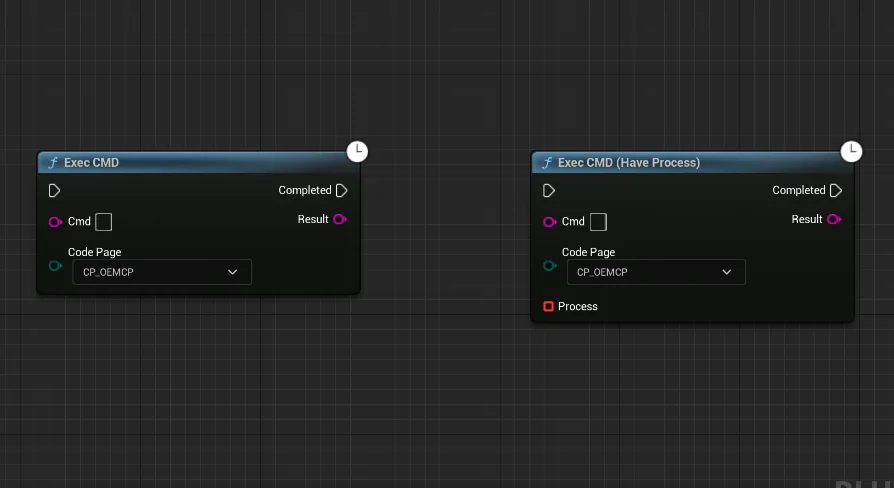
Exec CMD - DTCmd provides a dedicated mechanism for bridging Unreal Engine visual scripting with the Windows operating system shell. Built specifically for Blueprint workflows, the tool delivers non-blocking command execution, standard output monitoring, return code acquisition, direct executable launching via full file paths, and batch script handling.
Non-Blocking Windows Command Execution in Blueprint Graphs
Running operating system commands from an engine's main execution thread often risks frame stalls or total visual freezes whenever a child process takes time to complete. Exec CMD - DTCmd addresses this fundamental issue by running Windows command-line operations asynchronously. When a command is triggered through a Blueprint node, the parent application remains fully responsive while the requested process operates independently in the operating system environment.
Because the command execution is decoupled from the frame loop, developers can trigger lengthy system-level utilities, data transfers, or file system modifications without stalling rendering, physics, or game logic. The task runs in the background, allowing Blueprint graphs to dispatch shell instructions cleanly without locking up the user interface or stalling real-time simulations.
Continuous Output Monitoring and Return Value Capture
Many system processes do not merely complete silently; they emit status indicators, diagnostic lines, and exit codes. Exec CMD - DTCmd is built to monitor the standard output stream generated by running operations and extract the final return value upon completion.
The ability to monitor output content from time to time provides visibility into long-running tasks. Instead of waiting blindly for an entire process to finish, Blueprints can track line-by-line messages or interim data emitted by the console. Once the task terminates, the node returns the final exit code or return value, giving the visual script explicit confirmation of whether the operation concluded successfully or encountered an error condition. This feedback loop makes it practical to build downstream logic that responds dynamically to command success or failure.
Direct Program Launching via Full File Paths
In addition to raw command-line text, Exec CMD - DTCmd includes the direct capability to launch third-party programs. This functionality requires providing the full file path to the target executable, isolating the operation from ambiguous system environment variable lookups.
By defining the absolute path to an executable binary, projects can spin up auxiliary desktop software, secondary diagnostic utilities, or external rendering helpers directly from engine logic. The program executes within the Windows environment while the engine maintains control over the execution trigger, establishing a clean pipeline between interactive Blueprint events and standalone software packages installed on the host machine.
Executing Custom Operations Through Bat Scripts
Complex command sequences often require chaining multiple utilities, setting temporary environment variables, or iterating through local directories. Rather than forcing developers to construct complex, multi-line command strings within a single Blueprint string literal, Exec CMD - DTCmd can execute Windows batch (.bat) scripts directly.
Running a.bat file allows projects to delegate any arbitrary operation supported by the Windows command shell to an external script file. Developers can write customized routines within the script—such as archive extraction, file renaming, hardware state inspection, or local server management—and call that file through a clean Blueprint node. Because the batch execution inherits the non-blocking execution model, entire multi-step administrative routines can run in the background while the live engine session continues uninterrupted.
System Tooling and Mqtt Client Compatibility Context
By connecting low-level system commands, console output listeners, executable management, and.bat script automation, Exec CMD - DTCmd functions as an operating system integration layer for Blueprint projects. The tool lists explicit compatibility with Mqtt Client implementations, making it relevant for setups that coordinate local machine behavior alongside networked messaging protocols or external broker architectures.
Whether used to monitor console output streams, launch specialized host applications by path, or execute batch routines behind the scenes, the package provides a grounded toolset for managing host machine processes without stalling the primary engine thread.
 Engine Tools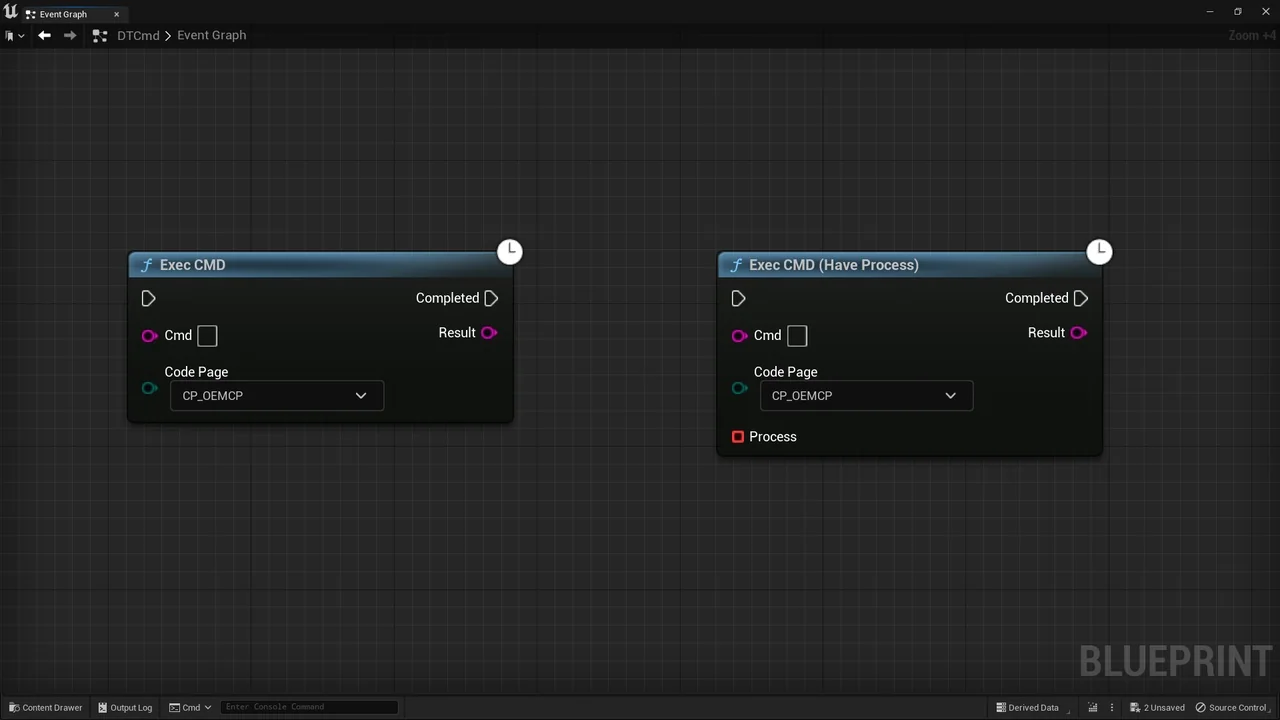
 Engine Tools
 Engine Tools
 Engine Tools