"d27121fc7467914a"{"id":"1002299","slug":"electricity-toolkit","title":"Electricity Toolkit","category":"Procedural Systems","engine":"4.26+,5.0+","assetVersion":"","engineVersion":"Engine Version: 4.26+,5.0+","tag":"Procedural Systems","accent":"blue","visual":"city","summary":"A Blueprint framework for cable connections, power management, switches and circuits, with emitter, transmitter and receiver roles plus working examples.","platform":"Unreal Engine","indexPolicy":"index","publishedAt":"2026-11-05T10:01:39.307Z","updatedAt":"2026-11-05T10:01:39.307Z","sourceNotes":[],"fileContents":[],"compatibility":["Unreal Engine","Engine Version: 4.26+,5.0+"],"featuredImage":{"alt":"Electricity Toolkit","src":"/wp-content/uploads/published/2026/11/c6d7e776cda7-4b4e5172-9b08-4be8-81d0-90994de03f9f-bcc1d573e2.webp"},"hasDownloadLink":true,"downloads":0,"terms":[{"taxonomy":"category","slug":"procedural-systems","name":"Procedural Systems"}],"galleryImages":[{"src":"/wp-content/uploads/published/2026/11/82508d5386a3-9193845b-141b-42a3-9acc-ed55ab784ce6-fc12386c9b.webp","alt":"Electricity Toolkit"},{"src":"/wp-content/uploads/published/2026/11/d7461c09002b-dfed87c1-1942-46b1-9ae0-3ebbbdcffe6d-a5b81b49ed.webp","alt":"Electricity Toolkit"},{"src":"/wp-content/uploads/published/2026/11/c01bac1401c3-49c41da1-ce55-44f2-b3ae-5a31b2c9b558-b09fc55ec3.webp","alt":"Electricity Toolkit"},{"src":"/wp-content/uploads/published/2026/11/087d656cd6d8-cdacbc52-36f3-42c2-b0af-7e784f11ba6d-cb7b16836e.webp","alt":"Electricity Toolkit"},{"src":"/wp-content/uploads/published/2026/11/9ab75c178b69-d7f1cac4-6489-463a-bfe9-3759e5b4d05c-8d0d49a2b1.webp","alt":"Electricity Toolkit"},{"src":"/wp-content/uploads/published/2026/11/f6f1de646972-c0755a2b-0dff-4f1f-b060-493c09d26f66-bc4bca9f81.webp","alt":"Electricity Toolkit"},{"src":"/wp-content/uploads/published/2026/11/fd7ae5c9f4ea-ae49d024-295c-493a-875f-64101d93dc9f-d6a7fcc761.webp","alt":"Electricity Toolkit"},{"src":"/wp-content/uploads/published/2026/11/4ee10940763c-2067d845-4ca1-476d-af44-4b211fb34624-f954f06c7d.webp","alt":"Electricity Toolkit"},{"src":"/wp-content/uploads/published/2026/11/e279513418b2-60575fa1-1ba4-47d3-a78b-0d81b8169074-d93d7f60cb.webp","alt":"Electricity Toolkit"}],"accessPanel":{"kind":"resource","title":"Get this resource","eyebrow":"Free resource","message":"3DCGHUB is a discovery service. EduQuill provides the file, account, quotas and delivery.","fileName":"Content.7z","safetyNote":"Resources are manually reviewed before listing to improve quality and reduce obvious risks.","actionLabel":"Get from EduQuill","resourceType":"Resource archive","versions":[]},"contentHtml":"\u003cp\u003eWire a generator to a door, put a switch in between, and the door answers the switch. That chain — source, conductor, destination — is what Electricity Toolkit reproduces inside a project, treating cables, power management, switches and circuits as framework pieces instead of hand-coded one-offs.\u003c/p\u003e\n\u003cp\u003eNothing in the system is locked to one specific prop. Anything that emits a signal can start a circuit. Anything that reacts can end it. That flexibility is the whole reason the pack can be dropped into a sandbox game and handed to players as a toy box rather than a fixed set of interactive objects.\u003c/p\u003e \u003ch2\u003eEmitter, transmitter, receiver: the three roles a circuit is made of\u003c/h2\u003e\n\u003cp\u003eThe framework splits electricity into three jobs, and each one is intentionally loose about what fills it.\u003c/p\u003e\n\u003cul\u003e\n\u003cli\u003e\u003cstrong\u003eEmitter\u003c/strong\u003e — sends an electric signal through the circuit. A generator is the obvious candidate, and a battery works just as well, but the role is open to anything the project needs as a source.\u003c/li\u003e\n\u003cli\u003e\u003cstrong\u003eTransmitter\u003c/strong\u003e — the thing that transmits electricity. This is the layer that carries the signal onward rather than deciding what it does.\u003c/li\u003e\n\u003cli\u003e\u003cstrong\u003eReceiver\u003c/strong\u003e — whatever sits at the far end. Simple lights are one option, complex traps are another. Switches that alter the flow and pressure plates that spring traps both live here.\u003c/li\u003e\n\u003c/ul\u003e\n\u003cp\u003eBecause the receiver slot accepts anything, the same three roles cover a lamp, a gate, a hazard, or a switch that reroutes the whole chain. Logic devices, contraptions and machines all come out of the same structure, which is what makes the pack suitable for sandbox play where players build their own arrangements instead of following a scripted sequence.\u003c/p\u003e \u003ch2\u003eCables, power management and switches as reusable parts\u003c/h2\u003e\n\u003cp\u003eReal-life-like cable connections sit at the center of the simulation. Circuits are what the system reasons about, and switches act on the flow rather than acting on individual props. A switch does not need to know that a door exists at the other end — it changes the state of the circuit and the circuit carries the consequence.\u003c/p\u003e\n\u003cp\u003eThat separation matters in production. Content built once can be rewired in the level without new logic, and a designer assembling a scene is placing parts into a running system rather than asking for code every time a new combination appears. The framework's stated purpose is exactly this: giving players the ability to express themselves through interesting logic-based devices, contraptions and machines without the studio spending months coding the core logic of the system.\u003c/p\u003e \u003ch2\u003eWhat ships as working examples\u003c/h2\u003e\n\u003cp\u003eThe package includes a set of demonstrations that show the roles in use, and they read like a short tour of the system's range:\u003c/p\u003e\n\u003cul\u003e\n\u003cli\u003eAutomatic door\u003c/li\u003e\n\u003cli\u003eSwitch and button\u003c/li\u003e\n\u003cli\u003ePressure plate\u003c/li\u003e\n\u003cli\u003eFlamethrower trap\u003c/li\u003e\n\u003cli\u003eGenerator\u003c/li\u003e\n\u003cli\u003eSpotlights and construction lights\u003c/li\u003e\n\u003cli\u003eElectric poles\u003c/li\u003e\n\u003c/ul\u003e\n\u003cp\u003eGrouped together, those cover the ordinary and the dramatic ends of the same mechanic — a button that opens a door and a pressure plate that fires a trap are the same emitter-to-receiver relationship with different payloads. The lighting entries and the poles also give scenes the lowpoly hardware that makes a cable run legible in the world rather than abstract. Showcase assets are included alongside the framework, so the examples are not just diagrams.\u003c/p\u003e \u003ch2\u003eWhy the essential logic stays off Event Tick\u003c/h2\u003e\n\u003cp\u003ePerformance was treated as a design constraint. The essential circuit logic does not use Event Tick. Tick appears only in a debug mode, and that debug mode can be deleted. The practical result, as stated, is that the system will not affect performance at all.\u003c/p\u003e\n\u003cp\u003eFor a sandbox title this is the difference between a system that scales and one that quietly taxes every frame. Circuits are a background concern most of the time — a door is closed, a trap is idle, a light is off — and paying per-frame for every idle device is waste. Keeping the core logic off the tick loop and confining the per-frame part to a removable debug layer means the framework can be left in place across a whole level without becoming the thing that drags the frame budget down.\u003c/p\u003e \u003ch2\u003eReading the Blueprints before you extend them\u003c/h2\u003e\n\u003cp\u003eThe framework is meant to be opened, not treated as a black box. Every variable carries a tooltip explaining what it does. Every Blueprint is commented. Every node is tidy and organized, so following a signal from emitter to receiver does not mean untangling a graph.\u003c/p\u003e\n\u003cp\u003eExtending the pack assumes basic knowledge on the part of whoever does it. That is a fair line to draw: the three roles and the examples give a working base, and the comments and tooltips give the orientation needed to add a new receiver or a new emitter type, but the person doing that work should already be comfortable inside Blueprints.\u003c/p\u003e \u003ch2\u003eWhere it fits on a project\u003c/h2\u003e\n\u003cp\u003eThe natural home is a sandbox game, or any project where players are expected to assemble their own devices. Instead of building a bespoke interaction for each prop, a team adopts emitter, transmitter and receiver as the vocabulary and lets cables and circuits do the connecting work. Level designers get a system that responds to arrangement; players get machinery they can reason about, because a switch changes a flow and a flow drives a device.\u003c/p\u003e\n\u003cp\u003eThe most concrete takeaway for a team evaluating the pack is the division of labor it imposes: signals are emitted, transmitted and received, the core logic stays off Event Tick, and the debug layer is disposable. Everything the players build afterward sits on top of that, without new code underneath.\u003c/p\u003e\n\n\u003ch2\u003eContinue Browsing Similar Packs\u003c/h2\u003e\n\u003cul\u003e\n\u003cli\u003e\u003ca href=\"https://3dcghub.com/lightgrid/\" rel=\"noopener noreferrer\"\u003eLIGHTGRID\u003c/a\u003e\u003c/li\u003e\n\u003cli\u003e\u003ca href=\"https://3dcghub.com/ultimate-archvis-kit/\" rel=\"noopener noreferrer\"\u003eUltimate Archvis Kit\u003c/a\u003e\u003c/li\u003e\n\u003cli\u003e\u003ca href=\"https://3dcghub.com/archvis-vr/\" rel=\"noopener noreferrer\"\u003eArchVis VR\u003c/a\u003e\u003c/li\u003e\n\u003cli\u003e\u003ca href=\"https://3dcghub.com/the-backrooms-camcorder/\" rel=\"noopener noreferrer\"\u003eThe Backrooms + Camcorder\u003c/a\u003e\u003c/li\u003e\n\u003cli\u003e\u003ca href=\"https://3dcghub.com/ultimate-greyboxing-kit/\" rel=\"noopener noreferrer\"\u003eUltimate Greyboxing Kit\u003c/a\u003e\u003c/li\u003e\n\u003c/ul\u003e","contentTextLength":5603,"navigation":{"current":9,"total":4230,"previous":{"id":"1002300","slug":"electro-groove-music-pack","title":"Electro Groove Music Pack","category":"Music","platform":"Unreal Engine","updatedAt":"2026-11-05T10:01:53.844Z"},"next":{"id":"1002298","slug":"dynamic-rain-overlay","title":"Dynamic Rain Overlay","category":"Variety","platform":"Unreal Engine","updatedAt":"2026-11-05T10:00:32.178Z"}},"relatedResources":[{"id":"11457","slug":"lightgrid","title":"LIGHTGRID","category":"Procedural Systems","engine":"5.3+","assetVersion":"Engine version: 5.3+","engineVersion":"5.3","tag":"Procedural Systems","accent":"blue","visual":"character","summary":"LIGHTGRID is a modular lighting and post-process toolkit for Unreal Engine, offering creators cinematic control through a library of 500+ gobos and intuitive in-scene controls.","platform":"Unreal Engine","indexPolicy":"index","publishedAt":"2026-03-05T17:25:56.000Z","updatedAt":"2026-04-19T15:48:12.000Z","sourceNotes":[],"fileContents":[],"compatibility":["Unreal Engine","Engine version: 5.3+"],"featuredImage":{"alt":"LIGHTGRID","src":"https://3dcghub.com/wp-content/uploads/2026/03/005ddb87-72e6-4d5d-abda-88359facf6f4.webp"},"hasDownloadLink":true,"downloads":0},{"id":"1000407","slug":"ultimate-archvis-kit","title":"Ultimate Archvis Kit","category":"Procedural Systems","engine":"5.1+","assetVersion":"","engineVersion":"Engine Version: 5.1+","tag":"Procedural Systems","accent":"blue","visual":"mech","summary":"A comprehensive Blueprint toolkit for architectural visualization, featuring dynamic UI controls, material swapping, interactive lighting, and profile managemen","platform":"Unreal Engine","indexPolicy":"index","publishedAt":"2026-07-08T11:46:44.936Z","updatedAt":"2026-07-08T11:46:44.936Z","sourceNotes":[],"fileContents":[],"compatibility":["Unreal Engine","Engine Version: 5.1+"],"featuredImage":{"alt":"Ultimate Archvis Kit","src":"/wp-content/uploads/published/2026/07/060c703e9991-c4935242-c4ab-41df-bdd0-12d5f98e689c-b6473af33f.webp"},"hasDownloadLink":true,"downloads":0},{"id":"1001952","slug":"archvis-vr","title":"ArchVis VR","category":"Procedural Systems","engine":"4.27+,5.0+","assetVersion":"","engineVersion":"Engine Version: 4.27+,5.0+","tag":"Procedural Systems","accent":"blue","visual":"mech","summary":"Explore ArchVis VR, a Blueprint framework offering interactive scene design, Live Map teleportation, light control, and customizable UI in virtual spaces.","platform":"Unreal Engine","indexPolicy":"index","publishedAt":"2026-10-24T11:31:25.633Z","updatedAt":"2026-10-24T11:31:25.633Z","sourceNotes":[],"fileContents":[],"compatibility":["Unreal Engine","Engine Version: 4.27+,5.0+"],"featuredImage":{"alt":"ArchVis VR","src":"/wp-content/uploads/published/2026/10/669a4f2efe95-9b17cbc1-4fa5-4b88-a6fc-5497ccce3e61-4a1fd53f37.webp"},"hasDownloadLink":true,"downloads":0}]}
Procedural Systems
Electricity Toolkit
A Blueprint framework for cable connections, power management, switches and circuits, with emitter, transmitter and receiver roles plus working examples.
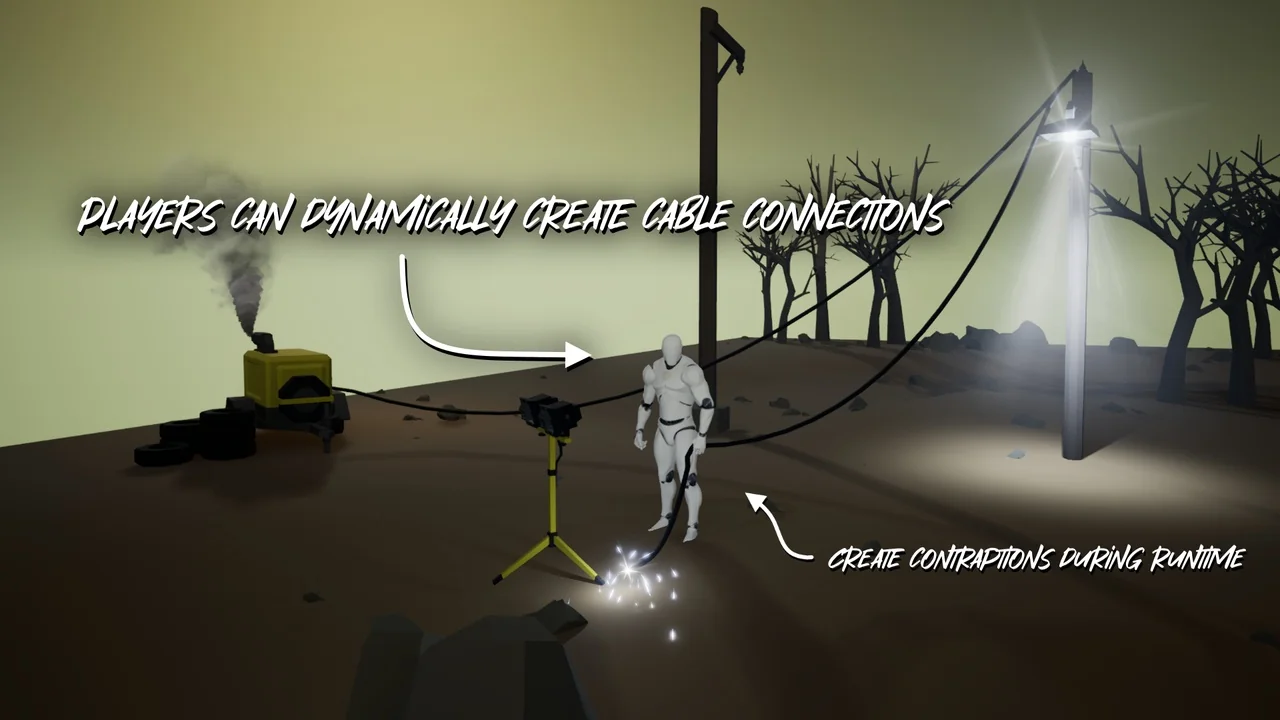
Wire a generator to a door, put a switch in between, and the door answers the switch. That chain — source, conductor, destination — is what Electricity Toolkit reproduces inside a project, treating cables, power management, switches and circuits as framework pieces instead of hand-coded one-offs.
Nothing in the system is locked to one specific prop. Anything that emits a signal can start a circuit. Anything that reacts can end it. That flexibility is the whole reason the pack can be dropped into a sandbox game and handed to players as a toy box rather than a fixed set of interactive objects.
Emitter, transmitter, receiver: the three roles a circuit is made of
The framework splits electricity into three jobs, and each one is intentionally loose about what fills it.
Emitter — sends an electric signal through the circuit. A generator is the obvious candidate, and a battery works just as well, but the role is open to anything the project needs as a source.
Transmitter — the thing that transmits electricity. This is the layer that carries the signal onward rather than deciding what it does.
Receiver — whatever sits at the far end. Simple lights are one option, complex traps are another. Switches that alter the flow and pressure plates that spring traps both live here.
Because the receiver slot accepts anything, the same three roles cover a lamp, a gate, a hazard, or a switch that reroutes the whole chain. Logic devices, contraptions and machines all come out of the same structure, which is what makes the pack suitable for sandbox play where players build their own arrangements instead of following a scripted sequence.
Cables, power management and switches as reusable parts
Real-life-like cable connections sit at the center of the simulation. Circuits are what the system reasons about, and switches act on the flow rather than acting on individual props. A switch does not need to know that a door exists at the other end — it changes the state of the circuit and the circuit carries the consequence.
That separation matters in production. Content built once can be rewired in the level without new logic, and a designer assembling a scene is placing parts into a running system rather than asking for code every time a new combination appears. The framework's stated purpose is exactly this: giving players the ability to express themselves through interesting logic-based devices, contraptions and machines without the studio spending months coding the core logic of the system.
What ships as working examples
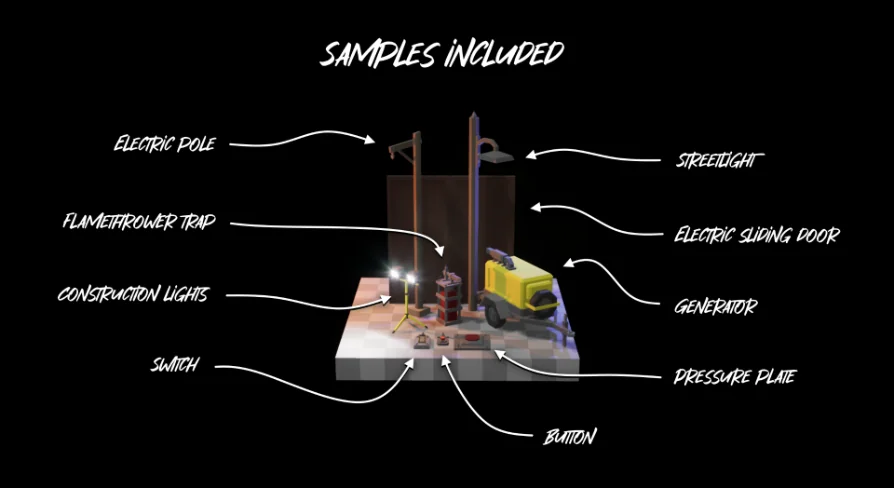
The package includes a set of demonstrations that show the roles in use, and they read like a short tour of the system's range:
Automatic door
Switch and button
Pressure plate
Flamethrower trap
Generator
Spotlights and construction lights
Electric poles
Grouped together, those cover the ordinary and the dramatic ends of the same mechanic — a button that opens a door and a pressure plate that fires a trap are the same emitter-to-receiver relationship with different payloads. The lighting entries and the poles also give scenes the lowpoly hardware that makes a cable run legible in the world rather than abstract. Showcase assets are included alongside the framework, so the examples are not just diagrams.
Why the essential logic stays off Event Tick
Performance was treated as a design constraint. The essential circuit logic does not use Event Tick. Tick appears only in a debug mode, and that debug mode can be deleted. The practical result, as stated, is that the system will not affect performance at all.
For a sandbox title this is the difference between a system that scales and one that quietly taxes every frame. Circuits are a background concern most of the time — a door is closed, a trap is idle, a light is off — and paying per-frame for every idle device is waste. Keeping the core logic off the tick loop and confining the per-frame part to a removable debug layer means the framework can be left in place across a whole level without becoming the thing that drags the frame budget down.
Reading the Blueprints before you extend them
The framework is meant to be opened, not treated as a black box. Every variable carries a tooltip explaining what it does. Every Blueprint is commented. Every node is tidy and organized, so following a signal from emitter to receiver does not mean untangling a graph.
Extending the pack assumes basic knowledge on the part of whoever does it. That is a fair line to draw: the three roles and the examples give a working base, and the comments and tooltips give the orientation needed to add a new receiver or a new emitter type, but the person doing that work should already be comfortable inside Blueprints.
Where it fits on a project
The natural home is a sandbox game, or any project where players are expected to assemble their own devices. Instead of building a bespoke interaction for each prop, a team adopts emitter, transmitter and receiver as the vocabulary and lets cables and circuits do the connecting work. Level designers get a system that responds to arrangement; players get machinery they can reason about, because a switch changes a flow and a flow drives a device.
The most concrete takeaway for a team evaluating the pack is the division of labor it imposes: signals are emitted, transmitted and received, the core logic stays off Event Tick, and the debug layer is disposable. Everything the players build afterward sits on top of that, without new code underneath.
 Procedural Systems
 Procedural Systems
 Procedural Systems
 Procedural Systems