"ca3dbdfe6ba54099"{"id":"1002298","slug":"dynamic-rain-overlay","title":"Dynamic Rain Overlay","category":"Variety","engine":"4.27+,5.0+","assetVersion":"","engineVersion":"Engine Version: 4.27+,5.0+","tag":"Variety","accent":"blue","visual":"mech","summary":"A material function that adds controllable rain to existing materials, with animated and static droplets, wetness and puddle overlays, and per-material tiling.","platform":"Unreal Engine","indexPolicy":"index","publishedAt":"2026-11-05T10:00:32.178Z","updatedAt":"2026-11-05T10:00:32.178Z","sourceNotes":[],"fileContents":[],"compatibility":["Unreal Engine","Engine Version: 4.27+,5.0+"],"featuredImage":{"alt":"Dynamic Rain Overlay","src":"/wp-content/uploads/published/2026/11/8dc6b19c2057-fdeac25e-d408-45aa-ba69-428e46584c34-ca1a25c870.webp"},"hasDownloadLink":true,"downloads":0,"terms":[{"taxonomy":"category","slug":"variety","name":"Variety"}],"galleryImages":[{"src":"/wp-content/uploads/published/2026/11/a8b45e1dd9e1-43629643-b1c9-4845-bf05-eed6b13114a1-39d55b935c.webp","alt":"Dynamic Rain Overlay"},{"src":"/wp-content/uploads/published/2026/11/1efa384f53de-07440456-d65f-49fa-be48-e045be5397ac-19eaec7e63.webp","alt":"Dynamic Rain Overlay"},{"src":"/wp-content/uploads/published/2026/11/6f163a51a08a-54287599-3dba-481f-b019-e61655028dfc-9c0bdb6b3d.webp","alt":"Dynamic Rain Overlay"}],"accessPanel":{"kind":"resource","title":"Download this resource","eyebrow":"Free Download","message":"Log in or create a free account to start your download.","fileName":"Dynamic Rain Overlay.7z","safetyNote":"Resources are manually reviewed before listing to improve quality and reduce obvious risks.","actionLabel":"Download Free","resourceType":"Resource archive"},"contentHtml":"\u003cp\u003eDynamic Rain Overlay is a material function that plugs into existing materials and adds a controllable rain layer. Its parts are straightforward: a Global Rain Amount parameter for rain quantity, animated and static impact droplets, a macro wetness and puddle overlay, exposed tiling and intensity values, and optional inputs with default values. The function is meant to be dropped into a material and adjusted, not rebuilt from scratch for every surface.\u003c/p\u003e \u003ch2\u003eThe Global Rain Amount parameter\u003c/h2\u003e\n\u003cp\u003eRain quantity is handled through the Global Rain Amount material parameter. Once the function is connected to an existing material, that value controls how much rain the material shows. This keeps the rain level separate from the base material, so the surface can keep its existing treatment while the overlay changes the weather condition.\u003c/p\u003e\n\u003cp\u003eTiling amounts and intensity are also exposed. Both can be tweaked for each material, which means a wall, floor, or prop does not have to share one universal rain scale. The function supplies the controls; the material decides how they are set. That per-material access is useful when surfaces in the same scene need different rain density or visual strength while still coming from the same overlay.\u003c/p\u003e \u003ch2\u003eAnimated and static impact droplets\u003c/h2\u003e\n\u003cp\u003eImpact droplets come in two forms: animated and static. The animated droplets provide movement, while the static droplets hold their position as surface detail. Both are included in the function, so a material can use the moving impact state, the fixed droplet state, or refer to either without needing a separate droplet setup.\u003c/p\u003e\n\u003cp\u003eThis split gives an artist a direct way to shape how rain reads on a surface. Animated impacts suggest active rainfall; static droplets suggest droplets that have settled. The two are material-level elements, so the same rain overlay can shift between those readings by using the supplied droplet types. The function does not force one look across every material that uses it.\u003c/p\u003e \u003ch2\u003eWetness, puddles, and smoothed normals\u003c/h2\u003e\n\u003cp\u003eA macro wetness and puddle overlay sits alongside the droplets. This layer handles the broader wet look and the pooled areas rather than only the individual impact marks. Puddles automatically smooth the normals of the geometry underneath, changing how the surface responds in those areas. The smoothing is not locked; it can be adjusted to the user's liking.\u003c/p\u003e\n\u003cp\u003eFor scene work, this is the part that helps a surface feel waterlogged rather than merely dotted with rain. The puddle overlay can be tuned separately from the droplet layer, and the normal smoothing gives the pooled regions their own surface behavior. Because the values are exposed, the same function can support a light dampness or a heavier puddle treatment depending on the material and the intended look.\u003c/p\u003e \u003ch2\u003eTiling controls and world-space seams\u003c/h2\u003e\n\u003cp\u003eTiling amounts are exposed for per-material adjustment. With tiling available directly in the function, the rain pattern can be scaled to the surface instead of accepting a single fixed repetition. Intensity is exposed the same way, so the visual strength of the overlay can be raised or lowered material by material.\u003c/p\u003e\n\u003cp\u003eWorld-space tiling can be used on static objects to prevent seams on UV borders. That is a specific option for static geometry where UV boundaries would otherwise interrupt the rain pattern. Using world-space tiling in those cases keeps the overlay continuous across the object. The function does not require it for every material; it is an available route for static objects where UV seams are a concern.\u003c/p\u003e \u003ch2\u003eOptional inputs and default values\u003c/h2\u003e\n\u003cp\u003eAll inputs are optional. The material function has default values, and the user only needs to override those values when necessary. A material can therefore use the function without connecting every control, starting from the defaults and changing only what the look requires. This keeps the setup lean and makes the function easier to add to an existing material.\u003c/p\u003e\n\u003cp\u003eThe optional structure also means the function can serve as a base rain layer before any custom tuning. Defaults handle the initial state; overrides handle the specific case. For a material that only needs a basic rain response, that is enough. For a material that needs different tiling, intensity, or puddle behavior, the exposed controls are there to adjust.\u003c/p\u003e \u003ch2\u003eHow the pieces work together in a material\u003c/h2\u003e\n\u003cp\u003eThe overlay is most useful when its parts are treated as a small set of material decisions. Global Rain Amount sets the amount. Animated and static droplets set the impact character. The macro wetness and puddle layer sets the broad wet coverage and normal smoothing. Tiling and intensity set the scale and strength. Optional inputs and defaults keep the initial setup from becoming heavy.\u003c/p\u003e\n\u003cp\u003eBecause the function hooks into existing materials, it can be added to surfaces that already have their own material treatment. The rain layer is the variable part; the underlying material remains the base. That makes the function suited to projects that need rain across several materials without rebuilding each one around a separate rain shader.\u003c/p\u003e\n\u003cp\u003eFor an artist, the practical appeal is control at the material level. A single function carries rain amount, droplets, wetness, puddles, tiling, and intensity, with each material able to override what it needs. Static objects can use world-space tiling to avoid UV border seams. Defaults cover the rest. The package is set up to handle the rain overlay as an adjustable layer on top of existing material work.\u003c/p\u003e\n\n\u003ch2\u003eExplore Similar Assets\u003c/h2\u003e\n\u003cul\u003e\n\u003cli\u003e\u003ca href=\"https://3dcghub.com/rain-thunder-system/\" rel=\"noopener noreferrer\"\u003eRain Thunder System\u003c/a\u003e\u003c/li\u003e\n\u003cli\u003e\u003ca href=\"https://3dcghub.com/matrix-rain-of-symbols-vfx/\" rel=\"noopener noreferrer\"\u003eMatrix / Rain of Symbols - VFX\u003c/a\u003e\u003c/li\u003e\n\u003cli\u003e\u003ca href=\"https://3dcghub.com/good-fx-rain/\" rel=\"noopener noreferrer\"\u003eGood FX : Rain\u003c/a\u003e\u003c/li\u003e\n\u003cli\u003e\u003ca href=\"https://3dcghub.com/rain-effects/\" rel=\"noopener noreferrer\"\u003eRain Effects\u003c/a\u003e\u003c/li\u003e\n\u003cli\u003e\u003ca href=\"https://3dcghub.com/motionui/\" rel=\"noopener noreferrer\"\u003eMotionUI\u003c/a\u003e\u003c/li\u003e\n\u003c/ul\u003e","contentTextLength":5610,"navigation":{"current":9,"total":4229,"previous":{"id":"1002299","slug":"electricity-toolkit","title":"Electricity Toolkit","category":"Procedural Systems","platform":"Unreal Engine","updatedAt":"2026-11-05T10:01:39.307Z"},"next":{"id":"1002297","slug":"demon-commander","title":"Demon Commander","category":"Characters \u0026 Creatures","platform":"Unreal Engine","updatedAt":"2026-11-05T10:00:00.681Z"}},"relatedResources":[{"id":"1000133","slug":"rain-thunder-system","title":"Rain Thunder System","category":"Procedural Systems","engine":"4.26+,5.0+","assetVersion":"","engineVersion":"Engine Version: 4.26+,5.0+","tag":"Procedural Systems","accent":"blue","visual":"mech","summary":"Rain Thunder System adds dynamic rain, thunder, mist, wetness changes, camera droplets, and a DemoMap, including a roof-edge dripping update.","platform":"Unreal Engine","indexPolicy":"index","publishedAt":"2026-06-11T16:58:22.935Z","updatedAt":"2026-06-11T16:58:22.935Z","sourceNotes":[],"fileContents":[],"compatibility":["Unreal Engine","Engine Version: 4.26+,5.0+"],"featuredImage":{"alt":"Rain Thunder System","src":"/wp-content/uploads/published/2026/06/38d9b7e2fff1-1123f071-2c08-4e84-8f38-544dc7f8cb69-f659ccd99a.webp"},"hasDownloadLink":true,"downloads":3},{"id":"1002101","slug":"matrix-rain-of-symbols-vfx","title":"Matrix / Rain of Symbols - VFX","category":"Variety","engine":"5.0+","assetVersion":"","engineVersion":"Engine Version: 5.0+","tag":"Variety","accent":"blue","visual":"mech","summary":"Create cascading code simulations and digital illusions in Unreal Engine 5 with Matrix / Rain of Symbols - VFX, featuring customizable Niagara systems.","platform":"Unreal Engine","indexPolicy":"index","publishedAt":"2026-10-29T08:46:24.158Z","updatedAt":"2026-10-29T08:46:24.158Z","sourceNotes":[],"fileContents":[],"compatibility":["Unreal Engine","Engine Version: 5.0+"],"featuredImage":{"alt":"Matrix / Rain of Symbols - VFX","src":"/wp-content/uploads/published/2026/10/9a74edcfdc30-e714abdf-6bee-4c74-b512-4ec089db75d9-0bcf9a6e1b.webp"},"hasDownloadLink":true,"downloads":0},{"id":"1001731","slug":"good-fx-rain","title":"Good FX : Rain","category":"Weather","engine":"4.25+,5.0+","assetVersion":"","engineVersion":"Engine Version: 4.25+,5.0+","tag":"Weather","accent":"blue","visual":"mech","summary":"Good FX: Rain delivers a drag-and-drop Niagara rain and splash simulation with Blueprint controls for spawn rate, scale, color, and range.","platform":"Unreal Engine","indexPolicy":"index","publishedAt":"2026-10-20T02:37:07.841Z","updatedAt":"2026-10-20T02:37:07.841Z","sourceNotes":[],"fileContents":[],"compatibility":["Unreal Engine","Engine Version: 4.25+,5.0+"],"featuredImage":{"alt":"Good FX : Rain","src":"/wp-content/uploads/published/2026/10/8582e50667f8-77fae63e-f4e9-45c9-8e22-f2cb6c8749f0-441821f992.webp"},"hasDownloadLink":true,"downloads":1}]}
Variety
Dynamic Rain Overlay
A material function that adds controllable rain to existing materials, with animated and static droplets, wetness and puddle overlays, and per-material tiling.
Category:Unreal Engine,VarietyPlatform: Unreal EngineEngine Version: 4.27+,5.0+Published: Nov 5, 2026
Variety
Resource overview
Dynamic Rain Overlay is a material function that plugs into existing materials and adds a controllable rain layer. Its parts are straightforward: a Global Rain Amount parameter for rain quantity, animated and static impact droplets, a macro wetness and puddle overlay, exposed tiling and intensity values, and optional inputs with default values. The function is meant to be dropped into a material and adjusted, not rebuilt from scratch for every surface.
The Global Rain Amount parameter
Rain quantity is handled through the Global Rain Amount material parameter. Once the function is connected to an existing material, that value controls how much rain the material shows. This keeps the rain level separate from the base material, so the surface can keep its existing treatment while the overlay changes the weather condition.
Tiling amounts and intensity are also exposed. Both can be tweaked for each material, which means a wall, floor, or prop does not have to share one universal rain scale. The function supplies the controls; the material decides how they are set. That per-material access is useful when surfaces in the same scene need different rain density or visual strength while still coming from the same overlay.
Animated and static impact droplets
Impact droplets come in two forms: animated and static. The animated droplets provide movement, while the static droplets hold their position as surface detail. Both are included in the function, so a material can use the moving impact state, the fixed droplet state, or refer to either without needing a separate droplet setup.
This split gives an artist a direct way to shape how rain reads on a surface. Animated impacts suggest active rainfall; static droplets suggest droplets that have settled. The two are material-level elements, so the same rain overlay can shift between those readings by using the supplied droplet types. The function does not force one look across every material that uses it.
Wetness, puddles, and smoothed normals
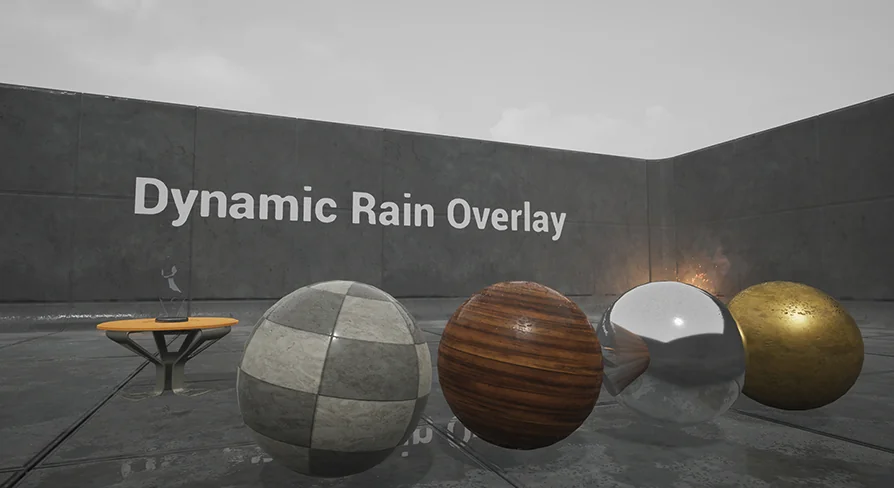
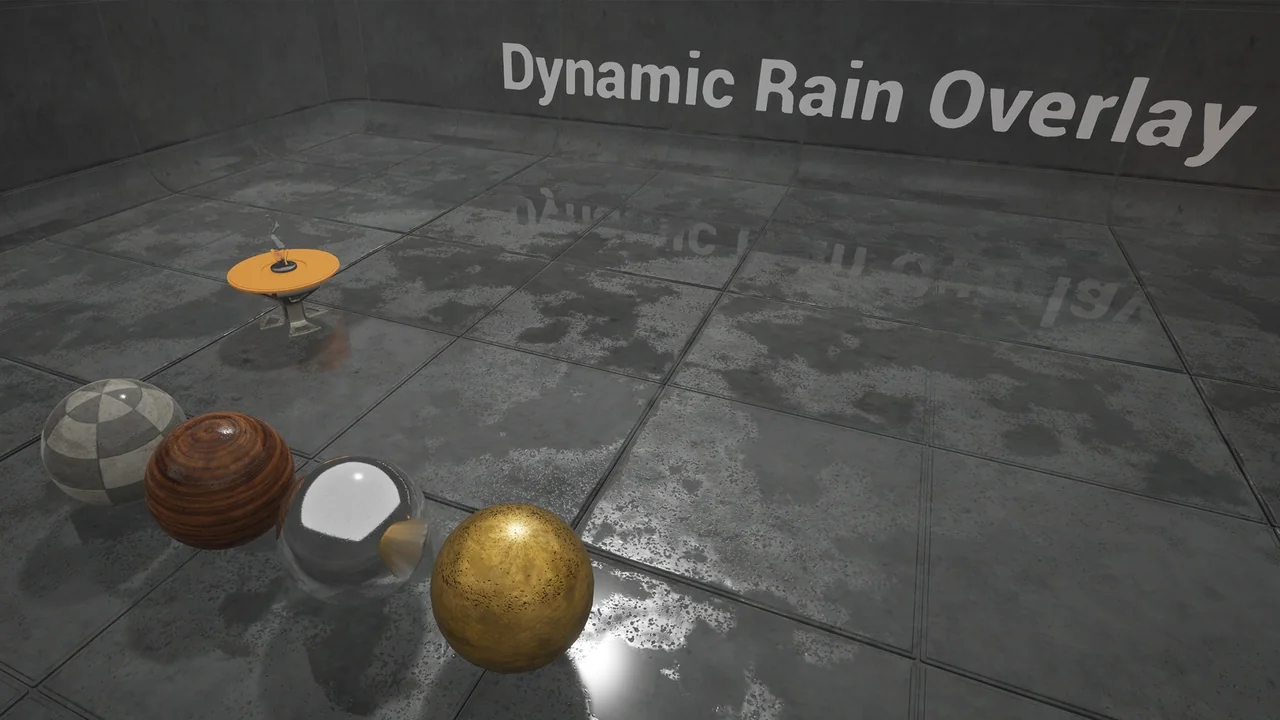
A macro wetness and puddle overlay sits alongside the droplets. This layer handles the broader wet look and the pooled areas rather than only the individual impact marks. Puddles automatically smooth the normals of the geometry underneath, changing how the surface responds in those areas. The smoothing is not locked; it can be adjusted to the user's liking.
For scene work, this is the part that helps a surface feel waterlogged rather than merely dotted with rain. The puddle overlay can be tuned separately from the droplet layer, and the normal smoothing gives the pooled regions their own surface behavior. Because the values are exposed, the same function can support a light dampness or a heavier puddle treatment depending on the material and the intended look.
Tiling controls and world-space seams
Tiling amounts are exposed for per-material adjustment. With tiling available directly in the function, the rain pattern can be scaled to the surface instead of accepting a single fixed repetition. Intensity is exposed the same way, so the visual strength of the overlay can be raised or lowered material by material.
World-space tiling can be used on static objects to prevent seams on UV borders. That is a specific option for static geometry where UV boundaries would otherwise interrupt the rain pattern. Using world-space tiling in those cases keeps the overlay continuous across the object. The function does not require it for every material; it is an available route for static objects where UV seams are a concern.
Optional inputs and default values
All inputs are optional. The material function has default values, and the user only needs to override those values when necessary. A material can therefore use the function without connecting every control, starting from the defaults and changing only what the look requires. This keeps the setup lean and makes the function easier to add to an existing material.
The optional structure also means the function can serve as a base rain layer before any custom tuning. Defaults handle the initial state; overrides handle the specific case. For a material that only needs a basic rain response, that is enough. For a material that needs different tiling, intensity, or puddle behavior, the exposed controls are there to adjust.
How the pieces work together in a material
The overlay is most useful when its parts are treated as a small set of material decisions. Global Rain Amount sets the amount. Animated and static droplets set the impact character. The macro wetness and puddle layer sets the broad wet coverage and normal smoothing. Tiling and intensity set the scale and strength. Optional inputs and defaults keep the initial setup from becoming heavy.
Because the function hooks into existing materials, it can be added to surfaces that already have their own material treatment. The rain layer is the variable part; the underlying material remains the base. That makes the function suited to projects that need rain across several materials without rebuilding each one around a separate rain shader.
For an artist, the practical appeal is control at the material level. A single function carries rain amount, droplets, wetness, puddles, tiling, and intensity, with each material able to override what it needs. Static objects can use world-space tiling to avoid UV border seams. Defaults cover the rest. The package is set up to handle the rain overlay as an adjustable layer on top of existing material work.
 Variety
 Procedural Systems
 Variety
 Weather