"6f9bd6df1f44a86f"{"id":"1000818","slug":"easyxmlparser","title":"EasyXMLParser","category":"Engine Tools","engine":"5.7","assetVersion":"Asset Version: 1.0.1","engineVersion":"Engine Version: 5.7","tag":"Engine Tools","accent":"blue","visual":"mech","summary":"EasyXMLParser is a Blueprint plugin for Unreal Engine that extracts string, int, float, and bool values from XML using dot-notation path syntax for runtime game","platform":"Unreal Engine","indexPolicy":"index","publishedAt":"2026-07-31T11:29:36.777Z","updatedAt":"2026-07-31T11:29:36.777Z","sourceNotes":[],"fileContents":[],"compatibility":["Unreal Engine","Asset Version: 1.0.1","Engine Version: 5.7"],"featuredImage":{"alt":"EasyXMLParser","src":"/wp-content/uploads/published/2026/07/3d14a05e472f-9197aa99-9c04-4fc2-8c13-826f360abe9c-988dbf56ee.webp"},"hasDownloadLink":true,"downloads":0,"terms":[{"taxonomy":"category","slug":"engine-tools-tools-and-plugins","name":"Engine Tools"}],"galleryImages":[{"src":"/wp-content/uploads/published/2026/07/1a07407125f0-89cea65f-ec6d-4e14-849a-d2c31c0d7cf9-44b60ecf42.webp","alt":"EasyXMLParser"},{"src":"/wp-content/uploads/published/2026/07/b079f2564daa-56058411-4c49-4d85-892d-0a938fe25ba8-6b589a42f3.webp","alt":"EasyXMLParser"},{"src":"/wp-content/uploads/published/2026/07/4250f543a8d3-ceb5051d-e53c-497c-a44f-61f5dcd5d28b-2b5602cb15.webp","alt":"EasyXMLParser"},{"src":"/wp-content/uploads/published/2026/07/9dfb6eeaab48-239d06ef-b62c-4824-9f1c-21027479a954-5b13a0bc5f.webp","alt":"EasyXMLParser"},{"src":"/wp-content/uploads/published/2026/07/34928ab61387-26ee909e-7211-4fe9-9a32-3efb91f8454e-eb39fba3be.webp","alt":"EasyXMLParser"},{"src":"/wp-content/uploads/published/2026/07/cea90db6e787-340fade3-1cea-415f-8783-5ecf9c060b0b-681b4e7cfa.webp","alt":"EasyXMLParser"}],"accessPanel":{"kind":"resource","title":"Download this resource","eyebrow":"Free Download","message":"Log in or create a free account to start your download.","fileName":"5.7.7z","safetyNote":"Resources are manually reviewed before listing to improve quality and reduce obvious risks.","actionLabel":"Download Free","resourceType":"Resource archive"},"contentHtml":"\u003cp\u003e\u003cem\u003eEasyXMLParser\u003c/em\u003e is a development tool driven by a single proposition: reading values from XML should not require boilerplate deserialization code. The plugin exposes 4 primitive data types—\u003ccode\u003estring\u003c/code\u003e, \u003ccode\u003eint\u003c/code\u003e, \u003ccode\u003efloat\u003c/code\u003e, and \u003ccode\u003ebool\u003c/code\u003e—as direct return variables accessible from Blueprint Nodes. Rather than navigating tree structures manually, developers chain tag names together with dot-notation syntax to pinpoint the exact data the gameplay logic requires.\u003c/p\u003e\n\n\u003ch2\u003eDot-Notation Path Syntax in EasyXMLParser\u003c/h2\u003e\n\u003cp\u003eThe plugin replaces verbose traversal with a concise addressing scheme. Tags are connected by dots, array indices are addressed with bracket notation, and attributes use the at-symbol prefix (\u003ccode\u003e@\u003c/code\u003e). This three-part convention collapses an entire parser query into something a designer can type into a node input or hard-reference in a Blueprint variable.\u003c/p\u003e\n\n\u003cp\u003eConsider the following XML structure provided as a reference example:\u003c/p\u003e\n\n\u003cpre\u003e\u003ccode\u003e\u0026lt;Root\u0026gt;\n \u0026lt;ABC id=\"1\"\u0026gt;123\u0026lt;/ABC\u0026gt;\n \u0026lt;ABC id=\"2\"\u0026gt;456\u0026lt;/ABC\u0026gt;\n \u0026lt;ABC id=\"3\"\u0026gt;789\u0026lt;/ABC\u0026gt;\n\u0026lt;/Root\u0026gt;\u003c/code\u003e\u003c/pre\u003e\n\n\u003cp\u003eUsing the plugin’s query language, the path \u003ccode\u003eRoot.ABC[1]\u003c/code\u003e returns the value \u003ccode\u003e456\u003c/code\u003e. The array index is zero-based, matching the standard convention across most programming environments. The index resolves to the second \u003ccode\u003eABC\u003c/code\u003e node inside the \u003ccode\u003eRoot\u003c/code\u003e parent.\u003c/p\u003e\n\n\u003cp\u003eAttribute reads follow a parallel convention. The path \u003ccode\u003eRoot.ABC[2].@id\u003c/code\u003e returns the value \u003ccode\u003e3\u003c/code\u003e. The at-symbol tells the parser to look at the metadata attached to the tag rather than the text nested between the opening and closing elements. Splitting value reads and attribute reads into two distinct syntax forms keeps the intent of each query unambiguous.\u003c/p\u003e\n\n\u003ch2\u003eWorking with String, Int, Float, and Bool Retrieval\u003c/h2\u003e\n\u003cp\u003eEvery return node funnels into 1 of 4 usable types. A \u003ccode\u003estring\u003c/code\u003e value captures raw text content. An \u003ccode\u003eint\u003c/code\u003e value handles discrete integer counts, useful for things like score multipliers, inventory counts, or wave-number tracking. A \u003ccode\u003efloat\u003c/code\u003e value covers continuous ranges—coordinates, health percentages, animation timing offsets. A \u003ccode\u003ebool\u003c/code\u003e value resolves to \u003ccode\u003etrue\u003c/code\u003e or \u003ccode\u003efalse\u003c/code\u003e, suitable for feature flags, unlock states, or conditional event triggers.\u003c/p\u003e\n\n\u003cp\u003eThe type system matters most in how the plugin sits inside Unreal Engine’s Blueprint Graph. Because each return is already cast to a native primitive, the data feeds straight into comparison nodes, math operations, set-logic functions, and display Widgets without an intermediate conversion step. A designer reading a balance file does not need to parse a string into a float before wiring it into a damage calculation—the \u003ccode\u003efloat\u003c/code\u003e output handles it directly.\u003c/p\u003e\n\n\u003ch2\u003eCreative Uses for EasyXMLParser in Level and Quest Logic\u003c/h2\u003e\n\u003cp\u003eFor gameplay teams, the dot-notation syntax opens up several design patterns. A quest designer can store branching dialogue trees and conditional flags in an XML file, read a specific node by index at runtime, and react based on a returned \u003ccode\u003ebool\u003c/code\u003e. Because paths like \u003ccode\u003eRoot.Quest[4].Objective[2].@complete\u003c/code\u003e can pinpoint nested attributes, the system extends cleanly into multi-layer data without forcing a flat document structure.\u003c/p\u003e\n\n\u003cp\u003eEnvironment artists can use the same mechanism to read instance parameters stored in external files—object counts, transforms as numeric values, or trigger-box enable states—pulling \u003ccode\u003eint\u003c/code\u003e and \u003ccode\u003efloat\u003c/code\u003e results into Blueprint-driven Level population logic. Since the plugin supports \u003ccode\u003estring\u003c/code\u003e, \u003ccode\u003eint\u003c/code\u003e, \u003ccode\u003efloat\u003c/code\u003e, and \u003ccode\u003ebool\u003c/code\u003e natively, the same file can feed diverse subsystems: a \u003ccode\u003estring\u003c/code\u003e for object names, an \u003ccode\u003eint\u003c/code\u003e for tier level, a \u003ccode\u003efloat\u003c/code\u003e for spawn offset, and a \u003ccode\u003ebool\u003c/code\u003e for initial visibility.\u003c/p\u003e\n\n\u003cp\u003eLocalization pipelines also fit naturally. Developers can store localized quest text, NPC names, and item descriptions as \u003ccode\u003estring\u003c/code\u003e values inside language-specific XML files. A path like \u003ccode\u003eRoot.NPC[0].Name\u003c/code\u003e returns the raw string, ready for display in a Widget or subtitling system.\u003c/p\u003e\n\n\u003ch2\u003eMIT-Licensed Open-Source Version and Build Considerations\u003c/h2\u003e\n\u003cp\u003eThe developer also maintains an open-source version under the MIT License, available on GitHub. Choosing the GitHub iteration means accepting responsibility for compiling the plugin from source code—the repository provides the raw project rather than a pre-packaged binary. This approach appeals to studios that prefer auditing dependencies, patching behavior for custom engine versions, or integrating the parser directly into larger build pipelines.\u003c/p\u003e\n\n\u003cp\u003eBecause MIT imposes minimal redistribution constraints, teams embedding the parser into shipped products have broad latitude. Modifying the codebase to support additional return types or custom path syntax is permitted without loosening the license on derivative code, which matters for projects with strict legal review requirements.\u003c/p\u003e\n\n\u003cp\u003eEngine compatibility notes indicate the plugin family shares integration patterns with \u003cem\u003eEasyJsonParser V2\u003c/em\u003e, a sibling tool focused on reading, writing, and parsing JSON from Blueprint Nodes. Projects that already employ JSON for configuration will find a familiar workflow when XML is needed for data formats that require attributes or nested hierarchical tagging—such as legacy data exports, third-party tool configurations, or SVG-style scene descriptors.\u003c/p\u003e\n\n\u003ch2\u003eWhere EasyXMLParser Fits in a Data-Driven Pipeline\u003c/h2\u003e\n\u003cp\u003eAs a tagged development tool, the plugin slots into pipelines where designers need raw access to external data without recompiling classes. Whether the use case is localized text lookup tables, scripted event timing files, or gameplay balance spreadsheets exported to XML, the return-focused interface keeps the author-of-record in the hands of the designer writing the data rather than the programmer writing the parser.\u003c/p\u003e\n\n\u003cp\u003eThe combination of dot-notation addressing, 4 typed return outputs, and a permissive MIT-licensed source alternative makes \u003cem\u003eEasyXMLParser\u003c/em\u003e a practical fit for teams that treat configuration files as first-class Level Design assets.\u003c/p\u003e\n\n\u003ch2\u003eExplore Similar Assets\u003c/h2\u003e\n\u003cul\u003e\n\u003cli\u003e\u003ca href=\"https://3dcghub.com/json4ue-json-for-ue/\" rel=\"noopener noreferrer\"\u003eJSON4UE(JSON For UE)\u003c/a\u003e\u003c/li\u003e\n\u003cli\u003e\u003ca href=\"https://3dcghub.com/xandra-character-creator/\" rel=\"noopener noreferrer\"\u003eXandra Character Creator\u003c/a\u003e\u003c/li\u003e\n\u003cli\u003e\u003ca href=\"https://3dcghub.com/able-ability-system/\" rel=\"noopener noreferrer\"\u003eAble Ability System\u003c/a\u003e\u003c/li\u003e\n\u003cli\u003e\u003ca href=\"https://3dcghub.com/steamcore-pro/\" rel=\"noopener noreferrer\"\u003eSteamCore PRO\u003c/a\u003e\u003c/li\u003e\n\u003cli\u003e\u003ca href=\"https://3dcghub.com/directexcel/\" rel=\"noopener noreferrer\"\u003eDirectExcel\u003c/a\u003e\u003c/li\u003e\n\u003c/ul\u003e","contentTextLength":5944,"navigation":{"current":1546,"total":4218,"previous":{"id":"1000820","slug":"euphoria-close-combat","title":"Euphoria - Close Combat","category":"Gameplay Features","platform":"Unreal Engine","updatedAt":"2026-07-31T11:39:00.360Z"},"next":{"id":"1000817","slug":"easy-nameplate","title":"Easy Nameplate","category":"Characters \u0026 Creatures","platform":"Unreal Engine","updatedAt":"2026-07-31T11:25:26.400Z"}},"relatedResources":[{"id":"1000305","slug":"json4ue-json-for-ue","title":"JSON4UE(JSON For UE)","category":"Engine Tools","engine":"5.6 - 5.7","assetVersion":"Asset Version: 1.2.4","engineVersion":"Engine Version: 5.6 - 5.7","tag":"Engine Tools","accent":"blue","visual":"mech","summary":"A lightweight, dependency-free UE4 plugin that provides 18 Blueprint nodes and 4 C++ classes for fast JSON string and file parsing across all platforms.","platform":"Unreal Engine","indexPolicy":"index","publishedAt":"2026-07-04T09:12:37.041Z","updatedAt":"2026-07-04T09:12:37.041Z","sourceNotes":[],"fileContents":[],"compatibility":["Unreal Engine","Asset Version: 1.2.4","Engine Version: 5.6 - 5.7"],"featuredImage":{"alt":"JSON4UE(JSON For UE)","src":"/wp-content/uploads/published/2026/07/a8b13b531e8c-f664d4e4-64b1-47da-86cc-351d892f1d6e-ca45898d7c.webp"},"hasDownloadLink":true,"downloads":1},{"id":"1000353","slug":"xandra-character-creator","title":"Xandra Character Creator","category":"Engine Tools","engine":"5.5 - 5.7","assetVersion":"Asset Version: 3.6","engineVersion":"Engine Version: 5.5 - 5.7","tag":"Engine Tools","accent":"blue","visual":"character","summary":"Implement a runtime character creation system in Unreal Engine using a blend of C++ and Blueprints, featuring ARKit blendshapes and Metahuman compatibility.","platform":"Unreal Engine","indexPolicy":"index","publishedAt":"2026-07-05T10:12:13.471Z","updatedAt":"2026-07-05T10:12:13.471Z","sourceNotes":[],"fileContents":[],"compatibility":["Unreal Engine","Asset Version: 3.6","Engine Version: 5.5 - 5.7"],"featuredImage":{"alt":"Xandra Character Creator","src":"/wp-content/uploads/published/2026/07/4adf90c04a88-de6831db-caba-4c86-acfa-4ba67a03c988-69c24d3ae5.webp"},"hasDownloadLink":true,"downloads":12},{"id":"14592","slug":"shadersource-waterfall-tool-2","title":"SHADERSOURCE - Waterfall Tool 2","category":"Engine Tools","engine":"5.2 - 5.7","assetVersion":"Asset Version: 1.0a - 1.0d","engineVersion":"Engine Version: 5.2 - 5.7","tag":"Engine Tools","accent":"blue","visual":"animation","summary":"The SHADERSOURCE - Waterfall Tool 2 introduces a specialized Editor Mode for generating realistic waterfalls through dynamic meshes and spline paths. This tool offers both Simple and Advanced modes to provide full control over fluid paths and VFX generation.","platform":"Unreal Engine","indexPolicy":"index","publishedAt":"2026-03-11T18:36:22.000Z","updatedAt":"2026-10-04T08:27:42.401Z","sourceNotes":[],"fileContents":[],"compatibility":["Unreal Engine","Asset Version: 1.0a - 1.0d","Engine Version: 5.2 - 5.7"],"featuredImage":{"alt":"SHADERSOURCE - Waterfall Tool 2","src":"https://3dcghub.com/wp-content/uploads/2026/03/79d82bd8-c7cf-4877-9519-16f36c4a03c4.webp"},"hasDownloadLink":true,"downloads":1}]}
Engine Tools
EasyXMLParser
EasyXMLParser is a Blueprint plugin for Unreal Engine that extracts string, int, float, and bool values from XML using dot-notation path syntax for runtime game
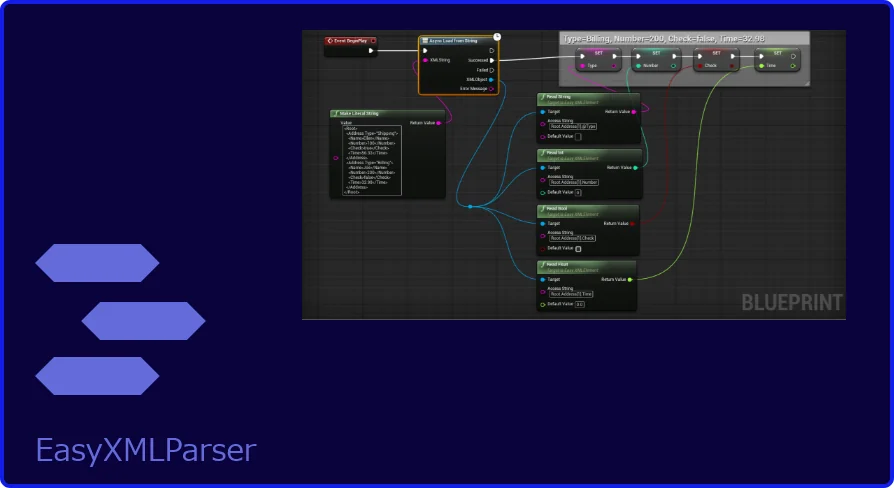
EasyXMLParser is a development tool driven by a single proposition: reading values from XML should not require boilerplate deserialization code. The plugin exposes 4 primitive data types—string, int, float, and bool—as direct return variables accessible from Blueprint Nodes. Rather than navigating tree structures manually, developers chain tag names together with dot-notation syntax to pinpoint the exact data the gameplay logic requires.
Dot-Notation Path Syntax in EasyXMLParser
The plugin replaces verbose traversal with a concise addressing scheme. Tags are connected by dots, array indices are addressed with bracket notation, and attributes use the at-symbol prefix (@). This three-part convention collapses an entire parser query into something a designer can type into a node input or hard-reference in a Blueprint variable.
Consider the following XML structure provided as a reference example:
Using the plugin’s query language, the path Root.ABC[1] returns the value 456. The array index is zero-based, matching the standard convention across most programming environments. The index resolves to the second ABC node inside the Root parent.
Attribute reads follow a parallel convention. The path Root.ABC[2].@id returns the value 3. The at-symbol tells the parser to look at the metadata attached to the tag rather than the text nested between the opening and closing elements. Splitting value reads and attribute reads into two distinct syntax forms keeps the intent of each query unambiguous.
Working with String, Int, Float, and Bool Retrieval
Every return node funnels into 1 of 4 usable types. A string value captures raw text content. An int value handles discrete integer counts, useful for things like score multipliers, inventory counts, or wave-number tracking. A float value covers continuous ranges—coordinates, health percentages, animation timing offsets. A bool value resolves to true or false, suitable for feature flags, unlock states, or conditional event triggers.
The type system matters most in how the plugin sits inside Unreal Engine’s Blueprint Graph. Because each return is already cast to a native primitive, the data feeds straight into comparison nodes, math operations, set-logic functions, and display Widgets without an intermediate conversion step. A designer reading a balance file does not need to parse a string into a float before wiring it into a damage calculation—the float output handles it directly.
Creative Uses for EasyXMLParser in Level and Quest Logic
For gameplay teams, the dot-notation syntax opens up several design patterns. A quest designer can store branching dialogue trees and conditional flags in an XML file, read a specific node by index at runtime, and react based on a returned bool. Because paths like Root.Quest[4].Objective[2].@complete can pinpoint nested attributes, the system extends cleanly into multi-layer data without forcing a flat document structure.
Environment artists can use the same mechanism to read instance parameters stored in external files—object counts, transforms as numeric values, or trigger-box enable states—pulling int and float results into Blueprint-driven Level population logic. Since the plugin supports string, int, float, and bool natively, the same file can feed diverse subsystems: a string for object names, an int for tier level, a float for spawn offset, and a bool for initial visibility.
Localization pipelines also fit naturally. Developers can store localized quest text, NPC names, and item descriptions as string values inside language-specific XML files. A path like Root.NPC[0].Name returns the raw string, ready for display in a Widget or subtitling system.
MIT-Licensed Open-Source Version and Build Considerations
The developer also maintains an open-source version under the MIT License, available on GitHub. Choosing the GitHub iteration means accepting responsibility for compiling the plugin from source code—the repository provides the raw project rather than a pre-packaged binary. This approach appeals to studios that prefer auditing dependencies, patching behavior for custom engine versions, or integrating the parser directly into larger build pipelines.
Because MIT imposes minimal redistribution constraints, teams embedding the parser into shipped products have broad latitude. Modifying the codebase to support additional return types or custom path syntax is permitted without loosening the license on derivative code, which matters for projects with strict legal review requirements.
Engine compatibility notes indicate the plugin family shares integration patterns with EasyJsonParser V2, a sibling tool focused on reading, writing, and parsing JSON from Blueprint Nodes. Projects that already employ JSON for configuration will find a familiar workflow when XML is needed for data formats that require attributes or nested hierarchical tagging—such as legacy data exports, third-party tool configurations, or SVG-style scene descriptors.
Where EasyXMLParser Fits in a Data-Driven Pipeline
As a tagged development tool, the plugin slots into pipelines where designers need raw access to external data without recompiling classes. Whether the use case is localized text lookup tables, scripted event timing files, or gameplay balance spreadsheets exported to XML, the return-focused interface keeps the author-of-record in the hands of the designer writing the data rather than the programmer writing the parser.
The combination of dot-notation addressing, 4 typed return outputs, and a permissive MIT-licensed source alternative makes EasyXMLParser a practical fit for teams that treat configuration files as first-class Level Design assets.
 Engine Tools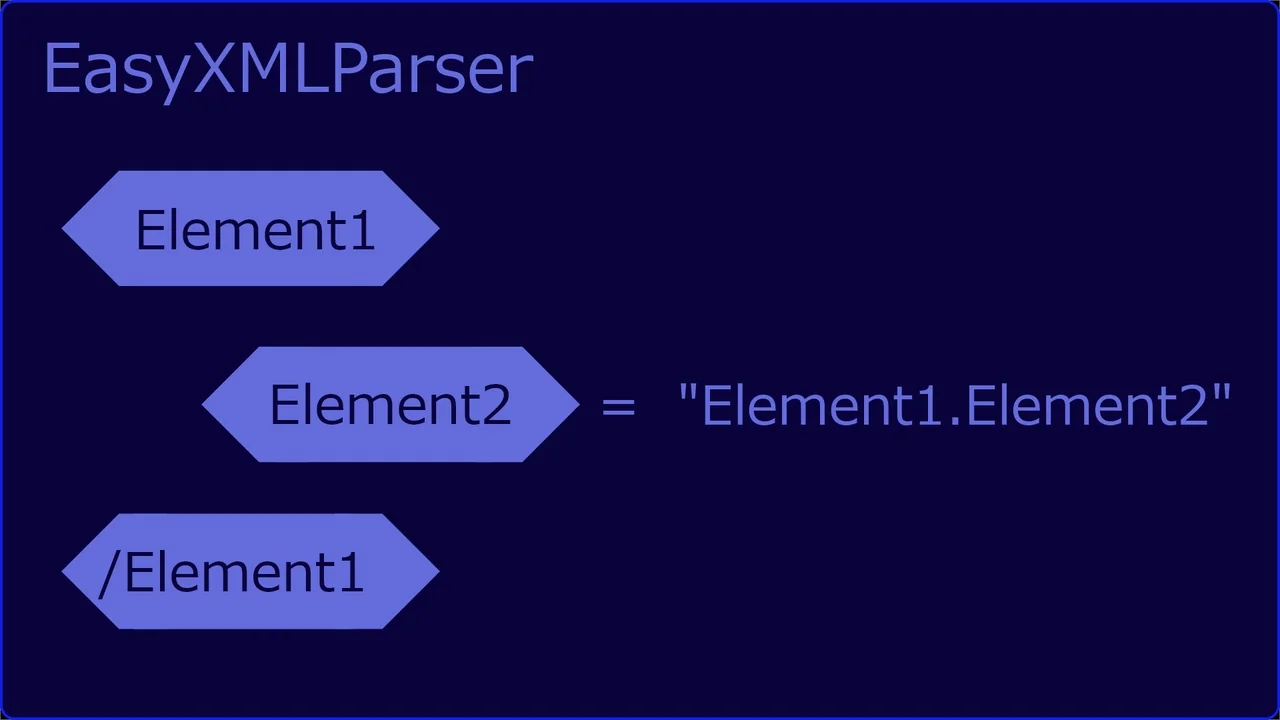
 Engine Tools
 Engine Tools
 Engine Tools