"7ad89cffa44984cf"{"id":"1002570","slug":"dynamic-spline-fx-2","title":"Dynamic Spline FX 2","category":"Shaders","engine":"5.0+","assetVersion":"","engineVersion":"Engine Version: 5.0+","tag":"Shaders","accent":"blue","visual":"mech","summary":"Create procedural particle trails in Unreal Engine 5 with Dynamic Spline FX 2, featuring 18 Niagara systems, 24 presets, and full parameter control.","platform":"Unreal Engine","indexPolicy":"index","publishedAt":"2026-11-13T18:05:56.582Z","updatedAt":"2026-11-13T18:05:56.582Z","sourceNotes":[],"fileContents":[],"compatibility":["Unreal Engine","Engine Version: 5.0+"],"featuredImage":{"alt":"Dynamic Spline FX 2","src":"/wp-content/uploads/published/2026/11/7e45344e8e71-d56a7f95-d258-4d71-8caf-4b8163f5c73e-2858537f91.webp"},"hasDownloadLink":true,"downloads":0,"terms":[{"taxonomy":"category","slug":"shaders","name":"Shaders"}],"galleryImages":[{"src":"/wp-content/uploads/published/2026/11/73b84ecbb238-009afaec-b72e-4f3e-a8a0-37381c85cd34-d46872b757.webp","alt":"Dynamic Spline FX 2"},{"src":"/wp-content/uploads/published/2026/11/a400e4198704-917f4d44-a667-4d8c-86dd-c9c28923bb65-155623a1c3.webp","alt":"Dynamic Spline FX 2"},{"src":"/wp-content/uploads/published/2026/11/829bec9be097-47db6560-9410-4614-a7bf-9b8d0ddf0887-8b32235ca3.webp","alt":"Dynamic Spline FX 2"},{"src":"/wp-content/uploads/published/2026/11/ab619850ff92-645dcb58-c321-4d43-a331-bdb72539a815-1fe1ea6496.webp","alt":"Dynamic Spline FX 2"},{"src":"/wp-content/uploads/published/2026/11/cccdfa5ff398-c3216b84-960c-4cd2-99c4-7b0c455beab0-a1864b6ae2.webp","alt":"Dynamic Spline FX 2"},{"src":"/wp-content/uploads/published/2026/11/74d9fd9ef38d-2d5d6793-3565-4b0a-bf57-9e15b0d188a9-4a6fa727d6.webp","alt":"Dynamic Spline FX 2"},{"src":"/wp-content/uploads/published/2026/11/5fa8c25dafc6-9c3233e4-96eb-4312-915a-96aa7a541c71-0267a6da6e.webp","alt":"Dynamic Spline FX 2"},{"src":"/wp-content/uploads/published/2026/11/cb340382c198-f4ce1586-2236-4d2d-96a7-f0f3f89fad0b-149a01b9cb.webp","alt":"Dynamic Spline FX 2"},{"src":"/wp-content/uploads/published/2026/11/0314b6982d59-dcb4467d-8230-445b-a713-56390432cced-43622186c2.webp","alt":"Dynamic Spline FX 2"},{"src":"/wp-content/uploads/published/2026/11/7992d4520657-ee71d287-3712-4a9d-9342-0ae76bacac06-12d2da0516.webp","alt":"Dynamic Spline FX 2"}],"accessPanel":{"kind":"resource","title":"Get this resource","eyebrow":"Free resource","message":"Download this resource in your browser.","fileName":"Content.7z","safetyNote":"Resources are manually reviewed before listing to improve quality and reduce obvious risks.","actionLabel":"Get this resource","resourceType":"Resource archive","versions":[]},"contentHtml":"\u003cp\u003ePlacing complex visual effects along arbitrary curves in Unreal Engine 5 often demands custom vector math, manual alignment, or custom particle scripting. Dynamic Spline FX 2 approaches this workflow by directly linking spline creation tools to automated Niagara visual effects. When an artist draws, stretches, or angles a spline inside the viewport, the underlying system instantly distributes animated Niagara particle emitters across the path. This procedural behavior turns line placement into an immediate visual styling tool, allowing effects to bend, twist, and follow custom routes across environments without manual keyframing.\u003c/p\u003e \u003ch2\u003eDrawing Paths with Dynamic Spline FX 2\u003c/h2\u003e\n\u003cp\u003eThe core mechanic of the toolkit revolves around user-defined curves. By placing a spline actor into an Unreal Engine 5 scene, designers can manipulate individual spline points to define tracks, linear routes, or complex winding loops. As the trajectory changes, the system recalculates effect positioning automatically. There is no need to manually set particle spawn points or align static meshes sequentially to mimic a moving stream.\u003c/p\u003e\n\u003cp\u003eThis automated alignment works for both linear geometries and intricate, curved sweeps. Whether outlining a straight architectural boundary or wrapping a spiral around a landmark, the toolkit ensures that the active visual effect conforms strictly to the underlying spline. The continuous orientation along the route preserves particle density and visual coherence regardless of how sharply the path twists or how far it extends into the distance.\u003c/p\u003e \u003ch2\u003eNiagara System Architecture and Preset Breakdown\u003c/h2\u003e\n\u003cp\u003eAt the center of the package are 18 unique Niagara systems supported by one specialized Niagara module. Rather than offering purely static effects, these systems handle the dynamic distribution of particles, ribbon structures, and meshes along the designated spline path. The custom module provides the core logic required to bind particle behavior directly to spline coordinates, controlling how elements travel, spawn, and fade relative to the spline length.\u003c/p\u003e\n\u003cp\u003eTo provide immediate utility out of the box, the system includes 24 versatile effect presets. These presets demonstrate how the base Niagara systems can be deployed across different aesthetic contexts. Each preset comes preconfigured with specific timings, spatial distributions, and movement behaviors. Technical artists can inspect these presets to see how the single Niagara module drives diverse visual results across the 18 parent systems, using them either as production-ready assets or as architectural templates for custom VFX graphs.\u003c/p\u003e \u003ch2\u003eCustomization Controls within Dynamic Spline FX 2\u003c/h2\u003e\n\u003cp\u003eAdjusting the visual character of the effects does not require opening particle node graphs or editing raw HLSL. Every element in the toolkit features exposed controls designed to adjust critical artistic parameters quickly. Creators can alter color schemes, modify core shapes, swap underlying textures, tweak travel speed, and increase or decrease emissive power directly within the actor properties.\u003c/p\u003e\n\u003cp\u003eEmissive power adjustments allow effects to scale from soft, subtle decorative guides up to intense, bloom-heavy energy beams suited for high-contrast lighting setups. Speed controls govern how rapidly energy pulses, particles, or ribbons traverse the length of the spline, accommodating both sluggish ambient drifts and violent, high-velocity trails. Shape and color controls grant full authority over how the effect reads in the viewport, ensuring visual alignment with the surrounding art direction.\u003c/p\u003e\n\u003cp\u003eSupporting these parameters is an asset library comprising:\u003c/p\u003e\n\u003cul\u003e\n\u003cli\u003e2 custom effect meshes optimized for particle projection and ribbon guiding\u003c/li\u003e\n\u003cli\u003e27 hand-crafted textures providing distinct alpha masks, energy patterns, and stylized gradients\u003c/li\u003e\n\u003cli\u003e29 materials and material instances specifically optimized for real-time visual effects performance\u003c/li\u003e\n\u003c/ul\u003e\n\u003cp\u003eThe 29 material instances allow rapid swapping of noise textures, tiling settings, and emissive thresholds without recompiling base shaders, keeping editor iteration fast and runtime overhead low.\u003c/p\u003e \u003ch2\u003eStylized Trails, Motion Lines, and Decorative Overlays\u003c/h2\u003e\n\u003cp\u003eThe toolkit addresses a broad spectrum of visual requirements, ranging from subtle ambient accents to sharp environmental indicators. In sci-fi scenes, the systems function cleanly as futuristic energy conduits, high-tech data cables, neon line overlays, or luminous motion tracks. In fantasy or stylized projects, the same framework can be transformed into magical paths, spell trajectories, or floating elemental guides that lead players through intricate levels.\u003c/p\u003e\n\u003cp\u003eThe library also accommodates bulb-style decoration, where illuminated points follow a defined track to serve as ambient lighting fixtures or festive strings. Because the system treats the spline as a structural guide, these decorative setups remain fully editable: shifting a single point drags the lighting elements along with it while preserving relative spacing and animation rates.\u003c/p\u003e \u003ch2\u003eTechnical Integration and Niagara Compatibility\u003c/h2\u003e\n\u003cp\u003eDynamic Spline FX 2 is engineered specifically for Unreal Engine 5 projects leveraging the modern Niagara particle framework. In addition to functioning as a standalone procedural spline toolkit, it features verified compatibility with HOLOGRAM VFX With Niagara, allowing visual effects artists to combine spline-driven motion lines with holographic asset workflows seamlessly.\u003c/p\u003e\n\u003cp\u003eFor teams evaluating performance, scaling, and runtime responsiveness before integration, a 64-bit Windows playable demo demonstrates the assets in active execution. By combining procedural spline manipulation with optimized materials and customizable Niagara emitters, the package delivers a dependable foundation for building directional visual accents, dynamic boundary lines, and complex path-following effects.\u003c/p\u003e\n\n\u003ch2\u003eMore From The Same Workflow\u003c/h2\u003e\n\u003cul\u003e\n\u003cli\u003e\u003ca href=\"https://3dcghub.com/star-vfx-pack/\" rel=\"noopener noreferrer\"\u003eStar VFX Pack\u003c/a\u003e\u003c/li\u003e\n\u003cli\u003e\u003ca href=\"https://3dcghub.com/stylized-volumetric-clouds-shader/\" rel=\"noopener noreferrer\"\u003eStylized Volumetric Clouds Shader\u003c/a\u003e\u003c/li\u003e\n\u003cli\u003e\u003ca href=\"https://3dcghub.com/radial-scan-fx/\" rel=\"noopener noreferrer\"\u003eRadial Scan FX\u003c/a\u003e\u003c/li\u003e\n\u003cli\u003e\u003ca href=\"https://3dcghub.com/cyberpunk-fx-pack-2-neon-panels-and-screens/\" rel=\"noopener noreferrer\"\u003eCyberpunk FX Pack 2 - Neon Panels and Screens\u003c/a\u003e\u003c/li\u003e\n\u003cli\u003e\u003ca href=\"https://3dcghub.com/crystal-vfx-pack/\" rel=\"noopener noreferrer\"\u003eCrystal VFX Pack\u003c/a\u003e\u003c/li\u003e\n\u003c/ul\u003e","contentTextLength":6005,"navigation":{"current":7,"total":4499,"previous":{"id":"1002571","slug":"easy-impact-frames","title":"Easy Impact Frames","category":"Shaders","platform":"Unreal Engine","updatedAt":"2026-11-13T18:07:36.408Z"},"next":{"id":"1002569","slug":"celebrations-all-in-one-bundle-vfx-and-material-for-christmas-halloween-holidays","title":"Celebrations All In One Bundle — VFX \u0026 Material for Christmas Halloween Holidays","category":"Variety","platform":"Unreal Engine","updatedAt":"2026-11-13T18:04:37.405Z"}},"relatedResources":[{"id":"1002571","slug":"easy-impact-frames","title":"Easy Impact Frames","category":"Shaders","engine":"5.0+","assetVersion":"","engineVersion":"Engine Version: 5.0+","tag":"Shaders","accent":"blue","visual":"mech","summary":"Explore Easy Impact Frames, a stylized VFX package delivering screen flashes, dynamic materials, and drag-and-drop systems for anime combat games.","platform":"Unreal Engine","indexPolicy":"index","publishedAt":"2026-11-13T18:07:36.408Z","updatedAt":"2026-11-13T18:07:36.408Z","sourceNotes":[],"fileContents":[],"compatibility":["Unreal Engine","Engine Version: 5.0+"],"featuredImage":{"alt":"Easy Impact Frames","src":"/wp-content/uploads/published/2026/11/6f5d3adba137-5c615008-47ea-4f52-b9b3-17cb22d5da08-ece2865eb1.webp"},"hasDownloadLink":true,"downloads":0},{"id":"1001017","slug":"star-vfx-pack","title":"Star VFX Pack","category":"Shaders","engine":"5.0+","assetVersion":"","engineVersion":"Engine Version: 5.0+","tag":"Shaders","accent":"blue","visual":"mech","summary":"Customizable star VFX pack with 28+ Niagara systems, 45+ dynamic materials, 22+ textures, and 17+ models. Includes a Win64bit demo and Discord support.","platform":"Unreal Engine","indexPolicy":"index","publishedAt":"2026-08-22T16:14:20.964Z","updatedAt":"2026-08-22T16:14:20.964Z","sourceNotes":[],"fileContents":[],"compatibility":["Unreal Engine","Engine Version: 5.0+"],"featuredImage":{"alt":"Star VFX Pack","src":"/wp-content/uploads/published/2026/08/6c8b512b96a6-338ff890-24aa-4c23-9f1e-be692219540d-2d18fd0080.webp"},"hasDownloadLink":true,"downloads":0},{"id":"1000894","slug":"stylized-volumetric-clouds-shader","title":"Stylized Volumetric Clouds Shader","category":"Shaders","engine":"5.0+","assetVersion":"","engineVersion":"Engine Version: 5.0+","tag":"Shaders","accent":"blue","visual":"mech","summary":"A stylized volumetric cloud shader with dynamic controls for color, density, movement, and lighting, built for games, cinematics, and immersive scenes.","platform":"Unreal Engine","indexPolicy":"index","publishedAt":"2026-08-06T04:43:20.840Z","updatedAt":"2026-08-06T04:43:20.840Z","sourceNotes":[],"fileContents":[],"compatibility":["Unreal Engine","Engine Version: 5.0+"],"featuredImage":{"alt":"Stylized Volumetric Clouds Shader","src":"/wp-content/uploads/published/2026/08/71d33757280e-2287f8a8-713f-42a2-951b-9f5332b68bb4-ac24eb472e.webp"},"hasDownloadLink":true,"downloads":0}]}
Shaders
Dynamic Spline FX 2
Create procedural particle trails in Unreal Engine 5 with Dynamic Spline FX 2, featuring 18 Niagara systems, 24 presets, and full parameter control.
Category:Unreal Engine,ShadersPlatform: Unreal EngineEngine Version: 5.0+Published: Nov 13, 2026
Shaders
Resource overview
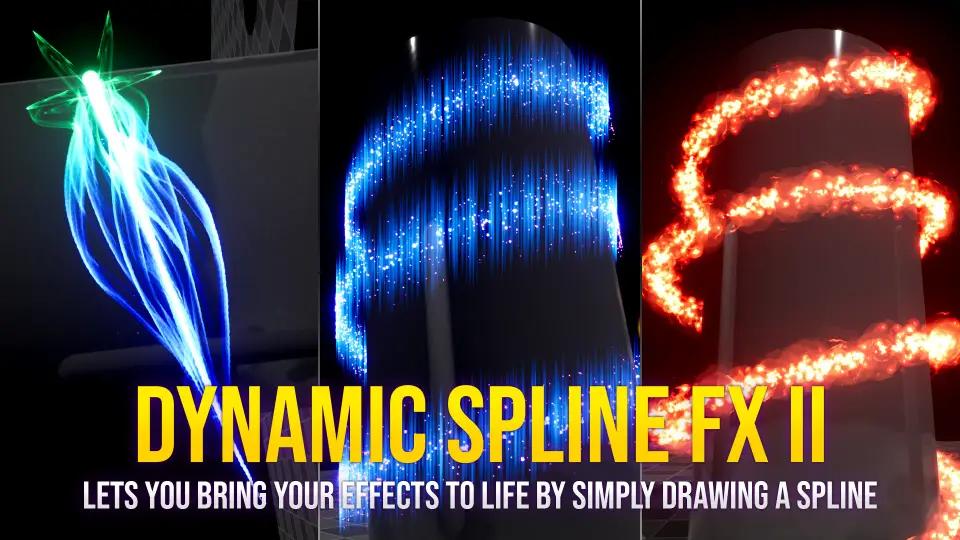
Placing complex visual effects along arbitrary curves in Unreal Engine 5 often demands custom vector math, manual alignment, or custom particle scripting. Dynamic Spline FX 2 approaches this workflow by directly linking spline creation tools to automated Niagara visual effects. When an artist draws, stretches, or angles a spline inside the viewport, the underlying system instantly distributes animated Niagara particle emitters across the path. This procedural behavior turns line placement into an immediate visual styling tool, allowing effects to bend, twist, and follow custom routes across environments without manual keyframing.
Drawing Paths with Dynamic Spline FX 2
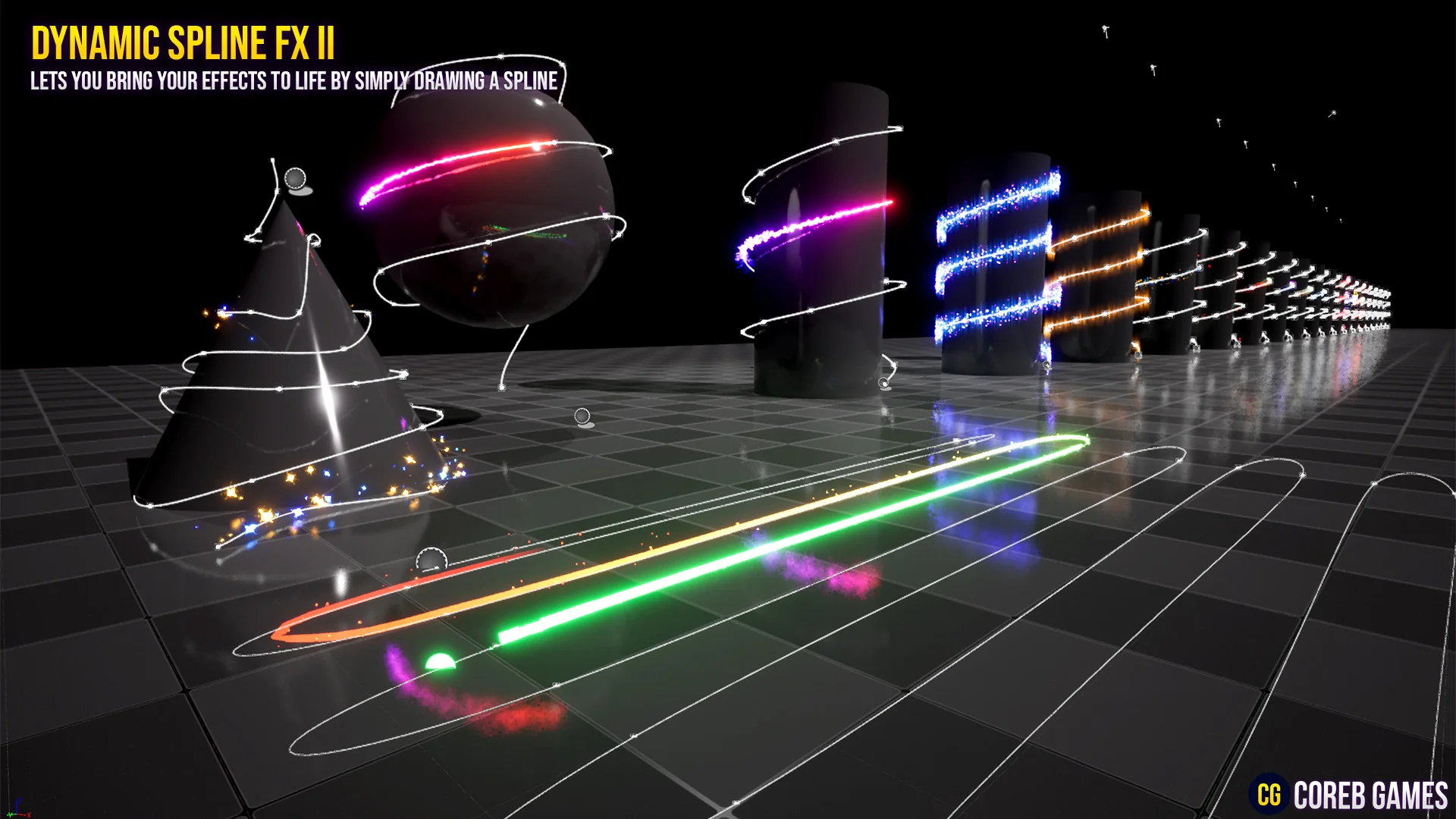
The core mechanic of the toolkit revolves around user-defined curves. By placing a spline actor into an Unreal Engine 5 scene, designers can manipulate individual spline points to define tracks, linear routes, or complex winding loops. As the trajectory changes, the system recalculates effect positioning automatically. There is no need to manually set particle spawn points or align static meshes sequentially to mimic a moving stream.
This automated alignment works for both linear geometries and intricate, curved sweeps. Whether outlining a straight architectural boundary or wrapping a spiral around a landmark, the toolkit ensures that the active visual effect conforms strictly to the underlying spline. The continuous orientation along the route preserves particle density and visual coherence regardless of how sharply the path twists or how far it extends into the distance.
Niagara System Architecture and Preset Breakdown
At the center of the package are 18 unique Niagara systems supported by one specialized Niagara module. Rather than offering purely static effects, these systems handle the dynamic distribution of particles, ribbon structures, and meshes along the designated spline path. The custom module provides the core logic required to bind particle behavior directly to spline coordinates, controlling how elements travel, spawn, and fade relative to the spline length.
To provide immediate utility out of the box, the system includes 24 versatile effect presets. These presets demonstrate how the base Niagara systems can be deployed across different aesthetic contexts. Each preset comes preconfigured with specific timings, spatial distributions, and movement behaviors. Technical artists can inspect these presets to see how the single Niagara module drives diverse visual results across the 18 parent systems, using them either as production-ready assets or as architectural templates for custom VFX graphs.
Customization Controls within Dynamic Spline FX 2
Adjusting the visual character of the effects does not require opening particle node graphs or editing raw HLSL. Every element in the toolkit features exposed controls designed to adjust critical artistic parameters quickly. Creators can alter color schemes, modify core shapes, swap underlying textures, tweak travel speed, and increase or decrease emissive power directly within the actor properties.
Emissive power adjustments allow effects to scale from soft, subtle decorative guides up to intense, bloom-heavy energy beams suited for high-contrast lighting setups. Speed controls govern how rapidly energy pulses, particles, or ribbons traverse the length of the spline, accommodating both sluggish ambient drifts and violent, high-velocity trails. Shape and color controls grant full authority over how the effect reads in the viewport, ensuring visual alignment with the surrounding art direction.
Supporting these parameters is an asset library comprising:
2 custom effect meshes optimized for particle projection and ribbon guiding
27 hand-crafted textures providing distinct alpha masks, energy patterns, and stylized gradients
29 materials and material instances specifically optimized for real-time visual effects performance
The 29 material instances allow rapid swapping of noise textures, tiling settings, and emissive thresholds without recompiling base shaders, keeping editor iteration fast and runtime overhead low.
Stylized Trails, Motion Lines, and Decorative Overlays
The toolkit addresses a broad spectrum of visual requirements, ranging from subtle ambient accents to sharp environmental indicators. In sci-fi scenes, the systems function cleanly as futuristic energy conduits, high-tech data cables, neon line overlays, or luminous motion tracks. In fantasy or stylized projects, the same framework can be transformed into magical paths, spell trajectories, or floating elemental guides that lead players through intricate levels.
The library also accommodates bulb-style decoration, where illuminated points follow a defined track to serve as ambient lighting fixtures or festive strings. Because the system treats the spline as a structural guide, these decorative setups remain fully editable: shifting a single point drags the lighting elements along with it while preserving relative spacing and animation rates.
Technical Integration and Niagara Compatibility
Dynamic Spline FX 2 is engineered specifically for Unreal Engine 5 projects leveraging the modern Niagara particle framework. In addition to functioning as a standalone procedural spline toolkit, it features verified compatibility with HOLOGRAM VFX With Niagara, allowing visual effects artists to combine spline-driven motion lines with holographic asset workflows seamlessly.
For teams evaluating performance, scaling, and runtime responsiveness before integration, a 64-bit Windows playable demo demonstrates the assets in active execution. By combining procedural spline manipulation with optimized materials and customizable Niagara emitters, the package delivers a dependable foundation for building directional visual accents, dynamic boundary lines, and complex path-following effects.
 Shaders
 Shaders
 Shaders
 Shaders