"95ccd6d7c96110f6"{"id":"1002451","slug":"dragon-2","title":"Dragon","category":"Creatures \u0026 Monsters","engine":"5.5+","assetVersion":"","engineVersion":"Engine Version: 5.5+","tag":"Creatures","accent":"blue","visual":"character","summary":"Explore the implementation, mesh setups, 51 facial blendshapes, 8K single-UV textures, and animation systems for this 25-meter Unreal Engine dragon asset.","platform":"Unreal Engine","indexPolicy":"index","publishedAt":"2026-11-11T06:44:24.088Z","updatedAt":"2026-11-11T06:44:24.088Z","sourceNotes":[],"fileContents":[],"compatibility":["Unreal Engine","Engine Version: 5.5+"],"featuredImage":{"alt":"Dragon","src":"/wp-content/uploads/published/2026/11/6f7a5c60f7e5-5c01399b-b66b-4075-8a67-c1c0a4a7d513-21221a059f.webp"},"hasDownloadLink":true,"downloads":0,"terms":[{"taxonomy":"category","slug":"creatures-and-monsters","name":"Creatures \u0026 Monsters"}],"galleryImages":[{"src":"/wp-content/uploads/published/2026/11/6469709ba426-e1badd83-bb64-40a6-9c15-0b4fb9cab346-87e7cb6b18.webp","alt":"Dragon"},{"src":"/wp-content/uploads/published/2026/11/752c59928376-4043676c-a35a-4c54-9c72-4dcfcaf1d272-24b2cd18c2.webp","alt":"Dragon"},{"src":"/wp-content/uploads/published/2026/11/053cd051c82b-061b2777-2878-44b4-a789-2b2ae79c6f60-bca5732988.webp","alt":"Dragon"},{"src":"/wp-content/uploads/published/2026/11/cb8b33907431-fa23d160-709f-4df0-8c9b-fdd538ca53a5-b4cdab3126.webp","alt":"Dragon"},{"src":"/wp-content/uploads/published/2026/11/7f0d6d51f19e-a16c0c2f-38d2-4cef-8ac9-c10284b21dae-c688074b70.webp","alt":"Dragon"},{"src":"/wp-content/uploads/published/2026/11/c6a6e279fe56-872fedac-8f17-4e19-8303-564a89d52ee2-0a80f7b7bd.webp","alt":"Dragon"},{"src":"/wp-content/uploads/published/2026/11/039b5aeb6c03-52b145b7-4d57-4cf0-9868-9e8fbf3f459e-96598a51a0.webp","alt":"Dragon"},{"src":"/wp-content/uploads/published/2026/11/8f9ab97eb7df-c4b232a1-4439-42ec-ae4d-1a829f92b757-ccff3bb45b.webp","alt":"Dragon"},{"src":"/wp-content/uploads/published/2026/11/93613efe055d-364d4b60-badb-4bb2-b7d4-f76d1f2f00c6-b4af1f35d6.webp","alt":"Dragon"},{"src":"/wp-content/uploads/published/2026/11/85f08b29eb68-f6b2fc6d-db18-45a2-b522-20dac430ddf1-5290f098db.webp","alt":"Dragon"}],"accessPanel":{"kind":"resource","title":"Get this resource","eyebrow":"Free resource","message":"Download this resource in your browser.","fileName":"Dragon.7z","safetyNote":"Resources are manually reviewed before listing to improve quality and reduce obvious risks.","actionLabel":"Get this resource","resourceType":"Resource archive","versions":[]},"contentHtml":"\u003cp\u003eA creature spanning 25 meters in length imposes immediate demands on spatial planning, camera work, and collision setup. Built for Unreal Engine, the Dragon character provides a massive presence suitable for fantasy and medieval productions, whether deployed as an airborne wyvern-style boss or an environmental hazard. Gauging its scale against a standard reference mannequin reveals just how much volume the beast occupies in a level, requiring developers to think carefully about clearance, arena boundaries, and visual framing.\u003c/p\u003e\u003ch2\u003eSpatial Footprint and Sizing the Dragon\u003c/h2\u003e\u003cp\u003eWorking with a 25-meter creature fundamentally shifts how encounter spaces and cinematic shots must be blocked out. Standard corridors and default doorways are out of the question; the scale demands broad landscapes, wide cavernous interiors, or dedicated exterior arenas. Because the proportions align with a massive reptilian predator, navigation meshes and movement systems need broad clearance radiuses to avoid clipping into nearby geometry or terrain.\u003c/p\u003e\u003cp\u003eThe asset balances lowpoly structural efficiency with realistic anatomical shaping. While lowpoly optimization keeps the mesh lightweight enough for active runtime deployment, the proportions convey massive weight and muscular definition. That balance ensures that when the creature swoops down or towers over player-scale characters, its physical mass feels authentic without overwhelming system performance. Compatibility considerations also extend across related fantasy character implementations, including integration alongside figures like the Stone Golem within compatible project frameworks.\u003c/p\u003e\u003ch2\u003eMesh Variants and Facial Deformation Setup\u003c/h2\u003e\u003cp\u003eProduction pipelines often require different trade-offs between rendering performance and visual fidelity. To address this, two distinct mesh configurations are provided: one mesh built with a complete suite of facial blendshapes, and a second mesh stripped of facial blendshapes. Having both variants allows teams to budget resources selectively across different scenes.\u003c/p\u003e\u003cp\u003eThe mesh containing facial deformation features 51 dedicated face blendshapes. This volume of morph targets allows complex, nuanced facial performances, ranging from snarling lips, flared nostrils, and squinting eyelids to full jaw articulation during roars. For close-up cinematics, narrative dialogues, or moments where the creature directly faces the camera, the blendshape-enabled mesh delivers precise emotional inflection and menacing character acting.\u003c/p\u003e\u003cp\u003eFor background encounters, wide-angle flight paths, or scenarios where the player never gets close enough to register subtle lip twitches or brow contractions, swapping to the mesh without blendshapes avoids processing unnecessary morph targets. This modular approach preserves engine overhead during chaotic action scenes without requiring manual asset stripping by technical artists.\u003c/p\u003e\u003ch2\u003eTexturing and Customizing Dragon Surfaces Across a Single UV Set\u003c/h2\u003e\u003cp\u003eTexturing a 25-meter model presents a significant visual challenge, as stretching a low-resolution map across such vast surface area quickly results in blurry scales and indistinct details. The Dragon solves this by wrapping the entire body within a single UV set mapped to ultra-high-definition 8K textures. Utilizing a single UV set minimizes material draw calls while the 8K pixel density ensures that skin folds, scale edges, and surface ridges remain crisp even when observed from nearby camera angles.\u003c/p\u003e\u003cp\u003eMaterial customization is an integral part of the surface setup. Color parameters can be altered directly on the model, allowing developers to change the look of:\u003c/p\u003e\u003cul\u003e\u003cli\u003eBody scales and underlying skin tones to match diverse biomes or element types\u003c/li\u003e\u003cli\u003eEye surfaces, adjusting color to convey calm intelligence, predatory rage, or supernatural possession\u003c/li\u003e\u003cli\u003eTeeth, shifting shading from weathered ivory to calcified or stained bone\u003c/li\u003e\u003c/ul\u003e\u003cp\u003eThese exposed color controls make it possible to spawn visually distinct variations across the same project. Multiple creatures can inhabit the same world without looking like identical clones, letting technical artists tune palettes to match desert wastes, volcanic peaks, or frozen tundra without altering underlying texture files.\u003c/p\u003e\u003ch2\u003eAnimation Blueprint Integration and Motion Sets\u003c/h2\u003e\u003cp\u003eBringing a 25-meter beast to life requires smooth skeletal motion and responsive logic. The asset includes a library of 34 distinct animations designed to cover essential creature states, from idle postures and ground locomotion to aggressive attacks and flight cycles. These animations are built to feed directly into an Animation Blueprint, making it straightforward to construct state machines that blend smooth transitions between running, turning, resting, and striking.\u003c/p\u003e\u003cp\u003eScript support and Animation Blueprint structures allow developers to bridge skeletal animation tracks with the 51 facial morph targets. A roaring animation, for example, can be linked to trigger corresponding jaw, throat, and nostril blendshapes in sync with sound cues. Because the animations are already tailored to the rig's specific bone hierarchy and wyvern-inspired proportions, technical animators avoid the tedious process of retargeting base locomotion from mismatched quadruped rigs.\u003c/p\u003e\u003ch2\u003eCinematics, Throat Emission, and Scene Configuration\u003c/h2\u003e\u003cp\u003eA fantasy dragon is rarely complete without fire-breathing capabilities. The asset incorporates dedicated emission effects mapped specifically to the throat and chest areas. By activating and driving the intensity of these emissive channels, artists can simulate the internal buildup of fiery energy before an attack, illuminating the ribcage and throat lining from within as heat builds toward an inferno. This visual effect can be synchronized alongside particle systems and lighting components inside the engine to generate dramatic combat sequences or environmental destruction cutscenes.\u003c/p\u003e\u003cp\u003eWhen capturing marketing assets, trailer sequences, or pre-rendered cutscenes, scene setup requires a specific camera choice. The included render scene is configured specifically for Unreal Engine's CineCamera Actor. Selecting the CineCamera Actor ensures that focal lengths, sensor dimensions, depth of field, and exposure settings accurately capture the 25-meter scale without wide-angle distortion or incorrect perspective flattening. All showcase renders and demonstration clips were generated directly within Unreal Engine using this exact CineCamera setup, providing a direct reference for how lighting, 8K textures, throat emission, and skeletal motion coalesce under production camera settings.\u003c/p\u003e\n\n\u003ch2\u003eMore From The Same Workflow\u003c/h2\u003e\n\u003cul\u003e\n\u003cli\u003e\u003ca href=\"https://3dcghub.com/dragon/\" rel=\"noopener noreferrer\"\u003eDragon\u003c/a\u003e\u003c/li\u003e\n\u003cli\u003e\u003ca href=\"https://3dcghub.com/ocean-monster-fish-pack-part-2-underwater-creatures-fish-low-poly-11/\" rel=\"noopener noreferrer\"\u003eOcean Monster Fish Pack - Part 2 - Underwater Creatures - Fish low poly - #11\u003c/a\u003e\u003c/li\u003e\n\u003cli\u003e\u003ca href=\"https://3dcghub.com/lizards/\" rel=\"noopener noreferrer\"\u003eLizards\u003c/a\u003e\u003c/li\u003e\n\u003cli\u003e\u003ca href=\"https://3dcghub.com/monsters-skeleton/\" rel=\"noopener noreferrer\"\u003eMonsters - Skeleton\u003c/a\u003e\u003c/li\u003e\n\u003cli\u003e\u003ca href=\"https://3dcghub.com/orc-warlock-modular/\" rel=\"noopener noreferrer\"\u003eOrc Warlock (Modular)\u003c/a\u003e\u003c/li\u003e\n\u003c/ul\u003e","contentTextLength":6745,"navigation":{"current":14,"total":4387,"previous":{"id":"1002452","slug":"assistant-dog","title":"Assistant Dog","category":"Characters \u0026 Creatures","platform":"Unreal Engine","updatedAt":"2026-11-11T08:40:54.802Z"},"next":{"id":"1002450","slug":"complete-animals-pack","title":"Complete Animals Pack","category":"Animals","platform":"Unreal Engine","updatedAt":"2026-11-11T02:21:00.355Z"}},"relatedResources":[{"id":"1000053","slug":"dragon","title":"Dragon","category":"Creatures \u0026 Monsters","engine":"5.1+","assetVersion":"","engineVersion":"5.1+","tag":"Creatures","accent":"blue","visual":"character","summary":"A cinematic wyvern with walking, flight, landing, takeoff, fire breath, Control Rig, Live Link facial mocap support, and Fire and Ice textures.","platform":"Unreal Engine","indexPolicy":"index","publishedAt":"2026-05-22T13:33:18.918Z","updatedAt":"2026-05-22T13:33:18.918Z","sourceNotes":[],"fileContents":[],"compatibility":["Unreal Engine","Engine version: 5.1+"],"featuredImage":{"alt":"Dragon","src":"/wp-content/uploads/published/2026/05/e28671acc617-e0b72e17-c394-4668-a933-1fd9e18939e3-c4991e3716.webp"},"hasDownloadLink":true,"downloads":4},{"id":"1000084","slug":"ocean-monster-fish-pack-part-2-underwater-creatures-fish-low-poly-11","title":"Ocean Monster Fish Pack - Part 2 - Underwater Creatures - Fish low poly - #11","category":"Creatures \u0026 Monsters","engine":"5.5+","assetVersion":"","engineVersion":"Engine Version: 5.5+","tag":"Creatures","accent":"blue","visual":"character","summary":"Five low poly underwater predators with 4K PBR textures and creature-specific animation sets for Unreal Engine 4.18+ and Unity 2019+.","platform":"Unreal Engine","indexPolicy":"index","publishedAt":"2026-06-05T16:10:19.047Z","updatedAt":"2026-10-21T09:00:49.338Z","sourceNotes":[],"fileContents":[],"compatibility":["Unreal Engine","Engine Version: 5.5+"],"featuredImage":{"alt":"Ocean Monster Fish Pack - Part 2 - Underwater Creatures - Fish low poly - #11","src":"/wp-content/uploads/published/2026/06/b6571f02d880-f5259706-5176-48e5-9a7a-2b0dce6d60c0-f35957ada4.webp"},"hasDownloadLink":true,"downloads":1},{"id":"1002079","slug":"lizards","title":"Lizards","category":"Creatures \u0026 Monsters","engine":"5.0+","assetVersion":"","engineVersion":"Engine Version: 5.0+","tag":"Creatures","accent":"blue","visual":"character","summary":"Integrate two animated primitive lizard predator models featuring distinct material setups, complete locomotion, and directional hit animations.","platform":"Unreal Engine","indexPolicy":"index","publishedAt":"2026-10-26T15:48:41.755Z","updatedAt":"2026-10-26T15:48:41.755Z","sourceNotes":[],"fileContents":[],"compatibility":["Unreal Engine","Engine Version: 5.0+"],"featuredImage":{"alt":"Lizards","src":"/wp-content/uploads/published/2026/10/707eb6061717-e45335f8-8696-4c3a-b7ff-d8f993b91322-5dc8f93617.webp"},"hasDownloadLink":true,"downloads":0}]}
Creatures
Dragon
Explore the implementation, mesh setups, 51 facial blendshapes, 8K single-UV textures, and animation systems for this 25-meter Unreal Engine dragon asset.
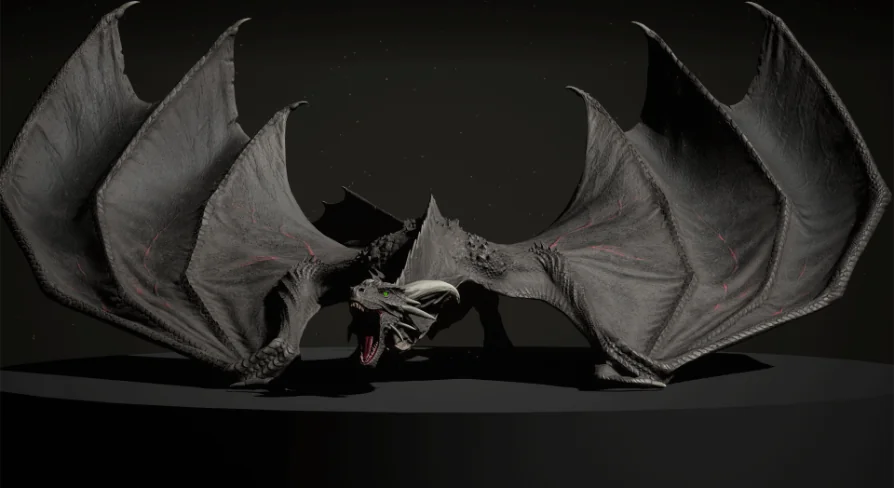
A creature spanning 25 meters in length imposes immediate demands on spatial planning, camera work, and collision setup. Built for Unreal Engine, the Dragon character provides a massive presence suitable for fantasy and medieval productions, whether deployed as an airborne wyvern-style boss or an environmental hazard. Gauging its scale against a standard reference mannequin reveals just how much volume the beast occupies in a level, requiring developers to think carefully about clearance, arena boundaries, and visual framing.
Spatial Footprint and Sizing the Dragon
Working with a 25-meter creature fundamentally shifts how encounter spaces and cinematic shots must be blocked out. Standard corridors and default doorways are out of the question; the scale demands broad landscapes, wide cavernous interiors, or dedicated exterior arenas. Because the proportions align with a massive reptilian predator, navigation meshes and movement systems need broad clearance radiuses to avoid clipping into nearby geometry or terrain.
The asset balances lowpoly structural efficiency with realistic anatomical shaping. While lowpoly optimization keeps the mesh lightweight enough for active runtime deployment, the proportions convey massive weight and muscular definition. That balance ensures that when the creature swoops down or towers over player-scale characters, its physical mass feels authentic without overwhelming system performance. Compatibility considerations also extend across related fantasy character implementations, including integration alongside figures like the Stone Golem within compatible project frameworks.
Mesh Variants and Facial Deformation Setup
Production pipelines often require different trade-offs between rendering performance and visual fidelity. To address this, two distinct mesh configurations are provided: one mesh built with a complete suite of facial blendshapes, and a second mesh stripped of facial blendshapes. Having both variants allows teams to budget resources selectively across different scenes.
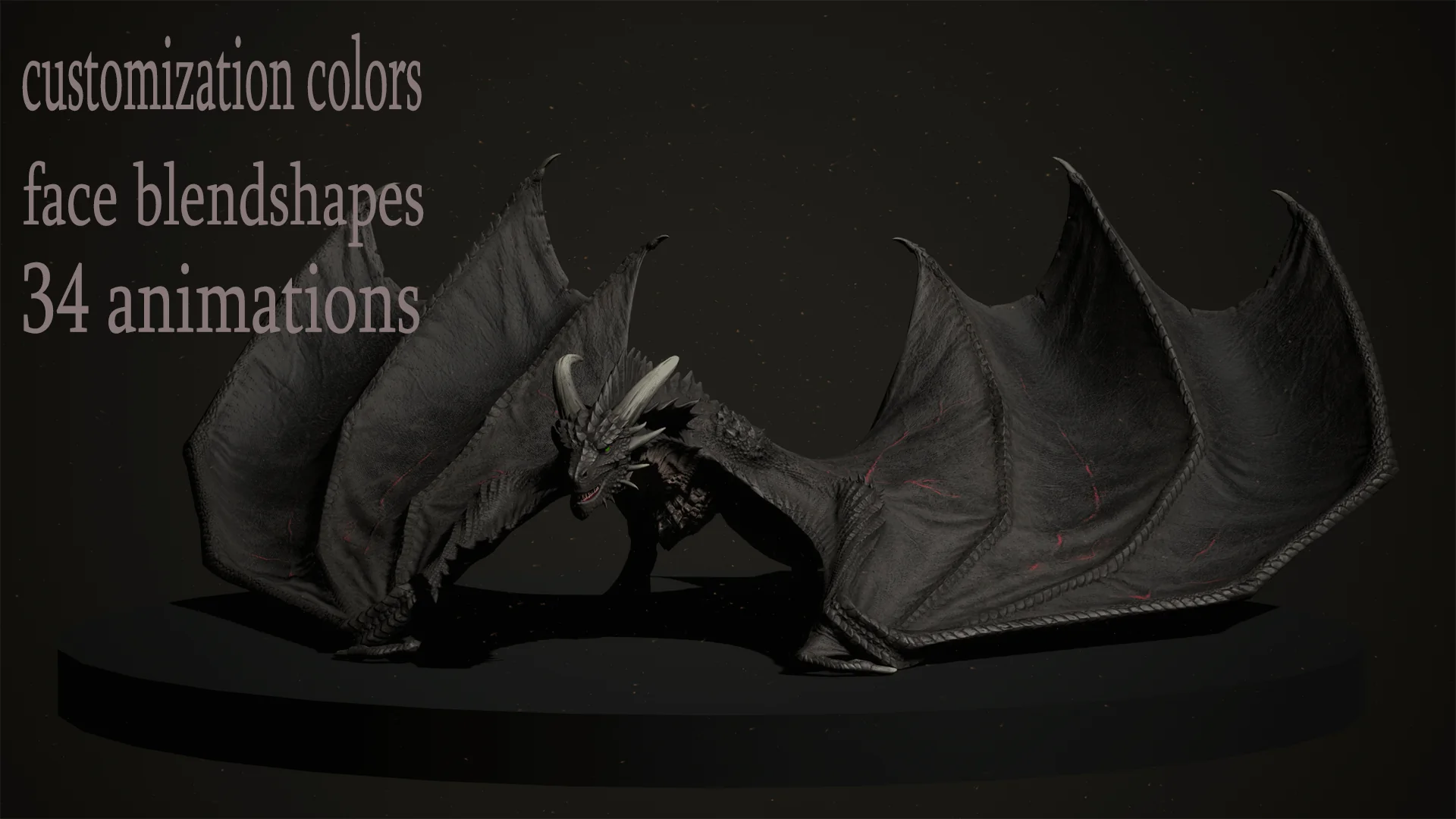
The mesh containing facial deformation features 51 dedicated face blendshapes. This volume of morph targets allows complex, nuanced facial performances, ranging from snarling lips, flared nostrils, and squinting eyelids to full jaw articulation during roars. For close-up cinematics, narrative dialogues, or moments where the creature directly faces the camera, the blendshape-enabled mesh delivers precise emotional inflection and menacing character acting.
For background encounters, wide-angle flight paths, or scenarios where the player never gets close enough to register subtle lip twitches or brow contractions, swapping to the mesh without blendshapes avoids processing unnecessary morph targets. This modular approach preserves engine overhead during chaotic action scenes without requiring manual asset stripping by technical artists.
Texturing and Customizing Dragon Surfaces Across a Single UV Set
Texturing a 25-meter model presents a significant visual challenge, as stretching a low-resolution map across such vast surface area quickly results in blurry scales and indistinct details. The Dragon solves this by wrapping the entire body within a single UV set mapped to ultra-high-definition 8K textures. Utilizing a single UV set minimizes material draw calls while the 8K pixel density ensures that skin folds, scale edges, and surface ridges remain crisp even when observed from nearby camera angles.
Material customization is an integral part of the surface setup. Color parameters can be altered directly on the model, allowing developers to change the look of:
Body scales and underlying skin tones to match diverse biomes or element types
Eye surfaces, adjusting color to convey calm intelligence, predatory rage, or supernatural possession
Teeth, shifting shading from weathered ivory to calcified or stained bone
These exposed color controls make it possible to spawn visually distinct variations across the same project. Multiple creatures can inhabit the same world without looking like identical clones, letting technical artists tune palettes to match desert wastes, volcanic peaks, or frozen tundra without altering underlying texture files.
Animation Blueprint Integration and Motion Sets
Bringing a 25-meter beast to life requires smooth skeletal motion and responsive logic. The asset includes a library of 34 distinct animations designed to cover essential creature states, from idle postures and ground locomotion to aggressive attacks and flight cycles. These animations are built to feed directly into an Animation Blueprint, making it straightforward to construct state machines that blend smooth transitions between running, turning, resting, and striking.
Script support and Animation Blueprint structures allow developers to bridge skeletal animation tracks with the 51 facial morph targets. A roaring animation, for example, can be linked to trigger corresponding jaw, throat, and nostril blendshapes in sync with sound cues. Because the animations are already tailored to the rig's specific bone hierarchy and wyvern-inspired proportions, technical animators avoid the tedious process of retargeting base locomotion from mismatched quadruped rigs.
Cinematics, Throat Emission, and Scene Configuration
A fantasy dragon is rarely complete without fire-breathing capabilities. The asset incorporates dedicated emission effects mapped specifically to the throat and chest areas. By activating and driving the intensity of these emissive channels, artists can simulate the internal buildup of fiery energy before an attack, illuminating the ribcage and throat lining from within as heat builds toward an inferno. This visual effect can be synchronized alongside particle systems and lighting components inside the engine to generate dramatic combat sequences or environmental destruction cutscenes.
When capturing marketing assets, trailer sequences, or pre-rendered cutscenes, scene setup requires a specific camera choice. The included render scene is configured specifically for Unreal Engine's CineCamera Actor. Selecting the CineCamera Actor ensures that focal lengths, sensor dimensions, depth of field, and exposure settings accurately capture the 25-meter scale without wide-angle distortion or incorrect perspective flattening. All showcase renders and demonstration clips were generated directly within Unreal Engine using this exact CineCamera setup, providing a direct reference for how lighting, 8K textures, throat emission, and skeletal motion coalesce under production camera settings.
 Creatures
 Creatures
 Creatures
 Creatures