"82ee98b2ee2793f1"{"id":"1002426","slug":"cute-kitten","title":"Cute Kitten","category":"Characters \u0026 Creatures","engine":"4.12+,5.0+","assetVersion":"","engineVersion":"Engine Version: 4.12+,5.0+","tag":"Characters","accent":"blue","visual":"character","summary":"Cute Kitten is a stylized Unreal character with movement, extra control, an input.ini, a minigame map, and a Mobile Preview ES2 caveat to check.","platform":"Unreal Engine","indexPolicy":"index","publishedAt":"2026-11-10T18:20:17.778Z","updatedAt":"2026-11-10T18:20:17.778Z","sourceNotes":[],"fileContents":[],"compatibility":["Unreal Engine","Engine Version: 4.12+,5.0+"],"featuredImage":{"alt":"Cute Kitten","src":"/wp-content/uploads/published/2026/11/e11c157c9f84-307f1eb1-8eb9-47a1-a452-10539e6947f9-7e82617798.webp"},"hasDownloadLink":true,"downloads":0,"terms":[{"taxonomy":"category","slug":"characters-and-creatures","name":"Characters \u0026 Creatures"}],"galleryImages":[{"src":"/wp-content/uploads/published/2026/11/f03555e0ad84-36a13ae7-6c9b-4dc3-a103-c095248adeae-be7e5aa0db.webp","alt":"Cute Kitten"},{"src":"/wp-content/uploads/published/2026/11/3a8ee89c2413-6f3c462a-863a-494d-9d86-2ea99dfc2b44-f0fbac997f.webp","alt":"Cute Kitten"},{"src":"/wp-content/uploads/published/2026/11/1bac6b7834e8-20be54d7-091a-487a-8ecc-4c4e1ed7cc90-4bd87e5d8c.webp","alt":"Cute Kitten"},{"src":"/wp-content/uploads/published/2026/11/fb6300a7c973-e2a93527-1faa-4755-9a35-352ba869c4da-39953c75a3.webp","alt":"Cute Kitten"},{"src":"/wp-content/uploads/published/2026/11/1f2081329284-7c38ab3b-bbcd-4236-b860-e6f4176a046b-3f3e852840.webp","alt":"Cute Kitten"}],"accessPanel":{"kind":"resource","title":"Get this resource","eyebrow":"Free resource","message":"Download this resource in your browser.","fileName":"Content.7z","safetyNote":"Resources are manually reviewed before listing to improve quality and reduce obvious risks.","actionLabel":"Get this resource","resourceType":"Resource archive","versions":[]},"contentHtml":"\u003cp\u003eCute Kitten starts with an input step, not a mesh drop. The project input file is the reference point for keyboard, mouse, and gamepad movement, and the.ini belongs in Edit \u0026gt; Project Settings \u0026gt; Input. Import it there when input movement misbehaves, then treat the character and its minigame map as the next layer. The asset is a high quality stylized kitten with movement and additional control, made for Unreal Engine and tied to the Unreal Engine - 3rd Person Game with Blueprints 2015 base.\u003c/p\u003e \u003ch2\u003eCute Kitten's Input Import Path\u003c/h2\u003e\n\u003cp\u003eThe control set covers keyboard, mouse, and gamepad. That matters before any animation or map test: if the project is not reading the same input mappings, movement will look broken even when the kitten itself is intact. The.ini import is handled through Edit \u0026gt; Project Settings \u0026gt; Input. That single path is the first troubleshooting stop for any input movement issue.\u003c/p\u003e\n\u003cp\u003eWhen the character moves into a different project, the input settings need to travel with it. The recommendation for newer engine versions is to use migrate assets or migrate the folder, and to carry the project input settings as well. Leaving the input behind creates a mismatch between what the kitten expects and what the new project provides. Re-importing the.ini after migration keeps the keyboard, mouse, and gamepad bindings aligned with the character.\u003c/p\u003e \u003ch2\u003eWhat the Kitten Package Contains\u003c/h2\u003e\n\u003cp\u003eThe centerpiece is a high quality stylized kitten character with movement and additional control. The minigame map is included alongside it, so the character is not presented as an isolated mesh. A level overview video and a basic animations video sit with the package, giving a direct look at the map and the animation set before the character is placed into another scene.\u003c/p\u003e\n\u003cp\u003eThe tag set is narrow and useful: Script, Stylized, Blueprint, Cat, Character, Animationblueprint. Those terms describe the kind of asset this is. The kitten is a Blueprint-driven character with an animation blueprint, not a static cat model with no control layer. The script and Blueprint tags also point to the logic side of the asset, while Stylized and Cat identify the visual and subject category.\u003c/p\u003e \u003ch2\u003eMovement, Animation, and the Minigame Map\u003c/h2\u003e\n\u003cp\u003eMovement and additional control are the functional core. The basic animations video shows the animation side without requiring a project launch, and the animation blueprint tag confirms that the animation logic is part of the character setup. A Blueprint-based third-person project can use the kitten as a controllable character rather than a prop. The minigame map gives that control a contained place to run: the map is included, so movement, animation, and input can be checked in the same environment.\u003c/p\u003e\n\u003cp\u003eUse cases follow from those pieces. A small third-person scene can drop in the kitten as the player character. A minigame prototype can use the included map as the starting space. An animation review can use the basic animations video to inspect the motion before opening the engine. A Blueprint study can look at the character and animation blueprint tags together. None of those uses require a different asset; they are different ways of working with the same stylized kitten, movement, additional control, and minigame map.\u003c/p\u003e \u003ch2\u003eCute Kitten on Newer Engine Versions\u003c/h2\u003e\n\u003cp\u003eThe character follows the Unreal Engine - 3rd Person Game with Blueprints 2015 base. That lineage is useful context for newer engine versions: the project structure and input settings are older, so migration needs both the assets and the input configuration. Migrating assets or the folder is the recommended route, with the project input settings handled at the same time. Version coverage is 4.12+ and 5.0+.\u003c/p\u003e\n\u003cp\u003eThis is a production-readiness detail rather than a visual one. A migrated folder without the matching input settings can leave the kitten in a project where movement does not respond as expected. A project that keeps the input file but skips the migration can run into the older project structure. Treating the asset migration and the input migration as one step avoids that split.\u003c/p\u003e \u003ch2\u003eThe Max Influences Limit in Mobile Preview ES2\u003c/h2\u003e\n\u003cp\u003eMobile Preview ES2 has a specific rendering catch on newer versions. Since version 4.21, Mobile Preview ES2 does not render the skeletal mesh. The cause is Max Influences, the number of joints the mesh uses. The original mesh has Max Influences 5. The newest versions support a maximum of 4.\u003c/p\u003e\n\u003cp\u003eThat detail changes how the character should be evaluated. A missing skeletal mesh in Mobile Preview ES2 is tied to the influence count, not to the kitten's movement or Blueprint setup. The limit belongs to the preview path and the mesh's joint influences. Checking Max Influences before using Mobile Preview ES2 keeps the rendering issue separate from input and animation testing.\u003c/p\u003e \u003ch2\u003eWho Cute Kitten Fits\u003c/h2\u003e\n\u003cp\u003eThe strongest fit is a project that needs a stylized cat character with movement and additional control already joined to a Blueprint and animation blueprint. The included minigame map and the level overview video make the asset useful for a small playable scene, a character test, or a minigame prototype. The keyboard, mouse, and gamepad input file adds a concrete control layer for projects that want to inspect input mappings rather than build them from scratch.\u003c/p\u003e\n\u003cp\u003eDevelopers working from the Unreal Engine - 3rd Person Game with Blueprints 2015 base will recognize the structure. Teams moving the kitten into a newer engine version should plan for migration of both assets and input settings. Anyone testing in Mobile Preview ES2 from 4.21 onward should check the Max Influences limit before reading a missing skeletal mesh as a problem with the character. Those are the maintenance points that decide whether Cute Kitten is ready for the project at hand.\u003c/p\u003e\n\n\u003ch2\u003eContinue Browsing Similar Packs\u003c/h2\u003e\n\u003cul\u003e\n\u003cli\u003e\u003ca href=\"https://3dcghub.com/2d-animated-cute-and-furry-monster-pack-pack-of-30/\" rel=\"noopener noreferrer\"\u003e2D Animated Cute and Furry Monster Pack (Pack of 30)\u003c/a\u003e\u003c/li\u003e\n\u003cli\u003e\u003ca href=\"https://3dcghub.com/cute-hamsters/\" rel=\"noopener noreferrer\"\u003eCute Hamsters\u003c/a\u003e\u003c/li\u003e\n\u003cli\u003e\u003ca href=\"https://3dcghub.com/crash-test-robot-dummy/\" rel=\"noopener noreferrer\"\u003eCrash Test Robot Dummy\u003c/a\u003e\u003c/li\u003e\n\u003cli\u003e\u003ca href=\"https://3dcghub.com/animalia-rat/\" rel=\"noopener noreferrer\"\u003eAnimalia - Rat\u003c/a\u003e\u003c/li\u003e\n\u003cli\u003e\u003ca href=\"https://3dcghub.com/animalia-brown-bear-male/\" rel=\"noopener noreferrer\"\u003eAnimalia - Brown Bear (male)\u003c/a\u003e\u003c/li\u003e\n\u003c/ul\u003e","contentTextLength":5948,"navigation":{"current":24,"total":4372,"previous":{"id":"1002427","slug":"cute-pet","title":"Cute Pet","category":"Animals","platform":"Unreal Engine","updatedAt":"2026-11-10T18:20:59.773Z"},"next":{"id":"1002425","slug":"crocodile","title":"CROCODILE","category":"Characters \u0026 Creatures","platform":"Unreal Engine","updatedAt":"2026-11-10T18:18:15.717Z"}},"relatedResources":[{"id":"1000971","slug":"2d-animated-cute-and-furry-monster-pack-pack-of-30","title":"2D Animated Cute and Furry Monster Pack (Pack of 30)","category":"Characters \u0026 Creatures","engine":"4.27,5.0+","assetVersion":"","engineVersion":"Engine Version: 4.27,5.0+","tag":"Characters","accent":"blue","visual":"character","summary":"A pack of 30 animated 2D furry monster sprites with expressive idle poses, colorful cartoon art, and broad genre fit for platformers, RPGs, and puzzle games.","platform":"Unreal Engine","indexPolicy":"index","publishedAt":"2026-08-17T15:38:53.654Z","updatedAt":"2026-08-17T15:38:53.654Z","sourceNotes":[],"fileContents":[],"compatibility":["Unreal Engine","Engine Version: 4.27,5.0+"],"featuredImage":{"alt":"2D Animated Cute and Furry Monster Pack (Pack of 30)","src":"/wp-content/uploads/published/2026/08/7a28c58c6042-26c9a573-8ed7-44ac-9261-87fa7c647836-1437b80258.webp"},"hasDownloadLink":true,"downloads":2},{"id":"1002313","slug":"cute-hamsters","title":"Cute Hamsters","category":"Animals","engine":"4.20+,5.0+","assetVersion":"","engineVersion":"Engine Version: 4.20+,5.0+","tag":"Animals","accent":"blue","visual":"mech","summary":"Cute Hamsters packs 31 hamster characters and 12 animations, with a Unity3D animation example and a UE version that omits the script and Toon shader.","platform":"Unreal Engine","indexPolicy":"index","publishedAt":"2026-11-06T06:15:37.558Z","updatedAt":"2026-11-06T06:15:37.558Z","sourceNotes":[],"fileContents":[],"compatibility":["Unreal Engine","Engine Version: 4.20+,5.0+"],"featuredImage":{"alt":"Cute Hamsters","src":"/wp-content/uploads/published/2026/11/cd85b9463262-766c2630-3b0e-416b-a94d-4f2be305d982-f7b99950c0.webp"},"hasDownloadLink":true,"downloads":0},{"id":"2655","slug":"bunny-cute-fighting-anime-warrior-girl-realistic-mmorpg-fps-stylized-character","title":"Bunny - Cute Fighting Anime Warrior Girl Realistic MMORPG FPS Stylized Character","category":"Humans","engine":"4.26+,5.0+","assetVersion":"Engine version: 4.26+,5.0+","engineVersion":"4.20","tag":"Humans","accent":"blue","visual":"character","summary":"Enhance your game with this modular Bunny Warrior character. Features 52 facial blendshapes, full physics, and Epic Skeleton compatibility for MMORPG and FPS.","platform":"Unreal Engine","indexPolicy":"index","publishedAt":"2026-02-07T14:41:48.000Z","updatedAt":"2026-04-19T15:57:59.000Z","sourceNotes":[],"fileContents":[],"compatibility":["Unreal Engine","Engine version: 4.26+,5.0+"],"featuredImage":{"alt":"Bunny - Cute Fighting Anime Warrior Girl Realistic MMORPG FPS Stylized Character","src":"https://3dcghub.com/wp-content/uploads/2026/02/b4dddbf3-6208-4c0b-b543-d334beaad341.webp"},"hasDownloadLink":true,"downloads":0}]}
Characters
Cute Kitten
Cute Kitten is a stylized Unreal character with movement, extra control, an input.ini, a minigame map, and a Mobile Preview ES2 caveat to check.
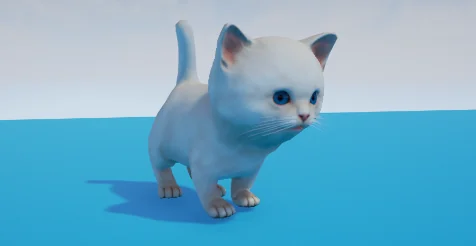
Cute Kitten starts with an input step, not a mesh drop. The project input file is the reference point for keyboard, mouse, and gamepad movement, and the.ini belongs in Edit > Project Settings > Input. Import it there when input movement misbehaves, then treat the character and its minigame map as the next layer. The asset is a high quality stylized kitten with movement and additional control, made for Unreal Engine and tied to the Unreal Engine - 3rd Person Game with Blueprints 2015 base.
Cute Kitten's Input Import Path
The control set covers keyboard, mouse, and gamepad. That matters before any animation or map test: if the project is not reading the same input mappings, movement will look broken even when the kitten itself is intact. The.ini import is handled through Edit > Project Settings > Input. That single path is the first troubleshooting stop for any input movement issue.
When the character moves into a different project, the input settings need to travel with it. The recommendation for newer engine versions is to use migrate assets or migrate the folder, and to carry the project input settings as well. Leaving the input behind creates a mismatch between what the kitten expects and what the new project provides. Re-importing the.ini after migration keeps the keyboard, mouse, and gamepad bindings aligned with the character.
What the Kitten Package Contains
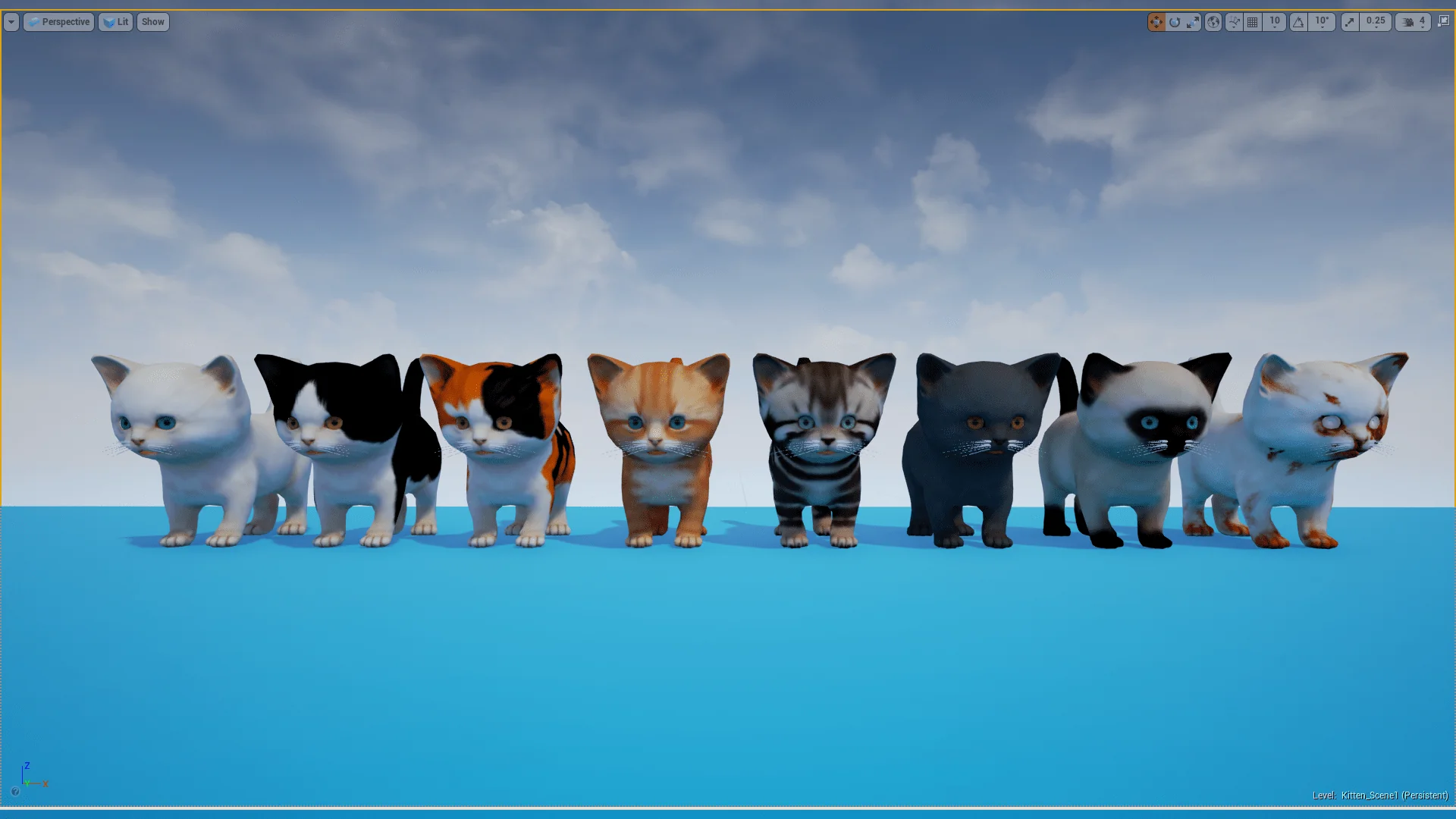
The centerpiece is a high quality stylized kitten character with movement and additional control. The minigame map is included alongside it, so the character is not presented as an isolated mesh. A level overview video and a basic animations video sit with the package, giving a direct look at the map and the animation set before the character is placed into another scene.
The tag set is narrow and useful: Script, Stylized, Blueprint, Cat, Character, Animationblueprint. Those terms describe the kind of asset this is. The kitten is a Blueprint-driven character with an animation blueprint, not a static cat model with no control layer. The script and Blueprint tags also point to the logic side of the asset, while Stylized and Cat identify the visual and subject category.
Movement, Animation, and the Minigame Map
Movement and additional control are the functional core. The basic animations video shows the animation side without requiring a project launch, and the animation blueprint tag confirms that the animation logic is part of the character setup. A Blueprint-based third-person project can use the kitten as a controllable character rather than a prop. The minigame map gives that control a contained place to run: the map is included, so movement, animation, and input can be checked in the same environment.
Use cases follow from those pieces. A small third-person scene can drop in the kitten as the player character. A minigame prototype can use the included map as the starting space. An animation review can use the basic animations video to inspect the motion before opening the engine. A Blueprint study can look at the character and animation blueprint tags together. None of those uses require a different asset; they are different ways of working with the same stylized kitten, movement, additional control, and minigame map.
Cute Kitten on Newer Engine Versions
The character follows the Unreal Engine - 3rd Person Game with Blueprints 2015 base. That lineage is useful context for newer engine versions: the project structure and input settings are older, so migration needs both the assets and the input configuration. Migrating assets or the folder is the recommended route, with the project input settings handled at the same time. Version coverage is 4.12+ and 5.0+.
This is a production-readiness detail rather than a visual one. A migrated folder without the matching input settings can leave the kitten in a project where movement does not respond as expected. A project that keeps the input file but skips the migration can run into the older project structure. Treating the asset migration and the input migration as one step avoids that split.
The Max Influences Limit in Mobile Preview ES2
Mobile Preview ES2 has a specific rendering catch on newer versions. Since version 4.21, Mobile Preview ES2 does not render the skeletal mesh. The cause is Max Influences, the number of joints the mesh uses. The original mesh has Max Influences 5. The newest versions support a maximum of 4.
That detail changes how the character should be evaluated. A missing skeletal mesh in Mobile Preview ES2 is tied to the influence count, not to the kitten's movement or Blueprint setup. The limit belongs to the preview path and the mesh's joint influences. Checking Max Influences before using Mobile Preview ES2 keeps the rendering issue separate from input and animation testing.
Who Cute Kitten Fits
The strongest fit is a project that needs a stylized cat character with movement and additional control already joined to a Blueprint and animation blueprint. The included minigame map and the level overview video make the asset useful for a small playable scene, a character test, or a minigame prototype. The keyboard, mouse, and gamepad input file adds a concrete control layer for projects that want to inspect input mappings rather than build them from scratch.
Developers working from the Unreal Engine - 3rd Person Game with Blueprints 2015 base will recognize the structure. Teams moving the kitten into a newer engine version should plan for migration of both assets and input settings. Anyone testing in Mobile Preview ES2 from 4.21 onward should check the Max Influences limit before reading a missing skeletal mesh as a problem with the character. Those are the maintenance points that decide whether Cute Kitten is ready for the project at hand.
 Characters
 Characters
 Animals
 Humans