"4481da9c895ef786"{"id":"1001321","slug":"clipboard-copy-and-paste","title":"Clipboard - Copy and Paste","category":"Engine Tools","engine":"5.2 - 5.8","assetVersion":"Asset Version: 1.0.0","engineVersion":"Engine Version: 5.2 - 5.8","tag":"Engine Tools","accent":"blue","visual":"mech","summary":"Clipboard - Copy and Paste enables direct transfer between engine data types and the OS clipboard, with native support for String, Name, and Text formats.","platform":"Unreal Engine","publishedAt":"2026-10-02T09:45:44.117Z","updatedAt":"2026-10-02T09:45:44.117Z","sourceNotes":[],"fileContents":[],"compatibility":["Unreal Engine","Asset Version: 1.0.0","Engine Version: 5.2 - 5.8"],"featuredImage":{"alt":"Clipboard - Copy and Paste","src":"/wp-content/uploads/published/2026/10/52247dfc6e90-ec6946c5-760d-4a46-9ed3-866c3a2e44fe-90735e7038.webp"},"hasDownloadLink":true,"downloads":0,"terms":[{"taxonomy":"category","slug":"engine-tools-tools-and-plugins","name":"Engine Tools"}],"galleryImages":[],"accessPanel":{"kind":"resource","title":"Download this resource","eyebrow":"Free Download","message":"Log in or create a free account to start your download.","fileName":"Clipboard - Copy and Paste.7z","safetyNote":"Resources are manually reviewed before listing to improve quality and reduce obvious risks.","actionLabel":"Download Free","resourceType":"Resource archive"},"contentHtml":"\u003cp\u003eUser interface screens, interactive settings panels, and multiplayer setup lobbies frequently demand clean channels for transferring text between an active runtime session and the underlying operating system. In complex gameplay setups—such as those utilizing the FPS First Person Shooter Framework (SKG Shooter Framework V2)—players routinely need to share room codes, paste server addresses, duplicate sensitive account names, or extract diagnostic logs directly from a HUD widget. Clipboard - Copy and Paste provides the functional backbone for these transactions, establishing direct communication channels that read from and write to the host system buffer without intermediate scripting workarounds.\u003c/p\u003e \u003ch2\u003eBridging In-Game Interfaces and the Operating System Clipboard\u003c/h2\u003e\n\u003cp\u003eInteractive interfaces in modern game clients frequently encounter friction when handling input fields. Players expect standard system-level utilities to function seamlessly inside a game window, particularly when navigating first-person shooter lobbies, chat systems, or command consoles. Transferring data out of runtime menus usually requires bridging distinct engine data types into the universal text buffer of the operating system.\u003c/p\u003e\n\u003cp\u003eClipboard - Copy and Paste resolves this friction by introducing straightforward function calls focused on explicit data types. Whether an interface relies on dynamic UI strings, strict identifier keys, or localized user-facing text, data can be transferred into the host clipboard buffer immediately upon a user action like a button press or hotkey execution.\u003c/p\u003e \u003ch2\u003eExporting Data via ClipboardCopy Function Variants\u003c/h2\u003e\n\u003cp\u003eWriting runtime values to the operating system requires managing how specific engine representations translate into external text buffers. Clipboard - Copy and Paste separates write actions into three distinct functions, ensuring developers do not need to convert their variables manually before calling a transfer action:\u003c/p\u003e\n\u003cul\u003e \u003cli\u003e\u003cstrong\u003eClipboardCopy:\u003c/strong\u003e Copies the contents of a passed-in String variable directly to the operating system's clipboard. This node handles dynamic text manipulations, user-entered chat lines, and concatenated log entries without stripping internal formatting.\u003c/li\u003e \u003cli\u003e\u003cstrong\u003eClipboardCopyName:\u003c/strong\u003e Copies the contents of a passed-in Name variable directly to the operating system's clipboard. Because Name types are heavily optimized internally for asset referencing, object mapping, and fixed identifiers, pushing them outward as literal character strings preserves their exact internal terminology.\u003c/li\u003e \u003cli\u003e\u003cstrong\u003eClipboardCopyText:\u003c/strong\u003e Copies the contents of a passed-in Text variable directly to the operating system's clipboard. This pathway is intended for localized strings, UI labels, and user-facing notifications, passing the resolved text presentation to the operating system.\u003c/li\u003e\n\u003c/ul\u003e\n\u003cp\u003eHandling these types individually minimizes unintentional conversion errors. When an interface element passes a localized UI element to the host clipboard, using ClipboardCopyText ensures that the processed display string arrives intact in the external environment.\u003c/p\u003e \u003ch2\u003eReading System Information with ClipboardPaste and Native Data Types\u003c/h2\u003e\n\u003cp\u003eReceiving data from the host operating system presents the inverse challenge: external text must be imported back into engine logic in a format that downstream blueprints and data structures can process without extra casting steps. Incoming external strings often need to populate various systems, from console command parsers to UI text fields. Clipboard - Copy and Paste mirrors its export structure with three dedicated retrieval functions:\u003c/p\u003e\n\u003cul\u003e \u003cli\u003e\u003cstrong\u003eClipboardPaste:\u003c/strong\u003e Accesses the current contents of the operating system's clipboard and returns the data formatted as a standard String. This is suited for raw input, multi-line user inputs, and general alphanumeric data streams.\u003c/li\u003e \u003cli\u003e\u003cstrong\u003eClipboardPasteName:\u003c/strong\u003e Accesses the operating system's clipboard and converts the incoming character sequence directly into a Name format. This enables immediate lookup operations against data tables, asset reference maps, or internal identifier lists without needing a manual string-to-name conversion node.\u003c/li\u003e \u003cli\u003e\u003cstrong\u003eClipboardPasteText:\u003c/strong\u003e Retrieves the clipboard data and outputs it directly as an engine Text format. This simplifies setting widget text blocks, button labels, and localized player display fields directly from incoming clipboard material.\u003c/li\u003e\n\u003c/ul\u003e\n\u003cp\u003eBy routing the incoming clipboard stream into the precise variable format required by the receiving node, logic networks remain compact and readable. Interface graphs can bypass secondary conversion operations, pulling data directly into slate or UMG elements with minimal overhead.\u003c/p\u003e \u003ch2\u003eValidating Buffer State with IsClipboardEmpty\u003c/h2\u003e\n\u003cp\u003eReading from an unpopulated system buffer can introduce silent logic failures, blank variable states, or unexpected UI behavior. To address this, the toolset includes a dedicated query function named \u003ccode\u003eIsClipboardEmpty\u003c/code\u003e.\u003c/p\u003e\n\u003cp\u003eThis utility checks the status of the operating system's clipboard buffer and returns a boolean value—evaluating to true whenever the clipboard contains no readable data. Integrating \u003ccode\u003eIsClipboardEmpty\u003c/code\u003e Into interface validation passes allows developers to design cleaner interactive screens:\u003c/p\u003e\n\u003cul\u003e \u003cli\u003ePaste buttons in user menus can dynamically disable or gray out when no valid clipboard content is present.\u003c/li\u003e \u003cli\u003eInput fields can run conditional checks before attempting data ingestion, preventing empty variable overrides in player profile forms or server join dialogues.\u003c/li\u003e \u003cli\u003eScripting logic can route users toward fallback workflows or display inline instructional warnings if an expected paste operation yields an empty buffer.\u003c/li\u003e\n\u003c/ul\u003e\n\u003cp\u003eThis single query node prevents runtime logic from parsing null or absent strings, reinforcing stability across input-heavy game screens.\u003c/p\u003e \u003ch2\u003ePractical Implementations inside the SKG Shooter Framework V2 Pipeline\u003c/h2\u003e\n\u003cp\u003eProjects building upon modular architectures—specifically systems utilizing the FPS First Person Shooter Framework (SKG Shooter Framework V2)—rely on precision input handling and streamlined configuration sharing. In high-tempo first-person tactical setups, players frequently swap loadout configurations, keybind profiles, and network connection strings.\u003c/p\u003e\n\u003cp\u003eUsing Clipboard - Copy and Paste inside an SKG Shooter Framework V2 environment allows configuration strings to be copied directly from in-game loadout customization menus and shared externally across communication platforms. Similarly, joining specific match instances or applying preset weapon tuning codes becomes a single-click operation: a player copies a serialized string from outside the game client, accesses the framework's custom menu, and applies the parameters directly via \u003ccode\u003eClipboardPaste\u003c/code\u003e Or \u003ccode\u003eClipboardPasteString\u003c/code\u003e.\u003c/p\u003e\n\u003cp\u003eDevelopers implementing custom developer consoles, automated testing sequences, or match coordination systems within first-person frameworks can maintain direct, two-way text interchange with desktop environments, ensuring that administrative and player workflows operate without friction.\u003c/p\u003e\n\n\u003ch2\u003eExplore Similar Assets\u003c/h2\u003e\n\u003cul\u003e\n\u003cli\u003e\u003ca href=\"https://3dcghub.com/collision-settings-debugger/\" title=\"Collision Settings Debugger\"\u003eCollision Settings Debugger\u003c/a\u003e\u003c/li\u003e\n\u003cli\u003e\u003ca href=\"https://3dcghub.com/modular-snap-system-2/\" title=\"Modular Snap System\"\u003eModular Snap System\u003c/a\u003e\u003c/li\u003e\n\u003cli\u003e\u003ca href=\"https://3dcghub.com/externaltextureplugin/\" title=\"ExternalTexturePlugin\"\u003eExternalTexturePlugin\u003c/a\u003e\u003c/li\u003e\n\u003cli\u003e\u003ca href=\"https://3dcghub.com/combo-graph/\" title=\"Combo Graph\"\u003eCombo Graph\u003c/a\u003e\u003c/li\u003e\n\u003cli\u003e\u003ca href=\"https://3dcghub.com/gravity-scatter-tool/\" title=\"Gravity Scatter Tool\"\u003eGravity Scatter Tool\u003c/a\u003e\u003c/li\u003e\n\u003c/ul\u003e","contentTextLength":7101,"navigation":{"current":19,"total":3269,"previous":{"id":"1001322","slug":"collision-settings-debugger-2","title":"Collision Settings Debugger","category":"Engine Tools","platform":"Unreal Engine","updatedAt":"2026-10-02T09:47:46.569Z"},"next":{"id":"1001320","slug":"clarus-viewer-base","title":"Clarus Viewer Base","category":"Engine Tools","platform":"Unreal Engine","updatedAt":"2026-10-02T09:43:29.741Z"}},"relatedResources":[{"id":"1001326","slug":"replicated-tickable-uobjects","title":"Replicated Tickable UObjects","category":"Engine Tools","engine":"5.2 - 5.8","assetVersion":"Asset Version: 1.0.0 - 1.0","engineVersion":"Engine Version: 5.2 - 5.8","tag":"Engine Tools","accent":"blue","visual":"mech","summary":"Implement ticking and networking on UObjects with USKGObject, USKGReplicatedObject, and registered subobject helpers for Blueprint and C++.","platform":"Unreal Engine","publishedAt":"2026-10-02T09:56:00.531Z","updatedAt":"2026-10-02T09:56:00.531Z","sourceNotes":[],"fileContents":[],"compatibility":["Unreal Engine","Asset Version: 1.0.0 - 1.0","Engine Version: 5.2 - 5.8"],"featuredImage":{"alt":"Replicated Tickable UObjects","src":"/wp-content/uploads/published/2026/10/ba76fc84ce02-30f8480a-bf11-417b-a91f-6751827f7ee4-450ae220f2.webp"},"hasDownloadLink":true,"downloads":0},{"id":"1001322","slug":"collision-settings-debugger-2","title":"Collision Settings Debugger","category":"Engine Tools","engine":"5.2 - 5.8","assetVersion":"Asset Version: 1.0","engineVersion":"Engine Version: 5.2 - 5.8","tag":"Engine Tools","accent":"blue","visual":"mech","summary":"Inspect and verify primitive component collision settings in Unreal Engine using a dedicated Gameplay Debugger category and Blueprint query nodes.","platform":"Unreal Engine","publishedAt":"2026-10-02T09:47:46.569Z","updatedAt":"2026-10-02T09:47:46.569Z","sourceNotes":[],"fileContents":[],"compatibility":["Unreal Engine","Asset Version: 1.0","Engine Version: 5.2 - 5.8"],"featuredImage":{"alt":"Collision Settings Debugger","src":"/wp-content/uploads/published/2026/10/c67f33b2af27-cbdc50fb-4aa1-4656-9759-3b1f00b8d07e-1da0e85a65.webp"},"hasDownloadLink":true,"downloads":0},{"id":"1001265","slug":"collision-settings-debugger","title":"Collision Settings Debugger","category":"Engine Tools","engine":"5.2 - 5.8","assetVersion":"Asset Version: 1.0","engineVersion":"Engine Version: 5.2 - 5.8","tag":"Engine Tools","accent":"blue","visual":"mech","summary":"Inspect primitive component collisions with Collision Settings Debugger, featuring a Gameplay Debugger category and dedicated Blueprint query nodes.","platform":"Unreal Engine","publishedAt":"2026-09-30T05:43:51.525Z","updatedAt":"2026-09-30T05:43:51.525Z","sourceNotes":[],"fileContents":[],"compatibility":["Unreal Engine","Asset Version: 1.0","Engine Version: 5.2 - 5.8"],"featuredImage":{"alt":"Collision Settings Debugger","src":"/wp-content/uploads/published/2026/09/c67f33b2af27-cbdc50fb-4aa1-4656-9759-3b1f00b8d07e-8d276138cc.webp"},"hasDownloadLink":true,"downloads":0}]}
Engine Tools
Clipboard - Copy and Paste
Clipboard - Copy and Paste enables direct transfer between engine data types and the OS clipboard, with native support for String, Name, and Text formats.
User interface screens, interactive settings panels, and multiplayer setup lobbies frequently demand clean channels for transferring text between an active runtime session and the underlying operating system. In complex gameplay setups—such as those utilizing the FPS First Person Shooter Framework (SKG Shooter Framework V2)—players routinely need to share room codes, paste server addresses, duplicate sensitive account names, or extract diagnostic logs directly from a HUD widget. Clipboard - Copy and Paste provides the functional backbone for these transactions, establishing direct communication channels that read from and write to the host system buffer without intermediate scripting workarounds.
Bridging In-Game Interfaces and the Operating System Clipboard
Interactive interfaces in modern game clients frequently encounter friction when handling input fields. Players expect standard system-level utilities to function seamlessly inside a game window, particularly when navigating first-person shooter lobbies, chat systems, or command consoles. Transferring data out of runtime menus usually requires bridging distinct engine data types into the universal text buffer of the operating system.
Clipboard - Copy and Paste resolves this friction by introducing straightforward function calls focused on explicit data types. Whether an interface relies on dynamic UI strings, strict identifier keys, or localized user-facing text, data can be transferred into the host clipboard buffer immediately upon a user action like a button press or hotkey execution.
Exporting Data via ClipboardCopy Function Variants
Writing runtime values to the operating system requires managing how specific engine representations translate into external text buffers. Clipboard - Copy and Paste separates write actions into three distinct functions, ensuring developers do not need to convert their variables manually before calling a transfer action:
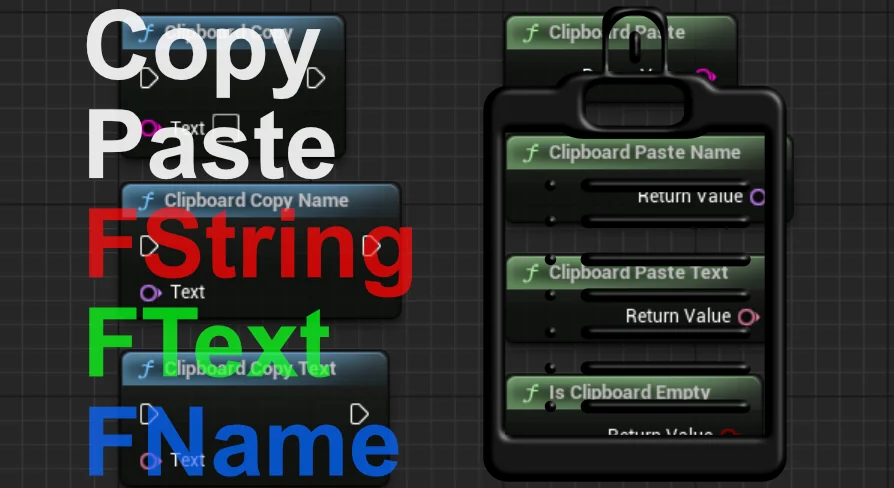
ClipboardCopy: Copies the contents of a passed-in String variable directly to the operating system's clipboard. This node handles dynamic text manipulations, user-entered chat lines, and concatenated log entries without stripping internal formatting.
ClipboardCopyName: Copies the contents of a passed-in Name variable directly to the operating system's clipboard. Because Name types are heavily optimized internally for asset referencing, object mapping, and fixed identifiers, pushing them outward as literal character strings preserves their exact internal terminology.
ClipboardCopyText: Copies the contents of a passed-in Text variable directly to the operating system's clipboard. This pathway is intended for localized strings, UI labels, and user-facing notifications, passing the resolved text presentation to the operating system.
Handling these types individually minimizes unintentional conversion errors. When an interface element passes a localized UI element to the host clipboard, using ClipboardCopyText ensures that the processed display string arrives intact in the external environment.
Reading System Information with ClipboardPaste and Native Data Types
Receiving data from the host operating system presents the inverse challenge: external text must be imported back into engine logic in a format that downstream blueprints and data structures can process without extra casting steps. Incoming external strings often need to populate various systems, from console command parsers to UI text fields. Clipboard - Copy and Paste mirrors its export structure with three dedicated retrieval functions:
ClipboardPaste: Accesses the current contents of the operating system's clipboard and returns the data formatted as a standard String. This is suited for raw input, multi-line user inputs, and general alphanumeric data streams.
ClipboardPasteName: Accesses the operating system's clipboard and converts the incoming character sequence directly into a Name format. This enables immediate lookup operations against data tables, asset reference maps, or internal identifier lists without needing a manual string-to-name conversion node.
ClipboardPasteText: Retrieves the clipboard data and outputs it directly as an engine Text format. This simplifies setting widget text blocks, button labels, and localized player display fields directly from incoming clipboard material.
By routing the incoming clipboard stream into the precise variable format required by the receiving node, logic networks remain compact and readable. Interface graphs can bypass secondary conversion operations, pulling data directly into slate or UMG elements with minimal overhead.
Validating Buffer State with IsClipboardEmpty
Reading from an unpopulated system buffer can introduce silent logic failures, blank variable states, or unexpected UI behavior. To address this, the toolset includes a dedicated query function named IsClipboardEmpty.
This utility checks the status of the operating system's clipboard buffer and returns a boolean value—evaluating to true whenever the clipboard contains no readable data. Integrating IsClipboardEmpty Into interface validation passes allows developers to design cleaner interactive screens:
Paste buttons in user menus can dynamically disable or gray out when no valid clipboard content is present.
Input fields can run conditional checks before attempting data ingestion, preventing empty variable overrides in player profile forms or server join dialogues.
Scripting logic can route users toward fallback workflows or display inline instructional warnings if an expected paste operation yields an empty buffer.
This single query node prevents runtime logic from parsing null or absent strings, reinforcing stability across input-heavy game screens.
Practical Implementations inside the SKG Shooter Framework V2 Pipeline
Projects building upon modular architectures—specifically systems utilizing the FPS First Person Shooter Framework (SKG Shooter Framework V2)—rely on precision input handling and streamlined configuration sharing. In high-tempo first-person tactical setups, players frequently swap loadout configurations, keybind profiles, and network connection strings.
Using Clipboard - Copy and Paste inside an SKG Shooter Framework V2 environment allows configuration strings to be copied directly from in-game loadout customization menus and shared externally across communication platforms. Similarly, joining specific match instances or applying preset weapon tuning codes becomes a single-click operation: a player copies a serialized string from outside the game client, accesses the framework's custom menu, and applies the parameters directly via ClipboardPaste Or ClipboardPasteString.
Developers implementing custom developer consoles, automated testing sequences, or match coordination systems within first-person frameworks can maintain direct, two-way text interchange with desktop environments, ensuring that administrative and player workflows operate without friction.
 Engine Tools
 Engine Tools
 Engine Tools
 Engine Tools