"7aa4acc705f0d80b"{"id":"1001976","slug":"character-body-fx-vol-3","title":"Character Body FX Vol. 3","category":"Variety","engine":"4.27+,5.0+","assetVersion":"","engineVersion":"Engine Version: 4.27+,5.0+","tag":"Variety","accent":"blue","visual":"character","summary":"Explore Niagara character visual effects for skeletal meshes, covering GPU distance field setup, regional mesh sampling, and elemental presets.","platform":"Unreal Engine","publishedAt":"2026-10-24T14:07:03.848Z","updatedAt":"2026-10-24T14:07:03.848Z","sourceNotes":[],"fileContents":[],"compatibility":["Unreal Engine","Engine Version: 4.27+,5.0+"],"featuredImage":{"alt":"Character Body FX Vol. 3","src":"/wp-content/uploads/published/2026/10/1a33fb059d6b-bd702f6d-b042-44b5-a5bf-f4ba963dfc1b-e8e00fc35f.webp"},"hasDownloadLink":true,"downloads":0,"terms":[{"taxonomy":"category","slug":"variety-vfx","name":"Variety"}],"galleryImages":[{"src":"/wp-content/uploads/published/2026/10/9265d64bb626-959d0388-7c02-4bbb-99f9-d64dca457390-e74101b764.webp","alt":"Character Body FX Vol. 3"},{"src":"/wp-content/uploads/published/2026/10/6f181cccf966-8df3b441-ea41-4de4-b3e7-a5b81f09dced-ed471bc0fd.webp","alt":"Character Body FX Vol. 3"},{"src":"/wp-content/uploads/published/2026/10/f7323b7d4a2e-4e22f0d8-6aa6-46d1-959d-8db78e6bf581-bfcff1be62.webp","alt":"Character Body FX Vol. 3"},{"src":"/wp-content/uploads/published/2026/10/db6a6243d176-6f0a9b9d-21a9-41ef-b80e-af63f3bca1ca-3a9b858072.webp","alt":"Character Body FX Vol. 3"},{"src":"/wp-content/uploads/published/2026/10/6ace25b37f71-39ae4e1d-191d-42fa-af3b-da4673104842-c7ce8bb772.webp","alt":"Character Body FX Vol. 3"},{"src":"/wp-content/uploads/published/2026/10/f28eddb45276-69596d29-2249-49f9-9828-9b5f8ab6d7ac-d0cda8947c.webp","alt":"Character Body FX Vol. 3"},{"src":"/wp-content/uploads/published/2026/10/02eacec3ba68-6db1a78e-963c-4a50-b01f-791ebd1ddc95-4c9aafc10a.webp","alt":"Character Body FX Vol. 3"},{"src":"/wp-content/uploads/published/2026/10/26aafe72ab5f-6685891c-d4dc-4fbc-9a02-aff16021cb9f-273beffb95.webp","alt":"Character Body FX Vol. 3"},{"src":"/wp-content/uploads/published/2026/10/4d42e78f7658-78f886d1-9a5d-4628-8c24-ce153e924b4b-9107a14f4c.webp","alt":"Character Body FX Vol. 3"},{"src":"/wp-content/uploads/published/2026/10/c4e6b30eb276-7482ee92-ad1e-4ae3-997d-a4e3b49072b2-2f6d81c301.webp","alt":"Character Body FX Vol. 3"}],"accessPanel":{"kind":"resource","title":"Download this resource","eyebrow":"Free Download","message":"Log in or create a free account to start your download.","fileName":"Content.7z","safetyNote":"Resources are manually reviewed before listing to improve quality and reduce obvious risks.","actionLabel":"Download Free","resourceType":"Resource archive"},"contentHtml":"\u003ch2\u003eBinding Niagara Particle Systems Directly to Any Skeletal Mesh\u003c/h2\u003e\u003cp\u003eAttaching reactive visual effects to moving characters often requires complex emitter sockets or bespoke rigging that fails when transferred to new models. Character Body FX Vol. 3 bypasses that friction by allowing Niagara effects to attach directly to any skeletal mesh hierarchy.\u003c/p\u003e\u003cp\u003eThe package demonstrates this flexibility through a standard UE4 mannequin execution inside the demo environment. Because the emitters track the underlying bone transforms and skin surface rather than static world vectors, the visual systems hold their coherence during extreme skeletal deformation, combat sequences, and rhythmic dance cycles. Whether handling a realistic human protagonist or an anatomical fantasy skeleton, the particle systems wrap around the animated geometry without separating from limb joints or torso volumes as the character shifts.\u003c/p\u003e\u003ch2\u003eElemental, Visceral, and Cosmic Character Body FX Themes\u003c/h2\u003e\u003cp\u003eThe collection spans sixteen distinct visual effect treatments that cover both raw elemental forces and stylized, abstract energies.\u003c/p\u003e\u003cp\u003eThe included presets break down across distinct aesthetic categories:\u003c/p\u003e\u003cul\u003e\u003cli\u003e\u003cstrong\u003eVisceral and Fluid Matter:\u003c/strong\u003e Blood, Black Ooze, Slime, and Water simulate dense, dripping, or clinging surface substances suitable for organic damage states and environmental saturation.\u003c/li\u003e\u003cli\u003e\u003cstrong\u003eThermal and Geological Energy:\u003c/strong\u003e Ash, Furnace, Lava, and Sulfur project scorched surfaces, molten crusts, burning interiors, and volatile chemical plumes.\u003c/li\u003e\u003cli\u003e\u003cstrong\u003eElectrical and High-Frequency Currents:\u003c/strong\u003e Electric and Lightning wrap limbs in branching arcs, sharp discharge flashes, and unstable voltage patterns.\u003c/li\u003e\u003cli\u003e\u003cstrong\u003eAbstract and Stylized Emissions:\u003c/strong\u003e Cosmic, Neon, Radioactive, Rainbow, Ribbon - Dark, and Ribbon - Light cast luminous trails, glowing bands, and spectral atmospheric envelopes around moving forms.\u003c/li\u003e\u003c/ul\u003e\u003cp\u003eEach treatment alters how light and particle density interact with the underlying model. The visceral selections focus on viscous cling and gravity-influenced fluid movement, whereas the energetic variants rely on high-velocity sparks, trailing ribbons, and erratic arcing that emphasize the direction of character motion.\u003c/p\u003e\u003ch2\u003eEnabling Mesh Distance Fields for GPU Effects\u003c/h2\u003e\u003cp\u003eA fundamental project configuration requirement governs the GPU-driven components of this package. Projects utilizing these systems must have the Generate Mesh Distance Fields setting explicitly enabled in their configuration settings.\u003c/p\u003e\u003cp\u003eGPU-simulated particles rely on global distance fields to sample spatial proximity, surface normal directions, and obstacle boundaries across the scene. With Mesh Distance Fields turned on, the GPU emitters accurately detect surrounding geometry, enabling particles to trace body contours, bounce off intersecting props, or pool along physical creases in the skeletal mesh. Leaving this setting disabled prevents the GPU emitters from calculating volumetric distance data, which disrupts surface tracking and breaks realistic spatial interaction between the character and nearby level surfaces.\u003c/p\u003e\u003ch2\u003eSampling Mesh Regions and Blueprint Integration\u003c/h2\u003e\u003cp\u003eApplying an effect across an entire character rig is straightforward, but targeted scenarios often call for localized emission on specific limbs, wounds, or armor pieces. Mesh region sampling allows developers to isolate emitter points to defined UV quadrants or material zones rather than dispersing particles uniformly across the entire silhouette.\u003c/p\u003e\u003cp\u003eCoordinating these emissions dynamically during gameplay relies on Blueprint integration. Through dedicated Blueprint setups, the particle parameters can be linked directly to character health levels, elemental weapon impacts, or specific animation state changes. A character stepping into toxic terrain can trigger the Slime or Sulfur emitters across their lower extremities, while an overloaded ability state can activate Cosmic, Neon, or Lightning bursts across the upper torso. Because the Blueprints reference the native skeletal mesh components, swapping assets across different player or enemy classes requires no re-authoring of the underlying emitter coordinates.\u003c/p\u003e\u003ch2\u003eAnimation Adaptability Across Fantasy and Realistic Rigs\u003c/h2\u003e\u003cp\u003eTesting visual effects against stationary poses frequently hides clipping, unnatural stretching, and particle clumping. Character Body FX Vol. 3 addresses this by showcasing emitters against full-body dance and locomotive animations within the demonstration scene.\u003c/p\u003e\u003cp\u003eThis stress-testing confirms that effects like Ribbon - Dark, Ribbon - Light, and high-density Ash trails flow naturally behind moving appendages rather than freezing in place or shearing across the camera view. The system maintains visual density whether a character is sprinting forward, rolling across terrain, or performing rapid, multi-joint rotations. As part of the broader character visual effects series and compatible with the unified character VFX mega bundle architecture, this volume serves productions requiring fast, drag-and-drop elemental integration across expansive rosters of animated creatures, stylized combatants, and realistic human performers.\u003c/p\u003e\n\n\u003ch2\u003eExplore Similar Assets\u003c/h2\u003e\n\u003cul\u003e\n\u003cli\u003e\u003ca href=\"https://3dcghub.com/character-body-fx-vol-1/\" title=\"Character Body FX Vol. 1\"\u003eCharacter Body FX Vol. 1\u003c/a\u003e\u003c/li\u003e\n\u003cli\u003e\u003ca href=\"https://3dcghub.com/master-materials-and-layer-system-for-daz3d-imports/\" title=\"Master Materials and Layer System for Daz3D Imports\"\u003eMaster Materials and Layer System for Daz3D Imports\u003c/a\u003e\u003c/li\u003e\n\u003cli\u003e\u003ca href=\"https://3dcghub.com/simple-cartoon-fx-pack/\" title=\"Simple Cartoon FX Pack\"\u003eSimple Cartoon FX Pack\u003c/a\u003e\u003c/li\u003e\n\u003cli\u003e\u003ca href=\"https://3dcghub.com/cartoony-impact-fx-second-edition/\" title=\"Cartoony Impact FX - Second Edition\"\u003eCartoony Impact FX - Second Edition\u003c/a\u003e\u003c/li\u003e\n\u003cli\u003e\u003ca href=\"https://3dcghub.com/modular-soldier-pack-vol-1/\" title=\"MODULAR SOLDIER PACK Vol. 1\"\u003eMODULAR SOLDIER PACK Vol. 1\u003c/a\u003e\u003c/li\u003e\n\u003c/ul\u003e","contentTextLength":5298,"navigation":{"current":14,"total":3925,"previous":{"id":"1001977","slug":"character-conversation-mocap-pack","title":"Character Conversation - MoCap Pack","category":"Game Development Resource","platform":"Unreal Engine","updatedAt":"2026-10-24T14:14:57.765Z"},"next":{"id":"1001975","slug":"casino-props","title":"Casino Props","category":"Tools, Objects \u0026 Decor","platform":"Unreal Engine","updatedAt":"2026-10-24T14:04:38.873Z"}},"relatedResources":[{"id":"1000259","slug":"character-body-fx-vol-1","title":"Character Body FX Vol. 1","category":"Variety","engine":"5.0+","assetVersion":"","engineVersion":"Engine Version: 5.0+","tag":"Variety","accent":"blue","visual":"character","summary":"A technical breakdown of Character Body FX Vol. 1, detailing its 16 Niagara particle setups, skeletal mesh attachment processes, and mesh sampling features.","platform":"Unreal Engine","publishedAt":"2026-06-30T22:54:39.158Z","updatedAt":"2026-06-30T22:54:39.158Z","sourceNotes":[],"fileContents":[],"compatibility":["Unreal Engine","Engine Version: 5.0+"],"featuredImage":{"alt":"Character Body FX Vol. 1","src":"/wp-content/uploads/published/2026/06/a17b8bdb95c5-6b74e2d6-4d08-4ed6-bab5-0864dd9cbf2c-81a22072a0.webp"},"hasDownloadLink":true,"downloads":0},{"id":"25079","slug":"master-materials-and-layer-system-for-daz3d-imports","title":"Master Materials and Layer System for Daz3D Imports","category":"Variety","engine":"5.0+","assetVersion":"Engine version: 5.0+","engineVersion":"","tag":"Variety","accent":"blue","visual":"luts","summary":"This material system gives imported characters a faster path into game-ready presentation, with runtime control over roughness, tint, makeup, and tattoos. It also centralizes shared parameters so multiple body regions can be adjusted together instead of edi...","platform":"Unreal Engine","publishedAt":"2026-04-18T17:32:35.000Z","updatedAt":"2026-04-20T06:12:33.000Z","sourceNotes":[],"fileContents":[],"compatibility":["Unreal Engine","Engine version: 5.0+"],"featuredImage":{"alt":"Master Materials and Layer System for Daz3D Imports","src":"https://3dcghub.com/wp-content/uploads/2026/04/d40f210d6801_8fc4237c-0e00-4c8a-ab90-795e96b288d2.webp"},"hasDownloadLink":true,"downloads":0},{"id":"1001666","slug":"simple-cartoon-fx-pack","title":"Simple Cartoon FX Pack","category":"Variety","engine":"4.10+,5.0+","assetVersion":"","engineVersion":"Engine Version: 4.10+,5.0+","tag":"Variety","accent":"blue","visual":"mech","summary":"Explore the Simple Cartoon FX Pack, featuring 10 stylized game particles with cartoon shading and editable material instances for casual game workflows.","platform":"Unreal Engine","publishedAt":"2026-10-13T15:07:26.502Z","updatedAt":"2026-10-13T15:07:26.502Z","sourceNotes":[],"fileContents":[],"compatibility":["Unreal Engine","Engine Version: 4.10+,5.0+"],"featuredImage":{"alt":"Simple Cartoon FX Pack","src":"/wp-content/uploads/published/2026/10/43e6ff1aa10a-e7eed192-5502-4a94-a4a9-c2409c0d8613-2453e9c1e9.webp"},"hasDownloadLink":true,"downloads":3}]}
Variety
Character Body FX Vol. 3
Explore Niagara character visual effects for skeletal meshes, covering GPU distance field setup, regional mesh sampling, and elemental presets.
Category:Unreal Engine,VarietyPlatform: Unreal EngineEngine Version: 4.27+,5.0+Published: Oct 24, 2026
Variety
Resource overview
Binding Niagara Particle Systems Directly to Any Skeletal Mesh
Attaching reactive visual effects to moving characters often requires complex emitter sockets or bespoke rigging that fails when transferred to new models. Character Body FX Vol. 3 bypasses that friction by allowing Niagara effects to attach directly to any skeletal mesh hierarchy.
The package demonstrates this flexibility through a standard UE4 mannequin execution inside the demo environment. Because the emitters track the underlying bone transforms and skin surface rather than static world vectors, the visual systems hold their coherence during extreme skeletal deformation, combat sequences, and rhythmic dance cycles. Whether handling a realistic human protagonist or an anatomical fantasy skeleton, the particle systems wrap around the animated geometry without separating from limb joints or torso volumes as the character shifts.
Elemental, Visceral, and Cosmic Character Body FX Themes
The collection spans sixteen distinct visual effect treatments that cover both raw elemental forces and stylized, abstract energies.
The included presets break down across distinct aesthetic categories:
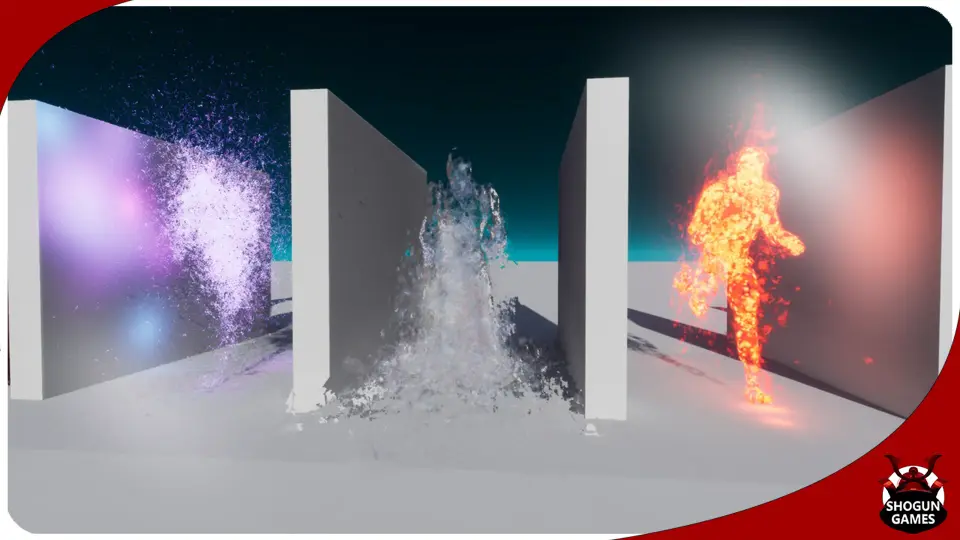
Visceral and Fluid Matter: Blood, Black Ooze, Slime, and Water simulate dense, dripping, or clinging surface substances suitable for organic damage states and environmental saturation.
Thermal and Geological Energy: Ash, Furnace, Lava, and Sulfur project scorched surfaces, molten crusts, burning interiors, and volatile chemical plumes.
Electrical and High-Frequency Currents: Electric and Lightning wrap limbs in branching arcs, sharp discharge flashes, and unstable voltage patterns.
Abstract and Stylized Emissions: Cosmic, Neon, Radioactive, Rainbow, Ribbon - Dark, and Ribbon - Light cast luminous trails, glowing bands, and spectral atmospheric envelopes around moving forms.
Each treatment alters how light and particle density interact with the underlying model. The visceral selections focus on viscous cling and gravity-influenced fluid movement, whereas the energetic variants rely on high-velocity sparks, trailing ribbons, and erratic arcing that emphasize the direction of character motion.
Enabling Mesh Distance Fields for GPU Effects
A fundamental project configuration requirement governs the GPU-driven components of this package. Projects utilizing these systems must have the Generate Mesh Distance Fields setting explicitly enabled in their configuration settings.
GPU-simulated particles rely on global distance fields to sample spatial proximity, surface normal directions, and obstacle boundaries across the scene. With Mesh Distance Fields turned on, the GPU emitters accurately detect surrounding geometry, enabling particles to trace body contours, bounce off intersecting props, or pool along physical creases in the skeletal mesh. Leaving this setting disabled prevents the GPU emitters from calculating volumetric distance data, which disrupts surface tracking and breaks realistic spatial interaction between the character and nearby level surfaces.
Sampling Mesh Regions and Blueprint Integration
Applying an effect across an entire character rig is straightforward, but targeted scenarios often call for localized emission on specific limbs, wounds, or armor pieces. Mesh region sampling allows developers to isolate emitter points to defined UV quadrants or material zones rather than dispersing particles uniformly across the entire silhouette.
Coordinating these emissions dynamically during gameplay relies on Blueprint integration. Through dedicated Blueprint setups, the particle parameters can be linked directly to character health levels, elemental weapon impacts, or specific animation state changes. A character stepping into toxic terrain can trigger the Slime or Sulfur emitters across their lower extremities, while an overloaded ability state can activate Cosmic, Neon, or Lightning bursts across the upper torso. Because the Blueprints reference the native skeletal mesh components, swapping assets across different player or enemy classes requires no re-authoring of the underlying emitter coordinates.
Animation Adaptability Across Fantasy and Realistic Rigs
Testing visual effects against stationary poses frequently hides clipping, unnatural stretching, and particle clumping. Character Body FX Vol. 3 addresses this by showcasing emitters against full-body dance and locomotive animations within the demonstration scene.
This stress-testing confirms that effects like Ribbon - Dark, Ribbon - Light, and high-density Ash trails flow naturally behind moving appendages rather than freezing in place or shearing across the camera view. The system maintains visual density whether a character is sprinting forward, rolling across terrain, or performing rapid, multi-joint rotations. As part of the broader character visual effects series and compatible with the unified character VFX mega bundle architecture, this volume serves productions requiring fast, drag-and-drop elemental integration across expansive rosters of animated creatures, stylized combatants, and realistic human performers.
 Variety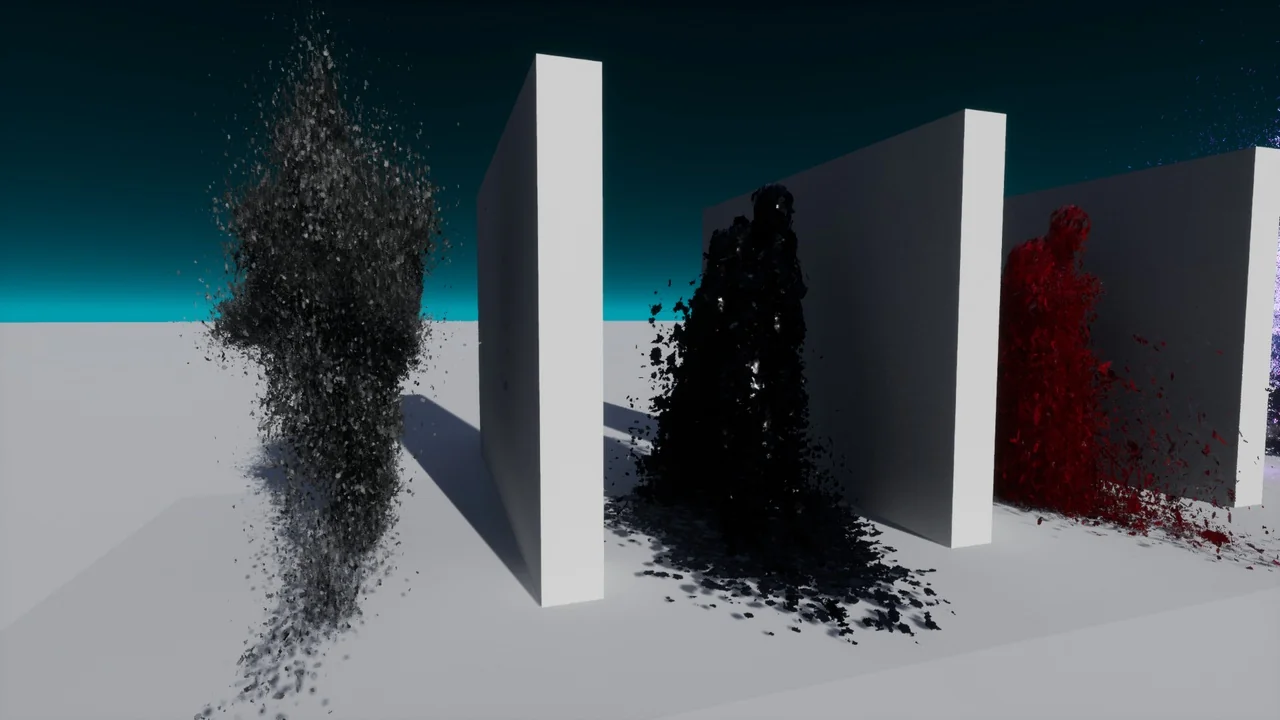
 Variety
 Variety
 Variety