"7aa4acc705f0d80b"{"id":"1001966","slug":"blood-splatter-blueprint-system","title":"Blood Splatter Blueprint System","category":"Weapons \u0026 Combat","engine":"4.26+,5.0+","assetVersion":"","engineVersion":"Engine Version: 4.26+,5.0+","tag":"Weapons \u0026 Combat","accent":"blue","visual":"mech","summary":"Dynamic blood drop impacts, Niagara splatter styles, and depth fade materials combine in this high-fidelity Blueprint framework for Unreal Engine.","platform":"Unreal Engine","publishedAt":"2026-10-24T13:31:45.156Z","updatedAt":"2026-10-24T13:31:45.156Z","sourceNotes":[],"fileContents":[],"compatibility":["Unreal Engine","Engine Version: 4.26+,5.0+"],"featuredImage":{"alt":"Blood Splatter Blueprint System","src":"/wp-content/uploads/published/2026/10/db7feea75d43-bfc56ce9-b20c-4570-bbbf-0d3756c4788a-fcfe16fb42.webp"},"hasDownloadLink":true,"downloads":0,"terms":[{"taxonomy":"category","slug":"weapons-and-combat","name":"Weapons \u0026 Combat"}],"galleryImages":[{"src":"/wp-content/uploads/published/2026/10/b86d4b549101-0f50cada-9cb6-4748-9ce2-d3f149632be4-b6b84a705d.webp","alt":"Blood Splatter Blueprint System"},{"src":"/wp-content/uploads/published/2026/10/525a95585170-4c7c501b-6f1e-4ee2-b5cf-be47d3decb77-9b2f3b7d62.webp","alt":"Blood Splatter Blueprint System"},{"src":"/wp-content/uploads/published/2026/10/d09d15b05536-194caa68-e356-4011-9680-33dad5790144-6a36310614.webp","alt":"Blood Splatter Blueprint System"},{"src":"/wp-content/uploads/published/2026/10/b1926d8f485f-33aa9a54-f832-4501-90e2-3458b7616724-52a2b7e620.webp","alt":"Blood Splatter Blueprint System"},{"src":"/wp-content/uploads/published/2026/10/90bdda3b1bd2-da0413aa-3559-4c93-8a2a-17e7983d3bcd-43820e9d21.webp","alt":"Blood Splatter Blueprint System"},{"src":"/wp-content/uploads/published/2026/10/0412f62ccca0-0a5e73d0-2b95-476f-a9d8-532edeedcab9-7765cb74d5.webp","alt":"Blood Splatter Blueprint System"},{"src":"/wp-content/uploads/published/2026/10/44134f4deb70-057f5299-b804-4aec-99ce-6423d827d2fa-e00c57aecf.webp","alt":"Blood Splatter Blueprint System"},{"src":"/wp-content/uploads/published/2026/10/7ded430fe3d0-59065de3-8ac8-4f45-8f3e-a00764f884a1-75771764b4.webp","alt":"Blood Splatter Blueprint System"},{"src":"/wp-content/uploads/published/2026/10/6ebc3cf6bfa5-f6e82e5f-1820-4b69-8e9a-9de356fe3cae-b1b46c5433.webp","alt":"Blood Splatter Blueprint System"},{"src":"/wp-content/uploads/published/2026/10/5643ff85b961-fc2f9698-a7ac-4a38-88b1-e604ab3f1a3d-5d56c85a8c.webp","alt":"Blood Splatter Blueprint System"}],"accessPanel":{"kind":"resource","title":"Download this resource","eyebrow":"Free Download","message":"Log in or create a free account to start your download.","fileName":"Content.7z","safetyNote":"Resources are manually reviewed before listing to improve quality and reduce obvious risks.","actionLabel":"Download Free","resourceType":"Resource archive"},"contentHtml":"\u003ch2\u003eNiagara Splatter Fx and Directional Blood Drops\u003c/h2\u003e\u003cp\u003eCombat encounters and horror set pieces often rely on believable visual feedback when strikes land or projectiles pierce targets. The Blood Splatter Blueprint System addresses this dynamic by tying together airborne particle motion and persistent environment marks. Central to the package are eight distinct Niagara splatter FX styles, each offering a different dispersal pattern to represent varying amounts of force, velocity, and fluid spread.\u003c/p\u003e\u003cp\u003eRather than treating environmental bloodstains as detached decals dropped arbitrarily into a scene, the system directly tracks the trajectory of airborne blood drops. As these Niagara-driven particles travel outward and strike nearby collision geometry, the blueprint detects the exact hit locations. Stains spawn precisely at those contact points. This physical connection between airborne fluid simulation and static surface staining gives scenes a coherent sense of spatial continuity, ensuring that blood appears exactly where droplets actually travel.\u003c/p\u003e\u003ch2\u003eDepth Fade Behavior on Flat Surfaces\u003c/h2\u003e\u003cp\u003eSurface interaction in the pack is governed by six dedicated bloodstain materials engineered with depth fade characteristics. Depth fade softens the boundary where the fluid geometry intersects with underlying level meshes, avoiding the stark, artificial cutoffs typical of unblended geometry. This blending technique creates naturalistic puddles, runs, and splatter pools that appear to cling naturally to floorboards, concrete slabs, and walls.\u003c/p\u003e\u003cp\u003eBecause the underlying math relies on depth fade, the material setup performs at its best on flat surfaces. Broad floors, level corridors, and flat vertical dividers provide the most consistent depth calculation, allowing the bloodstain edges to melt smoothly across surfaces. When staging violent encounters or setting up environmental storytelling—such as trails left by dragging a casualty or violent residue in an interrogation room—placing these stains across flat modular floors maximizes the clean intersection blending that the shaders provide.\u003c/p\u003e\u003ch2\u003eTranslucent Shaders and High-End Rendering Demands\u003c/h2\u003e\u003cp\u003eThe visual presentation leans heavily into physical realism, matching PBR rendering standards with a shaded translucent shader. Translucency allows the liquid to interact convincingly with direct illumination, soft ambient lighting, and shadows, simulating the variable opacity of real blood where pooled liquid darkens while thin splatter edges permit light penetration.\u003c/p\u003e\u003cp\u003eThis level of visual fidelity comes with strict hardware parameters. The shaded translucent shader is built exclusively for high-quality graphics and is not usable for mobile platforms. Translucent passes and depth tests introduce substantial fill-rate demands that mobile graphics chipsets struggle to compute efficiently. The system is squarely targeted at desktop and console pipelines where dynamic lighting, depth buffers, and complex material properties can run without severe hardware throttling.\u003c/p\u003e\u003ch2\u003eBlueprint Optimization and Master Material Flexibility\u003c/h2\u003e\u003cp\u003eA core strength of the framework is its customization potential. The pack includes an optimized blueprint example to demonstrate how to balance fluid volume against hardware limitations. While every property—from particle emission rates to stain distribution—can be modified, tuning presets with exaggerated parameters can trigger noticeable performance drops. High particle counts paired with overlapping translucent materials create fill-rate bottlenecks, making thoughtful tuning against the included documentation necessary during level production.\u003c/p\u003e\u003cp\u003eFor projects requiring distinct visual identities, such as stylistically altered blood colors or specific wound shapes, the pack provides master materials. Developers can easily introduce custom bloodstains or unique splatter masks into the pipeline. By creating material instances from the existing master structures, teams can adjust base textures, tint, roughness, and normal detail without rebuilding the underlying logic that drives depth blending and hit spawning.\u003c/p\u003e\u003ch2\u003eIntegration Scope Within Project Pipelines\u003c/h2\u003e\u003cp\u003eThe system is dedicated entirely to handling blood splatter effects, droplet trajectory, and stain placement. It intentionally excludes gameplay-specific frameworks such as a shooting system, rifle mechanics, player HUD, or character meshes. Developers implementing combat logic can pull character movement and weapon-firing templates from standard learning samples, such as the Unreal Engine shooter example, and tie the splatter blueprint directly into those hit-scan or projectile damage events.\u003c/p\u003e\u003cp\u003eThis narrow functional boundary makes the package particularly useful for high-end horror games, intense tactical shooters, and dark fantasy projects where high-fidelity visual effects take priority. By offloading the visual complexity of fluid collisions, Niagara particle tuning, and realistic depth-blended stains onto an established framework, artists and technical designers can focus on building atmospheric, impact-heavy environments.\u003c/p\u003e\n\n\u003ch2\u003eMore From The Same Workflow\u003c/h2\u003e\n\u003cul\u003e\n\u003cli\u003e\u003ca href=\"https://3dcghub.com/post-apocalyptic-melee-weapons/\" title=\"Post Apocalyptic Melee Weapons\"\u003ePost Apocalyptic Melee Weapons\u003c/a\u003e\u003c/li\u003e\n\u003cli\u003e\u003ca href=\"https://3dcghub.com/destruction-system/\" title=\"Destruction System\"\u003eDestruction System\u003c/a\u003e\u003c/li\u003e\n\u003cli\u003e\u003ca href=\"https://3dcghub.com/horror-collection-blood-1000-textures/\" title=\"Horror Collection: Blood [1000+ textures]\"\u003eHorror Collection: Blood [1000+ textures]\u003c/a\u003e\u003c/li\u003e\n\u003cli\u003e\u003ca href=\"https://3dcghub.com/axes-pack/\" title=\"Axes Pack\"\u003eAxes Pack\u003c/a\u003e\u003c/li\u003e\n\u003cli\u003e\u003ca href=\"https://3dcghub.com/sci-fi-arsenal-vol-3-1/\" title=\"Sci-fi Arsenal Vol 3.1\"\u003eSci-fi Arsenal Vol 3.1\u003c/a\u003e\u003c/li\u003e\n\u003c/ul\u003e","contentTextLength":5231,"navigation":{"current":24,"total":3925,"previous":{"id":"1001967","slug":"boat-and-submarine","title":"Boat and Submarine","category":"Vehicles \u0026 Transportation","platform":"Unreal Engine","updatedAt":"2026-10-24T13:32:06.854Z"},"next":{"id":"1001965","slug":"blood-circulation","title":"Blood Circulation","category":"Interior","platform":"Unreal Engine","updatedAt":"2026-10-24T13:30:58.851Z"}},"relatedResources":[{"id":"24733","slug":"post-apocalyptic-melee-weapons","title":"Post Apocalyptic Melee Weapons","category":"Weapons \u0026 Combat","engine":"4.26+,5.0+","assetVersion":"Engine version: 4.26+,5.0+","engineVersion":"","tag":"Weapons \u0026 Combat","accent":"blue","visual":"character","summary":"Post Apocalyptic Melee Weapons brings melee gear with variations, emissive burning detail, blood textures, and a flame particle system into one package. It also includes a blueprint that changes flame direction with the weapon swing, plus meshes in static a...","platform":"Unreal Engine","publishedAt":"2026-04-16T17:22:08.000Z","updatedAt":"2026-04-20T06:12:38.000Z","sourceNotes":[],"fileContents":[],"compatibility":["Unreal Engine","Engine version: 4.26+,5.0+"],"featuredImage":{"alt":"Post Apocalyptic Melee Weapons","src":"https://3dcghub.com/wp-content/uploads/2026/04/1b0251452b2d_d0788fbb-54ce-4971-bb94-2906f7da430c.webp"},"hasDownloadLink":true,"downloads":1},{"id":"1001876","slug":"destruction-system","title":"Destruction System","category":"Weapons \u0026 Combat","engine":"4.26+,5.0+","assetVersion":"","engineVersion":"Engine Version: 4.26+,5.0+","tag":"Weapons \u0026 Combat","accent":"blue","visual":"mech","summary":"A Blueprint-based destruction framework utilizing predefined static mesh damage states, physics debris impulse control, and transition VFX.","platform":"Unreal Engine","publishedAt":"2026-10-22T11:18:28.834Z","updatedAt":"2026-10-22T11:18:28.834Z","sourceNotes":[],"fileContents":[],"compatibility":["Unreal Engine","Engine Version: 4.26+,5.0+"],"featuredImage":{"alt":"Destruction System","src":"/wp-content/uploads/published/2026/10/eff7a6cce3e1-1e1512c4-ddeb-48f3-9b23-a0c9c2f6b577-e37c00d85e.webp"},"hasDownloadLink":true,"downloads":0},{"id":"1000725","slug":"axes-pack","title":"Axes Pack","category":"Weapons \u0026 Combat","engine":"4.26+,5.0+","assetVersion":"","engineVersion":"Engine Version: 4.26+,5.0+","tag":"Weapons \u0026 Combat","accent":"blue","visual":"mech","summary":"Axes Pack delivers five ready-for-battle melee axes with rigged versions, PBR materials, four texture resolutions, and 17 Blueprints for Unreal Engine workflows","platform":"Unreal Engine","publishedAt":"2026-07-26T15:29:31.703Z","updatedAt":"2026-07-26T15:55:51.664Z","sourceNotes":[],"fileContents":[],"compatibility":["Unreal Engine","Engine Version: 4.26+,5.0+"],"featuredImage":{"alt":"Axes Pack","src":"/wp-content/uploads/published/2026/07/6183996495d5-3e87e9af-7afa-4979-98e1-e5a25d473023-16fc163f21.webp"},"hasDownloadLink":true,"downloads":0}]}
Weapons & Combat
Blood Splatter Blueprint System
Dynamic blood drop impacts, Niagara splatter styles, and depth fade materials combine in this high-fidelity Blueprint framework for Unreal Engine.
Combat encounters and horror set pieces often rely on believable visual feedback when strikes land or projectiles pierce targets. The Blood Splatter Blueprint System addresses this dynamic by tying together airborne particle motion and persistent environment marks. Central to the package are eight distinct Niagara splatter FX styles, each offering a different dispersal pattern to represent varying amounts of force, velocity, and fluid spread.
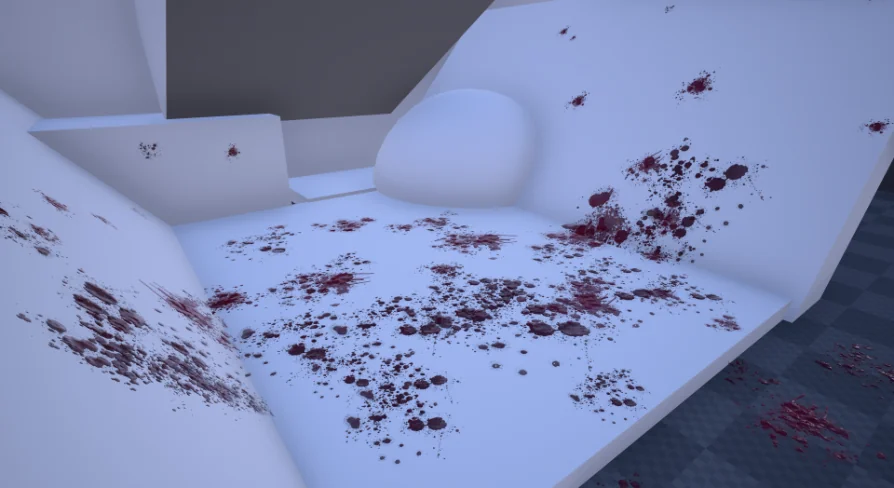
Rather than treating environmental bloodstains as detached decals dropped arbitrarily into a scene, the system directly tracks the trajectory of airborne blood drops. As these Niagara-driven particles travel outward and strike nearby collision geometry, the blueprint detects the exact hit locations. Stains spawn precisely at those contact points. This physical connection between airborne fluid simulation and static surface staining gives scenes a coherent sense of spatial continuity, ensuring that blood appears exactly where droplets actually travel.
Depth Fade Behavior on Flat Surfaces
Surface interaction in the pack is governed by six dedicated bloodstain materials engineered with depth fade characteristics. Depth fade softens the boundary where the fluid geometry intersects with underlying level meshes, avoiding the stark, artificial cutoffs typical of unblended geometry. This blending technique creates naturalistic puddles, runs, and splatter pools that appear to cling naturally to floorboards, concrete slabs, and walls.
Because the underlying math relies on depth fade, the material setup performs at its best on flat surfaces. Broad floors, level corridors, and flat vertical dividers provide the most consistent depth calculation, allowing the bloodstain edges to melt smoothly across surfaces. When staging violent encounters or setting up environmental storytelling—such as trails left by dragging a casualty or violent residue in an interrogation room—placing these stains across flat modular floors maximizes the clean intersection blending that the shaders provide.
Translucent Shaders and High-End Rendering Demands
The visual presentation leans heavily into physical realism, matching PBR rendering standards with a shaded translucent shader. Translucency allows the liquid to interact convincingly with direct illumination, soft ambient lighting, and shadows, simulating the variable opacity of real blood where pooled liquid darkens while thin splatter edges permit light penetration.
This level of visual fidelity comes with strict hardware parameters. The shaded translucent shader is built exclusively for high-quality graphics and is not usable for mobile platforms. Translucent passes and depth tests introduce substantial fill-rate demands that mobile graphics chipsets struggle to compute efficiently. The system is squarely targeted at desktop and console pipelines where dynamic lighting, depth buffers, and complex material properties can run without severe hardware throttling.
Blueprint Optimization and Master Material Flexibility
A core strength of the framework is its customization potential. The pack includes an optimized blueprint example to demonstrate how to balance fluid volume against hardware limitations. While every property—from particle emission rates to stain distribution—can be modified, tuning presets with exaggerated parameters can trigger noticeable performance drops. High particle counts paired with overlapping translucent materials create fill-rate bottlenecks, making thoughtful tuning against the included documentation necessary during level production.
For projects requiring distinct visual identities, such as stylistically altered blood colors or specific wound shapes, the pack provides master materials. Developers can easily introduce custom bloodstains or unique splatter masks into the pipeline. By creating material instances from the existing master structures, teams can adjust base textures, tint, roughness, and normal detail without rebuilding the underlying logic that drives depth blending and hit spawning.
Integration Scope Within Project Pipelines
The system is dedicated entirely to handling blood splatter effects, droplet trajectory, and stain placement. It intentionally excludes gameplay-specific frameworks such as a shooting system, rifle mechanics, player HUD, or character meshes. Developers implementing combat logic can pull character movement and weapon-firing templates from standard learning samples, such as the Unreal Engine shooter example, and tie the splatter blueprint directly into those hit-scan or projectile damage events.
This narrow functional boundary makes the package particularly useful for high-end horror games, intense tactical shooters, and dark fantasy projects where high-fidelity visual effects take priority. By offloading the visual complexity of fluid collisions, Niagara particle tuning, and realistic depth-blended stains onto an established framework, artists and technical designers can focus on building atmospheric, impact-heavy environments.
 Weapons & Combat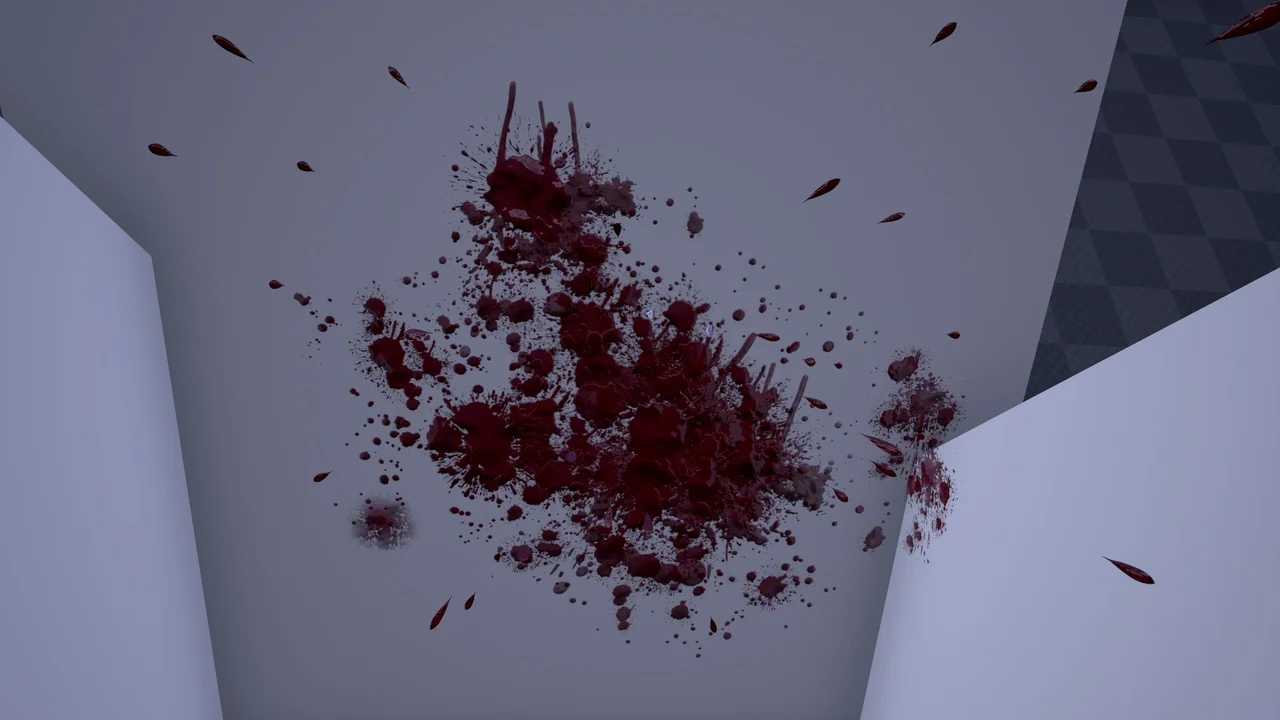
 Weapons & Combat
 Weapons & Combat
 Weapons & Combat