"c68a05d5e51405b3"{"id":"1001876","slug":"destruction-system","title":"Destruction System","category":"Weapons \u0026 Combat","engine":"4.26+,5.0+","assetVersion":"","engineVersion":"Engine Version: 4.26+,5.0+","tag":"Weapons \u0026 Combat","accent":"blue","visual":"mech","summary":"A Blueprint-based destruction framework utilizing predefined static mesh damage states, physics debris impulse control, and transition VFX.","platform":"Unreal Engine","publishedAt":"2026-10-22T11:18:28.834Z","updatedAt":"2026-10-22T11:18:28.834Z","sourceNotes":[],"fileContents":[],"compatibility":["Unreal Engine","Engine Version: 4.26+,5.0+"],"featuredImage":{"alt":"Destruction System","src":"/wp-content/uploads/published/2026/10/eff7a6cce3e1-1e1512c4-ddeb-48f3-9b23-a0c9c2f6b577-e37c00d85e.webp"},"hasDownloadLink":true,"downloads":0,"terms":[{"taxonomy":"category","slug":"weapons-and-combat","name":"Weapons \u0026 Combat"}],"galleryImages":[{"src":"/wp-content/uploads/published/2026/10/ffdae57fff02-ef8b36ad-ddf3-4eee-a342-f6f62778b5e2-6460e9cc44.webp","alt":"Destruction System"},{"src":"/wp-content/uploads/published/2026/10/e3a63261c1b6-c6322dce-5687-4db9-ac57-c93639f46b6a-62a05b310a.webp","alt":"Destruction System"},{"src":"/wp-content/uploads/published/2026/10/03325ab98a32-14f7a605-557c-4cd4-a09c-518ef08f3ddf-19588108fd.webp","alt":"Destruction System"},{"src":"/wp-content/uploads/published/2026/10/8478c42c5a24-525d605f-e8f9-4b20-bef4-d06fa9bf6a9c-62a65acf26.webp","alt":"Destruction System"},{"src":"/wp-content/uploads/published/2026/10/d61e4965bcf4-05bd6645-f46e-46e7-8df9-fa7020ba9931-f56e83dc23.webp","alt":"Destruction System"}],"accessPanel":{"kind":"resource","title":"Download this resource","eyebrow":"Free Download","message":"Log in or create a free account to start your download.","fileName":"Destruction System.7z","safetyNote":"Resources are manually reviewed before listing to improve quality and reduce obvious risks.","actionLabel":"Download Free","resourceType":"Resource archive"},"contentHtml":"\u003cp\u003eDestruction in real-time environments often comes down to timing, feedback, and how cleanly an asset transitions between being whole and being shattered. Instead of relying on unpredictable runtime mesh slicing, the Destruction System organizes damage progression through a predefined list of static meshes. Each entry in the mesh array corresponds to a specific stage of wear, structural compromise, or complete collapse. When gameplay events apply damage to an object, the underlying logic evaluates the incoming hit, compares it against the object's health status, and transitions the geometry to the next visual state in line.\u003c/p\u003e \u003ch2\u003ePredefined Static Meshes and Multi-State Damage Progression\u003c/h2\u003e\n\u003cp\u003eManaging destruction through discrete visual steps gives technical artists precise control over how an object fails. Rather than trusting automatic algorithms to generate clean cross-sections, artists author distinct static meshes for every desired phase of damage. An intact stone pillar, for instance, can step through a lightly chipped model, a cracked structural phase, and finally a collapsed stump.\u003c/p\u003e\n\u003cp\u003eThe system navigates this progression by handling the sequential switching between these static meshes. Because the states exist in a defined list, the actor can hold as many intermediate damage variations as the asset requires. Light interactions might only bump an object into its first damaged state, whereas heavy, high-impact events can drive the health down rapidly enough to skip directly to severe structural failure.\u003c/p\u003e \u003ch2\u003eCalibrating Damage Thresholds and Health Points\u003c/h2\u003e\n\u003cp\u003eCentral to the state-switching logic is a dedicated damage threshold and health point structure. Each interactive asset possesses its own operational health pool. As damage events hit the target, the script subtracts those values from the current pool and tests the remaining health against assigned thresholds.\u003c/p\u003e\n\u003cp\u003eSetting thresholds at distinct increments allows creators to govern the pacing of environmental wear. A heavy barrier might absorb small-arms fire with minimal cosmetic shift until a cumulative damage threshold is reached, at which point the system triggers the switch to a heavily splintered static mesh. This numeric framework keeps physical damage predictable, preventing objects from breaking prematurely or reacting inconsistently to repeated impacts.\u003c/p\u003e \u003ch2\u003eTransition Particles and Sound Effect Synchronization\u003c/h2\u003e\n\u003cp\u003eInstantaneous mesh swaps can create harsh visual popping if an asset shifts abruptly between frames. To ensure fluid transitions across states, the system incorporates dedicated support for audio and particle system triggers during every state switch.\u003c/p\u003e\n\u003cp\u003eWhenever a health threshold is crossed and a new static mesh is instantiated, the system can simultaneously fire chosen sound effects and particle systems. Dust clouds, flying splinters, falling mortar, and heavy impact cracks mask the replacement of the geometry. Because any audio asset or particle emitter can be tied to these threshold handoffs, creators can tailor the sensory weight of the collapse to fit the specific material, pairing crunching stone sounds with thick dust or metallic crunches with bright spark bursts.\u003c/p\u003e \u003ch2\u003eDebris Elements with Physics Simulation and Force Impulse Control\u003c/h2\u003e\n\u003cp\u003eA convincing destruction event requires more than an updated base mesh; it requires dynamic fragments reacting to the force of the collision. The system incorporates secondary debris elements backed by full physics simulation to scatter loose material into the scene.\u003c/p\u003e\n\u003cp\u003eThese debris pieces do not simply drop under gravity. The system features explicit controls for debris spawn offsets and force impulse applications. Creators can adjust the spatial origin where loose chunks appear relative to the primary mesh, ensuring fragments do not clip into nearby walls or spawn underneath the floor. Once spawned, an impulse vector applies directional force to the debris, kicking chunks outward into the environment. Tuning these force impulse values allows debris to either tumble gently around the base of a cracked object or blast violently across the room during explosive hits.\u003c/p\u003e \u003ch2\u003eBlueprint Architecture and Drag-and-Drop Setup\u003c/h2\u003e\n\u003cp\u003eThe entire toolset is built as a 100% Blueprint solution, avoiding compiled C++ code entirely. Developers can inspect, adjust, and expand the underlying logic directly within the standard node graph. Exposing parameters through Blueprints makes threshold tuning, mesh assignment, and audio hookups immediately visible in the editor viewport.\u003c/p\u003e\n\u003cp\u003eTo streamline implementation across level grayboxes and finalized maps, the pack includes drag-and-drop examples. These working templates demonstrate how to organize the predefined mesh arrays, balance health point thresholds against incoming damage scripts, and dial in impulse forces for secondary physics props. Teams can drop an existing example into a level, link their own custom static meshes, and verify the physical response immediately.\u003c/p\u003e \u003ch2\u003eStylized Material Coordination and Scene Application\u003c/h2\u003e\n\u003cp\u003eMaintaining visual coherence during damage is essential for non-photorealistic projects. The framework is verified for compatibility with Advanced Stylized Material, ensuring that stylized shading models, custom edge outlines, and bespoke surface treatments continue to render correctly as meshes switch across varying degrees of destruction. By combining predictable static mesh stages, configurable debris impulses, and synchronized transition VFX, the system delivers reliable, performance-conscious destruction suited for interactive combat spaces and dynamic set pieces.\u003c/p\u003e\n\n\u003ch2\u003eMore From The Same Workflow\u003c/h2\u003e\n\u003cul\u003e\n\u003cli\u003e\u003ca href=\"https://3dcghub.com/tactical-grenades/\" title=\"Tactical Grenades\"\u003eTactical Grenades\u003c/a\u003e\u003c/li\u003e\n\u003cli\u003e\u003ca href=\"https://3dcghub.com/fps-world-war-pack/\" title=\"FPS World War Pack\"\u003eFPS World War Pack\u003c/a\u003e\u003c/li\u003e\n\u003cli\u003e\u003ca href=\"https://3dcghub.com/spaceship-colony-cruiser/\" title=\"Spaceship Colony Cruiser\"\u003eSpaceship Colony Cruiser\u003c/a\u003e\u003c/li\u003e\n\u003cli\u003e\u003ca href=\"https://3dcghub.com/military-supplies-vol-5-war-machines/\" title=\"Military Supplies - VOL.5 - War Machines\"\u003eMilitary Supplies - VOL.5 - War Machines\u003c/a\u003e\u003c/li\u003e\n\u003cli\u003e\u003ca href=\"https://3dcghub.com/axes-pack/\" title=\"Axes Pack\"\u003eAxes Pack\u003c/a\u003e\u003c/li\u003e\n\u003c/ul\u003e","contentTextLength":5721,"navigation":{"current":49,"total":3860,"previous":{"id":"1001877","slug":"edge-stylized-weapons","title":"EDGE - Stylized Weapons","category":"Weapons \u0026 Combat","platform":"Unreal Engine","updatedAt":"2026-10-22T11:19:04.697Z"},"next":{"id":"1001875","slug":"defender-melee-combat","title":"Defender: Melee Combat","category":"Gameplay Features","platform":"Unreal Engine","updatedAt":"2026-10-22T11:17:54.526Z"}},"relatedResources":[{"id":"1001709","slug":"tactical-grenades","title":"Tactical Grenades","category":"Weapons \u0026 Combat","engine":"4.26+,5.0+","assetVersion":"","engineVersion":"Engine Version: 4.26+,5.0+","tag":"Weapons \u0026 Combat","accent":"blue","visual":"mech","summary":"AAA tactical grenades featuring 4K PBR textures, custom animations, visual effects, and audio for PC, console, and VR combat projects.","platform":"Unreal Engine","publishedAt":"2026-10-14T17:14:02.022Z","updatedAt":"2026-10-14T17:14:02.022Z","sourceNotes":[],"fileContents":[],"compatibility":["Unreal Engine","Engine Version: 4.26+,5.0+"],"featuredImage":{"alt":"Tactical Grenades","src":"/wp-content/uploads/published/2026/10/3b1d353a273c-01b18f81-7f25-4166-92a9-31ee2818a19d-3e669dc0f6.webp"},"hasDownloadLink":true,"downloads":5},{"id":"1001516","slug":"fps-world-war-pack","title":"FPS World War Pack","category":"Weapons \u0026 Combat","engine":"4.16+,5.0+","assetVersion":"","engineVersion":"Engine Version: 4.16+,5.0+","tag":"Weapons \u0026 Combat","accent":"blue","visual":"mech","summary":"FPS World War Pack delivers realistic WW1 and WW2 firearms, 4K textures, animations, integrated FX, LODs, and rigged arms for first-person shooters.","platform":"Unreal Engine","publishedAt":"2026-10-09T13:17:18.880Z","updatedAt":"2026-10-09T13:17:18.880Z","sourceNotes":[],"fileContents":[],"compatibility":["Unreal Engine","Engine Version: 4.16+,5.0+"],"featuredImage":{"alt":"FPS World War Pack","src":"/wp-content/uploads/published/2026/10/62c84537fa94-8749cd98-e6b1-478b-9cfd-fb968a8ef547-9263acada7.webp"},"hasDownloadLink":true,"downloads":1},{"id":"1001837","slug":"spaceship-colony-cruiser","title":"Spaceship Colony Cruiser","category":"Weapons \u0026 Combat","engine":"4.26+,5.0+","assetVersion":"","engineVersion":"Engine Version: 4.26+,5.0+","tag":"Weapons \u0026 Combat","accent":"blue","visual":"mech","summary":"Spaceship Colony Cruiser provides the Davis3D flight system, dynamic shields, customizable lasers, physics asteroids, automated turrets, and optimized shaders.","platform":"Unreal Engine","publishedAt":"2026-10-21T08:28:03.709Z","updatedAt":"2026-10-21T08:28:03.709Z","sourceNotes":[],"fileContents":[],"compatibility":["Unreal Engine","Engine Version: 4.26+,5.0+"],"featuredImage":{"alt":"Spaceship Colony Cruiser","src":"/wp-content/uploads/published/2026/10/54c024b5cf11-fe8acb37-eb2c-4562-8197-b28a3f0134a3-887ce93b16.webp"},"hasDownloadLink":true,"downloads":0}]}
Weapons & Combat
Destruction System
A Blueprint-based destruction framework utilizing predefined static mesh damage states, physics debris impulse control, and transition VFX.
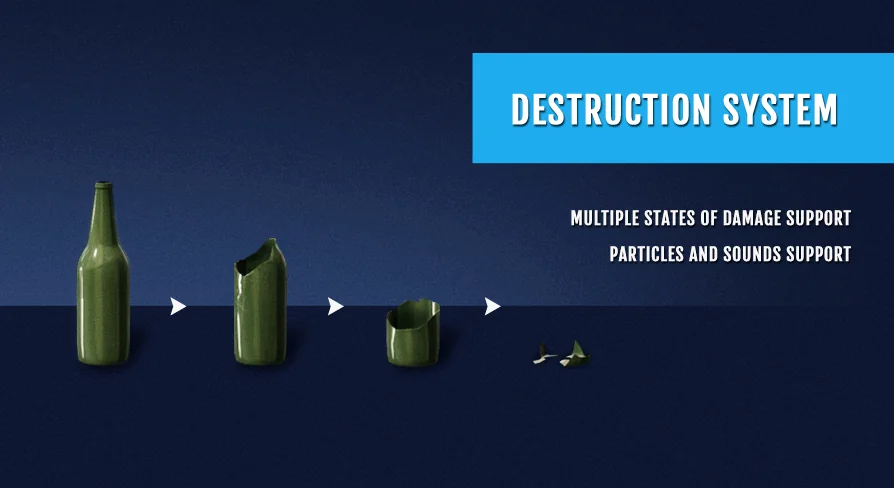
Destruction in real-time environments often comes down to timing, feedback, and how cleanly an asset transitions between being whole and being shattered. Instead of relying on unpredictable runtime mesh slicing, the Destruction System organizes damage progression through a predefined list of static meshes. Each entry in the mesh array corresponds to a specific stage of wear, structural compromise, or complete collapse. When gameplay events apply damage to an object, the underlying logic evaluates the incoming hit, compares it against the object's health status, and transitions the geometry to the next visual state in line.
Predefined Static Meshes and Multi-State Damage Progression
Managing destruction through discrete visual steps gives technical artists precise control over how an object fails. Rather than trusting automatic algorithms to generate clean cross-sections, artists author distinct static meshes for every desired phase of damage. An intact stone pillar, for instance, can step through a lightly chipped model, a cracked structural phase, and finally a collapsed stump.
The system navigates this progression by handling the sequential switching between these static meshes. Because the states exist in a defined list, the actor can hold as many intermediate damage variations as the asset requires. Light interactions might only bump an object into its first damaged state, whereas heavy, high-impact events can drive the health down rapidly enough to skip directly to severe structural failure.
Calibrating Damage Thresholds and Health Points
Central to the state-switching logic is a dedicated damage threshold and health point structure. Each interactive asset possesses its own operational health pool. As damage events hit the target, the script subtracts those values from the current pool and tests the remaining health against assigned thresholds.
Setting thresholds at distinct increments allows creators to govern the pacing of environmental wear. A heavy barrier might absorb small-arms fire with minimal cosmetic shift until a cumulative damage threshold is reached, at which point the system triggers the switch to a heavily splintered static mesh. This numeric framework keeps physical damage predictable, preventing objects from breaking prematurely or reacting inconsistently to repeated impacts.
Transition Particles and Sound Effect Synchronization
Instantaneous mesh swaps can create harsh visual popping if an asset shifts abruptly between frames. To ensure fluid transitions across states, the system incorporates dedicated support for audio and particle system triggers during every state switch.
Whenever a health threshold is crossed and a new static mesh is instantiated, the system can simultaneously fire chosen sound effects and particle systems. Dust clouds, flying splinters, falling mortar, and heavy impact cracks mask the replacement of the geometry. Because any audio asset or particle emitter can be tied to these threshold handoffs, creators can tailor the sensory weight of the collapse to fit the specific material, pairing crunching stone sounds with thick dust or metallic crunches with bright spark bursts.
Debris Elements with Physics Simulation and Force Impulse Control
A convincing destruction event requires more than an updated base mesh; it requires dynamic fragments reacting to the force of the collision. The system incorporates secondary debris elements backed by full physics simulation to scatter loose material into the scene.
These debris pieces do not simply drop under gravity. The system features explicit controls for debris spawn offsets and force impulse applications. Creators can adjust the spatial origin where loose chunks appear relative to the primary mesh, ensuring fragments do not clip into nearby walls or spawn underneath the floor. Once spawned, an impulse vector applies directional force to the debris, kicking chunks outward into the environment. Tuning these force impulse values allows debris to either tumble gently around the base of a cracked object or blast violently across the room during explosive hits.
Blueprint Architecture and Drag-and-Drop Setup
The entire toolset is built as a 100% Blueprint solution, avoiding compiled C++ code entirely. Developers can inspect, adjust, and expand the underlying logic directly within the standard node graph. Exposing parameters through Blueprints makes threshold tuning, mesh assignment, and audio hookups immediately visible in the editor viewport.
To streamline implementation across level grayboxes and finalized maps, the pack includes drag-and-drop examples. These working templates demonstrate how to organize the predefined mesh arrays, balance health point thresholds against incoming damage scripts, and dial in impulse forces for secondary physics props. Teams can drop an existing example into a level, link their own custom static meshes, and verify the physical response immediately.
Stylized Material Coordination and Scene Application
Maintaining visual coherence during damage is essential for non-photorealistic projects. The framework is verified for compatibility with Advanced Stylized Material, ensuring that stylized shading models, custom edge outlines, and bespoke surface treatments continue to render correctly as meshes switch across varying degrees of destruction. By combining predictable static mesh stages, configurable debris impulses, and synchronized transition VFX, the system delivers reliable, performance-conscious destruction suited for interactive combat spaces and dynamic set pieces.
 Weapons & Combat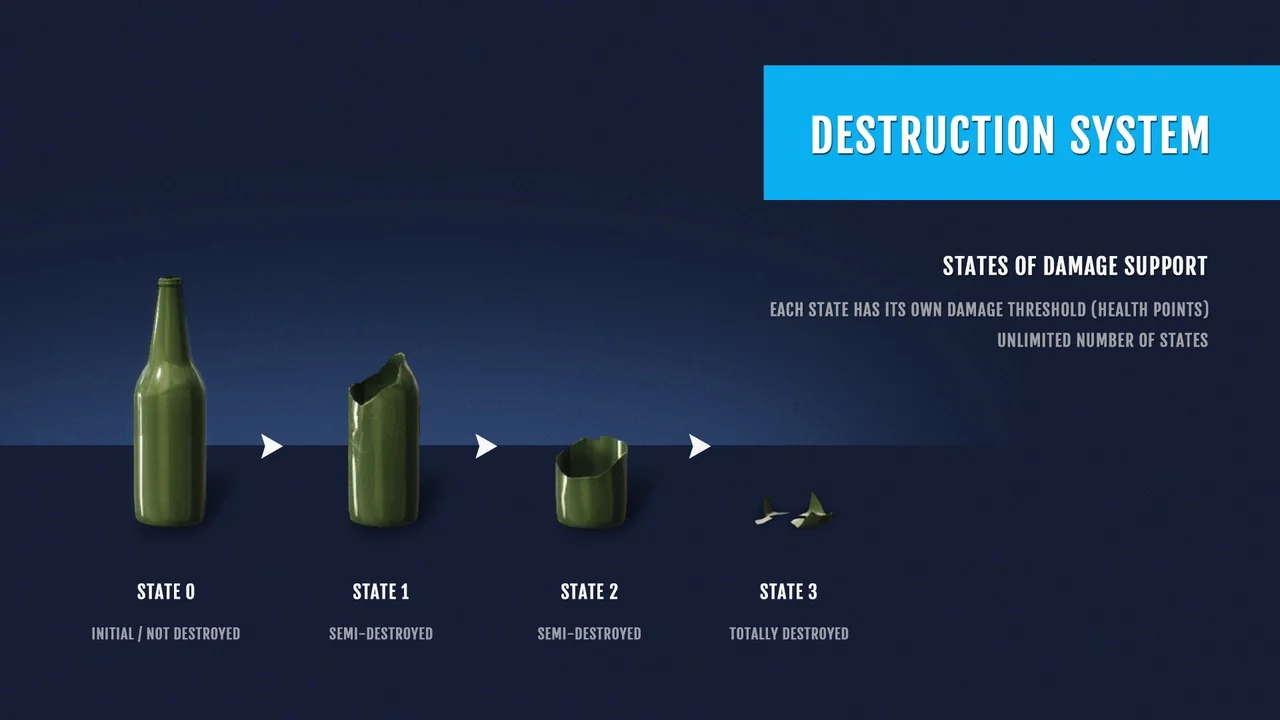
 Weapons & Combat
 Weapons & Combat
 Weapons & Combat