"7aa4acc705f0d80b"{"id":"1001964","slug":"black-hole","title":"Black Hole","category":"Sky","engine":"5.4+","assetVersion":"","engineVersion":"Engine Version: 5.4+","tag":"Sky","accent":"blue","visual":"mech","summary":"A technical breakdown of Black Hole materials, covering Surface and Post Process domains, gravitational lensing distortions, and UE5 rendering settings.","platform":"Unreal Engine","publishedAt":"2026-10-24T11:40:28.947Z","updatedAt":"2026-10-24T11:40:28.947Z","sourceNotes":[],"fileContents":[],"compatibility":["Unreal Engine","Engine Version: 5.4+"],"featuredImage":{"alt":"Black Hole","src":"/wp-content/uploads/published/2026/10/7c02b51a93e7-803a5573-dfb0-42c9-b030-993117cfdafc-3edbc9f7f7.webp"},"hasDownloadLink":true,"downloads":0,"terms":[{"taxonomy":"category","slug":"sky","name":"Sky"}],"galleryImages":[{"src":"/wp-content/uploads/published/2026/10/c7ce56574848-839c8763-f552-4de6-bdfb-d5a2debf552b-55138c4013.webp","alt":"Black Hole"},{"src":"/wp-content/uploads/published/2026/10/93d55b807e84-880e611b-2e0a-4e57-9350-b1e148934d7f-b865ccae8d.webp","alt":"Black Hole"},{"src":"/wp-content/uploads/published/2026/10/9dd7d9d33da3-88092237-f289-4999-8843-8fdf147f6398-92d4eba579.webp","alt":"Black Hole"},{"src":"/wp-content/uploads/published/2026/10/0ab45de892ac-4a9ef420-424f-4f06-b274-8beb1f9badfa-a2e80c7c33.webp","alt":"Black Hole"},{"src":"/wp-content/uploads/published/2026/10/6bac6a8f18ea-127e5184-44ae-41af-87b3-945fd3540c40-d60068ed2e.webp","alt":"Black Hole"},{"src":"/wp-content/uploads/published/2026/10/26ad0943af28-a7993c73-e327-44d8-ae1c-2c02f09030da-8f2b01e01a.webp","alt":"Black Hole"},{"src":"/wp-content/uploads/published/2026/10/6718c8201296-8d706b19-495a-4f11-a1d5-075a9a03de96-789eb2c762.webp","alt":"Black Hole"},{"src":"/wp-content/uploads/published/2026/10/d0dd0a5e79ef-7d84e82a-0585-4f49-8524-b4ce0a644b30-1416e14570.webp","alt":"Black Hole"},{"src":"/wp-content/uploads/published/2026/10/dc912862c904-9c8e1e7d-b70f-4e78-a2f0-0b03ec6ab004-17cf46b8ca.webp","alt":"Black Hole"},{"src":"/wp-content/uploads/published/2026/10/0ac63f76d0fe-d8832c75-c3b7-4391-ac0b-3e0e7a872e98-9721a50111.webp","alt":"Black Hole"}],"accessPanel":{"kind":"resource","title":"Download this resource","eyebrow":"Free Download","message":"Log in or create a free account to start your download.","fileName":"Black Hole.7z","safetyNote":"Resources are manually reviewed before listing to improve quality and reduce obvious risks.","actionLabel":"Download Free","resourceType":"Resource archive"},"contentHtml":"\u003ch2\u003eSelecting Surface and Post Process Black Hole Materials\u003c/h2\u003e\n\u003cp\u003eImplementing this asset begins with choosing the correct material domain for the project's interactive requirements. The package divides its shaders into two primary categories: standard Surface domain materials and Post Process materials, which are designated by the \"PP\" suffix in their asset names.\u003c/p\u003e\n\u003cp\u003eSurface materials feature a lighter shader profile with fewer instructions. They function well for distant space backgrounds where the player camera remains outside the celestial phenomenon. The primary limitation of the Surface domain version is that it does not accommodate camera traversal through the distortion boundary; the camera cannot fall into the black hole. When a project calls for seamless travel directly through the event horizon or into the center of the gravitational field, the Post Process materials must be deployed instead.\u003c/p\u003e\n\u003cp\u003eMaterials bearing the \"PP\" tag possess a higher instruction count and demand more computational overhead. In exchange, they allow the camera to enter the interior volume without clipping artifacts and can blend correctly with surrounding scene geometry. Choosing between these domains is an initial design fork: distant background vistas remain performant on the Surface shaders, while first-person space flight, close-proximity flybys, and descent sequences require the Post Process setup.\u003c/p\u003e \u003ch2\u003eGravitational Lensing Distortions on Accretion Disks and Scene Objects\u003c/h2\u003e\n\u003cp\u003eThe mathematical models driving the shaders do not attempt to solve general relativity equations in real time. Instead of relying on physically accurate formulas, the material calculations use practical approximations engineered to replicate the visual characteristics observed in astrophysical photography and relativistic simulations. This approach captures the distinct warp of space while managing frame time in real-time viewports.\u003c/p\u003e\n\u003cp\u003eA critical technical rule governs how these shaders distort space: distortion calculations are applied strictly to the flat accretion disk and the chosen background environment texture. Other 3D assets in the level do not receive native geometric warping from the material. Because of this architectural choice, scene objects such as spacecraft, orbital stations, or asteroids must remain relatively small in scale when compared against the outer radius of the black hole—defined as the radius of the sphere bounding the distortion field. If an asset is too large relative to this bounding sphere, the absence of per-object geometric refraction becomes noticeable, breaking the illusion of immense gravitational pull.\u003c/p\u003e \u003ch2\u003eConfiguring Static Cubemaps and Equirectangular Projections\u003c/h2\u003e\n\u003cp\u003eBackground imagery behind the black hole is fed through either cubemaps or static textures utilizing equirectangular projections. Each method presents a clear trade-off between instruction cost and image stability under extreme mathematical warping.\u003c/p\u003e\n\u003cp\u003eStatic cubemaps are the less computationally intensive alternative, processing through fewer shader instructions per pixel. However, when light rays bend sharply near the photon ring, cubemaps can struggle with texture filtering artifacts along compressed coordinates. Equirectangular projections demand a higher instruction budget, but their texture coordinate layouts allow for superior filtering methods when dealing with acute gravitational lensing distortions. When visual clarity along the lensing rim is paramount, equirectangular textures provide cleaner results.\u003c/p\u003e\n\u003cp\u003eProjects seeking to warp nearby scene geometry can employ dynamically updating cubemaps to imitate gravitational lensing on surrounding objects. This technique creates visual distortion on world elements, but realism is constrained: it produces convincing results only for objects situated far away from the player's camera. Dynamically updating cubemaps require Scene Capture Cubes, which introduce a heavy performance cost that may degrade runtime performance if applied without strict profiling.\u003c/p\u003e \u003ch2\u003eUnreal Engine 5 Render Settings and Anti-Aliasing\u003c/h2\u003e\n\u003cp\u003eAchieving stable image quality when rendering fine light rings and warping backgrounds depends heavily on engine-level rendering settings in Unreal Engine 5. Sub-pixel distortion around the outer boundary can produce shimmering or temporal ghosting depending on the selected anti-aliasing pass.\u003c/p\u003e\n\u003cp\u003eTemporal Anti-Aliasing (TAA) frequently delivers a more stable image and improved performance when compared to Temporal Super Resolution (TSR) in this specific implementation. While TSR handles general scene geometry cleanly, the rapid spatial compression around the accretion disk can cause stability issues that TAA resolves with lower overhead.\u003c/p\u003e\n\u003cp\u003eTargeting the correct graphics API also yields measurable performance differences. Running the shaders under DirectX 11 with Shader Model 5 (SM5) offers better performance margins than running under DirectX 12 with Shader Model 6 (SM6). For projects striving to lock frame rates, configuring the project to run on SM5 and relying on standard TAA maintains smooth distortion rendering without excessive GPU consumption.\u003c/p\u003e \u003ch2\u003eDocumentation, Texture Credits, and Support Workflow\u003c/h2\u003e\n\u003cp\u003eSetup is assisted by packaged documentation, including a Quick Setup Guide and leisurely paced demo footage demonstrating viewport behavior. The demonstration scenes incorporate external textures, including Earth and cloud maps sourced from Tom Patterson for planetary HDR backgrounds, alongside architectural textures attributed to #cgbtextures.\u003c/p\u003e\n\u003cp\u003eDevelopers implementing this resource should note current maintenance conditions: technical support capacity is limited due to hardware issues affecting the creator's primary workstation. The provided documentation and setup guides serve as the principal references for resolving material parameter assignments, background texture mapping, and domain selection.\u003c/p\u003e\n\n\u003ch2\u003eMore From The Same Workflow\u003c/h2\u003e\n\u003cul\u003e\n\u003cli\u003e\u003ca href=\"https://3dcghub.com/space-creator-pro/\" title=\"Space Creator Pro\"\u003eSpace Creator Pro\u003c/a\u003e\u003c/li\u003e\n\u003cli\u003e\u003ca href=\"https://3dcghub.com/animated-skies/\" title=\"Animated Skies\"\u003eAnimated Skies\u003c/a\u003e\u003c/li\u003e\n\u003cli\u003e\u003ca href=\"https://3dcghub.com/skies-3-matte-painting/\" title=\"Skies 3 - Matte painting\"\u003eSkies 3 - Matte painting\u003c/a\u003e\u003c/li\u003e\n\u003cli\u003e\u003ca href=\"https://3dcghub.com/arghanions-cosmic-forge-space-nebula-skyboxes-volume-11/\" title=\"Arghanion\u0026#039;s Cosmic Forge - Space Nebula Skyboxes - Volume 11\"\u003eArghanion\u0026#039;s Cosmic Forge - Space Nebula Skyboxes - Volume 11\u003c/a\u003e\u003c/li\u003e\n\u003cli\u003e\u003ca href=\"https://3dcghub.com/cartoon-sky-shader/\" title=\"Cartoon Sky Shader\"\u003eCartoon Sky Shader\u003c/a\u003e\u003c/li\u003e\n\u003c/ul\u003e","contentTextLength":6046,"navigation":{"current":26,"total":3925,"previous":{"id":"1001965","slug":"blood-circulation","title":"Blood Circulation","category":"Interior","platform":"Unreal Engine","updatedAt":"2026-10-24T13:30:58.851Z"},"next":{"id":"1001963","slug":"bigblob-the-slime-physical-and-soft-body-slime-creature-with-blueprint-and-mat","title":"BigBlob the Slime, physical and soft body slime creature with blueprint and mat","category":"Characters \u0026 Creatures","platform":"Unreal Engine","updatedAt":"2026-10-24T11:39:33.963Z"}},"relatedResources":[{"id":"1001572","slug":"space-creator-pro","title":"Space Creator Pro","category":"Sky \u0026 Space","engine":"5.0+","assetVersion":"","engineVersion":"Engine Version: 5.0+","tag":"Sky \u0026 Space","accent":"blue","visual":"mech","summary":"Build film-quality celestial scenes using Space Creator Pro, featuring 16K skyboxes, parametric planets, star systems, black holes, and asteroid fields.","platform":"Unreal Engine","publishedAt":"2026-10-10T04:06:11.432Z","updatedAt":"2026-10-10T04:06:11.432Z","sourceNotes":[],"fileContents":[],"compatibility":["Unreal Engine","Engine Version: 5.0+"],"featuredImage":{"alt":"Space Creator Pro","src":"/wp-content/uploads/published/2026/10/c621ed20932e-311b762b-9e14-46b4-ad3c-fda4b077a28e-d09556b24c.webp"},"hasDownloadLink":true,"downloads":2},{"id":"1001424","slug":"animated-skies","title":"Animated Skies","category":"Sky","engine":"5.2+","assetVersion":"","engineVersion":"Engine Version: 5.2+","tag":"Sky","accent":"blue","visual":"mech","summary":"Animated Skies brings 14 optimized outdoor skies, an 8K 256 sq km landscape, and an adaptive terrain auto-material to Unreal Engine 5 projects.","platform":"Unreal Engine","publishedAt":"2026-10-07T05:59:24.301Z","updatedAt":"2026-10-07T05:59:24.301Z","sourceNotes":[],"fileContents":[],"compatibility":["Unreal Engine","Engine Version: 5.2+"],"featuredImage":{"alt":"Animated Skies","src":"/wp-content/uploads/published/2026/10/209358d58274-e1387c59-ecf4-40cb-9f45-44521ddb2087-85ec694d41.webp"},"hasDownloadLink":true,"downloads":0},{"id":"1001016","slug":"skies-3-matte-painting","title":"Skies 3 - Matte painting","category":"Sky","engine":"5.0+","assetVersion":"","engineVersion":"Engine Version: 5.0+","tag":"Sky","accent":"blue","visual":"mech","summary":"Five 8K equirectangular sky textures on sphere or hemisphere meshes, nine wallpapers, demo scenes. Photo-based matte painting skies for games, VR, mobile.","platform":"Unreal Engine","publishedAt":"2026-08-22T14:01:06.534Z","updatedAt":"2026-08-22T14:01:06.534Z","sourceNotes":[],"fileContents":[],"compatibility":["Unreal Engine","Engine Version: 5.0+"],"featuredImage":{"alt":"Skies 3 - Matte painting","src":"/wp-content/uploads/published/2026/08/560e04a8fa3d-06c7f695-cb67-4b35-838a-fd4a79055ce7-b8514fabf4.webp"},"hasDownloadLink":true,"downloads":1}]}
Sky
Black Hole
A technical breakdown of Black Hole materials, covering Surface and Post Process domains, gravitational lensing distortions, and UE5 rendering settings.
Category:Unreal Engine,SkyPlatform: Unreal EngineEngine Version: 5.4+Published: Oct 24, 2026
Sky
Resource overview
Selecting Surface and Post Process Black Hole Materials
Implementing this asset begins with choosing the correct material domain for the project's interactive requirements. The package divides its shaders into two primary categories: standard Surface domain materials and Post Process materials, which are designated by the "PP" suffix in their asset names.
Surface materials feature a lighter shader profile with fewer instructions. They function well for distant space backgrounds where the player camera remains outside the celestial phenomenon. The primary limitation of the Surface domain version is that it does not accommodate camera traversal through the distortion boundary; the camera cannot fall into the black hole. When a project calls for seamless travel directly through the event horizon or into the center of the gravitational field, the Post Process materials must be deployed instead.
Materials bearing the "PP" tag possess a higher instruction count and demand more computational overhead. In exchange, they allow the camera to enter the interior volume without clipping artifacts and can blend correctly with surrounding scene geometry. Choosing between these domains is an initial design fork: distant background vistas remain performant on the Surface shaders, while first-person space flight, close-proximity flybys, and descent sequences require the Post Process setup.
Gravitational Lensing Distortions on Accretion Disks and Scene Objects
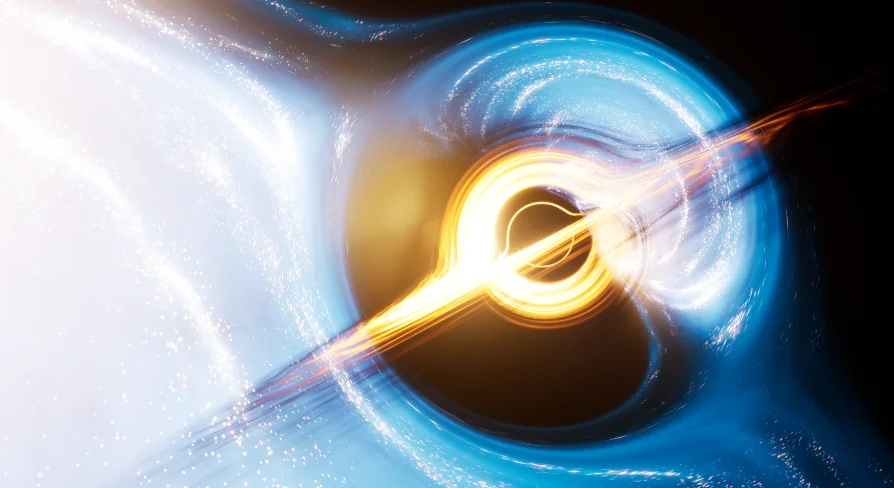
The mathematical models driving the shaders do not attempt to solve general relativity equations in real time. Instead of relying on physically accurate formulas, the material calculations use practical approximations engineered to replicate the visual characteristics observed in astrophysical photography and relativistic simulations. This approach captures the distinct warp of space while managing frame time in real-time viewports.
A critical technical rule governs how these shaders distort space: distortion calculations are applied strictly to the flat accretion disk and the chosen background environment texture. Other 3D assets in the level do not receive native geometric warping from the material. Because of this architectural choice, scene objects such as spacecraft, orbital stations, or asteroids must remain relatively small in scale when compared against the outer radius of the black hole—defined as the radius of the sphere bounding the distortion field. If an asset is too large relative to this bounding sphere, the absence of per-object geometric refraction becomes noticeable, breaking the illusion of immense gravitational pull.
Configuring Static Cubemaps and Equirectangular Projections
Background imagery behind the black hole is fed through either cubemaps or static textures utilizing equirectangular projections. Each method presents a clear trade-off between instruction cost and image stability under extreme mathematical warping.
Static cubemaps are the less computationally intensive alternative, processing through fewer shader instructions per pixel. However, when light rays bend sharply near the photon ring, cubemaps can struggle with texture filtering artifacts along compressed coordinates. Equirectangular projections demand a higher instruction budget, but their texture coordinate layouts allow for superior filtering methods when dealing with acute gravitational lensing distortions. When visual clarity along the lensing rim is paramount, equirectangular textures provide cleaner results.
Projects seeking to warp nearby scene geometry can employ dynamically updating cubemaps to imitate gravitational lensing on surrounding objects. This technique creates visual distortion on world elements, but realism is constrained: it produces convincing results only for objects situated far away from the player's camera. Dynamically updating cubemaps require Scene Capture Cubes, which introduce a heavy performance cost that may degrade runtime performance if applied without strict profiling.
Unreal Engine 5 Render Settings and Anti-Aliasing
Achieving stable image quality when rendering fine light rings and warping backgrounds depends heavily on engine-level rendering settings in Unreal Engine 5. Sub-pixel distortion around the outer boundary can produce shimmering or temporal ghosting depending on the selected anti-aliasing pass.
Temporal Anti-Aliasing (TAA) frequently delivers a more stable image and improved performance when compared to Temporal Super Resolution (TSR) in this specific implementation. While TSR handles general scene geometry cleanly, the rapid spatial compression around the accretion disk can cause stability issues that TAA resolves with lower overhead.
Targeting the correct graphics API also yields measurable performance differences. Running the shaders under DirectX 11 with Shader Model 5 (SM5) offers better performance margins than running under DirectX 12 with Shader Model 6 (SM6). For projects striving to lock frame rates, configuring the project to run on SM5 and relying on standard TAA maintains smooth distortion rendering without excessive GPU consumption.
Documentation, Texture Credits, and Support Workflow
Setup is assisted by packaged documentation, including a Quick Setup Guide and leisurely paced demo footage demonstrating viewport behavior. The demonstration scenes incorporate external textures, including Earth and cloud maps sourced from Tom Patterson for planetary HDR backgrounds, alongside architectural textures attributed to #cgbtextures.
Developers implementing this resource should note current maintenance conditions: technical support capacity is limited due to hardware issues affecting the creator's primary workstation. The provided documentation and setup guides serve as the principal references for resolving material parameter assignments, background texture mapping, and domain selection.
 Sky
Sky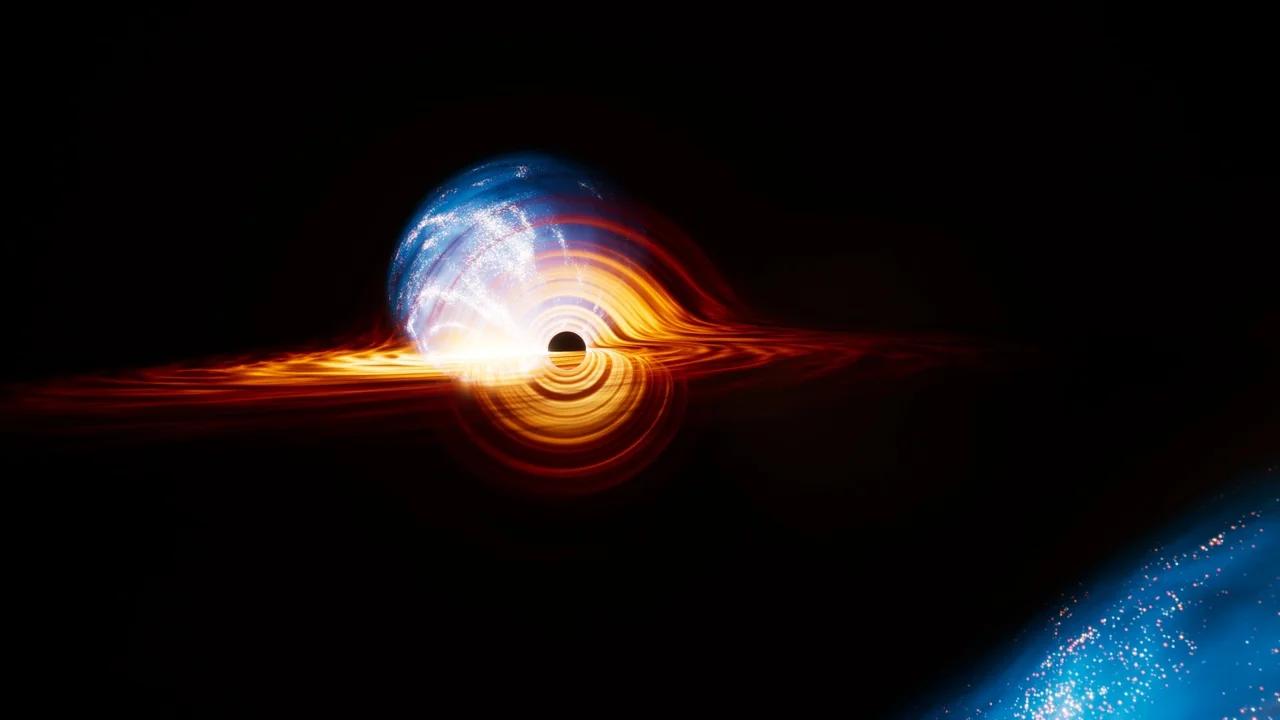
 Sky & Space
 Sky
Sky Sky
Sky