"7e6fc58c410f2894"{"id":"1000450","slug":"animated-curtains-vol-1","title":"Animated Curtains vol. 1","category":"Buildings \u0026 Architecture","engine":"5.3+","assetVersion":"","engineVersion":"Engine Version: 5.3+","tag":"Buildings","accent":"blue","visual":"mech","summary":"Pre-animated, hyper-realistic Unreal Engine curtains with 4K PBR materials. Drag-and-drop workflow with adjustable speed, phase, and keys. Nanite and Lumen supp","platform":"Unreal Engine","publishedAt":"2026-07-11T01:14:08.778Z","updatedAt":"2026-07-11T01:14:08.778Z","sourceNotes":[],"fileContents":[],"compatibility":["Unreal Engine","Engine Version: 5.3+"],"featuredImage":{"alt":"Animated Curtains vol. 1","src":"/wp-content/uploads/published/2026/07/c5380b365c81-5886ed05-09cf-4b5f-8b47-e194887aa2df-b6f85c8e52.webp"},"hasDownloadLink":true,"downloads":0,"terms":[{"taxonomy":"category","slug":"buildings-and-architecture","name":"Buildings \u0026 Architecture"}],"galleryImages":[{"src":"/wp-content/uploads/published/2026/07/8a2f22f41f51-4d00075e-73e5-4ea5-9649-641c846f577f-8cf1ddeed2.webp","alt":"Animated Curtains vol. 1"},{"src":"/wp-content/uploads/published/2026/07/91e41790e5d5-f568af33-f619-49cf-b226-e90a4d0ba09e-fb8f7a1f80.webp","alt":"Animated Curtains vol. 1"},{"src":"/wp-content/uploads/published/2026/07/a29c24f26c28-cc85bb52-0071-4068-b015-8cb420b6745e-93b4d6ef02.webp","alt":"Animated Curtains vol. 1"},{"src":"/wp-content/uploads/published/2026/07/daedeebbb4af-d3deeeb7-534c-4d42-aa1c-cc2fc48e0c78-7594b47d99.webp","alt":"Animated Curtains vol. 1"},{"src":"/wp-content/uploads/published/2026/07/ceb9e88b625d-cbcb03cd-8c2f-4f8f-9c72-893510b3d4ce-c1f3de542b.webp","alt":"Animated Curtains vol. 1"},{"src":"/wp-content/uploads/published/2026/07/238c33c6e392-1a2d49cf-1488-4494-8cf2-1ad2f0ec99d4-90d3867a13.webp","alt":"Animated Curtains vol. 1"},{"src":"/wp-content/uploads/published/2026/07/634f36990098-a509e029-526a-45ff-a893-7a89c58d0f02-54c78d986e.webp","alt":"Animated Curtains vol. 1"},{"src":"/wp-content/uploads/published/2026/07/11c309d3db98-034a919e-874d-4201-9b3e-06ccff33c611-9b951a003a.webp","alt":"Animated Curtains vol. 1"},{"src":"/wp-content/uploads/published/2026/07/23d3ad1172dd-48ea96b7-1af2-49b9-807b-cad39122ae0d-4b22b1db9e.webp","alt":"Animated Curtains vol. 1"},{"src":"/wp-content/uploads/published/2026/07/4c207f86ce18-bdff45d8-9f9f-458f-a31a-cf8bc0b1f17c-5040dd1598.webp","alt":"Animated Curtains vol. 1"}],"accessPanel":{"kind":"resource","title":"Download this resource","eyebrow":"Free Download","message":"Log in or create a free account to start your download.","fileName":"Content.7z","safetyNote":"Resources are manually reviewed before listing to improve quality and reduce obvious risks.","actionLabel":"Download Free","resourceType":"Resource archive"},"contentHtml":"\u003cp\u003eCurtains that move on their own inside a real-time scene change the reading of a room instantly. Instead of static geometry pinned to a wall, the fabric shifts, settles, and responds as if air is passing through the space. That continuous motion is what Animated Curtains vol. 1 puts into a drag-and-drop workflow for Unreal Engine 5.0+.\u003c/p\u003e\u003ch2\u003ePre-animated fabric without blueprints or code\u003c/h2\u003e\u003cp\u003eThe core premise is that every curtain in the set arrives already animated. There is no need to open the material editor, wire up timelines, or build simulation logic from scratch. The workflow described by the creator is four steps: drag the asset into the scene, drop it in place, adjust the available parameters, and then play or render. That simplicity is aimed at users who want motion in their scene without spending time on technical setup.\u003c/p\u003e\u003cp\u003eWhat makes this practical is how much control remains after the drag-and-drop step. The developer exposes three specific parameters that can be tuned per instance: \u003cstrong\u003eSpeed\u003c/strong\u003e, \u003cstrong\u003ePhase\u003c/strong\u003e, and \u003cstrong\u003eKeys\u003c/strong\u003e. If two curtains hang in the same room, adjusting phase offsets prevents them from swaying identically, adding a layer of natural variation to multiple instances placed close together.\u003c/p\u003e\u003ch2\u003ePBR materials at 4K resolution with full customization\u003c/h2\u003e\u003cp\u003eEach model ships with fully customizable PBR materials and 4K textures. The resolution matters for scenes where the camera sits close to the fabric and detail holds up under scrutiny. Because the materials are built on a PBR pipeline, they respond correctly to the lighting environment around them, which becomes especially visible when combined with Unreal\u0026rsquo;s dynamic lighting technology.\u003c/p\u003e\u003ch2\u003eNanite and Lumen support on Unreal Engine 5.0+\u003c/h2\u003e\u003cp\u003eThe package is built to take advantage of two core rendering pillars introduced in Unreal Engine 5: Nanite and Lumen.\u003c/p\u003e\u003cp\u003e\u003cstrong\u003eNanite\u003c/strong\u003e Allows high-poly geometry to render efficiently without manual LOD creation. For curtains, that means the folds and surface detail of the cloth can remain dense without forcing the user to manage performance trade-offs by hand.\u003c/p\u003e\u003cp\u003e\u003cstrong\u003eLumen\u003c/strong\u003e Handles dynamic global illumination and reflections. When the curtains move, the indirect light bouncing off the fabric updates in real time. The perceived realism of cloth in motion depends heavily on how light catches the folds and creases at different angles, and Lumen produces that response without baked lightmaps.\u003c/p\u003e\u003cp\u003eCompatibility extends through Unreal Engine versions 5.3 to 5.6, covering current and upcoming releases of the editor.\u003c/p\u003e\u003ch2\u003eWhere pre-animated curtains fit in a scene\u003c/h2\u003e\u003cp\u003eThe tags attached to the asset collection point to the specific room types and production contexts where these curtains and blinds serve a practical purpose. They include environments such as dining areas, bedrooms, and living rooms. Industrial and general architecture categories appear as well, suggesting the asset is intended for use beyond residential interiors.\u003c/p\u003e\u003cp\u003eFor architectural visualization, a curtain that gently sways sells the idea that a space is occupied and lived in. Static cloth often reads as a placeholder; motion implies ventilation, an open window, or even the subtle vibration caused by footfall on the floor above. Adjusting the speed parameter down provides a relaxed sway suitable for a quiet bedroom, while increasing it suits a more active environment where air circulation is implied.\u003c/p\u003e\u003ch3\u003eIntegration with Sequencer for rendered output\u003c/h3\u003e\u003cp\u003eThe creator includes an animated curtains tutorial focused specifically on Sequencer, which signals that the assets are intended to work inside Unreal\u0026rsquo;s cinematic toolset. Placing the curtains on a Sequencer track means their animation can be locked to specific frames, synchronized with camera cuts, and rendered out as part of a final video sequence. This matters for teams producing pre-rendered flythroughs of interiors, where frame-accurate control over cloth movement prevents unwanted jitter or mid-render pose shifts.\u003c/p\u003e\u003ch2\u003eExpanding the collection and learning resources\u003c/h2\u003e\u003cp\u003eIf the initial set does not cover every window type needed for a project, a second volume titled Animated Curtains 2 is available to extend the selection. The creator also provides supplemental media to assist with evaluation and adoption: a rendered assets video that demonstrates the final look of the curtains in motion, an in-editor video showing how they behave during interactive development, and a Sequencer tutorial covering the process of integrating the pre-animated cloth into cinematic sequences.\u003c/p\u003e\u003cp\u003eThe strongest takeaway for teams evaluating this package: the combination of Nanite-supported geometry, Lumen-driven lighting response, and adjustable animation parameters means these curtains can drop into a high-end Unreal Engine 5.3+ scene and immediately contribute to the perception of realism without any custom blueprints, manual optimization, or simulation work.\u003c/p\u003e\n\n\u003ch2\u003eContinue Browsing Similar Packs\u003c/h2\u003e\n\u003cul\u003e\n\u003cli\u003e\u003ca href=\"https://3dcghub.com/signage-vol-4-small-town/\" title=\"Signage VOL.4 - Small Town\"\u003eSignage VOL.4 - Small Town\u003c/a\u003e\u003c/li\u003e\n\u003cli\u003e\u003ca href=\"https://3dcghub.com/ghost-town-vol-3-modular-fences/\" title=\"Ghost Town VOL.3 - Modular Fences\"\u003eGhost Town VOL.3 - Modular Fences\u003c/a\u003e\u003c/li\u003e\n\u003cli\u003e\u003ca href=\"https://3dcghub.com/industrial-vol-4-electricity-hydro-and-water-treatment/\" title=\"Industrial VOL.4 - Electricity, Hydro, and Water Treatment\"\u003eIndustrial VOL.4 - Electricity, Hydro, and Water Treatment\u003c/a\u003e\u003c/li\u003e\n\u003cli\u003e\u003ca href=\"https://3dcghub.com/post-apocalyptic-signs-vol-2/\" title=\"Post Apocalyptic Signs - VOL 2\"\u003ePost Apocalyptic Signs - VOL 2\u003c/a\u003e\u003c/li\u003e\n\u003cli\u003eBillboards Pack Vol.01: Animated LED Ads for 3D Cities\u003c/li\u003e\n\u003c/ul\u003e","contentTextLength":5104,"navigation":{"current":1308,"total":3618,"previous":{"id":"1000451","slug":"astronauts-pack","title":"Astronauts (Pack)","category":"Characters \u0026 Creatures","platform":"Unreal Engine","updatedAt":"2026-07-11T01:19:38.245Z"},"next":{"id":"1000449","slug":"airplane-hangar","title":"Airplane Hangar","category":"Industrial","platform":"Unreal Engine","updatedAt":"2026-07-11T00:59:20.627Z"}},"relatedResources":[{"id":"1001459","slug":"suburbs-vol-11-rugs-nanite-and-low-poly","title":"Suburbs VOL.11 - Rugs (Nanite and Low Poly)","category":"Buildings \u0026 Architecture","engine":"5.1+","assetVersion":"","engineVersion":"Engine Version: 5.1+","tag":"Buildings","accent":"blue","visual":"mech","summary":"Explore Suburbs VOL.11 - Rugs featuring 30 Nanite and low-poly meshes, 4K channel-packed textures, master materials, and Lumen support in Unreal Engine.","platform":"Unreal Engine","publishedAt":"2026-10-08T01:04:12.761Z","updatedAt":"2026-10-08T01:04:12.761Z","sourceNotes":[],"fileContents":[],"compatibility":["Unreal Engine","Engine Version: 5.1+"],"featuredImage":{"alt":"Suburbs VOL.11 - Rugs (Nanite and Low Poly)","src":"/wp-content/uploads/published/2026/10/0586d3855e14-a9bb8f28-4c7f-4dd4-916f-6d288e7880b4-2b15276468.webp"},"hasDownloadLink":true,"downloads":1},{"id":"1001458","slug":"suburbs-vol-10-fireplaces-nanite-and-low-poly","title":"Suburbs VOL.10 - Fireplaces (Nanite and Low Poly)","category":"Buildings \u0026 Architecture","engine":"5.1+","assetVersion":"","engineVersion":"Engine Version: 5.1+","tag":"Buildings","accent":"blue","visual":"mech","summary":"Examine Suburbs VOL.10 - Fireplaces for Unreal Engine, featuring Nanite and low-poly meshes, 4K packed textures, Lumen lighting, and master materials.","platform":"Unreal Engine","publishedAt":"2026-10-08T01:01:52.468Z","updatedAt":"2026-10-08T01:01:52.468Z","sourceNotes":[],"fileContents":[],"compatibility":["Unreal Engine","Engine Version: 5.1+"],"featuredImage":{"alt":"Suburbs VOL.10 - Fireplaces (Nanite and Low Poly)","src":"/wp-content/uploads/published/2026/10/e0dcd09a87f4-ee618294-2a9c-4769-9118-aca415fe5b06-1dfe033979.webp"},"hasDownloadLink":true,"downloads":0},{"id":"1000672","slug":"school-vol-2-classroom","title":"School VOL.2 - Classroom","category":"Buildings \u0026 Architecture","engine":"5.1+","assetVersion":"","engineVersion":"Engine Version: 5.1+","tag":"Buildings","accent":"blue","visual":"mech","summary":"Dekogon's School VOL.2 - Classroom delivers 276 AAA-quality Unreal Engine meshes, Lumen support, channel-packed 2k textures, and a master material system for re","platform":"Unreal Engine","publishedAt":"2026-07-22T13:14:21.193Z","updatedAt":"2026-07-22T13:14:21.193Z","sourceNotes":[],"fileContents":[],"compatibility":["Unreal Engine","Engine Version: 5.1+"],"featuredImage":{"alt":"School VOL.2 - Classroom","src":"/wp-content/uploads/published/2026/07/56c89ba2664a-db6ba533-0722-4a41-aa16-f22f824c493f-28709e0bf5.webp"},"hasDownloadLink":true,"downloads":1}]}
Buildings
Animated Curtains vol. 1
Pre-animated, hyper-realistic Unreal Engine curtains with 4K PBR materials. Drag-and-drop workflow with adjustable speed, phase, and keys. Nanite and Lumen supp
Curtains that move on their own inside a real-time scene change the reading of a room instantly. Instead of static geometry pinned to a wall, the fabric shifts, settles, and responds as if air is passing through the space. That continuous motion is what Animated Curtains vol. 1 puts into a drag-and-drop workflow for Unreal Engine 5.0+.
Pre-animated fabric without blueprints or code
The core premise is that every curtain in the set arrives already animated. There is no need to open the material editor, wire up timelines, or build simulation logic from scratch. The workflow described by the creator is four steps: drag the asset into the scene, drop it in place, adjust the available parameters, and then play or render. That simplicity is aimed at users who want motion in their scene without spending time on technical setup.
What makes this practical is how much control remains after the drag-and-drop step. The developer exposes three specific parameters that can be tuned per instance: Speed, Phase, and Keys. If two curtains hang in the same room, adjusting phase offsets prevents them from swaying identically, adding a layer of natural variation to multiple instances placed close together.
PBR materials at 4K resolution with full customization
Each model ships with fully customizable PBR materials and 4K textures. The resolution matters for scenes where the camera sits close to the fabric and detail holds up under scrutiny. Because the materials are built on a PBR pipeline, they respond correctly to the lighting environment around them, which becomes especially visible when combined with Unreal’s dynamic lighting technology.
Nanite and Lumen support on Unreal Engine 5.0+
The package is built to take advantage of two core rendering pillars introduced in Unreal Engine 5: Nanite and Lumen.
Nanite Allows high-poly geometry to render efficiently without manual LOD creation. For curtains, that means the folds and surface detail of the cloth can remain dense without forcing the user to manage performance trade-offs by hand.
Lumen Handles dynamic global illumination and reflections. When the curtains move, the indirect light bouncing off the fabric updates in real time. The perceived realism of cloth in motion depends heavily on how light catches the folds and creases at different angles, and Lumen produces that response without baked lightmaps.
Compatibility extends through Unreal Engine versions 5.3 to 5.6, covering current and upcoming releases of the editor.
Where pre-animated curtains fit in a scene
The tags attached to the asset collection point to the specific room types and production contexts where these curtains and blinds serve a practical purpose. They include environments such as dining areas, bedrooms, and living rooms. Industrial and general architecture categories appear as well, suggesting the asset is intended for use beyond residential interiors.
For architectural visualization, a curtain that gently sways sells the idea that a space is occupied and lived in. Static cloth often reads as a placeholder; motion implies ventilation, an open window, or even the subtle vibration caused by footfall on the floor above. Adjusting the speed parameter down provides a relaxed sway suitable for a quiet bedroom, while increasing it suits a more active environment where air circulation is implied.
Integration with Sequencer for rendered output
The creator includes an animated curtains tutorial focused specifically on Sequencer, which signals that the assets are intended to work inside Unreal’s cinematic toolset. Placing the curtains on a Sequencer track means their animation can be locked to specific frames, synchronized with camera cuts, and rendered out as part of a final video sequence. This matters for teams producing pre-rendered flythroughs of interiors, where frame-accurate control over cloth movement prevents unwanted jitter or mid-render pose shifts.
Expanding the collection and learning resources
If the initial set does not cover every window type needed for a project, a second volume titled Animated Curtains 2 is available to extend the selection. The creator also provides supplemental media to assist with evaluation and adoption: a rendered assets video that demonstrates the final look of the curtains in motion, an in-editor video showing how they behave during interactive development, and a Sequencer tutorial covering the process of integrating the pre-animated cloth into cinematic sequences.
The strongest takeaway for teams evaluating this package: the combination of Nanite-supported geometry, Lumen-driven lighting response, and adjustable animation parameters means these curtains can drop into a high-end Unreal Engine 5.3+ scene and immediately contribute to the perception of realism without any custom blueprints, manual optimization, or simulation work.
 Buildings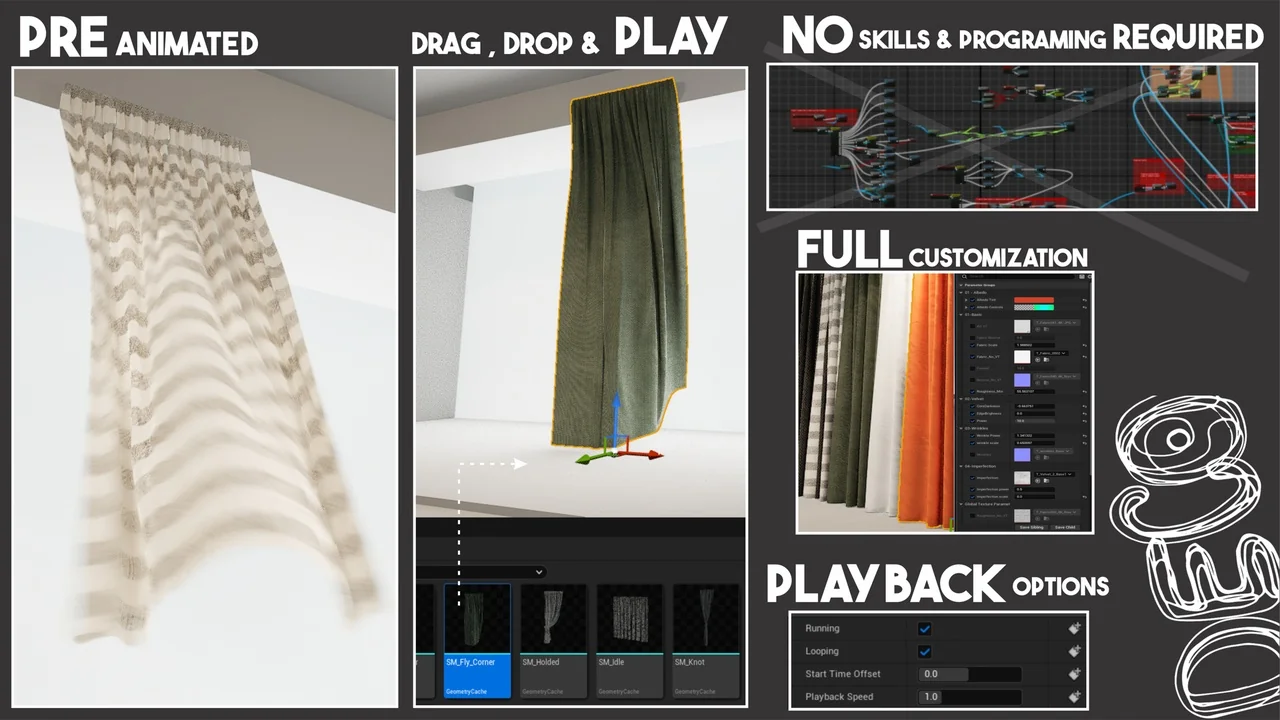
 Buildings
 Buildings
 Buildings