"7e6fc58c410f2894"{"id":"1000449","slug":"airplane-hangar","title":"Airplane Hangar","category":"Industrial","engine":"4.26+,5.0+","assetVersion":"Video Language: English","engineVersion":"Engine Version: 4.26+,5.0+","tag":"Industrial","accent":"blue","visual":"mech","summary":"Realistic airplane hangar pack with planes, tools, workbench, fusebox, and props. Includes static and animation-ready blueprint planes for Unreal 4.22–5.7.","platform":"Unreal Engine","publishedAt":"2026-07-11T00:59:20.627Z","updatedAt":"2026-07-11T00:59:20.627Z","sourceNotes":[],"fileContents":[],"compatibility":["Unreal Engine","Video Language: English","Engine Version: 4.26+,5.0+"],"featuredImage":{"alt":"Airplane Hangar","src":"/wp-content/uploads/published/2026/07/35ce694031b0-7926b151-d99c-448b-bea2-5db4e26245f3-1f97a09901.webp"},"hasDownloadLink":true,"downloads":0,"terms":[{"taxonomy":"category","slug":"industrial-environments","name":"Industrial"}],"galleryImages":[{"src":"/wp-content/uploads/published/2026/07/70cdc74427e1-db7441f5-110d-48d9-8dc8-6a35cfe1d9bc-d36e937715.webp","alt":"Airplane Hangar"},{"src":"/wp-content/uploads/published/2026/07/a3847fcb9380-41874f7d-3637-4065-b18a-39238b24211f-aae096cdad.webp","alt":"Airplane Hangar"},{"src":"/wp-content/uploads/published/2026/07/5701a1a60482-dd8647d7-a375-47b1-bef8-f0cbeca0c9db-901819574e.webp","alt":"Airplane Hangar"},{"src":"/wp-content/uploads/published/2026/07/9274cd0c196c-5b515136-3c27-4c49-a465-c991758023a9-9a1068fd24.webp","alt":"Airplane Hangar"},{"src":"/wp-content/uploads/published/2026/07/36b814a9dc24-5c4f5290-7b7c-4fbf-bfc3-015b4f6611f1-7a6349a9be.webp","alt":"Airplane Hangar"},{"src":"/wp-content/uploads/published/2026/07/716f9d8e4fca-5dd5f4cc-0d3b-4577-bad6-69b1b16c3143-fc8a21563d.webp","alt":"Airplane Hangar"},{"src":"/wp-content/uploads/published/2026/07/23badb54e80d-28c41ed1-698b-4d9e-9cf0-de10120a87df-271546a77e.webp","alt":"Airplane Hangar"},{"src":"/wp-content/uploads/published/2026/07/385b7b5153d6-04b1cb71-3e0c-4c47-b33b-f6c7df50725d-bdc4ed8c07.webp","alt":"Airplane Hangar"},{"src":"/wp-content/uploads/published/2026/07/f27656d5095a-90023fa8-8cc8-4678-8d89-6c8af982c104-26066087ca.webp","alt":"Airplane Hangar"},{"src":"/wp-content/uploads/published/2026/07/bf8738accd2d-26880ec9-0553-42e3-a7fd-cffec2e1857b-aa75a5d4ed.webp","alt":"Airplane Hangar"}],"accessPanel":{"kind":"resource","title":"Download this resource","eyebrow":"Free Download","message":"Log in or create a free account to start your download.","fileName":"Content.7z","safetyNote":"Resources are manually reviewed before listing to improve quality and reduce obvious risks.","actionLabel":"Download Free","resourceType":"Resource archive"},"contentHtml":"\u003cp\u003eIndustrial settings with grounded realism often anchor the most memorable scenes in games and visualization. An airplane hangar fits squarely into that category — a large, open volume where light catches metal surfaces, scattered tools sit half-used on workbenches, and planes rest either dormant or mid-repair. This pack addresses exactly that environment.\u003c/p\u003e\n\u003cp\u003e Artists and developers can drop into a believable industrial airfield setting without starting from scratch. The hangar itself forms the architectural base, while the supporting cast of planes and workshop clutter does the heavy lifting for atmosphere.\u003c/p\u003e \u003ch2\u003eScene-Building Value of the Hangar and Its Planes\u003c/h2\u003e\n\u003cp\u003eThe central draw is a complete airplane hangar environment paired with planes. Because the planes come in two distinct flavors — static versions and Blueprint-based animation-ready versions — creators have room to decide how each aircraft behaves within a scene. A static plane might sit parked in the background, locked in place as environmental dressing. An animation-ready variant, built as a Blueprint, opens the door to gameplay sequences, cinematic shots, or simulation mechanics where movement matters.\u003c/p\u003e\n\u003cp\u003eThat dual approach means the same model can serve two production branches at once. Level designers can block out a hangar interior with static planes for performance, while cinematic artists or gameplay programmers can swap in Blueprint versions for shots that require motion. Tagged as both realistic and simulation-oriented, the planes fit into scenarios ranging from flight training environments to narrative sequences set in maintenance facilities.\u003c/p\u003e\n\u003cp\u003eEvery asset is built to high quality standards, with attention paid to how props hold up under close inspection. Close-up framing — whether for a cutscene, an inspection mechanic, or a first-person walkthrough — is part of the intended use case.\u003c/p\u003e \u003ch3\u003eWorkshop Props\u003c/h3\u003e\n\u003cp\u003eThe hangar would feel empty without the secondary objects that make a workspace feel lived-in. This pack addresses that directly with a substantial prop set:\u003c/p\u003e\n\u003cul\u003e\n\u003cli\u003e\u003cstrong\u003eTools\u003c/strong\u003e For maintenance scenes\u003c/li\u003e\n\u003cli\u003e\u003cstrong\u003eWorkbench\u003c/strong\u003e As a focal surface for scattered detail\u003c/li\u003e\n\u003cli\u003e\u003cstrong\u003eFuseBox\u003c/strong\u003e For wall-mounted industrial accent\u003c/li\u003e\n\u003cli\u003e\u003cstrong\u003eLamps\u003c/strong\u003e For localized lighting variation\u003c/li\u003e\n\u003cli\u003e\u003cstrong\u003eTrash Debree\u003c/strong\u003e For environmental storytelling\u003c/li\u003e\n\u003cli\u003e\u003cstrong\u003eContainer\u003c/strong\u003e For storage and set dressing\u003c/li\u003e\n\u003cli\u003eMany more supporting items\u003c/li\u003e\n\u003c/ul\u003e\n\u003cp\u003eScattering tools across a workbench, positioning lamps to cast harsh industrial shadows, or leaving trash debris near a corner all contribute to a space that reads as operational rather than sterile. The container and fusebox add structural variety, breaking up flat surfaces with functional-looking equipment.\u003c/p\u003e \u003ch2\u003eBuilding Industrial Realism Across Engine Versions\u003c/h2\u003e\n\u003cp\u003eRealistic industrial environments live or die by prop density and surface fidelity. This pack positions itself in that space with tags including \u003cstrong\u003eRealistic\u003c/strong\u003e, \u003cstrong\u003eIndustrial\u003c/strong\u003e, and \u003cstrong\u003eSimulation\u003c/strong\u003e, suggesting a visual target grounded in believable facility aesthetics rather than stylized interpretations.\u003c/p\u003e\n\u003cp\u003eSupport spans Unreal Engine \u003cstrong\u003e4.22 through 4.27\u003c/strong\u003e And \u003cstrong\u003e5.0 through 5.7\u003c/strong\u003e, covering both the late 4.x cycle and the 5.x generation including forward-compatible versions. That range gives teams flexibility during transitions between engine major versions. Projects still shipping on 4.27 can integrate the hangar without upgrade pressure, while those on 5.x can take advantage of newer rendering features without losing access to the assets.\u003c/p\u003e\n\u003cp\u003eThe combination of warehouse, aircraft, and hangar tags indicates the pack is designed to serve as a self-contained level or environment module. Rather than piecing together separate warehouse interiors, aircraft models, and toolbox props from unrelated sources, creators can treat this as a unified industrial scene kit. The planes anchor the space, the hangar provides enclosure, and the scattered props fill the narrative gaps.\u003c/p\u003e \u003ch3\u003eAnimation-Ready Plane Blueprints\u003c/h3\u003e\n\u003cp\u003eThe Blueprint versions of the planes deserve particular attention. Animation-ready in this context means the aircraft are not just mesh-only assets — they carry Blueprint logic that can drive movement. For a simulation context, this saves a meaningful step. Rather than wiring custom animation logic or attaching separate controllers, creators can work with assets already prepared for animation through Unreal's Blueprint system.\u003c/p\u003e\n\u003cp\u003eStatic versions serve the opposite need. When a scene requires dozens of planes parked across a tarmac or lining a hangar floor, Blueprint overhead becomes unnecessary. Static meshes for the same aircraft keep the scene lightweight and render-efficient.\u003c/p\u003e \u003ch2\u003eSetting Up Cinematic and Gameplay Contexts\u003c/h2\u003e\n\u003cp\u003eBecause the tag set includes \u003cstrong\u003eLevel\u003c/strong\u003e, \u003cstrong\u003eWarehouse\u003c/strong\u003e, \u003cstrong\u003eAircraft\u003c/strong\u003e, and \u003cstrong\u003ePlane\u003c/strong\u003e, the pack is positioned as a full-level environment rather than a loose collection of props. Creators approaching it as a simulation backdrop can populate the hangar with maintenance crews, parked planes, and scattered equipment. The realistic styling supports both direct interaction in gameplay and passive backdrop use in cinematics.\u003c/p\u003e\n\u003cp\u003eFor a mechanic involving exploration, the inclusion of props like the fusebox, workbench, and container offers interaction anchors. Tools scattered across surfaces invite inspection mechanics. Lamps placed thoughtfully create pools of light that guide movement or frame key shots. Even the trash debris plays a role by breaking up floor surfaces and adding irregular silhouette variety.\u003c/p\u003e \u003ch2\u003eFitting the Hangar Into a Production Pipeline\u003c/h2\u003e\n\u003cp\u003eTeams evaluating this pack should think about how the dual plane system aligns with their workflow. If a project requires both parked and moving aircraft, the static and Blueprint pairing avoids duplicate work. The same visual foundation scales from background dressing to foreground animated subject.\u003c/p\u003e\n\u003cp\u003eFor environment artists focused on realistic industrial spaces, the hangar plus prop combination covers the major beats: architectural enclosure, primary subject (the planes), and scattered detail (tools, workbench, debris). All of it maintains enough quality for close-up framing without requiring additional asset procurement or custom modeling to fill the gaps.\u003c/p\u003e\n\n\u003ch2\u003eMore From The Same Workflow\u003c/h2\u003e\n\u003cul\u003e\n\u003cli\u003e\u003ca href=\"https://3dcghub.com/industrial-area-hangar/\" title=\"Industrial Area Hangar\"\u003eIndustrial Area Hangar\u003c/a\u003e\u003c/li\u003e\n\u003cli\u003e\u003ca href=\"https://3dcghub.com/hawknest-an-aircraft-factory-hangar-modular/\" title=\"HAWKNEST An Aircraft Factory Hangar (Modular)\"\u003eHAWKNEST An Aircraft Factory Hangar (Modular)\u003c/a\u003e\u003c/li\u003e\n\u003cli\u003e\u003ca href=\"https://3dcghub.com/hangar-warehouse-in-the-tropics/\" title=\"Hangar warehouse in the tropics\"\u003eHangar warehouse in the tropics\u003c/a\u003e\u003c/li\u003e\n\u003cli\u003e\u003ca href=\"https://3dcghub.com/tank-cleaning-center/\" title=\"Tank Cleaning Center\"\u003eTank Cleaning Center\u003c/a\u003e\u003c/li\u003e\n\u003cli\u003e\u003ca href=\"https://3dcghub.com/factory/\" title=\"Factory\"\u003eFactory\u003c/a\u003e\u003c/li\u003e\n\u003c/ul\u003e","contentTextLength":6262,"navigation":{"current":1309,"total":3618,"previous":{"id":"1000450","slug":"animated-curtains-vol-1","title":"Animated Curtains vol. 1","category":"Buildings \u0026 Architecture","platform":"Unreal Engine","updatedAt":"2026-07-11T01:14:08.778Z"},"next":{"id":"1000448","slug":"blue-gem-earth-80k","title":"Blue Gem Earth 80k","category":"Sky \u0026 Space","platform":"Unreal Engine","updatedAt":"2026-07-11T00:53:53.737Z"}},"relatedResources":[{"id":"1000538","slug":"modular-target-practice-hangar","title":"Modular Target Practice Hangar","category":"Industrial","engine":"4.26+,5.0+","assetVersion":"","engineVersion":"Engine Version: 4.26+,5.0+","tag":"Industrial","accent":"blue","visual":"mech","summary":"Modular Target Practice Hangar delivers modular interior walls, animated rail targets, scaffolding, a work-bench, and props for tactical training scenes.","platform":"Unreal Engine","publishedAt":"2026-07-15T02:41:52.368Z","updatedAt":"2026-07-15T02:41:52.368Z","sourceNotes":[],"fileContents":[],"compatibility":["Unreal Engine","Engine Version: 4.26+,5.0+"],"featuredImage":{"alt":"Modular Target Practice Hangar","src":"/wp-content/uploads/published/2026/07/69b125e42586-d2a5ec2f-2ea3-430e-8301-3eb6b803e9ac-defd1cdee2.webp"},"hasDownloadLink":true,"downloads":0},{"id":"8623","slug":"industrial-area-hangar","title":"Industrial Area Hangar","category":"Industrial","engine":"4.26+,5.0+","assetVersion":"Engine version: 4.26+,5.0+","engineVersion":"4.10","tag":"Industrial","accent":"blue","visual":"city","summary":"Build realistic industrial zones with this comprehensive modular asset pack. It includes everything from massive hangars and drilling platforms to detailed props like containers and fuel tanks.","platform":"Unreal Engine","publishedAt":"2026-02-23T18:12:21.000Z","updatedAt":"2026-04-19T15:55:23.000Z","sourceNotes":[],"fileContents":[],"compatibility":["Unreal Engine","Engine version: 4.26+,5.0+"],"featuredImage":{"alt":"Industrial Area Hangar","src":"https://3dcghub.com/wp-content/uploads/2026/02/d3d2c2ad-3810-4cdf-9805-3c8bff091db3.webp"},"hasDownloadLink":true,"downloads":2},{"id":"8605","slug":"hawknest-an-aircraft-factory-hangar-modular","title":"HAWKNEST An Aircraft Factory Hangar (Modular)","category":"Industrial","engine":"5.1+","assetVersion":"Engine version: 5.1+","engineVersion":"5.1","tag":"Industrial","accent":"blue","visual":"city","summary":"Create stunning industrial spaces with this modular aircraft factory hangar. It features over 340 high-quality assets, animated robots, and fully functional drivable vehicles.","platform":"Unreal Engine","publishedAt":"2026-02-23T18:05:05.000Z","updatedAt":"2026-04-19T15:55:24.000Z","sourceNotes":[],"fileContents":[],"compatibility":["Unreal Engine","Engine version: 5.1+"],"featuredImage":{"alt":"HAWKNEST An Aircraft Factory Hangar (Modular)","src":"https://3dcghub.com/wp-content/uploads/2026/02/0f603211-4c1b-4d0d-b6a4-9fe97117dd12.webp"},"hasDownloadLink":true,"downloads":1}]}
Industrial
Airplane Hangar
Realistic airplane hangar pack with planes, tools, workbench, fusebox, and props. Includes static and animation-ready blueprint planes for Unreal 4.22–5.7.
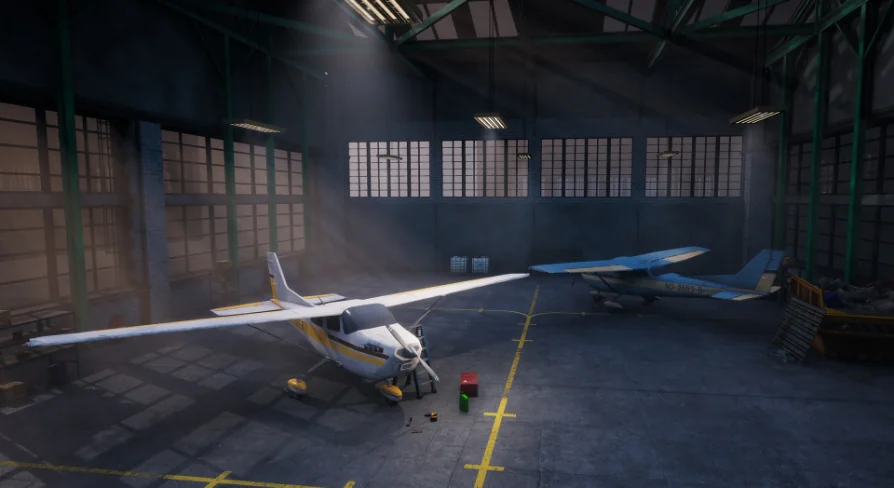
Industrial settings with grounded realism often anchor the most memorable scenes in games and visualization. An airplane hangar fits squarely into that category — a large, open volume where light catches metal surfaces, scattered tools sit half-used on workbenches, and planes rest either dormant or mid-repair. This pack addresses exactly that environment.
Artists and developers can drop into a believable industrial airfield setting without starting from scratch. The hangar itself forms the architectural base, while the supporting cast of planes and workshop clutter does the heavy lifting for atmosphere.
Scene-Building Value of the Hangar and Its Planes
The central draw is a complete airplane hangar environment paired with planes. Because the planes come in two distinct flavors — static versions and Blueprint-based animation-ready versions — creators have room to decide how each aircraft behaves within a scene. A static plane might sit parked in the background, locked in place as environmental dressing. An animation-ready variant, built as a Blueprint, opens the door to gameplay sequences, cinematic shots, or simulation mechanics where movement matters.
That dual approach means the same model can serve two production branches at once. Level designers can block out a hangar interior with static planes for performance, while cinematic artists or gameplay programmers can swap in Blueprint versions for shots that require motion. Tagged as both realistic and simulation-oriented, the planes fit into scenarios ranging from flight training environments to narrative sequences set in maintenance facilities.
Every asset is built to high quality standards, with attention paid to how props hold up under close inspection. Close-up framing — whether for a cutscene, an inspection mechanic, or a first-person walkthrough — is part of the intended use case.
Workshop Props
The hangar would feel empty without the secondary objects that make a workspace feel lived-in. This pack addresses that directly with a substantial prop set:
Tools For maintenance scenes
Workbench As a focal surface for scattered detail
FuseBox For wall-mounted industrial accent
Lamps For localized lighting variation
Trash Debree For environmental storytelling
Container For storage and set dressing
Many more supporting items
Scattering tools across a workbench, positioning lamps to cast harsh industrial shadows, or leaving trash debris near a corner all contribute to a space that reads as operational rather than sterile. The container and fusebox add structural variety, breaking up flat surfaces with functional-looking equipment.
Building Industrial Realism Across Engine Versions
Realistic industrial environments live or die by prop density and surface fidelity. This pack positions itself in that space with tags including Realistic, Industrial, and Simulation, suggesting a visual target grounded in believable facility aesthetics rather than stylized interpretations.
Support spans Unreal Engine 4.22 through 4.27 And 5.0 through 5.7, covering both the late 4.x cycle and the 5.x generation including forward-compatible versions. That range gives teams flexibility during transitions between engine major versions. Projects still shipping on 4.27 can integrate the hangar without upgrade pressure, while those on 5.x can take advantage of newer rendering features without losing access to the assets.
The combination of warehouse, aircraft, and hangar tags indicates the pack is designed to serve as a self-contained level or environment module. Rather than piecing together separate warehouse interiors, aircraft models, and toolbox props from unrelated sources, creators can treat this as a unified industrial scene kit. The planes anchor the space, the hangar provides enclosure, and the scattered props fill the narrative gaps.
Animation-Ready Plane Blueprints
The Blueprint versions of the planes deserve particular attention. Animation-ready in this context means the aircraft are not just mesh-only assets — they carry Blueprint logic that can drive movement. For a simulation context, this saves a meaningful step. Rather than wiring custom animation logic or attaching separate controllers, creators can work with assets already prepared for animation through Unreal's Blueprint system.
Static versions serve the opposite need. When a scene requires dozens of planes parked across a tarmac or lining a hangar floor, Blueprint overhead becomes unnecessary. Static meshes for the same aircraft keep the scene lightweight and render-efficient.
Setting Up Cinematic and Gameplay Contexts
Because the tag set includes Level, Warehouse, Aircraft, and Plane, the pack is positioned as a full-level environment rather than a loose collection of props. Creators approaching it as a simulation backdrop can populate the hangar with maintenance crews, parked planes, and scattered equipment. The realistic styling supports both direct interaction in gameplay and passive backdrop use in cinematics.
For a mechanic involving exploration, the inclusion of props like the fusebox, workbench, and container offers interaction anchors. Tools scattered across surfaces invite inspection mechanics. Lamps placed thoughtfully create pools of light that guide movement or frame key shots. Even the trash debris plays a role by breaking up floor surfaces and adding irregular silhouette variety.
Fitting the Hangar Into a Production Pipeline
Teams evaluating this pack should think about how the dual plane system aligns with their workflow. If a project requires both parked and moving aircraft, the static and Blueprint pairing avoids duplicate work. The same visual foundation scales from background dressing to foreground animated subject.
For environment artists focused on realistic industrial spaces, the hangar plus prop combination covers the major beats: architectural enclosure, primary subject (the planes), and scattered detail (tools, workbench, debris). All of it maintains enough quality for close-up framing without requiring additional asset procurement or custom modeling to fill the gaps.
 Industrial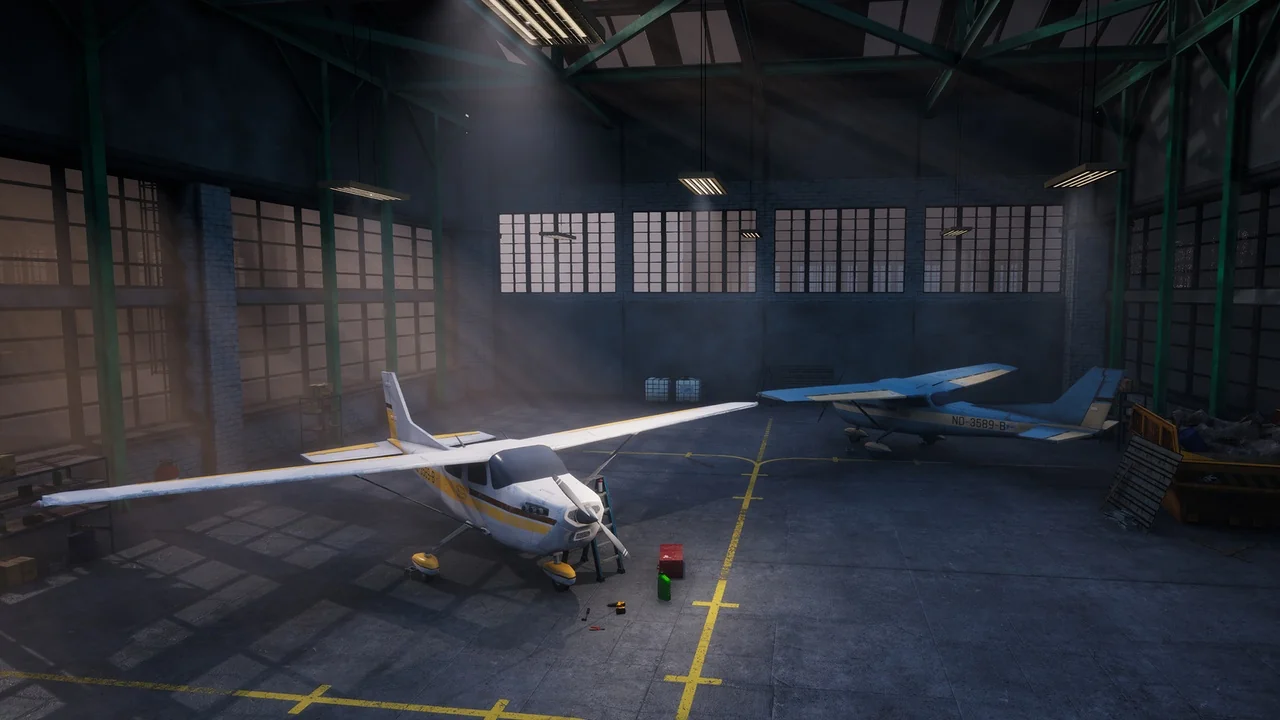
 Industrial
 Industrial
 Industrial