"7e6fc58c410f2894"{"id":"1000448","slug":"blue-gem-earth-80k","title":"Blue Gem Earth 80k","category":"Sky \u0026 Space","engine":"5.0+","assetVersion":"Video Language: English","engineVersion":"Engine Version: 5.0+","tag":"Sky \u0026 Space","accent":"blue","visual":"mech","summary":"Nanite-powered Earth planet with hand-painted 80k color and normal maps, exaggerated or realistic topography, bathymetry, dynamic city lights, and blueprint spa","platform":"Unreal Engine","publishedAt":"2026-07-11T00:53:53.737Z","updatedAt":"2026-07-11T00:53:53.737Z","sourceNotes":[],"fileContents":[],"compatibility":["Unreal Engine","Video Language: English","Engine Version: 5.0+"],"featuredImage":{"alt":"Blue Gem Earth 80k","src":"/wp-content/uploads/published/2026/07/52cacd4f10c8-796f82f8-3ae4-4b41-b7af-b2a7425aceaf-72955625df.webp"},"hasDownloadLink":true,"downloads":0,"terms":[{"taxonomy":"category","slug":"sky-and-space","name":"Sky \u0026 Space"}],"galleryImages":[{"src":"/wp-content/uploads/published/2026/07/1e80d6e32887-7a0d1b70-1795-4724-88ab-353b67da85dd-9d447c1859.webp","alt":"Blue Gem Earth 80k"},{"src":"/wp-content/uploads/published/2026/07/785de44b127d-4ab39f70-839d-4d31-90bf-7361b4a5fda3-bb59cddaeb.webp","alt":"Blue Gem Earth 80k"},{"src":"/wp-content/uploads/published/2026/07/0f3a4f4e3356-1bb5fe52-e8c2-4a2e-8ca0-30eb4b9d3b51-5012a70720.webp","alt":"Blue Gem Earth 80k"},{"src":"/wp-content/uploads/published/2026/07/be0906a2934e-bce410b7-d876-4c8e-8f25-8818292557d8-d29ec68233.webp","alt":"Blue Gem Earth 80k"},{"src":"/wp-content/uploads/published/2026/07/4cc58d5201c1-833bb22a-ac38-4d8d-95bb-fcee87822ac3-2fbedddece.webp","alt":"Blue Gem Earth 80k"},{"src":"/wp-content/uploads/published/2026/07/21180ee4bc86-5fce9fbe-3c28-4158-a448-84436743bc04-599f3a5bf4.webp","alt":"Blue Gem Earth 80k"},{"src":"/wp-content/uploads/published/2026/07/031afc970de0-fcbafee8-9647-4e57-96a6-08290bd25778-6576db450e.webp","alt":"Blue Gem Earth 80k"},{"src":"/wp-content/uploads/published/2026/07/34fdc2a921c1-ea252996-cb67-4eb3-9a00-c7ac3bd95f53-68e3e49d8a.webp","alt":"Blue Gem Earth 80k"},{"src":"/wp-content/uploads/published/2026/07/da96cf9f0a22-bb701d9b-6bd1-42b4-86a6-146ac28999fe-0fc4ce149a.webp","alt":"Blue Gem Earth 80k"},{"src":"/wp-content/uploads/published/2026/07/56f31cf44935-07d180a6-23a0-4a96-a94e-7274e54346d4-20cab972b7.webp","alt":"Blue Gem Earth 80k"}],"accessPanel":{"kind":"resource","title":"Download this resource","eyebrow":"Free Download","message":"Log in or create a free account to start your download.","fileName":"Content.7z","safetyNote":"Resources are manually reviewed before listing to improve quality and reduce obvious risks.","actionLabel":"Download Free","resourceType":"Resource archive"},"contentHtml":"\u003cp\u003eShadows sweep across mountain ranges and ocean floors as the sun moves through the sky. City lights flicker on when the sun drops below the horizon and fade again when daylight returns. This is how \u003cstrong\u003eBlue Gem Earth 80k\u003c/strong\u003e Behaves inside a scene: a real-time, raytraced planet built from many static meshes beyond one sphere, with terrain data fed through Epic's Nanite virtualized geometry system. The creator built it for geography-oriented games, YouTube videos, editorial presentations, and cinematic renders where the world itself is a character in the story.\u003c/p\u003e \u003ch2\u003eHand-painted surface data at 81,920 pixels\u003c/h2\u003e\n\u003cp\u003eThe color map stretches 81,920 pixels wide and 40,960 pixels high. Every pixel has been hand-painted to strip out data processing artifacts that often plague satellite-derived textures. The normal map matches that same resolution and carries an adjustable flatness parameter, letting artists dial the intensity of terrain features up or down to match different visual styles and production needs.\u003c/p\u003e \u003cp\u003eLayered on top of the surface are road and railroad textures added in the March 2026 update. Country borders and internal borders—state and provincial lines—exist as separate texture layers at roughly 80,000 by 40,000 pixels. Both border sets offer adjustable intensity and adjustable color, so borders can be made bold for editorial clarity or softened for a more painterly look. Any unpacked textures that go unused are flagged for removal in a future project update to keep disk footprint manageable.\u003c/p\u003e \u003ch2\u003eTopography, bathymetry, and the two height levels\u003c/h2\u003e\n\u003cp\u003eThe planet offers two distinct height configurations. One level provides realistic topography and bathymetry heights. The other uses a roughly 11x vertical exaggeration that amplifies mountain relief and ocean-floor contours, casting longer shadows and adding visual drama to the surface. The creator notes that exaggerated relief adds depth and dynamism to how light interacts with the land, which is particularly effective in cinematic shots where sweeps across mountain ranges benefit from pronounced shadow play.\u003c/p\u003e \u003cp\u003eThe project does not include heightmaps or adjustable terrain height features. The terrain is not exposed as an Unreal Engine Landscape, meaning the ground cannot be sculpted with Landscape tools. The surface is built from triangulated Nanite-enabled static meshes assembled into a complete planet, not from a heightmap-driven landscape system.\u003c/p\u003e \u003ch2\u003eAtmospheric lighting and city light behavior\u003c/h2\u003e\n\u003cp\u003eThe asset harnesses Epic's atmospheric lighting system. As the sun angle changes, dynamic lighting and shading adjust across the entire globe. City lights turn on and off based on light visibility—when the sun sets and a region enters darkness, the city lights illuminate; when daylight returns, they switch off. This physical light-visibility logic means the day-night cycle can be driven entirely by sun position without manual toggling of emissive layers.\u003c/p\u003e \u003cp\u003eWater meshes in the project are translucent by default and are \u003cem\u003eNot\u003c/em\u003e Nanite enabled. This is deliberate: enabling Nanite on translucent water would eliminate the translucency. The water materials rely on blend modes that Nanite does not currently support for translucency, so keeping Nanite off on these meshes preserves the intended visual result.\u003c/p\u003e \u003ch2\u003eBlueprint spawners for cities, airports, and ports\u003c/h2\u003e\n\u003cp\u003eThe March 2026 update introduced a blueprint spawner driven by a data table. It handles city, airport, and port locations, allowing markers or meshes to be placed at real-world positions without manually positioning each one. This data-table approach means the location data lives separate from the blueprint logic, making it straightforward to update, extend, or swap out point sets as needed.\u003c/p\u003e \u003cp\u003eThe project also ships with the level sequence used in the showcase video. That sequence serves as a working reference for camera moves, timing, and how the creator set up shots to show off the terrain, lighting, and city-light transitions.\u003c/p\u003e \u003ch2\u003eHardware requirements and Nanite compatibility\u003c/h2\u003e\n\u003cp\u003eRunning Nanite on PC requires an NVIDIA Maxwell-generation card or newer, or an AMD GCN-generation card or newer. For rendering movie sequences, 16GB or more of dedicated VRAM is recommended, with 24GB being the sweet spot for heavier workloads.\u003c/p\u003e \u003cp\u003eOn Unreal Engine 5.1 or later, Nanite requires Shader Model 6 (SM6), which is enabled by default in those versions. If seams appear on the planet, the creator points to a remedy in the project's DefaultEngine.ini file: switching \u003ccode\u003eDefaultGraphicsRHI\u003c/code\u003e From \u003ccode\u003eDefaultGraphicsRHI_Default\u003c/code\u003e To \u003ccode\u003eDefaultGraphicsRHI_DX12\u003c/code\u003e Resolves the issue. For crashes encountered when rendering sequences on UE 5.1 and above with DX12, a troubleshooting video is referenced in the documentation.\u003c/p\u003e \u003ch2\u003eWhat the project is and what it is not\u003c/h2\u003e\n\u003cp\u003eLikely use cases include aerial or orbital establishing shots, geography-oriented educational content, stylized world map presentations, and cinematic sequences where the planet is viewed from a distance. The project is explicitly described as \u003cstrong\u003eNot\u003c/strong\u003e Suitable for first-person play or ground-level use. Surface detail at human scale is insufficient, the package lacks proper collisions for walking on the terrain, and the ground is not meant to be traversed on foot. The planet is assembled from many meshes, all Nanite-enabled except the translucent water meshes, and the whole package weighs in at roughly 11.3 GB.\u003c/p\u003e \u003cp\u003eOne operational quirk: after opening the project in the editor, the creator recommends pressing play and then stopping to execute recommended console variables. This setup step ensures certain rendering and performance parameters are initialized correctly before a session begins.\u003c/p\u003e \u003cp\u003eTeams evaluating this asset should treat it as a visual storytelling instrument for globe-scale shots: a stylized relief map with dynamic lighting, hand-painted satellite-free textures, and a data-driven point-spawning system. The stylized relief, the hand-painted detail, and the dynamic lighting make a strong asset for anyone producing geographic or editorial content who needs a planet that holds up under cinematic framing without pretending to be a walkable world.\u003c/p\u003e\n\n\u003ch2\u003eMore From The Same Workflow\u003c/h2\u003e\n\u003cul\u003e\n\u003cli\u003e\u003ca href=\"https://3dcghub.com/moon-landscape/\" title=\"Moon Landscape\"\u003eMoon Landscape\u003c/a\u003e\u003c/li\u003e\n\u003cli\u003e\u003ca href=\"https://3dcghub.com/quick-cloud-vdb-cloud-volumetric-cinematic-clouds/\" title=\"Quick Cloud - VDB Cloud Volumetric Cinematic Clouds\"\u003eQuick Cloud - VDB Cloud Volumetric Cinematic Clouds\u003c/a\u003e\u003c/li\u003e\n\u003cli\u003e\u003ca href=\"https://3dcghub.com/matte-painting-skybox-pack-demonic-skies/\" title=\"Matte Painting Skybox Pack: Demonic Skies\"\u003eMatte Painting Skybox Pack: Demonic Skies\u003c/a\u003e\u003c/li\u003e\n\u003cli\u003e\u003ca href=\"https://3dcghub.com/matte-painting-skybox-pack-viii-doom-skies/\" title=\"Matte Painting Skybox Pack VIII: Doom Skies\"\u003eMatte Painting Skybox Pack VIII: Doom Skies\u003c/a\u003e\u003c/li\u003e\n\u003cli\u003e\u003ca href=\"https://3dcghub.com/stylized-dynamic-sky-weather-system/\" title=\"Stylized Dynamic Sky \u0026amp; Weather System\"\u003eStylized Dynamic Sky \u0026amp; Weather System\u003c/a\u003e\u003c/li\u003e\n\u003c/ul\u003e","contentTextLength":6340,"navigation":{"current":1310,"total":3618,"previous":{"id":"1000449","slug":"airplane-hangar","title":"Airplane Hangar","category":"Industrial","platform":"Unreal Engine","updatedAt":"2026-07-11T00:59:20.627Z"},"next":{"id":"1000447","slug":"unreal-engine-5-realistic-automotive-rendering-masterclass","title":"Unreal Engine 5: Realistic Automotive Rendering Masterclass","category":"Unreal Engine","platform":"Unreal Engine","updatedAt":"2026-07-11T00:27:47.295Z"}},"relatedResources":[{"id":"1001130","slug":"incredible-earth-80k-photorealistic-planet","title":"Incredible Earth 80K - Photorealistic Planet","category":"Sky \u0026 Space","engine":"5.1+","assetVersion":"","engineVersion":"Engine Version: 5.1+","tag":"Sky \u0026 Space","accent":"blue","visual":"mech","summary":"A realistic Earth asset for Unreal Engine with 80K NASA-based textures, shader-driven clouds, night lights, and cinematic orbit tools. Covers setup, controls, a","platform":"Unreal Engine","publishedAt":"2026-09-09T01:54:42.653Z","updatedAt":"2026-09-09T01:54:42.653Z","sourceNotes":[],"fileContents":[],"compatibility":["Unreal Engine","Engine Version: 5.1+"],"featuredImage":{"alt":"Incredible Earth 80K - Photorealistic Planet","src":"/wp-content/uploads/published/2026/09/78c40b0d4a02-02693118-f950-478d-b12d-fe025eaa2c27-2359b964b1.webp"},"hasDownloadLink":true,"downloads":1},{"id":"9747","slug":"moon-landscape","title":"Moon Landscape","category":"Sky \u0026 Space","engine":"4.26+,5.0+","assetVersion":"Engine version: 4.26+,5.0+","engineVersion":"5.0","tag":"Sky \u0026 Space","accent":"blue","visual":"city","summary":"Enhance your cosmic scenes with this detailed Moon Landscape. It features a massive 8129x8129 surface, unique material layers, and realistic background assets like planet Earth and a starry sky.","platform":"Unreal Engine","publishedAt":"2026-03-01T17:43:23.000Z","updatedAt":"2026-04-19T15:51:01.000Z","sourceNotes":[],"fileContents":[],"compatibility":["Unreal Engine","Engine version: 4.26+,5.0+"],"featuredImage":{"alt":"Moon Landscape","src":"https://3dcghub.com/wp-content/uploads/2026/03/0c3bb51b-8fd3-4b08-93a2-b69c5d7ee79a.webp"},"hasDownloadLink":true,"downloads":1},{"id":"1001667","slug":"space-frontier-stations-and-ships","title":"Space Frontier Stations \u0026 Ships","category":"Sky \u0026 Space","engine":"5.0+","assetVersion":"","engineVersion":"Engine Version: 5.0+","tag":"Sky \u0026 Space","accent":"blue","visual":"mech","summary":"Build vast sci-fi environments with Space Frontier Stations \u0026 Ships, featuring 60+ blueprints, procedural scattering, flyable ships, and Nanite/Lumen support.","platform":"Unreal Engine","publishedAt":"2026-10-13T15:09:29.578Z","updatedAt":"2026-10-13T15:09:29.578Z","sourceNotes":[],"fileContents":[],"compatibility":["Unreal Engine","Engine Version: 5.0+"],"featuredImage":{"alt":"Space Frontier Stations \u0026 Ships","src":"/wp-content/uploads/published/2026/10/bc4215e944b8-2c47d31a-f13b-40d5-a5c8-3a6f3f1b6ef5-5a5ee01424.webp"},"hasDownloadLink":true,"downloads":0}]}
Sky & Space
Blue Gem Earth 80k
Nanite-powered Earth planet with hand-painted 80k color and normal maps, exaggerated or realistic topography, bathymetry, dynamic city lights, and blueprint spa
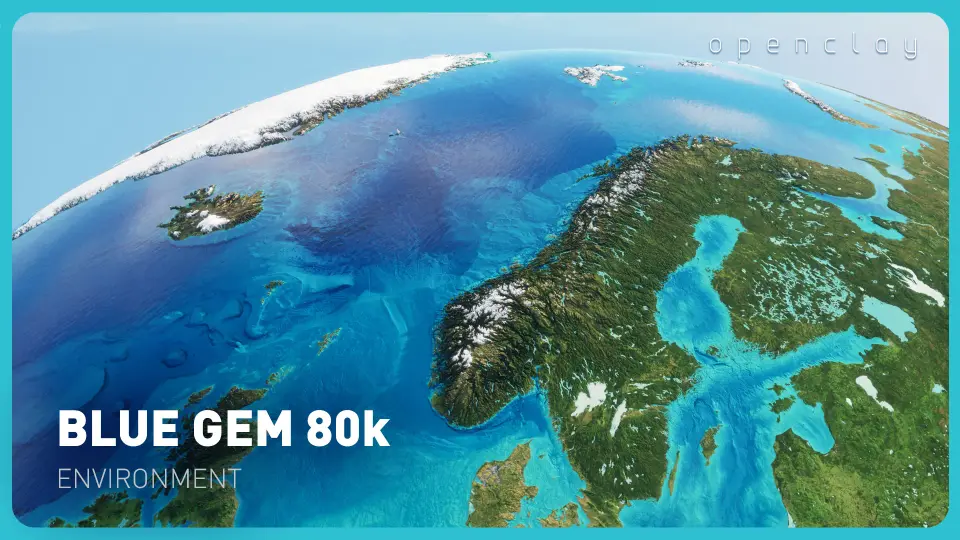
Shadows sweep across mountain ranges and ocean floors as the sun moves through the sky. City lights flicker on when the sun drops below the horizon and fade again when daylight returns. This is how Blue Gem Earth 80k Behaves inside a scene: a real-time, raytraced planet built from many static meshes beyond one sphere, with terrain data fed through Epic's Nanite virtualized geometry system. The creator built it for geography-oriented games, YouTube videos, editorial presentations, and cinematic renders where the world itself is a character in the story.
Hand-painted surface data at 81,920 pixels
The color map stretches 81,920 pixels wide and 40,960 pixels high. Every pixel has been hand-painted to strip out data processing artifacts that often plague satellite-derived textures. The normal map matches that same resolution and carries an adjustable flatness parameter, letting artists dial the intensity of terrain features up or down to match different visual styles and production needs.
Layered on top of the surface are road and railroad textures added in the March 2026 update. Country borders and internal borders—state and provincial lines—exist as separate texture layers at roughly 80,000 by 40,000 pixels. Both border sets offer adjustable intensity and adjustable color, so borders can be made bold for editorial clarity or softened for a more painterly look. Any unpacked textures that go unused are flagged for removal in a future project update to keep disk footprint manageable.
Topography, bathymetry, and the two height levels
The planet offers two distinct height configurations. One level provides realistic topography and bathymetry heights. The other uses a roughly 11x vertical exaggeration that amplifies mountain relief and ocean-floor contours, casting longer shadows and adding visual drama to the surface. The creator notes that exaggerated relief adds depth and dynamism to how light interacts with the land, which is particularly effective in cinematic shots where sweeps across mountain ranges benefit from pronounced shadow play.
The project does not include heightmaps or adjustable terrain height features. The terrain is not exposed as an Unreal Engine Landscape, meaning the ground cannot be sculpted with Landscape tools. The surface is built from triangulated Nanite-enabled static meshes assembled into a complete planet, not from a heightmap-driven landscape system.
Atmospheric lighting and city light behavior
The asset harnesses Epic's atmospheric lighting system. As the sun angle changes, dynamic lighting and shading adjust across the entire globe. City lights turn on and off based on light visibility—when the sun sets and a region enters darkness, the city lights illuminate; when daylight returns, they switch off. This physical light-visibility logic means the day-night cycle can be driven entirely by sun position without manual toggling of emissive layers.
Water meshes in the project are translucent by default and are Not Nanite enabled. This is deliberate: enabling Nanite on translucent water would eliminate the translucency. The water materials rely on blend modes that Nanite does not currently support for translucency, so keeping Nanite off on these meshes preserves the intended visual result.
Blueprint spawners for cities, airports, and ports
The March 2026 update introduced a blueprint spawner driven by a data table. It handles city, airport, and port locations, allowing markers or meshes to be placed at real-world positions without manually positioning each one. This data-table approach means the location data lives separate from the blueprint logic, making it straightforward to update, extend, or swap out point sets as needed.
The project also ships with the level sequence used in the showcase video. That sequence serves as a working reference for camera moves, timing, and how the creator set up shots to show off the terrain, lighting, and city-light transitions.
Hardware requirements and Nanite compatibility
Running Nanite on PC requires an NVIDIA Maxwell-generation card or newer, or an AMD GCN-generation card or newer. For rendering movie sequences, 16GB or more of dedicated VRAM is recommended, with 24GB being the sweet spot for heavier workloads.
On Unreal Engine 5.1 or later, Nanite requires Shader Model 6 (SM6), which is enabled by default in those versions. If seams appear on the planet, the creator points to a remedy in the project's DefaultEngine.ini file: switching DefaultGraphicsRHI From DefaultGraphicsRHI_Default To DefaultGraphicsRHI_DX12 Resolves the issue. For crashes encountered when rendering sequences on UE 5.1 and above with DX12, a troubleshooting video is referenced in the documentation.
What the project is and what it is not
Likely use cases include aerial or orbital establishing shots, geography-oriented educational content, stylized world map presentations, and cinematic sequences where the planet is viewed from a distance. The project is explicitly described as Not Suitable for first-person play or ground-level use. Surface detail at human scale is insufficient, the package lacks proper collisions for walking on the terrain, and the ground is not meant to be traversed on foot. The planet is assembled from many meshes, all Nanite-enabled except the translucent water meshes, and the whole package weighs in at roughly 11.3 GB.
One operational quirk: after opening the project in the editor, the creator recommends pressing play and then stopping to execute recommended console variables. This setup step ensures certain rendering and performance parameters are initialized correctly before a session begins.
Teams evaluating this asset should treat it as a visual storytelling instrument for globe-scale shots: a stylized relief map with dynamic lighting, hand-painted satellite-free textures, and a data-driven point-spawning system. The stylized relief, the hand-painted detail, and the dynamic lighting make a strong asset for anyone producing geographic or editorial content who needs a planet that holds up under cinematic framing without pretending to be a walkable world.
 Sky & Space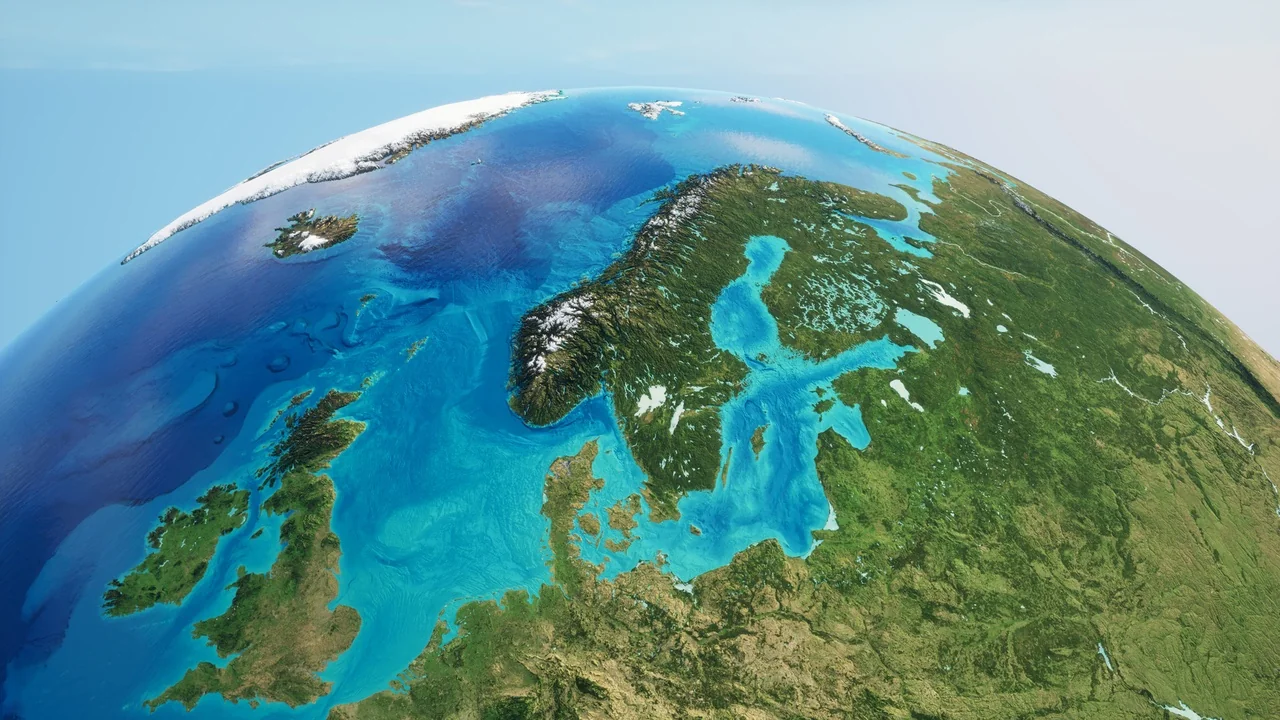
 Sky & Space
 Sky & Space
 Sky & Space