"d33c94b0a941547b"{"id":"1002747","slug":"warehouse-environment","title":"Warehouse Environment","category":"Industrial","engine":"5.1+","assetVersion":"","engineVersion":"Engine Version: 5.1+","tag":"Industrial","accent":"blue","visual":"city","summary":"Examine the modular Warehouse Environment for Unreal Engine 5, featuring over 165 assets, Lumen lighting, Nanite capability, and PBR master materials.","platform":"Unreal Engine","indexPolicy":"index","publishedAt":"2026-11-19T06:58:01.055Z","updatedAt":"2026-11-19T06:58:01.055Z","sourceNotes":[],"fileContents":[],"compatibility":["Unreal Engine","Engine Version: 5.1+"],"featuredImage":{"alt":"Warehouse Environment","src":"/wp-content/uploads/published/2026/11/bb189cbc8a44-bb0e156d-e3ae-42c5-9d8d-1324964cc86e-ad8e3541ce.webp"},"fileSizeBytes":2858580172,"hasDownloadLink":true,"downloads":0,"terms":[{"taxonomy":"category","slug":"industrial","name":"Industrial"}],"galleryImages":[{"src":"/wp-content/uploads/published/2026/11/1ced7e9098af-75b1b0f6-aa71-4591-8dd9-a1c7ac8e1f67-d064e0ea13.webp","alt":"Warehouse Environment"},{"src":"/wp-content/uploads/published/2026/11/add71d4beb21-5eafd89e-6cd3-43ae-b65d-44624f8fff57-47beaf0d19.webp","alt":"Warehouse Environment"},{"src":"/wp-content/uploads/published/2026/11/9f77d29623b3-10c2f619-5f3a-4c78-baa3-32c8142c11a8-8e141bb867.webp","alt":"Warehouse Environment"},{"src":"/wp-content/uploads/published/2026/11/e010d13efdfe-81edd033-80ca-4de3-bf65-c8fce675afd4-d512d038be.webp","alt":"Warehouse Environment"},{"src":"/wp-content/uploads/published/2026/11/bb41a955c31a-091f3220-d328-40d8-b3e2-83fb49640674-a7117a425d.webp","alt":"Warehouse Environment"},{"src":"/wp-content/uploads/published/2026/11/9b9bd6a03eb1-89be2ab5-c229-49da-ad6f-46f60fa5a23b-eada248e94.webp","alt":"Warehouse Environment"},{"src":"/wp-content/uploads/published/2026/11/f35e56376890-992880bf-f6c4-49ce-82c2-0d7bfb4609e0-965a1164c1.webp","alt":"Warehouse Environment"},{"src":"/wp-content/uploads/published/2026/11/9db2544b2134-f7e47dfa-db33-4ddc-a103-d467a626715f-4a1bd60f3a.webp","alt":"Warehouse Environment"},{"src":"/wp-content/uploads/published/2026/11/f96acfa93606-cac1af16-e4e3-48e2-b0b8-218ebad44c59-8d009636e5.webp","alt":"Warehouse Environment"},{"src":"/wp-content/uploads/published/2026/11/57cea6db5c1c-cc20cc57-af1b-441c-88a0-d558180778ec-7d38345f80.webp","alt":"Warehouse Environment"}],"accessPanel":{"kind":"resource","title":"Get this resource","safetyNote":"Resources are manually reviewed before listing to improve quality and reduce obvious risks.","fileName":"Content.7z","resourceType":"Resource archive","versions":[]},"contentHtml":"\u003ch2\u003eIndustrial Logistics in Unreal Engine 5\u003c/h2\u003e\u003cp\u003eIndustrial settings demand a careful balance between expansive architectural volume and granular ground-level detail. The Warehouse Environment provides an extensive collection of assets tailored to Unreal Engine 5, engineered to represent modern commercial storage facilities, freight depots, and supply chain hubs. By using the core technical toolsets of the engine, the collection supports both real-time game development and high-end cinematic visualization.\u003c/p\u003e\u003cp\u003eCreating believable industrial interiors requires extensive repetition of structural elements without appearing artificial or monotonous. This collection resolves that challenge through modular architectural pieces and industrial props that can be assembled into warehouses of arbitrary size, height, and footprint. Whether blocking out a tight labyrinth of storage racks or configuring an open distribution center with towering ceilings, the asset library supplies the foundational elements required to establish scale and logistical logic.\u003c/p\u003e\u003ch2\u003eModular Assembly Across the Warehouse Environment\u003c/h2\u003e\u003cp\u003eThe kit contains more than 165 high-quality modular assets, an inventory count that excludes the basic whitebox shapes utilized in the project's demo staging. Modularity has been applied wherever logical, focusing heavily on primary architectural structures, wall runs, and heavy-duty scaffolding. Developers can piece together custom structural layouts or lean on pre-assembled blueprints provided directly in the project files. These scaffolding blueprints group complex steel frameworks into single, movable objects, accelerating the layout phase of expansive facilities.\u003c/p\u003e\u003cp\u003eBeyond the primary architecture, the collection includes a wide assortment of props essential to believable logistics centers:\u003c/p\u003e\u003cul\u003e\u003cli\u003ePallets, wooden surfaces, and heavy industrial tables for staging cargo.\u003c/li\u003e\u003cli\u003eStacked and loose cardboard boxes displaying realistic packing wear.\u003c/li\u003e\u003cli\u003eDurable shipping crates, storage bins, and metal containers.\u003c/li\u003e\u003cli\u003eStandardized storage racks and metal shelving units ready for stocking.\u003c/li\u003e\u003cli\u003eIndustrial equipment, structural beams, and utility hardware.\u003c/li\u003e\u003c/ul\u003e\u003cp\u003eBecause structural pieces and utility hardware snap together logically, level designers can establish complex multi-tiered storage arrangements. Walkways, raised scaffolding platforms, and vertical pallet racks give production teams the tools to introduce verticality, cover, and distinct sightlines into action-oriented gameplay spaces.\u003c/p\u003e\u003ch2\u003eMaster Materials, Dust, and Texture Distribution\u003c/h2\u003e\u003cp\u003eSurfaces in industrial facilities rarely stay pristine. The Warehouse Environment incorporates an advanced master material equipped with granular controls, roughness variation parameters, and world-space dust distribution. The world-space dust control allows dust layers to accumulate realistically on upward-facing planes across different assets, binding disparate modular components into a cohesive visual scene without requiring custom texture baking for every placement.\u003c/p\u003e\u003cp\u003eAll textures originate in 4K PBR resolution, with texture resolutions managed directly in Unreal Engine to sustain a logical balance between memory consumption and close-up visual fidelity. To optimize rendering efficiency, structural pieces lean primarily on high-resolution tillable materials. Standalone props—such as individual crates, tables, containers, and specialized equipment—feature unique texture maps, ensuring that individual props retain their material authenticity when inspected up close or placed in isolation within other projects.\u003c/p\u003e\u003ch2\u003eLumen Lighting and Raytracing Inside the Environment\u003c/h2\u003e\u003cp\u003eLighting plays a critical role in conveying the atmosphere of massive, cavernous interiors. The scene takes full advantage of Unreal Engine 5's dynamic Lumen architecture, and the assets have been developed to follow official Lumen technical validation standards. Because dynamic global illumination drives the scene, the meshes do not include traditional lightmap UV channels out of the box, though engine-based lightmap generation tools can readily create them if static lighting workflows are introduced.\u003c/p\u003e\u003cp\u003eEvery lighting fixture is constructed inside dedicated Blueprints. These setups expose straightforward controls for light intensity and simple on-and-off toggles, allowing level designers to alter lighting states, create emergency blackouts, or balance interior exposure without navigating deep lighting component hierarchies.\u003c/p\u003e\u003cp\u003eHigh visual fidelity extends to subtle surface phenomena, such as wrapped protective plastic bound around stacked cardboard boxes. The environment utilizes raytracing to resolve the complex reflections and light transmission characteristics of this translucent plastic wrapping. Raytracing can impose high rendering costs on performance-constrained scenes. Creators looking to run the environment on more conservative hardware budgets can disable raytracing temporarily via the console command \u003ccode\u003eR.raytracing.ForceAllRayTracingEffects 0\u003c/code\u003e, though doing so may require slight manual adjustments to the plastic material parameters to achieve the preferred appearance under purely rasterized conditions.\u003c/p\u003e\u003ch2\u003eHardware Targets and Scalability in Production\u003c/h2\u003e\u003cp\u003eThe environment is targeted at higher-end desktop computers and modern home consoles capable of handling heavy geometric density and real-time indirect illumination. Demonstrations and promotional captures of the environment achieve an average frame rate of 40 to 50 frames per second at cinematic quality when running on an NVIDIA RTX 3090 graphics card. To provide broad baseline usability out of the box, the default project settings configure engine scalability to medium, enabling smoother frame rates across a broader range of hardware setups while leaving users free to dial settings upward for production rendering.\u003c/p\u003e\u003cp\u003eGeometric detail is anchored by full Nanite compatibility across the asset catalog, eliminating manual level-of-detail management for complex meshes. If a production pipeline requires standard rendering workflows, the meshes can operate without Nanite or Lumen enabled, providing fallback flexibility for varied project constraints.\u003c/p\u003e\u003cp\u003eTeams developing first-person shooters, stealth infiltrations, survival horror scenarios, or virtual production set pieces will find the collection directly applicable. The included gameplay-ready demo level demonstrates practical placement patterns, dynamic lighting layouts, and modular prop grouping, functioning as an operational template for building custom commercial and industrial levels.\u003c/p\u003e\n\n\u003ch2\u003eMore From The Same Workflow\u003c/h2\u003e\n\u003cul\u003e\n\u003cli\u003e\u003ca href=\"https://3dcghub.com/factory-warehouse-interior-modular-pack/\" rel=\"noopener noreferrer\"\u003eFactory/Warehouse Interior Modular Pack\u003c/a\u003e\u003c/li\u003e\n\u003cli\u003e\u003ca href=\"https://3dcghub.com/storage-house-set/\" rel=\"noopener noreferrer\"\u003eStorage House Set\u003c/a\u003e\u003c/li\u003e\n\u003cli\u003e\u003ca href=\"https://3dcghub.com/scifi-kitbash-level-builder-vol-2/\" rel=\"noopener noreferrer\"\u003eSciFi Kitbash Level Builder Vol.2\u003c/a\u003e\u003c/li\u003e\n\u003cli\u003e\u003ca href=\"https://3dcghub.com/industrial-factory-factory-warehouse-industrial-factory-modular-factory/\" rel=\"noopener noreferrer\"\u003eIndustrial Factory (Factory, Warehouse, Industrial Factory, Modular Factory)\u003c/a\u003e\u003c/li\u003e\n\u003cli\u003e\u003ca href=\"https://3dcghub.com/brooke-industrial-town/\" rel=\"noopener noreferrer\"\u003eBrooke Industrial Town\u003c/a\u003e\u003c/li\u003e\n\u003c/ul\u003e","contentTextLength":6753,"navigation":{"current":10,"total":4676,"previous":{"id":"1002748","slug":"watermills-nature-environment-watermills-nature-environment-nature-ruin","title":"Watermills / Nature Environment ( Watermills Nature Environment Nature Ruin )","category":"Forest \u0026 Jungle","platform":"Unreal Engine","updatedAt":"2026-11-19T07:00:18.097Z"},"next":{"id":"1002746","slug":"vista-modern-house-environment","title":"Vista Modern House Environment","category":"Towns \u0026 Villages","platform":"Unreal Engine","updatedAt":"2026-11-19T06:57:04.915Z"}},"relatedResources":[{"id":"1001389","slug":"factory-warehouse-interior-modular-pack","title":"Factory/Warehouse Interior Modular Pack","category":"Industrial","engine":"4.15+,5.0+","assetVersion":"","engineVersion":"Engine Version: 4.15+,5.0+","tag":"Industrial","accent":"blue","visual":"mech","summary":"An architectural kit featuring 90 modular meshes, 89 prefabs, manual lightmap UVs, and trim-sheet textures for desktop, mobile, and Meta Quest VR.","platform":"Unreal Engine","indexPolicy":"index","publishedAt":"2026-10-04T15:30:17.771Z","updatedAt":"2026-10-04T15:30:17.771Z","sourceNotes":[],"fileContents":[],"compatibility":["Unreal Engine","Engine Version: 4.15+,5.0+"],"featuredImage":{"alt":"Factory/Warehouse Interior Modular Pack","src":"/wp-content/uploads/published/2026/10/c9f58b4a89b4-eea1d7a5-4df0-4a6e-b4d2-fad07f03cd33-ec37054ed2.webp"},"fileSizeBytes":238889320,"hasDownloadLink":true,"downloads":0},{"id":"1002730","slug":"storage-house-set","title":"Storage House Set","category":"Industrial","engine":"5.0+","assetVersion":"","engineVersion":"Engine Version: 5.0+","tag":"Industrial","accent":"blue","visual":"mech","summary":"Storage House Set provides 400+ modular meshes, customizable master materials, ORM maps, and full LODs for building realistic lowpoly warehouse scenes.","platform":"Unreal Engine","indexPolicy":"index","publishedAt":"2026-11-17T19:06:43.185Z","updatedAt":"2026-11-17T19:06:43.185Z","sourceNotes":[],"fileContents":[],"compatibility":["Unreal Engine","Engine Version: 5.0+"],"featuredImage":{"alt":"Storage House Set","src":"/wp-content/uploads/published/2026/11/809a1a11720e-4f9f0112-e598-44bb-95de-23c1f961931d-237d279885.webp"},"fileSizeBytes":2272239081,"hasDownloadLink":true,"downloads":0},{"id":"1001850","slug":"scifi-kitbash-level-builder-vol-2","title":"SciFi Kitbash Level Builder Vol.2","category":"Industrial","engine":"4.19+,5.0+","assetVersion":"","engineVersion":"Engine Version: 4.19+,5.0+","tag":"Industrial","accent":"blue","visual":"mech","summary":"Build industrial sci-fi and cyberpunk interiors using modular kitbash modules, PBR textures, lowpoly assets, and garage warehouse props.","platform":"Unreal Engine","indexPolicy":"index","publishedAt":"2026-10-21T08:43:34.987Z","updatedAt":"2026-10-21T08:43:34.987Z","sourceNotes":[],"fileContents":[],"compatibility":["Unreal Engine","Engine Version: 4.19+,5.0+"],"featuredImage":{"alt":"SciFi Kitbash Level Builder Vol.2","src":"/wp-content/uploads/published/2026/10/fbffd7fc0c39-16a26e0b-f2fc-4a71-85db-ab35adf42c0e-7d0b0a4a8d.webp"},"fileSizeBytes":2429341330,"hasDownloadLink":true,"downloads":0}]}
Resource screenshots
1 / 10
Join our channel
Follow 3DCGHUB on Telegram for new resource drops, migration updates, and community notices.
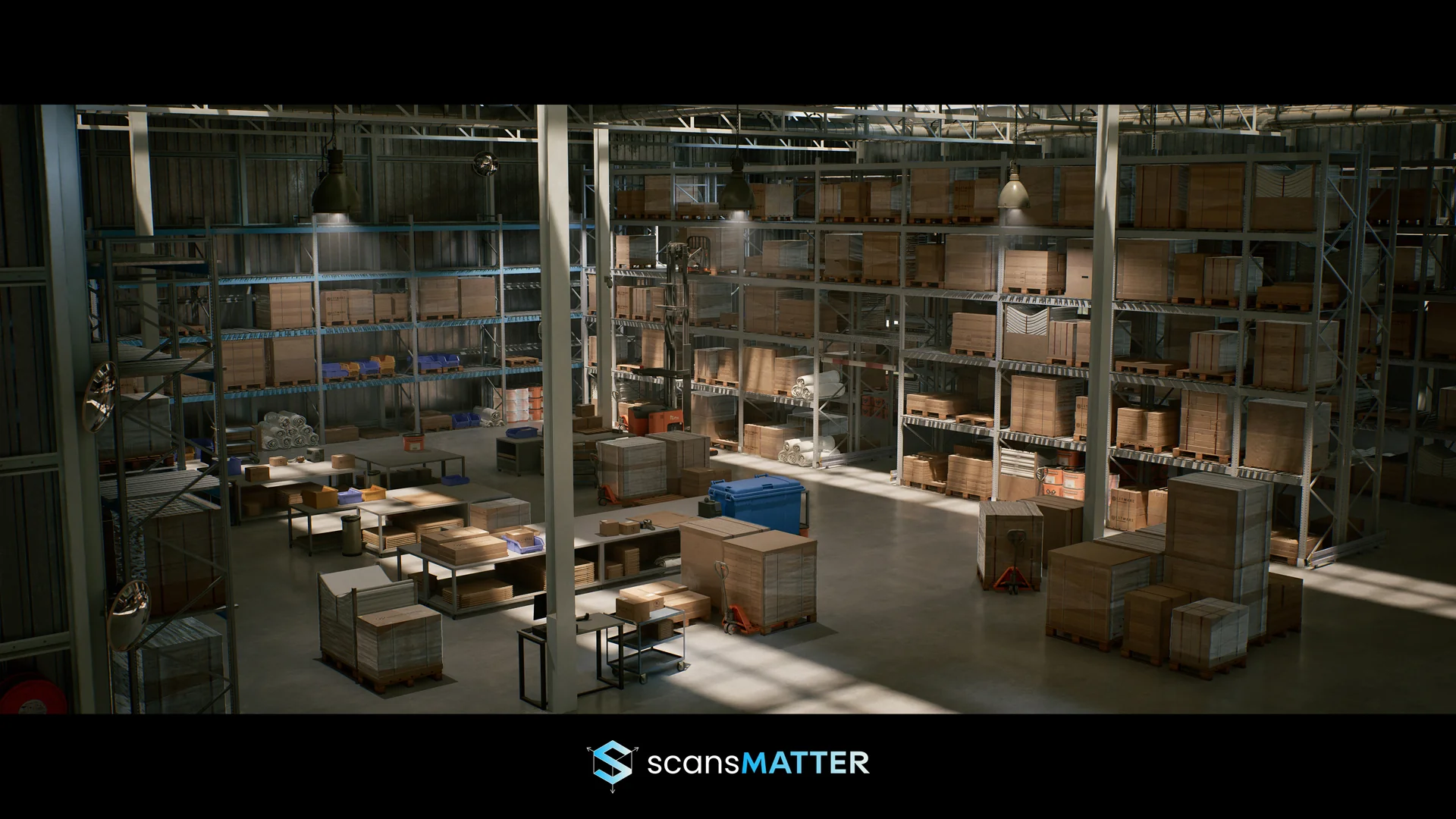
Industrial settings demand a careful balance between expansive architectural volume and granular ground-level detail. The Warehouse Environment provides an extensive collection of assets tailored to Unreal Engine 5, engineered to represent modern commercial storage facilities, freight depots, and supply chain hubs. By using the core technical toolsets of the engine, the collection supports both real-time game development and high-end cinematic visualization.
Creating believable industrial interiors requires extensive repetition of structural elements without appearing artificial or monotonous. This collection resolves that challenge through modular architectural pieces and industrial props that can be assembled into warehouses of arbitrary size, height, and footprint. Whether blocking out a tight labyrinth of storage racks or configuring an open distribution center with towering ceilings, the asset library supplies the foundational elements required to establish scale and logistical logic.
Modular Assembly Across the Warehouse Environment
The kit contains more than 165 high-quality modular assets, an inventory count that excludes the basic whitebox shapes utilized in the project's demo staging. Modularity has been applied wherever logical, focusing heavily on primary architectural structures, wall runs, and heavy-duty scaffolding. Developers can piece together custom structural layouts or lean on pre-assembled blueprints provided directly in the project files. These scaffolding blueprints group complex steel frameworks into single, movable objects, accelerating the layout phase of expansive facilities.
Beyond the primary architecture, the collection includes a wide assortment of props essential to believable logistics centers:
Pallets, wooden surfaces, and heavy industrial tables for staging cargo.
Stacked and loose cardboard boxes displaying realistic packing wear.
Durable shipping crates, storage bins, and metal containers.
Standardized storage racks and metal shelving units ready for stocking.
Industrial equipment, structural beams, and utility hardware.
Because structural pieces and utility hardware snap together logically, level designers can establish complex multi-tiered storage arrangements. Walkways, raised scaffolding platforms, and vertical pallet racks give production teams the tools to introduce verticality, cover, and distinct sightlines into action-oriented gameplay spaces.
Master Materials, Dust, and Texture Distribution
Surfaces in industrial facilities rarely stay pristine. The Warehouse Environment incorporates an advanced master material equipped with granular controls, roughness variation parameters, and world-space dust distribution. The world-space dust control allows dust layers to accumulate realistically on upward-facing planes across different assets, binding disparate modular components into a cohesive visual scene without requiring custom texture baking for every placement.
All textures originate in 4K PBR resolution, with texture resolutions managed directly in Unreal Engine to sustain a logical balance between memory consumption and close-up visual fidelity. To optimize rendering efficiency, structural pieces lean primarily on high-resolution tillable materials. Standalone props—such as individual crates, tables, containers, and specialized equipment—feature unique texture maps, ensuring that individual props retain their material authenticity when inspected up close or placed in isolation within other projects.
Lumen Lighting and Raytracing Inside the Environment
Lighting plays a critical role in conveying the atmosphere of massive, cavernous interiors. The scene takes full advantage of Unreal Engine 5's dynamic Lumen architecture, and the assets have been developed to follow official Lumen technical validation standards. Because dynamic global illumination drives the scene, the meshes do not include traditional lightmap UV channels out of the box, though engine-based lightmap generation tools can readily create them if static lighting workflows are introduced.
Every lighting fixture is constructed inside dedicated Blueprints. These setups expose straightforward controls for light intensity and simple on-and-off toggles, allowing level designers to alter lighting states, create emergency blackouts, or balance interior exposure without navigating deep lighting component hierarchies.
High visual fidelity extends to subtle surface phenomena, such as wrapped protective plastic bound around stacked cardboard boxes. The environment utilizes raytracing to resolve the complex reflections and light transmission characteristics of this translucent plastic wrapping. Raytracing can impose high rendering costs on performance-constrained scenes. Creators looking to run the environment on more conservative hardware budgets can disable raytracing temporarily via the console command R.raytracing.ForceAllRayTracingEffects 0, though doing so may require slight manual adjustments to the plastic material parameters to achieve the preferred appearance under purely rasterized conditions.
Hardware Targets and Scalability in Production
The environment is targeted at higher-end desktop computers and modern home consoles capable of handling heavy geometric density and real-time indirect illumination. Demonstrations and promotional captures of the environment achieve an average frame rate of 40 to 50 frames per second at cinematic quality when running on an NVIDIA RTX 3090 graphics card. To provide broad baseline usability out of the box, the default project settings configure engine scalability to medium, enabling smoother frame rates across a broader range of hardware setups while leaving users free to dial settings upward for production rendering.
Geometric detail is anchored by full Nanite compatibility across the asset catalog, eliminating manual level-of-detail management for complex meshes. If a production pipeline requires standard rendering workflows, the meshes can operate without Nanite or Lumen enabled, providing fallback flexibility for varied project constraints.
Teams developing first-person shooters, stealth infiltrations, survival horror scenarios, or virtual production set pieces will find the collection directly applicable. The included gameplay-ready demo level demonstrates practical placement patterns, dynamic lighting layouts, and modular prop grouping, functioning as an operational template for building custom commercial and industrial levels.
 Industrial
 Industrial
 Industrial