"1f00f67f9253451b"{"id":"1001261","slug":"upfiledialog","title":"UPFileDialog","category":"Dialog Systems","engine":"5.0 - 5.7","assetVersion":"Asset Version: 1.0","engineVersion":"Engine Version: 5.0 - 5.7","tag":"Dialog Systems","accent":"blue","visual":"mech","summary":"UPFileDialog enables file selection box functionality after packaging, supporting folder navigation, save routines, progress, and CryptoppPluginLibrary.","platform":"Unreal Engine","publishedAt":"2026-09-30T05:30:56.686Z","updatedAt":"2026-09-30T05:30:56.686Z","sourceNotes":[],"fileContents":[],"compatibility":["Unreal Engine","Asset Version: 1.0","Engine Version: 5.0 - 5.7"],"featuredImage":{"alt":"UPFileDialog","src":"/wp-content/uploads/published/2026/09/41274ddf3675-a9df7cf6-e276-4587-86f2-1d41e5b1d306-c1647a0bc3.webp"},"hasDownloadLink":true,"downloads":0,"terms":[{"taxonomy":"category","slug":"dialog-systems-tools-and-plugins","name":"Dialog Systems"}],"galleryImages":[{"src":"/wp-content/uploads/published/2026/09/44eeeae5973a-618d2d51-08b6-4914-914b-ee0640b6336c-5d23c44fa0.webp","alt":"UPFileDialog"},{"src":"/wp-content/uploads/published/2026/09/713416da0e2e-82f5fe67-0dda-44be-89d5-4d20c9d9fde6-f4405495c6.webp","alt":"UPFileDialog"},{"src":"/wp-content/uploads/published/2026/09/da715dc136d3-5a386871-7931-4ff5-88fb-a8f818eb9d68-965bffa3a6.webp","alt":"UPFileDialog"}],"accessPanel":{"kind":"resource","title":"Download this resource","eyebrow":"Free Download","message":"Log in or create a free account to start your download.","fileName":"UPFileDialog.7z","safetyNote":"Resources are manually reviewed before listing to improve quality and reduce obvious risks.","actionLabel":"Download Free","resourceType":"Resource archive"},"contentHtml":"\u003ch2\u003eRuntime Environments and the Packaged File Selection Box\u003c/h2\u003e\n\u003cp\u003eInteractive projects that require runtime content loading, custom configuration importing, or sandbox modification frequently run into operational roadblocks once exported. During in-editor development, accessing the host operating system's directory structure is straightforward, but standard builds often lose the ability to invoke native windowing dialogs once packaged. UPFileDialog addresses this specific limitation by ensuring that the file selection box remains fully operational after packaging has taken place.\u003c/p\u003e\n\u003cp\u003eMaintaining access to a functional file selection box changes the scope of what standalone releases can accomplish. Rather than locking an application strictly to pre-cooked internal assets, developers can build runtime interfaces that invite external interaction. Players and end users can navigate storage drives directly from a shipping executable, establishing custom paths to external assets, configuration documents, and user-generated modifications. Because the dialog functions after packaging, internal tool suites, standalone level designers, and visualization sandboxes can rely on standard OS-level browsing conventions without requiring the user to manually paste convoluted directory paths into raw text fields.\u003c/p\u003e \u003ch2\u003eFolder Structures and File Management at Runtime\u003c/h2\u003e\n\u003cp\u003eBeyond selecting individual files, complex pipelines demand broad directory management. UPFileDialog incorporates functional handling for both file and folder workflows, granting users control over the hierarchy of their local drives. Selecting a folder allows a packaged project to batch-process datasets, ingest collections of items, or identify custom target libraries for downstream tasks.\u003c/p\u003e\n\u003cp\u003eHandling whole folders directly in packaged software is particularly useful for asset management utilities, simulation suites, and creative production pipelines. When an application needs to read or write multiple assets located within a single folder, targeting the directory through a dedicated file selection interface provides a clear, recognizable user experience. Users can isolate working directories, browse local volumes, and point the software toward project trees without breaking away from the runtime experience.\u003c/p\u003e \u003ch2\u003eSave Routines and User-Directed Storage\u003c/h2\u003e\n\u003cp\u003eData output represents another critical element of packaged software pipelines. While simple games often rely on automated, hidden save directories, productivity software, scene builders, and complex sandbox titles require deliberate save paths determined entirely by the user. UPFileDialog incorporates save operations into its functional framework, allowing packaged software to prompt the user for designated output destinations.\u003c/p\u003e\n\u003cp\u003eProviding a native save dialog allows users to export project states, customized assets, game progression checkpoints, or custom scenarios to any location they choose. This level of control prevents output data from being trapped inside hidden application data folders, giving users the freedom to save their progress onto external drives, shared network storage, or dedicated project folders. Paired with file selection, the save mechanism completes the fundamental read-write loop needed for standalone creative software.\u003c/p\u003e \u003ch2\u003eMonitoring Progress Across File and Directory Tasks\u003c/h2\u003e\n\u003cp\u003eWorking with files and folder hierarchies involves variable operational times. Reading complex archives, writing dense project states, or searching large directories can introduce perceptible delays into runtime software. UPFileDialog incorporates progress handling to give structure to these operations.\u003c/p\u003e\n\u003cp\u003eTracking progress ensures that ongoing file interactions do not leave the interface unresponsive or ambiguous. In packaged deployments where end users expect immediate visual feedback, connecting file dialog routines to progress tracking allows applications to clearly communicate when data is being processed, written, or transferred. This provides stability to the user experience during prolonged file operations, bridging the gap between selecting an item in the file selection box and completing the underlying disk task.\u003c/p\u003e \u003ch2\u003eCryptoppPluginLibrary Integration with AES and DES\u003c/h2\u003e\n\u003cp\u003eSecure data management often requires protection against unauthorized viewing or tampering, especially when user saves and local files are exposed outside the packaged build. UPFileDialog maintains compatibility with CryptoppPluginLibrary, including standard cryptographic algorithms such as AES and DES.\u003c/p\u003e\n\u003cp\u003eThis compatibility allows developers to implement security layers directly into their file ingestion and save pipelines. When saving confidential project data, user credentials, or protected gameplay progress, the application can route selected files through AES or DES encryption before committing them to the storage drive. Conversely, encrypted files chosen through the file selection box can be verified and decrypted using CryptoppPluginLibrary routines before the runtime environment parses their contents. The integration ensures that opening packaged applications to arbitrary user storage does not force developers to compromise on file integrity or data security.\u003c/p\u003e \u003ch2\u003eUPFileDialog Workflow Suitability\u003c/h2\u003e\n\u003cp\u003eUPFileDialog serves projects that cannot afford to sever communication with local file systems after compiling into a final build. Whether an application requires simple folder selection, user-driven save targets, file ingestion, real-time progress feedback, or secure cryptographic pipelines powered by CryptoppPluginLibrary, AES, and DES, the plugin ensures that disk operations remain intact long after the project leaves the development editor.\u003c/p\u003e\n\n\u003ch2\u003eExplore Similar Assets\u003c/h2\u003e\n\u003cul\u003e\n\u003cli\u003e\u003ca href=\"https://3dcghub.com/dialogue-plugin/\" title=\"Dialogue Plugin\"\u003eDialogue Plugin\u003c/a\u003e\u003c/li\u003e\n\u003cli\u003e\u003ca href=\"https://3dcghub.com/fullstag-quest-system/\" title=\"Fullstag Quest System\"\u003eFullstag Quest System\u003c/a\u003e\u003c/li\u003e\n\u003cli\u003e\u003ca href=\"https://3dcghub.com/ogs-dialogue-quest-master/\" title=\"OGS - Dialogue \u0026amp; Quest Master\"\u003eOGS - Dialogue \u0026amp; Quest Master\u003c/a\u003e\u003c/li\u003e\n\u003cli\u003e\u003ca href=\"https://3dcghub.com/grab-component-system/\" title=\"Grab Component System\"\u003eGrab Component System\u003c/a\u003e\u003c/li\u003e\n\u003cli\u003e\u003ca href=\"https://3dcghub.com/chaos-battleground-ragdoll-corpse-freezing-and-culling/\" title=\"Chaos Battleground - Ragdoll Corpse Freezing \u0026amp; Culling\"\u003eChaos Battleground - Ragdoll Corpse Freezing \u0026amp; Culling\u003c/a\u003e\u003c/li\u003e\n\u003c/ul\u003e","contentTextLength":5842,"navigation":{"current":23,"total":3222,"previous":{"id":"1001262","slug":"blueprint-array-helper","title":"[Blueprint] Array Helper","category":"Engine Tools","platform":"Unreal Engine","updatedAt":"2026-09-30T05:34:08.385Z"},"next":{"id":"1001260","slug":"world-director-npc-pro-massive-npc-simulation-with-multiplayer-and-optimization","title":"World Director NPC PRO – Massive NPC Simulation with Multiplayer \u0026 Optimization","category":"Artificial Intelligence","platform":"Unreal Engine","updatedAt":"2026-09-30T05:29:11.329Z"}},"relatedResources":[{"id":"13636","slug":"dialogue-plugin","title":"Dialogue Plugin","category":"Dialog Systems","engine":"1.5","assetVersion":"Engine version: 5.2 - 5.3,5.6","engineVersion":"Asset Version:1.5","tag":"Dialog Systems","accent":"blue","visual":"mech","summary":"The Dialogue Plugin is a robust tool for Unreal Engine 5 that simplifies the creation of branching conversations. With a custom node-based editor and optional AI integration, it provides a professional solution for narrative-driven games.","platform":"Unreal Engine","publishedAt":"2026-03-11T09:23:26.000Z","updatedAt":"2026-06-18T22:58:59.169Z","sourceNotes":[],"fileContents":[],"compatibility":["Unreal Engine","Engine version: 5.2 - 5.3,5.6","Asset Version:1.5"],"featuredImage":{"alt":"Dialogue Plugin","src":"https://3dcghub.com/wp-content/uploads/2026/03/936120c3-4bdc-4cff-88bf-810e4facaedd.webp"},"hasDownloadLink":true,"downloads":0},{"id":"1000061","slug":"fullstag-quest-system","title":"Fullstag Quest System","category":"Dialog Systems","engine":"5.3","assetVersion":"1.2.3","engineVersion":"5.3","tag":"Dialog Systems","accent":"blue","visual":"mech","summary":"A modular quest framework with a custom editor, non-linear node trees, blueprint extensions, replication, and per-player or shared quests.","platform":"Unreal Engine","publishedAt":"2026-05-28T12:09:46.608Z","updatedAt":"2026-05-28T12:09:46.608Z","sourceNotes":[],"fileContents":[],"compatibility":["Unreal Engine","Asset Version: 1.2.3","Engine version: 5.3"],"featuredImage":{"alt":"Fullstag Quest System","src":"/wp-content/uploads/published/2026/05/271d9fe27242-096bd766-88a0-4b18-9cd7-1ae950a9118f-fdca615055.webp"},"hasDownloadLink":true,"downloads":0},{"id":"27100","slug":"ogs-dialogue-quest-master","title":"OGS - Dialogue \u0026 Quest Master","category":"Dialog Systems","engine":"5.5 - 5.6","assetVersion":"Engine version: 5.5 - 5.6","engineVersion":"Asset Version:2.1.3","tag":"Dialog Systems","accent":"blue","visual":"mech","summary":"Dialogue \u0026 Quest Master turns Unreal Engine 5 into a structured workspace for interactive stories, quests, and cinematic conversations. It brings dialogue editing, quest logic, statistics, and save handling into one extensible framework built with C++ and B...","platform":"Unreal Engine","publishedAt":"2026-04-21T10:12:23.000Z","updatedAt":"2026-04-21T10:12:25.000Z","sourceNotes":[],"fileContents":[],"compatibility":["Unreal Engine","Engine version: 5.5 - 5.6","Asset Version: 2.1.3"],"featuredImage":{"alt":"OGS - Dialogue \u0026 Quest Master","src":"https://3dcghub.com/wp-content/uploads/2026/04/48a41fb58a32_582b3097-a5c8-4066-8891-d6d8924e4ecc-4.webp"},"hasDownloadLink":true,"downloads":1}]}
Dialog Systems
UPFileDialog
UPFileDialog enables file selection box functionality after packaging, supporting folder navigation, save routines, progress, and CryptoppPluginLibrary.
Runtime Environments and the Packaged File Selection Box
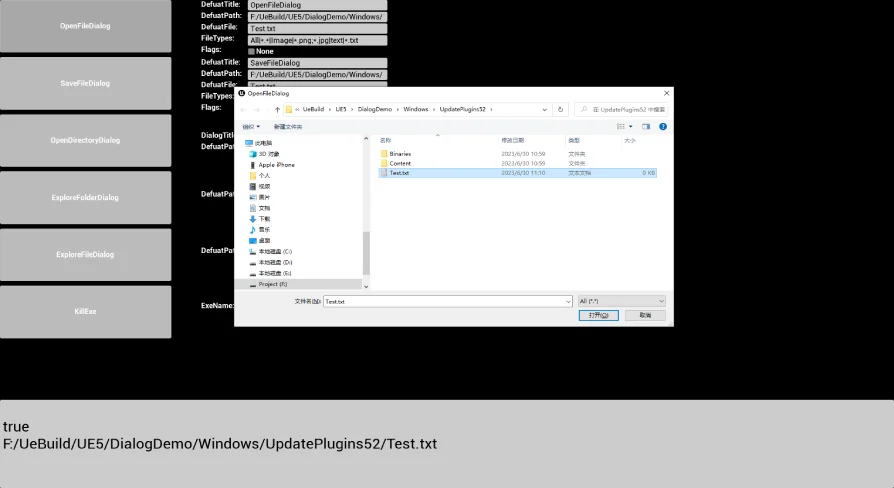
Interactive projects that require runtime content loading, custom configuration importing, or sandbox modification frequently run into operational roadblocks once exported. During in-editor development, accessing the host operating system's directory structure is straightforward, but standard builds often lose the ability to invoke native windowing dialogs once packaged. UPFileDialog addresses this specific limitation by ensuring that the file selection box remains fully operational after packaging has taken place.
Maintaining access to a functional file selection box changes the scope of what standalone releases can accomplish. Rather than locking an application strictly to pre-cooked internal assets, developers can build runtime interfaces that invite external interaction. Players and end users can navigate storage drives directly from a shipping executable, establishing custom paths to external assets, configuration documents, and user-generated modifications. Because the dialog functions after packaging, internal tool suites, standalone level designers, and visualization sandboxes can rely on standard OS-level browsing conventions without requiring the user to manually paste convoluted directory paths into raw text fields.
Folder Structures and File Management at Runtime
Beyond selecting individual files, complex pipelines demand broad directory management. UPFileDialog incorporates functional handling for both file and folder workflows, granting users control over the hierarchy of their local drives. Selecting a folder allows a packaged project to batch-process datasets, ingest collections of items, or identify custom target libraries for downstream tasks.
Handling whole folders directly in packaged software is particularly useful for asset management utilities, simulation suites, and creative production pipelines. When an application needs to read or write multiple assets located within a single folder, targeting the directory through a dedicated file selection interface provides a clear, recognizable user experience. Users can isolate working directories, browse local volumes, and point the software toward project trees without breaking away from the runtime experience.
Save Routines and User-Directed Storage
Data output represents another critical element of packaged software pipelines. While simple games often rely on automated, hidden save directories, productivity software, scene builders, and complex sandbox titles require deliberate save paths determined entirely by the user. UPFileDialog incorporates save operations into its functional framework, allowing packaged software to prompt the user for designated output destinations.
Providing a native save dialog allows users to export project states, customized assets, game progression checkpoints, or custom scenarios to any location they choose. This level of control prevents output data from being trapped inside hidden application data folders, giving users the freedom to save their progress onto external drives, shared network storage, or dedicated project folders. Paired with file selection, the save mechanism completes the fundamental read-write loop needed for standalone creative software.
Monitoring Progress Across File and Directory Tasks
Working with files and folder hierarchies involves variable operational times. Reading complex archives, writing dense project states, or searching large directories can introduce perceptible delays into runtime software. UPFileDialog incorporates progress handling to give structure to these operations.
Tracking progress ensures that ongoing file interactions do not leave the interface unresponsive or ambiguous. In packaged deployments where end users expect immediate visual feedback, connecting file dialog routines to progress tracking allows applications to clearly communicate when data is being processed, written, or transferred. This provides stability to the user experience during prolonged file operations, bridging the gap between selecting an item in the file selection box and completing the underlying disk task.
CryptoppPluginLibrary Integration with AES and DES
Secure data management often requires protection against unauthorized viewing or tampering, especially when user saves and local files are exposed outside the packaged build. UPFileDialog maintains compatibility with CryptoppPluginLibrary, including standard cryptographic algorithms such as AES and DES.
This compatibility allows developers to implement security layers directly into their file ingestion and save pipelines. When saving confidential project data, user credentials, or protected gameplay progress, the application can route selected files through AES or DES encryption before committing them to the storage drive. Conversely, encrypted files chosen through the file selection box can be verified and decrypted using CryptoppPluginLibrary routines before the runtime environment parses their contents. The integration ensures that opening packaged applications to arbitrary user storage does not force developers to compromise on file integrity or data security.
UPFileDialog Workflow Suitability
UPFileDialog serves projects that cannot afford to sever communication with local file systems after compiling into a final build. Whether an application requires simple folder selection, user-driven save targets, file ingestion, real-time progress feedback, or secure cryptographic pipelines powered by CryptoppPluginLibrary, AES, and DES, the plugin ensures that disk operations remain intact long after the project leaves the development editor.
 Dialog Systems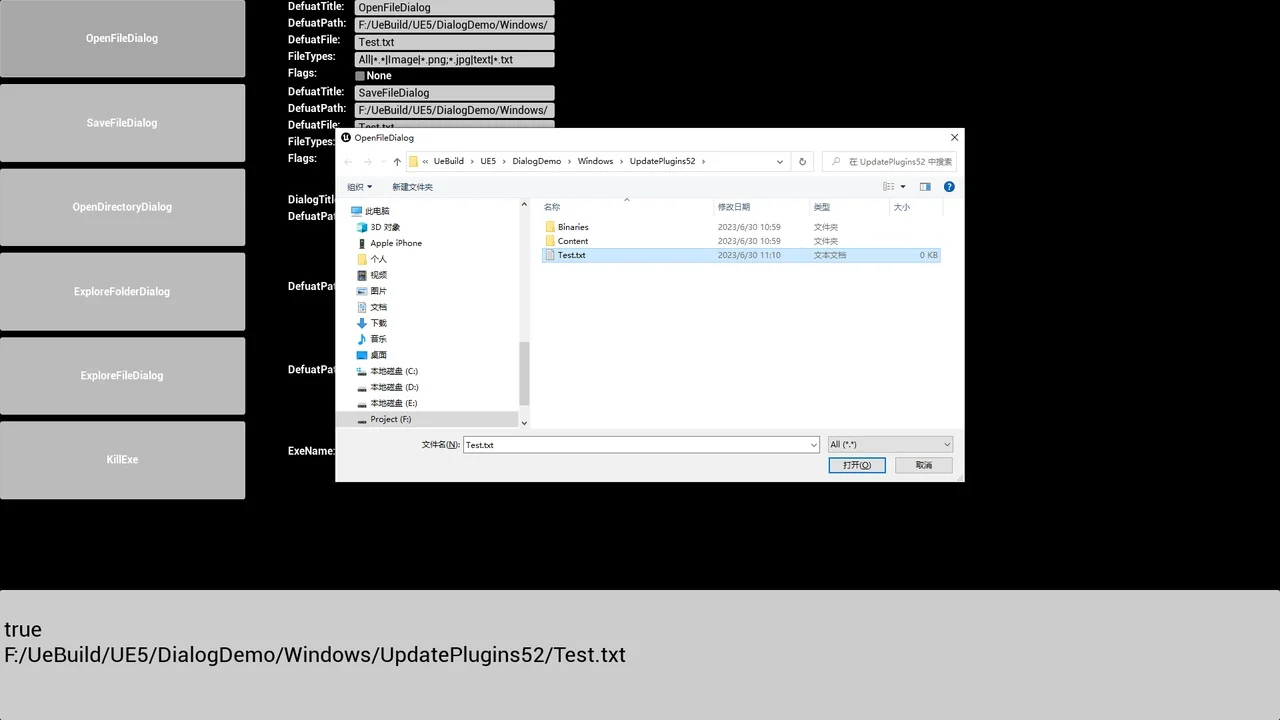
 Dialog Systems
 Dialog Systems
 Dialog Systems