"216a1d817ec3ca8a"{"id":"1000901","slug":"universal-doors-system","title":"Universal Doors System","category":"Gameplay Features","engine":"4.26+,5.0+","assetVersion":"","engineVersion":"Engine Version: 4.26+,5.0+","tag":"Gameplay Features","accent":"blue","visual":"mech","summary":"A universal door logic system for single and double-leaf doors, covering trigger, key, damage, panel, and timer interactions. Compatible with Advanced Universal","platform":"Unreal Engine","indexPolicy":"index","publishedAt":"2026-08-06T05:05:49.071Z","updatedAt":"2026-08-06T05:05:49.071Z","sourceNotes":[],"fileContents":[],"compatibility":["Unreal Engine","Engine Version: 4.26+,5.0+"],"featuredImage":{"alt":"Universal Doors System","src":"/wp-content/uploads/published/2026/08/8701fb1d8b61-c05940c9-d759-4d6b-8746-269667ef3c37-dafdad5cc8.webp"},"hasDownloadLink":true,"downloads":0,"terms":[{"taxonomy":"category","slug":"gameplay-features","name":"Gameplay Features"}],"galleryImages":[{"src":"/wp-content/uploads/published/2026/08/eeaf7d1263c9-2dcaa9be-60af-4987-883b-8f4ebae1b184-fbc0c54310.webp","alt":"Universal Doors System"},{"src":"/wp-content/uploads/published/2026/08/f2012adbffee-45e1328a-b716-4f9c-971b-30d466ecb99a-c429ba8380.webp","alt":"Universal Doors System"},{"src":"/wp-content/uploads/published/2026/08/21989084c172-9a5bfc2b-5352-447f-a684-4771faaddeda-cd8d051f82.webp","alt":"Universal Doors System"},{"src":"/wp-content/uploads/published/2026/08/214733c33ae8-8af64956-e3fe-49eb-84c5-65379213d123-cf76dcce75.webp","alt":"Universal Doors System"},{"src":"/wp-content/uploads/published/2026/08/12663919f1e4-019e3e1c-1a56-4e51-982d-572d61a7f432-446e0d434e.webp","alt":"Universal Doors System"},{"src":"/wp-content/uploads/published/2026/08/14c03781faef-dc6f6c4f-b131-43ad-85f1-b685a1a5a5c3-4808bf2555.webp","alt":"Universal Doors System"},{"src":"/wp-content/uploads/published/2026/08/5e4c716833b4-4f4fcf94-0d8b-47e0-a69f-538606a0cfa0-a33c328053.webp","alt":"Universal Doors System"}],"accessPanel":{"kind":"resource","title":"Get this resource","eyebrow":"Free resource","message":"3DCGHUB is the service provider for this listing. Access is fulfilled through the official publisher channel.","fileName":"Content.7z","safetyNote":"Resources are manually reviewed before listing to improve quality and reduce obvious risks.","actionLabel":"Get this resource","resourceType":"Resource archive","versions":[]},"contentHtml":"\u003cp\u003eEvery project eventually hits the same point: a door needs to open, close, lock, or break. The usual route is to write custom Blueprint logic for each door type, then debug edge cases like the key not being consumed or the panel not registering the interact press. \u003cem\u003eUniversal Doors System\u003c/em\u003e takes the opposite approach by bundling the most popular door behaviors into 1 single logic set.\u003c/p\u003e\n\n\u003cp\u003eThe asset works with both single-leaf and double-leaf doors. You provide the Meshes, drop them into the scene, and make minor adjustments. The Blueprint logic handles the rest.\u003c/p\u003e\n\n\u003ch2\u003eBringing the Meshes, Skipping the Logic\u003c/h2\u003e\n\n\u003cp\u003eThe core idea is separation. A door is a visual object plus a set of rules. \u003cem\u003eUniversal Doors System\u003c/em\u003e lets you keep the visual object separate from the rules. This means the same logic can drive a wooden cabin door, a sci-fi blast door, or a castle gate without needing individual rewrites.\u003c/p\u003e\n\n\u003cp\u003eFor a single-leaf door, you attach 1 Mesh. For a double-leaf door, you attach 2. The system manages the state and movement for both configurations. “Minor adjustments” might mean dragging the door Mesh into a Socket or setting a Pivot Point. The logic itself is already in place, so you don't need to design a new interaction controller for each door in the Level.\u003c/p\u003e\n\n\u003ch2\u003eInteraction Types That Cover the Common Cases\u003c/h2\u003e\n\n\u003cp\u003e\u003cem\u003eUniversal Doors System\u003c/em\u003e ships with 9 interaction modes. Each 1 changes how the door responds to the player and the world. The list covers:\u003c/p\u003e\n\n\u003cul\u003e\n \u003cli\u003e\u003cstrong\u003e\u003ccode\u003eTrigger\u003c/code\u003e\u003c/strong\u003e – a Trigger Volume or an Actor that activates the door when entered.\u003c/li\u003e\n \u003cli\u003e\u003cstrong\u003e\u003ccode\u003eInteract\u003c/code\u003e\u003c/strong\u003e – a direct interaction where the player presses a key or button to open or close the door.\u003c/li\u003e\n \u003cli\u003e\u003cstrong\u003e\u003ccode\u003eOpen Timer\u003c/code\u003e\u003c/strong\u003e – a door that opens on a timer, automatically starting after an event or closing after a set time.\u003c/li\u003e\n \u003cli\u003e\u003cstrong\u003e\u003ccode\u003eKeys\u003c/code\u003e\u003c/strong\u003e – a key-based lock that only opens when the player holds a matching key.\u003c/li\u003e\n \u003cli\u003e\u003cstrong\u003e\u003ccode\u003eDamage\u003c/code\u003e\u003c/strong\u003e – a door that reacts to damage, either by opening or changing states when it takes hits.\u003c/li\u003e\n \u003cli\u003e\u003cstrong\u003e\u003ccode\u003eInteract Panel\u003c/code\u003e\u003c/strong\u003e – a control panel that the player interacts with to trigger the door.\u003c/li\u003e\n \u003cli\u003e\u003cstrong\u003e\u003ccode\u003eInteract Panel With Keys\u003c/code\u003e\u003c/strong\u003e – a panel that also requires a key before interaction is allowed.\u003c/li\u003e\n \u003cli\u003e\u003cstrong\u003e\u003ccode\u003eInteract With Platform\u003c/code\u003e\u003c/strong\u003e – a pressure plate or platform that activates the door when stepped on or when an object is placed on it.\u003c/li\u003e\n \u003cli\u003e\u003cstrong\u003e\u003ccode\u003eDestroy Elements\u003c/code\u003e\u003c/strong\u003e – a mode that lets elements of the door be destroyed, effectively bypassing normal opening mechanics.\u003c/li\u003e\n\u003c/ul\u003e\n\n\u003cp\u003eHaving all of these in 1 system removes the need to keep separate Blueprints for each variation. Instead, you switch the interaction type and adjust the parameters. That makes late-stage Level Design changes easier because you can swap a key door to a damage door without rebuilding the door Actor.\u003c/p\u003e\n\n\u003ch2\u003eWhat V1.1 Update Changed\u003c/h2\u003e\n\n\u003cp\u003eThe V1.1 update introduced the \u003ccode\u003eDestroy Elements\u003c/code\u003e mode. That addition turns the system into a viable option for destructible environments. Players can blast through a barricade instead of searching for the correct key, which opens up more direct gameplay solutions.\u003c/p\u003e\n\n\u003cp\u003eThe same update also refreshed the interface and modified some elements. That suggests the developer is actively polishing the visual presentation of the Blueprint nodes and the in-editor setup. When the interface is clearer, the promised ease of use is easier to reach.\u003c/p\u003e\n\n\u003ch2\u003eHandling Both Door Configurations\u003c/h2\u003e\n\n\u003cp\u003eThe system is built to handle single-leaf and double-leaf doors within the same logic. For a standard single door, you get 1 panel with 1 swing area. For a twin door or gate, both panels respond to the same interaction. This matters in production because you don't need separate assets for the 2 most common architectural door styles.\u003c/p\u003e\n\n\u003cp\u003eA 1 single asset that covers both forms also helps keep the Level Design consistent. All doors in a project share the same input handling, the same lock behavior, and the same Replication setup. That consistency avoids subtle bugs like 1 door opening on its own while its partner stays closed.\u003c/p\u003e\n\n\u003ch2\u003eBlueprint, Network, and Spawner Compatibility\u003c/h2\u003e\n\n\u003cp\u003eThe asset is a Blueprint system, and its tags include \u003cem\u003eReplicated\u003c/em\u003e and \u003cem\u003eNetwork\u003c/em\u003e. That means the door state can synchronize across Clients in a multiplayer session. When 1 Client opens a door, the other sees the same movement rather than a desynced version.\u003c/p\u003e\n\n\u003cp\u003eCompatibility with the \u003cem\u003eAdvanced Universal Spawner\u003c/em\u003e is also listed. That integration makes the door system part of a broader runtime spawning pipeline. If your project already uses that spawner to manage placed Actors, the door logic can plug into that existing workflow without forcing you to adopt a separate management tool.\u003c/p\u003e\n\n\u003ch2\u003ePractical Takeaway\u003c/h2\u003e\n\n\u003cp\u003e\u003cem\u003eUniversal Doors System\u003c/em\u003e delivers on the promise of removing repetitive door logic. By covering the most requested interaction modes, supporting 2 common door configurations, and offering a destructible element in V1.1, it gives a developer a practical starting point. You add Meshes, decide how the door should respond, and move on to the parts of the game that deserve custom attention.\u003c/p\u003e\n\n\u003ch2\u003eRelated Resources Worth Checking\u003c/h2\u003e\n\u003cul\u003e\n\u003cli\u003e\u003ca href=\"https://3dcghub.com/universal-shooting-game-template-and-framework/\" rel=\"noopener noreferrer\"\u003eUniversal Shooting Game Template and Framework\u003c/a\u003e\u003c/li\u003e\n\u003cli\u003e\u003ca href=\"https://3dcghub.com/npc-ai-queuing-system/\" rel=\"noopener noreferrer\"\u003eNPC AI Queuing System\u003c/a\u003e\u003c/li\u003e\n\u003cli\u003e\u003ca href=\"https://3dcghub.com/multiplayer-xp-system/\" rel=\"noopener noreferrer\"\u003eMultiplayer XP System\u003c/a\u003e\u003c/li\u003e\n\u003cli\u003e\u003ca href=\"https://3dcghub.com/level-transition-system/\" rel=\"noopener noreferrer\"\u003eLevel Transition System\u003c/a\u003e\u003c/li\u003e\n\u003cli\u003e\u003ca href=\"https://3dcghub.com/cinematic-duel-system/\" rel=\"noopener noreferrer\"\u003eCinematic Duel System\u003c/a\u003e\u003c/li\u003e\n\u003c/ul\u003e","contentTextLength":5048,"navigation":{"current":1473,"total":4230,"previous":{"id":"1000902","slug":"unlit-stylized-military-characters","title":"Unlit Stylized Military Characters","category":"Characters \u0026 Creatures","platform":"Unreal Engine","updatedAt":"2026-08-06T05:08:45.276Z"},"next":{"id":"1000900","slug":"underwater-odyssey","title":"Underwater odyssey","category":"Characters \u0026 Creatures","platform":"Unreal Engine","updatedAt":"2026-08-06T05:02:54.022Z"}},"relatedResources":[{"id":"11176","slug":"universal-shooting-game-template-and-framework","title":"Universal Shooting Game Template and Framework","category":"Gameplay Features","engine":"5.1+","assetVersion":"Engine version: 5.1+","engineVersion":"5.1","tag":"Gameplay Features","accent":"blue","visual":"character","summary":"A comprehensive, blueprint-only framework designed for creating shooting games with independent modules and multiplayer support. It features integrated AI, weapon systems, and character customization tools.","platform":"Unreal Engine","indexPolicy":"index","publishedAt":"2026-03-03T17:04:56.000Z","updatedAt":"2026-04-19T15:48:15.000Z","sourceNotes":[],"fileContents":[],"compatibility":["Unreal Engine","Engine version: 5.1+"],"featuredImage":{"alt":"Universal Shooting Game Template and Framework","src":"https://3dcghub.com/wp-content/uploads/2026/03/809586c9-06d5-4b25-8d10-adc2975bbd96.webp"},"hasDownloadLink":true,"downloads":0},{"id":"1002294","slug":"auto-instance","title":"Auto Instance","category":"Gameplay Features","engine":"4.26+,5.0+","assetVersion":"","engineVersion":"Engine Version: 4.26+,5.0+","tag":"Gameplay Features","accent":"blue","visual":"mech","summary":"Auto Instance converts Static Mesh Actors in existing levels into Hierarchical or Instanced Static Mesh actors, with a threshold and one-click targeting.","platform":"Unreal Engine","indexPolicy":"index","publishedAt":"2026-11-04T05:22:04.042Z","updatedAt":"2026-11-04T05:22:04.042Z","sourceNotes":[],"fileContents":[],"compatibility":["Unreal Engine","Engine Version: 4.26+,5.0+"],"featuredImage":{"alt":"Auto Instance","src":"/wp-content/uploads/published/2026/11/b31daade89b7-1334a2ea-c735-4714-adcd-9c437d80b7aa-7a48a60d94.webp"},"hasDownloadLink":true,"downloads":1},{"id":"1002304","slug":"fight-game-select-character","title":"Fight Game Select Character","category":"Gameplay Features","engine":"4.26+,5.0+","assetVersion":"","engineVersion":"Engine Version: 4.26+,5.0+","tag":"Gameplay Features","accent":"blue","visual":"character","summary":"A Blueprint kit for fighting games: data-table rosters and stages, an automatic 3D character select grid, start menu HUD, health and energy bars, and camera and","platform":"Unreal Engine","indexPolicy":"index","publishedAt":"2026-11-05T10:04:37.850Z","updatedAt":"2026-11-05T10:04:37.850Z","sourceNotes":[],"fileContents":[],"compatibility":["Unreal Engine","Engine Version: 4.26+,5.0+"],"featuredImage":{"alt":"Fight Game Select Character","src":"/wp-content/uploads/published/2026/11/a51b60b826d5-6c8f6a9a-58b2-415a-810d-3c6a7747031e-6ac7fc7c3a.webp"},"hasDownloadLink":true,"downloads":0}]}
Gameplay Features
Universal Doors System
A universal door logic system for single and double-leaf doors, covering trigger, key, damage, panel, and timer interactions. Compatible with Advanced Universal
Every project eventually hits the same point: a door needs to open, close, lock, or break. The usual route is to write custom Blueprint logic for each door type, then debug edge cases like the key not being consumed or the panel not registering the interact press. Universal Doors System takes the opposite approach by bundling the most popular door behaviors into 1 single logic set.
The asset works with both single-leaf and double-leaf doors. You provide the Meshes, drop them into the scene, and make minor adjustments. The Blueprint logic handles the rest.
Bringing the Meshes, Skipping the Logic
The core idea is separation. A door is a visual object plus a set of rules. Universal Doors System lets you keep the visual object separate from the rules. This means the same logic can drive a wooden cabin door, a sci-fi blast door, or a castle gate without needing individual rewrites.
For a single-leaf door, you attach 1 Mesh. For a double-leaf door, you attach 2. The system manages the state and movement for both configurations. “Minor adjustments” might mean dragging the door Mesh into a Socket or setting a Pivot Point. The logic itself is already in place, so you don't need to design a new interaction controller for each door in the Level.
Interaction Types That Cover the Common Cases
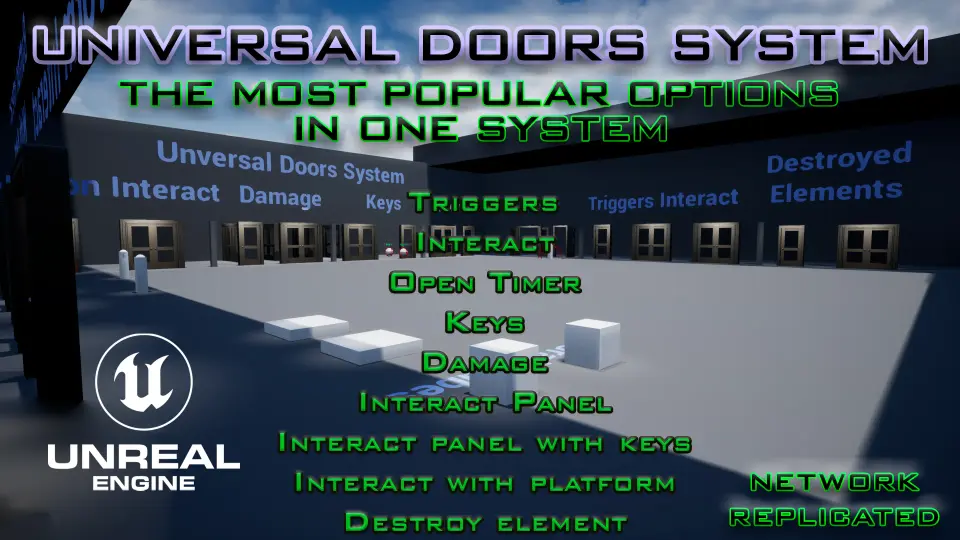
Universal Doors System ships with 9 interaction modes. Each 1 changes how the door responds to the player and the world. The list covers:
Trigger – a Trigger Volume or an Actor that activates the door when entered.
Interact – a direct interaction where the player presses a key or button to open or close the door.
Open Timer – a door that opens on a timer, automatically starting after an event or closing after a set time.
Keys – a key-based lock that only opens when the player holds a matching key.
Damage – a door that reacts to damage, either by opening or changing states when it takes hits.
Interact Panel – a control panel that the player interacts with to trigger the door.
Interact Panel With Keys – a panel that also requires a key before interaction is allowed.
Interact With Platform – a pressure plate or platform that activates the door when stepped on or when an object is placed on it.
Destroy Elements – a mode that lets elements of the door be destroyed, effectively bypassing normal opening mechanics.
Having all of these in 1 system removes the need to keep separate Blueprints for each variation. Instead, you switch the interaction type and adjust the parameters. That makes late-stage Level Design changes easier because you can swap a key door to a damage door without rebuilding the door Actor.
What V1.1 Update Changed
The V1.1 update introduced the Destroy Elements mode. That addition turns the system into a viable option for destructible environments. Players can blast through a barricade instead of searching for the correct key, which opens up more direct gameplay solutions.
The same update also refreshed the interface and modified some elements. That suggests the developer is actively polishing the visual presentation of the Blueprint nodes and the in-editor setup. When the interface is clearer, the promised ease of use is easier to reach.
Handling Both Door Configurations
The system is built to handle single-leaf and double-leaf doors within the same logic. For a standard single door, you get 1 panel with 1 swing area. For a twin door or gate, both panels respond to the same interaction. This matters in production because you don't need separate assets for the 2 most common architectural door styles.
A 1 single asset that covers both forms also helps keep the Level Design consistent. All doors in a project share the same input handling, the same lock behavior, and the same Replication setup. That consistency avoids subtle bugs like 1 door opening on its own while its partner stays closed.
Blueprint, Network, and Spawner Compatibility
The asset is a Blueprint system, and its tags include Replicated and Network. That means the door state can synchronize across Clients in a multiplayer session. When 1 Client opens a door, the other sees the same movement rather than a desynced version.
Compatibility with the Advanced Universal Spawner is also listed. That integration makes the door system part of a broader runtime spawning pipeline. If your project already uses that spawner to manage placed Actors, the door logic can plug into that existing workflow without forcing you to adopt a separate management tool.
Practical Takeaway
Universal Doors System delivers on the promise of removing repetitive door logic. By covering the most requested interaction modes, supporting 2 common door configurations, and offering a destructible element in V1.1, it gives a developer a practical starting point. You add Meshes, decide how the door should respond, and move on to the parts of the game that deserve custom attention.
 Gameplay Features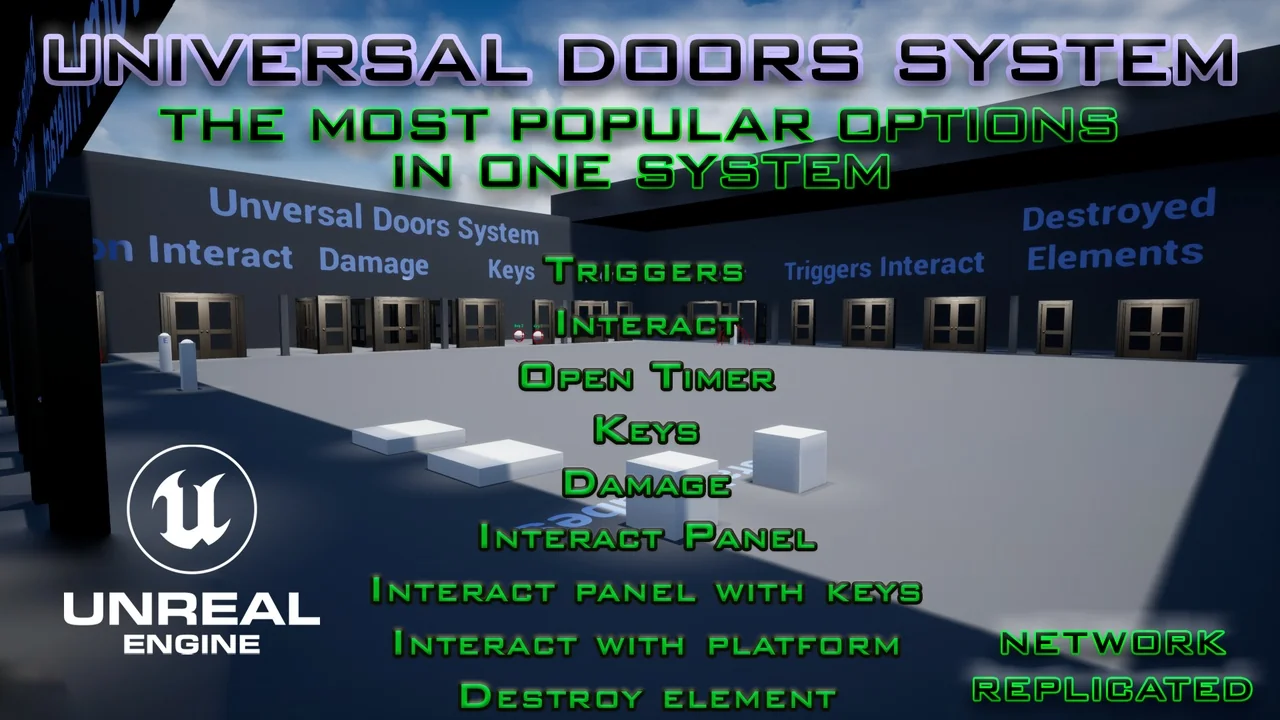
 Gameplay Features
 Gameplay Features
 Gameplay Features