"efaa631e936fd3ee"{"id":"1002243","slug":"tv-set","title":"TV Set","category":"Consumer","engine":"5.0+","assetVersion":"","engineVersion":"Engine Version: 5.0+","tag":"Consumer","accent":"blue","visual":"mech","summary":"Integrate interactive televisions into Unreal Engine interiors with modular meshes, video and audio playback, and customizable blueprint controls.","platform":"Unreal Engine","publishedAt":"2026-10-29T15:59:22.438Z","updatedAt":"2026-10-29T15:59:22.438Z","sourceNotes":[],"fileContents":[],"compatibility":["Unreal Engine","Engine Version: 5.0+"],"featuredImage":{"alt":"TV Set","src":"/wp-content/uploads/published/2026/10/57816d4b51c7-00f2af58-4a40-4241-80eb-813af7a5fe64-7137622752.webp"},"hasDownloadLink":true,"downloads":0,"terms":[{"taxonomy":"category","slug":"consumer","name":"Consumer"}],"galleryImages":[{"src":"/wp-content/uploads/published/2026/10/7dffb4f85a5f-f70d6251-95df-498e-b2b1-aded5e92c604-a3b3fd1931.webp","alt":"TV Set"},{"src":"/wp-content/uploads/published/2026/10/9eb7d3577ac5-1d84ecb2-00f5-4fa5-a2d2-4ce344e568ad-17eeb9bd41.webp","alt":"TV Set"},{"src":"/wp-content/uploads/published/2026/10/639f393dad6e-0474f49b-fd7f-4aad-85b9-e139c33b9488-553898ebc3.webp","alt":"TV Set"},{"src":"/wp-content/uploads/published/2026/10/903126d5b6c7-63235900-1347-4af1-bb6c-43b7e8539b63-66c1938ab9.webp","alt":"TV Set"},{"src":"/wp-content/uploads/published/2026/10/cbda93d554a4-2ca39ef3-3e46-443f-a8da-a0031d6fc91c-b83f9b0998.webp","alt":"TV Set"},{"src":"/wp-content/uploads/published/2026/10/d1789fd95f00-6faaf256-2e0d-47bb-aa0a-c96c63338449-353f818683.webp","alt":"TV Set"},{"src":"/wp-content/uploads/published/2026/10/1ddc43a86601-87309d79-9b47-43f6-8f1a-b8f092c411e7-c0bb42bdf2.webp","alt":"TV Set"},{"src":"/wp-content/uploads/published/2026/10/c0be0bcab31c-7ca2ce21-2670-4654-82e8-e90d3912cfe4-30acd0e42d.webp","alt":"TV Set"},{"src":"/wp-content/uploads/published/2026/10/dbc2bad3816c-d0a27f67-1fa6-415a-b5c9-f97889f4abbe-88dc301f17.webp","alt":"TV Set"},{"src":"/wp-content/uploads/published/2026/10/d6744063eb0a-508956e1-f5ae-4a65-9a57-415ab8c99afe-1e3e675f1b.webp","alt":"TV Set"}],"accessPanel":{"kind":"resource","title":"Download this resource","eyebrow":"Free Download","message":"Log in or create a free account to start your download.","fileName":"Content.7z","safetyNote":"Resources are manually reviewed before listing to improve quality and reduce obvious risks.","actionLabel":"Download Free","resourceType":"Resource archive"},"contentHtml":"\u003ch2\u003eStaging Modern Interiors with the TV Set Blueprint\u003c/h2\u003e\n\u003cp\u003ePopulating a living room, media room, or modern office interior often requires functional electronic props rather than lifeless geometry. The TV Set package provides an interactive solution designed to display active content inside Unreal Engine scenes. Driven by a dedicated blueprint system, it allows level designers and environment artists to insert realistic screens that cycle through still imagery or play video files with accompanying audio, instantly bringing living spaces to life.\u003c/p\u003e\n\u003cp\u003eThe asset adapts to varied scene compositions through a flexible blueprint architecture. Instead of locking the display into a single fixed prop, the blueprint ties together modular hardware components, material configurations, and playback parameters. Whether placing a small display on a bedroom dresser, mounting a large unit in a commercial waiting area, or creating a dedicated home theater center, the blueprint manages screen states and visual aesthetics directly within the scene.\u003c/p\u003e \u003ch2\u003eModular Meshes, Mounting Configurations, and Material Swaps\u003c/h2\u003e\n\u003cp\u003ePhysical presentation is supported by a collection of 24 distinct meshes. These models provide the flexibility needed to assemble different screen styles across multiple rooms without repeating identical silhouettes:\u003c/p\u003e\n\u003cul\u003e \u003cli\u003e4 standalone TV Set bodies providing distinct screen frames and dimensions.\u003c/li\u003e \u003cli\u003e6 pre-assembled TV Sets fitted directly with bases for simple tabletop staging.\u003c/li\u003e \u003cli\u003e4 TV Sets paired with wall mounts for flush architectural placement.\u003c/li\u003e \u003cli\u003e6 standalone bases and 1 standalone wall mount for custom rigging.\u003c/li\u003e \u003cli\u003e1 dedicated soundbar mesh for building out complete audio-visual systems.\u003c/li\u003e \u003cli\u003e2 distinct remote control meshes to detail nearby coffee tables, desks, or nightstands.\u003c/li\u003e\n\u003c/ul\u003e\n\u003cp\u003eTo match specific architectural color palettes, the package includes 7 metal materials and 9 plastic materials. These surface presets allow users to change the appearance of external frames, stands, mounts, and accessories. Modifying these materials helps differentiate units placed across the same level, ensuring that an office conference screen, a living room centerpiece, and a bedroom display each sport distinct finishes.\u003c/p\u003e \u003ch2\u003eDisplaying Static Artwork and Video Content on Screen\u003c/h2\u003e\n\u003cp\u003eScreens can show both stationary images and continuous video footage. For scenes requiring quiet background details, the pack includes 15 predefined pictures ready for instant display. These still images function cleanly for ambient staging, digital photo frames, or idle monitors when video playback is unnecessary.\u003c/p\u003e\n\u003cp\u003eWhen full motion is desired, the blueprint integrates media playback with sound support. Two sample video files are supplied directly with the pack: a 720p mp4 advertisement titled Velocity Cars Ad, and a 720p mp4 clip called City Timelapse. Both demo videos come without baked audio, providing lightweight sample footage to test immediate playback functionality right inside the simple demo map provided with the project.\u003c/p\u003e \u003ch2\u003eEngine Setup, WMF Media Settings, and Movie Packaging\u003c/h2\u003e\n\u003cp\u003eImporting custom video material into the TV Set blueprint follows a direct pipeline inside Unreal Engine. Dragging an external video file into the project automatically creates a File Media Source asset. Pointing the TV blueprint's media source variable to this newly generated asset starts playback immediately on the designated screen geometry.\u003c/p\u003e\n\u003cp\u003eProject configuration requires a few specific steps to maintain playback stability and ensure packaged builds function correctly:\u003c/p\u003e\n\u003cul\u003e \u003cli\u003eFor packaged builds, any video file intended for runtime playback must be stored physically inside the project's Content/Movies folder.\u003c/li\u003e \u003cli\u003eThe two included demo mp4 files reside inside the Content\\TV_Set\\Movies folder on disk; users must drag these files into the Content Browser in the editor to activate them or delete them if custom footage is used instead.\u003c/li\u003e \u003cli\u003eFor improved video playback stability, open Project Settings, navigate to Plugins, select WMF Media, and enable all three media checkboxes.\u003c/li\u003e\n\u003c/ul\u003e \u003ch2\u003eConfiguring Multiple TV Set Blueprints for Simultaneous Playback\u003c/h2\u003e\n\u003cp\u003eIn environments such as electronics showrooms, sports bars, multi-room residences, or command centers, multiple screens often need to run distinct feeds at the same time. The TV Set blueprint supports concurrent independent video streams through a brief duplication workflow:\u003c/p\u003e\n\u003cul\u003e \u003cli\u003eDuplicate the base TV_MediaPlayer asset to create a unique media player reference.\u003c/li\u003e \u003cli\u003eDuplicate the TV_MediaPlayer_VideoTexture asset, open its settings, and assign the newly duplicated media player to it.\u003c/li\u003e \u003cli\u003eIn the new BP_TV_Set placed in the scene, reassign its internal Media Player and Video Texture variables to target the newly duplicated assets.\u003c/li\u003e \u003cli\u003eAssign the custom video source to the updated blueprint actor.\u003c/li\u003e\n\u003c/ul\u003e\n\u003cp\u003eFollowing this structure prevents multiple screens from conflicting with one another or mirroring identical media streams, allowing artists to run unique footage, commercial spots, or security monitors across separate parts of an environment.\u003c/p\u003e \u003ch2\u003eInteractive Event Control and Blueprint Evolution\u003c/h2\u003e\n\u003cp\u003eControlling screen behavior during gameplay is handled through pre-built blueprint events. The TV Set system includes dedicated Turn ON, Turn OFF, and Toggle ON/OFF events. These hooks make it straightforward to wire screens to physical light switches, player proximity triggers, remote control interactions, or timed quest objectives without rewriting underlying media logic.\u003c/p\u003e\n\u003cp\u003eThe asset's functionality has expanded across iterative updates. Event-driven power controls for turning the screen on and off were introduced in December 2023. Video playback audio handling was incorporated in February 2024, enabling projects to output synchronized sound directly alongside running footage. Support for simultaneous playback across multiple independent video instances was finalized in March 2025. Together with an included simple demo map, these functional tools make TV Set an adaptable choice for game developers, cinematics creators, and architectural visualizers seeking responsive display hardware inside modern interior scenes.\u003c/p\u003e\n\n\u003ch2\u003eContinue Browsing Similar Packs\u003c/h2\u003e\n\u003cul\u003e\n\u003cli\u003e\u003ca href=\"https://3dcghub.com/tv-studio-environment-set/\" title=\"TV Studio Environment Set\"\u003eTV Studio Environment Set\u003c/a\u003e\u003c/li\u003e\n\u003cli\u003e\u003ca href=\"https://3dcghub.com/dgruwier-flashlight-textures/\" title=\"DGruwier Flashlight Textures\"\u003eDGruwier Flashlight Textures\u003c/a\u003e\u003c/li\u003e\n\u003cli\u003e\u003ca href=\"https://3dcghub.com/hb-computers-pack/\" title=\"HB Computers Pack\"\u003eHB Computers Pack\u003c/a\u003e\u003c/li\u003e\n\u003cli\u003e\u003ca href=\"https://3dcghub.com/advanced-crt-tv-vcr-vhs-effects/\" title=\"Advanced CRT TV - VCR - VHS Effects\"\u003eAdvanced CRT TV - VCR - VHS Effects\u003c/a\u003e\u003c/li\u003e\n\u003cli\u003e\u003ca href=\"https://3dcghub.com/weather-tv-studio/\" title=\"Weather TV Studio\"\u003eWeather TV Studio\u003c/a\u003e\u003c/li\u003e\n\u003c/ul\u003e","contentTextLength":6246,"navigation":{"current":42,"total":4209,"previous":{"id":"1002244","slug":"tvtps","title":"TVTPS","category":"Shooter","platform":"Unreal Engine","updatedAt":"2026-10-29T16:02:50.058Z"},"next":{"id":"1002242","slug":"truck-trailer-attach-detach-system","title":"Truck Trailer Attach Detach System","category":"Vehicles \u0026 Transportation","platform":"Unreal Engine","updatedAt":"2026-10-29T15:58:22.057Z"}},"relatedResources":[{"id":"1001769","slug":"tv-studio-environment-set","title":"TV Studio Environment Set","category":"Interior","engine":"5.1+","assetVersion":"","engineVersion":"Engine Version: 5.1+","tag":"Interior","accent":"blue","visual":"city","summary":"Build broadcast stages with the TV Studio Environment Set, featuring modular meshes, custom PBR materials, and four dedicated television studio setups.","platform":"Unreal Engine","publishedAt":"2026-10-20T03:16:58.432Z","updatedAt":"2026-10-20T03:16:58.432Z","sourceNotes":[],"fileContents":[],"compatibility":["Unreal Engine","Engine Version: 5.1+"],"featuredImage":{"alt":"TV Studio Environment Set","src":"/wp-content/uploads/published/2026/10/d66f4588f14a-be856751-e5cd-4ae4-98f8-4ef47cc30a6e-90e1a6e75e.webp"},"hasDownloadLink":true,"downloads":0},{"id":"1000575","slug":"dgruwier-flashlight-textures","title":"DGruwier Flashlight Textures","category":"Consumer","engine":"5.1+","assetVersion":"","engineVersion":"Engine Version: 5.1+","tag":"Consumer","accent":"blue","visual":"luts","summary":"52 high-resolution 16-bit 2K flashlight light cookie textures for games, VFX, and animation, compatible with Unity, Unreal Engine, Octane, Vray, Redshift, and C","platform":"Unreal Engine","publishedAt":"2026-07-16T22:59:56.333Z","updatedAt":"2026-07-16T22:59:56.333Z","sourceNotes":[],"fileContents":[],"compatibility":["Unreal Engine","Engine Version: 5.1+"],"featuredImage":{"alt":"DGruwier Flashlight Textures","src":"/wp-content/uploads/published/2026/07/3af00a78af66-rqahmzlsmvvzy5oge0unw0rzctms-0bbfcfcb44.webp"},"hasDownloadLink":true,"downloads":2},{"id":"1002049","slug":"hb-computers-pack","title":"HB Computers Pack","category":"Consumer","engine":"4.26+,5.0+","assetVersion":"","engineVersion":"Engine Version: 4.26+,5.0+","tag":"Consumer","accent":"blue","visual":"mech","summary":"Build modular desktop workstation setups with computer cases, monitors, peripherals, spline-based cable connectors, and a configurable material dirt layer.","platform":"Unreal Engine","publishedAt":"2026-10-26T15:05:42.062Z","updatedAt":"2026-10-26T15:05:42.062Z","sourceNotes":[],"fileContents":[],"compatibility":["Unreal Engine","Engine Version: 4.26+,5.0+"],"featuredImage":{"alt":"HB Computers Pack","src":"/wp-content/uploads/published/2026/10/cd82bac9bbca-d003ec13-4efa-4357-9f6e-6a1945fbb633-8cdbff43f6.webp"},"hasDownloadLink":true,"downloads":0}]}
Consumer
TV Set
Integrate interactive televisions into Unreal Engine interiors with modular meshes, video and audio playback, and customizable blueprint controls.
Category:Unreal Engine,ConsumerPlatform: Unreal EngineEngine Version: 5.0+Published: Oct 29, 2026
Consumer
Resource overview
Staging Modern Interiors with the TV Set Blueprint
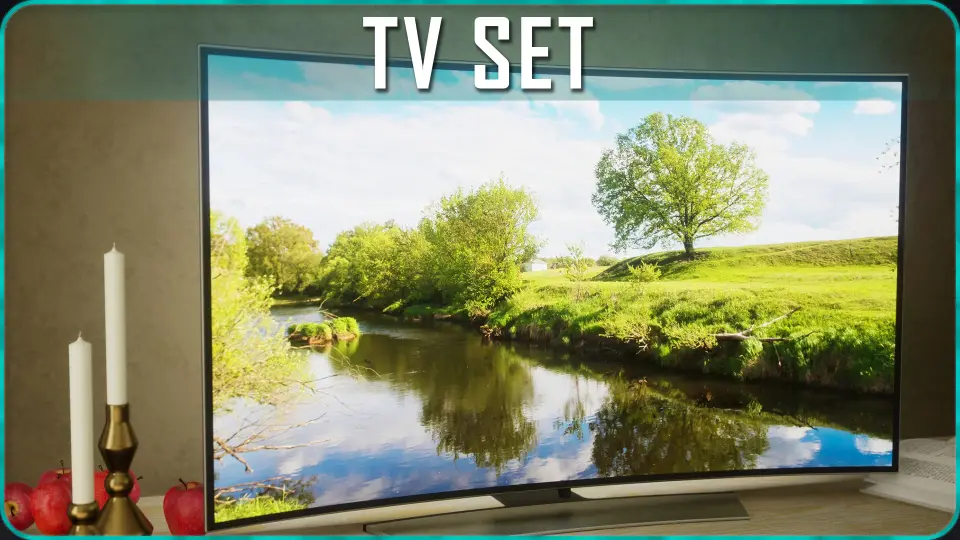
Populating a living room, media room, or modern office interior often requires functional electronic props rather than lifeless geometry. The TV Set package provides an interactive solution designed to display active content inside Unreal Engine scenes. Driven by a dedicated blueprint system, it allows level designers and environment artists to insert realistic screens that cycle through still imagery or play video files with accompanying audio, instantly bringing living spaces to life.
The asset adapts to varied scene compositions through a flexible blueprint architecture. Instead of locking the display into a single fixed prop, the blueprint ties together modular hardware components, material configurations, and playback parameters. Whether placing a small display on a bedroom dresser, mounting a large unit in a commercial waiting area, or creating a dedicated home theater center, the blueprint manages screen states and visual aesthetics directly within the scene.
Modular Meshes, Mounting Configurations, and Material Swaps
Physical presentation is supported by a collection of 24 distinct meshes. These models provide the flexibility needed to assemble different screen styles across multiple rooms without repeating identical silhouettes:
4 standalone TV Set bodies providing distinct screen frames and dimensions.
6 pre-assembled TV Sets fitted directly with bases for simple tabletop staging.
4 TV Sets paired with wall mounts for flush architectural placement.
6 standalone bases and 1 standalone wall mount for custom rigging.
1 dedicated soundbar mesh for building out complete audio-visual systems.
2 distinct remote control meshes to detail nearby coffee tables, desks, or nightstands.
To match specific architectural color palettes, the package includes 7 metal materials and 9 plastic materials. These surface presets allow users to change the appearance of external frames, stands, mounts, and accessories. Modifying these materials helps differentiate units placed across the same level, ensuring that an office conference screen, a living room centerpiece, and a bedroom display each sport distinct finishes.
Displaying Static Artwork and Video Content on Screen
Screens can show both stationary images and continuous video footage. For scenes requiring quiet background details, the pack includes 15 predefined pictures ready for instant display. These still images function cleanly for ambient staging, digital photo frames, or idle monitors when video playback is unnecessary.
When full motion is desired, the blueprint integrates media playback with sound support. Two sample video files are supplied directly with the pack: a 720p mp4 advertisement titled Velocity Cars Ad, and a 720p mp4 clip called City Timelapse. Both demo videos come without baked audio, providing lightweight sample footage to test immediate playback functionality right inside the simple demo map provided with the project.
Engine Setup, WMF Media Settings, and Movie Packaging
Importing custom video material into the TV Set blueprint follows a direct pipeline inside Unreal Engine. Dragging an external video file into the project automatically creates a File Media Source asset. Pointing the TV blueprint's media source variable to this newly generated asset starts playback immediately on the designated screen geometry.
Project configuration requires a few specific steps to maintain playback stability and ensure packaged builds function correctly:
For packaged builds, any video file intended for runtime playback must be stored physically inside the project's Content/Movies folder.
The two included demo mp4 files reside inside the Content\TV_Set\Movies folder on disk; users must drag these files into the Content Browser in the editor to activate them or delete them if custom footage is used instead.
For improved video playback stability, open Project Settings, navigate to Plugins, select WMF Media, and enable all three media checkboxes.
Configuring Multiple TV Set Blueprints for Simultaneous Playback
In environments such as electronics showrooms, sports bars, multi-room residences, or command centers, multiple screens often need to run distinct feeds at the same time. The TV Set blueprint supports concurrent independent video streams through a brief duplication workflow:
Duplicate the base TV_MediaPlayer asset to create a unique media player reference.
Duplicate the TV_MediaPlayer_VideoTexture asset, open its settings, and assign the newly duplicated media player to it.
In the new BP_TV_Set placed in the scene, reassign its internal Media Player and Video Texture variables to target the newly duplicated assets.
Assign the custom video source to the updated blueprint actor.
Following this structure prevents multiple screens from conflicting with one another or mirroring identical media streams, allowing artists to run unique footage, commercial spots, or security monitors across separate parts of an environment.
Interactive Event Control and Blueprint Evolution
Controlling screen behavior during gameplay is handled through pre-built blueprint events. The TV Set system includes dedicated Turn ON, Turn OFF, and Toggle ON/OFF events. These hooks make it straightforward to wire screens to physical light switches, player proximity triggers, remote control interactions, or timed quest objectives without rewriting underlying media logic.
The asset's functionality has expanded across iterative updates. Event-driven power controls for turning the screen on and off were introduced in December 2023. Video playback audio handling was incorporated in February 2024, enabling projects to output synchronized sound directly alongside running footage. Support for simultaneous playback across multiple independent video instances was finalized in March 2025. Together with an included simple demo map, these functional tools make TV Set an adaptable choice for game developers, cinematics creators, and architectural visualizers seeking responsive display hardware inside modern interior scenes.
 Consumer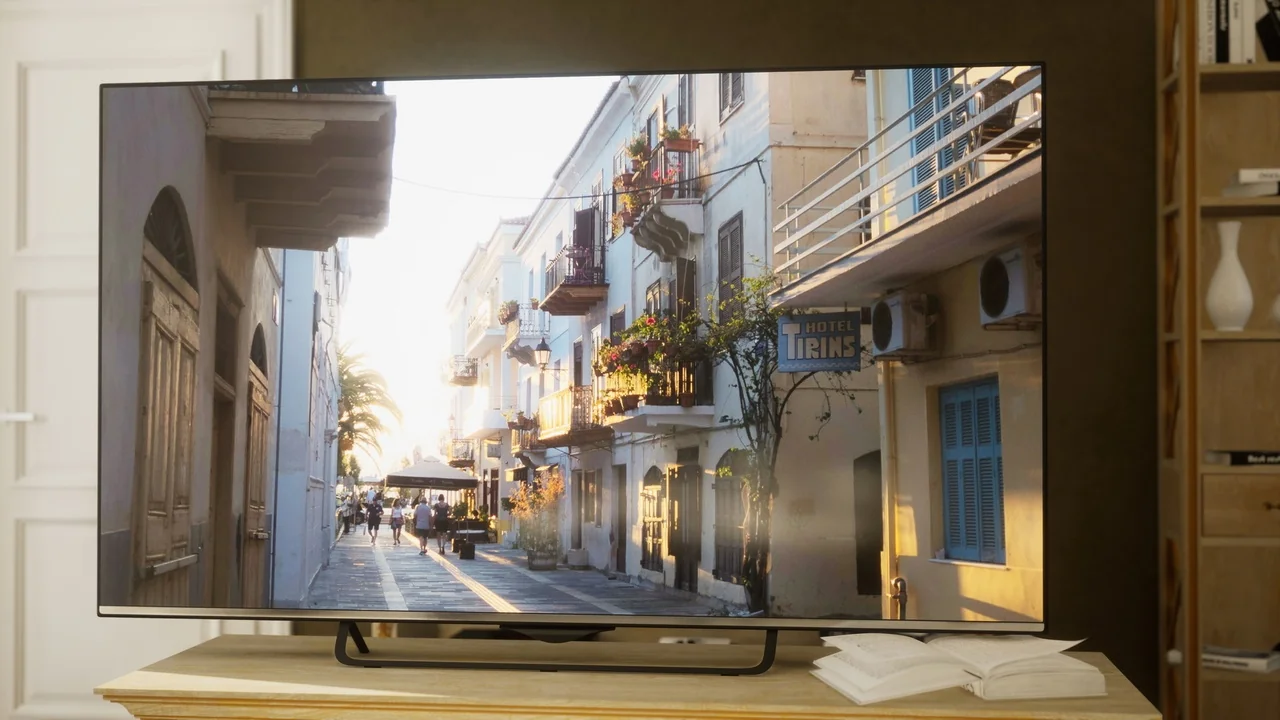
 Interior
 Consumer
 Consumer