"a19e0535960bd083"{"id":"1002049","slug":"hb-computers-pack","title":"HB Computers Pack","category":"Consumer","engine":"4.26+,5.0+","assetVersion":"","engineVersion":"Engine Version: 4.26+,5.0+","tag":"Consumer","accent":"blue","visual":"mech","summary":"Build modular desktop workstation setups with computer cases, monitors, peripherals, spline-based cable connectors, and a configurable material dirt layer.","platform":"Unreal Engine","publishedAt":"2026-10-26T15:05:42.062Z","updatedAt":"2026-10-26T15:05:42.062Z","sourceNotes":[],"fileContents":[],"compatibility":["Unreal Engine","Engine Version: 4.26+,5.0+"],"featuredImage":{"alt":"HB Computers Pack","src":"/wp-content/uploads/published/2026/10/cd82bac9bbca-d003ec13-4efa-4357-9f6e-6a1945fbb633-8cdbff43f6.webp"},"hasDownloadLink":true,"downloads":0,"terms":[{"taxonomy":"category","slug":"consumer","name":"Consumer"}],"galleryImages":[{"src":"/wp-content/uploads/published/2026/10/a9f5303a7629-6745c4e3-5ddb-4024-9f99-00e38bc30c5f-477b985961.webp","alt":"HB Computers Pack"},{"src":"/wp-content/uploads/published/2026/10/24784f668932-db222e14-b55b-405d-8067-4267efec00f4-d19df4cacf.webp","alt":"HB Computers Pack"},{"src":"/wp-content/uploads/published/2026/10/380d15566756-219a1c7f-3c92-4ede-b91a-9fa060872054-b161269009.webp","alt":"HB Computers Pack"},{"src":"/wp-content/uploads/published/2026/10/311545ee18cf-a96b3ebe-41af-4280-8179-869a6f4d0cdd-a742303194.webp","alt":"HB Computers Pack"},{"src":"/wp-content/uploads/published/2026/10/b658af87ae82-834a0b0e-3115-46f9-963b-794915163d6f-7ea5eec1b9.webp","alt":"HB Computers Pack"},{"src":"/wp-content/uploads/published/2026/10/8571a73d9ad5-172f7097-0e20-4239-a6c9-59dac1e26d40-644f768877.webp","alt":"HB Computers Pack"},{"src":"/wp-content/uploads/published/2026/10/04722b3b8a39-df428d43-93ec-454e-94da-ed4d3bf65be2-4845d8c721.webp","alt":"HB Computers Pack"},{"src":"/wp-content/uploads/published/2026/10/414ad4da6298-7ebbe1ba-fec3-4ea9-afcc-5e75137e65bd-72e3ba985c.webp","alt":"HB Computers Pack"},{"src":"/wp-content/uploads/published/2026/10/37ed4e40b3b6-2b015bfc-50e7-4ea0-83c2-af63d2a9cb80-0b4053ea36.webp","alt":"HB Computers Pack"},{"src":"/wp-content/uploads/published/2026/10/9dcdd59fe4f2-b2bd90fd-8a05-4d7d-909f-fa5c8f8a9272-cf87a25102.webp","alt":"HB Computers Pack"}],"accessPanel":{"kind":"resource","title":"Download this resource","eyebrow":"Free Download","message":"Log in or create a free account to start your download.","fileName":"Content.7z","safetyNote":"Resources are manually reviewed before listing to improve quality and reduce obvious risks.","actionLabel":"Download Free","resourceType":"Resource archive"},"contentHtml":"\u003ch2\u003eDressing Workstations Across Varied Production Scenes\u003c/h2\u003e\u003cp\u003eModern office floors, command centers, messy dorm rooms, and dilapidated server rooms all depend on convincing workstation clutter to feel grounded. Populating these spaces requires more than setting down a solitary monitor and hoping the desk looks finished. A believable desk environment requires distinct hardware parts: the tower housing the primary system, display units tilted toward an operator, input devices arranged within easy reach, and the physical wires binding everything together into a functional rig.\u003c/p\u003e\u003cp\u003eHB Computers Pack focuses on providing the constituent pieces needed to construct full computer setups across multiple configurations. Because the elements are broken down into individual items rather than locked into a single fused desk prop, scenes can feature anything from a minimal dual-screen business setup to a cluttered workbench overflowing with plugs, peripheral gear, and auxiliary hardware. The flexibility to arrange towers on the floor or atop the desk, shift input peripherals, and match different display orientations helps prevent office interiors from looking like repeating clones of the exact same asset.\u003c/p\u003e\u003ch2\u003eComputer Cases, Monitors, and Modular Desktop Peripherals\u003c/h2\u003e\u003cp\u003eThe collection brings together the essential hardware blocks necessary to populate digital desks and technical facilities. Central to any setup are the computer cases, which provide the visual anchor for the workstation, alongside dedicated screens and monitors that define the user's primary interface. These core fixtures are supported by keyboards and mice, letting level designers build natural resting poses for seated characters or dress vacant desks that look recently abandoned.\u003c/p\u003e\u003cp\u003eAudio and power accessories expand the visual scope beyond the basic monitor-and-tower pairing. The package includes speakers, individual connectors, and plugs that populate the rear panels of towers and desktop surfaces. Having loose plugs and small connector hardware enables micro-dressing around the back of equipment racks, beneath office furniture, and across peripheral hub areas where real-world workspaces accumulate the most clutter. This modular breakdown allows single-screen home setups, sprawling tech-support rows, and multi-monitor surveillance stations to emerge from the same pool of assets.\u003c/p\u003e\u003ch2\u003eRouting Wire Runs with the Cable Blueprint\u003c/h2\u003e\u003cp\u003eManaging believable wiring is frequently one of the most tedious tasks in interior environment art. Loose props placed on a desk without wires quickly look weightless and detached from the physical space, while manually stretching static wire meshes between ports consumes unnecessary production time.\u003c/p\u003e\u003cp\u003eTo solve this, the pack includes a specialized Cable Blueprint engineered to help route cables and link various connectors directly between devices. Utilizing Spline Components, the blueprint allows artists to map the gentle droop, sharp bends, and messy floor tangles that naturally happen when computer towers connect to screens, mice, keyboards, and wall sockets. Snapping connectors into place alongside dynamic cable curves means you can run leads out of the back of a case, loop them behind a monitor arm, and direct them down toward the floor or power strip with accurate physical flow.\u003c/p\u003e\u003ch2\u003eWeathering Hardware via the Material Dirt Layer\u003c/h2\u003e\u003cp\u003eHardware appearance in games and virtual production often needs to signal the passage of time or the cleanliness of the surrounding scene. A pristine, immaculate corporate tower looks completely out of place inside an abandoned security bunker, an auto repair shop, or a neglected industrial plant.\u003c/p\u003e\u003cp\u003eEvery object in the package supports surface aging through a material dirt layer. This feature allows environment artists to introduce grime and wear across computer cases, keyboard keys, speaker grilles, and monitor frames without having to author separate texture sets in external painting software. Adjusting this dirt layer enables clean, freshly deployed systems to sit in executive boardrooms, while heavier layers of accumulated dust and grime can be dialed up for post-apocalyptic shelters, damp basements, or long-forgotten server closets.\u003c/p\u003e\u003ch2\u003eSpline Handling and Unreal Engine 5.4 Considerations\u003c/h2\u003e\u003cp\u003eWorking with spline-driven assets requires an understanding of how construction scripts refresh across different engine revisions. In Unreal Engine 5.4.0, an engine-level bug prevents the Construction Script from executing properly while modifying Spline Components. When shaping lines with the Cable Blueprint inside that specific version, the viewport may appear unresponsive, failing to show updated meshes in real time as points are manipulated.\u003c/p\u003e\u003cp\u003eThe underlying system continues to work as intended despite this visual freeze. If you are operating in version 5.4.0, mesh updates can be forced manually by simply nudging the Actor inside the viewport or toggling any setting within the Actor Properties. For artists looking to avoid manual viewport refreshes entirely, the issue is resolved in Unreal Engine 5.4.2, where spline edits trigger the Construction Script automatically without workarounds.\u003c/p\u003e\u003ch2\u003eTarget Workflows and Level Dressing Roles\u003c/h2\u003e\u003cp\u003eEnvironment artists, set dressers, and architectural visualizers who regularly handle contemporary interiors will find this asset library particularly useful. It eliminates the need to cobble together mismatched peripherals from disparate sources, providing a cohesive visual style across towers, monitors, audio units, and cabling.\u003c/p\u003e\u003cp\u003eLevel designers benefit most from the balance of modular placement and cable generation. Instead of settling for sterile desks with floating electronics, teams can run tactile, messy cables across workstations and apply dirt layers to reflect the exact fictional background of any room.\n\n\u003ch2\u003eExplore Similar Assets\u003c/h2\u003e\n\u003cul\u003e\n\u003cli\u003e\u003ca href=\"https://3dcghub.com/dgruwier-flashlight-textures/\" title=\"DGruwier Flashlight Textures\"\u003eDGruwier Flashlight Textures\u003c/a\u003e\u003c/li\u003e\n\u003cli\u003e\u003ca href=\"https://3dcghub.com/neurofractals-pack/\" title=\"NeuroFractals Pack\"\u003eNeuroFractals Pack\u003c/a\u003e\u003c/li\u003e\n\u003cli\u003e\u003ca href=\"https://3dcghub.com/hb-medieval-weapons-pack-3/\" title=\"HB Medieval Weapons Pack 3\"\u003eHB Medieval Weapons Pack 3\u003c/a\u003e\u003c/li\u003e\n\u003cli\u003e\u003ca href=\"https://3dcghub.com/advanced-working-computer/\" title=\"Advanced Working Computer\"\u003eAdvanced Working Computer\u003c/a\u003e\u003c/li\u003e\n\u003cli\u003e\u003ca href=\"https://3dcghub.com/industry-props-pack-3-office/\" title=\"Industry Props Pack 3 Office\"\u003eIndustry Props Pack 3 Office\u003c/a\u003e\u003c/li\u003e\n\u003c/ul\u003e","contentTextLength":5959,"navigation":{"current":42,"total":4026,"previous":{"id":"1002050","slug":"healing-spells-sounds","title":"Healing Spells Sounds","category":"Sound Effects","platform":"Unreal Engine","updatedAt":"2026-10-26T15:06:57.263Z"},"next":{"id":"1002048","slug":"hatchback-car-driveable-animated-realistic-hatchback-car-driveable-vehicle","title":"HatchBack Car Driveable / Animated / Realistic (HatchBack Car Driveable Vehicle)","category":"Cars \u0026 Trucks","platform":"Unreal Engine","updatedAt":"2026-10-26T15:04:27.811Z"}},"relatedResources":[{"id":"1000575","slug":"dgruwier-flashlight-textures","title":"DGruwier Flashlight Textures","category":"Consumer","engine":"5.1+","assetVersion":"","engineVersion":"Engine Version: 5.1+","tag":"Consumer","accent":"blue","visual":"luts","summary":"52 high-resolution 16-bit 2K flashlight light cookie textures for games, VFX, and animation, compatible with Unity, Unreal Engine, Octane, Vray, Redshift, and C","platform":"Unreal Engine","publishedAt":"2026-07-16T22:59:56.333Z","updatedAt":"2026-07-16T22:59:56.333Z","sourceNotes":[],"fileContents":[],"compatibility":["Unreal Engine","Engine Version: 5.1+"],"featuredImage":{"alt":"DGruwier Flashlight Textures","src":"/wp-content/uploads/published/2026/07/3af00a78af66-rqahmzlsmvvzy5oge0unw0rzctms-0bbfcfcb44.webp"},"hasDownloadLink":true,"downloads":2},{"id":"9566","slug":"neurofractals-pack","title":"NeuroFractals Pack","category":"Sci-Fi","engine":"4.26+,5.0+","assetVersion":"Engine version: 4.26+,5.0+","engineVersion":"4.25","tag":"Sci-Fi","accent":"blue","visual":"city","summary":"Discover the NeuroFractals Pack, a collection of 3D assets created through computer simulations. These models feature specialized shaders for thickness and color control, making them ideal for neural and space-themed environments.","platform":"Unreal Engine","publishedAt":"2026-03-01T17:17:26.000Z","updatedAt":"2026-04-19T15:51:07.000Z","sourceNotes":[],"fileContents":[],"compatibility":["Unreal Engine","Engine version: 4.26+,5.0+"],"featuredImage":{"alt":"NeuroFractals Pack","src":"https://3dcghub.com/wp-content/uploads/2026/03/8be3ca16-314f-49cd-8f3d-f4d9d13ecd95.webp"},"hasDownloadLink":true,"downloads":1},{"id":"5420","slug":"hb-medieval-weapons-pack-3","title":"HB Medieval Weapons Pack 3","category":"Weapons \u0026 Combat","engine":"4.26+,5.0+","assetVersion":"Engine version: 4.26+,5.0+","engineVersion":"4.10","tag":"Weapons \u0026 Combat","accent":"blue","visual":"city","summary":"Boost your game's realism with this Medieval Weapons Pack. It features low-poly spears, longbows, and crossbows designed for performance and easy customization.","platform":"Unreal Engine","publishedAt":"2026-02-15T15:03:53.000Z","updatedAt":"2026-04-19T15:56:57.000Z","sourceNotes":[],"fileContents":[],"compatibility":["Unreal Engine","Engine version: 4.26+,5.0+"],"featuredImage":{"alt":"HB Medieval Weapons Pack 3","src":"https://3dcghub.com/wp-content/uploads/2026/02/146254f8-0728-4879-b523-75d28692b8c0.webp"},"hasDownloadLink":true,"downloads":1}]}
Consumer
HB Computers Pack
Build modular desktop workstation setups with computer cases, monitors, peripherals, spline-based cable connectors, and a configurable material dirt layer.
Category:Unreal Engine,ConsumerPlatform: Unreal EngineEngine Version: 4.26+,5.0+Published: Oct 26, 2026
Consumer
Resource overview
Dressing Workstations Across Varied Production Scenes
Modern office floors, command centers, messy dorm rooms, and dilapidated server rooms all depend on convincing workstation clutter to feel grounded. Populating these spaces requires more than setting down a solitary monitor and hoping the desk looks finished. A believable desk environment requires distinct hardware parts: the tower housing the primary system, display units tilted toward an operator, input devices arranged within easy reach, and the physical wires binding everything together into a functional rig.
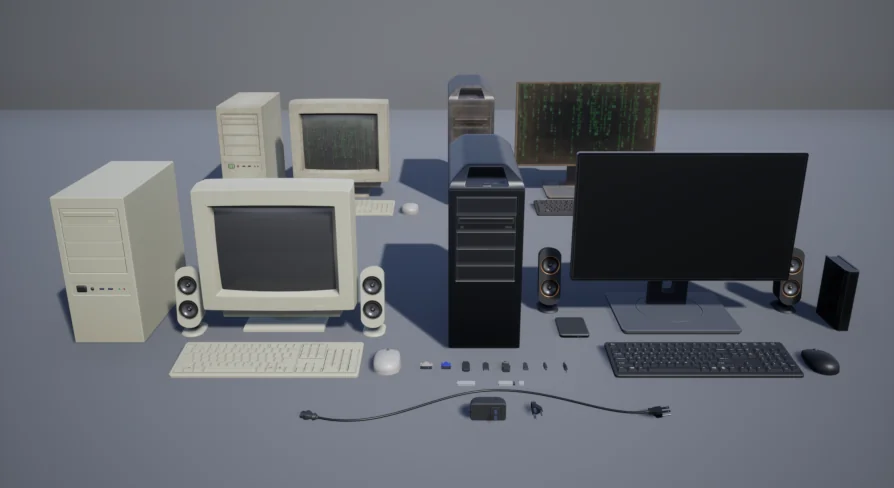
HB Computers Pack focuses on providing the constituent pieces needed to construct full computer setups across multiple configurations. Because the elements are broken down into individual items rather than locked into a single fused desk prop, scenes can feature anything from a minimal dual-screen business setup to a cluttered workbench overflowing with plugs, peripheral gear, and auxiliary hardware. The flexibility to arrange towers on the floor or atop the desk, shift input peripherals, and match different display orientations helps prevent office interiors from looking like repeating clones of the exact same asset.
Computer Cases, Monitors, and Modular Desktop Peripherals
The collection brings together the essential hardware blocks necessary to populate digital desks and technical facilities. Central to any setup are the computer cases, which provide the visual anchor for the workstation, alongside dedicated screens and monitors that define the user's primary interface. These core fixtures are supported by keyboards and mice, letting level designers build natural resting poses for seated characters or dress vacant desks that look recently abandoned.
Audio and power accessories expand the visual scope beyond the basic monitor-and-tower pairing. The package includes speakers, individual connectors, and plugs that populate the rear panels of towers and desktop surfaces. Having loose plugs and small connector hardware enables micro-dressing around the back of equipment racks, beneath office furniture, and across peripheral hub areas where real-world workspaces accumulate the most clutter. This modular breakdown allows single-screen home setups, sprawling tech-support rows, and multi-monitor surveillance stations to emerge from the same pool of assets.
Routing Wire Runs with the Cable Blueprint
Managing believable wiring is frequently one of the most tedious tasks in interior environment art. Loose props placed on a desk without wires quickly look weightless and detached from the physical space, while manually stretching static wire meshes between ports consumes unnecessary production time.
To solve this, the pack includes a specialized Cable Blueprint engineered to help route cables and link various connectors directly between devices. Utilizing Spline Components, the blueprint allows artists to map the gentle droop, sharp bends, and messy floor tangles that naturally happen when computer towers connect to screens, mice, keyboards, and wall sockets. Snapping connectors into place alongside dynamic cable curves means you can run leads out of the back of a case, loop them behind a monitor arm, and direct them down toward the floor or power strip with accurate physical flow.
Weathering Hardware via the Material Dirt Layer
Hardware appearance in games and virtual production often needs to signal the passage of time or the cleanliness of the surrounding scene. A pristine, immaculate corporate tower looks completely out of place inside an abandoned security bunker, an auto repair shop, or a neglected industrial plant.
Every object in the package supports surface aging through a material dirt layer. This feature allows environment artists to introduce grime and wear across computer cases, keyboard keys, speaker grilles, and monitor frames without having to author separate texture sets in external painting software. Adjusting this dirt layer enables clean, freshly deployed systems to sit in executive boardrooms, while heavier layers of accumulated dust and grime can be dialed up for post-apocalyptic shelters, damp basements, or long-forgotten server closets.
Spline Handling and Unreal Engine 5.4 Considerations
Working with spline-driven assets requires an understanding of how construction scripts refresh across different engine revisions. In Unreal Engine 5.4.0, an engine-level bug prevents the Construction Script from executing properly while modifying Spline Components. When shaping lines with the Cable Blueprint inside that specific version, the viewport may appear unresponsive, failing to show updated meshes in real time as points are manipulated.
The underlying system continues to work as intended despite this visual freeze. If you are operating in version 5.4.0, mesh updates can be forced manually by simply nudging the Actor inside the viewport or toggling any setting within the Actor Properties. For artists looking to avoid manual viewport refreshes entirely, the issue is resolved in Unreal Engine 5.4.2, where spline edits trigger the Construction Script automatically without workarounds.
Target Workflows and Level Dressing Roles
Environment artists, set dressers, and architectural visualizers who regularly handle contemporary interiors will find this asset library particularly useful. It eliminates the need to cobble together mismatched peripherals from disparate sources, providing a cohesive visual style across towers, monitors, audio units, and cabling.
Level designers benefit most from the balance of modular placement and cable generation. Instead of settling for sterile desks with floating electronics, teams can run tactile, messy cables across workstations and apply dirt layers to reflect the exact fictional background of any room.
 Consumer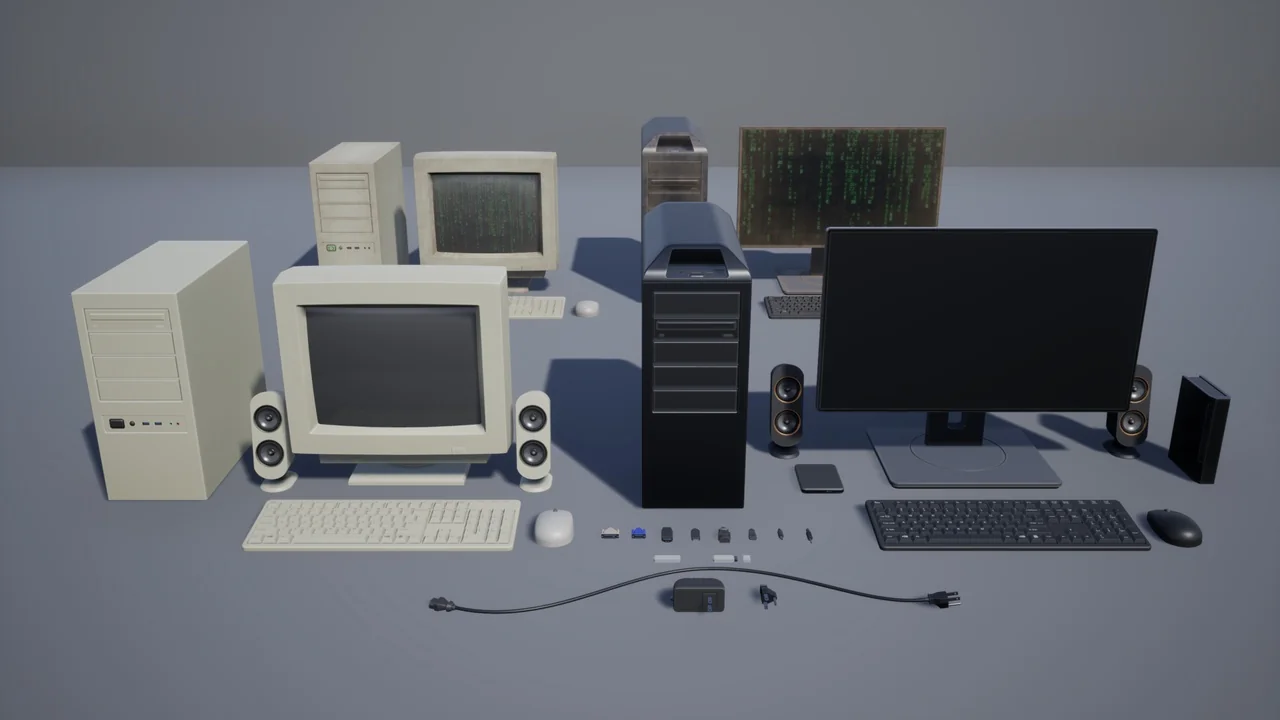
 Consumer
 Sci-Fi
 Weapons & Combat