"1f00f67f9253451b"{"id":"1000968","slug":"top-down-rpg-template","title":"Top Down RPG Template","category":"RPG","engine":"5.3+","assetVersion":"","engineVersion":"Engine Version: 5.3+","tag":"RPG","accent":"blue","visual":"mech","summary":"A Blueprint-only top-down RPG template for Unreal Engine with multiplayer, quests, crafting, inventory, AI combat, boss fights, and save/load systems.","platform":"Unreal Engine","publishedAt":"2026-08-15T14:14:08.269Z","updatedAt":"2026-08-15T14:14:08.269Z","sourceNotes":[],"fileContents":[],"compatibility":["Unreal Engine","Engine Version: 5.3+"],"featuredImage":{"alt":"Top Down RPG Template","src":"/wp-content/uploads/published/2026/08/e7b6b5ea7536-6c7c43af-314b-4c04-88f8-d4e2ddbb31d8-cf531ad050.webp"},"hasDownloadLink":true,"downloads":1,"terms":[{"taxonomy":"category","slug":"rpg","name":"RPG"}],"galleryImages":[{"src":"/wp-content/uploads/published/2026/08/f3e2f905ea6a-de6f3c20-616b-4a38-aacc-7c0c04941736-22f8007076.webp","alt":"Top Down RPG Template"},{"src":"/wp-content/uploads/published/2026/08/0fc7aecb3cd9-1d3cf3ef-21c6-48a1-8e5b-dbb4209bd695-1420fcebec.webp","alt":"Top Down RPG Template"},{"src":"/wp-content/uploads/published/2026/08/6e4e4707871d-87676fe0-8e29-45b7-93af-d4f1c229edba-4966af1ef2.webp","alt":"Top Down RPG Template"},{"src":"/wp-content/uploads/published/2026/08/43e03776d617-de0ec6b1-d3e1-4bc5-8c27-b905310cb7ce-469d1ba115.webp","alt":"Top Down RPG Template"},{"src":"/wp-content/uploads/published/2026/08/560bcc03d09f-10a377c9-3693-4459-bc1f-16126808fbeb-b748e11872.webp","alt":"Top Down RPG Template"},{"src":"/wp-content/uploads/published/2026/08/a064ef304602-fd8666b5-71b0-401d-9298-b35d532ea4ad-d14d93cd27.webp","alt":"Top Down RPG Template"},{"src":"/wp-content/uploads/published/2026/08/03fb63f6a359-f2a24a5f-8fd5-4347-b545-cc84f9f9d75a-e9c298f2ac.webp","alt":"Top Down RPG Template"},{"src":"/wp-content/uploads/published/2026/08/863653a7f512-208b303e-687a-4e1f-b9d3-7a7589149c50-cf98e84078.webp","alt":"Top Down RPG Template"}],"accessPanel":{"kind":"resource","title":"Download this resource","eyebrow":"Free Download","message":"Log in or create a free account to start your download.","fileName":"TopDownRPGTemplate.7z","safetyNote":"Resources are manually reviewed before listing to improve quality and reduce obvious risks.","actionLabel":"Download Free","resourceType":"Resource archive"},"contentHtml":"\u003cp\u003eStarting a top-down RPG project means staking together countless systems before the first quest can be completed. Combat, inventory, stats, quests, crafting, and world interaction all need to exist and work in harmony. The Top Down RPG Template packages those systems into a single Blueprint-driven toolkit that runs multiplayer-ready from the start.\u003c/p\u003e\u003ch2\u003eA Blueprint-Only Foundation for Top-Down RPGs\u003c/h2\u003e\u003cp\u003eThe template is built entirely in Blueprints, which means no C++ compilation or recompilation steps. Every system — from character stats to shop NPCs — is exposed as a Blueprint graph. That makes it approachable for level designers and gameplay scripters who want to tweak behavior without diving into source code. Because the whole project is Blueprint-based, it also stays easy to port or extend inside the Unreal Editor.\u003c/p\u003e\u003cp\u003eMultiplayer readiness is another core part of the foundation. The template comes set up for replicated gameplay, so the inventory, quests, combat, and save/load systems are already designed with networked sessions in mind. This is a major time-saver for teams that want to build a co-op or online RPG without first writing the replication layer themselves.\u003c/p\u003e\u003ch2\u003eCharacter Classes, Combat, and AI Encounters\u003c/h2\u003e\u003cp\u003eThe template supports multiple character classes, letting players pick different roles at the start. Combat is split into three archetypes: melee, ranged, and magic. Each combat style works with the same underlying Blueprint systems, so adding a new class means wiring it into the existing damage model rather than building a separate combat path.\u003c/p\u003e\u003cp\u003eAI is included for enemies. That covers basic behaviors like chasing, attacking, and reacting to player actions. Because the AI is Blueprint-driven, it can be adjusted to fit different enemy types — from melee mobs to ranged attackers. The presence of boss fights in the feature list indicates that the AI system also accommodates larger, more scripted encounters with more complex attack patterns and phases.\u003c/p\u003e\u003ch2\u003eInventory, Quests, and Crafting Systems\u003c/h2\u003e\u003cp\u003eThe inventory system uses a jigsaw layout, where items occupy grid-shaped slots and require players to fit them together. This is a distinctive approach that goes beyond simple list-based inventories. The equipment system ties into the same inventory framework, letting players swap weapons, armor, and accessories while keeping the stat integration consistent.\u003c/p\u003e\u003cp\u003eQuesting and crafting are also built into the same Blueprint ecosystem. Quests can drive player progression, while the crafting system lets players combine materials into new items. Because these systems are interconnected, a quest can reward a crafted item, or a crafting recipe can require a quest-granted material, without needing custom glue code.\u003c/p\u003e\u003ch2\u003eSkills, Status Effects, and Boss Fights\u003c/h2\u003e\u003cp\u003eCharacter progression is backed by a stats and leveling system. On top of that, the template includes skills in three categories: passive, active, and aura. Passive skills give ongoing bonuses, active skills are triggered by the player, and aura skills project effects around the character. This spread covers a lot of typical RPG skill trees without hardcoding a specific class structure.\u003c/p\u003e\u003cp\u003eStatus effects add another layer of depth. These are likely to include common conditions like burn, poison, stun, or buffs, though the source does not list the specific effect types. In combination with boss fights, status effects become a meaningful part of encounter design. Bosses can be built to be vulnerable to certain effects, or players might need to cleanse their own debuffs during a fight.\u003c/p\u003e\u003ch2\u003eSave/Load, Interactables, and Shop NPCs\u003c/h2\u003e\u003cp\u003eThe save and load system provides persistence for player progress. That includes the character's stats, inventory state, and quest progress, which are the standard things an RPG needs to store between sessions. The system is designed to work with the multiplayer setup, so a hosted session can keep state consistent for all players.\u003c/p\u003e\u003cp\u003eThe world itself is interactive through the interactables system. These are the doors, chests, levers, or other objects that players can activate. The shop NPC is a specific kind of interactable that opens a trading interface. With the inventory, equipment, and crafting systems already in place, a shop can effectively buy and sell items, making the economy part of the gameplay loop.\u003c/p\u003e\u003ch2\u003eSample Project, Documentation, and Tutorials\u003c/h2\u003e\u003cp\u003eA sample project is available for the template, according to the documentation section. This gives a ready-made level and setup that can be stripped down or rebuilt. The documentation itself covers the basics, including a specific section that explains how to set up the sample project. Video tutorials walk through key parts of the template visually, which is useful for teams that prefer learning by watching over reading.\u003c/p\u003e\u003cp\u003eThere is also a playable demo and two trailer videos that show the template in action. For anyone evaluating whether this fits their project, the demo offers a hands-on look at the core loop. The forum and Discord community provide a place for users to ask questions, and the Facebook page serves as a release channel for updates.\u003c/p\u003e\u003cp\u003eFor a team that wants to jump into a multiplayer top-down RPG without writing the underlying systems from scratch, the Top Down RPG Template hits the major pillars: combat, progression, inventory, quests, crafting, AI, and persistence. The Blueprint-only approach keeps it flexible for iterative development, and the included learning resources shorten the onboarding time.\u003c/p\u003e\n\n\u003ch2\u003eContinue Browsing Similar Packs\u003c/h2\u003e\n\u003cul\u003e\n\u003cli\u003e\u003ca href=\"https://3dcghub.com/turn-based-tactic-starter-pack/\" title=\"Turn Based Tactic Starter Pack\"\u003eTurn Based Tactic Starter Pack\u003c/a\u003e\u003c/li\u003e\n\u003cli\u003e\u003ca href=\"https://3dcghub.com/modern-rpg-bundle-v7-0-1/\" title=\"Modern RPG BUNDLE v7.0.1\"\u003eModern RPG BUNDLE v7.0.1\u003c/a\u003e\u003c/li\u003e\n\u003cli\u003e\u003ca href=\"https://3dcghub.com/easy-survival-rpg-v5/\" title=\"Easy Survival RPG V5\"\u003eEasy Survival RPG V5\u003c/a\u003e\u003c/li\u003e\n\u003cli\u003e\u003ca href=\"https://3dcghub.com/action-rpg-template/\" title=\"Action RPG Template\"\u003eAction RPG Template\u003c/a\u003e\u003c/li\u003e\n\u003cli\u003e\u003ca href=\"https://3dcghub.com/multiplayer-top-down-shooter-template/\" title=\"Multiplayer Top Down Shooter Template\"\u003eMultiplayer Top Down Shooter Template\u003c/a\u003e\u003c/li\u003e\n\u003c/ul\u003e","contentTextLength":5666,"navigation":{"current":359,"total":3222,"previous":{"id":"1000969","slug":"ultimate-torches-package-50-variations","title":"Ultimate Torches package / 50 Variations","category":"Tools, Objects \u0026 Decor","platform":"Unreal Engine","updatedAt":"2026-08-15T14:19:51.805Z"},"next":{"id":"1000967","slug":"tokyo-back-alleys-buildings","title":"Tokyo Back Alleys - Buildings","category":"Buildings \u0026 Architecture","platform":"Unreal Engine","updatedAt":"2026-08-15T12:13:52.457Z"}},"relatedResources":[{"id":"1001031","slug":"easy-topdown-template-v2-1-survival-action-shooter-top-down-rpg","title":"Easy TopDown Template V2.1 | Survival Action Shooter Top Down RPG","category":"RPG","engine":"5.6+","assetVersion":"","engineVersion":"Engine Version: 5.6+","tag":"RPG","accent":"blue","visual":"mech","summary":"Production-ready top-down survival RPG template with replicated multiplayer, combat, inventory, building, AI, narrative systems, 280+ docs, and a V3 roadmap.","platform":"Unreal Engine","publishedAt":"2026-08-23T12:26:25.601Z","updatedAt":"2026-08-23T12:26:25.601Z","sourceNotes":[],"fileContents":[],"compatibility":["Unreal Engine","Engine Version: 5.6+"],"featuredImage":{"alt":"Easy TopDown Template V2.1 | Survival Action Shooter Top Down RPG","src":"/wp-content/uploads/published/2026/08/8044fdff0e95-28bfa536-f855-4e68-910b-00eda2dc37ec-911ae442b6.webp"},"hasDownloadLink":true,"downloads":6},{"id":"1001250","slug":"open-world-rpg-toolkit","title":"Open World RPG Toolkit","category":"RPG","engine":"5.0+","assetVersion":"","engineVersion":"Engine Version: 5.0+","tag":"RPG","accent":"blue","visual":"mech","summary":"Explore the Open World RPG Toolkit, featuring 47 network-replicated blueprints covering quests, inventory, map setup, saves, and survival systems.","platform":"Unreal Engine","publishedAt":"2026-09-23T15:32:52.651Z","updatedAt":"2026-09-23T15:32:52.651Z","sourceNotes":[],"fileContents":[],"compatibility":["Unreal Engine","Engine Version: 5.0+"],"featuredImage":{"alt":"Open World RPG Toolkit","src":"/wp-content/uploads/published/2026/09/5cd2af69cae2-b06f35c2-d7a7-4212-8d3b-32855ff16e82-d90a9599f6.webp"},"hasDownloadLink":true,"downloads":0},{"id":"11887","slug":"turn-based-tactic-starter-pack","title":"Turn Based Tactic Starter Pack","category":"RPG","engine":"4.26+,5.0+","assetVersion":"Engine version: 4.26+,5.0+","engineVersion":"4.26","tag":"RPG","accent":"blue","visual":"animation","summary":"The Turn Based Tactic Starter Pack provides a robust foundation for building tactical games, featuring turn-based combat, enemy AI, and a fully functional marketplace.","platform":"Unreal Engine","publishedAt":"2026-03-05T19:00:34.000Z","updatedAt":"2026-04-19T15:48:06.000Z","sourceNotes":[],"fileContents":[],"compatibility":["Unreal Engine","Engine version: 4.26+,5.0+"],"featuredImage":{"alt":"Turn Based Tactic Starter Pack","src":"https://3dcghub.com/wp-content/uploads/2026/03/5f5a9534-d2b6-4b49-9dde-2c6d13a0a118.webp"},"hasDownloadLink":true,"downloads":0}]}
RPG
Top Down RPG Template
A Blueprint-only top-down RPG template for Unreal Engine with multiplayer, quests, crafting, inventory, AI combat, boss fights, and save/load systems.
Category:Unreal Engine,RPGPlatform: Unreal EngineEngine Version: 5.3+Published: Aug 15, 2026
RPG
Resource overview
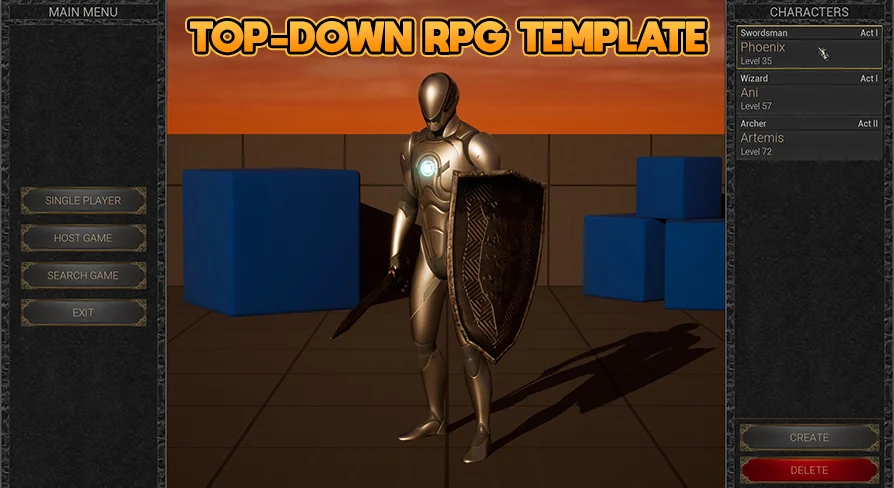
Starting a top-down RPG project means staking together countless systems before the first quest can be completed. Combat, inventory, stats, quests, crafting, and world interaction all need to exist and work in harmony. The Top Down RPG Template packages those systems into a single Blueprint-driven toolkit that runs multiplayer-ready from the start.
A Blueprint-Only Foundation for Top-Down RPGs
The template is built entirely in Blueprints, which means no C++ compilation or recompilation steps. Every system — from character stats to shop NPCs — is exposed as a Blueprint graph. That makes it approachable for level designers and gameplay scripters who want to tweak behavior without diving into source code. Because the whole project is Blueprint-based, it also stays easy to port or extend inside the Unreal Editor.
Multiplayer readiness is another core part of the foundation. The template comes set up for replicated gameplay, so the inventory, quests, combat, and save/load systems are already designed with networked sessions in mind. This is a major time-saver for teams that want to build a co-op or online RPG without first writing the replication layer themselves.
Character Classes, Combat, and AI Encounters
The template supports multiple character classes, letting players pick different roles at the start. Combat is split into three archetypes: melee, ranged, and magic. Each combat style works with the same underlying Blueprint systems, so adding a new class means wiring it into the existing damage model rather than building a separate combat path.
AI is included for enemies. That covers basic behaviors like chasing, attacking, and reacting to player actions. Because the AI is Blueprint-driven, it can be adjusted to fit different enemy types — from melee mobs to ranged attackers. The presence of boss fights in the feature list indicates that the AI system also accommodates larger, more scripted encounters with more complex attack patterns and phases.
Inventory, Quests, and Crafting Systems
The inventory system uses a jigsaw layout, where items occupy grid-shaped slots and require players to fit them together. This is a distinctive approach that goes beyond simple list-based inventories. The equipment system ties into the same inventory framework, letting players swap weapons, armor, and accessories while keeping the stat integration consistent.
Questing and crafting are also built into the same Blueprint ecosystem. Quests can drive player progression, while the crafting system lets players combine materials into new items. Because these systems are interconnected, a quest can reward a crafted item, or a crafting recipe can require a quest-granted material, without needing custom glue code.
Skills, Status Effects, and Boss Fights
Character progression is backed by a stats and leveling system. On top of that, the template includes skills in three categories: passive, active, and aura. Passive skills give ongoing bonuses, active skills are triggered by the player, and aura skills project effects around the character. This spread covers a lot of typical RPG skill trees without hardcoding a specific class structure.
Status effects add another layer of depth. These are likely to include common conditions like burn, poison, stun, or buffs, though the source does not list the specific effect types. In combination with boss fights, status effects become a meaningful part of encounter design. Bosses can be built to be vulnerable to certain effects, or players might need to cleanse their own debuffs during a fight.
Save/Load, Interactables, and Shop NPCs
The save and load system provides persistence for player progress. That includes the character's stats, inventory state, and quest progress, which are the standard things an RPG needs to store between sessions. The system is designed to work with the multiplayer setup, so a hosted session can keep state consistent for all players.
The world itself is interactive through the interactables system. These are the doors, chests, levers, or other objects that players can activate. The shop NPC is a specific kind of interactable that opens a trading interface. With the inventory, equipment, and crafting systems already in place, a shop can effectively buy and sell items, making the economy part of the gameplay loop.
Sample Project, Documentation, and Tutorials
A sample project is available for the template, according to the documentation section. This gives a ready-made level and setup that can be stripped down or rebuilt. The documentation itself covers the basics, including a specific section that explains how to set up the sample project. Video tutorials walk through key parts of the template visually, which is useful for teams that prefer learning by watching over reading.
There is also a playable demo and two trailer videos that show the template in action. For anyone evaluating whether this fits their project, the demo offers a hands-on look at the core loop. The forum and Discord community provide a place for users to ask questions, and the Facebook page serves as a release channel for updates.
For a team that wants to jump into a multiplayer top-down RPG without writing the underlying systems from scratch, the Top Down RPG Template hits the major pillars: combat, progression, inventory, quests, crafting, AI, and persistence. The Blueprint-only approach keeps it flexible for iterative development, and the included learning resources shorten the onboarding time.
 RPG
RPG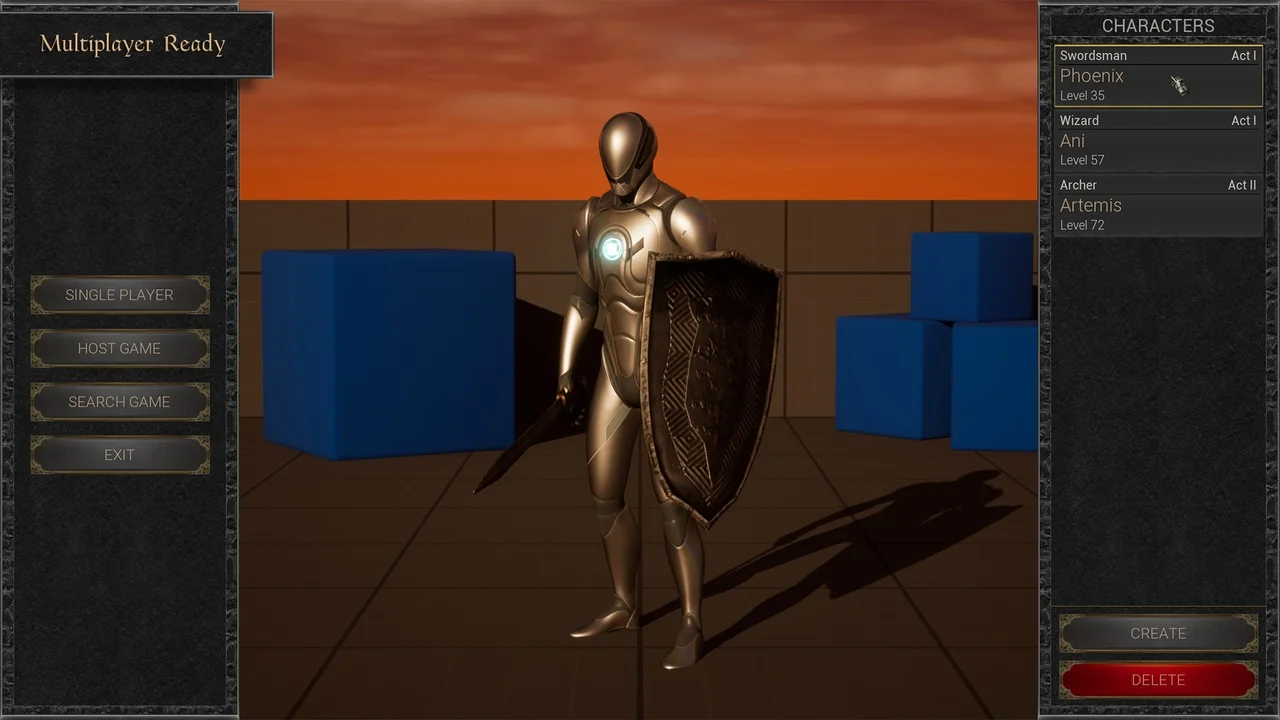
 RPG
RPG RPG
RPG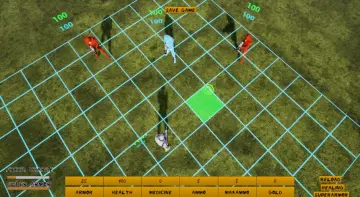 RPG
RPG