"efaa631e936fd3ee"{"id":"1002235","slug":"top-down-kit-shooter","title":"Top down Kit : Shooter","category":"Shooter","engine":"4.26+,5.0+","assetVersion":"","engineVersion":"Engine Version: 4.26+,5.0+","tag":"Shooter","accent":"blue","visual":"mech","summary":"Top down Kit: Shooter provides a 100% blueprint twin-stick shooter controller with dedicated feature levels, detailed notes, and mouse-and-keyboard setups.","platform":"Unreal Engine","publishedAt":"2026-10-29T15:42:02.875Z","updatedAt":"2026-10-29T15:42:02.875Z","sourceNotes":[],"fileContents":[],"compatibility":["Unreal Engine","Engine Version: 4.26+,5.0+"],"featuredImage":{"alt":"Top down Kit : Shooter","src":"/wp-content/uploads/published/2026/10/531c88f88c2c-57c258a5-80a1-4d5c-9b43-9de49f235745-4ef6592030.webp"},"hasDownloadLink":true,"downloads":0,"terms":[{"taxonomy":"category","slug":"shooter","name":"Shooter"}],"galleryImages":[{"src":"/wp-content/uploads/published/2026/10/e7780891b501-8e757194-1f01-47f2-b6f0-1c84abaf9469-63abdca600.webp","alt":"Top down Kit : Shooter"},{"src":"/wp-content/uploads/published/2026/10/365e0521c7f2-9ddde8e4-b240-4d9e-a79b-e36277ee1e2f-e10547ea4d.webp","alt":"Top down Kit : Shooter"},{"src":"/wp-content/uploads/published/2026/10/9908457afbb1-234765e2-54a7-4bd6-8388-5f5408e34c03-ac95110430.webp","alt":"Top down Kit : Shooter"},{"src":"/wp-content/uploads/published/2026/10/27ab70cf0e51-c0a7ef19-3e24-44dc-9566-441a8820fed0-d16e586cd7.webp","alt":"Top down Kit : Shooter"},{"src":"/wp-content/uploads/published/2026/10/d2e131418c5c-bdc81486-9dbf-437c-a39d-ddbe08e439d8-339ccf22a5.webp","alt":"Top down Kit : Shooter"},{"src":"/wp-content/uploads/published/2026/10/7184d1894582-68f8ab37-eea3-43d6-9fd2-a6e59d1ae254-61efe83340.webp","alt":"Top down Kit : Shooter"},{"src":"/wp-content/uploads/published/2026/10/98a0450596c1-dfd4ec7e-4d1d-4061-9e3d-f4975c27d5c1-bc4fd8cc2a.webp","alt":"Top down Kit : Shooter"},{"src":"/wp-content/uploads/published/2026/10/4c5768b0e3e8-95945617-c267-4588-948c-1b7b4a77ef25-65f2507fbd.webp","alt":"Top down Kit : Shooter"},{"src":"/wp-content/uploads/published/2026/10/43a9e77903c5-0ad99899-883a-444c-b88b-4340e9427ac0-ebaed0bb00.webp","alt":"Top down Kit : Shooter"}],"accessPanel":{"kind":"resource","title":"Download this resource","eyebrow":"Free Download","message":"Log in or create a free account to start your download.","fileName":"Top down Kit Shooter.7z","safetyNote":"Resources are manually reviewed before listing to improve quality and reduce obvious risks.","actionLabel":"Download Free","resourceType":"Resource archive"},"contentHtml":"\u003ch2\u003eTwin-Stick-Shooter Controller Mechanics\u003c/h2\u003e\n\u003cp\u003eTop down Kit: Shooter provides an interactive twin-stick shooter controller foundation intended for top-down action game projects. The core logic handles the distinct separation between character directional locomotion and directional aiming, which serves as the defining control mechanism of the twin-stick format. Instead of binding character rotation solely to movement inputs, the system resolves directional movement and targeting vectors independently.\u003c/p\u003e\n\u003cp\u003eIn standard gameplay situations, this allows a character to traverse the environment in any chosen direction along the horizontal plane while keeping a weapon oriented toward an opposing threat or target point. Decoupling the input axes ensures smooth, responsive maneuvering during intense combat scenarios, letting players strafe, retreat, or flank hostile entities without interrupting their firing line. This baseline controller architecture forms the central backbone of the entire gameplay loop.\u003c/p\u003e \u003ch2\u003eVisual Scripting Within a 100% Blueprint Project\u003c/h2\u003e\n\u003cp\u003eThe kit is structured as a 100% blueprint project, meaning that all execution chains, calculations, and controller events exist purely within visual scripting graphs. Game logic is executed entirely through interconnected nodes, avoiding the need for external compiled code, compiler environments, or native code rebuilds when testing gameplay variations.\u003c/p\u003e\n\u003cp\u003eBy implementing every feature through native visual scripting, the underlying systems remain open for direct inspection within the editor. Developers can trace execution lines from raw player input events down to rotation calculations, velocity changes, and projectile or weapon trigger events. Variable types, math operations, and event graphs are accessible directly inside the asset hierarchy, providing a clear reference for how each component operates within the broader top-down framework.\u003c/p\u003e \u003ch2\u003eTesting Mechanics in the Detailed Features Level\u003c/h2\u003e\n\u003cp\u003eIncluded with the setup is a detailed features level that demonstrates each gameplay system in a working environment. Rather than leaving the logic detached in an empty space, this test map sets up the controller within an active play area, showing how the movement boundaries, collision, and action mechanics interact during a live session.\u003c/p\u003e\n\u003cp\u003eOpening the features level allows developers to immediately evaluate the responsive feel of the top-down perspective. Viewing the camera distance, player perspective, aiming line-of-sight, and character handling in an active scene helps confirm how the controller manages physics and directional steering. It also serves as a benchmark space where new environmental obstacles, targets, or geometry adjustments can be introduced and tested against the base controller math.\u003c/p\u003e \u003ch2\u003eHandling Mouse and Keyboard Controls\u003c/h2\u003e\n\u003cp\u003eThe project includes a functional demo configured specifically for mouse and keyboard inputs. In this configuration, translation is typically assigned to standard directional keys, while rotation and targeting rely on the position of the mouse cursor across the game viewport.\u003c/p\u003e\n\u003cp\u003eTranslating cursor coordinates from screen space into a three-dimensional world location is essential for accurate top-down aiming. The controller logic tracks the pointer position on the screen plane and performs the necessary vector calculations to point the character or weapon system directly toward that target coordinate. This setup provides rapid, pinpoint aiming precision, distinct from analog stick input schemes, giving keyboard and mouse players immediate tactical responsiveness when steering their shots across the screen.\u003c/p\u003e \u003ch2\u003eGraph Documentation and In-Blueprint Notes\u003c/h2\u003e\n\u003cp\u003eTo assist with navigating the node networks, the project includes detailed notes inside the blueprints alongside external documentation and a manual. These in-graph comments identify what specific node clusters are doing, mapping out the function of mathematical conversions, axis inputs, and state updates.\u003c/p\u003e\n\u003cp\u003eHaving written explanations placed directly over the node networks minimizes the guesswork involved in troubleshooting or extending visual scripts. Developers looking to isolate a specific calculation—such as aiming orientation formulas or acceleration parameters—can follow the commentary blocks to find the relevant logic quickly. Paired with the manual and documentation files, these in-engine notes clarify the intent of each graph segment, illustrating how the shooter framework processes data from initial player input to on-screen motion.\u003c/p\u003e \u003ch2\u003eProject Application and Shooter Logic\u003c/h2\u003e\n\u003cp\u003eThe kit establishes a clean foundation for projects focusing on top-down action and shooter systems. Because the logic is modularized across annotated blueprint graphs, the controller can be adapted into larger action titles, arena survival environments, or linear twin-stick campaign levels.\u003c/p\u003e\n\u003cp\u003eWith its combination of an interactive test level, mouse and keyboard control implementation, and fully exposed visual script networks, the package acts as a complete reference implementation for top-down shooter mechanics. It handles the baseline input processing, camera orientation relationships, and directional control demands required by modern top-down combat games.\u003c/p\u003e\n\n\u003ch2\u003eMore From The Same Workflow\u003c/h2\u003e\n\u003cul\u003e\n\u003cli\u003e\u003ca href=\"https://3dcghub.com/side-scroller-shooter-kit-v1-1/\" title=\"Side Scroller Shooter Kit v1.1\"\u003eSide Scroller Shooter Kit v1.1\u003c/a\u003e\u003c/li\u003e\n\u003cli\u003e\u003ca href=\"https://3dcghub.com/definitive-fps-kit/\" title=\"DEFINITIVE FPS KIT\"\u003eDEFINITIVE FPS KIT\u003c/a\u003e\u003c/li\u003e\n\u003cli\u003e\u003ca href=\"https://3dcghub.com/ultimate-multiplayer-fps-kit/\" title=\"Ultimate Multiplayer FPS Kit\"\u003eUltimate Multiplayer FPS Kit\u003c/a\u003e\u003c/li\u003e\n\u003cli\u003e\u003ca href=\"https://3dcghub.com/zombie-shooter-kit-v2-12-unreal-engine-5-starter-pack/\" title=\"Zombie Shooter Kit v2.12 - UNREAL ENGINE 5 Starter Pack\"\u003eZombie Shooter Kit v2.12 - UNREAL ENGINE 5 Starter Pack\u003c/a\u003e\u003c/li\u003e\n\u003cli\u003e\u003ca href=\"https://3dcghub.com/third-person-shooter-kit-v2-2/\" title=\"Third Person Shooter Kit v2.2\"\u003eThird Person Shooter Kit v2.2\u003c/a\u003e\u003c/li\u003e\n\u003c/ul\u003e","contentTextLength":5411,"navigation":{"current":50,"total":4209,"previous":{"id":"1002236","slug":"top-down-post-apocalyptic-props","title":"Top-Down Post-Apocalyptic Props","category":"Vehicles \u0026 Transportation","platform":"Unreal Engine","updatedAt":"2026-10-29T15:43:19.697Z"},"next":{"id":"1002234","slug":"timers-clocks-and-counters-pack","title":"Timers, Clocks and Counters Pack","category":"Gameplay Features","platform":"Unreal Engine","updatedAt":"2026-10-29T15:38:30.257Z"}},"relatedResources":[{"id":"1000137","slug":"side-scroller-shooter-kit-v1-1","title":"Side Scroller Shooter Kit v1.1","category":"Shooter","engine":"4.26+,5.0+","assetVersion":"","engineVersion":"Engine Version: 4.26+,5.0+","tag":"Shooter","accent":"blue","visual":"mech","summary":"A 100% Blueprint single-player side scroller base for Unreal Engine, with cover, AI, aiming updates, input integration, and UE 5.5-5.7 support.","platform":"Unreal Engine","publishedAt":"2026-06-12T08:11:24.509Z","updatedAt":"2026-06-12T08:11:24.509Z","sourceNotes":[],"fileContents":[],"compatibility":["Unreal Engine","Engine Version: 4.26+,5.0+"],"featuredImage":{"alt":"Side Scroller Shooter Kit v1.1","src":"/wp-content/uploads/published/2026/06/0a51d74f8ceb-6369af1c-09d8-40ae-82e2-47626dd263a8-87602d033a.webp"},"hasDownloadLink":true,"downloads":5},{"id":"11974","slug":"definitive-fps-kit","title":"DEFINITIVE FPS KIT","category":"Shooter","engine":"5.5+","assetVersion":"Asset Version: 0.0.3","engineVersion":"Engine version: 5.5+","tag":"Shooter","accent":"blue","visual":"luts","summary":"The DEFINITIVE FPS KIT provides a solid foundation for creating professional first-person shooters. It features high-quality animations, customizable loadouts, and diverse game modes like round-based zombies and multiplayer.","platform":"Unreal Engine","publishedAt":"2026-03-06T16:27:47.000Z","updatedAt":"2026-10-16T06:54:06.998Z","sourceNotes":[],"fileContents":[],"compatibility":["Unreal Engine","Asset Version: 0.0.3","Engine version: 5.5+"],"featuredImage":{"alt":"DEFINITIVE FPS KIT","src":"https://3dcghub.com/wp-content/uploads/2026/03/6ad028e1-885c-4980-aa89-7ecea094d867.webp"},"hasDownloadLink":true,"downloads":24},{"id":"1001496","slug":"ultimate-multiplayer-fps-kit","title":"Ultimate Multiplayer FPS Kit","category":"Shooter","engine":"5.3+","assetVersion":"","engineVersion":"Engine Version: 5.3+","tag":"Shooter","accent":"blue","visual":"mech","summary":"Explore the Ultimate Multiplayer FPS Kit, featuring replicated mechanics, modular weapons, dynamic locomotion, and flexible objective frameworks.","platform":"Unreal Engine","publishedAt":"2026-10-09T05:55:05.138Z","updatedAt":"2026-10-09T05:55:05.138Z","sourceNotes":[],"fileContents":[],"compatibility":["Unreal Engine","Engine Version: 5.3+"],"featuredImage":{"alt":"Ultimate Multiplayer FPS Kit","src":"/wp-content/uploads/published/2026/10/391e1644e6fa-13c21395-24cd-4606-b1ed-a04edd06457c-0245a33139.webp"},"hasDownloadLink":true,"downloads":3}]}
Shooter
Top down Kit : Shooter
Top down Kit: Shooter provides a 100% blueprint twin-stick shooter controller with dedicated feature levels, detailed notes, and mouse-and-keyboard setups.
Category:Unreal Engine,ShooterPlatform: Unreal EngineEngine Version: 4.26+,5.0+Published: Oct 29, 2026
Shooter
Resource overview
Twin-Stick-Shooter Controller Mechanics
Top down Kit: Shooter provides an interactive twin-stick shooter controller foundation intended for top-down action game projects. The core logic handles the distinct separation between character directional locomotion and directional aiming, which serves as the defining control mechanism of the twin-stick format. Instead of binding character rotation solely to movement inputs, the system resolves directional movement and targeting vectors independently.
In standard gameplay situations, this allows a character to traverse the environment in any chosen direction along the horizontal plane while keeping a weapon oriented toward an opposing threat or target point. Decoupling the input axes ensures smooth, responsive maneuvering during intense combat scenarios, letting players strafe, retreat, or flank hostile entities without interrupting their firing line. This baseline controller architecture forms the central backbone of the entire gameplay loop.
Visual Scripting Within a 100% Blueprint Project
The kit is structured as a 100% blueprint project, meaning that all execution chains, calculations, and controller events exist purely within visual scripting graphs. Game logic is executed entirely through interconnected nodes, avoiding the need for external compiled code, compiler environments, or native code rebuilds when testing gameplay variations.
By implementing every feature through native visual scripting, the underlying systems remain open for direct inspection within the editor. Developers can trace execution lines from raw player input events down to rotation calculations, velocity changes, and projectile or weapon trigger events. Variable types, math operations, and event graphs are accessible directly inside the asset hierarchy, providing a clear reference for how each component operates within the broader top-down framework.
Testing Mechanics in the Detailed Features Level
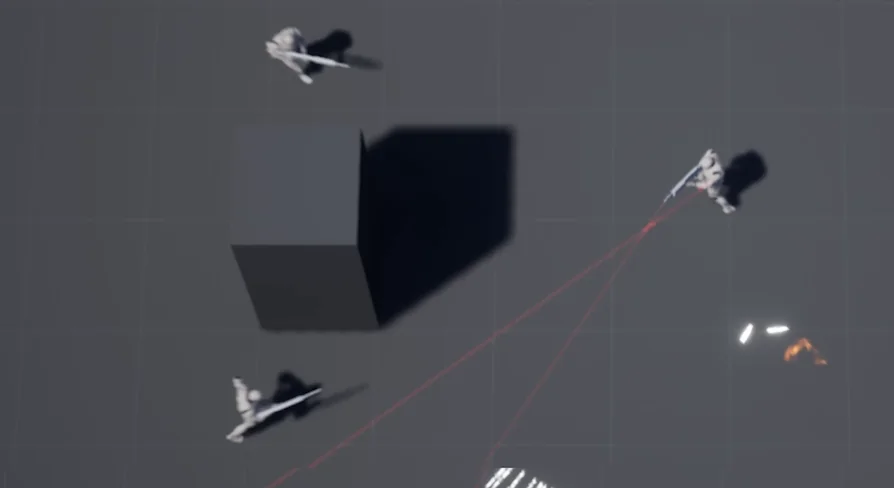
Included with the setup is a detailed features level that demonstrates each gameplay system in a working environment. Rather than leaving the logic detached in an empty space, this test map sets up the controller within an active play area, showing how the movement boundaries, collision, and action mechanics interact during a live session.
Opening the features level allows developers to immediately evaluate the responsive feel of the top-down perspective. Viewing the camera distance, player perspective, aiming line-of-sight, and character handling in an active scene helps confirm how the controller manages physics and directional steering. It also serves as a benchmark space where new environmental obstacles, targets, or geometry adjustments can be introduced and tested against the base controller math.
Handling Mouse and Keyboard Controls
The project includes a functional demo configured specifically for mouse and keyboard inputs. In this configuration, translation is typically assigned to standard directional keys, while rotation and targeting rely on the position of the mouse cursor across the game viewport.
Translating cursor coordinates from screen space into a three-dimensional world location is essential for accurate top-down aiming. The controller logic tracks the pointer position on the screen plane and performs the necessary vector calculations to point the character or weapon system directly toward that target coordinate. This setup provides rapid, pinpoint aiming precision, distinct from analog stick input schemes, giving keyboard and mouse players immediate tactical responsiveness when steering their shots across the screen.
Graph Documentation and In-Blueprint Notes
To assist with navigating the node networks, the project includes detailed notes inside the blueprints alongside external documentation and a manual. These in-graph comments identify what specific node clusters are doing, mapping out the function of mathematical conversions, axis inputs, and state updates.
Having written explanations placed directly over the node networks minimizes the guesswork involved in troubleshooting or extending visual scripts. Developers looking to isolate a specific calculation—such as aiming orientation formulas or acceleration parameters—can follow the commentary blocks to find the relevant logic quickly. Paired with the manual and documentation files, these in-engine notes clarify the intent of each graph segment, illustrating how the shooter framework processes data from initial player input to on-screen motion.
Project Application and Shooter Logic
The kit establishes a clean foundation for projects focusing on top-down action and shooter systems. Because the logic is modularized across annotated blueprint graphs, the controller can be adapted into larger action titles, arena survival environments, or linear twin-stick campaign levels.
With its combination of an interactive test level, mouse and keyboard control implementation, and fully exposed visual script networks, the package acts as a complete reference implementation for top-down shooter mechanics. It handles the baseline input processing, camera orientation relationships, and directional control demands required by modern top-down combat games.
 Shooter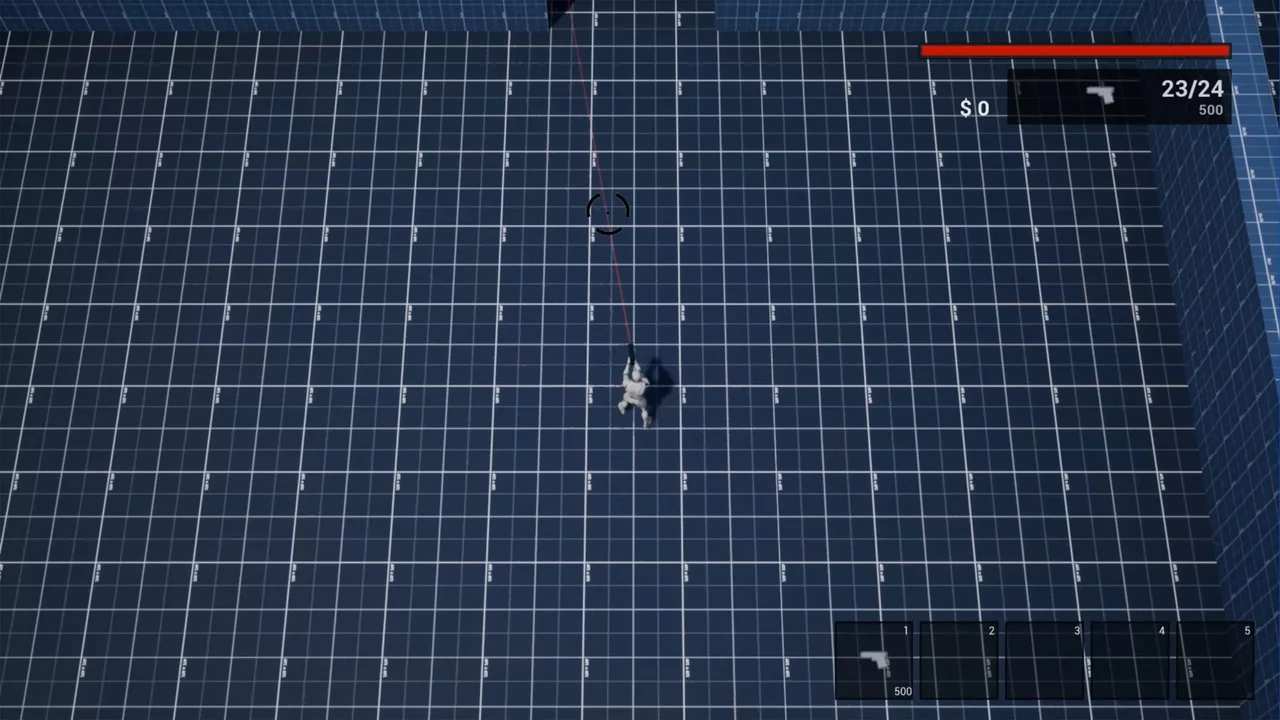
 Shooter
 Shooter
 Shooter