"b00678cacce53329"{"id":"1002846","slug":"sword-fx","title":"Sword FX","category":"Spells \u0026 Combat","engine":"4.26+,5.0+","assetVersion":"","engineVersion":"Engine Version: 4.26+,5.0+","tag":"Spells \u0026 Combat","accent":"blue","visual":"mech","summary":"A technical breakdown of Sword FX for Unreal Engine 4, detailing its Niagara particle systems, material-to-texture balance, and UE4 beta API considerations.","platform":"Unreal Engine","indexPolicy":"index","publishedAt":"2026-11-20T12:28:33.502Z","updatedAt":"2026-11-20T12:28:33.502Z","sourceNotes":[],"fileContents":[],"compatibility":["Unreal Engine","Engine Version: 4.26+,5.0+"],"featuredImage":{"alt":"Sword FX","src":"/wp-content/uploads/published/2026/11/f95ba3a1b099-b4cae4cf-5b4d-4506-90a9-e881af05b257-989139e5fc.webp"},"fileSizeBytes":25990406,"hasDownloadLink":true,"downloads":0,"terms":[{"taxonomy":"category","slug":"spells-and-combat","name":"Spells \u0026 Combat"}],"galleryImages":[{"src":"/wp-content/uploads/published/2026/11/5a792023369c-f6942c9e-078e-4190-b7d2-d639d3b63d97-66364d5c04.webp","alt":"Sword FX"},{"src":"/wp-content/uploads/published/2026/11/41a579907369-5cf875b1-5ed8-4de1-bfae-d3cd25bb48cf-b1c6ac4e5a.webp","alt":"Sword FX"},{"src":"/wp-content/uploads/published/2026/11/8dd740391cfd-fc96a641-c575-43a6-965e-2780effbc478-6cdb1e5613.webp","alt":"Sword FX"},{"src":"/wp-content/uploads/published/2026/11/88a648f53cf0-3c676568-4fd3-467b-8992-5e7af49d5d45-b49e96941e.webp","alt":"Sword FX"},{"src":"/wp-content/uploads/published/2026/11/7677a3a44262-5dca9885-d420-4351-bd42-cdd89e1ab3fe-acb7badb85.webp","alt":"Sword FX"},{"src":"/wp-content/uploads/published/2026/11/1bf38d98d50e-1d758455-02d6-496e-a460-7b663397f941-f7c640ef07.webp","alt":"Sword FX"},{"src":"/wp-content/uploads/published/2026/11/feb959bca29c-5cac8469-dae8-452e-9cf5-6bc95da30e78-68ce61f207.webp","alt":"Sword FX"},{"src":"/wp-content/uploads/published/2026/11/da8539067fac-fa9ee19b-d6b9-4bd7-a683-8f3089be03c4-7c51f4d171.webp","alt":"Sword FX"},{"src":"/wp-content/uploads/published/2026/11/6a59307d2625-11b065ad-7b28-4b51-8c19-ade77260b657-13009a2d37.webp","alt":"Sword FX"},{"src":"/wp-content/uploads/published/2026/11/13ca7028efe5-ef2545df-44b2-4e19-a865-fe28357dcdee-6195812fc6.webp","alt":"Sword FX"}],"accessPanel":{"kind":"resource","title":"Get this resource","safetyNote":"Resources are manually reviewed before listing to improve quality and reduce obvious risks.","fileName":"Content.7z","resourceType":"Resource archive","versions":[]},"contentHtml":"\u003ch2\u003eLoading Effect_Map and Integrating Sword FX Assets\u003c/h2\u003e\u003cp\u003eWorking with the package begins inside \u003ccode\u003eEffect_Map\u003c/code\u003e, the dedicated demonstration environment included to showcase each emitter configuration. Rather than loading individual emitters directly into a character viewport or weapon blueprint blind, launching the map offers a controlled baseline. You can immediately evaluate the playback behavior of the ten distinct particle setups in an isolated setting. This environment isolates light interactions, screen-space reflections, and emitter draw order away from complex gameplay scripts, allowing direct observation of trail timing and particle density.\u003c/p\u003e\u003cp\u003eBringing these visual assets into an active character pipeline requires binding the Niagara components to the weapon or character skeletal mesh. In standard Unreal Engine melee setups, trail components reference designated sockets placed along the weapon blade, typically at the hilt, mid-blade, and tip. Inside \u003ccode\u003eEffect_Map\u003c/code\u003e, each of the ten Niagara particle systems is staged so technical artists can inspect how the ribbons, arcs, and transient sprite bursts resolve in 3D space. Verifying emitter parameters in this map before referencing them in animation notifies or combat montages prevents common alignment errors, such as inverted ribbon twists or disconnected socket paths during high-velocity swing animations.\u003c/p\u003e\u003ch2\u003eAsset Footprint: Materials, Textures, and Emitter Logic\u003c/h2\u003e\u003cp\u003eThe library maintains a tightly focused footprint constructed from a specific set of visual components:\u003c/p\u003e\u003cul\u003e\u003cli\u003e1 level: \u003ccode\u003eEffect_Map\u003c/code\u003e For isolation and playback review\u003c/li\u003e\u003cli\u003e10 Niagara Particle Systems configured for weapon motion and combat impact\u003c/li\u003e\u003cli\u003e25 Materials providing dynamic surface and ribbon rendering logic\u003c/li\u003e\u003cli\u003e10 Textures serving as source masks, gradients, and noise elements\u003c/li\u003e\u003c/ul\u003e\u003cp\u003eAnalyzing this distribution reveals a clear architectural pattern. With twenty-five materials distributed across ten Niagara particle systems and ten source textures, the asset collection relies on flexible material logic rather than an excessive volume of texture bitmaps. The ten textures primarily deliver core visual profiles, including alpha erosion strips, linear gradients, and procedural distortion shapes. The twenty-five materials leverage these textures through varying blend modes, scrolling coordinates, and emissive multipliers to generate twenty-five unique visual expressions.\u003c/p\u003e\u003cp\u003eThis material-to-texture ratio is advantageous for performance monitoring. Melee trails generate significant pixel overdraw when broad ribbons sweep across the screen in quick succession. By utilizing twenty-five targeted materials driven by only ten base textures, texture memory overhead remains minimal. The materials handle the heavy lifting, controlling UV panning along the ribbons, dynamic opacity falloff, and color tint shifts that respond to dynamic parameters piped directly from the Niagara emitter update loops.\u003c/p\u003e\u003ch2\u003eNiagara Emitter Workflows for Sword Trails\u003c/h2\u003e\u003cp\u003eThe primary visual focus centered within this pack is the rendering of weapon trails and sword-based combat accents. Within Unreal Engine, building trails in the Niagara framework represents a distinct shift from legacy particle modules. Niagara calculates ribbon topology using custom interpolation, which allows high-speed weapon swings to maintain smooth curvature without jagged, angular stepping between animation frames.\u003c/p\u003e\u003cp\u003eThe ten particle systems provide separate variations of motion language. Some prioritize broad, continuous ribbons that define the full arc of a heavy slash, while others focus on high-energy dissipate effects where the trail breaks into airborne sparks or residual energy trails. Because these are built as native Niagara systems, technical artists can access emitter properties directly. You can adjust ribbon width, shorten or extend particle lifetime based on attack speed, and modulate the intensity of the materials driven across each swing.\u003c/p\u003e\u003cp\u003eAchieving clean weapon registration in fast-paced action titles demands tight synchronization between animation frames and particle lifetimes. When an attack animation plays, the trail must ignite precisely at the acceleration phase and fade out cleanly before the weapon returns to its idle stance. Having ten preconfigured systems provides sufficient variety to map distinct effects across light strikes, heavy combos, and directional swings without duplicating identical trail silhouettes across an entire combat moveset.\u003c/p\u003e\u003ch2\u003eManaging Unreal Engine 4 Beta Niagara Dependencies in Sword FX\u003c/h2\u003e\u003cp\u003eA critical technical factor in deploying this package is its underlying engine version framework. The asset was built using the Niagara feature set while it was categorized as a Beta feature within Unreal Engine 4. This classification carries operational implications for long-term project maintenance.\u003c/p\u003e\u003cp\u003eEpic Games does not provide backward compatibility guarantees for assets authored during beta phases. Furthermore, the public API governing beta features undergoes structural changes between engine sub-versions, and functionality can be deprecated, refactored, or eliminated at engine development discretion. Projects running on specific legacy builds of Unreal Engine 4 where Niagara was still under beta development can run these particle systems natively. However, teams operating in newer revisions or planning transitions toward modern production tracks must monitor for node-level deprecation.\u003c/p\u003e\u003cp\u003eWhen maintaining projects dependent on beta-era Niagara assets, developers must evaluate module scripts inside the emitter stack. Modules handling ribbon spacing, vector field sampling, and parameter binding occasionally require manual updating if the underlying engine version alters the native Niagara data interface. If an engine upgrade introduces compilation errors within any of the ten particle systems, the issue typically resides in altered module names or changed input pin types inside the Niagara system overview. Keeping an archived copy of the working project state ensures stability while auditing these nodes across engine upgrades.\u003c/p\u003e\u003ch2\u003eTarget Production Scenarios and Pipeline Fit\u003c/h2\u003e\u003cp\u003eThis package is directly tailored for developers building third-person action games, character-action titles, and top-down combat systems that utilize swordplay. In games with rapid melee interactions, visual clarity is paramount. Players rely heavily on visual cues provided by weapon trails to gauge attack ranges, anticipate enemy hitbox active windows, and register successful hits.\u003c/p\u003e\u003cp\u003eSolo developers and technical art teams benefit from having ten working systems that eliminate the need to construct ribbon curves, UV distortion logic, and spawn rate calculations from scratch. The provided \u003ccode\u003eEffect_Map\u003c/code\u003e Acts as a testing bed where materials and systems can be evaluated against project-specific lighting before committing them to character rigs. While teams must account for the beta status of the underlying UE4 Niagara foundation, the asset structure offers a cohesive set of materials, textures, and particle templates built exclusively to handle high-velocity sword motion.\u003c/p\u003e\n\n\u003ch2\u003eMore From The Same Workflow\u003c/h2\u003e\n\u003cul\u003e\n\u003cli\u003e\u003ca href=\"https://3dcghub.com/sword-auras/\" rel=\"noopener noreferrer\"\u003eSword Auras\u003c/a\u003e\u003c/li\u003e\n\u003cli\u003e\u003ca href=\"https://3dcghub.com/niagara-ray-vfx-pack-energy-ray-hit-effects/\" rel=\"noopener noreferrer\"\u003eNiagara Ray VFX Pack (Energy, Ray, Hit Effects)\u003c/a\u003e\u003c/li\u003e\n\u003cli\u003e\u003ca href=\"https://3dcghub.com/m5-vfx-rpg1-sword-trails-niagara/\" rel=\"noopener noreferrer\"\u003eM5 VFX RPG1. Sword Trails(Niagara)\u003c/a\u003e\u003c/li\u003e\n\u003cli\u003e\u003ca href=\"https://3dcghub.com/ky-magic-chant-fx/\" rel=\"noopener noreferrer\"\u003eKY Magic Chant FX\u003c/a\u003e\u003c/li\u003e\n\u003cli\u003e\u003ca href=\"https://3dcghub.com/ky-barrier-shield-fx/\" rel=\"noopener noreferrer\"\u003eKY Barrier Shield FX\u003c/a\u003e\u003c/li\u003e\n\u003c/ul\u003e","contentTextLength":7255,"navigation":{"current":34,"total":4797,"previous":{"id":"1002847","slug":"sword-swipes-anim-trail","title":"Sword Swipes Anim Trail","category":"Spells \u0026 Combat","platform":"Unreal Engine","updatedAt":"2026-11-20T12:29:30.087Z"},"next":{"id":"1002845","slug":"sword-auras","title":"Sword Auras","category":"Spells \u0026 Combat","platform":"Unreal Engine","updatedAt":"2026-11-20T12:27:45.695Z"}},"relatedResources":[{"id":"1002869","slug":"advanced-magic-fx-14","title":"Advanced Magic FX 14","category":"Spells \u0026 Combat","engine":"4.26+,5.0+","assetVersion":"","engineVersion":"Engine Version: 4.26+,5.0+","tag":"Spells \u0026 Combat","accent":"blue","visual":"mech","summary":"Explore Advanced Magic FX 14, featuring Niagara and Cascade magic spells, elemental fire vortexes, lasers, healing, lightning, and built-in particle LODs.","platform":"Unreal Engine","indexPolicy":"index","publishedAt":"2026-11-20T16:32:06.460Z","updatedAt":"2026-11-20T16:32:06.460Z","sourceNotes":[],"fileContents":[],"compatibility":["Unreal Engine","Engine Version: 4.26+,5.0+"],"featuredImage":{"alt":"Advanced Magic FX 14","src":"/wp-content/uploads/published/2026/11/33641332d289-27e981bf-72b2-4c5e-86dc-4b4d536e5221-8a43b3a7ca.webp"},"fileSizeBytes":112659794,"hasDownloadLink":true,"downloads":0},{"id":"1002845","slug":"sword-auras","title":"Sword Auras","category":"Spells \u0026 Combat","engine":"4.26+,5.0+","assetVersion":"","engineVersion":"Engine Version: 4.26+,5.0+","tag":"Spells \u0026 Combat","accent":"blue","visual":"mech","summary":"Explore Sword Auras, a Niagara VFX package featuring 18 particle effects, customizable colors, weapon auras, and hit impacts for combat games.","platform":"Unreal Engine","indexPolicy":"index","publishedAt":"2026-11-20T12:27:45.695Z","updatedAt":"2026-11-20T12:27:45.695Z","sourceNotes":[],"fileContents":[],"compatibility":["Unreal Engine","Engine Version: 4.26+,5.0+"],"featuredImage":{"alt":"Sword Auras","src":"/wp-content/uploads/published/2026/11/7355eeddb105-ebce4e47-be30-4870-8b11-a66c2c15c0a4-6f5ce676d5.webp"},"fileSizeBytes":24024741,"hasDownloadLink":true,"downloads":0},{"id":"1002822","slug":"niagara-ray-vfx-pack-energy-ray-hit-effects","title":"Niagara Ray VFX Pack (Energy, Ray, Hit Effects)","category":"Spells \u0026 Combat","engine":"4.25+,5.0+","assetVersion":"","engineVersion":"Engine Version: 4.25+,5.0+","tag":"Spells \u0026 Combat","accent":"blue","visual":"mech","summary":"Explore the Niagara Ray VFX Pack featuring 15 Niagara FX across 5 unique projectile sets with energy, ray, and hit visual effects.","platform":"Unreal Engine","indexPolicy":"index","publishedAt":"2026-11-20T07:57:41.195Z","updatedAt":"2026-11-20T07:57:41.195Z","sourceNotes":[],"fileContents":[],"compatibility":["Unreal Engine","Engine Version: 4.25+,5.0+"],"featuredImage":{"alt":"Niagara Ray VFX Pack (Energy, Ray, Hit Effects)","src":"/wp-content/uploads/published/2026/11/29c3acdf8696-c6eae2f2-a0c8-4492-a1dd-a74b000eafcd-dea05c8310.webp"},"fileSizeBytes":38586759,"hasDownloadLink":true,"downloads":0}]}
Resource screenshots
1 / 10
Join our channel
Follow 3DCGHUB on Telegram for new resource drops, migration updates, and community notices.
Resources are manually reviewed before listing to improve quality and reduce obvious risks.
No account required
Spells & Combat
Sword FX
A technical breakdown of Sword FX for Unreal Engine 4, detailing its Niagara particle systems, material-to-texture balance, and UE4 beta API considerations.
Loading Effect_Map and Integrating Sword FX Assets
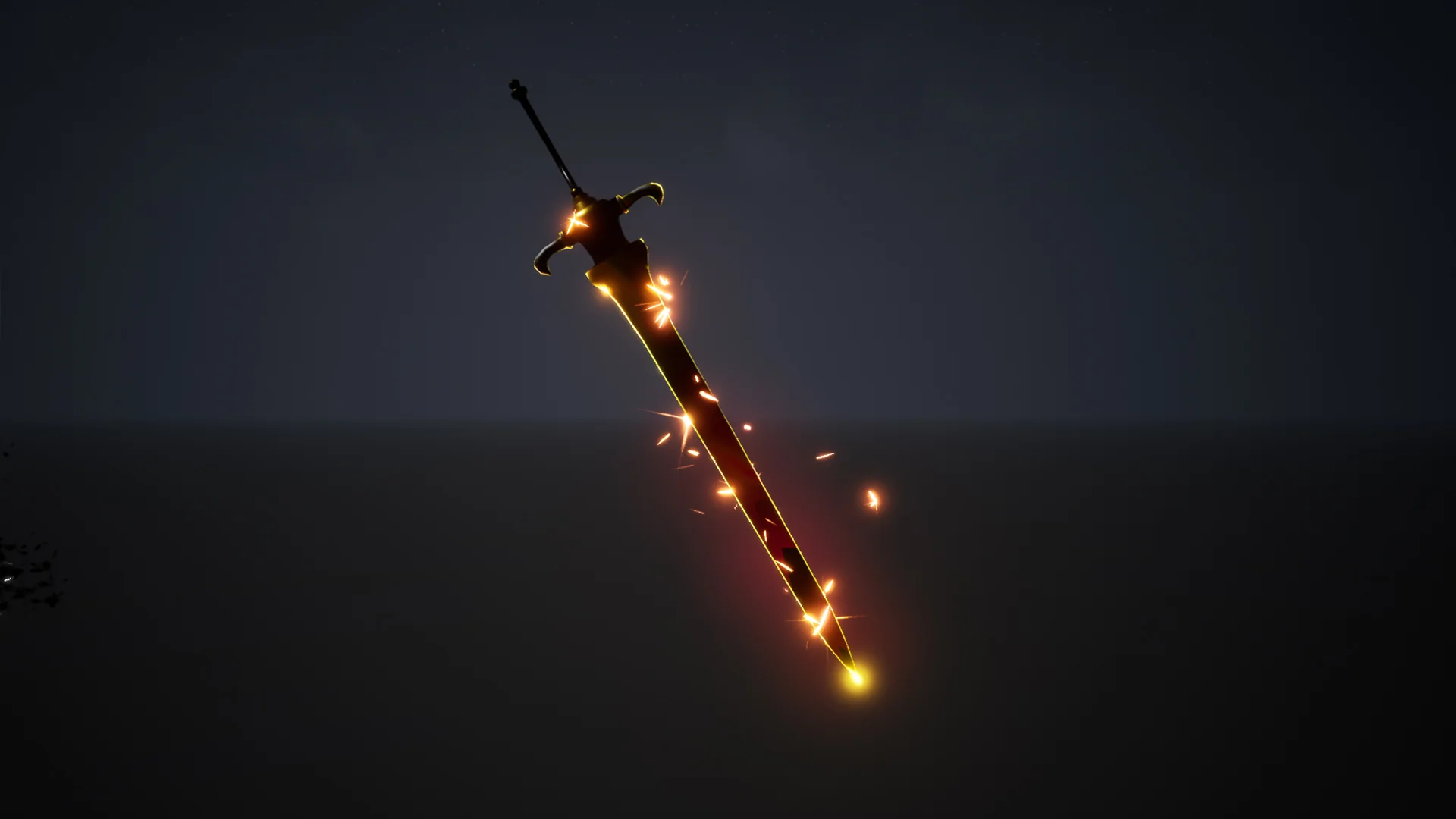
Working with the package begins inside Effect_Map, the dedicated demonstration environment included to showcase each emitter configuration. Rather than loading individual emitters directly into a character viewport or weapon blueprint blind, launching the map offers a controlled baseline. You can immediately evaluate the playback behavior of the ten distinct particle setups in an isolated setting. This environment isolates light interactions, screen-space reflections, and emitter draw order away from complex gameplay scripts, allowing direct observation of trail timing and particle density.
Bringing these visual assets into an active character pipeline requires binding the Niagara components to the weapon or character skeletal mesh. In standard Unreal Engine melee setups, trail components reference designated sockets placed along the weapon blade, typically at the hilt, mid-blade, and tip. Inside Effect_Map, each of the ten Niagara particle systems is staged so technical artists can inspect how the ribbons, arcs, and transient sprite bursts resolve in 3D space. Verifying emitter parameters in this map before referencing them in animation notifies or combat montages prevents common alignment errors, such as inverted ribbon twists or disconnected socket paths during high-velocity swing animations.
Asset Footprint: Materials, Textures, and Emitter Logic
The library maintains a tightly focused footprint constructed from a specific set of visual components:
1 level: Effect_Map For isolation and playback review
10 Niagara Particle Systems configured for weapon motion and combat impact
25 Materials providing dynamic surface and ribbon rendering logic
10 Textures serving as source masks, gradients, and noise elements
Analyzing this distribution reveals a clear architectural pattern. With twenty-five materials distributed across ten Niagara particle systems and ten source textures, the asset collection relies on flexible material logic rather than an excessive volume of texture bitmaps. The ten textures primarily deliver core visual profiles, including alpha erosion strips, linear gradients, and procedural distortion shapes. The twenty-five materials leverage these textures through varying blend modes, scrolling coordinates, and emissive multipliers to generate twenty-five unique visual expressions.
This material-to-texture ratio is advantageous for performance monitoring. Melee trails generate significant pixel overdraw when broad ribbons sweep across the screen in quick succession. By utilizing twenty-five targeted materials driven by only ten base textures, texture memory overhead remains minimal. The materials handle the heavy lifting, controlling UV panning along the ribbons, dynamic opacity falloff, and color tint shifts that respond to dynamic parameters piped directly from the Niagara emitter update loops.
Niagara Emitter Workflows for Sword Trails
The primary visual focus centered within this pack is the rendering of weapon trails and sword-based combat accents. Within Unreal Engine, building trails in the Niagara framework represents a distinct shift from legacy particle modules. Niagara calculates ribbon topology using custom interpolation, which allows high-speed weapon swings to maintain smooth curvature without jagged, angular stepping between animation frames.
The ten particle systems provide separate variations of motion language. Some prioritize broad, continuous ribbons that define the full arc of a heavy slash, while others focus on high-energy dissipate effects where the trail breaks into airborne sparks or residual energy trails. Because these are built as native Niagara systems, technical artists can access emitter properties directly. You can adjust ribbon width, shorten or extend particle lifetime based on attack speed, and modulate the intensity of the materials driven across each swing.
Achieving clean weapon registration in fast-paced action titles demands tight synchronization between animation frames and particle lifetimes. When an attack animation plays, the trail must ignite precisely at the acceleration phase and fade out cleanly before the weapon returns to its idle stance. Having ten preconfigured systems provides sufficient variety to map distinct effects across light strikes, heavy combos, and directional swings without duplicating identical trail silhouettes across an entire combat moveset.
Managing Unreal Engine 4 Beta Niagara Dependencies in Sword FX
A critical technical factor in deploying this package is its underlying engine version framework. The asset was built using the Niagara feature set while it was categorized as a Beta feature within Unreal Engine 4. This classification carries operational implications for long-term project maintenance.
Epic Games does not provide backward compatibility guarantees for assets authored during beta phases. Furthermore, the public API governing beta features undergoes structural changes between engine sub-versions, and functionality can be deprecated, refactored, or eliminated at engine development discretion. Projects running on specific legacy builds of Unreal Engine 4 where Niagara was still under beta development can run these particle systems natively. However, teams operating in newer revisions or planning transitions toward modern production tracks must monitor for node-level deprecation.
When maintaining projects dependent on beta-era Niagara assets, developers must evaluate module scripts inside the emitter stack. Modules handling ribbon spacing, vector field sampling, and parameter binding occasionally require manual updating if the underlying engine version alters the native Niagara data interface. If an engine upgrade introduces compilation errors within any of the ten particle systems, the issue typically resides in altered module names or changed input pin types inside the Niagara system overview. Keeping an archived copy of the working project state ensures stability while auditing these nodes across engine upgrades.
Target Production Scenarios and Pipeline Fit
This package is directly tailored for developers building third-person action games, character-action titles, and top-down combat systems that utilize swordplay. In games with rapid melee interactions, visual clarity is paramount. Players rely heavily on visual cues provided by weapon trails to gauge attack ranges, anticipate enemy hitbox active windows, and register successful hits.
Solo developers and technical art teams benefit from having ten working systems that eliminate the need to construct ribbon curves, UV distortion logic, and spawn rate calculations from scratch. The provided Effect_Map Acts as a testing bed where materials and systems can be evaluated against project-specific lighting before committing them to character rigs. While teams must account for the beta status of the underlying UE4 Niagara foundation, the asset structure offers a cohesive set of materials, textures, and particle templates built exclusively to handle high-velocity sword motion.
 Spells & Combat
 Spells & Combat
 Spells & Combat