"6f9bd6df1f44a86f"{"id":"1000889","slug":"stairs-set","title":"Stairs Set","category":"Locomotion / Gaits","engine":"5.0+","assetVersion":"","engineVersion":"Engine Version: 5.0+","tag":"Locomotion / Gaits","accent":"blue","visual":"animation","summary":"Walk and jog stair climbing animations for UE5 Male Mannequin, with Root Motion and In-Place variants, FBX and MotionBuilder source files, and IK bones. 40 file","platform":"Unreal Engine","indexPolicy":"index","publishedAt":"2026-08-05T18:23:59.885Z","updatedAt":"2026-08-05T18:23:59.885Z","sourceNotes":[],"fileContents":[],"compatibility":["Unreal Engine","Engine Version: 5.0+"],"featuredImage":{"alt":"Stairs Set","src":"/wp-content/uploads/published/2026/08/1b482e4877cc-cc7bdabb-dd65-4265-9310-b44696bd6e43-2a288748c7.webp"},"hasDownloadLink":true,"downloads":4,"terms":[{"taxonomy":"category","slug":"locomotion-gaits","name":"Locomotion / Gaits"}],"galleryImages":[{"src":"/wp-content/uploads/published/2026/08/88b49e2534f9-7d5e3773-faeb-4b03-abc9-8e2c5cc83145-be124167fd.webp","alt":"Stairs Set"},{"src":"/wp-content/uploads/published/2026/08/7325b38c2c71-6c61c4f2-5fd1-4f7c-86cb-f30be715b374-e9ed6d84a5.webp","alt":"Stairs Set"},{"src":"/wp-content/uploads/published/2026/08/98e47039a383-bd08dda8-c445-4e78-bc46-4796482fee4c-1703302142.webp","alt":"Stairs Set"},{"src":"/wp-content/uploads/published/2026/08/7819dfa7cda4-ff9862c5-bff9-414e-bfd8-c7fc3a8f5b53-64af9f538f.webp","alt":"Stairs Set"}],"accessPanel":{"kind":"resource","title":"Download this resource","eyebrow":"Free Download","message":"Log in or create a free account to start your download.","fileName":"Content.7z","safetyNote":"Resources are manually reviewed before listing to improve quality and reduce obvious risks.","actionLabel":"Download Free","resourceType":"Resource archive"},"contentHtml":"\u003cp\u003eWhen a character reaches a staircase, the gait usually changes for a few steps and then snaps back. \u003cem\u003eStairs Set\u003c/em\u003e treats that moment as its own locomotion problem. It provides dedicated \u003ccode\u003eWalk\u003c/code\u003e and \u003ccode\u003eJog\u003c/code\u003e animations for ascending and descending, organized so the character can enter a stair flight, keep moving at the chosen speed, and leave the stairs without a visible break. The animation set combines the core directional actions with different motion delivery formats, making it a practical fit for Unreal Engine 5 (UE5) projects that need stair traversal to feel just as natural as flat-ground movement.\u003c/p\u003e\n\n\u003cp\u003eThe set is structured through 2 movement types: \u003ccode\u003eWalk\u003c/code\u003e and \u003ccode\u003eJog\u003c/code\u003e. Each type contains 10 animations for Up and Down. That gives 20 unique animations total. Each unique animation is then provided in 2 variations: \u003ccode\u003eRoot Motion\u003c/code\u003e and \u003ccode\u003eIn-Place\u003c/code\u003e. The 2 variations double the number of files to 40, which means the full package includes both the motion that drives the character forward from the animation itself and the motion that leaves the character in place for a separate locomotion system to move.\u003c/p\u003e\n\n\u003ch2\u003eNatural Stair Traversal Without a Locomotion Break\u003c/h2\u003e\n\n\u003cp\u003eThe core behavior is straightforward: on the way up, the character can walk or jog; on the way down, the character can walk or jog. These 4 actions—\u003ccode\u003eWalk Up\u003c/code\u003e, \u003ccode\u003eJog Up\u003c/code\u003e, \u003ccode\u003eWalk Down\u003c/code\u003e, and \u003ccode\u003eJog Down\u003c/code\u003e—are the named content of the set. They are not 1 generic climb loop. Each action has a \u003ccode\u003eStart\u003c/code\u003e, a \u003ccode\u003eLoop\u003c/code\u003e, a 異\u003ccode\u003eStop\u003c/code\u003e, and a \u003ccode\u003ePivot\u003c/code\u003e. The \u003ccode\u003eStart\u003c/code\u003e and \u003ccode\u003eStop\u003c/code\u003e clips get the character onto and off of the stairs cleanly, the \u003ccode\u003eLoop\u003c/code\u003e clip sustains the climb for an arbitrarily long staircase, and the \u003ccode\u003ePivot\u003c/code\u003e clips handle directional changes when the stairs themselves change orientation. This segmentation is the kind of detail that prevents the character from floating at the top step or snapping into the climb at the bottom step.\u003c/p\u003e\n\n\u003cp\u003eFor a game that uses a lot of vertical Level geometry, the practical benefit is immediate. The character can approach a staircase, start the \u003ccode\u003eWalk Up\u003c/code\u003e animation at the 1st step, cycle through the \u003ccode\u003eLoop\u003c/code\u003e for the full flight, and then trigger the \u003ccode\u003eStop\u003c/code\u003e as the ground levels out. The same flow applies in reverse for descending. Because the clip structure is identical for both movement types, the State Machine does not need separate logic for walk and jog; it only needs to pick the correct speed tier and direction.\u003c/p\u003e\n\n\u003ch2\u003eInside the 40-File Stair Set: Walk and Jog in Root Motion and In-Place\u003c/h2\u003e\n\n\u003cp\u003eThe 40 files are not 40 different actions. The underlying animation library is 20 unique actions, each of which exists in both \u003ccode\u003eRoot Motion\u003c/code\u003e and \u003ccode\u003eIn-Place\u003c/code\u003e forms. The \u003ccode\u003eRoot Motion\u003c/code\u003e form moves the character through the scene based on the animation's own root translation, which is often the most reliable way to keep the feet in contact with the steps. The \u003ccode\u003eIn-Place\u003c/code\u003e form keeps the character stationary, allowing the gameplay locomotion system to drive the forward speed while the upper body and feet perform the stair motion.\u003c/p\u003e\n\n\u003cp\u003eHaving both variants in 1 pack means a team does not have to choose 1 single approach before importing. If the project already uses \u003ccode\u003eRoot Motion\u003c/code\u003e for other character actions, the \u003ccode\u003eRoot Motion\u003c/code\u003e files can be used directly. If the project relies on a Character Movement Component or a custom velocity system, the \u003ccode\u003eIn-Place\u003c/code\u003e files can be dropped in without converting the data. The 2 sets stay in sync because they are built from the same 20 animations.\u003c/p\u003e\n\n\u003ch3\u003eMovement Type Breakdown\u003c/h3\u003e\n\n\u003cul\u003e\n \u003cli\u003e\u003ccode\u003eWalk\u003c/code\u003e: 10 animations covering Up and Down\u003c/li\u003e\n \u003cli\u003e\u003ccode\u003eJog\u003c/code\u003e: 10 animations covering Up and Down\u003c/li\u003e\n\u003c/ul\u003e\n\n\u003cp\u003eThose 10 animations per movement type include the \u003ccode\u003eStart\u003c/code\u003e, \u003ccode\u003eLoop\u003c/code\u003e, \u003ccode\u003eStop\u003c/code\u003e, and \u003ccode\u003ePivot\u003c/code\u003e clips needed to complete a stair traversal. The same breakdown is then mirrored for \u003ccode\u003eRoot Motion\u003c/code\u003e and \u003ccode\u003eIn-Place\u003c/code\u003e, producing the full 40-file count.\u003c/p\u003e\n\n\u003ch2\u003eStart, Loop, Stop, and Pivots for Climbing Up and Down\u003c/h2\u003e\n\n\u003cp\u003eThe set lists \u003ccode\u003eStart\u003c/code\u003e, \u003ccode\u003eLoop\u003c/code\u003e, and \u003ccode\u003eStop\u003c/code\u003e as the core mechanics. In practice, that means each stair direction has an entry clip, a looping clip, and an exit clip. An animation pack that only provides 1 single climb loop would force the animator to blend a flat-ground walk into a stair-specific pose at the 1st step and then blend back out at the last step. With separate \u003ccode\u003eStart\u003c/code\u003e and \u003ccode\u003eStop\u003c/code\u003e clips, the transition happens at the correct moment and the character's posture changes at the point where the ground plane actually changes.\u003c/p\u003e\n\n\u003cp\u003ePivots are also included. On a staircase with a landing or a turn, the character needs to rotate between 1 segment and the next. The \u003ccode\u003ePivot\u003c/code\u003e clips give the locomotion system a clean file to use for that rotation without making the character spin in place or drift off the step center. Between the entry, loop, exit, and pivot, each direction has the full set of locomotion states that a typical UE5 Anim Graph would request for stair traversal.\u003c/p\u003e\n\n\u003ch2\u003eUE5 Mannequin Rig, Source Files, and IK Bones\u003c/h2\u003e\n\n\u003cp\u003eThe animations are rigged to the Epic Skeleton (\u003ccode\u003eUE5 Mannequin\u003c/code\u003e). That makes the set a direct match for the default Unreal Engine 5 character. The editor notes also identify it as a \u003cem\u003eMale Locomotion Set\u003c/em\u003e, meaning the motion is modeled for a male skeleton and can be expected to align with the proportions of the \u003ccode\u003eUE5 Mannequin\u003c/code\u003e. For projects that use a different Skeletal Mesh but keep the Epic Skeleton hierarchy, the clips can be retargeted in UE5 without modifying the original data.\u003c/p\u003e\n\n\u003cp\u003eIncluded with the animations are source files in \u003ccode\u003e.FBX\u003c/code\u003e and \u003ccode\u003eMotionBuilder\u003c/code\u003e formats. The \u003ccode\u003e.FBX\u003c/code\u003e files are useful for importing into UE5, Blender, Maya, or other tools that support FBX. The \u003ccode\u003eMotionBuilder\u003c/code\u003e files are useful for teams that want to layer additional motion or clean up foot roll before the animation reaches the engine. Since both formats use the same animation data, the set can be used as a final asset or as a starting point for custom stair motion.\u003c/p\u003e\n\n\u003cp\u003eInverse Kinematics (IK) Bones are included as well. Stair steps vary in height between environments, and a static animation rarely lines up perfectly with every step. The IK Bones give the system the hooks it needs to adjust foot placement during the climb, helping the character stay planted on each riser rather than sliding through the geometry.\u003c/p\u003e\n\n\u003ch2\u003eWorking With the Set in a UE5 Locomotion Setup\u003c/h2\u003e\n\n\u003cp\u003eFor teams evaluating the set, the path into a project is very direct. The clips can be assigned to the stair-related states in the character's Animation Blueprint. The \u003ccode\u003eRoot Motion\u003c/code\u003e variants are the right choice when the animation itself should dictate the distance traveled per step, such as on a fixed staircase with consistently sized steps. The \u003ccode\u003eIn-Place\u003c/code\u003e variants are better suited to situations where the character's movement speed is driven by player input or a locomotion system, since the animation provides the pose and gait shape while the Character Movement Component controls the forward pace.\u003c/p\u003e\n\n\u003cp\u003eThe source files extend the usefulness beyond the default clips. If a project uses stairs that are shorter or taller than the original capture, the \u003ccode\u003e.FBX\u003c/code\u003e and \u003ccode\u003eMotionBuilder\u003c/code\u003e files can be edited to change the vertical motion. The IK Bones further reduce the amount of manual cleanup needed for uneven step heights. Between the 2 format types and the root motion options, the set covers the 2 main animation delivery pipelines used in UE5.\u003c/p\u003e\n\n\u003cp\u003eFeedback loops are part of the set's ongoing development. Updates are shaped by what users report after integrating the pack, which is a useful signal for teams that may need support for edge cases like very long staircases or unusual step layouts. The documentation and preview materials accompanying the set make it possible to inspect the clips before import.\u003c/p\u003e\n\n\u003ch2\u003eContinue Browsing Similar Packs\u003c/h2\u003e\n\u003cul\u003e\n\u003cli\u003e\u003ca href=\"https://3dcghub.com/roll-and-dash-animation/\" rel=\"noopener noreferrer\"\u003eRoll and Dash Animation\u003c/a\u003e\u003c/li\u003e\n\u003cli\u003e\u003ca href=\"https://3dcghub.com/toon-movement-animation-set/\" rel=\"noopener noreferrer\"\u003eToon Movement Animation Set\u003c/a\u003e\u003c/li\u003e\n\u003cli\u003e\u003ca href=\"https://3dcghub.com/ledge-animation-set/\" rel=\"noopener noreferrer\"\u003eLedge Animation Set\u003c/a\u003e\u003c/li\u003e\n\u003cli\u003e\u003ca href=\"https://3dcghub.com/climbing-animation-set/\" rel=\"noopener noreferrer\"\u003eClimbing Animation Set\u003c/a\u003e\u003c/li\u003e\n\u003cli\u003e\u003ca href=\"https://3dcghub.com/procedural-animation-framework/\" rel=\"noopener noreferrer\"\u003eProcedural Animation Framework\u003c/a\u003e\u003c/li\u003e\n\u003c/ul\u003e","contentTextLength":7697,"navigation":{"current":1473,"total":4218,"previous":{"id":"1000890","slug":"stylized-forest-animals-rpg-bundle","title":"Stylized Forest Animals - RPG Bundle","category":"Characters \u0026 Creatures","platform":"Unreal Engine","updatedAt":"2026-08-06T04:29:55.435Z"},"next":{"id":"1000888","slug":"sport-female","title":"Sport_female","category":"Characters \u0026 Creatures","platform":"Unreal Engine","updatedAt":"2026-08-05T18:09:26.478Z"}},"relatedResources":[{"id":"1000438","slug":"roll-and-dash-animation","title":"Roll and Dash Animation","category":"Locomotion / Gaits","engine":"5.2+","assetVersion":"","engineVersion":"Engine Version: 5.2+","tag":"Locomotion / Gaits","accent":"blue","visual":"animation","summary":"Roll and Dash Animation is a 46-clip motion set covering directional dashes and rolling sequences for action, adventure, and combat character movement.","platform":"Unreal Engine","indexPolicy":"index","publishedAt":"2026-07-10T22:31:05.674Z","updatedAt":"2026-07-10T22:31:05.674Z","sourceNotes":[],"fileContents":[],"compatibility":["Unreal Engine","Engine Version: 5.2+"],"featuredImage":{"alt":"Roll and Dash Animation","src":"/wp-content/uploads/published/2026/07/6ebbafb6a8cf-3d976af6-d628-42be-a3ed-7923d6f223f1-55d887989f.webp"},"hasDownloadLink":true,"downloads":6},{"id":"1000443","slug":"toon-movement-animation-set","title":"Toon Movement Animation Set","category":"Locomotion / Gaits","engine":"5.0+","assetVersion":"","engineVersion":"Engine Version: 5.0+","tag":"Locomotion / Gaits","accent":"blue","visual":"animation","summary":"A UE4 and UE5 toon-style locomotion animation set with 65+ root motion and 65 in-place animations, designed for Motion Matching and major store controllers.","platform":"Unreal Engine","indexPolicy":"index","publishedAt":"2026-07-10T23:05:07.325Z","updatedAt":"2026-07-10T23:05:07.325Z","sourceNotes":[],"fileContents":[],"compatibility":["Unreal Engine","Engine Version: 5.0+"],"featuredImage":{"alt":"Toon Movement Animation Set","src":"/wp-content/uploads/published/2026/07/981298affe92-23283129-3a7a-46bf-93a2-228219b6bc05-9ba0a018bd.webp"},"hasDownloadLink":true,"downloads":5},{"id":"1001708","slug":"swimming-animation-set","title":"Swimming Animation Set","category":"Locomotion / Gaits","engine":"4.26+,5.0+","assetVersion":"","engineVersion":"Engine Version: 4.26+,5.0+","tag":"Locomotion / Gaits","accent":"blue","visual":"animation","summary":"Technical review of the Swimming Animation Set: 18 hand-crafted, in-place surface and underwater animations with example BlendSpaces and source FBX files.","platform":"Unreal Engine","indexPolicy":"index","publishedAt":"2026-10-14T17:13:26.147Z","updatedAt":"2026-10-14T17:13:26.147Z","sourceNotes":[],"fileContents":[],"compatibility":["Unreal Engine","Engine Version: 4.26+,5.0+"],"featuredImage":{"alt":"Swimming Animation Set","src":"/wp-content/uploads/published/2026/10/da76d3a92f66-62579e2f-4aa1-46b1-b296-1dea4441f041-093db39ec8.webp"},"hasDownloadLink":true,"downloads":3}]}
Locomotion / Gaits
Stairs Set
Walk and jog stair climbing animations for UE5 Male Mannequin, with Root Motion and In-Place variants, FBX and MotionBuilder source files, and IK bones. 40 file
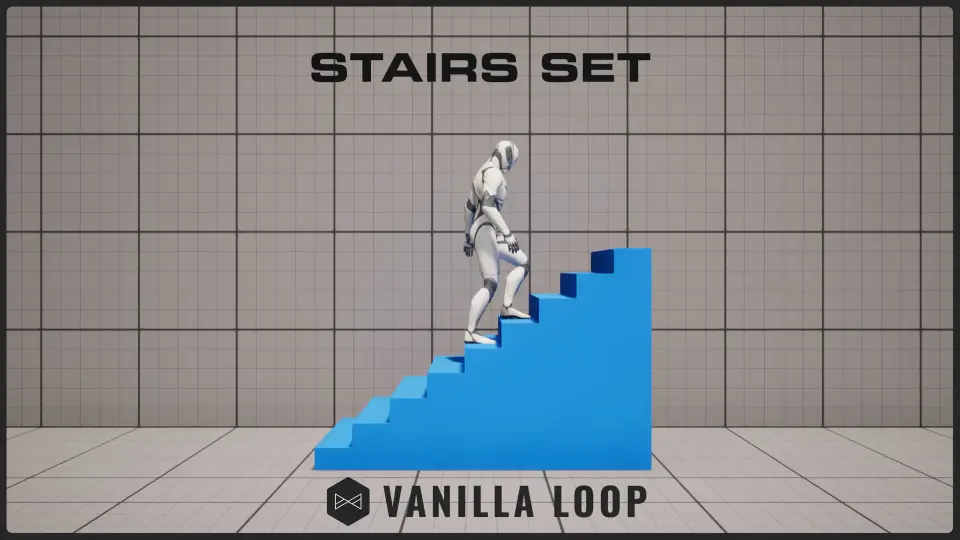
When a character reaches a staircase, the gait usually changes for a few steps and then snaps back. Stairs Set treats that moment as its own locomotion problem. It provides dedicated Walk and Jog animations for ascending and descending, organized so the character can enter a stair flight, keep moving at the chosen speed, and leave the stairs without a visible break. The animation set combines the core directional actions with different motion delivery formats, making it a practical fit for Unreal Engine 5 (UE5) projects that need stair traversal to feel just as natural as flat-ground movement.
The set is structured through 2 movement types: Walk and Jog. Each type contains 10 animations for Up and Down. That gives 20 unique animations total. Each unique animation is then provided in 2 variations: Root Motion and In-Place. The 2 variations double the number of files to 40, which means the full package includes both the motion that drives the character forward from the animation itself and the motion that leaves the character in place for a separate locomotion system to move.
Natural Stair Traversal Without a Locomotion Break
The core behavior is straightforward: on the way up, the character can walk or jog; on the way down, the character can walk or jog. These 4 actions—Walk Up, Jog Up, Walk Down, and Jog Down—are the named content of the set. They are not 1 generic climb loop. Each action has a Start, a Loop, a 異Stop, and a Pivot. The Start and Stop clips get the character onto and off of the stairs cleanly, the Loop clip sustains the climb for an arbitrarily long staircase, and the Pivot clips handle directional changes when the stairs themselves change orientation. This segmentation is the kind of detail that prevents the character from floating at the top step or snapping into the climb at the bottom step.
For a game that uses a lot of vertical Level geometry, the practical benefit is immediate. The character can approach a staircase, start the Walk Up animation at the 1st step, cycle through the Loop for the full flight, and then trigger the Stop as the ground levels out. The same flow applies in reverse for descending. Because the clip structure is identical for both movement types, the State Machine does not need separate logic for walk and jog; it only needs to pick the correct speed tier and direction.
Inside the 40-File Stair Set: Walk and Jog in Root Motion and In-Place
The 40 files are not 40 different actions. The underlying animation library is 20 unique actions, each of which exists in both Root Motion and In-Place forms. The Root Motion form moves the character through the scene based on the animation's own root translation, which is often the most reliable way to keep the feet in contact with the steps. The In-Place form keeps the character stationary, allowing the gameplay locomotion system to drive the forward speed while the upper body and feet perform the stair motion.
Having both variants in 1 pack means a team does not have to choose 1 single approach before importing. If the project already uses Root Motion for other character actions, the Root Motion files can be used directly. If the project relies on a Character Movement Component or a custom velocity system, the In-Place files can be dropped in without converting the data. The 2 sets stay in sync because they are built from the same 20 animations.
Movement Type Breakdown
Walk: 10 animations covering Up and Down
Jog: 10 animations covering Up and Down
Those 10 animations per movement type include the Start, Loop, Stop, and Pivot clips needed to complete a stair traversal. The same breakdown is then mirrored for Root Motion and In-Place, producing the full 40-file count.
Start, Loop, Stop, and Pivots for Climbing Up and Down
The set lists Start, Loop, and Stop as the core mechanics. In practice, that means each stair direction has an entry clip, a looping clip, and an exit clip. An animation pack that only provides 1 single climb loop would force the animator to blend a flat-ground walk into a stair-specific pose at the 1st step and then blend back out at the last step. With separate Start and Stop clips, the transition happens at the correct moment and the character's posture changes at the point where the ground plane actually changes.
Pivots are also included. On a staircase with a landing or a turn, the character needs to rotate between 1 segment and the next. The Pivot clips give the locomotion system a clean file to use for that rotation without making the character spin in place or drift off the step center. Between the entry, loop, exit, and pivot, each direction has the full set of locomotion states that a typical UE5 Anim Graph would request for stair traversal.
UE5 Mannequin Rig, Source Files, and IK Bones
The animations are rigged to the Epic Skeleton (UE5 Mannequin). That makes the set a direct match for the default Unreal Engine 5 character. The editor notes also identify it as a Male Locomotion Set, meaning the motion is modeled for a male skeleton and can be expected to align with the proportions of the UE5 Mannequin. For projects that use a different Skeletal Mesh but keep the Epic Skeleton hierarchy, the clips can be retargeted in UE5 without modifying the original data.
Included with the animations are source files in .FBX and MotionBuilder formats. The .FBX files are useful for importing into UE5, Blender, Maya, or other tools that support FBX. The MotionBuilder files are useful for teams that want to layer additional motion or clean up foot roll before the animation reaches the engine. Since both formats use the same animation data, the set can be used as a final asset or as a starting point for custom stair motion.
Inverse Kinematics (IK) Bones are included as well. Stair steps vary in height between environments, and a static animation rarely lines up perfectly with every step. The IK Bones give the system the hooks it needs to adjust foot placement during the climb, helping the character stay planted on each riser rather than sliding through the geometry.
Working With the Set in a UE5 Locomotion Setup
For teams evaluating the set, the path into a project is very direct. The clips can be assigned to the stair-related states in the character's Animation Blueprint. The Root Motion variants are the right choice when the animation itself should dictate the distance traveled per step, such as on a fixed staircase with consistently sized steps. The In-Place variants are better suited to situations where the character's movement speed is driven by player input or a locomotion system, since the animation provides the pose and gait shape while the Character Movement Component controls the forward pace.
The source files extend the usefulness beyond the default clips. If a project uses stairs that are shorter or taller than the original capture, the .FBX and MotionBuilder files can be edited to change the vertical motion. The IK Bones further reduce the amount of manual cleanup needed for uneven step heights. Between the 2 format types and the root motion options, the set covers the 2 main animation delivery pipelines used in UE5.
Feedback loops are part of the set's ongoing development. Updates are shaped by what users report after integrating the pack, which is a useful signal for teams that may need support for edge cases like very long staircases or unusual step layouts. The documentation and preview materials accompanying the set make it possible to inspect the clips before import.
 Locomotion / Gaits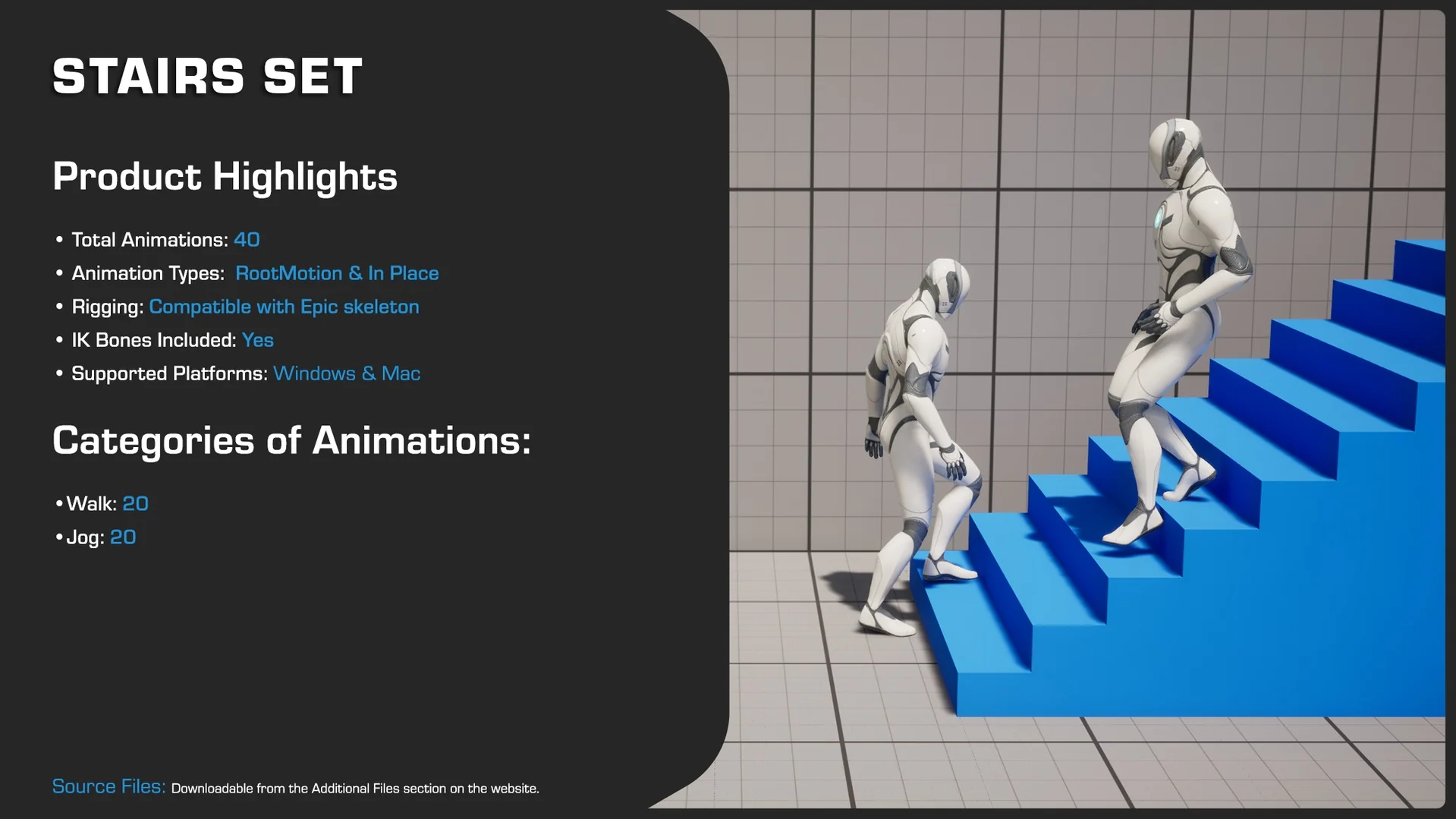
 Locomotion / Gaits
 Locomotion / Gaits
 Locomotion / Gaits