"c68a05d5e51405b3"{"id":"1001124","slug":"snow-vol-1-scanned-materials","title":"Snow Vol. 1 - Scanned Materials","category":"Snow","engine":"5.2+","assetVersion":"","engineVersion":"Engine Version: 5.2+","tag":"Snow","accent":"blue","visual":"luts","summary":"Snow material pack with ten instance materials featuring Base Color alpha height, Normal, ARM packing, plus adjustable saturation, tint, UV and intensity contro","platform":"Unreal Engine","publishedAt":"2026-09-07T13:21:15.487Z","updatedAt":"2026-09-07T13:21:15.487Z","sourceNotes":[],"fileContents":[],"compatibility":["Unreal Engine","Engine Version: 5.2+"],"featuredImage":{"alt":"Snow Vol. 1 - Scanned Materials","src":"/wp-content/uploads/published/2026/09/afbf0885705b-20b3d3c1-af6a-49cb-96ac-e7596a3445a3-e0975c5e15.webp"},"hasDownloadLink":true,"downloads":0,"terms":[{"taxonomy":"category","slug":"snow-nature-and-terrain","name":"Snow"}],"galleryImages":[{"src":"/wp-content/uploads/published/2026/09/c350ad3560e2-d97cc6aa-2512-4c8e-8fb0-4c5de92d17b3-1be387164f.webp","alt":"Snow Vol. 1 - Scanned Materials"},{"src":"/wp-content/uploads/published/2026/09/4156af14851e-7e95e249-cdcf-482e-a845-f6e152fabeed-9951136792.webp","alt":"Snow Vol. 1 - Scanned Materials"},{"src":"/wp-content/uploads/published/2026/09/9f4897c54f1c-c120da81-5e01-4717-b072-d3bc05473f38-55524e073c.webp","alt":"Snow Vol. 1 - Scanned Materials"},{"src":"/wp-content/uploads/published/2026/09/2229a9725b15-9ba063a8-1f17-45bc-8a30-f1822926bab1-53420f9fb1.webp","alt":"Snow Vol. 1 - Scanned Materials"},{"src":"/wp-content/uploads/published/2026/09/7333938acc74-24317299-87ca-493a-b9c0-af4e464443c4-d4f47fc46b.webp","alt":"Snow Vol. 1 - Scanned Materials"},{"src":"/wp-content/uploads/published/2026/09/4e0b2c96e95a-087ac5eb-8d72-4b0c-bb9b-6826fbb404b0-a2be1d739a.webp","alt":"Snow Vol. 1 - Scanned Materials"},{"src":"/wp-content/uploads/published/2026/09/40b568f67447-77a86266-5b9e-4299-b6b5-743d52b80318-3d902a2cb1.webp","alt":"Snow Vol. 1 - Scanned Materials"},{"src":"/wp-content/uploads/published/2026/09/96fbf15871e0-8033a69d-b81d-4cc7-ac47-809b1e8d2220-52794088fa.webp","alt":"Snow Vol. 1 - Scanned Materials"},{"src":"/wp-content/uploads/published/2026/09/a0344f1dd3ad-b6bee157-1b30-4bc0-9d6c-39a537af6daf-746dfb7abc.webp","alt":"Snow Vol. 1 - Scanned Materials"},{"src":"/wp-content/uploads/published/2026/09/97e4ae9f3c8c-73eda33b-5ab3-46c4-8acf-df12935668f0-4e471d6bd8.webp","alt":"Snow Vol. 1 - Scanned Materials"}],"accessPanel":{"kind":"resource","title":"Download this resource","eyebrow":"Free Download","message":"Log in or create a free account to start your download.","fileName":"Content.7z","safetyNote":"Resources are manually reviewed before listing to improve quality and reduce obvious risks.","actionLabel":"Download Free","resourceType":"Resource archive"},"contentHtml":"\u003cp\u003eWhen a winter scene depends on the surface of snow, the shading response has to hold up across different lighting conditions. Snow Vol. 1 - Scanned Materials is a set of ten instance materials that uses the same channel layout on each surface. That consistent structure makes it a direct fit for real-time projects where snow is assigned to multiple objects without forcing material authors to build a custom shader every time.\u003c/p\u003e \u003ch2\u003eTen Instances, One Channel Layout\u003c/h2\u003e \u003cp\u003eThe pack contains ten instance materials. An instance inherits the rules of a master material, but leaves room for local changes. If you need one snow surface to appear softer on the ground and another surface to be more compact on rock, the two can be tuned separately even though they live in the same family.\u003c/p\u003e \u003cp\u003eAll ten rely on the same texture set. Base Color carries an alpha channel for height, Normal comes as its own map, and ARM compresses Ambient Occlusion, Roughness, and Metallic into three color channels. Once you check the parameters on the first instance, the remaining nine follow the same pattern.\u003c/p\u003e \u003ch2\u003eBase Color With an Alpha Height\u003c/h2\u003e \u003cp\u003eThe Base Color map is where the snow's visible reflection begins. Its RGB channels provide the base tint, but the material puts extra information into the alpha channel: a height map. This means the same image resource is responsible for the color and for a grayscale height profile.\u003c/p\u003e \u003cp\u003eHeight data in the alpha channel is a practical way to add topographic information without a second file. While a normal map changes the direction of surface lighting, a height map stores actual elevation steps. The material can then interpret the alpha channel to create depth effects along the snow surface, giving the instance more bite than a flat colored map would.\u003c/p\u003e \u003ch2\u003eNormal and ARM: Controlling the Snow Response\u003c/h2\u003e \u003cp\u003eA separate Normal map covers the fine bumps and ridges that come from scanned snow. It also affects how light scatters along the surface, letting the snow appear granular rather than smooth.\u003c/p\u003e \u003cp\u003eThe ARM map sits alongside it. In this file, Ambient Occlusion lives in the red channel, Roughness lives in the green channel, and Metallic lives in the blue channel. Rather than loading three full maps, the engine can pull the necessary values from a single texture sample. The ambient occlusion term softens the darker pockets of the snow surface, roughness decides whether light is scattered or cut sharp, and metallic helps the material stay grounded in the PBR response the pack was built for.\u003c/p\u003e \u003ch2\u003eInstance-Level Controls: Saturation, Tint, UV, and Intensity\u003c/h2\u003e \u003cp\u003eBecause the materials are instances, every adjustment is exposed as a parameter. Saturation and Tint give the artist a way to change the overall character of the snow. Tint can push it toward cool blue or warm amber; saturation defines how strong that tint is allowed to become.\u003c/p\u003e \u003cp\u003eUV tweaks the tiling of the three maps at once. Scaling the UV up makes the same snow scan stretch across a larger area of terrain, while shrinking the UV treats a single object with a denser pattern. The other parameters—roughness intensity, normal intensity, and occlusion intensity—serve as multipliers. They don't replace the captured maps; they simply scale the strength of the material channel in the final surface. So the same scanned snow can be dialed from subtle to heavily textured depending on exactly where the material is applied.\u003c/p\u003e \u003ch2\u003eWorkflow With a Demo Cube, Not the Preview Meshes\u003c/h2\u003e \u003cp\u003eThe asset includes a demo cube as a preview surface. The static meshes shown in the product previews are not part of the package. That distinction matters because it keeps the focus on the material behavior instead of on a specific piece of geometry.\u003c/p\u003e \u003cp\u003eWith the demo cube in hand, you can turn lights around the surface, adjust the parameters and observe the relationship between the normal response and the roughness changes. The plain geometry of the cube gives an uncluttered read of how a particular instance performs. Once the cube looks right, the material is meant to be applied to your own static geometry, which is the intended production path. The snowy surfaces belong to the environment you are building, not to a set of fixed models from the asset's preview gallery.\u003c/p\u003e \u003cp\u003eThe scanned base of the material is part of its appeal. With tags pointing to photogrammetry, realistic white snow, and a winter forest/ice context, the pack still leaves the choice of surface to the artist. For a production, Snow Vol. 1 presents a compact set of ten instance materials that can be loaded onto existing static meshes, tuned per instance, and routed through the same Base Color-alpha, Normal, and ARM channel structure from scene to scene.\u003c/p\u003e\n\n\u003ch2\u003eContinue Browsing Similar Packs\u003c/h2\u003e\n\u003cul\u003e\n\u003cli\u003e\u003ca href=\"https://3dcghub.com/rocks-vol-1-scanned-materials/\" title=\"Rocks Vol. 1 - Scanned Materials\"\u003eRocks Vol. 1 - Scanned Materials\u003c/a\u003e\u003c/li\u003e\n\u003cli\u003e\u003ca href=\"https://3dcghub.com/desert-snow-vdb-collection-vol-2/\" title=\"Desert \u0026amp; Snow VDB Collection Vol.2\"\u003eDesert \u0026amp; Snow VDB Collection Vol.2\u003c/a\u003e\u003c/li\u003e\n\u003cli\u003e\u003ca href=\"https://3dcghub.com/icy-snow-environment-asset-pack/\" title=\"Icy Snow Environment - Asset Pack\"\u003eIcy Snow Environment - Asset Pack\u003c/a\u003e\u003c/li\u003e\n\u003cli\u003e\u003ca href=\"https://3dcghub.com/stylized-nature-vol-1-stylized-environment-bundle/\" title=\"Stylized Nature Vol. 1 | Stylized Environment Bundle\"\u003eStylized Nature Vol. 1 | Stylized Environment Bundle\u003c/a\u003e\u003c/li\u003e\n\u003cli\u003e\u003ca href=\"https://3dcghub.com/snow-forest/\" title=\"Snow Forest\"\u003eSnow Forest\u003c/a\u003e\u003c/li\u003e\n\u003c/ul\u003e","contentTextLength":4869,"navigation":{"current":852,"total":3860,"previous":{"id":"1001125","slug":"stylized-forest-trees-and-rocks-forest-rocks-trees-stylized-forest","title":"Stylized Forest - Trees \u0026 Rocks (Forest, Rocks, Trees, Stylized Forest)","category":"Forest \u0026 Jungle","platform":"Unreal Engine","updatedAt":"2026-09-07T13:23:58.967Z"},"next":{"id":"1001123","slug":"scanned-poplar-and-aspen-forest-with-seasons","title":"Scanned Poplar and Aspen Forest with Seasons","category":"Forest \u0026 Jungle","platform":"Unreal Engine","updatedAt":"2026-09-07T13:12:33.459Z"}},"relatedResources":[{"id":"1001603","slug":"stones-vol-1-scanned-materials","title":"Stones Vol. 1 - Scanned Materials","category":"Stone","engine":"5.2+","assetVersion":"","engineVersion":"Engine Version: 5.2+","tag":"Stone","accent":"blue","visual":"luts","summary":"Stones Vol. 1 - Scanned Materials delivers 10 photogrammetry PBR instance materials featuring packed ARM textures and customizable shader parameters.","platform":"Unreal Engine","publishedAt":"2026-10-10T16:27:55.183Z","updatedAt":"2026-10-10T16:27:55.183Z","sourceNotes":[],"fileContents":[],"compatibility":["Unreal Engine","Engine Version: 5.2+"],"featuredImage":{"alt":"Stones Vol. 1 - Scanned Materials","src":"/wp-content/uploads/published/2026/10/93c76ee97657-4d5c7a4a-44cc-480c-a49e-531250bd2f96-b69a9f13a8.webp"},"hasDownloadLink":true,"downloads":1},{"id":"1001210","slug":"forest-landscape-materials-vol-i","title":"Forest Landscape Materials Vol.I","category":"Nature \u0026 Terrain","engine":"5.0+","assetVersion":"","engineVersion":"Engine Version: 5.0+","tag":"Nature \u0026 Terrain","accent":"blue","visual":"luts","summary":"Examine Forest Landscape Materials Vol.I, featuring 3mx3m photo-scanned coniferous forest surfaces with multiple displacement methods.","platform":"Unreal Engine","publishedAt":"2026-09-19T08:43:08.399Z","updatedAt":"2026-09-19T08:43:08.399Z","sourceNotes":[],"fileContents":[],"compatibility":["Unreal Engine","Engine Version: 5.0+"],"featuredImage":{"alt":"Forest Landscape Materials Vol.I","src":"/wp-content/uploads/published/2026/09/b61bfba68fd5-e493231b-b7cb-4dda-a978-64109746a3b0-09225789f5.webp"},"hasDownloadLink":true,"downloads":0},{"id":"12886","slug":"rocks-vol-1-scanned-materials","title":"Rocks Vol. 1 - Scanned Materials","category":"Rock","engine":"5.2+","assetVersion":"Engine version: 5.2+","engineVersion":"5.2","tag":"Rock","accent":"blue","visual":"luts","summary":"Rocks Vol. 1 - Scanned Materials provides a collection of ten realistic instance materials derived from photogrammetry. These assets feature comprehensive texture maps and adjustable parameters for professional environment creation.","platform":"Unreal Engine","publishedAt":"2026-03-09T18:02:21.000Z","updatedAt":"2026-04-19T15:46:34.000Z","sourceNotes":[],"fileContents":[],"compatibility":["Unreal Engine","Engine version: 5.2+"],"featuredImage":{"alt":"Rocks Vol. 1 - Scanned Materials","src":"https://3dcghub.com/wp-content/uploads/2026/03/24bff8e2-efd6-4c46-b954-b472b547cd5b.webp"},"hasDownloadLink":true,"downloads":0}]}
Snow
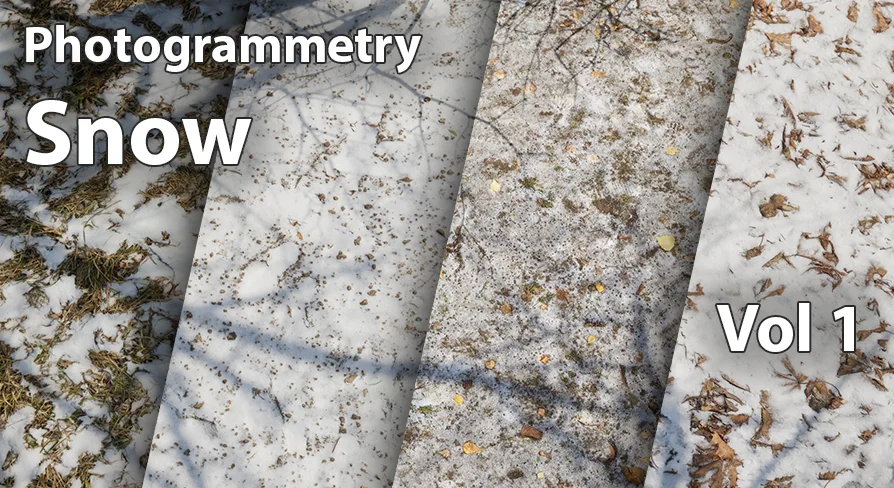
Snow Vol. 1 - Scanned Materials
Snow material pack with ten instance materials featuring Base Color alpha height, Normal, ARM packing, plus adjustable saturation, tint, UV and intensity contro
When a winter scene depends on the surface of snow, the shading response has to hold up across different lighting conditions. Snow Vol. 1 - Scanned Materials is a set of ten instance materials that uses the same channel layout on each surface. That consistent structure makes it a direct fit for real-time projects where snow is assigned to multiple objects without forcing material authors to build a custom shader every time.
Ten Instances, One Channel Layout
The pack contains ten instance materials. An instance inherits the rules of a master material, but leaves room for local changes. If you need one snow surface to appear softer on the ground and another surface to be more compact on rock, the two can be tuned separately even though they live in the same family.
All ten rely on the same texture set. Base Color carries an alpha channel for height, Normal comes as its own map, and ARM compresses Ambient Occlusion, Roughness, and Metallic into three color channels. Once you check the parameters on the first instance, the remaining nine follow the same pattern.
Base Color With an Alpha Height
The Base Color map is where the snow's visible reflection begins. Its RGB channels provide the base tint, but the material puts extra information into the alpha channel: a height map. This means the same image resource is responsible for the color and for a grayscale height profile.
Height data in the alpha channel is a practical way to add topographic information without a second file. While a normal map changes the direction of surface lighting, a height map stores actual elevation steps. The material can then interpret the alpha channel to create depth effects along the snow surface, giving the instance more bite than a flat colored map would.
Normal and ARM: Controlling the Snow Response
A separate Normal map covers the fine bumps and ridges that come from scanned snow. It also affects how light scatters along the surface, letting the snow appear granular rather than smooth.
The ARM map sits alongside it. In this file, Ambient Occlusion lives in the red channel, Roughness lives in the green channel, and Metallic lives in the blue channel. Rather than loading three full maps, the engine can pull the necessary values from a single texture sample. The ambient occlusion term softens the darker pockets of the snow surface, roughness decides whether light is scattered or cut sharp, and metallic helps the material stay grounded in the PBR response the pack was built for.
Instance-Level Controls: Saturation, Tint, UV, and Intensity
Because the materials are instances, every adjustment is exposed as a parameter. Saturation and Tint give the artist a way to change the overall character of the snow. Tint can push it toward cool blue or warm amber; saturation defines how strong that tint is allowed to become.
UV tweaks the tiling of the three maps at once. Scaling the UV up makes the same snow scan stretch across a larger area of terrain, while shrinking the UV treats a single object with a denser pattern. The other parameters—roughness intensity, normal intensity, and occlusion intensity—serve as multipliers. They don't replace the captured maps; they simply scale the strength of the material channel in the final surface. So the same scanned snow can be dialed from subtle to heavily textured depending on exactly where the material is applied.
Workflow With a Demo Cube, Not the Preview Meshes
The asset includes a demo cube as a preview surface. The static meshes shown in the product previews are not part of the package. That distinction matters because it keeps the focus on the material behavior instead of on a specific piece of geometry.
With the demo cube in hand, you can turn lights around the surface, adjust the parameters and observe the relationship between the normal response and the roughness changes. The plain geometry of the cube gives an uncluttered read of how a particular instance performs. Once the cube looks right, the material is meant to be applied to your own static geometry, which is the intended production path. The snowy surfaces belong to the environment you are building, not to a set of fixed models from the asset's preview gallery.
The scanned base of the material is part of its appeal. With tags pointing to photogrammetry, realistic white snow, and a winter forest/ice context, the pack still leaves the choice of surface to the artist. For a production, Snow Vol. 1 presents a compact set of ten instance materials that can be loaded onto existing static meshes, tuned per instance, and routed through the same Base Color-alpha, Normal, and ARM channel structure from scene to scene.
 Snow
Snow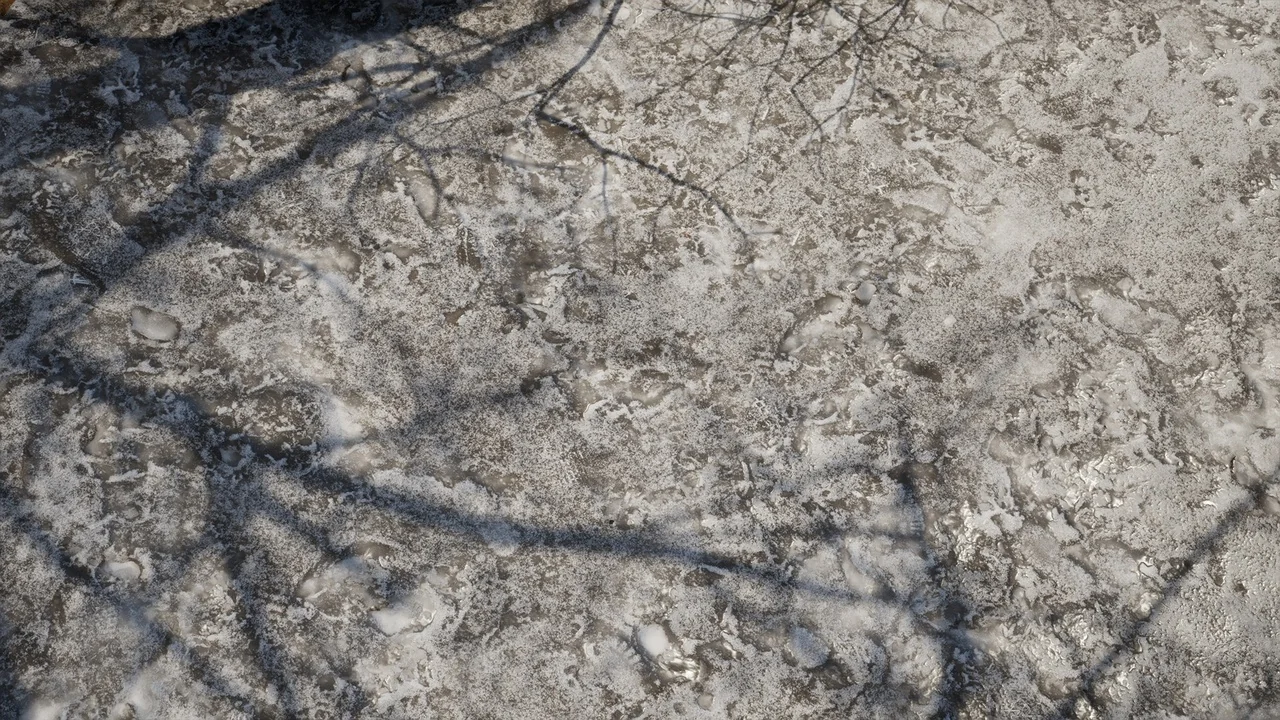
 Stone
Stone Nature & Terrain
 Rock
Rock