"a7cfa646d0d8ae55"{"id":"1000885","slug":"slime-and-puke-fx","title":"Slime \u0026 Puke FX","category":"Liquid","engine":"4.27,5.0+","assetVersion":"","engineVersion":"Engine Version: 4.27,5.0+","tag":"Liquid","accent":"blue","visual":"mech","summary":"45 Niagara slime and puke effects, split into intermittent, burst, and constant versions, with user parameters and emissive glow support.","platform":"Unreal Engine","publishedAt":"2026-08-05T16:28:32.004Z","updatedAt":"2026-08-05T16:28:32.004Z","sourceNotes":[],"fileContents":[],"compatibility":["Unreal Engine","Engine Version: 4.27,5.0+"],"featuredImage":{"alt":"Slime \u0026 Puke FX","src":"/wp-content/uploads/published/2026/08/ffcfcf59f3ea-d56ed8da-2639-442d-a6a6-15a13b551c5a-2aefced1a3.webp"},"hasDownloadLink":true,"downloads":0,"terms":[{"taxonomy":"category","slug":"liquid","name":"Liquid"}],"galleryImages":[{"src":"/wp-content/uploads/published/2026/08/71d5eabf7bc3-00ba93cf-d5b4-4945-8f47-76a1782843ea-692d124eb0.webp","alt":"Slime \u0026 Puke FX"},{"src":"/wp-content/uploads/published/2026/08/39e7e310de7a-18773b53-b5eb-4349-81f7-0ae3af653528-43ecc19492.webp","alt":"Slime \u0026 Puke FX"},{"src":"/wp-content/uploads/published/2026/08/0c8e33c1fd10-d8781dd2-fdca-42c1-bce6-04760a0b84aa-43493cb63e.webp","alt":"Slime \u0026 Puke FX"},{"src":"/wp-content/uploads/published/2026/08/622974b27a70-585a5f89-067e-4d9c-b186-a6803e52a179-8b0a357d4a.webp","alt":"Slime \u0026 Puke FX"},{"src":"/wp-content/uploads/published/2026/08/b2a20808a7c3-3ae1dc01-eb78-422d-8836-d4c13d7f0b7f-4445d42896.webp","alt":"Slime \u0026 Puke FX"},{"src":"/wp-content/uploads/published/2026/08/f54a2d02a747-d6f487cf-639f-424d-963a-01920cfa997a-4548cefa16.webp","alt":"Slime \u0026 Puke FX"},{"src":"/wp-content/uploads/published/2026/08/64a0d9d07cb7-353107ab-41d4-477f-961f-1a72cd8ae093-cad092ef12.webp","alt":"Slime \u0026 Puke FX"},{"src":"/wp-content/uploads/published/2026/08/5464cdd80615-26cdb162-705e-4849-b4e2-193401b2be45-24bc4983c8.webp","alt":"Slime \u0026 Puke FX"},{"src":"/wp-content/uploads/published/2026/08/9cff0a6e434c-e3592682-025f-4680-bc7c-8e7211d5b42c-851e7ab2a2.webp","alt":"Slime \u0026 Puke FX"},{"src":"/wp-content/uploads/published/2026/08/0b84f004a8ca-9233035f-7d97-4d20-9520-fba6965f7140-2f3a8a2608.webp","alt":"Slime \u0026 Puke FX"}],"accessPanel":{"kind":"resource","title":"Download this resource","eyebrow":"Free Download","message":"Log in or create a free account to start your download.","fileName":"Content.7z","safetyNote":"Resources are manually reviewed before listing to improve quality and reduce obvious risks.","actionLabel":"Download Free","resourceType":"Resource archive"},"contentHtml":"\u003ch2\u003e45 Effects Built for Slime and Puke\u003c/h2\u003e\n\n\u003cp\u003e\u003cem\u003eSlime \u0026 Puke FX\u003c/em\u003e is a Niagara Effects Pack that concentrates on 2 fluid-based visuals: slime and puke. All 45 effects are built for the Niagara Particle System, so they can be placed directly into projects that already use Niagara for real-time Visual Effects (VFX). The pack comes from SHOGUN GAMES, a developer that has released other asset packs under the same label.\u003c/p\u003e\n\n\u003cp\u003eThe most prominent structure is the even split: 15 intermittent versions, 15 burst versions, and 15 constant versions. That division makes it easy to choose a starting point based on how often the effect should run. Instead of searching through a long list of unrelated effects, you can go straight to the timing mode that matches your scene.\u003c/p\u003e\n\n\u003ch2\u003eIntermittent, Burst, and Constant Versions\u003c/h2\u003e\n\n\u003cp\u003eThe 3 timing modes cover distinct ways a slime or puke effect can appear on screen. Intermittent versions are suited for irregular, stop-and-go emission. They might release a few particles, pause, then release again. Burst versions handle short, intense pulses of material, which fits something like a sudden explosion of fluid. Constant versions run continuously, delivering a steady stream for as long as the effect is active.\u003c/p\u003e\n\n\u003cp\u003eEach mode contains 15 specific effects, so there are multiple options within 1 timing style. That variety gives you flexibility with density, direction, or overall shape. The user parameters mentioned later let you push each effect further, so the 45 predefined versions are also 45 starting points for custom work.\u003c/p\u003e\n\n\u003ch2\u003eUser Parameters for Building New Versions\u003c/h2\u003e\n\n\u003cp\u003eThe pack includes user parameters that can be used to customize any of the effects or create entirely new versions. This is a key part of the pack's flexibility. Instead of modifying the Niagara Graph directly, you can adjust exposed parameters from the Details Panel or through Blueprint logic.\u003c/p\u003e\n\n\u003cp\u003eFor an artist, this means you can take a constant version that's too fast and slow it down without opening the particle spawn module. For a programmer, it means the parameters can be driven by in-game events, though the exact parameter names are not specified. The important point is that the effects are not locked down; they are designed to be adjusted.\u003c/p\u003e\n\n\u003ch2\u003eEmissive Glow via Material Instances\u003c/h2\u003e\n\n\u003cp\u003eEmissive glow can be added to any of the effects through the Material Instances. That setup lets you keep the particle spawning logic intact while changing only the visual brightness. You don't need to edit the Niagara System to make a Material shine.\u003c/p\u003e\n\n\u003cp\u003eEmissive glow serves both style and readability. A bright, glowing slime can make a hazard in a dark Level easier to spot. A puke effect with strong emissive output might read as highly toxic or magical in a stylized game. Because the glow lives on a Material Instance, you can create multiple intensity levels without duplicating the Particle Effect. Swapping a Material Instance is a lightweight change compared to rebuilding a simulation.\u003c/p\u003e\n\n\u003ch2\u003eCompatible with \u003cem\u003eCharacter Body FX Vol. 3\u003c/em\u003e\u003c/h2\u003e\n\n\u003cp\u003e\u003cem\u003eSlime \u0026 Puke FX\u003c/em\u003e is listed as compatible with \u003cem\u003eCharacter Body FX Vol. 3\u003c/em\u003e. That note places the pack in a character-focused VFX context. If you already use \u003cem\u003eCharacter Body FX Vol. 3\u003c/em\u003e, these slime and puke effects are intended to fit into that same workflow. The compatibility also hints that the effects are scaled and oriented for character body attachment points, which is where slime and puke effects typically belong.\u003c/p\u003e\n\n\u003cp\u003eEven if you don't own that companion pack, the effects can stand alone. But the explicit compatibility is a strong signal for teams building character-driven effects, because it reduces the risk of integration surprises.\u003c/p\u003e\n\n\u003ch2\u003eA Flexible Base for Messy Effects\u003c/h2\u003e\n\n\u003cp\u003eAll 45 effects, regardless of timing mode, share the same customizable system. The user parameters and the Material Instance emissive glow are the 2 main handles for shaping the final look. The pack's own tags describe it as a \u003cem\u003esystem\u003c/em\u003e, \u003cem\u003evisual\u003c/em\u003e, \u003cem\u003ecustomizable\u003c/em\u003e, \u003cem\u003eimitation\u003c/em\u003e, \u003cem\u003eeffect\u003c/em\u003e, \u003cem\u003eNiagara\u003c/em\u003e, \u003cem\u003evisual effect\u003c/em\u003e, \u003cem\u003eslime\u003c/em\u003e, and \u003cem\u003eparticle\u003c/em\u003e collection. The \u003cem\u003eimitation\u003c/em\u003e tag points at the goal of imitating slime and puke behavior convincingly.\u003c/p\u003e\n\n\u003cp\u003eFor a developer or VFX artist, the practical value sits in the large set of ready-made Niagara Effects that cover a specific niche. The 15/15/15 split gives 3 clear timing choices, the user parameters keep the door open for fine-tuning, and emissive glow support lets the Material pop without touching the simulation. That combination makes the pack a useful addition to any project that needs gooey, running, or explosive fluid effects on characters or surfaces.\u003c/p\u003e\n\n\u003ch2\u003eRelated Resources Worth Checking\u003c/h2\u003e\n\u003cul\u003e\n\u003cli\u003e\u003ca href=\"https://3dcghub.com/nature-water-fx/\" title=\"Nature Water FX\"\u003eNature Water FX\u003c/a\u003e\u003c/li\u003e\n\u003cli\u003e\u003ca href=\"https://3dcghub.com/realistic-water-fx-pack/\" title=\"Realistic Water FX Pack\"\u003eRealistic Water FX Pack\u003c/a\u003e\u003c/li\u003e\n\u003cli\u003e\u003ca href=\"https://3dcghub.com/realistic-water-vfx/\" title=\"Realistic Water VFX\"\u003eRealistic Water VFX\u003c/a\u003e\u003c/li\u003e\n\u003cli\u003e\u003ca href=\"https://3dcghub.com/real-liquid-x-liquid-material-blueprint/\" title=\"Real Liquid X - Liquid Material \u0026amp; Blueprint\"\u003eReal Liquid X - Liquid Material \u0026amp; Blueprint\u003c/a\u003e\u003c/li\u003e\n\u003cli\u003e\u003ca href=\"https://3dcghub.com/slime-vfx-2/\" title=\"Slime VFX\"\u003eSlime VFX\u003c/a\u003e\u003c/li\u003e\n\u003c/ul\u003e","contentTextLength":4718,"navigation":{"current":364,"total":3167,"previous":{"id":"14467","slug":"rdtextools-rd-tools-pro","title":"rdTexTools (rd Tools Pro)","category":"Engine Tools","platform":"Unreal Engine","updatedAt":"2026-08-05T17:10:19.438Z"},"next":{"id":"1000884","slug":"slide-pro","title":"Slide Pro","category":"Characters \u0026 Creatures","platform":"Unreal Engine","updatedAt":"2026-08-05T16:22:03.425Z"}},"relatedResources":[{"id":"1000856","slug":"nature-water-fx","title":"Nature Water FX","category":"Liquid","engine":"4.26+,5.0+","assetVersion":"","engineVersion":"Engine Version: 4.26+,5.0+","tag":"Liquid","accent":"blue","visual":"mech","summary":"Fourteen looping Niagara water systems — fountains, geysers, streams, waterfalls — each with user-controlled variables and per-part tuning for Unreal Engine.","platform":"Unreal Engine","publishedAt":"2026-08-04T17:08:20.756Z","updatedAt":"2026-08-04T17:08:20.756Z","sourceNotes":[],"fileContents":[],"compatibility":["Unreal Engine","Engine Version: 4.26+,5.0+"],"featuredImage":{"alt":"Nature Water FX","src":"/wp-content/uploads/published/2026/08/ea4c5f83b21b-93c9b3ee-55d8-4c85-8f2b-65bf878912de-829f5283e3.webp"},"hasDownloadLink":true,"downloads":0},{"id":"15708","slug":"realistic-water-fx-pack","title":"Realistic Water FX Pack","category":"Liquid","engine":"4.27,5.0+","assetVersion":"Engine version: 4.27,5.0+","engineVersion":"4.27","tag":"Liquid","accent":"blue","visual":"animation","summary":"Enhance your digital environments with the Realistic Water FX Pack, featuring 22 unique liquid visual effects. Designed for high performance, these Niagara-based assets are suitable for both games and movies.","platform":"Unreal Engine","publishedAt":"2026-03-12T12:58:22.000Z","updatedAt":"2026-04-19T15:44:41.000Z","sourceNotes":[],"fileContents":[],"compatibility":["Unreal Engine","Engine version: 4.27,5.0+"],"featuredImage":{"alt":"Realistic Water FX Pack","src":"https://3dcghub.com/wp-content/uploads/2026/03/a4c7ff02-ed4d-40ee-9fd2-4aafc88f7d28.webp"},"hasDownloadLink":true,"downloads":0},{"id":"24836","slug":"realistic-water-vfx","title":"Realistic Water VFX","category":"Liquid","engine":"4.27,5.0+","assetVersion":"Engine version: 4.27,5.0+","engineVersion":"","tag":"Liquid","accent":"blue","visual":"audio","summary":"Realistic Water VFX brings together a wide spread of water effects for Unreal Engine scenes, from calm surfaces and raindrops to faucets, sprinklers, oceans, and underwater caustics. It works as a drag-and-drop starting point when a project needs believable...","platform":"Unreal Engine","publishedAt":"2026-04-17T09:31:36.000Z","updatedAt":"2026-04-20T06:12:37.000Z","sourceNotes":[],"fileContents":[],"compatibility":["Unreal Engine","Engine version: 4.27,5.0+"],"featuredImage":{"alt":"Realistic Water VFX","src":"https://3dcghub.com/wp-content/uploads/2026/04/3b03568cd1db_bbd11bc2-ad8c-4b88-881b-176bbdca3ca0.webp"},"hasDownloadLink":true,"downloads":2}]}
Liquid
Slime & Puke FX
45 Niagara slime and puke effects, split into intermittent, burst, and constant versions, with user parameters and emissive glow support.
Category:Unreal Engine, LiquidPlatform: Unreal EngineEngine Version: 4.27,5.0+Published: Aug 5, 2026
Liquid
Resource overview
45 Effects Built for Slime and Puke
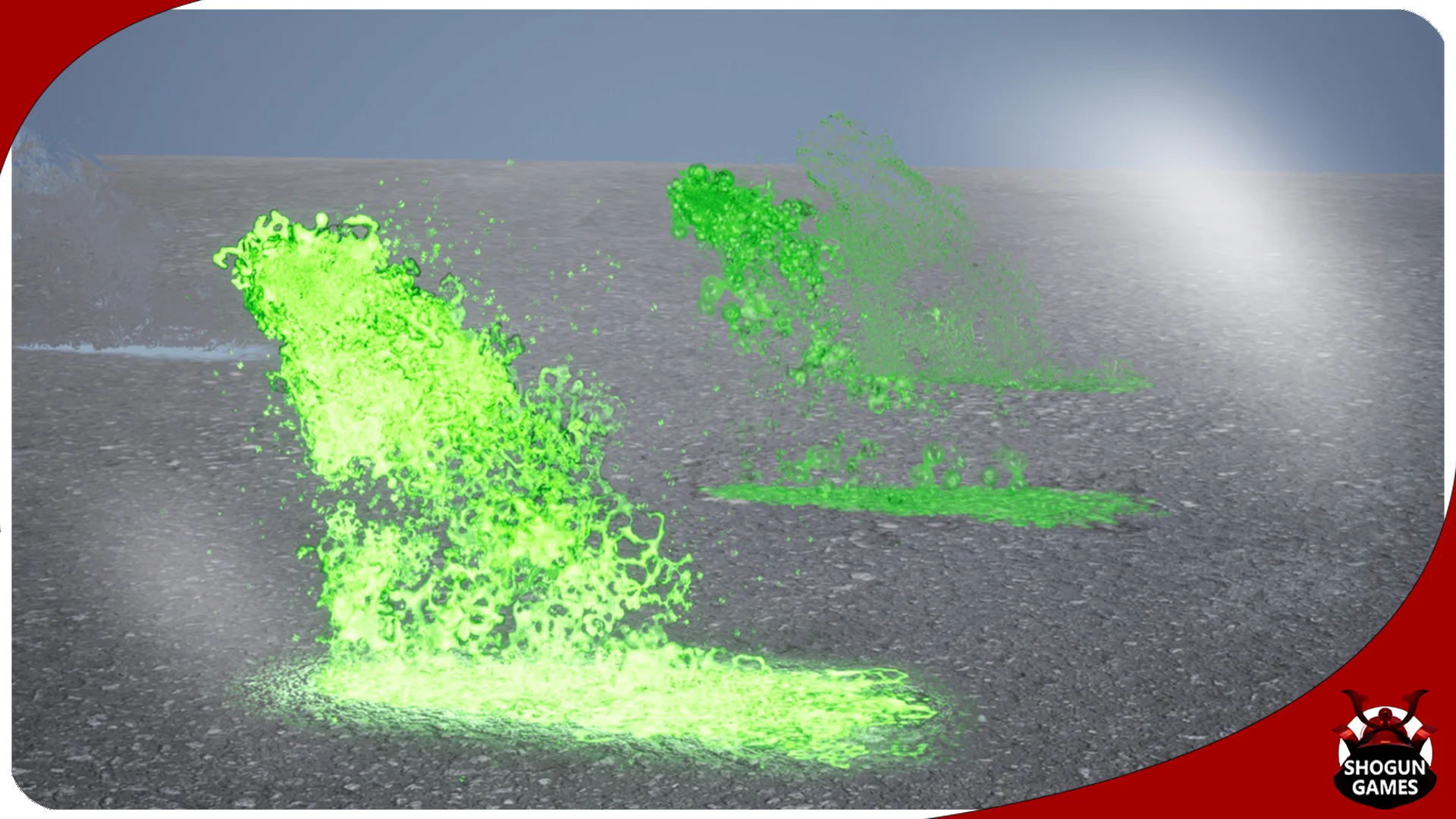
Slime & Puke FX is a Niagara Effects Pack that concentrates on 2 fluid-based visuals: slime and puke. All 45 effects are built for the Niagara Particle System, so they can be placed directly into projects that already use Niagara for real-time Visual Effects (VFX). The pack comes from SHOGUN GAMES, a developer that has released other asset packs under the same label.
The most prominent structure is the even split: 15 intermittent versions, 15 burst versions, and 15 constant versions. That division makes it easy to choose a starting point based on how often the effect should run. Instead of searching through a long list of unrelated effects, you can go straight to the timing mode that matches your scene.
Intermittent, Burst, and Constant Versions
The 3 timing modes cover distinct ways a slime or puke effect can appear on screen. Intermittent versions are suited for irregular, stop-and-go emission. They might release a few particles, pause, then release again. Burst versions handle short, intense pulses of material, which fits something like a sudden explosion of fluid. Constant versions run continuously, delivering a steady stream for as long as the effect is active.
Each mode contains 15 specific effects, so there are multiple options within 1 timing style. That variety gives you flexibility with density, direction, or overall shape. The user parameters mentioned later let you push each effect further, so the 45 predefined versions are also 45 starting points for custom work.
User Parameters for Building New Versions
The pack includes user parameters that can be used to customize any of the effects or create entirely new versions. This is a key part of the pack's flexibility. Instead of modifying the Niagara Graph directly, you can adjust exposed parameters from the Details Panel or through Blueprint logic.
For an artist, this means you can take a constant version that's too fast and slow it down without opening the particle spawn module. For a programmer, it means the parameters can be driven by in-game events, though the exact parameter names are not specified. The important point is that the effects are not locked down; they are designed to be adjusted.
Emissive Glow via Material Instances
Emissive glow can be added to any of the effects through the Material Instances. That setup lets you keep the particle spawning logic intact while changing only the visual brightness. You don't need to edit the Niagara System to make a Material shine.
Emissive glow serves both style and readability. A bright, glowing slime can make a hazard in a dark Level easier to spot. A puke effect with strong emissive output might read as highly toxic or magical in a stylized game. Because the glow lives on a Material Instance, you can create multiple intensity levels without duplicating the Particle Effect. Swapping a Material Instance is a lightweight change compared to rebuilding a simulation.
Compatible with Character Body FX Vol. 3
Slime & Puke FX is listed as compatible with Character Body FX Vol. 3. That note places the pack in a character-focused VFX context. If you already use Character Body FX Vol. 3, these slime and puke effects are intended to fit into that same workflow. The compatibility also hints that the effects are scaled and oriented for character body attachment points, which is where slime and puke effects typically belong.
Even if you don't own that companion pack, the effects can stand alone. But the explicit compatibility is a strong signal for teams building character-driven effects, because it reduces the risk of integration surprises.
A Flexible Base for Messy Effects
All 45 effects, regardless of timing mode, share the same customizable system. The user parameters and the Material Instance emissive glow are the 2 main handles for shaping the final look. The pack's own tags describe it as a system, visual, customizable, imitation, effect, Niagara, visual effect, slime, and particle collection. The imitation tag points at the goal of imitating slime and puke behavior convincingly.
For a developer or VFX artist, the practical value sits in the large set of ready-made Niagara Effects that cover a specific niche. The 15/15/15 split gives 3 clear timing choices, the user parameters keep the door open for fine-tuning, and emissive glow support lets the Material pop without touching the simulation. That combination makes the pack a useful addition to any project that needs gooey, running, or explosive fluid effects on characters or surfaces.
 Liquid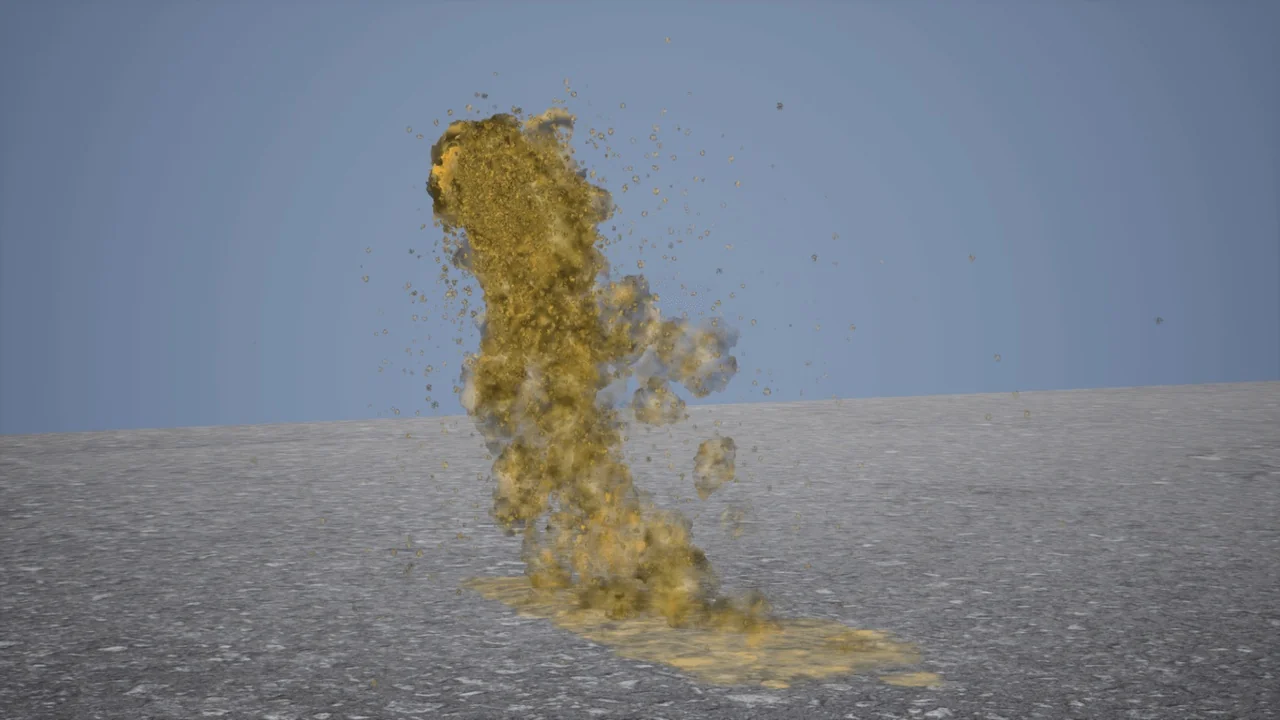
 Liquid
 Liquid
 Liquid