"a7cfa646d0d8ae55"{"id":"1000884","slug":"slide-pro","title":"Slide Pro","category":"Characters \u0026 Creatures","engine":"5.5+","assetVersion":"","engineVersion":"Engine Version: 5.5+","tag":"Characters","accent":"blue","visual":"character","summary":"Slide Pro adds character sliding that follows forward direction, with slope-up detection, sound cues, stop detection, and a camera switch example.","platform":"Unreal Engine","publishedAt":"2026-08-05T16:22:03.425Z","updatedAt":"2026-08-05T16:22:03.425Z","sourceNotes":[],"fileContents":[],"compatibility":["Unreal Engine","Engine Version: 5.5+"],"featuredImage":{"alt":"Slide Pro","src":"/wp-content/uploads/published/2026/08/a7fa611d0c1c-5f6d081b-edf7-427e-98b7-37c271b7c203-1febc973dd.webp"},"hasDownloadLink":true,"downloads":1,"terms":[{"taxonomy":"category","slug":"characters-and-creatures","name":"Characters \u0026 Creatures"}],"galleryImages":[{"src":"/wp-content/uploads/published/2026/08/f5dd3bd1e905-768943fb-cf3f-4b17-8c36-a062f96329c6-b2f5d28233.webp","alt":"Slide Pro"},{"src":"/wp-content/uploads/published/2026/08/41efd51fe6ef-87490399-fdab-4b06-8c95-0e647006fedd-5c33afff6a.webp","alt":"Slide Pro"},{"src":"/wp-content/uploads/published/2026/08/2cd3e3aa824d-41023499-600c-4203-bc28-b8b6d96ba06d-cab10f8288.webp","alt":"Slide Pro"},{"src":"/wp-content/uploads/published/2026/08/e556abd10156-714348c4-88bf-400d-a7d5-da65a9dfc710-3aaa2a1d44.webp","alt":"Slide Pro"}],"accessPanel":{"kind":"resource","title":"Download this resource","eyebrow":"Free Download","message":"Log in or create a free account to start your download.","fileName":"Content.7z","safetyNote":"Resources are manually reviewed before listing to improve quality and reduce obvious risks.","actionLabel":"Download Free","resourceType":"Resource archive"},"contentHtml":"\u003cp\u003eSliding mechanics often trip up games because the movement feels either too floaty or too abrupt. \u003cem\u003eSlide Pro\u003c/em\u003e takes a direct route: the character moves instantly based on its \u003ccode\u003eForward Direction\u003c/code\u003e, which makes the slide read clearly on screen and keeps the player in control. It also handles the tricky case where a character would normally get stuck underneath an obstacle, letting the slide continue as long as the situation demands.\u003c/p\u003e\n\n\u003ch2\u003eSliding Along the Character's Forward Direction\u003c/h2\u003e\n\n\u003cp\u003e\u003cem\u003eSlide Pro\u003c/em\u003e's core behavior starts with the character's facing direction. Instead of relying on a complicated physics-driven simulation, the component uses the \u003ccode\u003eForward Vector\u003c/code\u003e to decide where the slide goes. That makes the initial dash immediate and predictable. The character does not need a ramp or a slope to start sliding; the \u003ccode\u003eForward Direction\u003c/code\u003e alone is enough to move instantly.\u003c/p\u003e\n\n\u003cp\u003eBecause the movement is tied to the character's orientation, the feature works naturally when the player is turning. The slide follows wherever the character is looking, so it fits into Third-Person action games and exploration titles that need a quick burst of horizontal movement.\u003c/p\u003e\n\n\u003ch2\u003eUnlimited Sliding When Getting Up Is Blocked\u003c/h2\u003e\n\n\u003cp\u003e1 specific situation \u003cem\u003eSlide Pro\u003c/em\u003e addresses is when the character cannot stand back up because something is blocking the space above. In that case, the component allows sliding to continue without a maximum distance. This prevents the character from coming to a jerky halt in a place where the player needs to keep moving.\u003c/p\u003e\n\n\u003cp\u003eThe behavior is useful in tight tunnels, low ceilings, and any environment where the camera or character collides with overhead geometry. \u003cem\u003eSlide Pro\u003c/em\u003e keeps the motion going until the player lets go, makes a turn, or otherwise stops the input.\u003c/p\u003e\n\n\u003ch2\u003eV1.0.1 Update: Camera Switch Example and Function Organization\u003c/h2\u003e\n\n\u003cp\u003eAn earlier update added a basic example that switches the camera from Third-Person to First-Person. The example shows how the slide can be paired with a different perspective. This is useful for games where the player might slide through a tight passage and then want a closer view, or where the action shifts between over-the-shoulder and First-Person viewpoints.\u003c/p\u003e\n\n\u003cp\u003eThe same update also reorganized the component's functions by category. This makes the publicly exposed functions easier to browse in a Blueprint Editor. Instead of wading through a flat list of nodes, users can quickly locate the ones that match the task they are scripting.\u003c/p\u003e\n\n\u003ch2\u003eSlope Up Detection and Impulse Reduction in V1.1.0 Update\u003c/h2\u003e\n\n\u003cp\u003eSliding into an upward slope can feel like hitting a wall. The V1.1.0 update adds support for \u003ccode\u003eSlope Up Detection\u003c/code\u003e to reduce impulse. Instead of losing all momentum at once, the character eases into the incline. This reduces the jarring snap that often happens when a fast slide meets rising terrain.\u003c/p\u003e\n\n\u003cp\u003eThat leaves a smoother transition between flat ground and angled surfaces. The impulse reduction also makes it easier to chain a slide into a jump, as the character does not get bogged down by an abrupt velocity change.\u003c/p\u003e\n\n\u003ch3\u003eStart and End Sound Effects\u003c/h3\u003e\n\n\u003cp\u003eAudio feedback is often the quickest way to make a mechanic feel more solid. \u003cem\u003eSlide Pro\u003c/em\u003e now has sound effects for the moment the slide starts and the moment it ends. The start cue gives the player an immediate confirmation that the action triggered, while the end cue signals that the slide has finished.\u003c/p\u003e\n\n\u003ch3\u003eLast Position Detection for Stop Sliding\u003c/h3\u003e\n\n\u003cp\u003eThe update also introduced \u003ccode\u003eLast Position Detection\u003c/code\u003e. If the character is not actually moving while the slide is still active, the component stops the slide. This prevents the character from getting stuck in a sliding state when movement input has stopped or the character is blocked by an obstacle.\u003c/p\u003e\n\n\u003cp\u003eThis is especially important for the \"unlimited sliding when blocked\" scenario. Without such a check, the character might keep playing the slide animation or hold the sliding state forever. The new detection catches the no-movement case and ends the slide cleanly.\u003c/p\u003e\n\n\u003ch2\u003eTesting with the Windows Build and Lag Test\u003c/h2\u003e\n\n\u003cp\u003e\u003cem\u003eSlide Pro\u003c/em\u003e comes with a Windows build as part of the demo package. That gives developers a chance to test the slide behavior in a runnable build without opening the Editor first. The lag test is particularly handy for checking how the component performs when the slide is triggered repeatedly or when multiple characters might be sliding at the same time.\u003c/p\u003e\n\n\u003cp\u003eSince the package also includes a video tutorial and documentation, the setup path is relatively short. A developer can see the expected behavior, look at the documentation to understand the exposed functions, and then drop the component into a Character Blueprint.\u003c/p\u003e\n\n\u003ch2\u003eWhere \u003cem\u003eSlide Pro\u003c/em\u003e Fits in a Production\u003c/h2\u003e\n\n\u003cp\u003e\u003cem\u003eSlide Pro\u003c/em\u003e is not a full Character Controller. It is a focused movement component that can be layered onto an existing character setup. The tag list includes \u003cem\u003eReplicated\u003c/em\u003e and \u003cem\u003eMultiplayer\u003c/em\u003e, pointing toward networked projects, and \u003cem\u003eAnimation Blueprint\u003c/em\u003e lines up with how the slide can drive animation states. Because the functions are organized by category, it is intended to be integrated into a larger Blueprint structure rather than to replace 1.\u003c/p\u003e\n\n\u003cp\u003eFor a team that already has a working movement system, \u003cem\u003eSlide Pro\u003c/em\u003e offers a way to add a satisfying slide without building the velocity logic from scratch. The sound cues and stop detection are the kind of polish that usually takes extra iteration, so having them included in the component means that part of the work is already done.\u003c/p\u003e\n\n\u003ch2\u003eMore From The Same Workflow\u003c/h2\u003e\n\u003cul\u003e\n\u003cli\u003e\u003ca href=\"https://3dcghub.com/special-ops-modular-character-bundle/\" title=\"Special Ops - Modular Character Bundle\"\u003eSpecial Ops - Modular Character Bundle\u003c/a\u003e\u003c/li\u003e\n\u003cli\u003e\u003ca href=\"https://3dcghub.com/infected-rage-unleashed/\" title=\"INFECTED Rage Unleashed\"\u003eINFECTED Rage Unleashed\u003c/a\u003e\u003c/li\u003e\n\u003cli\u003e\u003ca href=\"https://3dcghub.com/beach-boys-2/\" title=\"Beach Boys\"\u003eBeach Boys\u003c/a\u003e\u003c/li\u003e\n\u003cli\u003e\u003ca href=\"https://3dcghub.com/ue5-rigged-npc-creator/\" title=\"UE5 Rigged NPC Creator\"\u003eUE5 Rigged NPC Creator\u003c/a\u003e\u003c/li\u003e\n\u003cli\u003e\u003ca href=\"https://3dcghub.com/low-poly-bird-mallard-duck/\" title=\"Low Poly Bird: Mallard Duck\"\u003eLow Poly Bird: Mallard Duck\u003c/a\u003e\u003c/li\u003e\n\u003c/ul\u003e","contentTextLength":5598,"navigation":{"current":365,"total":3167,"previous":{"id":"1000885","slug":"slime-and-puke-fx","title":"Slime \u0026 Puke FX","category":"Liquid","platform":"Unreal Engine","updatedAt":"2026-08-05T16:28:32.004Z"},"next":{"id":"1000883","slug":"skmodular-plugin-blueprint","title":"SKModular Plugin [Blueprint]","category":"Engine Tools","platform":"Unreal Engine","updatedAt":"2026-08-05T16:17:14.210Z"}},"relatedResources":[{"id":"24770","slug":"special-ops-modular-character-bundle","title":"Special Ops - Modular Character Bundle","category":"Characters \u0026 Creatures","engine":"5.5+","assetVersion":"Engine version: 5.5+","engineVersion":"5.5","tag":"Characters","accent":"blue","visual":"character","summary":"This bundle focuses on cinematic special-ops scenes that need fast character variation, pose control, and modular gear options. It combines photorealistic operatives, camouflage choices, and Unreal Engine-oriented Blueprint tools for tactical setups. It fit...","platform":"Unreal Engine","publishedAt":"2026-04-16T17:54:59.000Z","updatedAt":"2026-04-20T06:12:38.000Z","sourceNotes":[],"fileContents":[],"compatibility":["Unreal Engine","Engine version: 5.5+"],"featuredImage":{"alt":"Special Ops - Modular Character Bundle","src":"https://3dcghub.com/wp-content/uploads/2026/04/bbdf376a9114_c351e600-9483-4306-a061-27bdc851b013.webp"},"hasDownloadLink":true,"downloads":1},{"id":"1000070","slug":"infected-rage-unleashed","title":"INFECTED Rage Unleashed","category":"Characters \u0026 Creatures","engine":"Engine Version: 5.5+","assetVersion":"Engine Version: 5.5+","engineVersion":"","tag":"Characters","accent":"blue","visual":"character","summary":"A post-apocalyptic crowd bundle with 300+ infected assets, 200 characters, modular parts, 9 groups, rigs, and Blender and UE5 workflow support.","platform":"Unreal Engine","publishedAt":"2026-06-01T15:15:17.561Z","updatedAt":"2026-06-01T15:49:49.372Z","sourceNotes":[],"fileContents":[],"compatibility":["Unreal Engine","Engine Version: 5.5+"],"featuredImage":{"alt":"INFECTED Rage Unleashed","src":"/wp-content/uploads/published/2026/06/3c8a2b26a8b1-infected-box3-57234c04b4.webp"},"hasDownloadLink":true,"downloads":1},{"id":"1000916","slug":"driveable-mars-rover","title":"Driveable Mars Rover","category":"Characters \u0026 Creatures","engine":"5.1+","assetVersion":"","engineVersion":"Engine Version: 5.1+","tag":"Characters","accent":"blue","visual":"character","summary":"Driveable Mars Rover for Unreal Engine 5 with controls set up, complex suspension, customizable lights, 3 skins, 3 wheel types, 4K PBR textures, and sound.","platform":"Unreal Engine","publishedAt":"2026-08-08T03:54:32.461Z","updatedAt":"2026-08-08T03:54:32.461Z","sourceNotes":[],"fileContents":[],"compatibility":["Unreal Engine","Engine Version: 5.1+"],"featuredImage":{"alt":"Driveable Mars Rover","src":"/wp-content/uploads/published/2026/08/dd0a808e1e89-13847ffc-e222-49c8-a005-57b2f02bfce6-76dbefac57.webp"},"hasDownloadLink":true,"downloads":0}]}
Characters
Slide Pro
Slide Pro adds character sliding that follows forward direction, with slope-up detection, sound cues, stop detection, and a camera switch example.
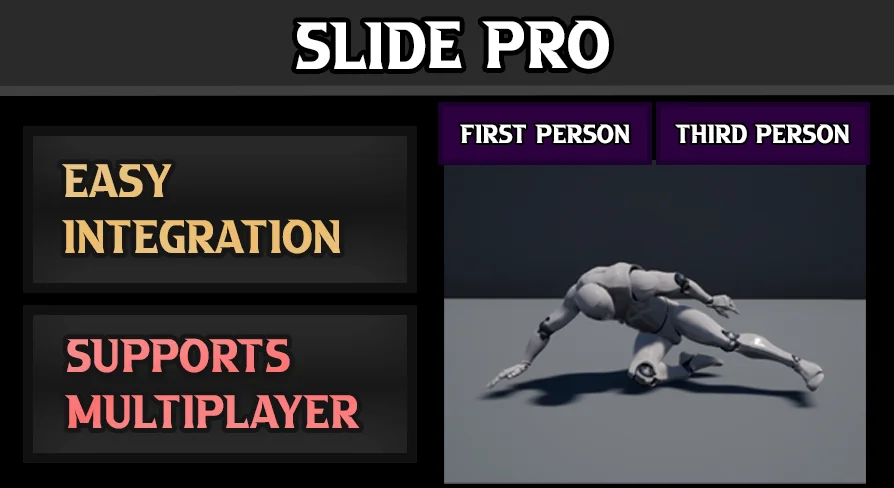
Sliding mechanics often trip up games because the movement feels either too floaty or too abrupt. Slide Pro takes a direct route: the character moves instantly based on its Forward Direction, which makes the slide read clearly on screen and keeps the player in control. It also handles the tricky case where a character would normally get stuck underneath an obstacle, letting the slide continue as long as the situation demands.
Sliding Along the Character's Forward Direction
Slide Pro's core behavior starts with the character's facing direction. Instead of relying on a complicated physics-driven simulation, the component uses the Forward Vector to decide where the slide goes. That makes the initial dash immediate and predictable. The character does not need a ramp or a slope to start sliding; the Forward Direction alone is enough to move instantly.
Because the movement is tied to the character's orientation, the feature works naturally when the player is turning. The slide follows wherever the character is looking, so it fits into Third-Person action games and exploration titles that need a quick burst of horizontal movement.
Unlimited Sliding When Getting Up Is Blocked
1 specific situation Slide Pro addresses is when the character cannot stand back up because something is blocking the space above. In that case, the component allows sliding to continue without a maximum distance. This prevents the character from coming to a jerky halt in a place where the player needs to keep moving.
The behavior is useful in tight tunnels, low ceilings, and any environment where the camera or character collides with overhead geometry. Slide Pro keeps the motion going until the player lets go, makes a turn, or otherwise stops the input.
V1.0.1 Update: Camera Switch Example and Function Organization
An earlier update added a basic example that switches the camera from Third-Person to First-Person. The example shows how the slide can be paired with a different perspective. This is useful for games where the player might slide through a tight passage and then want a closer view, or where the action shifts between over-the-shoulder and First-Person viewpoints.
The same update also reorganized the component's functions by category. This makes the publicly exposed functions easier to browse in a Blueprint Editor. Instead of wading through a flat list of nodes, users can quickly locate the ones that match the task they are scripting.
Slope Up Detection and Impulse Reduction in V1.1.0 Update
Sliding into an upward slope can feel like hitting a wall. The V1.1.0 update adds support for Slope Up Detection to reduce impulse. Instead of losing all momentum at once, the character eases into the incline. This reduces the jarring snap that often happens when a fast slide meets rising terrain.
That leaves a smoother transition between flat ground and angled surfaces. The impulse reduction also makes it easier to chain a slide into a jump, as the character does not get bogged down by an abrupt velocity change.
Start and End Sound Effects
Audio feedback is often the quickest way to make a mechanic feel more solid. Slide Pro now has sound effects for the moment the slide starts and the moment it ends. The start cue gives the player an immediate confirmation that the action triggered, while the end cue signals that the slide has finished.
Last Position Detection for Stop Sliding
The update also introduced Last Position Detection. If the character is not actually moving while the slide is still active, the component stops the slide. This prevents the character from getting stuck in a sliding state when movement input has stopped or the character is blocked by an obstacle.
This is especially important for the "unlimited sliding when blocked" scenario. Without such a check, the character might keep playing the slide animation or hold the sliding state forever. The new detection catches the no-movement case and ends the slide cleanly.
Testing with the Windows Build and Lag Test
Slide Pro comes with a Windows build as part of the demo package. That gives developers a chance to test the slide behavior in a runnable build without opening the Editor first. The lag test is particularly handy for checking how the component performs when the slide is triggered repeatedly or when multiple characters might be sliding at the same time.
Since the package also includes a video tutorial and documentation, the setup path is relatively short. A developer can see the expected behavior, look at the documentation to understand the exposed functions, and then drop the component into a Character Blueprint.
Where Slide Pro Fits in a Production
Slide Pro is not a full Character Controller. It is a focused movement component that can be layered onto an existing character setup. The tag list includes Replicated and Multiplayer, pointing toward networked projects, and Animation Blueprint lines up with how the slide can drive animation states. Because the functions are organized by category, it is intended to be integrated into a larger Blueprint structure rather than to replace 1.
For a team that already has a working movement system, Slide Pro offers a way to add a satisfying slide without building the velocity logic from scratch. The sound cues and stop detection are the kind of polish that usually takes extra iteration, so having them included in the component means that part of the work is already done.
 Characters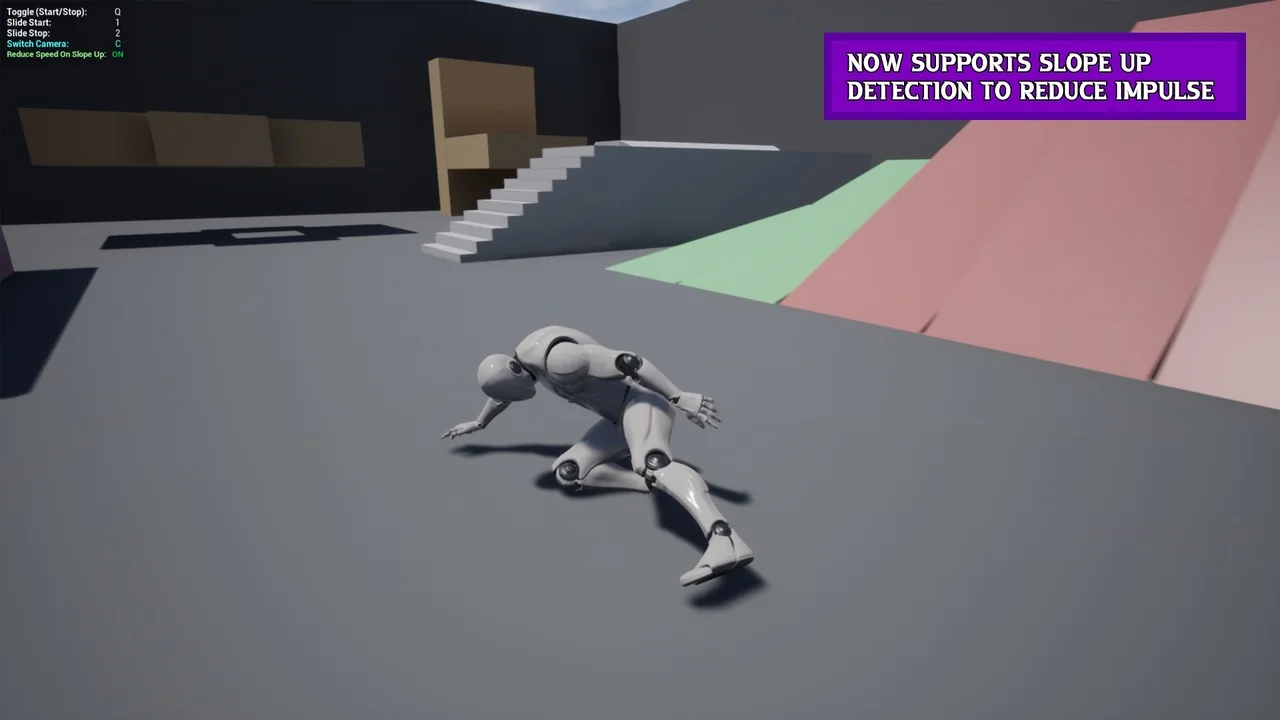
 Characters
 Characters
 Characters