"a338a1d501976271"{"id":"1001362","slug":"shooter-rifle-animations","title":"Shooter Rifle Animations","category":"Combat","engine":"5.0+","assetVersion":"","engineVersion":"Engine Version: 5.0+","tag":"Combat","accent":"blue","visual":"animation","summary":"Tactical full-body rifle animations for the UE4 mannequin, featuring true first-person head camera support, BlendSpaces, AimOffsets 1D, and hand IK setups.","platform":"Unreal Engine","publishedAt":"2026-10-04T10:31:18.353Z","updatedAt":"2026-10-04T10:31:18.353Z","sourceNotes":[],"fileContents":[],"compatibility":["Unreal Engine","Engine Version: 5.0+"],"featuredImage":{"alt":"Shooter Rifle Animations","src":"/wp-content/uploads/published/2026/10/c91333d8edc4-50a7901b-e742-416b-8d93-123662194abb-8a2635ccbe.webp"},"hasDownloadLink":true,"downloads":0,"terms":[{"taxonomy":"category","slug":"combat","name":"Combat"}],"galleryImages":[{"src":"/wp-content/uploads/published/2026/10/69894a60f1fe-acafba89-b413-49a0-939f-d3af892b238c-49cc67796a.webp","alt":"Shooter Rifle Animations"},{"src":"/wp-content/uploads/published/2026/10/c853a60272e4-5f17b2d6-5c6d-4fd1-83a0-94288dfbfc08-c31b220bec.webp","alt":"Shooter Rifle Animations"},{"src":"/wp-content/uploads/published/2026/10/edb33ba4889a-37692adf-ea79-4dfc-b592-fa9342c62f37-e4f97f57ac.webp","alt":"Shooter Rifle Animations"},{"src":"/wp-content/uploads/published/2026/10/c43eaca088bb-fe49716a-47ed-4b72-a74c-f8743e2e0558-5f865ada7a.webp","alt":"Shooter Rifle Animations"},{"src":"/wp-content/uploads/published/2026/10/0863903ced31-8a162e95-b9e0-47e6-9967-271ccd4894dd-051b47f733.webp","alt":"Shooter Rifle Animations"},{"src":"/wp-content/uploads/published/2026/10/9c114283b076-8324f50b-95cd-421b-bfaa-a28fc0b332c6-c4c1611374.webp","alt":"Shooter Rifle Animations"},{"src":"/wp-content/uploads/published/2026/10/205b62428a54-dcfe540a-e377-4e06-ac65-be0573127f46-e6cf920538.webp","alt":"Shooter Rifle Animations"},{"src":"/wp-content/uploads/published/2026/10/e517374cbef4-3f4febd4-70c2-4058-8d62-d1bd93cc8a23-f09229ed5a.webp","alt":"Shooter Rifle Animations"},{"src":"/wp-content/uploads/published/2026/10/757f899f21d4-39058c77-0846-4943-8090-5fd9fbba15a6-e0a6bd96f6.webp","alt":"Shooter Rifle Animations"}],"accessPanel":{"kind":"resource","title":"Download this resource","eyebrow":"Free Download","message":"Log in or create a free account to start your download.","fileName":"Content.7z","safetyNote":"Resources are manually reviewed before listing to improve quality and reduce obvious risks.","actionLabel":"Download Free","resourceType":"Resource archive"},"contentHtml":"\u003cp\u003eTactical shooter projects often encounter distinct pipeline friction when synchronizing weapon motion across different camera perspectives. In standard separated-mesh systems, arms are rendered solely for a floating first-person camera while a different set of lower-fidelity animations drives the external character body. Handcrafted tactical animations built on a single full-body UE4 mannequin bypass this division. By keyframing the full body so that both external third-person views and a head-mounted camera share the same skeletal motion, the character retains natural tactical body language without visual discrepancies between what the player sees and what surrounding characters see.\u003c/p\u003e \u003ch2\u003eHandcrafted Tactical Movement for First-Person and External Views\u003c/h2\u003e\n\u003cp\u003eTrue first-person camera setups present unique hurdles for animation stability. If a character breathes, steps, or shifts weight without fine-tuned head and upper-body compensation, an attached head camera will sway unpredictably or cause the weapon to dip completely out of frame. The rifle animations in this collection are handcrafted specifically to resolve this balance. Arms and the head have been articulated together so that the rifle stays cleanly positioned within the field of view of a camera parented directly to the head bone at all times.\u003c/p\u003e \u003cp\u003eThis design allows the same asset data to serve dual roles seamlessly. In third-person perspective modes, the character displays realistic, tactical weight distribution, firm foot placement, and deliberate handling. In true first-person view, the weapon maintains proper framing on screen without clipping through the camera plane or wandering off-target during complex steps. The handcrafted nature of the animations avoids the mechanical stiffness often found in raw motion capture, preserving the deliberate cadence expected in realistic military shooter environments.\u003c/p\u003e \u003ch2\u003eDirectional BlendSpaces and Locomotion Transitions\u003c/h2\u003e\n\u003cp\u003eCharacter locomotion in modern combat environments relies heavily on fluid pacing adjustments and multi-directional maneuvering. This collection organizes movement across dedicated BlendSpaces configured to calculate movement in all directions. Players can transition in full 360-degree sweeps without sudden snapping or broken motion paths.\u003c/p\u003e \u003cp\u003eThe system establishes progressive speed phases that blend seamlessly across distinct tactical tiers:\u003c/p\u003e\n\u003cul\u003e \u003cli\u003eIdle stances with steady weapon posture\u003c/li\u003e \u003cli\u003eSlow walking states for careful room clearing and low-profile patrol\u003c/li\u003e \u003cli\u003eJogging sequences for standard combat relocation\u003c/li\u003e \u003cli\u003eRunning cycles for full sprints while maintaining weapon control\u003c/li\u003e\n\u003c/ul\u003e \u003cp\u003eBecause the locomotion data blends across these states continuously, acceleration and deceleration occur smoothly. The transition logic ensures that whether a character is creeping forward in a deliberate walk or pushing sideways into a jog, the weapon maintains its calculated relationship to the upper torso and head perspective.\u003c/p\u003e \u003ch2\u003eAimOffsets 1D for Vertical Elevation Tracking\u003c/h2\u003e\n\u003cp\u003eAiming high or low requires precise pitch adjustments that do not distort the rifle grip or detach the character's eye line from the weapon sights. To handle vertical targeting, the pack incorporates AimOffsets 1D dedicated to aiming upward and downward.\u003c/p\u003e \u003cp\u003eConfiguring vertical targeting as a 1D offset simplifies the animation blending tree while preventing rotational skewing along unneeded axes. The spine, neck, and shoulder joints elevate and depress in unison, ensuring the rifle sight remains aligned with the player's focal point. By driving vertical aiming through dedicated AimOffsets 1D, the engine maintains the integrity of the base locomotion BlendSpaces underneath, allowing dynamic aiming to run simultaneously with forward, lateral, or diagonal travel.\u003c/p\u003e \u003ch2\u003eVirtual Bones and Hand IK in the Anim Blueprint\u003c/h2\u003e\n\u003cp\u003eKeeping a character's hands locked precisely to a rifle receiver and handguard is critical during dynamic movement. Small interpolation errors during complex blending can cause the left hand to drift away from the barrel or the right hand to slip from the pistol grip. This set addresses hand drift through an included Animation Blueprint configured with dedicated Inverse Kinematics (IK) nodes.\u003c/p\u003e \u003cp\u003eThe stabilization pipeline relies on adding two virtual bones directly to the skeleton. These virtual bones function as designated IK targets for the hands. When the character transitions between idle, walking, jogging, or running within the BlendSpaces, the Anim Blueprint calculates the position of these virtual bone targets and locks the hand bones to them via two-bone or direct IK solver nodes. This setup ensures that regardless of how aggressively the torso twists during an AimOffset elevation or how quickly the character alters their movement angle, both hands remain anchored to the rifle without visual sliding.\u003c/p\u003e \u003ch2\u003eNear Clip Plane Setup for Head-Mounted Cameras\u003c/h2\u003e\n\u003cp\u003eWhen running a true first-person camera attached directly to a skeletal mesh's head bone, the physical distance between the camera lens, the character's collarbones, and the rifle receiver becomes remarkably small. Under default engine parameters, geometry situated extremely close to the camera can slice through the near rendering threshold, creating visible visual cutaways into the interior of the weapon mesh or character body.\u003c/p\u003e \u003cp\u003eTo eliminate this clipping artifact, it is recommended to adjust the project-level rendering settings. Navigating to Edit, then Project Settings, and selecting Engine - General Settings exposes the Near Clip Plane property. Setting the Near Clip Plane to a relatively low value, such as 3, shortens the distance at which polygons are culled near the camera lens. This slight engine-level adjustment preserves the full geometry of the rifle and hands during tight aiming angles and close-quarter movement sequences.\u003c/p\u003e \u003ch2\u003eEpic Skeleton Compatibility and System Applications\u003c/h2\u003e\n\u003cp\u003eThe animation assets are built directly on the full-body UE4 mannequin, aligning them with the standard Epic skeleton hierarchy. This shared joint layout makes the asset data straightforward to retarget or integrate into existing Unreal Engine project structures without rebuilding basic rig hierarchies. Furthermore, the animations maintain cross-compatibility with Customizable Arm Animations, providing developers with flexibility when altering character gear, sleeve geometry, or modular rig attachments.\u003c/p\u003e \u003cp\u003eProjects focused on realistic tactical movement, tight indoor clearing, or seamless transitions between third-person tactical viewpoints and true first-person camera rigs can implement the locomotion BlendSpaces, AimOffsets 1D, and hand IK virtual bones directly as a cohesive weapon handling foundation.\u003c/p\u003e\n\n\u003ch2\u003eRelated Resources Worth Checking\u003c/h2\u003e\n\u003cul\u003e\n\u003cli\u003e\u003ca href=\"https://3dcghub.com/fps-automatic-rifle-01-animations/\" title=\"FPS Automatic Rifle 01 Animations\"\u003eFPS Automatic Rifle 01 Animations\u003c/a\u003e\u003c/li\u003e\n\u003cli\u003e\u003ca href=\"https://3dcghub.com/assault-rifle-animations/\" title=\"Assault Rifle Animations\"\u003eAssault Rifle Animations\u003c/a\u003e\u003c/li\u003e\n\u003cli\u003e\u003ca href=\"https://3dcghub.com/fps-automatic-gun-animations/\" title=\"FPS Automatic Gun Animations\"\u003eFPS Automatic Gun Animations\u003c/a\u003e\u003c/li\u003e\n\u003cli\u003e\u003ca href=\"https://3dcghub.com/fps-sniper-rifle-03-animations/\" title=\"FPS Sniper Rifle 03 (Animations)\"\u003eFPS Sniper Rifle 03 (Animations)\u003c/a\u003e\u003c/li\u003e\n\u003cli\u003e\u003ca href=\"https://3dcghub.com/ak-rifle-character-animation-pack-first-third-person/\" title=\"AK Rifle Character Animation Pack First \u0026amp; Third Person\"\u003eAK Rifle Character Animation Pack First \u0026amp; Third Person\u003c/a\u003e\u003c/li\u003e\n\u003c/ul\u003e","contentTextLength":6892,"navigation":{"current":40,"total":3338,"previous":{"id":"1001363","slug":"showroom-expo-hall","title":"Showroom Expo Hall","category":"Interior","platform":"Unreal Engine","updatedAt":"2026-10-04T10:32:16.987Z"},"next":{"id":"1001361","slug":"sci-fi-interior-04","title":"Sci-Fi Interior 04","category":"Sci-Fi","platform":"Unreal Engine","updatedAt":"2026-10-04T10:30:22.274Z"}},"relatedResources":[{"id":"1001171","slug":"fps-automatic-rifle-01-animations","title":"FPS Automatic Rifle 01 Animations","category":"Combat","engine":"5.0+","assetVersion":"","engineVersion":"Engine Version: 5.0+","tag":"Combat","accent":"blue","visual":"animation","summary":"First-person automatic rifle animation set featuring animated FPS hands with multiple skins, weapon reloading, firing, and detailed cartridge handling.","platform":"Unreal Engine","publishedAt":"2026-09-17T03:34:03.784Z","updatedAt":"2026-09-17T03:34:03.784Z","sourceNotes":[],"fileContents":[],"compatibility":["Unreal Engine","Engine Version: 5.0+"],"featuredImage":{"alt":"FPS Automatic Rifle 01 Animations","src":"/wp-content/uploads/published/2026/09/43275608c235-74b1eabb-34f4-459a-9724-3c909661891a-c49bdcd627.webp"},"hasDownloadLink":true,"downloads":4},{"id":"1001078","slug":"assault-rifle-animations","title":"Assault Rifle Animations","category":"Combat","engine":"5.2+","assetVersion":"","engineVersion":"Engine Version: 5.2+","tag":"Combat","accent":"blue","visual":"animation","summary":"25 Mocap assault rifle clips with reload, shots, crouch, prone, walk and shooting rack. Shots and reloads trigger sounds via notify events.","platform":"Unreal Engine","publishedAt":"2026-09-04T15:56:17.751Z","updatedAt":"2026-09-04T15:56:17.751Z","sourceNotes":[],"fileContents":[],"compatibility":["Unreal Engine","Engine Version: 5.2+"],"featuredImage":{"alt":"Assault Rifle Animations","src":"/wp-content/uploads/published/2026/09/e38384de8b24-66e3c82f-6c26-4635-a590-a0ab32731608-177f9044ed.webp"},"hasDownloadLink":true,"downloads":5},{"id":"1001170","slug":"fps-automatic-gun-animations","title":"FPS Automatic Gun Animations","category":"Combat","engine":"5.0+","assetVersion":"","engineVersion":"Engine Version: 5.0+","tag":"Combat","accent":"blue","visual":"animation","summary":"FPS Automatic Gun Animations provides dedicated first-person viewmodel animations, multi-skin hands, and weapon handling sequences for lowpoly shooters.","platform":"Unreal Engine","publishedAt":"2026-09-17T03:25:13.489Z","updatedAt":"2026-09-17T03:25:13.489Z","sourceNotes":[],"fileContents":[],"compatibility":["Unreal Engine","Engine Version: 5.0+"],"featuredImage":{"alt":"FPS Automatic Gun Animations","src":"/wp-content/uploads/published/2026/09/4a5b57141732-c0158733-6a8e-4847-9372-11bf88bf7201-cb4f2f9e93.webp"},"hasDownloadLink":true,"downloads":0}]}
Combat
Shooter Rifle Animations
Tactical full-body rifle animations for the UE4 mannequin, featuring true first-person head camera support, BlendSpaces, AimOffsets 1D, and hand IK setups.
Category:Unreal Engine,CombatPlatform: Unreal EngineEngine Version: 5.0+Published: Oct 4, 2026
Combat
Resource overview
Tactical shooter projects often encounter distinct pipeline friction when synchronizing weapon motion across different camera perspectives. In standard separated-mesh systems, arms are rendered solely for a floating first-person camera while a different set of lower-fidelity animations drives the external character body. Handcrafted tactical animations built on a single full-body UE4 mannequin bypass this division. By keyframing the full body so that both external third-person views and a head-mounted camera share the same skeletal motion, the character retains natural tactical body language without visual discrepancies between what the player sees and what surrounding characters see.
Handcrafted Tactical Movement for First-Person and External Views
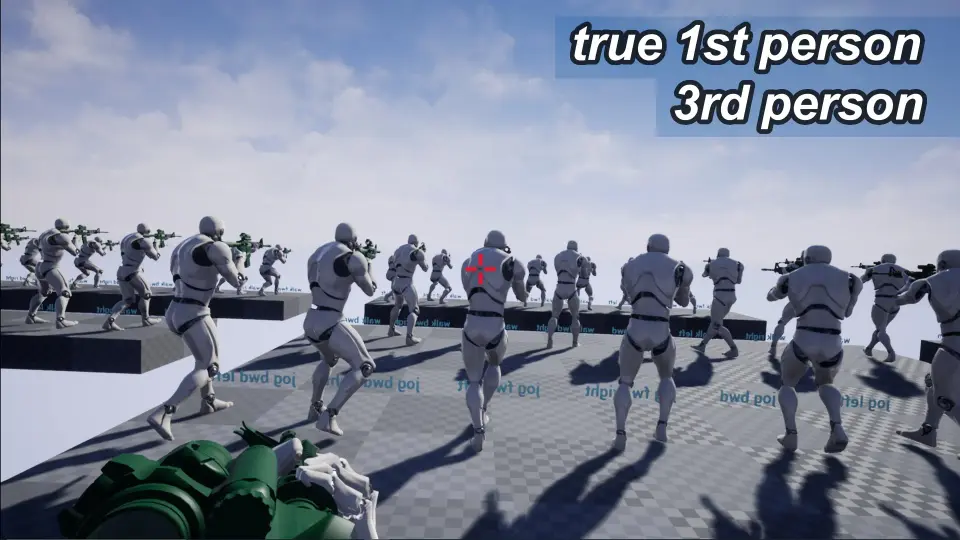
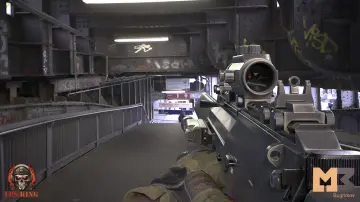
True first-person camera setups present unique hurdles for animation stability. If a character breathes, steps, or shifts weight without fine-tuned head and upper-body compensation, an attached head camera will sway unpredictably or cause the weapon to dip completely out of frame. The rifle animations in this collection are handcrafted specifically to resolve this balance. Arms and the head have been articulated together so that the rifle stays cleanly positioned within the field of view of a camera parented directly to the head bone at all times.
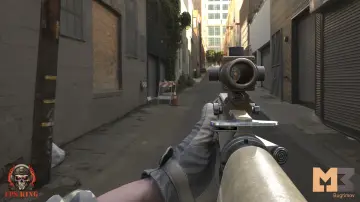
This design allows the same asset data to serve dual roles seamlessly. In third-person perspective modes, the character displays realistic, tactical weight distribution, firm foot placement, and deliberate handling. In true first-person view, the weapon maintains proper framing on screen without clipping through the camera plane or wandering off-target during complex steps. The handcrafted nature of the animations avoids the mechanical stiffness often found in raw motion capture, preserving the deliberate cadence expected in realistic military shooter environments.
Directional BlendSpaces and Locomotion Transitions
Character locomotion in modern combat environments relies heavily on fluid pacing adjustments and multi-directional maneuvering. This collection organizes movement across dedicated BlendSpaces configured to calculate movement in all directions. Players can transition in full 360-degree sweeps without sudden snapping or broken motion paths.
The system establishes progressive speed phases that blend seamlessly across distinct tactical tiers:
Idle stances with steady weapon posture
Slow walking states for careful room clearing and low-profile patrol
Jogging sequences for standard combat relocation
Running cycles for full sprints while maintaining weapon control
Because the locomotion data blends across these states continuously, acceleration and deceleration occur smoothly. The transition logic ensures that whether a character is creeping forward in a deliberate walk or pushing sideways into a jog, the weapon maintains its calculated relationship to the upper torso and head perspective.
AimOffsets 1D for Vertical Elevation Tracking
Aiming high or low requires precise pitch adjustments that do not distort the rifle grip or detach the character's eye line from the weapon sights. To handle vertical targeting, the pack incorporates AimOffsets 1D dedicated to aiming upward and downward.
Configuring vertical targeting as a 1D offset simplifies the animation blending tree while preventing rotational skewing along unneeded axes. The spine, neck, and shoulder joints elevate and depress in unison, ensuring the rifle sight remains aligned with the player's focal point. By driving vertical aiming through dedicated AimOffsets 1D, the engine maintains the integrity of the base locomotion BlendSpaces underneath, allowing dynamic aiming to run simultaneously with forward, lateral, or diagonal travel.
Virtual Bones and Hand IK in the Anim Blueprint
Keeping a character's hands locked precisely to a rifle receiver and handguard is critical during dynamic movement. Small interpolation errors during complex blending can cause the left hand to drift away from the barrel or the right hand to slip from the pistol grip. This set addresses hand drift through an included Animation Blueprint configured with dedicated Inverse Kinematics (IK) nodes.
The stabilization pipeline relies on adding two virtual bones directly to the skeleton. These virtual bones function as designated IK targets for the hands. When the character transitions between idle, walking, jogging, or running within the BlendSpaces, the Anim Blueprint calculates the position of these virtual bone targets and locks the hand bones to them via two-bone or direct IK solver nodes. This setup ensures that regardless of how aggressively the torso twists during an AimOffset elevation or how quickly the character alters their movement angle, both hands remain anchored to the rifle without visual sliding.
Near Clip Plane Setup for Head-Mounted Cameras
When running a true first-person camera attached directly to a skeletal mesh's head bone, the physical distance between the camera lens, the character's collarbones, and the rifle receiver becomes remarkably small. Under default engine parameters, geometry situated extremely close to the camera can slice through the near rendering threshold, creating visible visual cutaways into the interior of the weapon mesh or character body.
To eliminate this clipping artifact, it is recommended to adjust the project-level rendering settings. Navigating to Edit, then Project Settings, and selecting Engine - General Settings exposes the Near Clip Plane property. Setting the Near Clip Plane to a relatively low value, such as 3, shortens the distance at which polygons are culled near the camera lens. This slight engine-level adjustment preserves the full geometry of the rifle and hands during tight aiming angles and close-quarter movement sequences.
Epic Skeleton Compatibility and System Applications
The animation assets are built directly on the full-body UE4 mannequin, aligning them with the standard Epic skeleton hierarchy. This shared joint layout makes the asset data straightforward to retarget or integrate into existing Unreal Engine project structures without rebuilding basic rig hierarchies. Furthermore, the animations maintain cross-compatibility with Customizable Arm Animations, providing developers with flexibility when altering character gear, sleeve geometry, or modular rig attachments.
Projects focused on realistic tactical movement, tight indoor clearing, or seamless transitions between third-person tactical viewpoints and true first-person camera rigs can implement the locomotion BlendSpaces, AimOffsets 1D, and hand IK virtual bones directly as a cohesive weapon handling foundation.
 Combat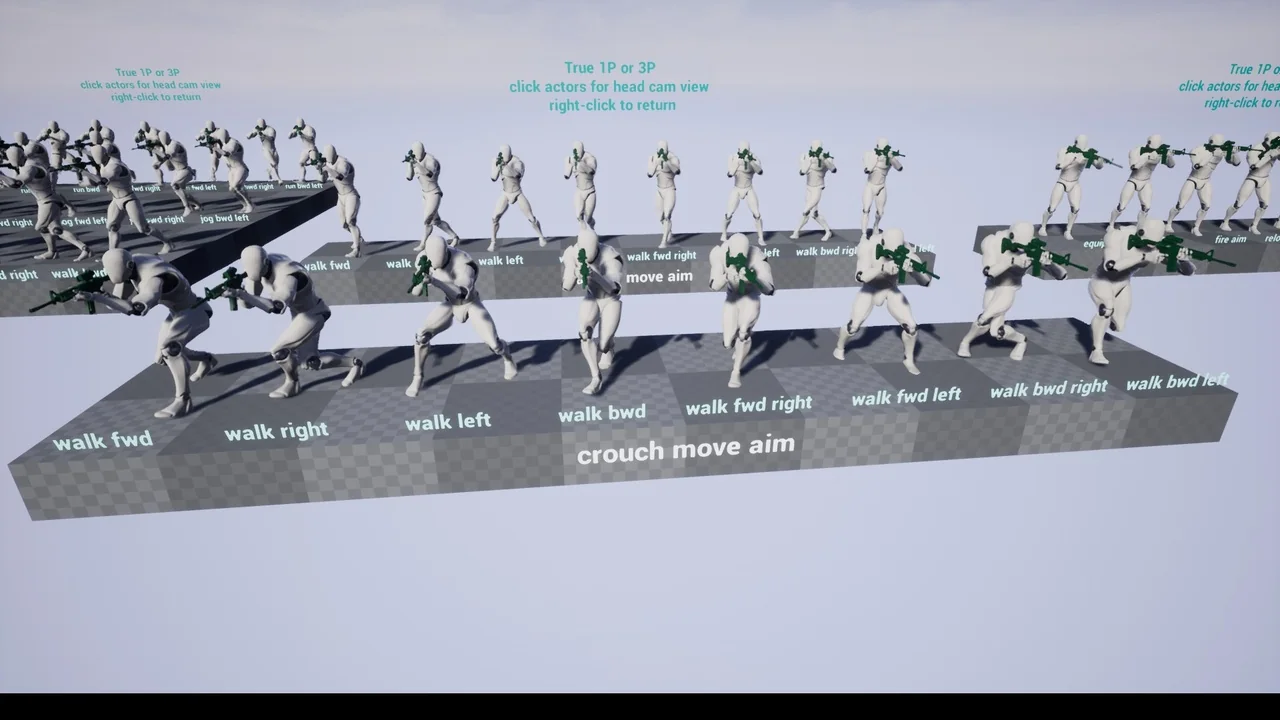
 Combat
 Combat
 Combat