"6f9bd6df1f44a86f"{"id":"1001171","slug":"fps-automatic-rifle-01-animations","title":"FPS Automatic Rifle 01 Animations","category":"Combat","engine":"5.0+","assetVersion":"","engineVersion":"Engine Version: 5.0+","tag":"Combat","accent":"blue","visual":"animation","summary":"First-person automatic rifle animation set featuring animated FPS hands with multiple skins, weapon reloading, firing, and detailed cartridge handling.","platform":"Unreal Engine","indexPolicy":"index","publishedAt":"2026-09-17T03:34:03.784Z","updatedAt":"2026-09-17T03:34:03.784Z","sourceNotes":[],"fileContents":[],"compatibility":["Unreal Engine","Engine Version: 5.0+"],"featuredImage":{"alt":"FPS Automatic Rifle 01 Animations","src":"/wp-content/uploads/published/2026/09/43275608c235-74b1eabb-34f4-459a-9724-3c909661891a-c49bdcd627.webp"},"hasDownloadLink":true,"downloads":4,"terms":[{"taxonomy":"category","slug":"combat","name":"Combat"}],"galleryImages":[{"src":"/wp-content/uploads/published/2026/09/a7a305958d3a-22b8f121-00f9-4fa1-aa81-028ab0368eb3-bb58de04ac.webp","alt":"FPS Automatic Rifle 01 Animations"},{"src":"/wp-content/uploads/published/2026/09/3f4be6b00e4d-754afebf-138c-4c0e-ad17-ac08e85e56cf-14156016d9.webp","alt":"FPS Automatic Rifle 01 Animations"},{"src":"/wp-content/uploads/published/2026/09/1ade2c14bd94-c17e6127-14ea-4136-b50f-492cd019b2f2-4b13c0006f.webp","alt":"FPS Automatic Rifle 01 Animations"},{"src":"/wp-content/uploads/published/2026/09/eb5c7cc907cb-4b838b1b-f5c1-40ef-852d-6246790bdd79-af9e3c9580.webp","alt":"FPS Automatic Rifle 01 Animations"}],"accessPanel":{"kind":"resource","title":"Download this resource","eyebrow":"Free Download","message":"Log in or create a free account to start your download.","fileName":"Content.7z","safetyNote":"Resources are manually reviewed before listing to improve quality and reduce obvious risks.","actionLabel":"Download Free","resourceType":"Resource archive"},"contentHtml":"\u003ch2\u003eFirst-Person Hand Rigging and Multi-Skin Variants\u003c/h2\u003e\u003cp\u003eFPS Automatic Rifle 01 Animations centers on dedicated first-person view handling. The collection provides animated hands configured specifically for the camera perspective typical of tactical shooters. Hand meshes include several skins, offering visual options for different character themes, equipment styles, or player customization systems. The asset strictly targets viewmodel mechanics; the animation set applies exclusively to the first-person hands rather than a full third-person character body. Developers building viewmodel pipelines receive clean motion without redundant bones or whole-body animation weight interfering with camera positioning.\u003c/p\u003e\u003cp\u003eBecause full-body skeleton animations are not part of the setup, integration focuses entirely on the arms, hands, primary weapon frame, and internal sub-elements. This deliberate separation allows the hands to remain anchored relative to the field of view while running, walking, aiming, or firing. The separate hand models and multiple skin assets allow quick material switches or mesh swaps directly inside state machines without recalculating weapon attachment transforms.\u003c/p\u003e\u003ch2\u003eLocomotion States and Dual-Mode Aiming Trajectories\u003c/h2\u003e\u003cp\u003eLocomotion covers comprehensive movement states split into standard and precision aiming variations. Idle states come in distinct varieties: Idle 01, Idle 02, Idle Aim, and Idle Sight. These options allow designers to break up static resting poses, transition dynamically when the character raises the rifle toward the shoulder, or settle into high-precision alignment down the optical axis or iron sights.\u003c/p\u003e\u003cp\u003eWalk and run sequences mirror this multi-layered approach to stance progression:\u003c/p\u003e\u003cul\u003e\u003cli\u003eWalk 01 and Walk 02 for standard patrolling, relaxed movement, and alternating footfall timing.\u003c/li\u003e\u003cli\u003eWalk Aim for moving with the stock shouldered in ready position while retaining scanning visibility.\u003c/li\u003e\u003cli\u003eWalk Sight for full ADS (aim-down-sights) strafing and advancing where hand sway minimizes sight disturbance.\u003c/li\u003e\u003cli\u003eRun 01 and Run 02 to represent varied forward sprinting speeds and urgent repositions.\u003c/li\u003e\u003c/ul\u003e\u003cp\u003eJump mechanics are handled through distinct blend nodes: Jump Start, Jump Loop, Jump End, alongside a unified Jump motion. Separating launch, hang time, and touchdown impact dampens weapon disorientation. The arms compress downward realistically on landing without decoupling the hands from the rifle receiver.\u003c/p\u003e\u003ch2\u003eRifle Firing Actions and Cartridge Mechanics\u003c/h2\u003e\u003cp\u003eShooting dynamics require precise synchronization between the shooter hands and the firearm mesh. FPS Automatic Rifle 01 Animations provides dedicated Hand animations alongside standalone Rifle Animations. Hand recoil comes tuned across distinct aim contexts: Shot, Shot Aim, and Shot Sight. Firing while looking down sights restricts weapon kickback to avoid throwing the sight picture off-screen, whereas standard hip fire conveys looser, heavier impulse dispersion through the wrists and forearms.\u003c/p\u003e\u003cp\u003eThe automatic rifle itself includes individual animation tracks for Shot and Reload. Mechanical components cycle in step with the trigger squeeze and slide reciprocation. For reloading, the package coordinates the hand movements pulling and seating the magazine with the firearm frame. Detailed weapon operation also incorporates a Cartridge Animation containing a Hide bullet sequence. This sub-element functionality enables animators and technical artists to hide or toggle the visible round inside the magazine or chamber during tactical reloads or empty-chamber cycles, preventing rounds from floating or appearing prematurely during magazine extraction.\u003c/p\u003e\u003ch2\u003eMelee Attacks, Impact Blocking, and Weapon Inspection Routines\u003c/h2\u003e\u003cp\u003eBeyond trigger cycles and movement, the animation library supports auxiliary combat actions and defensive responses. The set features Attack 01, Attack 02, and Attack 03, allowing designers to set up three-stage melee combos, muzzle strikes, or rifle-butt swings when enemies enter close quarters. Accompanying defensive postures include Block Idle and Block Get Hit. When raising the automatic rifle horizontally to deflect incoming blows, Block Idle sustains a protective stance, while Block Get Hit drives hand and rifle flinch back toward the camera to show physical absorption before returning to guard.\u003c/p\u003e\u003cp\u003eNon-combat weapon manipulation features Get Weapon and Hide for unholstering and stowing routines. For quieter gameplay moments or tactical status checks, two dedicated examination clips provide realistic character interaction:\u003c/p\u003e\u003cul\u003e\u003cli\u003eInspectionWeapon: The hands tilt, turn, and check the external receiver, sights, and controls of the rifle.\u003c/li\u003e\u003cli\u003eInspect Cartridge: The operative manipulates the action to expose, check, and verify the loaded status of the chambered round or magazine.\u003c/li\u003e\u003c/ul\u003e\u003ch2\u003eImplementing the Automatic Rifle 01 Animation Set\u003c/h2\u003e\u003cp\u003eConstructing the animation blueprint for this setup involves coordinating the three animated elements: the multi-skin FPS arms, the rifle mesh, and the cartridge bone or component. Blend trees typically feed movement speed and sight weight into the transition states connecting Walk Sight to Shot Sight, while sudden melee or inspection inputs override the upper body motion without breaking the ground locomotion speed variable.\u003c/p\u003e\u003cp\u003eThe Realistic tag defines the movement cadence, avoiding exaggerated cartoon arcs in favor of tight, deliberate firearm discipline. Compatibility tags note applicability for 56 Animations For Creatures configurations, reflecting adaptable bone retargeting pipelines across compatible humanoid or creature rigs configured for viewmodel hands. By managing discrete weapon layers, empty-chamber bullet visibility, and multiple aim stances, FPS Automatic Rifle 01 Animations delivers a complete, self-contained viewmodel handling system ready for modern shooter controller architectures.\u003c/p\u003e\n\n\u003ch2\u003eRelated Resources Worth Checking\u003c/h2\u003e\n\u003cul\u003e\n\u003cli\u003e\u003ca href=\"https://3dcghub.com/assault-rifle-animations/\" rel=\"noopener noreferrer\"\u003eAssault Rifle Animations\u003c/a\u003e\u003c/li\u003e\n\u003cli\u003e\u003ca href=\"https://3dcghub.com/fps-automatic-gun-animations/\" rel=\"noopener noreferrer\"\u003eFPS Automatic Gun Animations\u003c/a\u003e\u003c/li\u003e\n\u003cli\u003e\u003ca href=\"https://3dcghub.com/ultimate-fps-animations-pack/\" rel=\"noopener noreferrer\"\u003eUltimate FPS Animations Pack\u003c/a\u003e\u003c/li\u003e\n\u003cli\u003e\u003ca href=\"https://3dcghub.com/pistol-animations-pack/\" rel=\"noopener noreferrer\"\u003ePistol Animations Pack\u003c/a\u003e\u003c/li\u003e\n\u003cli\u003e\u003ca href=\"https://3dcghub.com/fps-pistol-and-knife-animations/\" rel=\"noopener noreferrer\"\u003eFPS Pistol And Knife Animations\u003c/a\u003e\u003c/li\u003e\n\u003c/ul\u003e","contentTextLength":6015,"navigation":{"current":1174,"total":4218,"previous":{"id":"1001172","slug":"ninja-starter-mocap-pack","title":"Ninja Starter - MoCap Pack","category":"Combat","platform":"Unreal Engine","updatedAt":"2026-09-17T03:37:38.633Z"},"next":{"id":"1001170","slug":"fps-automatic-gun-animations","title":"FPS Automatic Gun Animations","category":"Combat","platform":"Unreal Engine","updatedAt":"2026-09-17T03:25:13.489Z"}},"relatedResources":[{"id":"1001362","slug":"shooter-rifle-animations","title":"Shooter Rifle Animations","category":"Combat","engine":"5.0+","assetVersion":"","engineVersion":"Engine Version: 5.0+","tag":"Combat","accent":"blue","visual":"animation","summary":"Tactical full-body rifle animations for the UE4 mannequin, featuring true first-person head camera support, BlendSpaces, AimOffsets 1D, and hand IK setups.","platform":"Unreal Engine","indexPolicy":"index","publishedAt":"2026-10-04T10:31:18.353Z","updatedAt":"2026-10-04T10:31:18.353Z","sourceNotes":[],"fileContents":[],"compatibility":["Unreal Engine","Engine Version: 5.0+"],"featuredImage":{"alt":"Shooter Rifle Animations","src":"/wp-content/uploads/published/2026/10/c91333d8edc4-50a7901b-e742-416b-8d93-123662194abb-8a2635ccbe.webp"},"hasDownloadLink":true,"downloads":3},{"id":"1001078","slug":"assault-rifle-animations","title":"Assault Rifle Animations","category":"Combat","engine":"5.2+","assetVersion":"","engineVersion":"Engine Version: 5.2+","tag":"Combat","accent":"blue","visual":"animation","summary":"25 Mocap assault rifle clips with reload, shots, crouch, prone, walk and shooting rack. Shots and reloads trigger sounds via notify events.","platform":"Unreal Engine","indexPolicy":"index","publishedAt":"2026-09-04T15:56:17.751Z","updatedAt":"2026-09-04T15:56:17.751Z","sourceNotes":[],"fileContents":[],"compatibility":["Unreal Engine","Engine Version: 5.2+"],"featuredImage":{"alt":"Assault Rifle Animations","src":"/wp-content/uploads/published/2026/09/e38384de8b24-66e3c82f-6c26-4635-a590-a0ab32731608-177f9044ed.webp"},"hasDownloadLink":true,"downloads":8},{"id":"1001170","slug":"fps-automatic-gun-animations","title":"FPS Automatic Gun Animations","category":"Combat","engine":"5.0+","assetVersion":"","engineVersion":"Engine Version: 5.0+","tag":"Combat","accent":"blue","visual":"animation","summary":"FPS Automatic Gun Animations provides dedicated first-person viewmodel animations, multi-skin hands, and weapon handling sequences for lowpoly shooters.","platform":"Unreal Engine","indexPolicy":"index","publishedAt":"2026-09-17T03:25:13.489Z","updatedAt":"2026-09-17T03:25:13.489Z","sourceNotes":[],"fileContents":[],"compatibility":["Unreal Engine","Engine Version: 5.0+"],"featuredImage":{"alt":"FPS Automatic Gun Animations","src":"/wp-content/uploads/published/2026/09/4a5b57141732-c0158733-6a8e-4847-9372-11bf88bf7201-cb4f2f9e93.webp"},"hasDownloadLink":true,"downloads":1}]}
Combat
FPS Automatic Rifle 01 Animations
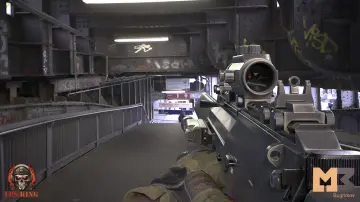
First-person automatic rifle animation set featuring animated FPS hands with multiple skins, weapon reloading, firing, and detailed cartridge handling.
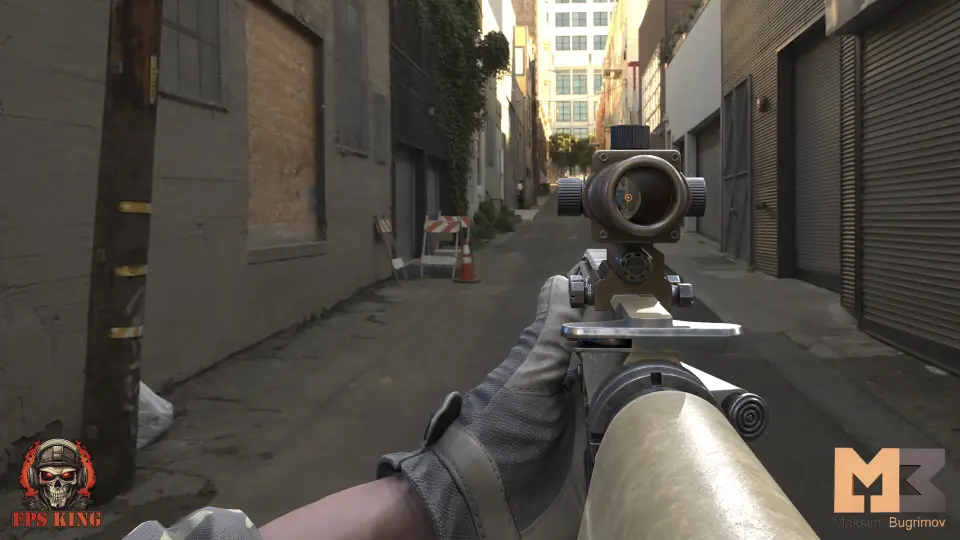
FPS Automatic Rifle 01 Animations centers on dedicated first-person view handling. The collection provides animated hands configured specifically for the camera perspective typical of tactical shooters. Hand meshes include several skins, offering visual options for different character themes, equipment styles, or player customization systems. The asset strictly targets viewmodel mechanics; the animation set applies exclusively to the first-person hands rather than a full third-person character body. Developers building viewmodel pipelines receive clean motion without redundant bones or whole-body animation weight interfering with camera positioning.
Because full-body skeleton animations are not part of the setup, integration focuses entirely on the arms, hands, primary weapon frame, and internal sub-elements. This deliberate separation allows the hands to remain anchored relative to the field of view while running, walking, aiming, or firing. The separate hand models and multiple skin assets allow quick material switches or mesh swaps directly inside state machines without recalculating weapon attachment transforms.
Locomotion States and Dual-Mode Aiming Trajectories
Locomotion covers comprehensive movement states split into standard and precision aiming variations. Idle states come in distinct varieties: Idle 01, Idle 02, Idle Aim, and Idle Sight. These options allow designers to break up static resting poses, transition dynamically when the character raises the rifle toward the shoulder, or settle into high-precision alignment down the optical axis or iron sights.
Walk and run sequences mirror this multi-layered approach to stance progression:
Walk 01 and Walk 02 for standard patrolling, relaxed movement, and alternating footfall timing.
Walk Aim for moving with the stock shouldered in ready position while retaining scanning visibility.
Walk Sight for full ADS (aim-down-sights) strafing and advancing where hand sway minimizes sight disturbance.
Run 01 and Run 02 to represent varied forward sprinting speeds and urgent repositions.
Jump mechanics are handled through distinct blend nodes: Jump Start, Jump Loop, Jump End, alongside a unified Jump motion. Separating launch, hang time, and touchdown impact dampens weapon disorientation. The arms compress downward realistically on landing without decoupling the hands from the rifle receiver.
Rifle Firing Actions and Cartridge Mechanics
Shooting dynamics require precise synchronization between the shooter hands and the firearm mesh. FPS Automatic Rifle 01 Animations provides dedicated Hand animations alongside standalone Rifle Animations. Hand recoil comes tuned across distinct aim contexts: Shot, Shot Aim, and Shot Sight. Firing while looking down sights restricts weapon kickback to avoid throwing the sight picture off-screen, whereas standard hip fire conveys looser, heavier impulse dispersion through the wrists and forearms.
The automatic rifle itself includes individual animation tracks for Shot and Reload. Mechanical components cycle in step with the trigger squeeze and slide reciprocation. For reloading, the package coordinates the hand movements pulling and seating the magazine with the firearm frame. Detailed weapon operation also incorporates a Cartridge Animation containing a Hide bullet sequence. This sub-element functionality enables animators and technical artists to hide or toggle the visible round inside the magazine or chamber during tactical reloads or empty-chamber cycles, preventing rounds from floating or appearing prematurely during magazine extraction.
Melee Attacks, Impact Blocking, and Weapon Inspection Routines
Beyond trigger cycles and movement, the animation library supports auxiliary combat actions and defensive responses. The set features Attack 01, Attack 02, and Attack 03, allowing designers to set up three-stage melee combos, muzzle strikes, or rifle-butt swings when enemies enter close quarters. Accompanying defensive postures include Block Idle and Block Get Hit. When raising the automatic rifle horizontally to deflect incoming blows, Block Idle sustains a protective stance, while Block Get Hit drives hand and rifle flinch back toward the camera to show physical absorption before returning to guard.
Non-combat weapon manipulation features Get Weapon and Hide for unholstering and stowing routines. For quieter gameplay moments or tactical status checks, two dedicated examination clips provide realistic character interaction:
InspectionWeapon: The hands tilt, turn, and check the external receiver, sights, and controls of the rifle.
Inspect Cartridge: The operative manipulates the action to expose, check, and verify the loaded status of the chambered round or magazine.
Implementing the Automatic Rifle 01 Animation Set
Constructing the animation blueprint for this setup involves coordinating the three animated elements: the multi-skin FPS arms, the rifle mesh, and the cartridge bone or component. Blend trees typically feed movement speed and sight weight into the transition states connecting Walk Sight to Shot Sight, while sudden melee or inspection inputs override the upper body motion without breaking the ground locomotion speed variable.
The Realistic tag defines the movement cadence, avoiding exaggerated cartoon arcs in favor of tight, deliberate firearm discipline. Compatibility tags note applicability for 56 Animations For Creatures configurations, reflecting adaptable bone retargeting pipelines across compatible humanoid or creature rigs configured for viewmodel hands. By managing discrete weapon layers, empty-chamber bullet visibility, and multiple aim stances, FPS Automatic Rifle 01 Animations delivers a complete, self-contained viewmodel handling system ready for modern shooter controller architectures.
 Combat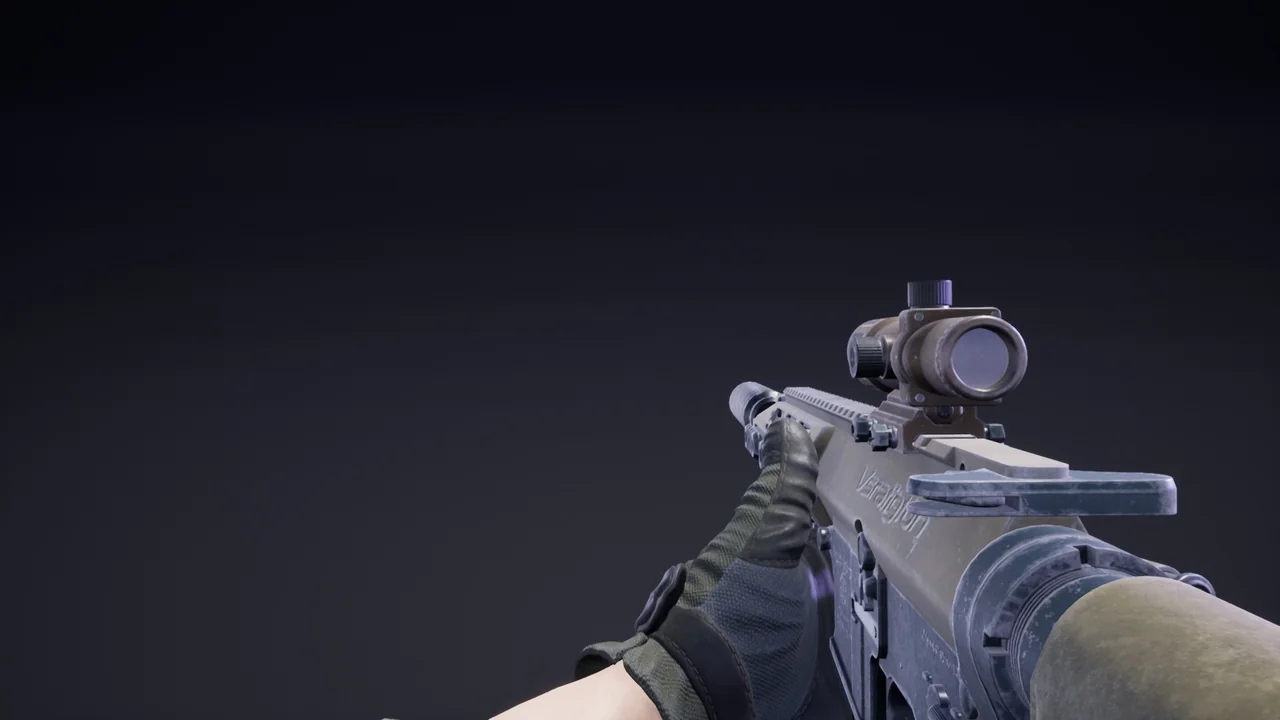
 Combat
 Combat
 Combat