"6f9bd6df1f44a86f"{"id":"1001170","slug":"fps-automatic-gun-animations","title":"FPS Automatic Gun Animations","category":"Combat","engine":"5.0+","assetVersion":"","engineVersion":"Engine Version: 5.0+","tag":"Combat","accent":"blue","visual":"animation","summary":"FPS Automatic Gun Animations provides dedicated first-person viewmodel animations, multi-skin hands, and weapon handling sequences for lowpoly shooters.","platform":"Unreal Engine","indexPolicy":"index","publishedAt":"2026-09-17T03:25:13.489Z","updatedAt":"2026-09-17T03:25:13.489Z","sourceNotes":[],"fileContents":[],"compatibility":["Unreal Engine","Engine Version: 5.0+"],"featuredImage":{"alt":"FPS Automatic Gun Animations","src":"/wp-content/uploads/published/2026/09/4a5b57141732-c0158733-6a8e-4847-9372-11bf88bf7201-cb4f2f9e93.webp"},"hasDownloadLink":true,"downloads":1,"terms":[{"taxonomy":"category","slug":"combat","name":"Combat"}],"galleryImages":[{"src":"/wp-content/uploads/published/2026/09/401230fc7576-cf3d1963-6363-4416-ba6c-2c4062428cba-4074a8700e.webp","alt":"FPS Automatic Gun Animations"},{"src":"/wp-content/uploads/published/2026/09/d76085b4f57b-8663ed82-3e06-4054-b15b-0fdc6c650b90-ebafd35801.webp","alt":"FPS Automatic Gun Animations"},{"src":"/wp-content/uploads/published/2026/09/bf837b8ae340-9d3c6f9e-9ba7-40f1-97d0-967ed870fe3f-7574fd34d2.webp","alt":"FPS Automatic Gun Animations"},{"src":"/wp-content/uploads/published/2026/09/8f4c8a28353f-5383a6f9-a961-4138-a3b7-afc14b6a500f-fc878de693.webp","alt":"FPS Automatic Gun Animations"}],"accessPanel":{"kind":"resource","title":"Download this resource","eyebrow":"Free Download","message":"Log in or create a free account to start your download.","fileName":"Content.7z","safetyNote":"Resources are manually reviewed before listing to improve quality and reduce obvious risks.","actionLabel":"Download Free","resourceType":"Resource archive"},"contentHtml":"\u003ch2\u003eFirst-Person Framing for Lowpoly Shooters\u003c/h2\u003e\u003cp\u003eFirst-person combat encounters rely heavily on the visual rhythm between the player camera, the equipped firearm, and the visible hands. Lowpoly battlefields and stylized shooter corridors require responsive, immediate visual feedback to convey weapon handling, recoil, and tactical readiness. FPS Automatic Gun Animations targets this distinct vantage point, focusing purely on first-person viewmodel mechanics. Instead of handling broad character mobility across an entire player mesh, the package centers on the immediate perspective through which players aim, fire, sprint, and check their ammunition.\u003c/p\u003e\u003cp\u003eThe included assets supply the hands and the weapon meshes needed to set up a working viewmodel hierarchy. Hand models are provided alongside several distinct skin variations, allowing projects to change visual styles or player appearances without altering the underlying movement clips. Because only the first-person hands are rigged and animated, the sequences are structured specifically for camera-attached viewports where full-body rendering is either separated or omitted entirely.\u003c/p\u003e\u003ch2\u003eMovement Cycles and Locomotion Sets in the FPS Automatic Gun Animations\u003c/h2\u003e\u003cp\u003eFluid gameplay depends on smooth transitions between scanning an area and breaking into an evasive sprint. The motion library includes dedicated clips to cover both steady movement and sudden repositioning:\u003c/p\u003e\u003cul\u003e\u003cli\u003e\u003cstrong\u003eWalk 01 and Walk 02:\u003c/strong\u003e Distinct walking cadences that represent baseline weapon carriage while patrolling or clearing rooms.\u003c/li\u003e\u003cli\u003e\u003cstrong\u003eWalk Aim:\u003c/strong\u003e A steady, controlled advance that keeps the weapon raised toward the center of the screen, matching down-sights movement speeds.\u003c/li\u003e\u003cli\u003e\u003cstrong\u003eRun 01 and Run 02:\u003c/strong\u003e High-speed traversal cycles where the weapon lowers or sways to mirror the momentum of sprinting across open terrain.\u003c/li\u003e\u003cli\u003e\u003cstrong\u003eJump Sequences:\u003c/strong\u003e Locomotion states are split into a standard Jump clip as well as discrete Jump Start, Jump Loop, and Jump End phases to cleanly bind with state machines handling vertical impulse, falling hang-time, and ground landing impact.\u003c/li\u003e\u003c/ul\u003e\u003cp\u003eSeparating the airborne states into starting, mid-air looping, and touchdown segments gives gameplay systems the exact hooks needed to coordinate with physics velocity changes. If a character falls from a ledge rather than initiating a jump, the looping clip can trigger directly, preventing mismatched visual hitches on landing.\u003c/p\u003e\u003ch2\u003eWeapon Handling, Aiming, and Firing Sequences\u003c/h2\u003e\u003cp\u003eManaging weapon readiness requires a clear visual distinction between resting states, targeted alignment, and active combat. For basic readiness, the asset set offers Idle 01 and Idle 02, providing slight variations in resting stance so that an idle viewmodel does not appear rigidly locked to the screen. Transitioning into engagement range is handled by Idle Aim, pulling the sights directly into line with the player camera.\u003c/p\u003e\u003cp\u003eFiring motions are partitioned to support different combat mechanics. Standard Shot and Shot Aim deliver single-trigger impulse visuals, letting designers drive distinct recoil kicks whether the player is shooting from the hip or looking directly down the iron sights. For sustained automatic fire, the dedicated Automatic Gun Shot sequence mirrors continuous cyclic recoil, settling into the rapid muzzle drift typical of automatic weapons.\u003c/p\u003e\u003cp\u003eDowntime and weapon cycle loops are supported by standard Reload and Automatic Gun Reload clips. The provision of specialized automatic reloading alongside general reload cycles ensures the hands interact with magazines, receivers, and charging handles in a manner appropriate to fully automatic platforms. Deploying and stowing the firearm are handled directly through Get Weapon and Hide clips, establishing smooth transitions when switching inventory slots or putting the rifle away during interactions.\u003c/p\u003e\u003ch2\u003eInspection Routines, Defensive Blocking, and Melee Actions\u003c/h2\u003e\u003cp\u003eShooter mechanics frequently require auxiliary interactions that take place outside the primary trigger pull. The asset includes two precise inspection routines: Inspection Weapon and Inspection Cartridge. The weapon inspection clip lets players rotate and check the exterior of the firearm during quiet stretches of gameplay, while the cartridge inspection specifically shifts focus to checking the chamber or round status, providing tactile feedback during tactical pauses.\u003c/p\u003e\u003cp\u003eDefensive and close-quarters situations are addressed through attack and guard sequences:\u003c/p\u003e\u003cul\u003e\u003cli\u003e\u003cstrong\u003eAttack 01 and Attack 02:\u003c/strong\u003e Close-range strikes useful for weapon-butt hits, secondary physical lunges, or rapid panic swings when hostiles breach minimum engagement distances.\u003c/li\u003e\u003cli\u003e\u003cstrong\u003eIdle Block:\u003c/strong\u003e A raised guard posture where the weapon and hands form a defensive barrier in front of the camera.\u003c/li\u003e\u003cli\u003e\u003cstrong\u003eBlock Get Hit:\u003c/strong\u003e An impact flinch that fires when damage is absorbed while in the blocking stance, giving direct visual feedback that an incoming strike was intercepted.\u003c/li\u003e\u003c/ul\u003e\u003cp\u003eThese specialized states allow a project to introduce light melee counter-attacks or defensive parrying into gunfights without requiring external animation packs to fill the mechanical gap.\u003c/p\u003e\u003ch2\u003eArm Rig Scope and Viewmodel Architecture\u003c/h2\u003e\u003cp\u003eA central technical reality of the asset is its strict focus on viewmodel utility. Only the first-person hands are animated; full-body third-person meshes are neither rigged nor included in the movement data. In engine implementation, this keeps the animation graph lightweight. The hands and weapons are attached directly to the active camera rig, leaving ground movement, leg collision, and third-person shadow proxies to separate character models.\u003c/p\u003e\u003cp\u003eBecause the collection bundles hands with multiple skin variants alongside the weapon objects, developers working on lowpoly projects can quickly assemble consistent shooter viewports. By pairing individual fire and aim clips with continuous automatic loops, inspection checks, and distinct jump-stage transitions, the package establishes an interconnected animation set focused squarely on the first-person combat experience.\u003c/p\u003e\n\n\u003ch2\u003eContinue Browsing Similar Packs\u003c/h2\u003e\n\u003cul\u003e\n\u003cli\u003e\u003ca href=\"https://3dcghub.com/ultimate-fps-animations-pack/\" rel=\"noopener noreferrer\"\u003eUltimate FPS Animations Pack\u003c/a\u003e\u003c/li\u003e\n\u003cli\u003e\u003ca href=\"https://3dcghub.com/pistol-animations-pack/\" rel=\"noopener noreferrer\"\u003ePistol Animations Pack\u003c/a\u003e\u003c/li\u003e\n\u003cli\u003e\u003ca href=\"https://3dcghub.com/fps-pistol-and-knife-animations/\" rel=\"noopener noreferrer\"\u003eFPS Pistol And Knife Animations\u003c/a\u003e\u003c/li\u003e\n\u003cli\u003e\u003ca href=\"https://3dcghub.com/fps-pistol-single/\" rel=\"noopener noreferrer\"\u003eFPS Pistol (Single)\u003c/a\u003e\u003c/li\u003e\n\u003cli\u003e\u003ca href=\"https://3dcghub.com/fps-sniper-rifle-03-animations/\" rel=\"noopener noreferrer\"\u003eFPS Sniper Rifle 03 (Animations)\u003c/a\u003e\u003c/li\u003e\n\u003c/ul\u003e","contentTextLength":6164,"navigation":{"current":1175,"total":4218,"previous":{"id":"1001171","slug":"fps-automatic-rifle-01-animations","title":"FPS Automatic Rifle 01 Animations","category":"Combat","platform":"Unreal Engine","updatedAt":"2026-09-17T03:34:03.784Z"},"next":{"id":"14610","slug":"simple-tree-generator","title":"Simple Tree Generator","category":"Engine Tools","platform":"Unreal Engine","updatedAt":"2026-09-17T02:13:52.813Z"}},"relatedResources":[{"id":"1001171","slug":"fps-automatic-rifle-01-animations","title":"FPS Automatic Rifle 01 Animations","category":"Combat","engine":"5.0+","assetVersion":"","engineVersion":"Engine Version: 5.0+","tag":"Combat","accent":"blue","visual":"animation","summary":"First-person automatic rifle animation set featuring animated FPS hands with multiple skins, weapon reloading, firing, and detailed cartridge handling.","platform":"Unreal Engine","indexPolicy":"index","publishedAt":"2026-09-17T03:34:03.784Z","updatedAt":"2026-09-17T03:34:03.784Z","sourceNotes":[],"fileContents":[],"compatibility":["Unreal Engine","Engine Version: 5.0+"],"featuredImage":{"alt":"FPS Automatic Rifle 01 Animations","src":"/wp-content/uploads/published/2026/09/43275608c235-74b1eabb-34f4-459a-9724-3c909661891a-c49bdcd627.webp"},"hasDownloadLink":true,"downloads":4},{"id":"1001345","slug":"fps-rocket-launcher-animations","title":"FPS Rocket Launcher Animations","category":"Combat","engine":"5.1+","assetVersion":"","engineVersion":"Engine Version: 5.1+","tag":"Combat","accent":"blue","visual":"animation","summary":"Low-poly first-person rocket launcher animation set featuring multiple hand skins, traversal cycles, aiming stances, and dedicated firing actions.","platform":"Unreal Engine","indexPolicy":"index","publishedAt":"2026-10-04T10:08:57.563Z","updatedAt":"2026-10-04T10:08:57.563Z","sourceNotes":[],"fileContents":[],"compatibility":["Unreal Engine","Engine Version: 5.1+"],"featuredImage":{"alt":"FPS Rocket Launcher Animations","src":"/wp-content/uploads/published/2026/10/190e171ddcf1-168a517a-0e43-433b-80bd-4f62dd1dd1aa-86574c97c5.webp"},"hasDownloadLink":true,"downloads":0},{"id":"24852","slug":"ultimate-fps-animations-pack","title":"Ultimate FPS Animations Pack","category":"Combat","engine":"5.1+","assetVersion":"Engine version: 5.1+","engineVersion":"","tag":"Combat","accent":"blue","visual":"animation","summary":"This Unreal Engine pack focuses on first-person weapon motion, with idle, fire, reload, movement, and aim-down-sights states for a broad set of firearms. It also includes a demo weapon system, pickup and drop behavior, UI, sway, and several supporting effects.","platform":"Unreal Engine","indexPolicy":"index","publishedAt":"2026-04-17T10:10:24.000Z","updatedAt":"2026-04-20T06:12:36.000Z","sourceNotes":[],"fileContents":[],"compatibility":["Unreal Engine","Engine version: 5.1+"],"featuredImage":{"alt":"Ultimate FPS Animations Pack","src":"https://3dcghub.com/wp-content/uploads/2026/04/03918a632525_4347bcc2-6ebb-4e23-84a2-637bdc754e2b.webp"},"hasDownloadLink":true,"downloads":9}]}
Combat
FPS Automatic Gun Animations
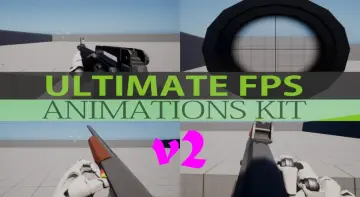
FPS Automatic Gun Animations provides dedicated first-person viewmodel animations, multi-skin hands, and weapon handling sequences for lowpoly shooters.
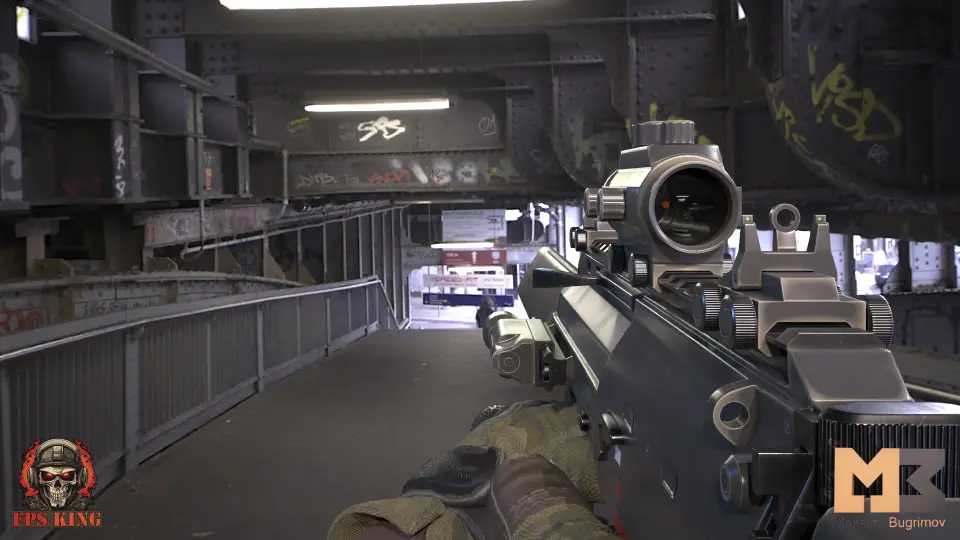
First-person combat encounters rely heavily on the visual rhythm between the player camera, the equipped firearm, and the visible hands. Lowpoly battlefields and stylized shooter corridors require responsive, immediate visual feedback to convey weapon handling, recoil, and tactical readiness. FPS Automatic Gun Animations targets this distinct vantage point, focusing purely on first-person viewmodel mechanics. Instead of handling broad character mobility across an entire player mesh, the package centers on the immediate perspective through which players aim, fire, sprint, and check their ammunition.
The included assets supply the hands and the weapon meshes needed to set up a working viewmodel hierarchy. Hand models are provided alongside several distinct skin variations, allowing projects to change visual styles or player appearances without altering the underlying movement clips. Because only the first-person hands are rigged and animated, the sequences are structured specifically for camera-attached viewports where full-body rendering is either separated or omitted entirely.
Movement Cycles and Locomotion Sets in the FPS Automatic Gun Animations
Fluid gameplay depends on smooth transitions between scanning an area and breaking into an evasive sprint. The motion library includes dedicated clips to cover both steady movement and sudden repositioning:
Walk 01 and Walk 02: Distinct walking cadences that represent baseline weapon carriage while patrolling or clearing rooms.
Walk Aim: A steady, controlled advance that keeps the weapon raised toward the center of the screen, matching down-sights movement speeds.
Run 01 and Run 02: High-speed traversal cycles where the weapon lowers or sways to mirror the momentum of sprinting across open terrain.
Jump Sequences: Locomotion states are split into a standard Jump clip as well as discrete Jump Start, Jump Loop, and Jump End phases to cleanly bind with state machines handling vertical impulse, falling hang-time, and ground landing impact.
Separating the airborne states into starting, mid-air looping, and touchdown segments gives gameplay systems the exact hooks needed to coordinate with physics velocity changes. If a character falls from a ledge rather than initiating a jump, the looping clip can trigger directly, preventing mismatched visual hitches on landing.
Weapon Handling, Aiming, and Firing Sequences
Managing weapon readiness requires a clear visual distinction between resting states, targeted alignment, and active combat. For basic readiness, the asset set offers Idle 01 and Idle 02, providing slight variations in resting stance so that an idle viewmodel does not appear rigidly locked to the screen. Transitioning into engagement range is handled by Idle Aim, pulling the sights directly into line with the player camera.
Firing motions are partitioned to support different combat mechanics. Standard Shot and Shot Aim deliver single-trigger impulse visuals, letting designers drive distinct recoil kicks whether the player is shooting from the hip or looking directly down the iron sights. For sustained automatic fire, the dedicated Automatic Gun Shot sequence mirrors continuous cyclic recoil, settling into the rapid muzzle drift typical of automatic weapons.
Downtime and weapon cycle loops are supported by standard Reload and Automatic Gun Reload clips. The provision of specialized automatic reloading alongside general reload cycles ensures the hands interact with magazines, receivers, and charging handles in a manner appropriate to fully automatic platforms. Deploying and stowing the firearm are handled directly through Get Weapon and Hide clips, establishing smooth transitions when switching inventory slots or putting the rifle away during interactions.
Inspection Routines, Defensive Blocking, and Melee Actions
Shooter mechanics frequently require auxiliary interactions that take place outside the primary trigger pull. The asset includes two precise inspection routines: Inspection Weapon and Inspection Cartridge. The weapon inspection clip lets players rotate and check the exterior of the firearm during quiet stretches of gameplay, while the cartridge inspection specifically shifts focus to checking the chamber or round status, providing tactile feedback during tactical pauses.
Defensive and close-quarters situations are addressed through attack and guard sequences:
Attack 01 and Attack 02: Close-range strikes useful for weapon-butt hits, secondary physical lunges, or rapid panic swings when hostiles breach minimum engagement distances.
Idle Block: A raised guard posture where the weapon and hands form a defensive barrier in front of the camera.
Block Get Hit: An impact flinch that fires when damage is absorbed while in the blocking stance, giving direct visual feedback that an incoming strike was intercepted.
These specialized states allow a project to introduce light melee counter-attacks or defensive parrying into gunfights without requiring external animation packs to fill the mechanical gap.
Arm Rig Scope and Viewmodel Architecture
A central technical reality of the asset is its strict focus on viewmodel utility. Only the first-person hands are animated; full-body third-person meshes are neither rigged nor included in the movement data. In engine implementation, this keeps the animation graph lightweight. The hands and weapons are attached directly to the active camera rig, leaving ground movement, leg collision, and third-person shadow proxies to separate character models.
Because the collection bundles hands with multiple skin variants alongside the weapon objects, developers working on lowpoly projects can quickly assemble consistent shooter viewports. By pairing individual fire and aim clips with continuous automatic loops, inspection checks, and distinct jump-stage transitions, the package establishes an interconnected animation set focused squarely on the first-person combat experience.
 Combat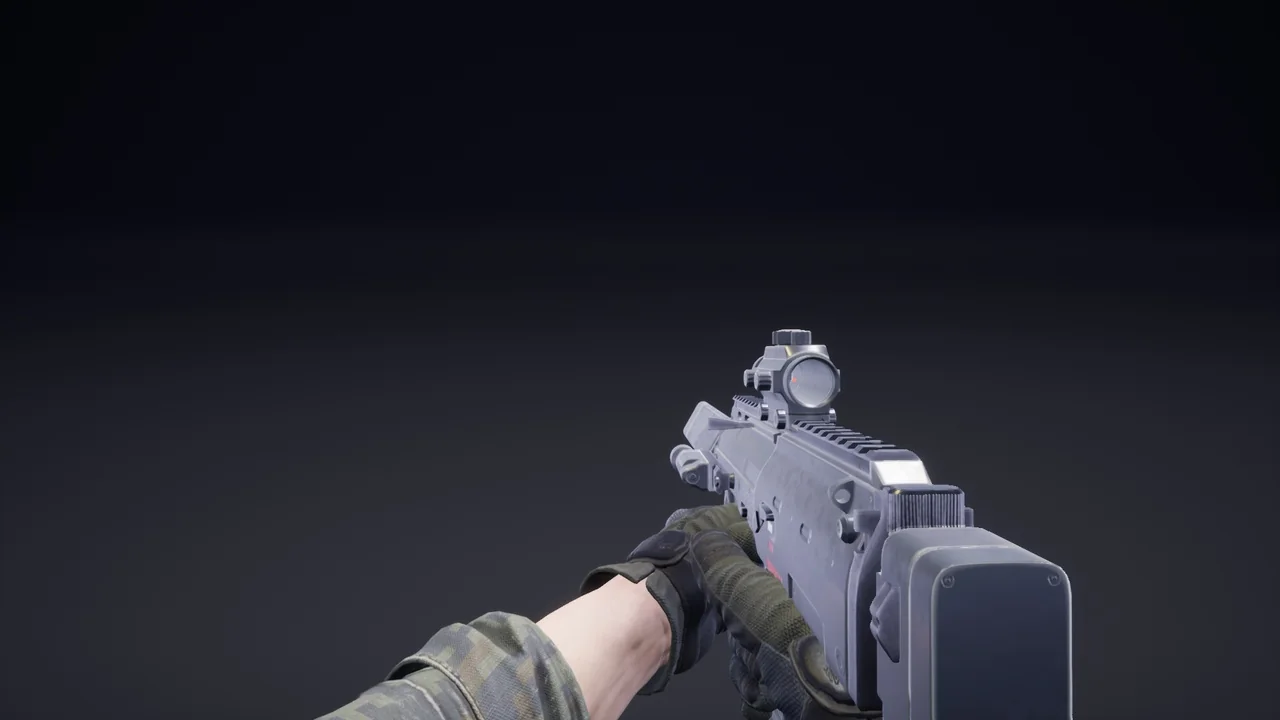
 Combat
 Combat
 Combat