"7e6fc58c410f2894"{"id":"1001661","slug":"sci-fi-modular-environment","title":"Sci-Fi Modular Environment","category":"Sci-Fi","engine":"4.26+,5.0+","assetVersion":"","engineVersion":"Engine Version: 4.26+,5.0+","tag":"Sci-Fi","accent":"blue","visual":"city","summary":"Configure the Sci-Fi Modular Environment in Unreal Engine, adjust baked lighting settings, customize tileable materials, and assemble game-ready layouts.","platform":"Unreal Engine","publishedAt":"2026-10-13T14:50:51.624Z","updatedAt":"2026-10-13T14:50:51.624Z","sourceNotes":[],"fileContents":[],"compatibility":["Unreal Engine","Engine Version: 4.26+,5.0+"],"featuredImage":{"alt":"Sci-Fi Modular Environment","src":"/wp-content/uploads/published/2026/10/edd6c1dc4afa-f7579210-842e-4f39-a072-1386ba719b0a-ee60bc5732.webp"},"hasDownloadLink":true,"downloads":0,"terms":[{"taxonomy":"category","slug":"sci-fi","name":"Sci-Fi"}],"galleryImages":[{"src":"/wp-content/uploads/published/2026/10/4ba9e4ccc44e-ebd2b3e0-d9ef-4bda-baf5-33a915682f55-a1176a7854.webp","alt":"Sci-Fi Modular Environment"},{"src":"/wp-content/uploads/published/2026/10/64f339f125a2-d9415a3f-61b4-4869-9f82-7238589ad364-66ab1d032f.webp","alt":"Sci-Fi Modular Environment"},{"src":"/wp-content/uploads/published/2026/10/8780de11b099-2e7423cc-7e41-4f9e-8f88-3b6df86d246f-6b3348cacd.webp","alt":"Sci-Fi Modular Environment"},{"src":"/wp-content/uploads/published/2026/10/b410235562f0-cee80325-5a11-4871-996c-e0af1dd07436-f04a4f73d7.webp","alt":"Sci-Fi Modular Environment"},{"src":"/wp-content/uploads/published/2026/10/f8c0d3354e42-9928f92e-9c4f-4c99-a0fb-07c048f92e54-6bf4fea99e.webp","alt":"Sci-Fi Modular Environment"},{"src":"/wp-content/uploads/published/2026/10/1ee1fd9832fc-51dea9d6-6bdb-4ccc-9313-2be5ee740896-9280f2cb14.webp","alt":"Sci-Fi Modular Environment"},{"src":"/wp-content/uploads/published/2026/10/f7e29a597ae3-1a3c5551-9c63-4f74-8f91-c2a81738205f-b521225f53.webp","alt":"Sci-Fi Modular Environment"},{"src":"/wp-content/uploads/published/2026/10/7dcebd71aa44-b985a085-41a9-412d-acdc-31522e037cc7-aa5040b889.webp","alt":"Sci-Fi Modular Environment"},{"src":"/wp-content/uploads/published/2026/10/66d4fdbccf1a-6fd9828b-0da8-4e43-956a-39d1f8721410-c4644e24fc.webp","alt":"Sci-Fi Modular Environment"}],"accessPanel":{"kind":"resource","title":"Download this resource","eyebrow":"Free Download","message":"Log in or create a free account to start your download.","fileName":"Sci-Fi Modular Environment.7z","safetyNote":"Resources are manually reviewed before listing to improve quality and reduce obvious risks.","actionLabel":"Download Free","resourceType":"Resource archive"},"contentHtml":"\u003ch2\u003eConfiguring Unreal Engine 5 Rendering for the Static Lighting Build\u003c/h2\u003e\u003cp\u003eWorking with the Sci-Fi Modular Environment begins with project-level rendering configuration. While the pack operates inside modern versions of Unreal Engine, its visual design relies on baked lighting. Unreal Engine 5 enables Lumen by default upon project creation, which overrides the static illumination embedded in the environment maps. To restore the precise illumination pass prepared for the assets, navigate directly to Project Settings under the Rendering section. Within these rendering controls, locate Dynamic Global Illumination and turn it off. Disabling this setting permits the bundled static lighting build to display as intended without unwanted dynamic bouncing or real-time illumination artifacts conflicting with the baked bake data.\u003c/p\u003e\u003cp\u003eAddressing the lighting settings before opening your scene prevents inaccurate light behavior across interior rooms. Baked lighting provides fixed, pre-calculated shadows and controlled bounce light across metallic paneling and interior bulkheads, delivering the specific mood built into the original level presentation. Once Dynamic Global Illumination is turned off, the bundled environment retains its clean light maps, calibrated contrast, and precise shadows across both open chambers and narrow corridors.\u003c/p\u003e\u003ch2\u003eNavigating the Pre-Built Level and Modular Asset Construction\u003c/h2\u003e\u003cp\u003eThe core structural workflow centers on assembling custom layouts through modular pieces. A comprehensive pre-built level is included right out of the box, organized into multiple distinct rooms and interconnected areas. This pre-assembled map serves as both a functional showcase and a structural blueprint, illustrating how the walls, floors, ceilings, and transition frames snap together into cohesive interior networks.\u003c/p\u003e\u003cp\u003eLevel designers can modify the supplied footprint or start from scratch using the individual modular components. Because the geometry is optimized specifically for game use, pieces can be duplicated, rotated, and aligned to form sprawling layouts suited for exploration. Whether constructing an industrial military facility or an isolated deep-space corridor, the modularity ensures that junctions meet cleanly, ceiling heights remain consistent, and doorways integrate naturally across custom floor plans.\u003c/p\u003e\u003ch2\u003eSurface Customization via Tileable Material Instances\u003c/h2\u003e\u003cp\u003eSurfaces throughout the facility utilize tileable materials that maintain visual consistency across large architectural expanses. Rather than locking artists into a static aesthetic, the material pipeline is configured for straightforward per-instance adjustments. Base material properties, including surface coloration and core parameters, can be adjusted directly through material instances without altering master shaders.\u003c/p\u003e\u003cp\u003eThis level of instance control allows for functional zoning within an installation. A research bay can adopt clean, pale finishes, while an engineering wing or propulsion deck built from the same modular assets can be shifted to darker, industrial hues through quick instance modifications. The tileable structure ensures that broad wall sections, floor plating, and industrial bulkheads keep their textural detail across repeated modules without introducing stretching or obvious repetition lines throughout the playable area.\u003c/p\u003e\u003ch2\u003eInspecting Meshes with the Asset Overview Map\u003c/h2\u003e\u003cp\u003eNavigating large directories to find specific structural framing or decorative parts can slow down level construction. To streamline this workflow, the pack includes a dedicated asset overview map. Opening this scene places every individual mesh in an open, neutral layout, letting you inspect scale, geometry, and pivot placement before placing assets into active scenes.\u003c/p\u003e\u003cp\u003eThe overview scene displays structural components alongside the high-quality props included to detail the facility. These props fill functional roles throughout living quarters, work zones, and control centers, providing the small-scale dressing needed to ground the larger architecture. Having all props laid out side by side simplifies set dressing, allowing designers to select relevant consoles, containers, and apparatus to break up repetitious wall paneling and define the identity of specific rooms.\u003c/p\u003e\u003ch2\u003eLevel Design for Survival, Military, and Horror Environments\u003c/h2\u003e\u003cp\u003eThe structural aesthetic of the pack supports a wide range of interactive genres. Its realistic, futuristic styling makes it a direct fit for first-person shooters, survival scenarios, and space station simulations. The stark modular panels, metallic framing, and industrial architectural shapes adapt naturally to scenarios involving derelict starships, research bases, and fortified military outposts.\u003c/p\u003e\u003cp\u003eFor projects requiring tension, the tight corridors and enclosed chambers easily translate into sci-fi horror spaces. The architectural density allows designers to construct claustrophobic maintenance shafts or expansive cargo bays where baked shadows emphasize isolation. Furthermore, the assets share compatibility with Modular Abandoned Bunker, allowing teams combining these collections to blend futuristic spacecraft interiors with reinforced subterranean bunkers and decayed industrial fortifications seamlessly.\u003c/p\u003e\u003ch2\u003eAsset Maintenance and Production Support\u003c/h2\u003e\u003cp\u003eMaintaining a smooth workflow across custom level builds relies on clear technical boundaries. The assets are packaged specifically to meet game-ready performance requirements without requiring secondary geometry cleanup. If unexpected visual issues occur during asset integration or if lighting setup questions arise when tailoring project settings, the developer offers direct technical support to assist with troubleshooting and help maintain production momentum.\u003c/p\u003e\n\n\u003ch2\u003eRelated Resources Worth Checking\u003c/h2\u003e\n\u003cul\u003e\n\u003cli\u003e\u003ca href=\"https://3dcghub.com/sci-fi-interior-pack/\" title=\"Sci-Fi Interior Pack\"\u003eSci-Fi Interior Pack\u003c/a\u003e\u003c/li\u003e\n\u003cli\u003e\u003ca href=\"https://3dcghub.com/modular-cyberpunk-city-asset-pack/\" title=\"Modular CyberPunk City Asset Pack\"\u003eModular CyberPunk City Asset Pack\u003c/a\u003e\u003c/li\u003e\n\u003cli\u003e\u003ca href=\"https://3dcghub.com/mega-sci-fi-city-package/\" title=\"Mega Sci-Fi City Package\"\u003eMega Sci-Fi City Package\u003c/a\u003e\u003c/li\u003e\n\u003cli\u003e\u003ca href=\"https://3dcghub.com/scifi-industrial-level-kit-2-0/\" title=\"SciFi/Industrial Level Kit 2.0\"\u003eSciFi/Industrial Level Kit 2.0\u003c/a\u003e\u003c/li\u003e\n\u003cli\u003e\u003ca href=\"https://3dcghub.com/sci-fi-creatures-cryo-capsules-room-2/\" title=\"Sci-Fi Creatures Cryo Capsules Room 2\"\u003eSci-Fi Creatures Cryo Capsules Room 2\u003c/a\u003e\u003c/li\u003e\n\u003c/ul\u003e","contentTextLength":5936,"navigation":{"current":21,"total":3618,"previous":{"id":"1001662","slug":"sci-fi-modular-hangars-location","title":"Sci-Fi Modular Hangars Location","category":"Sci-Fi","platform":"Unreal Engine","updatedAt":"2026-10-13T14:53:42.538Z"},"next":{"id":"1001660","slug":"sci-fi-interior-pack","title":"Sci-Fi Interior Pack","category":"Sci-Fi","platform":"Unreal Engine","updatedAt":"2026-10-13T14:49:18.243Z"}},"relatedResources":[{"id":"1001680","slug":"modular-sci-fi-interior","title":"Modular Sci-Fi Interior","category":"Sci-Fi","engine":"4.26+,5.0+","assetVersion":"","engineVersion":"Engine Version: 4.26+,5.0+","tag":"Sci-Fi","accent":"blue","visual":"mech","summary":"Build AAA spaceship corridors, engineering bays, and laboratories with Modular Sci-Fi Interior, featuring 68 compatible parts and customizable materials.","platform":"Unreal Engine","publishedAt":"2026-10-13T15:31:32.670Z","updatedAt":"2026-10-13T15:31:32.670Z","sourceNotes":[],"fileContents":[],"compatibility":["Unreal Engine","Engine Version: 4.26+,5.0+"],"featuredImage":{"alt":"Modular Sci-Fi Interior","src":"/wp-content/uploads/published/2026/10/5f742de1385a-81f27987-eea8-4083-8247-e2f32ed77b80-110aed85b4.webp"},"hasDownloadLink":true,"downloads":0},{"id":"1001665","slug":"scifi-corridor-environment","title":"SciFi Corridor Environment","category":"Sci-Fi","engine":"4.20+,5.0+","assetVersion":"","engineVersion":"Engine Version: 4.20+,5.0+","tag":"Sci-Fi","accent":"blue","visual":"city","summary":"Explore the SciFi Corridor Environment, a modular lowpoly level scene built for current gen games with customizable PBR materials and prop compatibility.","platform":"Unreal Engine","publishedAt":"2026-10-13T15:05:15.324Z","updatedAt":"2026-10-13T15:05:15.324Z","sourceNotes":[],"fileContents":[],"compatibility":["Unreal Engine","Engine Version: 4.20+,5.0+"],"featuredImage":{"alt":"SciFi Corridor Environment","src":"/wp-content/uploads/published/2026/10/522388a562b7-365997bb-848d-475f-be61-3d69c5e3307e-42292051e6.webp"},"hasDownloadLink":true,"downloads":0},{"id":"1001663","slug":"sci-fi-urban-pack","title":"Sci-Fi Urban Pack","category":"Sci-Fi","engine":"4.21+,5.0+","assetVersion":"","engineVersion":"Engine Version: 4.21+,5.0+","tag":"Sci-Fi","accent":"blue","visual":"mech","summary":"Explore Sci-Fi Urban Pack, a modular low-poly kit featuring a two-texture building system, day and night built lighting, and customizable city props.","platform":"Unreal Engine","publishedAt":"2026-10-13T14:54:42.148Z","updatedAt":"2026-10-13T14:54:42.148Z","sourceNotes":[],"fileContents":[],"compatibility":["Unreal Engine","Engine Version: 4.21+,5.0+"],"featuredImage":{"alt":"Sci-Fi Urban Pack","src":"/wp-content/uploads/published/2026/10/ea04bdf6f824-c5fc1227-3b25-416d-b69c-09903d848b5a-5c16af7374.webp"},"hasDownloadLink":true,"downloads":0}]}
Sci-Fi
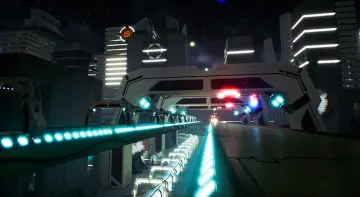
Sci-Fi Modular Environment
Configure the Sci-Fi Modular Environment in Unreal Engine, adjust baked lighting settings, customize tileable materials, and assemble game-ready layouts.
Category:Unreal Engine,Sci-FiPlatform: Unreal EngineEngine Version: 4.26+,5.0+Published: Oct 13, 2026
Sci-Fi
Resource overview
Configuring Unreal Engine 5 Rendering for the Static Lighting Build
Working with the Sci-Fi Modular Environment begins with project-level rendering configuration. While the pack operates inside modern versions of Unreal Engine, its visual design relies on baked lighting. Unreal Engine 5 enables Lumen by default upon project creation, which overrides the static illumination embedded in the environment maps. To restore the precise illumination pass prepared for the assets, navigate directly to Project Settings under the Rendering section. Within these rendering controls, locate Dynamic Global Illumination and turn it off. Disabling this setting permits the bundled static lighting build to display as intended without unwanted dynamic bouncing or real-time illumination artifacts conflicting with the baked bake data.
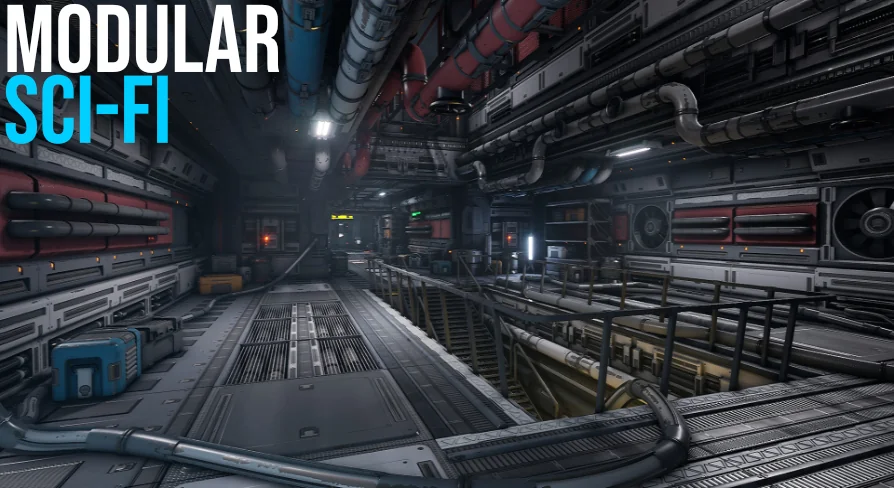
Addressing the lighting settings before opening your scene prevents inaccurate light behavior across interior rooms. Baked lighting provides fixed, pre-calculated shadows and controlled bounce light across metallic paneling and interior bulkheads, delivering the specific mood built into the original level presentation. Once Dynamic Global Illumination is turned off, the bundled environment retains its clean light maps, calibrated contrast, and precise shadows across both open chambers and narrow corridors.
Navigating the Pre-Built Level and Modular Asset Construction
The core structural workflow centers on assembling custom layouts through modular pieces. A comprehensive pre-built level is included right out of the box, organized into multiple distinct rooms and interconnected areas. This pre-assembled map serves as both a functional showcase and a structural blueprint, illustrating how the walls, floors, ceilings, and transition frames snap together into cohesive interior networks.
Level designers can modify the supplied footprint or start from scratch using the individual modular components. Because the geometry is optimized specifically for game use, pieces can be duplicated, rotated, and aligned to form sprawling layouts suited for exploration. Whether constructing an industrial military facility or an isolated deep-space corridor, the modularity ensures that junctions meet cleanly, ceiling heights remain consistent, and doorways integrate naturally across custom floor plans.
Surface Customization via Tileable Material Instances
Surfaces throughout the facility utilize tileable materials that maintain visual consistency across large architectural expanses. Rather than locking artists into a static aesthetic, the material pipeline is configured for straightforward per-instance adjustments. Base material properties, including surface coloration and core parameters, can be adjusted directly through material instances without altering master shaders.
This level of instance control allows for functional zoning within an installation. A research bay can adopt clean, pale finishes, while an engineering wing or propulsion deck built from the same modular assets can be shifted to darker, industrial hues through quick instance modifications. The tileable structure ensures that broad wall sections, floor plating, and industrial bulkheads keep their textural detail across repeated modules without introducing stretching or obvious repetition lines throughout the playable area.
Inspecting Meshes with the Asset Overview Map
Navigating large directories to find specific structural framing or decorative parts can slow down level construction. To streamline this workflow, the pack includes a dedicated asset overview map. Opening this scene places every individual mesh in an open, neutral layout, letting you inspect scale, geometry, and pivot placement before placing assets into active scenes.
The overview scene displays structural components alongside the high-quality props included to detail the facility. These props fill functional roles throughout living quarters, work zones, and control centers, providing the small-scale dressing needed to ground the larger architecture. Having all props laid out side by side simplifies set dressing, allowing designers to select relevant consoles, containers, and apparatus to break up repetitious wall paneling and define the identity of specific rooms.
Level Design for Survival, Military, and Horror Environments
The structural aesthetic of the pack supports a wide range of interactive genres. Its realistic, futuristic styling makes it a direct fit for first-person shooters, survival scenarios, and space station simulations. The stark modular panels, metallic framing, and industrial architectural shapes adapt naturally to scenarios involving derelict starships, research bases, and fortified military outposts.
For projects requiring tension, the tight corridors and enclosed chambers easily translate into sci-fi horror spaces. The architectural density allows designers to construct claustrophobic maintenance shafts or expansive cargo bays where baked shadows emphasize isolation. Furthermore, the assets share compatibility with Modular Abandoned Bunker, allowing teams combining these collections to blend futuristic spacecraft interiors with reinforced subterranean bunkers and decayed industrial fortifications seamlessly.
Asset Maintenance and Production Support
Maintaining a smooth workflow across custom level builds relies on clear technical boundaries. The assets are packaged specifically to meet game-ready performance requirements without requiring secondary geometry cleanup. If unexpected visual issues occur during asset integration or if lighting setup questions arise when tailoring project settings, the developer offers direct technical support to assist with troubleshooting and help maintain production momentum.
 Sci-Fi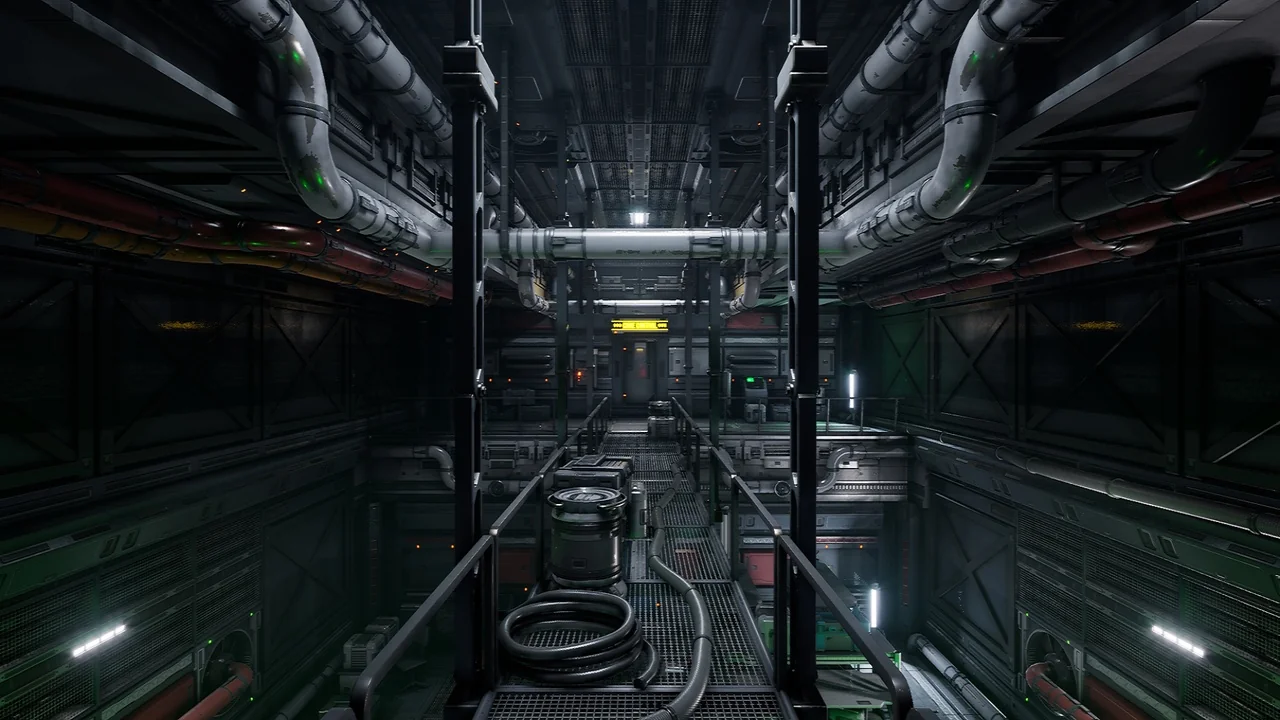
 Sci-Fi
 Sci-Fi
 Sci-Fi