"7e6fc58c410f2894"{"id":"23113","slug":"road-constructor","title":"Road Constructor","category":"Level Design","engine":"Original Unity version: 2022.3.31","assetVersion":"Original Unity version: 2022.3.31","engineVersion":"Asset Version:1.5.4","tag":"Level Design","accent":"cyan","visual":"audio","summary":"Road Constructor is a procedural generation tool designed for Unity 2022 LTS that handles road placement, intersection movement, and terrain modification. It includes a library of 461 assets for building rural, local, and highway environments.","platform":"Unity","publishedAt":"2026-04-08T16:13:02.000Z","updatedAt":"2026-04-19T15:36:52.000Z","sourceNotes":[],"fileContents":[],"compatibility":["Unity","Original Unity version: 2022.3.31","Asset Version: 1.5.4"],"featuredImage":{"alt":"Road Constructor","src":"https://3dcghub.com/wp-content/uploads/2026/04/90ed763146d6_bb961dc5-9b2a-45b3-b05c-6ff00bbe30d7_1280x720_stretch.webp"},"hasDownloadLink":true,"downloads":1,"terms":[{"taxonomy":"category","slug":"level-design","name":"Level Design"},{"taxonomy":"post_tag","slug":"environment","name":"Environment"},{"taxonomy":"post_tag","slug":"tools","name":"Tools"},{"taxonomy":"post_tag","slug":"unity","name":"Unity"}],"galleryImages":[{"src":"https://3dcghub.com/wp-content/uploads/2026/04/d0cb185e4190_1859d90b-60f5-42ea-b190-d00c27a22f14_scaled.webp","alt":"Road Constructor"},{"src":"https://3dcghub.com/wp-content/uploads/2026/04/87f81c835af7_328a6720-3bee-4e62-9397-8127e818d561_scaled.webp","alt":"Road Constructor"},{"src":"https://3dcghub.com/wp-content/uploads/2026/04/c01d993a7123_f82f1291-b1d0-443c-8bc5-1481ffe26a9e_scaled.webp","alt":"Road Constructor"},{"src":"https://3dcghub.com/wp-content/uploads/2026/04/1d18b1f55828_98dd196b-116c-4276-8c95-ba10ef361131_scaled.webp","alt":"Road Constructor"},{"src":"https://3dcghub.com/wp-content/uploads/2026/04/527595ec02f7_5fe21f39-ece6-45ac-8d16-c34788d2eec2_scaled.webp","alt":"Road Constructor"},{"src":"https://3dcghub.com/wp-content/uploads/2026/04/abb47b7d50e3_bd0df515-b6d9-469d-a8e4-39276be6125e_scaled.webp","alt":"Road Constructor"},{"src":"https://3dcghub.com/wp-content/uploads/2026/04/cd25c0fe3cfa_72f5d8cd-d638-486c-8b0c-752a5a4e9c47_scaled.webp","alt":"Road Constructor"},{"src":"https://3dcghub.com/wp-content/uploads/2026/04/5cc9bbd775be_34da4c9b-5f42-4aec-b256-d84bb1e5715f_scaled.webp","alt":"Road Constructor"},{"src":"https://3dcghub.com/wp-content/uploads/2026/04/7a65a9e507ea_774fbc09-79c4-4460-b068-707fa97e60d5_scaled.webp","alt":"Road Constructor"},{"src":"https://3dcghub.com/wp-content/uploads/2026/04/2f19a3af5276_5980660d-f491-4226-8394-df3ba18a42da_scaled.webp","alt":"Road Constructor"}],"accessPanel":{"kind":"resource","title":"Access this resource","eyebrow":"Free Download","message":"Log in or create a free account to start your download.","fileName":"Road Constructor v1.5.4.7z","safetyNote":"All resources are 100% manually reviewed to eliminate all risks.","actionLabel":"Download Free","resourceType":"Resource archive"},"contentHtml":"\u003ch2\u003eProcedural Road Generation and Environment Integration\u003c/h2\u003e\u003cp\u003eRoad Constructor is a specialized toolset built for Unity 2022 LTS that focuses on the creation of complex road networks through a procedural workflow. By leveraging core Unity packages like unity.splines, unity.burst, and unity.collections, the tool enables developers to generate infrastructure both during the editor-based design phase and dynamically at runtime. The system is designed to handle the logistical challenges of road placement, such as maintaining consistent curvature and managing how roads interact with the surrounding environment.\u003c/p\u003e\u003cp\u003eThe package is built around a library of 461 assets, primarily focusing on low-poly geometry to keep performance overhead low. This includes essential roadside props such as street lights, traffic lights, railings, and fences. To support more naturalistic scenes, the tool also provides vegetation assets like birch trees and grass, alongside bridge supports for elevated sections of the road network.\u003c/p\u003e\u003ch2\u003eSurface Materials and Visual Standards\u003c/h2\u003e\u003cp\u003eThe visual identity of the generated roads is managed through a collection of high-resolution textures, provided at 2048x2048 resolution with corresponding diffuse and normal maps. These are categorized into three distinct environment types:\u003c/p\u003e\u003cul\u003e\u003cli\u003e\u003cstrong\u003eRural:\u003c/strong\u003e Surfaces focusing on dirt and gravel paths.\u003c/li\u003e\u003cli\u003e\u003cstrong\u003eLocal:\u003c/strong\u003e Standard asphalt, grass-lined edges, and pavement textures.\u003c/li\u003e\u003cli\u003e\u003cstrong\u003eHighway:\u003c/strong\u003e Specialized layouts for two-lane and three-lane high-speed roads.\u003c/li\u003e\u003c/ul\u003e\u003cp\u003eTo ensure these materials map correctly across complex geometry, the tool includes specific UV options. Developers can choose between cutting or stretching UVs to accommodate different road shapes, ensuring that textures remain coherent regardless of the spline's length or curvature.\u003c/p\u003e\u003ch2\u003eEngineering and Construction Controls\u003c/h2\u003e\u003cp\u003eRoad Constructor uses a set of dedicated construction settings to maintain technical accuracy across the road network. A grid-based snapping system allows for precise control over distances, curve radiuses, and height increments. For more organic shapes, the tool provides tangent and curvature controls. The generation process also includes a 'smart reduce' function, which optimizes the road mesh based on its slope and curvature to reduce unnecessary polygon density while maintaining visual fidelity through LODs (Levels of Detail).\u003c/p\u003e\u003cp\u003eComplexity is managed through specific road components such as construction lanes, roundabouts, and intersection movement nodes. The system supports interconnected waypoints and traffic lanes, which are essential for establishing pathfinding routes. Developers can save configurations as presets to quickly replicate specific road styles across a project.\u003c/p\u003e\u003ch2\u003eTerrain and Verification Systems\u003c/h2\u003e\u003cp\u003eOne of the primary functions of the tool is its ability to modify the Unity terrain to accommodate new infrastructure. The terrain settings allow the system to automatically level the height of the ground beneath the road, remove existing terrain details or trees that would clip through the mesh, and apply texture blending to create a seamless transition between the road edge and the natural environment.\u003c/p\u003e\u003cp\u003eVerification settings are built into the workflow to prevent geometry errors. These include:\u003c/p\u003e\u003cul\u003e\u003cli\u003e\u003cstrong\u003eElevation and Slope Control:\u003c/strong\u003e Ensures roads do not exceed realistic vertical limits.\u003c/li\u003e\u003cli\u003e\u003cstrong\u003eOverlap Control:\u003c/strong\u003e Detects and prevents clashing geometry at intersections or tight turns.\u003c/li\u003e\u003cli\u003e\u003cstrong\u003eHeight and Distance Range:\u003c/strong\u003e Validates the physical dimensions of the splines.\u003c/li\u003e\u003c/ul\u003e\u003ch2\u003eWorkflow Compatibility and Traffic Integration\u003c/h2\u003e\u003cp\u003eThe tool is designed to work within the standard Unity ecosystem, supporting Built-in, HDRP, and URP render pipelines as of version 2022.3.31f1. Beyond simple mesh generation, Road Constructor is built to integrate with external traffic and pedestrian frameworks. It features direct compatibility with the Mobile Traffic System v2.0, Mobile Pedestrian System, and DOTS Traffic City, allowing the procedural paths to serve as the foundation for active AI traffic. This makes it a functional utility for developers building city simulations, racing tracks, or large-scale open environments where manual road placement would be inefficient.\u003c/p\u003e\n\n\u003ch2\u003eMore From The Same Workflow\u003c/h2\u003e\n\u003cul\u003e\n\u003cli\u003e\u003ca href=\"https://3dcghub.com/opencv-for-unity/\" title=\"OpenCV for Unity\"\u003eOpenCV for Unity\u003c/a\u003e\u003c/li\u003e\n\u003cli\u003e\u003ca href=\"https://3dcghub.com/exporter-for-unreal-to-for-unity-2026/\" title=\"Exporter for Unreal to/for Unity 2026\"\u003eExporter for Unreal to/for Unity 2026\u003c/a\u003e\u003c/li\u003e\n\u003cli\u003e\u003ca href=\"https://3dcghub.com/dialogue-system-for-unity/\" title=\"Dialogue System for Unity\"\u003eDialogue System for Unity\u003c/a\u003e\u003c/li\u003e\n\u003cli\u003e\u003ca href=\"https://3dcghub.com/ambient-sounds-interactive-soundscapes-for-unity-6/\" title=\"Ambient Sounds – Interactive Soundscapes for Unity 6\"\u003eAmbient Sounds – Interactive Soundscapes for Unity 6\u003c/a\u003e\u003c/li\u003e\n\u003cli\u003e\u003ca href=\"https://3dcghub.com/pegasus-flythroughs-for-unity-6/\" title=\"Pegasus – Flythroughs for Unity 6\"\u003ePegasus – Flythroughs for Unity 6\u003c/a\u003e\u003c/li\u003e\n\u003c/ul\u003e","contentTextLength":4399,"navigation":{"current":3503,"total":3618,"previous":{"id":"23126","slug":"i2-localization","title":"I2 Localization","category":"Localization","platform":"Unity","updatedAt":"2026-04-19T15:36:52.000Z"},"next":{"id":"23155","slug":"dynamic-mesh-cutter","title":"Dynamic Mesh Cutter","category":"Modeling","platform":"Unity","updatedAt":"2026-04-19T15:36:51.000Z"}},"relatedResources":[{"id":"23060","slug":"bakery-gpu-lightmapper","title":"Bakery - GPU Lightmapper","category":"Level Design","engine":"Original Unity version: 2018.4.0","assetVersion":"Original Unity version: 2018.4.0","engineVersion":"Asset Version:1.9501","tag":"Level Design","accent":"cyan","visual":"audio","summary":"Designed as a high-performance alternative to Enlighten and Progressive, Bakery utilizes GPU ray-tracing to produce physically correct baked lighting for Unity projects.","platform":"Unity","publishedAt":"2026-04-08T15:58:10.000Z","updatedAt":"2026-04-19T15:36:54.000Z","sourceNotes":[],"fileContents":[],"compatibility":["Unity","Original Unity version: 2018.4.0","Asset Version: 1.9501"],"featuredImage":{"alt":"Bakery - GPU Lightmapper","src":"https://3dcghub.com/wp-content/uploads/2026/04/0f1a4e2df268_5c53345b-8e25-47c7-8a9d-654769582e06_1280x720_stretch.webp"},"hasDownloadLink":true,"downloads":1},{"id":"23100","slug":"prefab-world-builder","title":"Prefab World Builder","category":"Level Design","engine":"Original Unity version: 2021.3.45","assetVersion":"Original Unity version: 2021.3.45","engineVersion":"Asset Version:4.7","tag":"Level Design","accent":"cyan","visual":"city","summary":"Prefab World Builder provides a comprehensive suite of editor-only tools designed to accelerate level design through physics-based placement, modular grid logic, and specialized brush systems.","platform":"Unity","publishedAt":"2026-04-08T16:12:51.000Z","updatedAt":"2026-04-19T15:36:53.000Z","sourceNotes":[],"fileContents":[],"compatibility":["Unity","Original Unity version: 2021.3.45","Asset Version: 4.7"],"featuredImage":{"alt":"Prefab World Builder","src":"https://3dcghub.com/wp-content/uploads/2026/04/847351c6dd61_4092fd06-49b3-4cb5-b7f4-98a6fc879b53_1280x720_stretch.webp"},"hasDownloadLink":true,"downloads":1},{"id":"23047","slug":"auto-fence-wall-builder","title":"Auto Fence \u0026 Wall Builder","category":"Level Design","engine":"Original Unity version: 2018.4.36","assetVersion":"Original Unity version: 2018.4.36","engineVersion":"Asset Version:4.0.1","tag":"Level Design","accent":"cyan","visual":"mech","summary":"Auto Fence \u0026 Wall Builder provides a specialized environment design workflow within Unity, allowing for the rapid deployment of fences and walls that adapt dynamically to terrain and user-defined parameters.","platform":"Unity","publishedAt":"2026-04-08T15:57:54.000Z","updatedAt":"2026-04-19T15:36:54.000Z","sourceNotes":[],"fileContents":[],"compatibility":["Unity","Original Unity version: 2018.4.36","Asset Version: 4.0.1"],"featuredImage":{"alt":"Auto Fence \u0026 Wall Builder","src":"https://3dcghub.com/wp-content/uploads/2026/04/7a172f0b4ab4_476166a4-2fc0-464a-973d-af68509480dc_1280x720_stretch.webp"},"hasDownloadLink":true,"downloads":0}]}
Level Design
Road Constructor
Road Constructor is a procedural generation tool designed for Unity 2022 LTS that handles road placement, intersection movement, and terrain modification. It includes a library of 461 assets for building rural, local, and highway environments.
Procedural Road Generation and Environment Integration
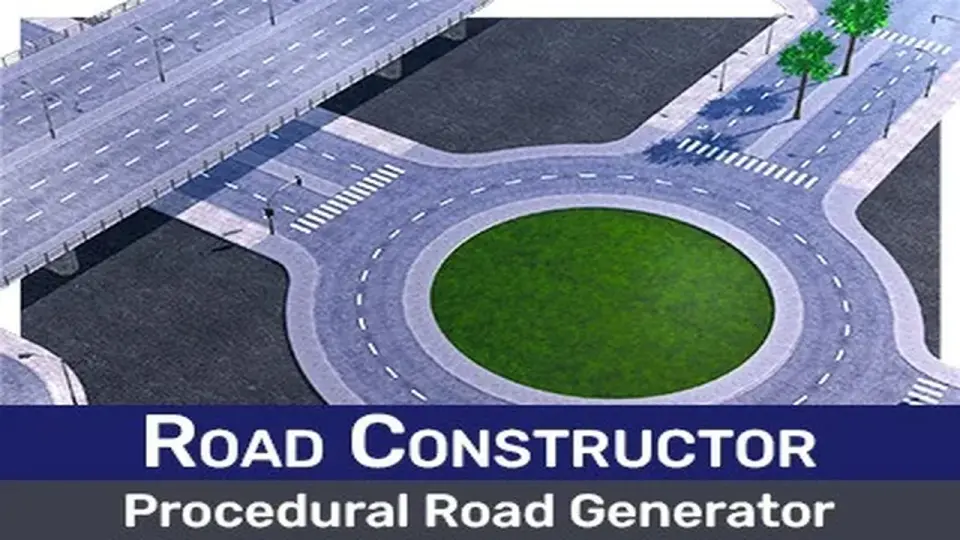
Road Constructor is a specialized toolset built for Unity 2022 LTS that focuses on the creation of complex road networks through a procedural workflow. By leveraging core Unity packages like unity.splines, unity.burst, and unity.collections, the tool enables developers to generate infrastructure both during the editor-based design phase and dynamically at runtime. The system is designed to handle the logistical challenges of road placement, such as maintaining consistent curvature and managing how roads interact with the surrounding environment.
The package is built around a library of 461 assets, primarily focusing on low-poly geometry to keep performance overhead low. This includes essential roadside props such as street lights, traffic lights, railings, and fences. To support more naturalistic scenes, the tool also provides vegetation assets like birch trees and grass, alongside bridge supports for elevated sections of the road network.
Surface Materials and Visual Standards
The visual identity of the generated roads is managed through a collection of high-resolution textures, provided at 2048x2048 resolution with corresponding diffuse and normal maps. These are categorized into three distinct environment types:
Rural: Surfaces focusing on dirt and gravel paths.
Local: Standard asphalt, grass-lined edges, and pavement textures.
Highway: Specialized layouts for two-lane and three-lane high-speed roads.
To ensure these materials map correctly across complex geometry, the tool includes specific UV options. Developers can choose between cutting or stretching UVs to accommodate different road shapes, ensuring that textures remain coherent regardless of the spline's length or curvature.
Engineering and Construction Controls
Road Constructor uses a set of dedicated construction settings to maintain technical accuracy across the road network. A grid-based snapping system allows for precise control over distances, curve radiuses, and height increments. For more organic shapes, the tool provides tangent and curvature controls. The generation process also includes a 'smart reduce' function, which optimizes the road mesh based on its slope and curvature to reduce unnecessary polygon density while maintaining visual fidelity through LODs (Levels of Detail).
Complexity is managed through specific road components such as construction lanes, roundabouts, and intersection movement nodes. The system supports interconnected waypoints and traffic lanes, which are essential for establishing pathfinding routes. Developers can save configurations as presets to quickly replicate specific road styles across a project.
Terrain and Verification Systems
One of the primary functions of the tool is its ability to modify the Unity terrain to accommodate new infrastructure. The terrain settings allow the system to automatically level the height of the ground beneath the road, remove existing terrain details or trees that would clip through the mesh, and apply texture blending to create a seamless transition between the road edge and the natural environment.
Verification settings are built into the workflow to prevent geometry errors. These include:
Elevation and Slope Control: Ensures roads do not exceed realistic vertical limits.
Overlap Control: Detects and prevents clashing geometry at intersections or tight turns.
Height and Distance Range: Validates the physical dimensions of the splines.
Workflow Compatibility and Traffic Integration
The tool is designed to work within the standard Unity ecosystem, supporting Built-in, HDRP, and URP render pipelines as of version 2022.3.31f1. Beyond simple mesh generation, Road Constructor is built to integrate with external traffic and pedestrian frameworks. It features direct compatibility with the Mobile Traffic System v2.0, Mobile Pedestrian System, and DOTS Traffic City, allowing the procedural paths to serve as the foundation for active AI traffic. This makes it a functional utility for developers building city simulations, racing tracks, or large-scale open environments where manual road placement would be inefficient.
 Level Design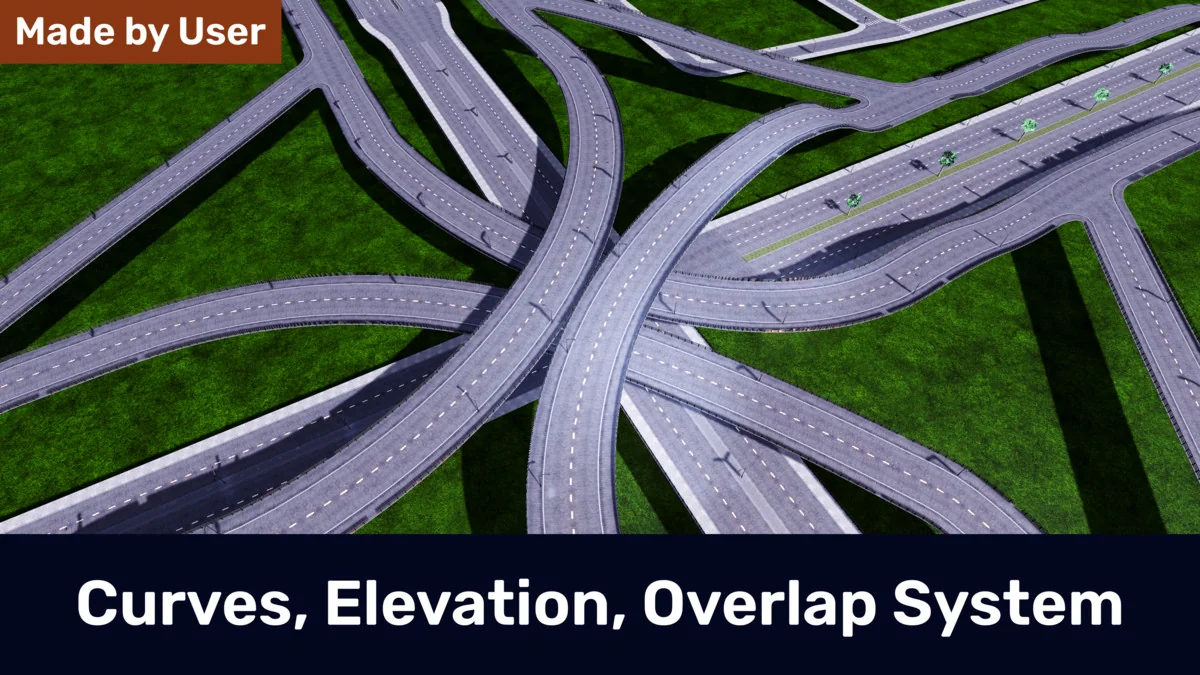
 Level Design
 Level Design
 Level Design