"ddd0e3fb95b0aec2"{"id":"1000397","slug":"realistic-rabbit","title":"Realistic Rabbit","category":"Characters \u0026 Creatures","engine":"4.26+,5.0+","assetVersion":"","engineVersion":"Engine Version: 4.26+,5.0+","tag":"Characters","accent":"blue","visual":"character","summary":"A lowpoly, animated 3D rabbit model featuring 29 distinct animations, three skin variations, and adjustable eye materials for mobile RPGs and hunting games.","platform":"Unreal Engine","publishedAt":"2026-07-07T15:27:45.915Z","updatedAt":"2026-07-07T15:27:45.915Z","sourceNotes":[],"fileContents":[],"compatibility":["Unreal Engine","Engine Version: 4.26+,5.0+"],"featuredImage":{"alt":"Realistic Rabbit","src":"/wp-content/uploads/published/2026/07/bf0acf43e34a-2c1ca981-d43a-4251-b6f7-d30b5d1b85de-14d1909f40.webp"},"hasDownloadLink":true,"downloads":0,"terms":[{"taxonomy":"category","slug":"characters-and-creatures","name":"Characters \u0026 Creatures"}],"galleryImages":[{"src":"/wp-content/uploads/published/2026/07/1816594825cc-4d400d92-e05a-4be6-8d8d-6f1c35365b82-ef454e77c9.webp","alt":"Realistic Rabbit"},{"src":"/wp-content/uploads/published/2026/07/5104acb78b61-77698234-895a-4ece-82f8-6286b74fe9a9-920d187217.webp","alt":"Realistic Rabbit"},{"src":"/wp-content/uploads/published/2026/07/27bce7bb66a8-45c81eda-b6b0-4c34-8738-69acee0df169-63f9db739a.webp","alt":"Realistic Rabbit"},{"src":"/wp-content/uploads/published/2026/07/ac357d8a97ee-d9418314-d164-4bc6-aea7-d41f11b2a975-2394eeb0a1.webp","alt":"Realistic Rabbit"},{"src":"/wp-content/uploads/published/2026/07/5e233d026072-62466bcf-5eaf-40a1-83ee-87045bc8fac1-4b9d76b805.webp","alt":"Realistic Rabbit"},{"src":"/wp-content/uploads/published/2026/07/54a18ff0eba9-1eb871d5-2e31-40ac-ad54-fd00e7c8058b-83e2f55d24.webp","alt":"Realistic Rabbit"},{"src":"/wp-content/uploads/published/2026/07/093b3f4cbfdb-cbdfacad-2863-4632-a47a-904558503e78-88ea13ece7.webp","alt":"Realistic Rabbit"},{"src":"/wp-content/uploads/published/2026/07/7b11df600986-8b51e51a-747f-415e-93f3-b2c5eeba2465-0de553c0be.webp","alt":"Realistic Rabbit"},{"src":"/wp-content/uploads/published/2026/07/2b9cf501d69f-f10b1359-274a-48d2-b781-b8eb8882b1d6-0bfe800609.webp","alt":"Realistic Rabbit"},{"src":"/wp-content/uploads/published/2026/07/f349965a7d86-c1d70f87-a08f-47fb-ba38-8830391cfa77-1d63131c30.webp","alt":"Realistic Rabbit"}],"accessPanel":{"kind":"resource","title":"Download this resource","eyebrow":"Free Download","message":"Log in or create a free account to start your download.","fileName":"Content.7z","safetyNote":"Resources are manually reviewed before listing to improve quality and reduce obvious risks.","actionLabel":"Download Free","resourceType":"Resource archive"},"contentHtml":"\u003ch2\u003eIntegrating Wildlife into Mobile RPGs and Hunting Games\u003c/h2\u003e\n\u003cp\u003ePopulating a digital forest or wilderness environment requires creatures that can operate efficiently within the performance constraints of the target platform. The Realistic Rabbit addresses this by utilizing a lowpoly mesh structure that minimizes the polygon rendering budget. This makes the asset highly suitable for mobile devices, where hardware limitations often dictate how many ambient characters can exist in a single scene.\u003c/p\u003e\n\u003cp\u003eWhether the project is a dedicated hunting game focused on tracking wild game, or a mobile RPG that needs ambient life to make its fantasy world feel grounded, this model serves as a versatile foundational creature. Despite the lowpoly approach, the proportions and silhouette maintain a realistic aesthetic that fits naturally into woodland, field, or forest biomes. The dual nature of the asset—capable of being presented as a cute bunny or a wild hare—gives developers the flexibility to use it as harmless background scenery or as an active participant in the game's ecosystem.\u003c/p\u003e\n\u003ch2\u003eBuilding the Traversal Blend Tree\u003c/h2\u003e\n\u003cp\u003eA believable prey animal needs to navigate uneven terrain and react quickly to threats. The Realistic Rabbit includes a comprehensive suite of movement animations designed to populate a complex traversal blend tree. Standard forward movement is covered by the basic Walk and Run clips, establishing the core locomotion speeds for the creature.\u003c/p\u003e\n\u003cp\u003eTo handle evasive maneuvers, which are critical in a hunting game scenario where the animal is fleeing from a player, the asset provides specific directional animations. WalkLeft, WalkRight, RunLeft, and RunRight allow the AI to cut angles and change direction fluidly without relying solely on rigid, programmatic rotation.\u003c/p\u003e\n\u003cp\u003eVertical movement and gravity reactions are also fully supported through a multi-stage airborne animation sequence. Instead of a single static jump, developers can string together specific phases of a leap or fall. The Jump and JumpForward animations initiate the vertical lift. If the rabbit falls off a ledge, the system can transition into Fall or FallForward, eventually settling into a sustained FallLoop or FallForwardLoop for extended drops. This granular approach to airborne states ensures that the creature behaves realistically when navigating steep hills or sudden drops in a forest environment.\u003c/p\u003e\n\u003ch2\u003eProgramming Environmental Interactions and Sleep Cycles\u003c/h2\u003e\n\u003cp\u003eWhen the rabbit is not actively fleeing or traversing the map, it requires a variety of resting and behavioral states to bring the digital ecosystem to life. To prevent the model from freezing in a static pose, developers can cycle between Idle1, Idle2, and Idle3. These varied idle animations give the creature a natural, breathing presence when observing its surroundings.\u003c/p\u003e\n\u003cp\u003eBeyond simple standing idles, the animation list supports active environmental interactions. By utilizing the Wash, Drink, and Eating clips, AI routines can be programmed to seek out water sources or grazing patches, making the wildlife feel integrated into the habitat rather than aimlessly wandering.\u003c/p\u003e\n\u003cp\u003eThe asset also provides the necessary clips for a complete, uninterrupted sleep cycle. Instead of snapping instantly from a standing position to a sleeping pose, the AI can trigger the StartSleep animation to lay down naturally. Once grounded, the Sleeping clip serves as a looping resting state. When the sun rises in an RPG day-night cycle, or if a hunter startles the creature, the EndSleep animation provides a realistic waking transition back into an idle or fleeing state. Additionally, a Carrying animation is included, which can be implemented if the rabbit is picked up by the player, transported by an eagle, or utilized in a specific quest scenario.\u003c/p\u003e\n\u003ch2\u003eConfiguring Prey Damage and Combat Responses\u003c/h2\u003e\n\u003cp\u003eIn many mobile RPGs and hunting titles, wildlife inevitably intersects with the player's combat or trapping mechanics. The Realistic Rabbit is equipped with animations to both receive and inflict damage. For scenarios where the rabbit is cornered, or if it is scaled up to represent a hostile fantasy hare, developers can utilize the Attack1 and Attack2 clips to program a defensive strike.\u003c/p\u003e\n\u003cp\u003eWhen the creature is hit by a player's weapon, the Impact1 and Impact2 animations provide immediate, distinct flinch responses to convey successful strikes. This physical feedback is essential in hunting games to confirm that a shot or trap has connected.\u003c/p\u003e\n\u003cp\u003eIf the creature's health is fully depleted, the system can pull from three different death animations: Death1, Death2, and Death3. Supplying multiple death variations is a critical feature for hunting games, as players will likely hunt dozens of these creatures over a playthrough. Randomizing the death sequence prevents the visual repetition that occurs when the exact same ragdoll or canned animation plays every time a creature falls.\u003c/p\u003e\n\u003ch2\u003eApplying Coat Skins and Customizing Eye Materials\u003c/h2\u003e\n\u003cp\u003eAdapting the rabbit to different climates, seasons, or biomes is handled through the included texture variations. The model is packaged with three distinct skins to fit various environmental themes. The Brown skin is ideal for standard temperate forests and autumnal landscapes. The White skin serves perfectly as winter camouflage for snowy tundras, while the Black skin provides an alternative coat for genetic variety within a larger warren.\u003c/p\u003e\n\u003cp\u003eBeyond the base coat textures, the model features a distinct material setup for its facial features. The eyes utilize their own dedicated material, completely separate from the main body skin. This separation allows technical artists to independently adjust the eye color through the engine's material editor without disrupting the fur textures. Modifying the eye color provides a simple way to alter the creature's alignment; keeping the eyes dark maintains a realistic nature asset, while shifting the eye color to a glowing red or magical purple instantly transforms the model into a corrupted or enchanted creature for a fantasy RPG.\u003c/p\u003e\n\n\u003ch2\u003eMore From The Same Workflow\u003c/h2\u003e\n\u003cul\u003e\n\u003cli\u003e\u003ca href=\"https://3dcghub.com/realistic-base-skeleton/\" title=\"Realistic Base Skeleton\"\u003eRealistic Base Skeleton\u003c/a\u003e\u003c/li\u003e\n\u003cli\u003e\u003ca href=\"https://3dcghub.com/gangs-pack-02/\" title=\"Gangs Pack 02\"\u003eGangs Pack 02\u003c/a\u003e\u003c/li\u003e\n\u003cli\u003e\u003ca href=\"https://3dcghub.com/greece-warrior/\" title=\"Greece warrior\"\u003eGreece warrior\u003c/a\u003e\u003c/li\u003e\n\u003cli\u003e\u003ca href=\"https://3dcghub.com/chinese-noble-lady/\" title=\"Chinese Noble Lady\"\u003eChinese Noble Lady\u003c/a\u003e\u003c/li\u003e\n\u003cli\u003e\u003ca href=\"https://3dcghub.com/fantasy-beast-09/\" title=\"Fantasy Beast 09\"\u003eFantasy Beast 09\u003c/a\u003e\u003c/li\u003e\n\u003c/ul\u003e","contentTextLength":6159,"navigation":{"current":1253,"total":3511,"previous":{"id":"1000398","slug":"renovate-vehicle-framework","title":"Renovate: Vehicle Framework","category":"Racing","platform":"Unreal Engine","updatedAt":"2026-07-07T15:36:06.344Z"},"next":{"id":"1000396","slug":"realistic-crocodile","title":"Realistic Crocodile","category":"Characters \u0026 Creatures","platform":"Unreal Engine","updatedAt":"2026-07-07T15:23:45.665Z"}},"relatedResources":[{"id":"24908","slug":"realistic-base-skeleton","title":"Realistic Base Skeleton","category":"Characters \u0026 Creatures","engine":"4.26+,5.0+","assetVersion":"Engine version: 4.26+,5.0+","engineVersion":"","tag":"Characters","accent":"blue","visual":"character","summary":"Realistic Base Skeleton supports both animation and prop workflows with a rigged Epic skeleton setup. The updated version adds x-ray visibility, separable body parts, and multiple texture variations for different scene states.","platform":"Unreal Engine","publishedAt":"2026-04-17T12:07:16.000Z","updatedAt":"2026-04-20T06:12:36.000Z","sourceNotes":[],"fileContents":[],"compatibility":["Unreal Engine","Engine version: 4.26+,5.0+"],"featuredImage":{"alt":"Realistic Base Skeleton","src":"https://3dcghub.com/wp-content/uploads/2026/04/042747b0d662_b7255164-629b-4690-91c7-7a1d9efdb1e8.webp"},"hasDownloadLink":true,"downloads":0},{"id":"3284","slug":"realistic-horse-with-animations","title":"Realistic Horse with Animations","category":"Characters \u0026 Creatures","engine":"5.0+","assetVersion":"Engine version: 5.0+","engineVersion":"5.4","tag":"Characters","accent":"blue","visual":"animation","summary":"Enhance your game with this high-quality Realistic Horse asset. Featuring 20 animations, customizable shaders, and muscle shaking effects for maximum realism.","platform":"Unreal Engine","publishedAt":"2026-02-09T06:09:54.000Z","updatedAt":"2026-04-19T15:57:40.000Z","sourceNotes":[],"fileContents":[],"compatibility":["Unreal Engine","Engine version: 5.0+"],"featuredImage":{"alt":"Realistic Horse with Animations","src":"https://3dcghub.com/wp-content/uploads/2026/02/34363d28-a5d5-411a-84f6-36caa5d096af.webp"},"hasDownloadLink":true,"downloads":0},{"id":"1524","slug":"animalia-bald-and-golden-eagle","title":"Animalia - Bald and Golden Eagle","category":"Characters \u0026 Creatures","engine":"4.26+5.0+","assetVersion":"Engine version: 4.26+5.0+","engineVersion":"4.20","tag":"Characters","accent":"blue","visual":"character","summary":"Enhance your projects with hyper-realistic Bald and Golden Eagle 3D models. Features 4K textures, 60fps animations, and full rigging for Unreal Engine.","platform":"Unreal Engine","publishedAt":"2026-02-06T18:49:59.000Z","updatedAt":"2026-04-19T15:58:09.000Z","sourceNotes":[],"fileContents":[],"compatibility":["Unreal Engine","Engine version: 4.26+5.0+"],"featuredImage":{"alt":"Animalia - Bald and Golden Eagle","src":"https://3dcghub.com/wp-content/uploads/2026/02/f3ecfbe6-43b2-4c2d-b5d7-eb2ff298929e.webp"},"hasDownloadLink":true,"downloads":2}]}
Characters
Realistic Rabbit
A lowpoly, animated 3D rabbit model featuring 29 distinct animations, three skin variations, and adjustable eye materials for mobile RPGs and hunting games.
Integrating Wildlife into Mobile RPGs and Hunting Games
Populating a digital forest or wilderness environment requires creatures that can operate efficiently within the performance constraints of the target platform. The Realistic Rabbit addresses this by utilizing a lowpoly mesh structure that minimizes the polygon rendering budget. This makes the asset highly suitable for mobile devices, where hardware limitations often dictate how many ambient characters can exist in a single scene.
Whether the project is a dedicated hunting game focused on tracking wild game, or a mobile RPG that needs ambient life to make its fantasy world feel grounded, this model serves as a versatile foundational creature. Despite the lowpoly approach, the proportions and silhouette maintain a realistic aesthetic that fits naturally into woodland, field, or forest biomes. The dual nature of the asset—capable of being presented as a cute bunny or a wild hare—gives developers the flexibility to use it as harmless background scenery or as an active participant in the game's ecosystem.
Building the Traversal Blend Tree
A believable prey animal needs to navigate uneven terrain and react quickly to threats. The Realistic Rabbit includes a comprehensive suite of movement animations designed to populate a complex traversal blend tree. Standard forward movement is covered by the basic Walk and Run clips, establishing the core locomotion speeds for the creature.
To handle evasive maneuvers, which are critical in a hunting game scenario where the animal is fleeing from a player, the asset provides specific directional animations. WalkLeft, WalkRight, RunLeft, and RunRight allow the AI to cut angles and change direction fluidly without relying solely on rigid, programmatic rotation.
Vertical movement and gravity reactions are also fully supported through a multi-stage airborne animation sequence. Instead of a single static jump, developers can string together specific phases of a leap or fall. The Jump and JumpForward animations initiate the vertical lift. If the rabbit falls off a ledge, the system can transition into Fall or FallForward, eventually settling into a sustained FallLoop or FallForwardLoop for extended drops. This granular approach to airborne states ensures that the creature behaves realistically when navigating steep hills or sudden drops in a forest environment.
Programming Environmental Interactions and Sleep Cycles
When the rabbit is not actively fleeing or traversing the map, it requires a variety of resting and behavioral states to bring the digital ecosystem to life. To prevent the model from freezing in a static pose, developers can cycle between Idle1, Idle2, and Idle3. These varied idle animations give the creature a natural, breathing presence when observing its surroundings.
Beyond simple standing idles, the animation list supports active environmental interactions. By utilizing the Wash, Drink, and Eating clips, AI routines can be programmed to seek out water sources or grazing patches, making the wildlife feel integrated into the habitat rather than aimlessly wandering.
The asset also provides the necessary clips for a complete, uninterrupted sleep cycle. Instead of snapping instantly from a standing position to a sleeping pose, the AI can trigger the StartSleep animation to lay down naturally. Once grounded, the Sleeping clip serves as a looping resting state. When the sun rises in an RPG day-night cycle, or if a hunter startles the creature, the EndSleep animation provides a realistic waking transition back into an idle or fleeing state. Additionally, a Carrying animation is included, which can be implemented if the rabbit is picked up by the player, transported by an eagle, or utilized in a specific quest scenario.
Configuring Prey Damage and Combat Responses
In many mobile RPGs and hunting titles, wildlife inevitably intersects with the player's combat or trapping mechanics. The Realistic Rabbit is equipped with animations to both receive and inflict damage. For scenarios where the rabbit is cornered, or if it is scaled up to represent a hostile fantasy hare, developers can utilize the Attack1 and Attack2 clips to program a defensive strike.
When the creature is hit by a player's weapon, the Impact1 and Impact2 animations provide immediate, distinct flinch responses to convey successful strikes. This physical feedback is essential in hunting games to confirm that a shot or trap has connected.
If the creature's health is fully depleted, the system can pull from three different death animations: Death1, Death2, and Death3. Supplying multiple death variations is a critical feature for hunting games, as players will likely hunt dozens of these creatures over a playthrough. Randomizing the death sequence prevents the visual repetition that occurs when the exact same ragdoll or canned animation plays every time a creature falls.
Applying Coat Skins and Customizing Eye Materials
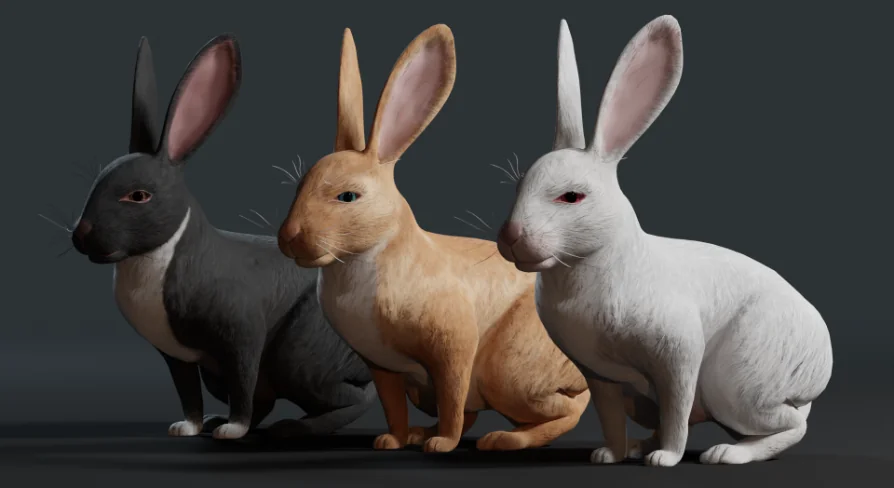
Adapting the rabbit to different climates, seasons, or biomes is handled through the included texture variations. The model is packaged with three distinct skins to fit various environmental themes. The Brown skin is ideal for standard temperate forests and autumnal landscapes. The White skin serves perfectly as winter camouflage for snowy tundras, while the Black skin provides an alternative coat for genetic variety within a larger warren.
Beyond the base coat textures, the model features a distinct material setup for its facial features. The eyes utilize their own dedicated material, completely separate from the main body skin. This separation allows technical artists to independently adjust the eye color through the engine's material editor without disrupting the fur textures. Modifying the eye color provides a simple way to alter the creature's alignment; keeping the eyes dark maintains a realistic nature asset, while shifting the eye color to a glowing red or magical purple instantly transforms the model into a corrupted or enchanted creature for a fantasy RPG.
 Characters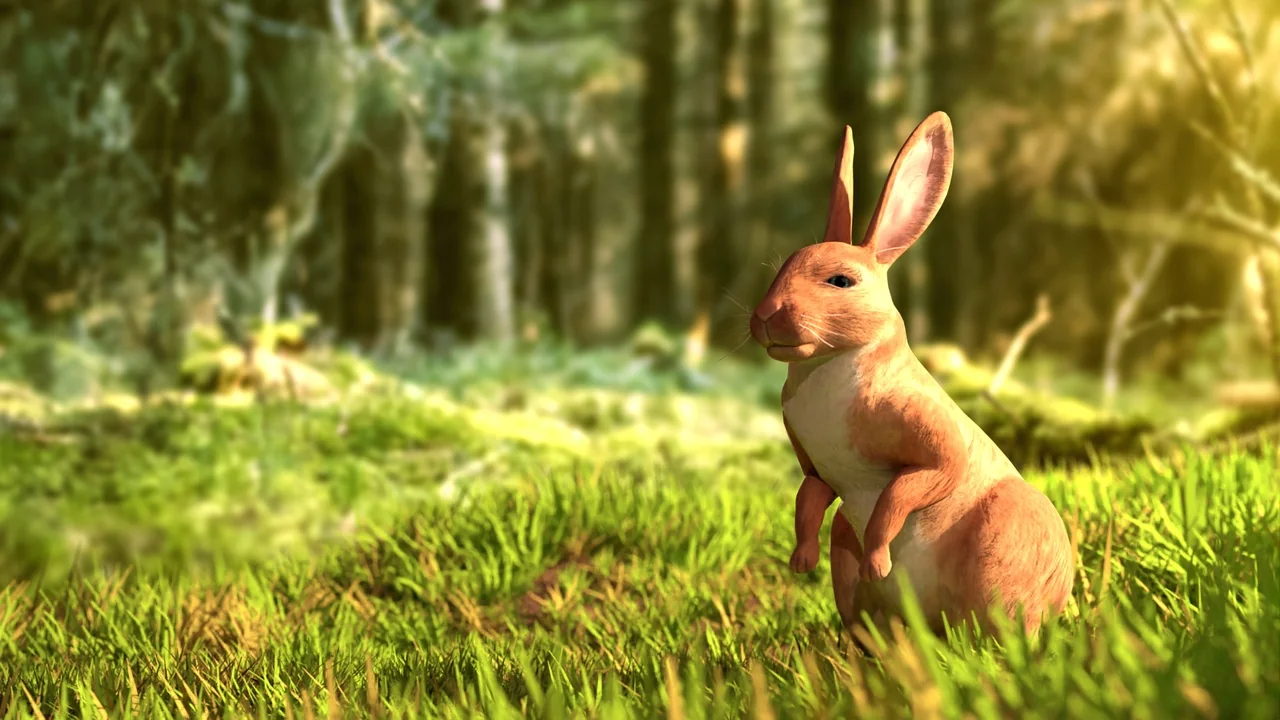
 Characters
 Characters
 Characters