"c14ff6bd758dadb1"{"id":"24908","slug":"realistic-base-skeleton","title":"Realistic Base Skeleton","category":"Characters \u0026 Creatures","engine":"4.26+,5.0+","assetVersion":"Engine version: 4.26+,5.0+","engineVersion":"","tag":"Characters","accent":"blue","visual":"character","summary":"Realistic Base Skeleton supports both animation and prop workflows with a rigged Epic skeleton setup. The updated version adds x-ray visibility, separable body parts, and multiple texture variations for different scene states.","platform":"Unreal Engine","publishedAt":"2026-04-17T12:07:16.000Z","updatedAt":"2026-04-20T06:12:36.000Z","sourceNotes":[],"fileContents":[],"compatibility":["Unreal Engine","Engine version: 4.26+,5.0+"],"featuredImage":{"alt":"Realistic Base Skeleton","src":"https://3dcghub.com/wp-content/uploads/2026/04/042747b0d662_b7255164-629b-4690-91c7-7a1d9efdb1e8.webp"},"hasDownloadLink":true,"downloads":0,"terms":[{"taxonomy":"category","slug":"characters-and-creatures","name":"Characters \u0026 Creatures"},{"taxonomy":"post_tag","slug":"characters","name":"Characters"},{"taxonomy":"post_tag","slug":"environment","name":"Environment"},{"taxonomy":"post_tag","slug":"prop","name":"Prop"}],"galleryImages":[{"src":"https://3dcghub.com/wp-content/uploads/2026/04/6a83c3d9c827_6eee2c4a-d83b-40ee-b42b-3a347b861422.webp","alt":"Realistic Base Skeleton"},{"src":"https://3dcghub.com/wp-content/uploads/2026/04/4dd987fbee38_f05f1ffe-6df2-4da8-befb-6a9d6b56447a.webp","alt":"Realistic Base Skeleton"},{"src":"https://3dcghub.com/wp-content/uploads/2026/04/59b57275d313_049c10a9-1d5b-41e6-9d39-e6e3c8277e50.webp","alt":"Realistic Base Skeleton"},{"src":"https://3dcghub.com/wp-content/uploads/2026/04/660b998337b5_2606a654-be7d-4c47-9a01-7fbf58101c83.webp","alt":"Realistic Base Skeleton"},{"src":"https://3dcghub.com/wp-content/uploads/2026/04/038e8785f251_5cde98b8-7776-4bff-9834-37b325c5c460.webp","alt":"Realistic Base Skeleton"},{"src":"https://3dcghub.com/wp-content/uploads/2026/04/64afc42b6021_720680ee-b9af-45e6-a60f-fe1d11fd8ff1.webp","alt":"Realistic Base Skeleton"},{"src":"https://3dcghub.com/wp-content/uploads/2026/04/e0dc595fac93_6a665955-a8a6-4fba-9832-44cd1c702f8b.webp","alt":"Realistic Base Skeleton"},{"src":"https://3dcghub.com/wp-content/uploads/2026/04/b13c5fe470af_2c232426-51ed-42b2-9d0e-14bc3544c0c0.webp","alt":"Realistic Base Skeleton"},{"src":"https://3dcghub.com/wp-content/uploads/2026/04/e3c57fc2f712_d59dd4a2-5893-4df9-b865-6c6ee64d5de1.webp","alt":"Realistic Base Skeleton"},{"src":"https://3dcghub.com/wp-content/uploads/2026/04/eaf086eacaac_5bad0753-d882-416f-8e02-0244656dcd8d.webp","alt":"Realistic Base Skeleton"}],"accessPanel":{"kind":"resource","title":"Access this resource","eyebrow":"Free Download","message":"Log in or create a free account to start your download.","fileName":"Content.7z","safetyNote":"All resources are 100% manually reviewed to eliminate all risks.","actionLabel":"Download Free","resourceType":"Resource archive"},"contentHtml":"\u003ch2\u003eDrop it into an Epic skeleton workflow\u003c/h2\u003e\u003cp\u003eThe updated skeleton removes the need for retargeting, which keeps the setup path short when the goal is to move straight into animation or scene assembly. It is rigged to the Epic skeleton and compatible with animations for it, so the base character can stay within that animation system instead of needing a separate conversion step.\u003c/p\u003e\u003cp\u003eThat compatibility also makes the asset easier to treat as either a moving character or a static prop. In one scene it can be posed and animated. In another, it can simply sit as part of the environment. The core advantage is that the same skeleton can serve both roles without changing the underlying setup.\u003c/p\u003e\u003cp\u003eFor teams working around an existing Epic skeleton animation library, that matters in a very practical way. The asset is ready to participate in the same motion path as other rigged characters, which keeps the focus on placement, timing, and presentation rather than on rebuilding the skeleton from scratch.\u003c/p\u003e\u003ch2\u003eSwitch the look without changing the model\u003c/h2\u003e\u003cp\u003eMaterial control is one of the most direct parts of the workflow here. The skeleton comes with switchable materials, so the visible surface can shift while the base structure stays the same. A separate control changes the amount of blaze in the Burnt Skeleton Material, giving the burned version a tunable look instead of a single fixed appearance.\u003c/p\u003e\u003cp\u003eThe included texture directions make that flexibility easier to use in different kinds of scenes:\u003c/p\u003e\u003cul\u003e\u003cli\u003eOld\u003c/li\u003e\u003cli\u003eSwamp\u003c/li\u003e\u003cli\u003eBurnt\u003c/li\u003e\u003cli\u003eFleshy\u003c/li\u003e\u003cli\u003eFresh\u003c/li\u003e\u003cli\u003eMedical-skeleton\u003c/li\u003e\u003c/ul\u003e\u003cp\u003eThose variations allow the same asset to read in different states of decay or condition without changing the rigged base. A weathered version works differently from a fresh one. A burnt version feels very different from a medical-skeleton look. The asset keeps its same underlying form while the surface treatment carries the visual direction.\u003c/p\u003e\u003cp\u003eBecause the materials are switchable, the skeleton can move between those looks as a scene changes. That makes the asset more flexible when one project needs several related appearances from a single model.\u003c/p\u003e\u003ch2\u003eSeparate the bones when a scene needs motion or damage\u003c/h2\u003e\u003cp\u003eBody parts can be separated into single pieces for a collapsing or scattering effect. That turns the skeleton into more than a fixed figure. It can break apart when a shot calls for impact, disassembly, or a more chaotic arrangement of bones.\u003c/p\u003e\u003cp\u003eThis separation also changes how the asset can be staged. Instead of relying only on the full body, the pieces can be used to suggest aftermath or disturbance. A collapse effect can be kept simple and direct. A scattering effect can spread the parts out into the scene. The asset is still the same skeleton, but it can present itself as a whole body or as separated pieces.\u003c/p\u003e\u003cp\u003eSingle bone parts can also be used as environmental props. That gives the skeleton a second life inside a set, where one or more bone pieces can support the scene even when the complete figure is not needed. The resource does not have to stay in a full character pose to remain useful.\u003c/p\u003e\u003cp\u003eThat kind of flexibility is helpful when a scene only needs fragments of a skeleton rather than a full body. Instead of being locked into one arrangement, the asset can support both complete and broken-up presentations.\u003c/p\u003e\u003ch2\u003eUse the x-ray shader for layered character work\u003c/h2\u003e\u003cp\u003eThe update adds a new shader for an x-ray effect, making the skeleton visible inside of a character. That gives the asset a very specific visual role in layered character work, where the skeleton needs to remain readable even when something else is placed over it.\u003c/p\u003e\u003cp\u003ePlaced inside a character, the skeleton does not disappear into the setup. It stays visible through the x-ray effect, which gives the scene a clearer internal structure. That is especially useful when the skeleton is meant to be seen as part of the character rather than as a separate prop in the background.\u003c/p\u003e\u003cp\u003eThe update also pairs with the body-part separation feature, so the asset can support both visibility and breakdown effects. One shader keeps the skeleton readable inside another character. The separable parts let it break apart when the shot needs that kind of motion or scattering.\u003c/p\u003e\u003cp\u003eMore detail is available in the documentation, which makes it easier to work through the setup when a specific step needs clarification. For practical use, the important point is straightforward: the skeleton is set up for Epic skeleton animation compatibility, can switch between several material states, and can also be split into pieces or used as a prop when the scene asks for something less than a full animated character.\u003c/p\u003e\u003cp\u003eThat combination keeps the asset useful across different scene needs without changing its base identity. It can stand as a character, sit as a prop, break into parts, or show through another character with the x-ray shader. The latest update keeps the workflow centered on reuse rather than rebuilding.\u003c/p\u003e\n\n\u003ch2\u003eMore From The Same Workflow\u003c/h2\u003e\n\u003cul\u003e\n\u003cli\u003e\u003ca href=\"https://3dcghub.com/nature-package-forest-environment/\" title=\"Nature Package – Forest Environment\"\u003eNature Package – Forest Environment\u003c/a\u003e\u003c/li\u003e\n\u003cli\u003e\u003ca href=\"https://3dcghub.com/forest-environment-dynamic-nature/\" title=\"Forest Environment – Dynamic Nature\"\u003eForest Environment – Dynamic Nature\u003c/a\u003e\u003c/li\u003e\n\u003cli\u003e\u003ca href=\"https://3dcghub.com/underwater-sunken-ship-environment/\" title=\"Underwater Sunken Ship Environment\"\u003eUnderwater Sunken Ship Environment\u003c/a\u003e\u003c/li\u003e\n\u003cli\u003e\u003ca href=\"https://3dcghub.com/the-carnival-environment/\" title=\"The Carnival Environment\"\u003eThe Carnival Environment\u003c/a\u003e\u003c/li\u003e\n\u003cli\u003e\u003ca href=\"https://3dcghub.com/pizza-bar-environment-by-gamertose/\" title=\"Pizza Bar Environment by Gamertose\"\u003ePizza Bar Environment by Gamertose\u003c/a\u003e\u003c/li\u003e\n\u003c/ul\u003e","contentTextLength":5123,"navigation":{"current":2056,"total":3719,"previous":{"id":"24798","slug":"post-soviet-furniture","title":"Post Soviet Furniture","category":"Furniture \u0026 Fixtures","platform":"Unreal Engine","updatedAt":"2026-04-20T06:12:37.000Z"},"next":{"id":"24895","slug":"niagara-realistic-starter-vfx-pack-2","title":"Niagara Realistic Starter VFX Pack 2","category":"Variety","platform":"Unreal Engine","updatedAt":"2026-04-20T06:12:36.000Z"}},"relatedResources":[{"id":"1000919","slug":"modular-private-military-contractor","title":"Modular Private Military Contractor","category":"Characters \u0026 Creatures","engine":"4.27,5.0+","assetVersion":"","engineVersion":"Engine Version: 4.27,5.0+","tag":"Characters","accent":"blue","visual":"character","summary":"A third-person character pack with naked base body, military and casual clothes, PBR materials for customization, Epic skeleton support, and Bunker compatibilit","platform":"Unreal Engine","publishedAt":"2026-08-08T04:43:36.260Z","updatedAt":"2026-08-08T04:43:36.260Z","sourceNotes":[],"fileContents":[],"compatibility":["Unreal Engine","Engine Version: 4.27,5.0+"],"featuredImage":{"alt":"Modular Private Military Contractor","src":"/wp-content/uploads/published/2026/08/850cd25aeb7a-4aac98be-ee23-441a-a76c-9bced6a6bd73-f527ab3be0.webp"},"hasDownloadLink":true,"downloads":1},{"id":"3342","slug":"samurai-girl","title":"Samurai Girl","category":"Characters \u0026 Creatures","engine":"4.26,5.0+","assetVersion":"Engine version: 4.26,5.0+","engineVersion":"4.21","tag":"Characters","accent":"blue","visual":"character","summary":"Enhance your project with this realistic Samurai Girl 3D model. Features 4K PBR textures, Epic Skeleton rigging, and modular meshes for maximum flexibility.","platform":"Unreal Engine","publishedAt":"2026-02-09T06:42:24.000Z","updatedAt":"2026-04-19T15:57:39.000Z","sourceNotes":[],"fileContents":[],"compatibility":["Unreal Engine","Engine version: 4.26,5.0+"],"featuredImage":{"alt":"Samurai Girl","src":"https://3dcghub.com/wp-content/uploads/2026/02/79b7de26-5b71-4d6b-93cc-8ff9cec51529.webp"},"hasDownloadLink":true,"downloads":0},{"id":"1000247","slug":"gangs-pack-02","title":"Gangs Pack 02","category":"Characters \u0026 Creatures","engine":"4.26+,5.0+","assetVersion":"","engineVersion":"Engine Version: 4.26+,5.0+","tag":"Characters","accent":"blue","visual":"character","summary":"Three optimized, realistic character models featuring Epic skeleton compatibility, customizable colors, and dedicated mobile materials for urban environments.","platform":"Unreal Engine","publishedAt":"2026-06-30T20:20:49.361Z","updatedAt":"2026-06-30T20:20:49.361Z","sourceNotes":[],"fileContents":[],"compatibility":["Unreal Engine","Engine Version: 4.26+,5.0+"],"featuredImage":{"alt":"Gangs Pack 02","src":"/wp-content/uploads/published/2026/06/becf0fe167ae-768f4de0-1226-4cd6-a53c-95b24643814a-b400e67dea.webp"},"hasDownloadLink":true,"downloads":2}]}
Characters
Realistic Base Skeleton
Realistic Base Skeleton supports both animation and prop workflows with a rigged Epic skeleton setup. The updated version adds x-ray visibility, separable body parts, and multiple texture variations for different scene states.
The updated skeleton removes the need for retargeting, which keeps the setup path short when the goal is to move straight into animation or scene assembly. It is rigged to the Epic skeleton and compatible with animations for it, so the base character can stay within that animation system instead of needing a separate conversion step.
That compatibility also makes the asset easier to treat as either a moving character or a static prop. In one scene it can be posed and animated. In another, it can simply sit as part of the environment. The core advantage is that the same skeleton can serve both roles without changing the underlying setup.
For teams working around an existing Epic skeleton animation library, that matters in a very practical way. The asset is ready to participate in the same motion path as other rigged characters, which keeps the focus on placement, timing, and presentation rather than on rebuilding the skeleton from scratch.
Switch the look without changing the model
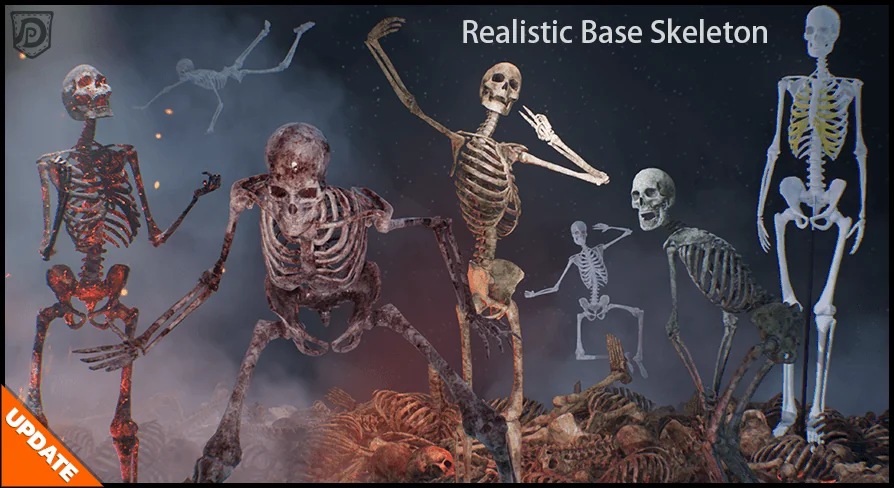
Material control is one of the most direct parts of the workflow here. The skeleton comes with switchable materials, so the visible surface can shift while the base structure stays the same. A separate control changes the amount of blaze in the Burnt Skeleton Material, giving the burned version a tunable look instead of a single fixed appearance.
The included texture directions make that flexibility easier to use in different kinds of scenes:
Old
Swamp
Burnt
Fleshy
Fresh
Medical-skeleton
Those variations allow the same asset to read in different states of decay or condition without changing the rigged base. A weathered version works differently from a fresh one. A burnt version feels very different from a medical-skeleton look. The asset keeps its same underlying form while the surface treatment carries the visual direction.
Because the materials are switchable, the skeleton can move between those looks as a scene changes. That makes the asset more flexible when one project needs several related appearances from a single model.
Separate the bones when a scene needs motion or damage
Body parts can be separated into single pieces for a collapsing or scattering effect. That turns the skeleton into more than a fixed figure. It can break apart when a shot calls for impact, disassembly, or a more chaotic arrangement of bones.
This separation also changes how the asset can be staged. Instead of relying only on the full body, the pieces can be used to suggest aftermath or disturbance. A collapse effect can be kept simple and direct. A scattering effect can spread the parts out into the scene. The asset is still the same skeleton, but it can present itself as a whole body or as separated pieces.
Single bone parts can also be used as environmental props. That gives the skeleton a second life inside a set, where one or more bone pieces can support the scene even when the complete figure is not needed. The resource does not have to stay in a full character pose to remain useful.
That kind of flexibility is helpful when a scene only needs fragments of a skeleton rather than a full body. Instead of being locked into one arrangement, the asset can support both complete and broken-up presentations.
Use the x-ray shader for layered character work
The update adds a new shader for an x-ray effect, making the skeleton visible inside of a character. That gives the asset a very specific visual role in layered character work, where the skeleton needs to remain readable even when something else is placed over it.
Placed inside a character, the skeleton does not disappear into the setup. It stays visible through the x-ray effect, which gives the scene a clearer internal structure. That is especially useful when the skeleton is meant to be seen as part of the character rather than as a separate prop in the background.
The update also pairs with the body-part separation feature, so the asset can support both visibility and breakdown effects. One shader keeps the skeleton readable inside another character. The separable parts let it break apart when the shot needs that kind of motion or scattering.
More detail is available in the documentation, which makes it easier to work through the setup when a specific step needs clarification. For practical use, the important point is straightforward: the skeleton is set up for Epic skeleton animation compatibility, can switch between several material states, and can also be split into pieces or used as a prop when the scene asks for something less than a full animated character.
That combination keeps the asset useful across different scene needs without changing its base identity. It can stand as a character, sit as a prop, break into parts, or show through another character with the x-ray shader. The latest update keeps the workflow centered on reuse rather than rebuilding.
 Characters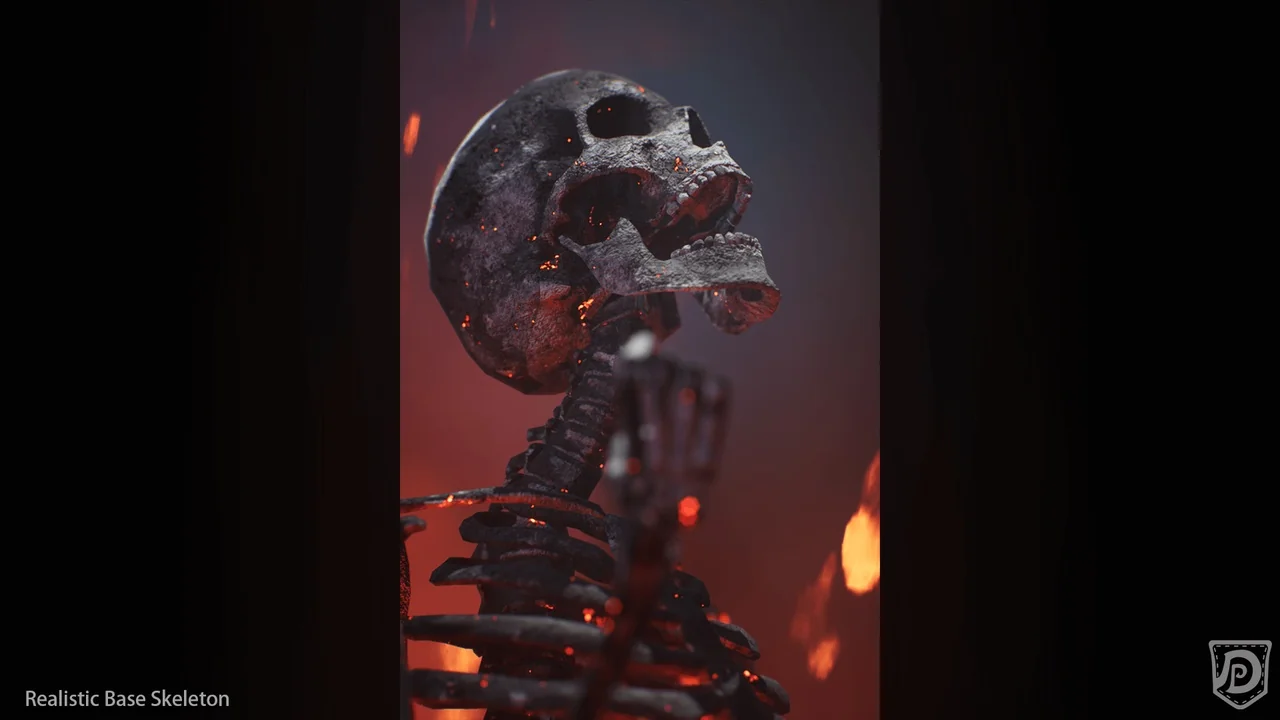
 Characters
 Characters
 Characters