"1f00f67f9253451b"{"id":"15075","slug":"real-action-camera-pro-record-and-view-gameplay-moments","title":"Real Action Camera PRO – Record and View Gameplay Moments","category":"Gameplay Features","engine":"5.6 - 5.7","assetVersion":"Engine version: 5.6 - 5.7","engineVersion":"Asset Version:1.0","tag":"Gameplay Features","accent":"blue","visual":"city","summary":"Real Action Camera PRO – Record and View Gameplay Moments is a powerful Unreal Engine plugin that enables players to capture and save gameplay footage directly within the game environment.","platform":"Unreal Engine","publishedAt":"2026-03-12T07:42:38.000Z","updatedAt":"2026-04-19T15:45:35.000Z","sourceNotes":[],"fileContents":[],"compatibility":["Unreal Engine","Engine version: 5.6 - 5.7","Asset Version: 1.0"],"featuredImage":{"alt":"Real Action Camera PRO – Record and View Gameplay Moments","src":"https://3dcghub.com/wp-content/uploads/2026/03/17520f5b-db0a-4a72-9f2f-53cca4b97855.webp"},"hasDownloadLink":true,"downloads":0,"terms":[{"taxonomy":"category","slug":"gameplay-features-tools-and-plugins","name":"Gameplay Features"},{"taxonomy":"post_tag","slug":"characters","name":"Characters"},{"taxonomy":"post_tag","slug":"environment","name":"Environment"},{"taxonomy":"post_tag","slug":"plugins","name":"Plugins"},{"taxonomy":"post_tag","slug":"tools","name":"Tools"},{"taxonomy":"post_tag","slug":"unreal-engine-5","name":"Unreal Engine 5"},{"taxonomy":"post_tag","slug":"vehicles","name":"Vehicles"}],"galleryImages":[{"src":"https://3dcghub.com/wp-content/uploads/2026/03/68e4b924100f_8d875f79-48b2-4580-97ac-c359fd96a91d.webp","alt":"Real Action Camera PRO – Record and View Gameplay Moments"},{"src":"https://3dcghub.com/wp-content/uploads/2026/03/eca9035ee915_83b170b4-c8bd-44c7-914f-bdb2f730dd27.webp","alt":"Real Action Camera PRO – Record and View Gameplay Moments"},{"src":"https://3dcghub.com/wp-content/uploads/2026/03/ee3e5c178118_eafd78af-9ffa-4597-8ebe-55ca5a090c49.webp","alt":"Real Action Camera PRO – Record and View Gameplay Moments"}],"accessPanel":{"kind":"resource","title":"Access this resource","eyebrow":"Free Download","message":"Log in or create a free account to start your download.","fileName":"Real Action Camera PRO – Record and View Gameplay Moments 5.6 - 5.7,v1.0.7z","safetyNote":"All resources are 100% manually reviewed to eliminate all risks.","actionLabel":"Download Free","resourceType":"Resource archive"},"contentHtml":"\u003ch2\u003eHigh-Quality In-Game Video Capture\u003c/h2\u003e\n\u003cp\u003eReal Action Camera PRO – Record and View Gameplay Moments is a specialized tool designed for Unreal Engine developers. This plugin allows you to add robust in-game video recording capabilities to both singleplayer and multiplayer projects. By using this system, players and scripted actors can capture specific moments during gameplay. Furthermore, the footage is saved directly for later viewing or sharing without the need for external software.\u003c/p\u003e\n\n\u003cp\u003eThe plugin focuses on providing a streamlined experience for capturing high-action sequences. Consequently, it is an ideal choice for developers who want to empower their players to document their best in-game achievements. Whether you are building a cinematic adventure or a competitive arena, this tool simplifies the process of recording footage.\u003c/p\u003e\n\n\u003ch2\u003eKey Features of Real Action Camera PRO\u003c/h2\u003e\n\u003cp\u003eThe developer has included several powerful features to enhance the recording experience within the engine. These features are designed to be flexible and easy to implement across various genres.\u003c/p\u003e\n\u003cul\u003e\n \u003cli\u003e\u003cstrong\u003eIn-Game Capture:\u003c/strong\u003e Record high-quality video during active gameplay sessions without external tools.\u003c/li\u003e\n \u003cli\u003e\u003cstrong\u003eMultiplayer Support:\u003c/strong\u003e The recording system functions perfectly in networked environments, allowing players to capture each other's actions.\u003c/li\u003e\n \u003cli\u003e\u003cstrong\u003eCinematic Capture:\u003c/strong\u003e It is well-suited for horror scares, stunts, combat beats, and scripted sequences.\u003c/li\u003e\n \u003cli\u003e\u003cstrong\u003eConfigurable UX:\u003c/strong\u003e Designers can easily expose options to start or stop recording via user input or game logic.\u003c/li\u003e\n\u003c/ul\u003e\n\n\u003ch2\u003eMultiplayer and Networked Support\u003c/h2\u003e\n\u003cp\u003eIn a multiplayer setting, capturing the action can be challenging. However, Real Action Camera PRO – Record and View Gameplay Moments is fully compatible with networked sessions. This means that players can capture each other’s actions seamlessly. Therefore, it is a valuable asset for competitive or cooperative games where sharing highlights is essential for the community.\u003c/p\u003e\n\n\u003ch2\u003eSimple Integration and Configuration\u003c/h2\u003e\n\u003cp\u003eIntegrating this plugin into an existing project is straightforward. The creator designed it as a component that you can add to characters or actors. This minimal setup ensures that you can begin recording quickly without complex coding. Additionally, the UX is highly configurable. You can trigger the recorder through specific game events or direct player input, giving designers full control over the process.\u003c/p\u003e\n\n\u003ch2\u003eDeveloper Expertise and Technical Notes\u003c/h2\u003e\n\u003cp\u003eThe creator of this plugin brings over seven years of proven experience in Unreal Engine development. Their work has been featured multiple times in the Epic Games Showcase, highlighting its quality and reliability. Furthermore, the plugin receives regular updates and improvements based on community feedback.\u003c/p\u003e\n\n\u003cp\u003ePlease note a specific technical requirement for the included demonstration content. For the vehicle blueprint to work in the demo scene, you must enable the \"Chaos Vehicle Plugin.\" This ensures that the demo environment functions as intended for testing purposes.\u003c/p\u003e\n\n\u003ch2\u003eClosing Notes\u003c/h2\u003e\n\u003cp\u003eReal Action Camera PRO – Record and View Gameplay Moments offers a professional solution for in-game footage capture. Whether you are developing a horror game or a fast-paced multiplayer shooter, this tool provides the flexibility needed to record and view gameplay. Its simple integration and robust feature set make it a reliable choice for any Unreal Engine project looking to enhance player engagement through shared moments.\u003c/p\u003e\n\n\u003ch2\u003eRelated Resources Worth Checking\u003c/h2\u003e\n\u003cul\u003e\n\u003cli\u003e\u003ca href=\"https://3dcghub.com/extile-plus-ultimate-non-tiling-material-toolkit-for-unreal-engine-environments/\" title=\"EXTILE PLUS -Ultimate Non-Tiling Material Toolkit for Unreal Engine Environments\"\u003eEXTILE PLUS -Ultimate Non-Tiling Material Toolkit for Unreal Engine Environments\u003c/a\u003e\u003c/li\u003e\n\u003cli\u003e\u003ca href=\"https://3dcghub.com/ultimate-template-unrealengine-2d-dialogue-inventory-system-save/\" title=\"ULTIMATE Template UnrealEngine || 2D + Dialogue + Inventory system + Save | |\"\u003eULTIMATE Template UnrealEngine || 2D + Dialogue + Inventory system + Save | |\u003c/a\u003e\u003c/li\u003e\n\u003cli\u003e\u003ca href=\"https://3dcghub.com/zxing-for-unreal/\" title=\"ZXing For Unreal\"\u003eZXing For Unreal\u003c/a\u003e\u003c/li\u003e\n\u003cli\u003e\u003ca href=\"https://3dcghub.com/daz-to-unreal/\" title=\"Daz To Unreal\"\u003eDaz To Unreal\u003c/a\u003e\u003c/li\u003e\n\u003cli\u003e\u003ca href=\"https://3dcghub.com/blueprint-generator-ai-kibibyte-labs-engine-assistant/\" title=\"Blueprint Generator Ai – Kibibyte Labs (Engine Assistant)\"\u003eBlueprint Generator Ai – Kibibyte Labs (Engine Assistant)\u003c/a\u003e\u003c/li\u003e\n\u003c/ul\u003e","contentTextLength":3752,"navigation":{"current":2630,"total":3222,"previous":{"id":"15092","slug":"tile-based-minimap","title":"Tile Based Minimap","category":"Gameplay Features","platform":"Unreal Engine","updatedAt":"2026-04-19T15:45:35.000Z"},"next":{"id":"15069","slug":"path-follow","title":"Path Follow","category":"Gameplay Features","platform":"Unreal Engine","updatedAt":"2026-04-19T15:45:35.000Z"}},"relatedResources":[{"id":"28457","slug":"advanced-third-person-camera","title":"Advanced Third Person Camera","category":"Gameplay Features","engine":"5.3 - 5.4","assetVersion":"Engine version: 5.3 - 5.4","engineVersion":"Asset Version:1.2.10 - 1.2.11","tag":"Gameplay Features","accent":"blue","visual":"mech","summary":"Third-person gameplay often breaks down when the camera cannot keep up with terrain, tight interiors, or fast character movement. Advanced Third Person Camera focuses on that problem with configurable camera modes, trigger-based switching, collision handlin...","platform":"Unreal Engine","publishedAt":"2026-05-15T16:49:49.000Z","updatedAt":"2026-05-15T16:49:52.000Z","sourceNotes":[],"fileContents":[],"compatibility":["Unreal Engine","Engine version: 5.3 - 5.4","Asset Version: 1.2.10 - 1.2.11"],"featuredImage":{"alt":"Advanced Third Person Camera","src":"https://3dcghub.com/wp-content/uploads/2026/05/8bd06e0f2f37_1e3ea3e5-774b-47e8-a130-b698a8cfa596.webp"},"hasDownloadLink":true,"downloads":0},{"id":"14967","slug":"advanced-fade-objects-pro-object-fading-with-tags-colors-and-multiplayer","title":"Advanced Fade Objects PRO – Object Fading with Tags, Colors and Multiplayer","category":"Gameplay Features","engine":"4.26 - 5.8","assetVersion":"Asset Version: 1.1 - 1.4.1","engineVersion":"Engine version: 4.26 - 5.8","tag":"Gameplay Features","accent":"blue","visual":"audio","summary":"Enhance your game's visibility with Advanced Fade Objects PRO. This C++ powered plugin automates object transparency between the camera and character for a smoother player experience.","platform":"Unreal Engine","publishedAt":"2026-03-12T07:09:41.000Z","updatedAt":"2026-07-29T12:55:52.438Z","sourceNotes":[],"fileContents":[],"compatibility":["Unreal Engine","Asset Version: 1.1 - 1.4.1","Engine version: 4.26 - 5.8"],"featuredImage":{"alt":"Advanced Fade Objects PRO – Object Fading with Tags, Colors and Multiplayer","src":"https://3dcghub.com/wp-content/uploads/2026/03/b42cd28c-8fea-4b0f-a37a-48aa5fe8a212.webp"},"hasDownloadLink":true,"downloads":1},{"id":"15108","slug":"ultimate-gameplay-camera","title":"Ultimate Gameplay Camera","category":"Gameplay Features","engine":"5.3 - 5.5","assetVersion":"Engine version: 5.3 - 5.5","engineVersion":"Asset Version:1.3","tag":"Gameplay Features","accent":"blue","visual":"audio","summary":"The Ultimate Gameplay Camera provides a professional-grade, dynamic third-person camera system for Unreal Engine. It features smooth movement, multiplayer replication, and extensive customization options without requiring C++ knowledge.","platform":"Unreal Engine","publishedAt":"2026-03-12T07:52:43.000Z","updatedAt":"2026-04-19T15:45:35.000Z","sourceNotes":[],"fileContents":[],"compatibility":["Unreal Engine","Engine version: 5.3 - 5.5","Asset Version: 1.3"],"featuredImage":{"alt":"Ultimate Gameplay Camera","src":"https://3dcghub.com/wp-content/uploads/2026/03/89e2406f-10ab-4f8a-97aa-fa74ad5bc513.webp"},"hasDownloadLink":true,"downloads":0}]}
Gameplay Features
Real Action Camera PRO – Record and View Gameplay Moments
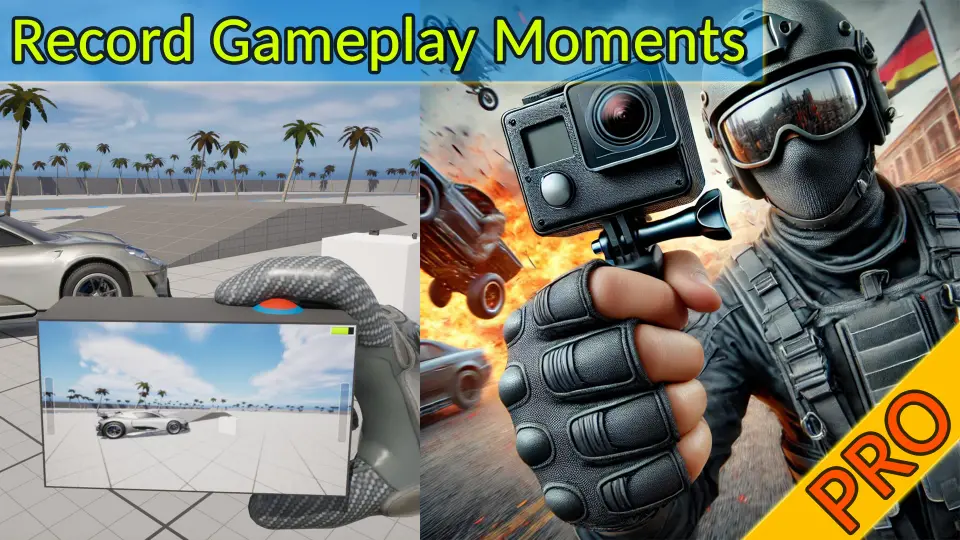
Real Action Camera PRO – Record and View Gameplay Moments is a powerful Unreal Engine plugin that enables players to capture and save gameplay footage directly within the game environment.
Real Action Camera PRO – Record and View Gameplay Moments is a specialized tool designed for Unreal Engine developers. This plugin allows you to add robust in-game video recording capabilities to both singleplayer and multiplayer projects. By using this system, players and scripted actors can capture specific moments during gameplay. Furthermore, the footage is saved directly for later viewing or sharing without the need for external software.
The plugin focuses on providing a streamlined experience for capturing high-action sequences. Consequently, it is an ideal choice for developers who want to empower their players to document their best in-game achievements. Whether you are building a cinematic adventure or a competitive arena, this tool simplifies the process of recording footage.
Key Features of Real Action Camera PRO
The developer has included several powerful features to enhance the recording experience within the engine. These features are designed to be flexible and easy to implement across various genres.
In-Game Capture: Record high-quality video during active gameplay sessions without external tools.
Multiplayer Support: The recording system functions perfectly in networked environments, allowing players to capture each other's actions.
Cinematic Capture: It is well-suited for horror scares, stunts, combat beats, and scripted sequences.
Configurable UX: Designers can easily expose options to start or stop recording via user input or game logic.
Multiplayer and Networked Support
In a multiplayer setting, capturing the action can be challenging. However, Real Action Camera PRO – Record and View Gameplay Moments is fully compatible with networked sessions. This means that players can capture each other’s actions seamlessly. Therefore, it is a valuable asset for competitive or cooperative games where sharing highlights is essential for the community.
Simple Integration and Configuration
Integrating this plugin into an existing project is straightforward. The creator designed it as a component that you can add to characters or actors. This minimal setup ensures that you can begin recording quickly without complex coding. Additionally, the UX is highly configurable. You can trigger the recorder through specific game events or direct player input, giving designers full control over the process.
Developer Expertise and Technical Notes
The creator of this plugin brings over seven years of proven experience in Unreal Engine development. Their work has been featured multiple times in the Epic Games Showcase, highlighting its quality and reliability. Furthermore, the plugin receives regular updates and improvements based on community feedback.
Please note a specific technical requirement for the included demonstration content. For the vehicle blueprint to work in the demo scene, you must enable the "Chaos Vehicle Plugin." This ensures that the demo environment functions as intended for testing purposes.
Closing Notes
Real Action Camera PRO – Record and View Gameplay Moments offers a professional solution for in-game footage capture. Whether you are developing a horror game or a fast-paced multiplayer shooter, this tool provides the flexibility needed to record and view gameplay. Its simple integration and robust feature set make it a reliable choice for any Unreal Engine project looking to enhance player engagement through shared moments.
 Gameplay Features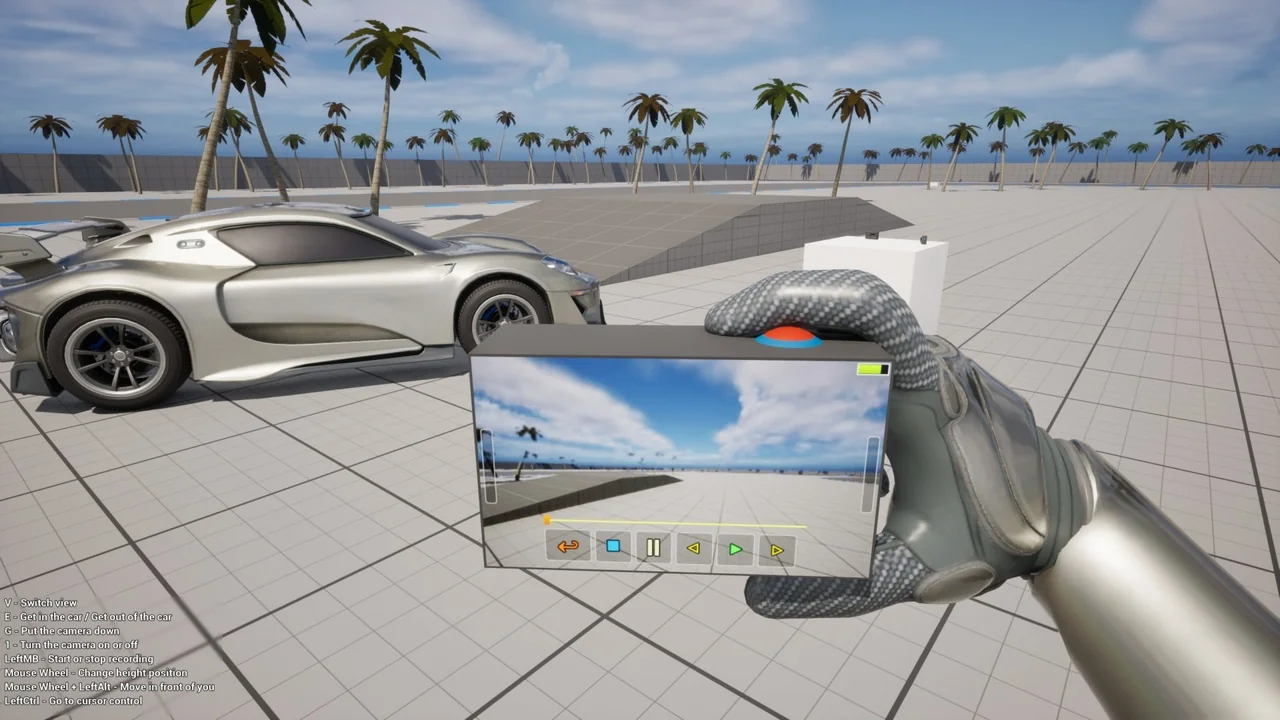
 Gameplay Features
 Gameplay Features
 Gameplay Features