"7e6fc58c410f2894"{"id":"23541","slug":"protosprite-rapid-2d-art","title":"ProtoSprite: Rapid 2D Art","category":"Sprite Management","engine":"Original Unity version: 2022.3.4","assetVersion":"Original Unity version: 2022.3.4","engineVersion":"Asset Version:1.2.92","tag":"Sprite Management","accent":"cyan","visual":"character","summary":"ProtoSprite keeps sprite painting inside Unityâs Scene View, so 2D art changes stay tied to the scene while you work. It uses PNG textures, supports quick duplication for variants or frame-based animation, and includes resizing, pivot, and pixel-perfect d...","platform":"Unity","publishedAt":"2026-04-10T17:37:23.000Z","updatedAt":"2026-04-19T15:35:17.000Z","sourceNotes":[],"fileContents":[],"compatibility":["Unity","Original Unity version: 2022.3.4","Asset Version: 1.2.92"],"featuredImage":{"alt":"ProtoSprite: Rapid 2D Art","src":"https://3dcghub.com/wp-content/uploads/2026/04/e5eb026a60aa_c1187223-7ddb-4325-a669-d4b569cad17a_1280x720_stretch.webp"},"hasDownloadLink":true,"downloads":0,"terms":[{"taxonomy":"category","slug":"sprite-management","name":"Sprite Management"},{"taxonomy":"post_tag","slug":"environment","name":"Environment"},{"taxonomy":"post_tag","slug":"textures","name":"Textures"},{"taxonomy":"post_tag","slug":"unity","name":"Unity"}],"galleryImages":[{"src":"https://3dcghub.com/wp-content/uploads/2026/04/c0856396ecf3_4b17ad31-0482-4670-8435-19987270b27e_scaled.webp","alt":"ProtoSprite: Rapid 2D Art"},{"src":"https://3dcghub.com/wp-content/uploads/2026/04/1ec4bdca0e66_538745fd-b97b-4d8d-b7c3-17d674ac4060_scaled.webp","alt":"ProtoSprite: Rapid 2D Art"},{"src":"https://3dcghub.com/wp-content/uploads/2026/04/0829c09ea023_6c364fa0-db61-4bbc-96ae-67a3f30ba372_scaled.webp","alt":"ProtoSprite: Rapid 2D Art"},{"src":"https://3dcghub.com/wp-content/uploads/2026/04/5a7a1c73eb20_2c993aa7-a568-433a-b7c7-b663c1898c1c_scaled.webp","alt":"ProtoSprite: Rapid 2D Art"},{"src":"https://3dcghub.com/wp-content/uploads/2026/04/80f43dd3851a_163e7648-33e7-4115-808d-a222431a3378_scaled.webp","alt":"ProtoSprite: Rapid 2D Art"},{"src":"https://3dcghub.com/wp-content/uploads/2026/04/19e4309a6758_188d4e5b-4114-4ff2-a82c-88e06f68eb0a_scaled.webp","alt":"ProtoSprite: Rapid 2D Art"},{"src":"https://3dcghub.com/wp-content/uploads/2026/04/89a570fb503d_52702a1d-1856-4739-b18e-74a092ff5ff5_scaled.webp","alt":"ProtoSprite: Rapid 2D Art"},{"src":"https://3dcghub.com/wp-content/uploads/2026/04/f4c08e969728_02ab011e-38d7-4a7c-afd1-9a40b4851954_scaled.webp","alt":"ProtoSprite: Rapid 2D Art"},{"src":"https://3dcghub.com/wp-content/uploads/2026/04/53eff5f17bc4_0fdfcf5c-ddd0-45f3-a469-731c53ae2d7f_scaled.webp","alt":"ProtoSprite: Rapid 2D Art"},{"src":"https://3dcghub.com/wp-content/uploads/2026/04/92f31be9ff0d_9174f472-f845-4910-844c-3a655919f8d5_scaled.webp","alt":"ProtoSprite: Rapid 2D Art"}],"accessPanel":{"kind":"resource","title":"Access this resource","eyebrow":"Free Download","message":"Log in or create a free account to start your download.","fileName":"ProtoSprite Rapid 2D Art v1.2.92.7z","safetyNote":"All resources are 100% manually reviewed to eliminate all risks.","actionLabel":"Download Free","resourceType":"Resource archive"},"contentHtml":"\u003ch2\u003ePaint sprites where the scene is already open\u003c/h2\u003e \u003cp\u003eProtoSprite lets sprites be created, drawn, and edited directly in Unityâs Scene View, in the context of the current scene. That makes it a practical fit for quick 2D world prototyping, where the art, placement, and scene layout need to change together instead of living in separate steps.\u003c/p\u003e \u003cp\u003eThe workflow stays focused on PNG texture files, which keeps the art in a format that is widely compatible with other software. There are no custom file formats or extra components to manage, and the tool integrates into a project without adding clutter. Even if external art software is already part of the process, ProtoSprite is set up to speed up the handoff between rough sketching and scene-based editing.\u003c/p\u003e \u003ch2\u003eStart with a SpriteRenderer, then branch into variants\u003c/h2\u003e \u003cp\u003eA new GameObject can be created with a SpriteRenderer and a linked texture file. From there, the duplicate button copies the texture so a sprite can branch into variants or frame-based animation. That keeps the work close to the object being edited rather than forcing a separate texture setup step.\u003c/p\u003e \u003cp\u003eThis approach is especially useful when a single prop needs several versions or when a simple animation needs multiple frames prepared from the same starting point. Because the texture stays linked, the scene and the art remain connected while the sprite is being refined. It is a straightforward way to move from an initial placeholder to something more deliberate without changing tools.\u003c/p\u003e \u003ch2\u003eDraw, erase, and fill without leaving Unity\u003c/h2\u003e \u003cp\u003ePainting happens directly on the spriteâs texture in the Scene View. The available drawing tools include paint, erase, and fill, so edits can be made while looking at the object in its actual scene context. Changes update immediately across every instance of the texture, which makes shared props much easier to keep in sync.\u003c/p\u003e \u003cp\u003eThat immediate feedback matters when the same rock, tree, or other prop appears in multiple places. Adjusting one texture changes all of the linked instances at once, so the result can be checked in the scene as it is being built. A pixel perfect mode is also included, making it possible to freehand draw pixel-perfect lines when the work needs a sharper, more controlled edge.\u003c/p\u003e \u003ch2\u003eResize edges, shift pivots, and move selected pixels\u003c/h2\u003e \u003cp\u003eProtoSprite includes resizing tools that let each edge of the SpriteRenderer be moved to increase or decrease the size of the associated texture. When that happens, the spriteâs pivot point updates automatically so it stays in the same place relative to where it was before the resize. That makes size changes feel less disruptive when a sprite already sits in a scene position that matters.\u003c/p\u003e \u003cp\u003eThe pivot itself can also be adjusted directly, with optional snapping to pixel perfect intervals. For more surgical edits, a rectangle selection can be made on the sprite, and the selected pixels can then be moved around the sprite. The same selection workflow supports rotating 90 degrees, flipping horizontally or vertically, and copying, pasting, or cutting with Ctrl/Cmd + C, V, and X. Those controls make it easier to nudge draft art into shape without rebuilding the whole texture.\u003c/p\u003e \u003ch2\u003eFits into Unity projects that need fast 2D iteration\u003c/h2\u003e \u003cp\u003eThe package targets Unity version 2022.2 or higher, with the original Unity version listed as 2022.3.4. Render pipeline compatibility is shown for Built-in, HDRP, URP, and Custom SRP on 2022.3.4f1, and all source code is included. The latest version is 1.2.92.\u003c/p\u003e \u003cp\u003eThat makes it a practical tool for projects where 2D art needs to be drafted, adjusted, and tested in place rather than passed around as a separate step. It fits especially well when the task is to sketch scene props, refine sprite shapes, adjust pivots, or shape simple texture variants while staying inside Unityâs workflow.\u003c/p\u003e\n\n\u003ch2\u003eRelated Resources Worth Checking\u003c/h2\u003e\n\u003cul\u003e\n\u003cli\u003e\u003ca href=\"https://3dcghub.com/toolkit-for-unity-physics-2026/\" title=\"Toolkit for Unity Physics 2026\"\u003eToolkit for Unity Physics 2026\u003c/a\u003e\u003c/li\u003e\n\u003cli\u003e\u003ca href=\"https://3dcghub.com/opencv-for-unity/\" title=\"OpenCV for Unity\"\u003eOpenCV for Unity\u003c/a\u003e\u003c/li\u003e\n\u003cli\u003e\u003ca href=\"https://3dcghub.com/exporter-for-unreal-to-for-unity-2026/\" title=\"Exporter for Unreal to/for Unity 2026\"\u003eExporter for Unreal to/for Unity 2026\u003c/a\u003e\u003c/li\u003e\n\u003cli\u003e\u003ca href=\"https://3dcghub.com/dialogue-system-for-unity/\" title=\"Dialogue System for Unity\"\u003eDialogue System for Unity\u003c/a\u003e\u003c/li\u003e\n\u003cli\u003e\u003ca href=\"https://3dcghub.com/ambient-sounds-interactive-soundscapes-for-unity-6/\" title=\"Ambient Sounds – Interactive Soundscapes for Unity 6\"\u003eAmbient Sounds – Interactive Soundscapes for Unity 6\u003c/a\u003e\u003c/li\u003e\n\u003c/ul\u003e\n\n\u003ch2\u003eAsset Gallery\u003c/h2\u003e","contentTextLength":4055,"navigation":{"current":3555,"total":3618,"previous":{"id":"23635","slug":"asset-cleaner-pro-clean-find-references","title":"Asset Cleaner PRO - Clean | Find References","category":"Utilities","platform":"Unity","updatedAt":"2026-04-19T15:35:17.000Z"},"next":{"id":"23671","slug":"avpro-decklink","title":"AVPro DeckLink","category":"Video","platform":"Unity","updatedAt":"2026-04-19T15:35:16.000Z"}},"relatedResources":[{"id":"17879","slug":"pixel-art-platformer-dungeon","title":"Pixel Art Platformer - Dungeon","category":"Environments","engine":"Original Unity version: 2021.3.15","assetVersion":"Original Unity version: 2021.3.15","engineVersion":"Asset Version:1.1.5","tag":"Environments","accent":"cyan","visual":"city","summary":"Create immersive underground levels with the Pixel Art Platformer - Dungeon asset pack. This collection features 32x32 tilesets, animated props, and full URP support for modern 2D game development.","platform":"Unity","publishedAt":"2026-03-14T17:16:34.000Z","updatedAt":"2026-04-19T15:43:26.000Z","sourceNotes":[],"fileContents":[],"compatibility":["Unity","Original Unity version: 2021.3.15","Asset Version: 1.1.5"],"featuredImage":{"alt":"Pixel Art Platformer - Dungeon","src":"https://3dcghub.com/wp-content/uploads/2026/03/8d14cf58-c555-4b75-bca8-af49cf9ea23f.webp"},"hasDownloadLink":true,"downloads":0},{"id":"17848","slug":"2d-topdown-tilesets-fantasy-dreamland","title":"2D TopDown Tilesets Fantasy Dreamland","category":"Environments","engine":"Original Unity version: 2022.3.14","assetVersion":"Original Unity version: 2022.3.14","engineVersion":"Asset Version:5.1.0","tag":"Environments","accent":"cyan","visual":"city","summary":"Fantasy Dreamland is a massive pixel art bundle containing over 25,000 tiles and 1,000 animations. It offers everything from castle interiors to enchanted forests for top-down game projects.","platform":"Unity","publishedAt":"2026-03-14T17:13:49.000Z","updatedAt":"2026-04-19T15:43:27.000Z","sourceNotes":[],"fileContents":[],"compatibility":["Unity","Original Unity version: 2022.3.14","Asset Version: 5.1.0"],"featuredImage":{"alt":"2D TopDown Tilesets Fantasy Dreamland","src":"https://3dcghub.com/wp-content/uploads/2026/03/a514a398-fab4-4b96-9e8c-7d312c5367a6.webp"},"hasDownloadLink":true,"downloads":1},{"id":"23528","slug":"pixelate-pixel-art-converter","title":"Pixelate - Pixel art converter","category":"Sprite Management","engine":"Original Unity version: 2022.3.45","assetVersion":"Original Unity version: 2022.3.45","engineVersion":"Asset Version:1.05","tag":"Sprite Management","accent":"cyan","visual":"audio","summary":"Pixelate turns 3D animation into pixel art sprite sheets, giving Unity teams a way to keep the look of pixel art without drawing every frame by hand. It adds direct control over sprite size, animation frame rate, previewing, and lighting response inside the...","platform":"Unity","publishedAt":"2026-04-10T16:14:47.000Z","updatedAt":"2026-04-19T15:35:22.000Z","sourceNotes":[],"fileContents":[],"compatibility":["Unity","Original Unity version: 2022.3.45","Asset Version: 1.05"],"featuredImage":{"alt":"Pixelate - Pixel art converter","src":"https://3dcghub.com/wp-content/uploads/2026/04/1fec65a2fde1_a9718803-50f4-4acd-8b97-1bbb65ec8d56_1280x720_stretch.webp"},"hasDownloadLink":true,"downloads":0}]}
Sprite Management
ProtoSprite: Rapid 2D Art
ProtoSprite keeps sprite painting inside Unityâs Scene View, so 2D art changes stay tied to the scene while you work. It uses PNG textures, supports quick duplication for variants or frame-based animation, and includes resizing, pivot, and pixel-perfect d...
ProtoSprite lets sprites be created, drawn, and edited directly in Unityâs Scene View, in the context of the current scene. That makes it a practical fit for quick 2D world prototyping, where the art, placement, and scene layout need to change together instead of living in separate steps.
The workflow stays focused on PNG texture files, which keeps the art in a format that is widely compatible with other software. There are no custom file formats or extra components to manage, and the tool integrates into a project without adding clutter. Even if external art software is already part of the process, ProtoSprite is set up to speed up the handoff between rough sketching and scene-based editing.
Start with a SpriteRenderer, then branch into variants
A new GameObject can be created with a SpriteRenderer and a linked texture file. From there, the duplicate button copies the texture so a sprite can branch into variants or frame-based animation. That keeps the work close to the object being edited rather than forcing a separate texture setup step.
This approach is especially useful when a single prop needs several versions or when a simple animation needs multiple frames prepared from the same starting point. Because the texture stays linked, the scene and the art remain connected while the sprite is being refined. It is a straightforward way to move from an initial placeholder to something more deliberate without changing tools.
Draw, erase, and fill without leaving Unity
Painting happens directly on the spriteâs texture in the Scene View. The available drawing tools include paint, erase, and fill, so edits can be made while looking at the object in its actual scene context. Changes update immediately across every instance of the texture, which makes shared props much easier to keep in sync.
That immediate feedback matters when the same rock, tree, or other prop appears in multiple places. Adjusting one texture changes all of the linked instances at once, so the result can be checked in the scene as it is being built. A pixel perfect mode is also included, making it possible to freehand draw pixel-perfect lines when the work needs a sharper, more controlled edge.
Resize edges, shift pivots, and move selected pixels
ProtoSprite includes resizing tools that let each edge of the SpriteRenderer be moved to increase or decrease the size of the associated texture. When that happens, the spriteâs pivot point updates automatically so it stays in the same place relative to where it was before the resize. That makes size changes feel less disruptive when a sprite already sits in a scene position that matters.
The pivot itself can also be adjusted directly, with optional snapping to pixel perfect intervals. For more surgical edits, a rectangle selection can be made on the sprite, and the selected pixels can then be moved around the sprite. The same selection workflow supports rotating 90 degrees, flipping horizontally or vertically, and copying, pasting, or cutting with Ctrl/Cmd + C, V, and X. Those controls make it easier to nudge draft art into shape without rebuilding the whole texture.
Fits into Unity projects that need fast 2D iteration
The package targets Unity version 2022.2 or higher, with the original Unity version listed as 2022.3.4. Render pipeline compatibility is shown for Built-in, HDRP, URP, and Custom SRP on 2022.3.4f1, and all source code is included. The latest version is 1.2.92.
That makes it a practical tool for projects where 2D art needs to be drafted, adjusted, and tested in place rather than passed around as a separate step. It fits especially well when the task is to sketch scene props, refine sprite shapes, adjust pivots, or shape simple texture variants while staying inside Unityâs workflow.
 Sprite Management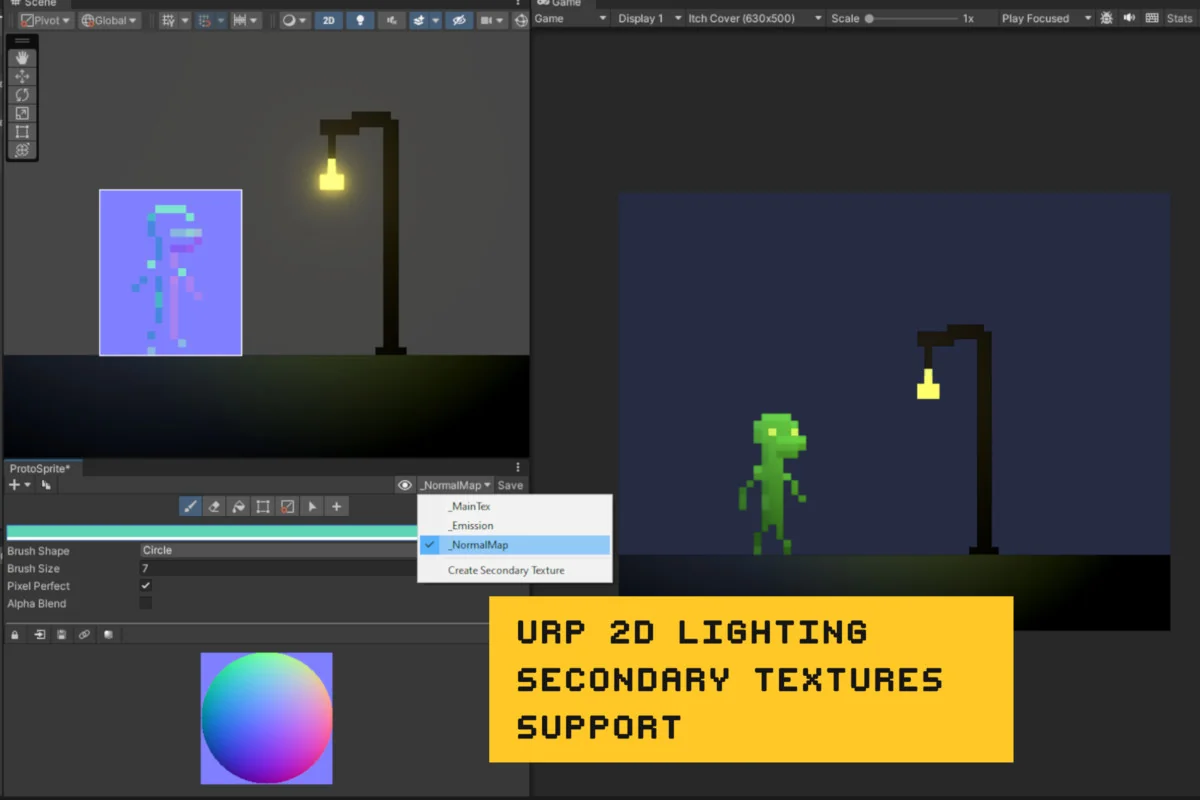
 Environments
 Environments
 Sprite Management