"7e6fc58c410f2894"{"id":"23671","slug":"avpro-decklink","title":"AVPro DeckLink","category":"Video","engine":"Original Unity version: 2021.3.0","assetVersion":"Original Unity version: 2021.3.0","engineVersion":"Asset Version:1.9.2","tag":"Video","accent":"cyan","visual":"audio","summary":"AVPro DeckLink adds native Blackmagic Design DeckLink support to Unity on Windows. It handles broadcast video input and output, multiple inputs, audio, keying, and up to 8K workflows.","platform":"Unity","publishedAt":"2026-04-11T14:23:19.000Z","updatedAt":"2026-04-19T15:35:16.000Z","sourceNotes":[],"fileContents":[],"compatibility":["Unity","Original Unity version: 2021.3.0","Asset Version: 1.9.2"],"featuredImage":{"alt":"AVPro DeckLink","src":"https://3dcghub.com/wp-content/uploads/2026/04/d4620efa5c70_c42d5db1-df84-4948-8c85-02e6d39c9819_1280x720_stretch.webp"},"hasDownloadLink":true,"downloads":0,"terms":[{"taxonomy":"category","slug":"unity-tools-video","name":"Video"},{"taxonomy":"post_tag","slug":"environment","name":"Environment"},{"taxonomy":"post_tag","slug":"tools","name":"Tools"},{"taxonomy":"post_tag","slug":"unity","name":"Unity"}],"galleryImages":[{"src":"https://3dcghub.com/wp-content/uploads/2026/04/d921a537c36a_f49139dd-6ee9-46c6-bf22-adb135b7342d_scaled.webp","alt":"AVPro DeckLink"},{"src":"https://3dcghub.com/wp-content/uploads/2026/04/c24aa5cd0b0a_580a7465-3368-4a63-a8cc-59f323c102b3_scaled.webp","alt":"AVPro DeckLink"},{"src":"https://3dcghub.com/wp-content/uploads/2026/04/37596a7383f6_9f20a7d3-a220-4cfe-a81b-169232bdf628_scaled.webp","alt":"AVPro DeckLink"},{"src":"https://3dcghub.com/wp-content/uploads/2026/04/51c425ab4aa3_311a9449-96e7-487d-be69-59092eb8dbb9_scaled.webp","alt":"AVPro DeckLink"},{"src":"https://3dcghub.com/wp-content/uploads/2026/04/ccd444ae664b_42aaf8f1-e811-4b0a-b529-3efe419ab8eb_scaled.webp","alt":"AVPro DeckLink"},{"src":"https://3dcghub.com/wp-content/uploads/2026/04/63a2b3a6d2f3_bc972c49-732f-4d27-9a22-c21f88c23498_scaled.webp","alt":"AVPro DeckLink"}],"accessPanel":{"kind":"resource","title":"Access this resource","eyebrow":"Free Download","message":"Log in or create a free account to start your download.","fileName":"AVPro DeckLink v1.9.2.7z","safetyNote":"All resources are 100% manually reviewed to eliminate all risks.","actionLabel":"Download Free","resourceType":"Resource archive"},"contentHtml":"\u003ch2\u003eBringing DeckLink hardware into Unity\u003c/h2\u003e\n\u003cp\u003eAVPro DeckLink adds native support for Blackmagic Design's DeckLink hardware to Unity on Windows. It fits the point in a production workflow where Unity has to move video to and from dedicated hardware rather than stay inside standard media playback.\u003c/p\u003e\n\u003cp\u003eThe package stays focused on that job. Broadcast standard video input and output are included, along with automatic video input mode detection, multiple inputs, low latency output, audio input and output, and support for up to 8K video input and output. Alpha channel output is supported too, which matters when the rendered result needs to carry transparency.\u003c/p\u003e \u003ch2\u003eHandling live feeds, UI control, and compositing\u003c/h2\u003e\n\u003cp\u003eThe feature set goes beyond simple signal passing. Internal and external keyer support points to composited output workflows, while material mapping support gives the video a place to live inside Unity materials.\u003c/p\u003e\n\u003cp\u003eIMGUI and uGUI support keep the package useful alongside Unity interface systems, and the included example scenes and drag-and-drop components make the setup path more concrete inside a project. Automatic bit-depth detection is part of the current feature list as well, so the package can respond to the incoming signal without extra manual handling.\u003c/p\u003e \u003ch2\u003eCompatibility across Unity versions and render pipelines\u003c/h2\u003e\n\u003cp\u003eThe current release is 1.9.11, dated 29 January 2026. It adds D3D12 support, Unity 2022 support, auto bit-depth detection, and DeckLink 8K Pro support. The release also requires the latest Blackmagic Desktop Video, version 15.3 or newer.\u003c/p\u003e\n\u003cp\u003eCompatibility is listed for Unity 2021.3.0 and 2021.3.45, with render pipeline support shown for Built-in, HDRP, URP, and Custom SRP in those versions. Render pipeline compatibility is specified for 2021.3.0f1 and 2021.3.45f2, and the feature list also states Unity 5.6 and above support. The original Unity version is 2021.3.0, and the package is delivered as a unitypackage with a 6.4 MB file size and 125 assets listed.\u003c/p\u003e \u003ch2\u003eWhat the latest release fixed\u003c/h2\u003e\n\u003cp\u003eThe 1.9.11 notes concentrate on color accuracy, editor stability, and output behavior. Fixed items include incorrect BT.709 colour conversion, the DeckLinkManager GameObject not correctly disabling input and output, output memory leaks, a NullReferenceException on the second run in the editor, input changes from progressive to interlaced, and a red/blue swap issue in Unity 6.something with D3D12.\u003c/p\u003e\n\u003cp\u003eTwo changes stand out during day-to-day use. Renderer Sync was added to input devices and defaults to on for smoother texture updates, though it can be turned off if it causes GPU contention. Renderer Sync support was also added for output, bringing the output side into line with the input side. The DeckLink SDK was updated to 15.3 as part of the release.\u003c/p\u003e \u003ch2\u003eWhere it fits in a production pipeline\u003c/h2\u003e\n\u003cp\u003eThis package fits where Unity needs to sit close to broadcast hardware, not just display video files. It is relevant for projects that need hardware-backed video input and output, keying, audio handling, and alpha channel output inside the same Unity scene.\u003c/p\u003e\n\u003cp\u003eFor a production team, the useful part is the combination of Windows-only DeckLink integration, multiple inputs, low-latency output, and support across Built-in, HDRP, URP, and Custom SRP. That keeps it anchored to the part of the workflow where the rendered result has to meet external video hardware directly.\u003c/p\u003e\n\n\u003ch2\u003eMore From The Same Workflow\u003c/h2\u003e\n\u003cul\u003e\n\u003cli\u003e\u003ca href=\"https://3dcghub.com/toolkit-for-unity-physics-2026/\" title=\"Toolkit for Unity Physics 2026\"\u003eToolkit for Unity Physics 2026\u003c/a\u003e\u003c/li\u003e\n\u003cli\u003e\u003ca href=\"https://3dcghub.com/opencv-for-unity/\" title=\"OpenCV for Unity\"\u003eOpenCV for Unity\u003c/a\u003e\u003c/li\u003e\n\u003cli\u003e\u003ca href=\"https://3dcghub.com/exporter-for-unreal-to-for-unity-2026/\" title=\"Exporter for Unreal to/for Unity 2026\"\u003eExporter for Unreal to/for Unity 2026\u003c/a\u003e\u003c/li\u003e\n\u003cli\u003e\u003ca href=\"https://3dcghub.com/dialogue-system-for-unity/\" title=\"Dialogue System for Unity\"\u003eDialogue System for Unity\u003c/a\u003e\u003c/li\u003e\n\u003cli\u003e\u003ca href=\"https://3dcghub.com/ambient-sounds-interactive-soundscapes-for-unity-6/\" title=\"Ambient Sounds – Interactive Soundscapes for Unity 6\"\u003eAmbient Sounds – Interactive Soundscapes for Unity 6\u003c/a\u003e\u003c/li\u003e\n\u003c/ul\u003e","contentTextLength":3604,"navigation":{"current":3556,"total":3618,"previous":{"id":"23541","slug":"protosprite-rapid-2d-art","title":"ProtoSprite: Rapid 2D Art","category":"Sprite Management","platform":"Unity","updatedAt":"2026-04-19T15:35:17.000Z"},"next":{"id":"23698","slug":"playmaker","title":"Playmaker","category":"Visual Scripting","platform":"Unity","updatedAt":"2026-04-19T15:35:15.000Z"}},"relatedResources":[{"id":"22958","slug":"cross-platform-screen-recorder-kit-easy-gif-video-recording","title":"Cross-Platform Screen Recorder Kit : Easy GIF \u0026 Video Recording!","category":"Input Management","engine":"Original Unity version: 2021.3.45","assetVersion":"Original Unity version: 2021.3.45","engineVersion":"Asset Version:2.2.0","tag":"Input Management","accent":"cyan","visual":"city","summary":"A unified recording solution for Unity that captures gameplay and UI as GIFs or videos. It supports current mobile operating systems and provides tools for sharing and debugging.","platform":"Unity","publishedAt":"2026-04-07T13:51:29.000Z","updatedAt":"2026-04-19T15:36:56.000Z","sourceNotes":[],"fileContents":[],"compatibility":["Unity","Original Unity version: 2021.3.45","Asset Version: 2.2.0"],"featuredImage":{"alt":"Cross-Platform Screen Recorder Kit : Easy GIF \u0026 Video Recording!","src":"https://3dcghub.com/wp-content/uploads/2026/04/00f2838a7df5_a41c31d4-22ba-4350-aedd-83d6afc6ffd7_1280x720_stretch.webp"},"hasDownloadLink":true,"downloads":0},{"id":"24521","slug":"math-for-video-games-the-fastest-way-to-get-smarter-at-math","title":"Math For Video Games: The Fastest Way To Get Smarter At Math","category":"Unity","engine":"Video language: English","assetVersion":"Video language: English","engineVersion":"File content: video + supporting files + English subtitles","tag":"Unity","accent":"cyan","visual":"audio","summary":"A beginner-level course that uses video game design and coding problems to teach core math. It moves from arithmetic and number bases into vectors, trigonometry, probability, and projectile motion.","platform":"Unity","publishedAt":"2026-04-14T16:34:54.000Z","updatedAt":"2026-04-20T06:12:46.000Z","sourceNotes":[],"fileContents":[],"compatibility":["Unity","Video language: English","File content: video + supporting files + English subtitles"],"featuredImage":{"alt":"Math For Video Games: The Fastest Way To Get Smarter At Math","src":"https://3dcghub.com/wp-content/uploads/2026/04/72d1f95d1cf4_3019460_d9a0_2.webp"},"hasDownloadLink":true,"downloads":0},{"id":"23698","slug":"playmaker","title":"Playmaker","category":"Visual Scripting","engine":"Original Unity version: 2021.2.0","assetVersion":"Original Unity version: 2021.2.0","engineVersion":"Asset Version:1.9.8","tag":"Visual Scripting","accent":"cyan","visual":"mech","summary":"Playmaker centers on a visual state machine workflow made up of States, Actions, and Events. It gives artists, designers, and programmers a shared way to build behaviors in Unity, with drag-and-drop editing, custom actions, and runtime debugging tools.","platform":"Unity","publishedAt":"2026-04-11T14:30:10.000Z","updatedAt":"2026-04-19T15:35:15.000Z","sourceNotes":[],"fileContents":[],"compatibility":["Unity","Original Unity version: 2021.2.0","Asset Version: 1.9.8"],"featuredImage":{"alt":"Playmaker","src":"https://3dcghub.com/wp-content/uploads/2026/04/bee30cbfc4ba_43ec439e-0b98-4767-a283-8dcd00ed93a1_1280x720_stretch.webp"},"hasDownloadLink":true,"downloads":3}]}
Video
AVPro DeckLink
AVPro DeckLink adds native Blackmagic Design DeckLink support to Unity on Windows. It handles broadcast video input and output, multiple inputs, audio, keying, and up to 8K workflows.
AVPro DeckLink adds native support for Blackmagic Design's DeckLink hardware to Unity on Windows. It fits the point in a production workflow where Unity has to move video to and from dedicated hardware rather than stay inside standard media playback.
The package stays focused on that job. Broadcast standard video input and output are included, along with automatic video input mode detection, multiple inputs, low latency output, audio input and output, and support for up to 8K video input and output. Alpha channel output is supported too, which matters when the rendered result needs to carry transparency.
Handling live feeds, UI control, and compositing
The feature set goes beyond simple signal passing. Internal and external keyer support points to composited output workflows, while material mapping support gives the video a place to live inside Unity materials.
IMGUI and uGUI support keep the package useful alongside Unity interface systems, and the included example scenes and drag-and-drop components make the setup path more concrete inside a project. Automatic bit-depth detection is part of the current feature list as well, so the package can respond to the incoming signal without extra manual handling.
Compatibility across Unity versions and render pipelines
The current release is 1.9.11, dated 29 January 2026. It adds D3D12 support, Unity 2022 support, auto bit-depth detection, and DeckLink 8K Pro support. The release also requires the latest Blackmagic Desktop Video, version 15.3 or newer.
Compatibility is listed for Unity 2021.3.0 and 2021.3.45, with render pipeline support shown for Built-in, HDRP, URP, and Custom SRP in those versions. Render pipeline compatibility is specified for 2021.3.0f1 and 2021.3.45f2, and the feature list also states Unity 5.6 and above support. The original Unity version is 2021.3.0, and the package is delivered as a unitypackage with a 6.4 MB file size and 125 assets listed.
What the latest release fixed
The 1.9.11 notes concentrate on color accuracy, editor stability, and output behavior. Fixed items include incorrect BT.709 colour conversion, the DeckLinkManager GameObject not correctly disabling input and output, output memory leaks, a NullReferenceException on the second run in the editor, input changes from progressive to interlaced, and a red/blue swap issue in Unity 6.something with D3D12.
Two changes stand out during day-to-day use. Renderer Sync was added to input devices and defaults to on for smoother texture updates, though it can be turned off if it causes GPU contention. Renderer Sync support was also added for output, bringing the output side into line with the input side. The DeckLink SDK was updated to 15.3 as part of the release.
Where it fits in a production pipeline
This package fits where Unity needs to sit close to broadcast hardware, not just display video files. It is relevant for projects that need hardware-backed video input and output, keying, audio handling, and alpha channel output inside the same Unity scene.
For a production team, the useful part is the combination of Windows-only DeckLink integration, multiple inputs, low-latency output, and support across Built-in, HDRP, URP, and Custom SRP. That keeps it anchored to the part of the workflow where the rendered result has to meet external video hardware directly.
 Video
Video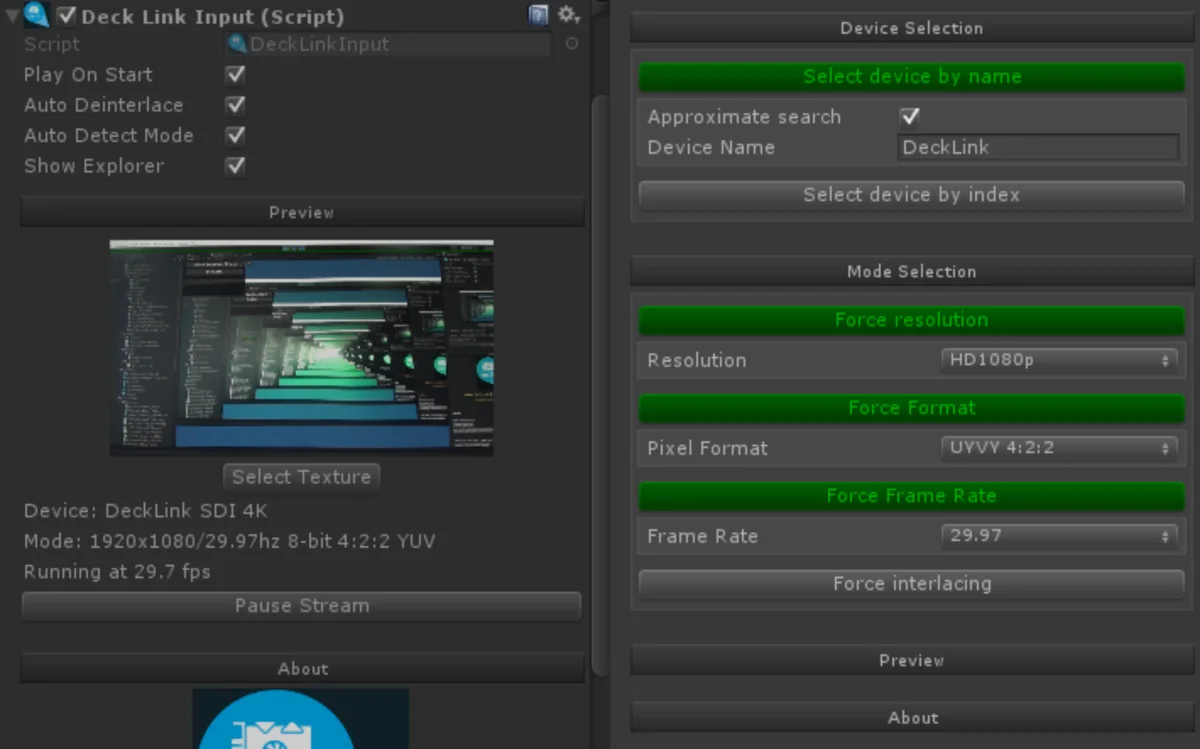
 Input Management
 Unity
Unity Visual Scripting