"7e6fc58c410f2894"{"id":"23635","slug":"asset-cleaner-pro-clean-find-references","title":"Asset Cleaner PRO - Clean | Find References","category":"Utilities","engine":"Original Unity version: 2022.3.50","assetVersion":"Original Unity version: 2022.3.50","engineVersion":"Asset Version:1.33","tag":"Utilities","accent":"cyan","visual":"animation","summary":"Unused files turn red in the Project view, folder counters show where clutter is growing, and reference changes appear instantly while you inspect dependencies. Asset Cleaner PRO brings cleanup and reference tracing into one Unity editor workflow. It is aim...","platform":"Unity","publishedAt":"2026-04-10T17:01:25.000Z","updatedAt":"2026-04-19T15:35:17.000Z","sourceNotes":[],"fileContents":[],"compatibility":["Unity","Original Unity version: 2022.3.50","Asset Version: 1.33"],"featuredImage":{"alt":"Asset Cleaner PRO - Clean | Find References","src":"https://3dcghub.com/wp-content/uploads/2026/04/b423dabc9983_3991b84d-c11d-4ed4-a24f-a4ae547e38c9_1280x720_stretch.webp"},"hasDownloadLink":true,"downloads":0,"terms":[{"taxonomy":"category","slug":"utilities","name":"Utilities"},{"taxonomy":"post_tag","slug":"environment","name":"Environment"},{"taxonomy":"post_tag","slug":"tools","name":"Tools"},{"taxonomy":"post_tag","slug":"unity","name":"Unity"}],"galleryImages":[{"src":"https://3dcghub.com/wp-content/uploads/2026/04/e1433810aba5_343b097e-7bc8-4dc8-b88e-eb70be99345f_scaled.webp","alt":"Asset Cleaner PRO - Clean | Find References"},{"src":"https://3dcghub.com/wp-content/uploads/2026/04/d00fe5bbf05b_208861fc-124e-40da-bb1d-bb11f2c6d0ed_scaled.webp","alt":"Asset Cleaner PRO - Clean | Find References"},{"src":"https://3dcghub.com/wp-content/uploads/2026/04/911cd97c26ad_7cb96275-7bfc-47ba-b1fa-af797563d86f_scaled.webp","alt":"Asset Cleaner PRO - Clean | Find References"},{"src":"https://3dcghub.com/wp-content/uploads/2026/04/94b6a2744507_92926267-4023-4da5-a664-47f89b4c1113_scaled.webp","alt":"Asset Cleaner PRO - Clean | Find References"}],"accessPanel":{"kind":"resource","title":"Access this resource","eyebrow":"Free Download","message":"Log in or create a free account to start your download.","fileName":"Asset Cleaner PRO - Clean Find References v1.33 (12 Nov 2024).7z","safetyNote":"All resources are 100% manually reviewed to eliminate all risks.","actionLabel":"Download Free","resourceType":"Resource archive"},"contentHtml":"\u003cp\u003eUnused files turn red in the Project view, folder counters show where clutter is growing, and reference changes appear instantly while you inspect dependencies. Asset Cleaner PRO brings cleanup and reference tracing into one Unity editor workflow, so project maintenance stays visible instead of turning into guesswork.\u003c/p\u003e \u003ch2\u003eProject Cleaner keeps clutter in view\u003c/h2\u003e\n\u003cp\u003eThe Project Cleaner side uses a non-distracting UI that works best when docked, which makes it easier to leave open while working in the Unity editor. Inside the enhanced Project view, unused files are marked red, folders show counters for unused assets and scenes, and both folders and files can display the size of those unused items. Editor Dark skin support is included, so the view remains readable in darker editor setups.\u003c/p\u003e\n\u003cp\u003eThe visual cues do most of the heavy lifting here. Instead of forcing a manual sweep through every folder, the editor highlights where unused content is sitting and how much of it is present. That makes the panel useful when a project starts to accumulate leftover scenes, old assets, or files that no longer need to stay in the active workspace.\u003c/p\u003e\n\u003cul\u003e \u003cli\u003eClean a single asset or scene\u003c/li\u003e \u003cli\u003eClean assets and scenes inside specific folders\u003c/li\u003e \u003cli\u003eUse multiselect cleanup, with all combinations supported\u003c/li\u003e\n\u003c/ul\u003e\n\u003cp\u003eThose cleanup actions give the tool a practical place in day-to-day project maintenance. A small cleanup pass can stay focused on one item, while a broader pass can handle multiple folders or mixed selections without changing tools.\u003c/p\u003e \u003ch2\u003eReference searches stay inside the Project or Scene\u003c/h2\u003e\n\u003cp\u003eThe Search References side is built for finding references, usages, and relationships directly in the Project or Scene. Changes in usage are displayed instantly, and the search is described as blazing fast, which matters when you need to confirm dependencies without waiting through long checks.\u003c/p\u003e\n\u003cp\u003eNested Prefabs are supported, and usage tracking covers all asset types, including AnimatorController states. That wider reach helps when dependencies are spread across different asset categories rather than sitting in one simple path. It also means reference work is not limited to one kind of object or one level of the hierarchy.\u003c/p\u003e\n\u003cp\u003eWhen a project contains layered prefab setups or animation logic tied to controller states, having those relationships visible in the same search flow saves time. The tool is not only looking for direct references; it also follows the connections that appear as assets interact inside a real Unity project.\u003c/p\u003e \u003ch2\u003eNavigation tools make deeper dependency work easier\u003c/h2\u003e\n\u003cp\u003eOnce a reference path becomes more complex, the tool includes Lock and Back/Forward features so the current result can stay fixed while you continue exploring. Back and Forward hotkeys use Ctrl+Z and Ctrl+Y, and mouse hotkeys are supported as well. That makes it easier to move through a chain of related objects without losing your place.\u003c/p\u003e\n\u003cp\u003eThis is useful when comparing multiple objects, checking where a reference came from, or stepping through a dependency path and then returning to an earlier result. The navigation controls are simple, but they fit the way reference investigation usually happens in a production environment: inspect one item, jump to the next, then step back when you need context again.\u003c/p\u003e \u003ch2\u003eRules and settings can match a projectâs cleanup habits\u003c/h2\u003e\n\u003cp\u003eCustomization is built into the cleanup workflow. Ignored folders are supported, Materials and ScriptableObjects can be ignored, and the background color for unused files can be customized from the default red. Those settings make it easier to keep the tool aligned with a teamâs own rules about what should be flagged and what should be left alone.\u003c/p\u003e\n\u003cp\u003eThat matters when some folders are meant to stay untouched, or when a project uses specific asset types in a way that should not trigger cleanup actions. Instead of applying one rigid rule across the whole project, the tool gives room to narrow the scan and tune the visual warning style.\u003c/p\u003e\n\u003cp\u003eSupport is listed as responsive, with answers in under 12 hours, and a FAQ with quick answers is also provided. The package was first published on Jul 02, 2020, the latest version is 1.50, and the latest release date is Feb 12, 2026. The original Unity version is 2022.3.50, the file size is 105.6 KB, the asset count is 55, and the package type is unitypackage.\u003c/p\u003e\n\u003cp\u003eFor Unity teams that need both cleanup and dependency tracing in the same editor workflow, Asset Cleaner PRO keeps unused content visible while showing what is still connected. That combination is what makes it useful when a project needs to stay organized without losing track of the assets that still matter.\u003c/p\u003e\n\n\u003ch2\u003eContinue Browsing Similar Packs\u003c/h2\u003e\n\u003cul\u003e\n\u003cli\u003e\u003ca href=\"https://3dcghub.com/toolkit-for-unity-physics-2026/\" title=\"Toolkit for Unity Physics 2026\"\u003eToolkit for Unity Physics 2026\u003c/a\u003e\u003c/li\u003e\n\u003cli\u003e\u003ca href=\"https://3dcghub.com/opencv-for-unity/\" title=\"OpenCV for Unity\"\u003eOpenCV for Unity\u003c/a\u003e\u003c/li\u003e\n\u003cli\u003e\u003ca href=\"https://3dcghub.com/exporter-for-unreal-to-for-unity-2026/\" title=\"Exporter for Unreal to/for Unity 2026\"\u003eExporter for Unreal to/for Unity 2026\u003c/a\u003e\u003c/li\u003e\n\u003cli\u003e\u003ca href=\"https://3dcghub.com/dialogue-system-for-unity/\" title=\"Dialogue System for Unity\"\u003eDialogue System for Unity\u003c/a\u003e\u003c/li\u003e\n\u003cli\u003e\u003ca href=\"https://3dcghub.com/ambient-sounds-interactive-soundscapes-for-unity-6/\" title=\"Ambient Sounds – Interactive Soundscapes for Unity 6\"\u003eAmbient Sounds – Interactive Soundscapes for Unity 6\u003c/a\u003e\u003c/li\u003e\n\u003c/ul\u003e","contentTextLength":4856,"navigation":{"current":3554,"total":3618,"previous":{"id":"23652","slug":"build-report-tool","title":"Build Report Tool","category":"Utilities","platform":"Unity","updatedAt":"2026-04-19T15:35:17.000Z"},"next":{"id":"23541","slug":"protosprite-rapid-2d-art","title":"ProtoSprite: Rapid 2D Art","category":"Sprite Management","platform":"Unity","updatedAt":"2026-04-19T15:35:17.000Z"}},"relatedResources":[{"id":"23628","slug":"amplify-impostors","title":"Amplify Impostors","category":"Utilities","engine":"Original Unity version: 2019.4.31","assetVersion":"Original Unity version: 2019.4.31","engineVersion":"","tag":"Utilities","accent":"cyan","visual":"character","summary":"Amplify Impostors turns complex models into simplified impostors with 1-click baking, octahedron and spherical shapes, and a billboard shape editor. It also includes smart blending, depth-write intersections, and support for forward and deferred rendering a...","platform":"Unity","publishedAt":"2026-04-10T16:57:43.000Z","updatedAt":"2026-04-19T15:35:18.000Z","sourceNotes":[],"fileContents":[],"compatibility":["Unity","Original Unity version: 2019.4.31"],"featuredImage":{"alt":"Amplify Impostors","src":"https://3dcghub.com/wp-content/uploads/2026/04/36bc9e806878_f5dc3cdc-1baf-422b-828d-acf24937e624_1280x720_stretch.webp"},"hasDownloadLink":true,"downloads":2},{"id":"23652","slug":"build-report-tool","title":"Build Report Tool","category":"Utilities","engine":"Original Unity version: 4.6.5","assetVersion":"Original Unity version: 4.6.5","engineVersion":"Asset Version:3.11.11","tag":"Utilities","accent":"cyan","visual":"luts","summary":"Build Report Tool turns Unityâs build info into a readable report, showing which assets are included and how much space each one uses. It also tracks unused assets, project settings, and managed DLLs, while noting that Asset Bundles and Addressables are n...","platform":"Unity","publishedAt":"2026-04-10T17:08:30.000Z","updatedAt":"2026-04-19T15:35:17.000Z","sourceNotes":[],"fileContents":[],"compatibility":["Unity","Original Unity version: 4.6.5","Asset Version: 3.11.11"],"featuredImage":{"alt":"Build Report Tool","src":"https://3dcghub.com/wp-content/uploads/2026/04/e4ac5bff9a2c_cbf8a053-aa26-4e05-9c26-589468b2ce4b_1280x720_stretch.webp"},"hasDownloadLink":true,"downloads":1},{"id":"23658","slug":"component-names","title":"Component Names","category":"Utilities","engine":"Original Unity version: 2021.3.45","assetVersion":"Original Unity version: 2021.3.45","engineVersion":"Asset Version:1.2.1","tag":"Utilities","accent":"cyan","visual":"city","summary":"Component Names adds in-Inspector renaming for Unity components, along with custom suffixes, tooltips, and clearer labels in Object fields and UnityEvents. It also includes code helpers for reading and setting names while keeping the custom data out of builds.","platform":"Unity","publishedAt":"2026-04-10T17:11:20.000Z","updatedAt":"2026-04-19T15:35:17.000Z","sourceNotes":[],"fileContents":[],"compatibility":["Unity","Original Unity version: 2021.3.45","Asset Version: 1.2.1"],"featuredImage":{"alt":"Component Names","src":"https://3dcghub.com/wp-content/uploads/2026/04/4728cc689c71_ee09c304-1c7a-414d-8c01-2da004386eda_1280x720_stretch.webp"},"hasDownloadLink":true,"downloads":0}]}
Utilities
Asset Cleaner PRO - Clean | Find References
Unused files turn red in the Project view, folder counters show where clutter is growing, and reference changes appear instantly while you inspect dependencies. Asset Cleaner PRO brings cleanup and reference tracing into one Unity editor workflow. It is aim...
Unused files turn red in the Project view, folder counters show where clutter is growing, and reference changes appear instantly while you inspect dependencies. Asset Cleaner PRO brings cleanup and reference tracing into one Unity editor workflow, so project maintenance stays visible instead of turning into guesswork.
Project Cleaner keeps clutter in view
The Project Cleaner side uses a non-distracting UI that works best when docked, which makes it easier to leave open while working in the Unity editor. Inside the enhanced Project view, unused files are marked red, folders show counters for unused assets and scenes, and both folders and files can display the size of those unused items. Editor Dark skin support is included, so the view remains readable in darker editor setups.
The visual cues do most of the heavy lifting here. Instead of forcing a manual sweep through every folder, the editor highlights where unused content is sitting and how much of it is present. That makes the panel useful when a project starts to accumulate leftover scenes, old assets, or files that no longer need to stay in the active workspace.
Clean a single asset or scene
Clean assets and scenes inside specific folders
Use multiselect cleanup, with all combinations supported
Those cleanup actions give the tool a practical place in day-to-day project maintenance. A small cleanup pass can stay focused on one item, while a broader pass can handle multiple folders or mixed selections without changing tools.
Reference searches stay inside the Project or Scene
The Search References side is built for finding references, usages, and relationships directly in the Project or Scene. Changes in usage are displayed instantly, and the search is described as blazing fast, which matters when you need to confirm dependencies without waiting through long checks.
Nested Prefabs are supported, and usage tracking covers all asset types, including AnimatorController states. That wider reach helps when dependencies are spread across different asset categories rather than sitting in one simple path. It also means reference work is not limited to one kind of object or one level of the hierarchy.
When a project contains layered prefab setups or animation logic tied to controller states, having those relationships visible in the same search flow saves time. The tool is not only looking for direct references; it also follows the connections that appear as assets interact inside a real Unity project.
Navigation tools make deeper dependency work easier
Once a reference path becomes more complex, the tool includes Lock and Back/Forward features so the current result can stay fixed while you continue exploring. Back and Forward hotkeys use Ctrl+Z and Ctrl+Y, and mouse hotkeys are supported as well. That makes it easier to move through a chain of related objects without losing your place.
This is useful when comparing multiple objects, checking where a reference came from, or stepping through a dependency path and then returning to an earlier result. The navigation controls are simple, but they fit the way reference investigation usually happens in a production environment: inspect one item, jump to the next, then step back when you need context again.
Rules and settings can match a projectâs cleanup habits
Customization is built into the cleanup workflow. Ignored folders are supported, Materials and ScriptableObjects can be ignored, and the background color for unused files can be customized from the default red. Those settings make it easier to keep the tool aligned with a teamâs own rules about what should be flagged and what should be left alone.
That matters when some folders are meant to stay untouched, or when a project uses specific asset types in a way that should not trigger cleanup actions. Instead of applying one rigid rule across the whole project, the tool gives room to narrow the scan and tune the visual warning style.
Support is listed as responsive, with answers in under 12 hours, and a FAQ with quick answers is also provided. The package was first published on Jul 02, 2020, the latest version is 1.50, and the latest release date is Feb 12, 2026. The original Unity version is 2022.3.50, the file size is 105.6 KB, the asset count is 55, and the package type is unitypackage.
For Unity teams that need both cleanup and dependency tracing in the same editor workflow, Asset Cleaner PRO keeps unused content visible while showing what is still connected. That combination is what makes it useful when a project needs to stay organized without losing track of the assets that still matter.
 Utilities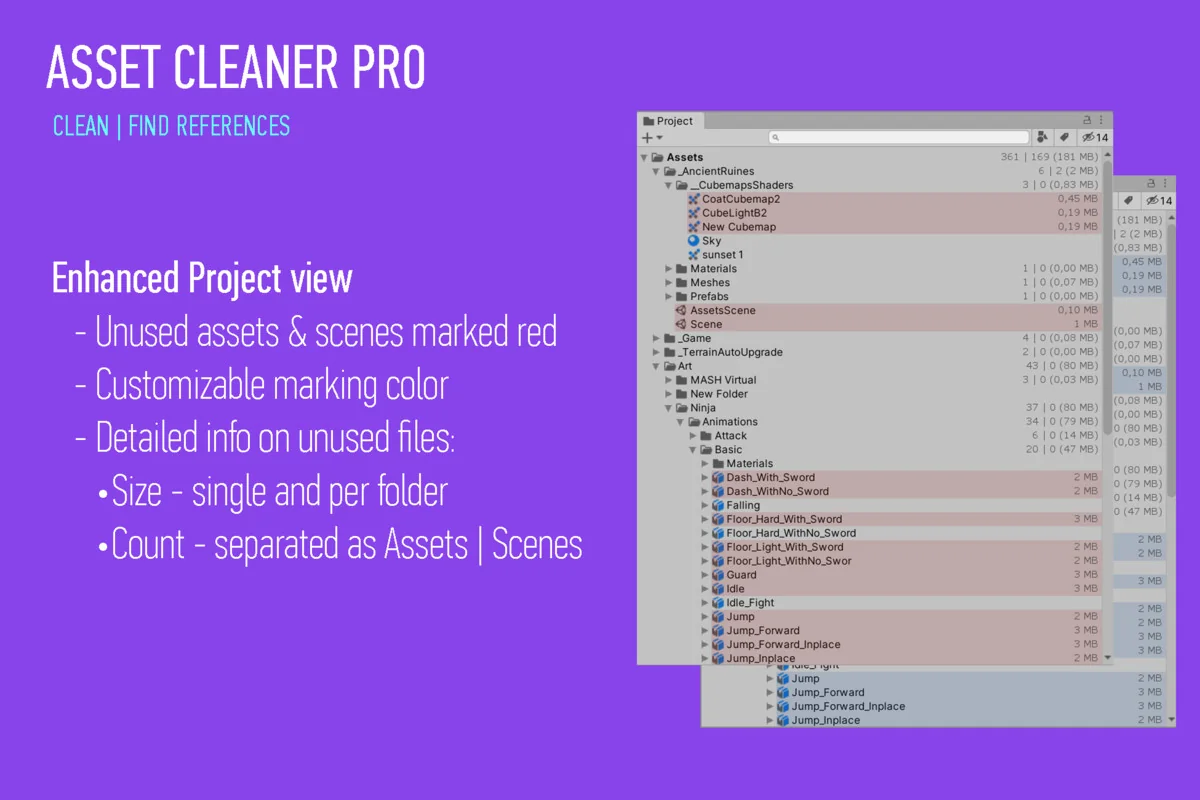
 Utilities
 Utilities
 Utilities